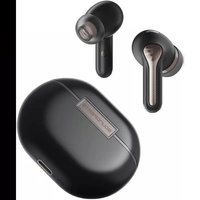
H2 - Headphones SoundPEATS - Free user manual and instructions
Find the device manual for free H2 SoundPEATS in PDF.


Pick your language and provide your email: we'll send you a specifically translated version.
| Product Type | True Wireless Stereo (TWS) Earbuds |
| Model | H2 |
| Brand | SoundPEATS |
| Driver Size | 10 mm |
| Frequency Response | 20 Hz – 20 kHz |
| Impedance | 16 Ω |
| Bluetooth Version | 5.2 |
| Battery Life (Earbuds) | Up to 5 hours per charge |
| Battery Life (with Case) | Up to 20 hours total |
| Charging Time | Approx. 1.5 hours for earbuds, 2 hours for case |
| Charging Connector | USB-C |
| Water Resistance | IPX4 (splash proof) |
| Weight (Single Earbud) | Approx. 4 g |
| Weight (Charging Case) | Approx. 30 g |
| Dimensions (Earbud) | 25 × 20 × 15 mm |
| Dimensions (Case) | 60 × 45 × 25 mm |
| Color | Black |
| Included Accessories | Earbuds, Charging Case, USB-C Cable, 3 Sets of Ear Tips (S/M/L), User Manual |
| Controls | Touch controls: Play/Pause, Next/Previous Track, Volume, Voice Assistant, Answer/Hang Up |
| Microphone | Built-in microphone with noise reduction |
| Maintenance | Clean with a soft, dry cloth. Do not use liquids or abrasive cleaners. |
| Safety | Avoid prolonged listening at high volume to prevent hearing damage. |
| Spare Parts | Replacement ear tips (S/M/L) available from SoundPEATS |
Frequently Asked Questions - H2 SoundPEATS
How do I pair the SoundPEATS H2 with my phone?
Remove both earbuds from the charging case. They will automatically enter pairing mode (LED flashes). On your phone, enable Bluetooth and select 'SoundPEATS H2' from the list. If unsuccessful, try resetting by placing earbuds back in case and taking them out again.
What is the battery life of the H2?
The earbuds provide up to 5 hours of playback on a single charge, and the charging case adds an additional 15 hours for a total of 20 hours.
Can I use the H2 in the rain?
The H2 has an IPX4 rating, meaning it is resistant to splashes of water. It can handle light rain or sweat, but should not be submerged or exposed to heavy water flow.
How do I control music and calls?
The earbuds have touch controls: tap once to play/pause or answer a call, tap twice to skip track, tap three times to go back, and long press to adjust volume or activate voice assistant (Siri/Google Assistant).
Why is one earbud not working?
First, ensure both earbuds are charged. If only one works, try resetting by placing both in the case, closing the lid, waiting 10 seconds, then removing them. If the issue persists, forget the device in your phone's Bluetooth settings and re-pair.
How long does it take to fully charge the H2?
Fully charging the earbuds takes about 1.5 hours, and the charging case takes about 2 hours via the included USB-C cable.
Are the ear tips replaceable?
Yes, the H2 comes with three sizes of silicone ear tips (S, M, L). You can purchase replacement sets from SoundPEATS or compatible third-party tips.
Does the H2 support multipoint connection?
No, the SoundPEATS H2 does not support simultaneous connection to multiple devices. You must disconnect from one device before connecting to another.
How do I reset the SoundPEATS H2?
Place both earbuds in the charging case and close the lid. Wait for 10 seconds, then open the lid. Press and hold the touch area on both earbuds for about 5 seconds until the LED flashes red and white. The earbuds are now reset.
What is the Bluetooth range?
The H2 supports Bluetooth 5.2 with a range of up to 10 meters (33 feet) in open space. Obstacles like walls may reduce the range.
User questions about H2 SoundPEATS
0 question about this device. Answer the ones you know or ask your own.
Ask a new question about this device
No questions yet. Be the first to ask one.
Download the instructions for your Headphones in PDF format for free! Find your manual H2 - SoundPEATS and take your electronic device back in hand. On this page are published all the documents necessary for the use of your device. H2 by SoundPEATS.