IZ-9047 - Household Fan Izzy - Free user manual and instructions
Find the device manual for free IZ-9047 Izzy in PDF.


| Product Type | Air Cooler 2in1 (Fan and Evaporative Cooler) |
| Brand | Izzy |
| Model | IZ-9047 |
| Voltage | AC 220-240V, 50/60Hz |
| Power Consumption | Max 65W |
| Fan Speeds | 3 (Low, Medium, High) |
| Oscillation | Yes (Swing mode) |
| Timer | 1 to 12 hours |
| Cooling Function | Evaporative cooling with water tank and ice packs |
| Air Purification | Anion function |
| Ice Packs Included | 4 |
| Remote Control | Yes (requires 2xAAA batteries, not included) |
| Filter Type | Removable, washable |
| Color | White |
| Warranty | 2 years (from manufacturer) |
| Maintenance | Clean filter regularly; empty water tank when not in use |
| Safety Features | Auto shut-off timer, thermal protection (built-in) |
Frequently Asked Questions - IZ-9047 Izzy
User questions about IZ-9047 Izzy
0 question about this device. Answer the ones you know or ask your own.
Ask a new question about this device
Download the instructions for your Household Fan in PDF format for free! Find your manual IZ-9047 - Izzy and take your electronic device back in hand. On this page are published all the documents necessary for the use of your device. IZ-9047 by Izzy.
USER MANUAL IZ-9047 Izzy
natural_image
White vertical tower-mounted air conditioner unit with black internal structure and 'UN' label (no visible text or symbols on device body)ΜΠΕΝΡΟΥΜΩΗ
natural_image
Simple line drawing of a mechanical device with a handle and arrow, no text or symbols presentnatural_image
Simple line drawing of a vertical stand with a horizontal double-headed X mark, no text or symbols present.Thank you for having chosen an appliance from the IZZY range.
Safety interlocks

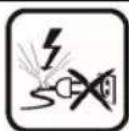
Please read these instructions carefully before using the appliance and save them for future reference. Please keep the sales receipt for guarantee purposes (pls see below “Guarantee and Customer Service”) Any us which does not conform to the instructions will absolve IZZY from an liability.
• Make sure your electricity supply is the same as the one shown on the underside of the appliance.
- Never leave the appliance unattended when operating.
- Close supervision is necessary when your appliance is being used near children or infirm persons. Ensure that they do not play with the appliance.
- This appliance is not intended for use by persons with reduced physical, sensory or mental capabilities, children or those with lack of experience and knowledge, unless they have been given supervision or instructing concerning use of the appliance by a person responsible for their safety.
WARNING: Do not expose babies and the elderly many hours in front of the fan's air.
- Switch off and unplug:
- When not in use.
- When you move it.
- Before cleaning.
- Never use the appliance for any other use than indicated. - The device is intended for indoor use. Do not use the device outdoors.
- The device is intended only for domestic use. Any other use will cancel the warranty.
• Always use the mixer on a secure, dry level surface.
- Do not operate or place the device or parts in places of high humidity or where it may get wet.
- Do not use this appliance in the immediate surroundings of a bath,
shower or a swimming pool or in places where it may get wet.
- Never let the power unit, cord or plug get wet. If the appliance does get wet, immediately remove the power cord from the wall outlet and do not put your hands in the water. Never run the wet appliance and contact one of the authorized BENRUBI service centers.
- Never place appliance close to radiant heat source.
CAUTION: To prevent injury, do not place foreign objects, pencils, e through the air outlets when the appliance is plugged in or when it is in operation.
CAUTION: To avoid injury, do not put your fingers through the air outlets when the appliance is plugged in or when it is in operation.
- Leave space of about 1 meter around the appliance so that you do not block the air outlets and the movement of the fan.
- Do not let the power cord of the appliance hang over the edge of a table or bench edge or where a child can grab it. Do not allow the power cord to touch any warm surface.
- Do not operate the appliance in areas where gasoline, paint or other flammable liquids are used or stored.
- Do not operate the appliance in closets or other enclosed spaces as this may cause fire hazard.
- Do not place the appliance in places with extremely high or extremely low temperatures.
- Ensure that the power cord is not clamped from any object, e.g. furniture. Do not press the power cord and never place it under carpets or ma where there is a risk of stepping on it. Keep the power cord in a place when there is no danger of stumbling.
- Do not place the appliance next to fabrics, e.g. hanging curtains, etc. Do not place clothes on the appliance to dry or for any other reason.
- Before inserting or removing the socket, make sure the appliance turned OFF.
- It is recommended that this appliance is plugged directly into the v socket.
- Never use the cord to pull the plug out of the socket. Disconnect always by pulling on the plug.
- Ensure that the power cord does not come into contact with moving parts of the appliance.
-
Do not use the appliance if it has been dropped or damaged in any way and contact an authorized BENRUBI Service Center.
-
In case that you notice some strange noise, smell, smoke or anything unusual, do not use the appliance. Disconnect it from electricity and contact an authorized BENRUBI Service Center.
- Failure to use properly may cause injury.
- Never leave the power cable wrapped during use. Unwind it completely.
- Never use highly corrosive or abstractive cleaning agents. Never use metal scouring pads for cleaning.
- Do not move the appliance when it is in operation.
- Do not touch the appliance with wet or damp hands.
- Do not use an extension power cord.
- This appliance is not intended to be operated by means of an external timer or separate remote control system.
- Check the power cord periodically for possible damages.
- If the power cord or the plug of the appliance has been damaged, do not use the appliance and contact an authorized BENRUBI Service Center.
- In case of a possible damage, do not attempt to repair the appliance by yourself. Please contact one of the authorized BENRUBI service centers.
- Any repair made by an unauthorized BENRUBI Service Center CANCELS THE GUARANTEE.
- Any misuse of the device cancels the warranty.
- Only use original spare parts
- The appliance conforms to EU directive 2014/30/EU on Electromagnetic Compatibility, the 2014/35/ EU Low Voltage Directive, the2011/65/EU RoHS Directive and the directive 2009/125/EC for eco-design.
SAVE THESE INSTRUCTIONS
Parts of the Appliance
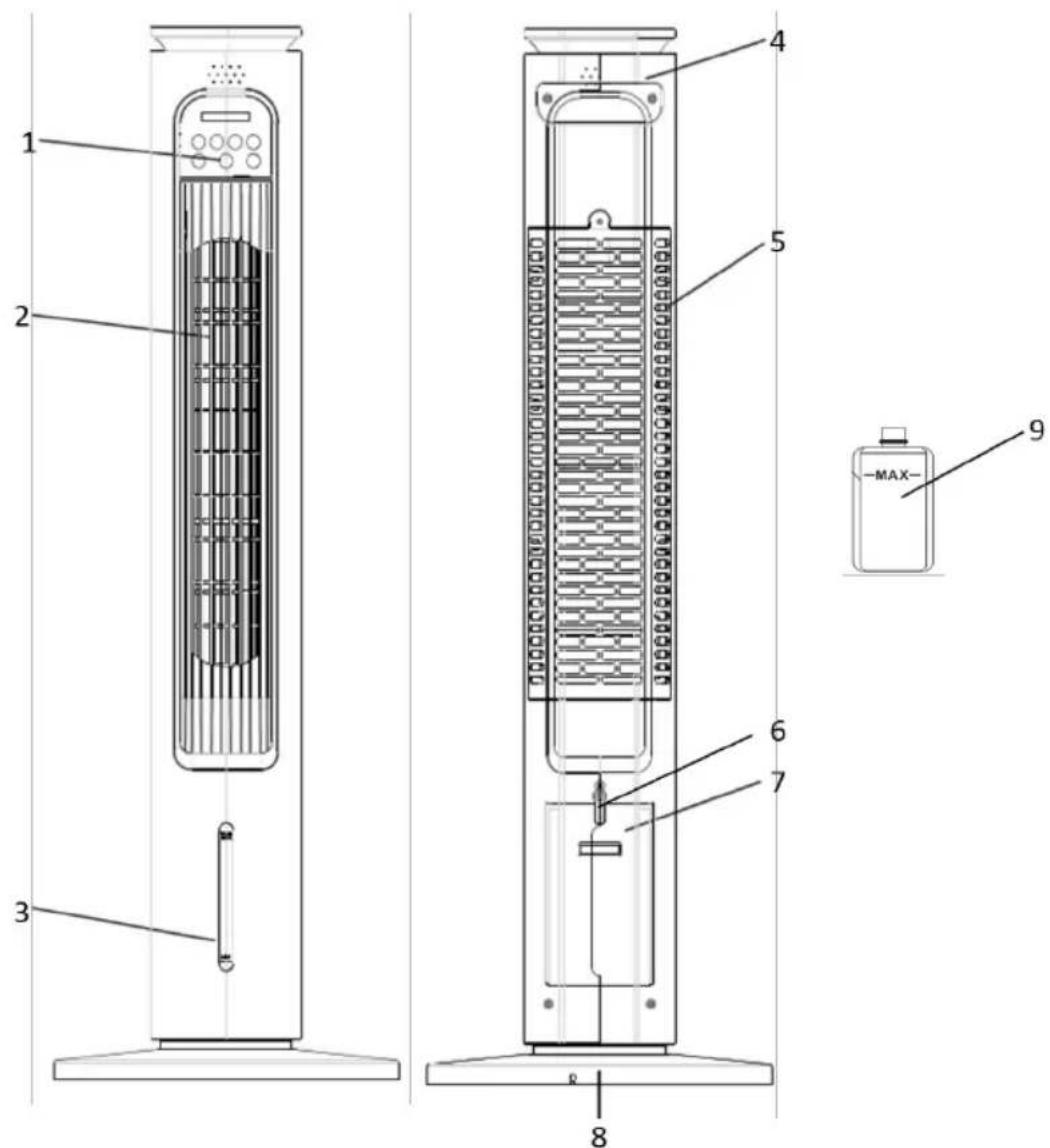
- Control panel with indication lights
- Air outlet
- Water level indication
- Handle
- Removable filter cover
- Water tank lock lever
- Water tank
- Base
- Ice pack (4pcs included)
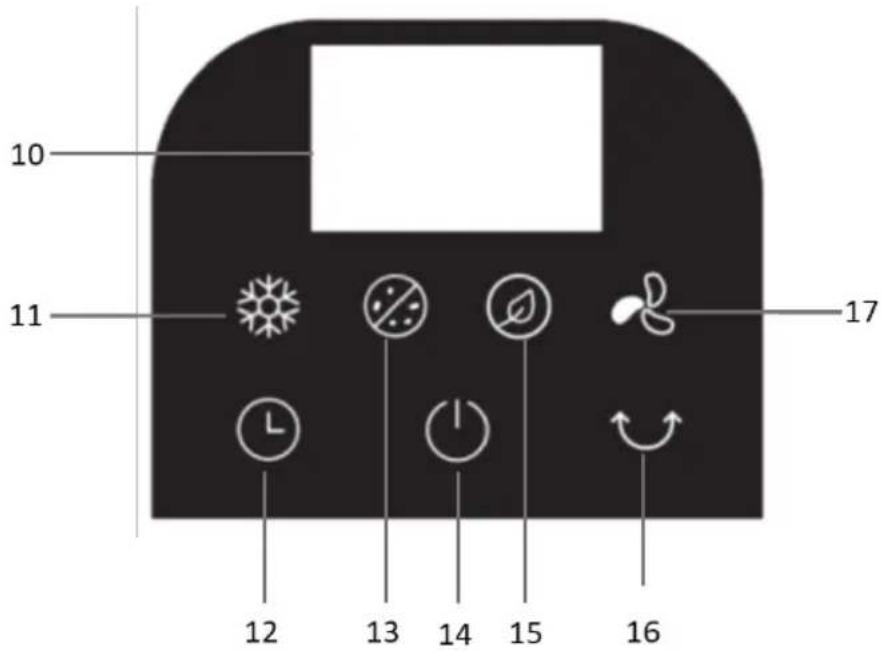
Control panel
- Display screen
- Cold air button
- Timer button
- ANION purify air button

-
Power button
-
Nature mode button

-
SWING button
-
Speed control button

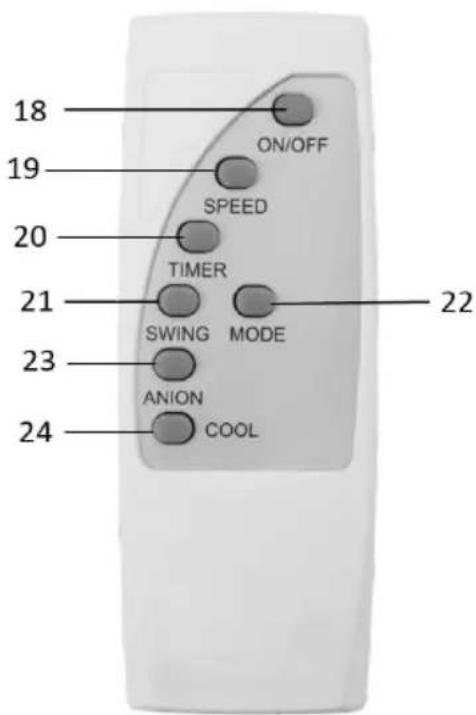
Remote control
- ON/OFF button
- SPEED control button
- TIMER button
- SWING button
- MODE button
- ANION purify air button
- COOL button
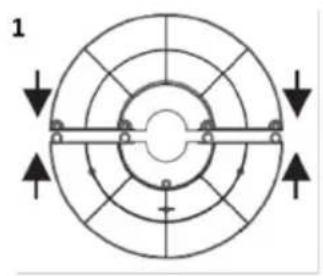
Base Assembly
natural_image
Circular mechanical component diagram with concentric rings and directional arrows, no text or symbols present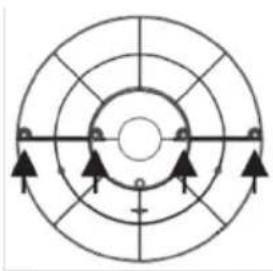
natural_image
Circular diagram with concentric rings and directional arrows, no text or symbols present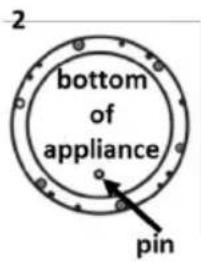
- Join the two parts of the base and snap them together (1).
- Pass the assembled base through the cable and attach it to the bottom of the appliance.
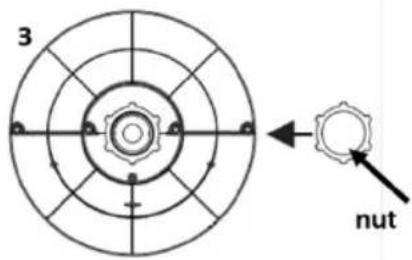
Note: Make sure the hole in the assembled base will fit the pin on the bottom of the appliance (2). - Thread the base nut through the cable and screw tight.
- Attach the cable to the slot on the base.
- The appliance is ready for use.
Installation and Replacement of Remote Control Batteries
The controller works with 2xAAA batteries.
Batteries installation
- Slide the battery compartment cover located on the back of the remote control.
- Insert the batteries and close the lid by sliding it inwards.
Batteries replacement
- Slide the battery compartment cover located on the back of the remote control.
- Remove the old batteries and insert the new ones.
- Close the lid by sliding inwards.
Note: Make sure you connect the batteries with the correct polarity.
Disposal of old batteries:
- Batteries must be disposed carefully and in accordance with local and national regulatory requirements for battery recycling and disposal.
- Batteries should be disposed of in the special battery recycling bins.
- Keep batteries in a safe place, away from children and pets. Also, make sure to protect them from sunlight.
- Efficient battery disposal helps protect the environment and recycle valuable resources.
Using the Fan (With the Control Panel)
CAUTION:
• Always place the device on a flat, dry and stable surface. There is a risk of damage if it is not installed on a flat and level surface.
- Before using, make sure that the appliance is in the "OFF" position.
- Plug in. A sound will be heard and on the control panel the power indication (14) will remain on.
- Press the power button ⏻(14). The fan will turn on and the display will show the room temperature.
- Press the speed control button (17) successively to set the speed of your choice. The selected speed will be displayed for a few seconds on the display screen and then the root temperature will be displayed.
The appliance has 3 speed options:
- 01 - LOW
- 02-MEDIUM
-
03-HIGH
-
Press the nature mode button (15) to activate the corresponding function. The corresponding indication will turn on. To deactivate the function, press the button (15) again. The corresponding indication will turn off.
Note: During nature mode, the speed of the appliance will fluctuate at intervals.
- Press the SWING button (16) to select the swing mode. The corresponding indication will turn on. To deactivate the swing function, press the SWING button (16) again. The corresponding indication will turn off.
- To activate the air-purify function, press the ANION button (13). The corresponding indication will turn on. To deactivate the air-purify function, press the ANION button (13) again. The corresponding indication will turn off.
- To set the timer, press the timer button (12) successively until the desired operating time is selected (1 to 12 hours). The display will show the selected time for a few seconds and then the room temperature. When the time you set is up, the fan will automatically stop working and enter standby mode.
Notes:
- If you wish to change or cancel the timer setting, press the button (12) again. The display will show the time you have selected. Press button (12) successively until the new desired time appears on the display.
- To deactivate the timer setting, the display should show "00".
- Press the power button ⏻(14) to turn off the appliance. The appliance enters standby mode and the indication light ⏻(14) remains on.
- Unplug the fan when not in use.
Using the Fan (With the Remote Control)
CAUTION:
• Always place the device on a flat, dry and stable surface. There is a risk of damage if it is not installed on a flat and level surface.
- Before using, make sure that the appliance is in the "OFF" position.
- Plug in. A sound will be heard and on the control panel the power indication (14) will remain on.
- Press the ON/OFF button (18). The fan will turn on and the display will show the room temperature.
- Press the SPEED control button (19) successively to set the speed of your choice. The selected speed will be displayed for a few seconds on the display screen and then the room temperature will be displayed.
The appliance has 3 speed options:
- 01 - LOW
- 02-MEDIUM
-
03-HIGH
-
Press the MODE button (22) to activate the nature function. The corresponding indication (15) will turn on. To deactivate the function, press the MODE button (22) again. The corresponding indication will turn off.
Note: During nature mode, the speed of the appliance will fluctuate at intervals.
- Press the SWING button (21) to select the swing mode. The corresponding indication will turn on. To deactivate the swing function, press the SWING button (21) again. The corresponding indication will turn off.
- To activate the air-purify function, press the ANION button (23). The corresponding indication will turn on. To deactivate the air-purify function, press the ANION button (23) again. The corresponding indication will turn off.
- To set the timer, press the TIMER button (20) successively until the desired operating time is selected (1 to 12 hours). The display will show the selected time for a few seconds and then the room temperature. When the time you set is up, the fan will automatically stop working and enter standby mode.
Notes:
- If you wish to change or cancel the timer setting, press the TIMER button (20) again. The display will show the time you have selected. Press TIMER button (20) successively until the new desired time appears on the display.
- To deactivate the timer setting, the display should show "00".
- Press the ON/OFF button (18) to turn off the appliance. The appliance enters standby mode and the indication light (14) remains on.
- Unplug the fan when not in use.
Cold Air Function
Filling water tank
natural_image
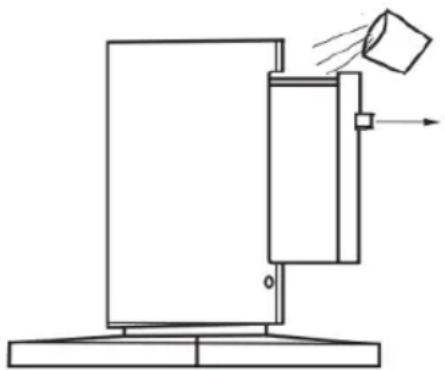
Simple line drawing of a mechanical device with a handle and arrow, no text or symbols present- Make sure the appliance is unplugged before filling the water tank.
- Turn the water tank lock lever (6) to the side and pull the water tank (7) out.
- Fill with fresh cold water. Never use hot or carbonated water.
Note: Make sure the water level is not lower than the MIN indication and not higher than the MAX indication.
Note: During use, if the water level drops to the MIN indication, turn off the appliance and refill with water.
ATTENTION: During the summer season, due to the heat, the water in the water container may deteriorate and produce a bad smell and bacteria. Please renew the water frequently.
- Place the water tank into place and turn the lock (6) down.
Notes:
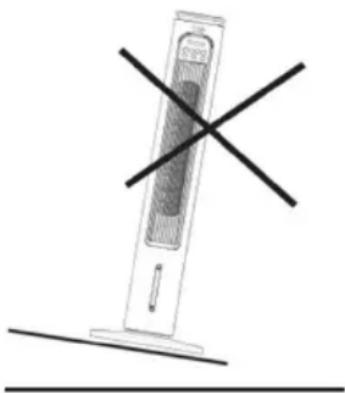
• After adding water, it is strictly forbidden to overturn and place the appliance on an inclined ground to avoid accidents.
- When moving the machine, move it slowly and steadily to avoid water leakage.
natural_image
Simple line drawing of a vertical tower with a horizontal double-headed X mark, no text or symbols present.ATTENTION: In the cold air mode, the appliance creates humidity in the room. Avoid using it in a closed environment. If you use it in closed environments, it is recommended to turn off the cold air mode.
Use of ice packs
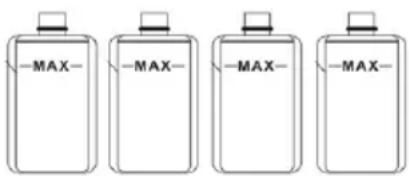
The package of the device includes 4 ice packs.
- Unscrew the cap and fill the bottles (9) with water up to the MAX indication.
- Screw the cap tightly and place the bottles in the freezer to freeze.
- When they are frozen, place them in the water container and then fill with water.
Cold air operation
-
After filling the water tank and placing the ice packs, turn on the appliance.
-
Choose the speed of your preference.
-
Press the cold air button (11) on the control panel or the COOL button (24) on the remote-control. The corresponding indication will turn on.
Note: The water tank must always be full of water when you activate the cold air function.
Care and Cleaning
- Switch off and unplug the appliance before cleaning.
- At regular intervals, clean the main body of the appliance with a soft cloth and dry thoroughly.
- Never use highly corrosive or abstractive cleaning agents. Never use metal brushes or sponges for cleaning and do not immerse the appliance in water.
- To ensure that the air circulates properly on the motor, keep the air outlets clean.
Filter cleaning:
Filters and air outlets may become clogged with dust. It is recommended to clean the filters regularly for the best performance of your appliance.
- Remove the filter cover (5) by unscrewing the screw.
- Remove the cover and filters. If the filters are wet, allow them to dry thoroughly before cleaning.
- Remove dust with a soft brush.
- Put the filters back into place and screw the filter cover (5).
- Never use strong corrosive or abrasive cleaners. Never use metal brushes or sponges for cleaning.
CAUTION: Make sure the filters are dry before reinstalling them and before turning on the appliance.
Carriage and Storage
Before storing make sure:
- That the fabric filter is dry to avoid any odor or mold due to moisture. It is recommended to run the appliance for a period of time in normal mode so that it dries thoroughly. Then remove the filter and air-dry it thoroughly.
• That the water tank is empty.
Storage:
- Switch off and unplug the appliance before storing it.
- Cover the appliance with a plastic cover and place it in a box.
- Store the appliance in a dry place without humidity.
- Before using the appliance for a long time, make sure it is clean and dry.
Store the appliance where it is not reachable by children.
Technical Characteristics
Model: AIR COOLER 2IN1 IZ-9047 IZZY
Voltage: AC 220\~240V
Frequency: 50/60Hz
Rated input: max 65W
Important Information for Correct Disposal of the Product in Accordance with EC Directive 2002/96/EC
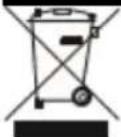
At the end of its working life, the product must not be disposed of as urban waste. It must be taken to a special local authority differentiated waste collection centre or to a dealer providing this service. Disposing of a household appliance separately avoids possible negative consequences for the environment and health deriving from inappropriate disposal and enables the constituent materials to be recovered to obtain significant savings in energy and resources.
As a reminder of the need to dispose of household appliances separately, the product is marked with a crossed-out wheeled dustbin.
Guarantee & Customer Service
- BENRUBI Company guarantees its products for any manufacturing defect or defective materials for a period of two (2) years from the date of purchase or delivery by presenting purchase receipt. If your product malfunctions or you find any defects, please revert to the retail location you have purchased it from or contact an authorized BENRUBI Service Centre. To find the nearest authorized BENRUBI Service Centre, visit our website www.benrubi.gr. It is in the discretion of BENRU Company to replace or repair the defective product.
- The warranty does not cover damages resulting from normal wear, breakage, scaling, improper installation or maintenance of the product, mishandling, abnormal working conditions, failure implement the instructions, conversion or repair of the product by an unauthorized technician who does not belong to the BENRUBI Service Centers.
Also, the warranty does not cover the following indicative factors:
• Stains, discoloration or scratches.
- Burns due to exposure to heat or flame.
- Damage from thermal shock (sudden temperature change or change of voltage).
FOR MORE INFORMATION PLEASE CONTACT:
(NEW) H. BENRUBI & FILS SA
27 Aghiou Thoma str, GR15124, Maroussi – Athens,
Tel./Customer Support: +30210 6156400
e-mail: benrubi-sda@benrubi.gr

- ΜΠΕΝΡΟΥΜΩΗ
- Safety interlocks
- Parts of the Appliance
- Control panel
- Remote control
- Base Assembly
- Installation and Replacement of Remote Control Batteries
- Batteries installation
- Batteries replacement
- Disposal of old batteries:
- Using the Fan (With the Control Panel)
- CAUTION:
- Using the Fan (With the Remote Control)
- The appliance has 3 speed options:
- Notes:
- Cold Air Function
- Filling water tank
- Use of ice packs
- Cold air operation
- Care and Cleaning
- Filter cleaning:
- Carriage and Storage
- Before storing make sure:
- Storage:
- Technical Characteristics
- Guarantee & Customer Service
Brand : Izzy
Model : IZ-9047
Category : Household Fan