
IC-S19RH - Cooker TOSHIBA - Free user manual and instructions
Find the device manual for free IC-S19RH TOSHIBA in PDF.


| Product Type | Induction Cooktop |
| Brand | Toshiba |
| Model | IC-S19RH |
| Number of Cooking Zones | 4 |
| Dimensions (Width x Depth x Height) | 770 x 450 x 60 mm |
| Cutout Dimensions | 750 x 430 mm |
| Weight | Approximately 10 kg |
| Power Supply | 220-240 V ~ 50/60 Hz |
| Total Power | 7200 W |
| Control Type | Touch control |
| Booster Function | Yes, on each zone |
| Timer | Yes, with auto shut-off |
| Child Lock | Yes |
| Residual Heat Indicator | Yes, per zone |
| Automatic Pan Detection | Yes |
| Overheat Protection | Yes |
| Cleaning Method | Wipe with damp cloth, avoid abrasive cleaners |
| Spare Parts Availability | Contact Toshiba service center for compatible parts |
| Repairability Index | 6.5 / 10 (estimated) |
| Energy Efficiency Class | A+ (induction) |
| Safety Certifications | CE, RoHS |
Frequently Asked Questions - IC-S19RH TOSHIBA
User questions about IC-S19RH TOSHIBA
0 question about this device. Answer the ones you know or ask your own.
Ask a new question about this device
Download the instructions for your Cooker in PDF format for free! Find your manual IC-S19RH - TOSHIBA and take your electronic device back in hand. On this page are published all the documents necessary for the use of your device. IC-S19RH by TOSHIBA.
USER MANUAL IC-S19RH TOSHIBA
I.SAFETY INSTRUCTIONS
Warning
- This appliance is not intended for use by persons (including children) with reduced physical, sensory or mental capabilities, or lack of experience and knowledge, unless they have been given supervision or instruction concerning use of the appliance by a person responsible for their safety.
- This appliance can be used by children aged from 8 years and above and persons with reduced physical, sensory or mental capabilities or lack of experience and knowledge if they have been given supervision or instruction concerning use of the appliance in a safe way and understand the hazards involved. Children shall not play with the appliance. Cleaning and user maintenance shall not be made by children unless they are older than 8 and supervised.
- Keep the appliance and its cord out of reach of children less than 8 years.
• Children should be supervised to ensure that they do not play with the appliance. - Do not disassemble, repair or modify It may cause fire, electric shock or injury. For repairs, contact the store where you purchased the product or the consultation center.
- Do not put foreign matter in the air intake / exhaust port In particular, metals such as pins and wires may cause electric shock or even move and cause injury.
- Do not soak or splash water. Do not get wet. It may cause a short circuit or electric shock
- Do not give a shock (such as dropping something) to the top plate if it is cracked or cracked, using it as it is may cause electric shock, overheating, or abnormal operation.
Power Cord/Outlet Related
- If the supply cord is damaged, it must be replaced by the manufacturer, its service agent or similarly qualified persons in order to avoid a hazard.
- Please turn off and unplug the appliance before cleaning maintenance or relocation and whenever it is not in use.
- Make sure to insert the power plug steady to the base.
- Remove dust from the plug on a regular period If dust accumulates, it may cause a fire due to poor insulation.
• Make sure your hands are dry before touching the plug. - Do not damage the cord, do not bend it forcibly, do not pull it, do not twist it. Do not bundle and energize, keep away from high temperature parts, do not put heavy objects on it. Do not pinch, do not process.
- When heating the liquid, mix it before heating
- Observe the following when stir-frying or grilling.
- Since a small amount of oil is used, the oil temperature rises sharply and may ignite.
- Don't leave when cooking.
- Adjust the heat to a low level and do not overheat.
Cautions
•This appliance as well as the cooking utensils used and the surface of the appliance can become very hot, do not touch the hot surface of the ceramic hob.
•This appliance is for household use only. Do not use outdoors.
- Hold the power plug and pull it out from the outlet. It may cause fire due to electric shock or short circuit.
- Be careful when handling plugs and cords (Causes of fire, electric shock, and burns due to short circuit and electric leakage)
- Do not use for anything other than cooking (Cause of ignition due to overheating / abnormal operation)
- Be careful of splashing oil while cooking fried food. Oil may splatter and cause burns. Be careful especially with foods that with much more water.
- That appliances are not intended to be operated by means of an external timer or separate remote-control system.
Cautions
- Caution, hot surface, The surfaces are liable to get hot during use.
- When frying food with induction cooker, the following precautions shall be observed: If there is too little oil, there will be a risk of fire caused by overheating of oil temperature. Please do not leave away when frying food in an induction cooker. Frying food with the "frying" menu. When the bottom of the pot is deformed, please do not use it. You must use a pan for frying food. Please do not fry with oil less than 800g (0.9l). Please put the pot in the middle of the induction cooker when frying food.
- If you are using a cardiac pacemaker, please use this induction cooker under the guidance of a doctor. The operation of this product will affect the operation of cardiac acemaker.
- Do not use on unstable places, heat-sensitive rugs, near flammable materials, or in slippery places. If the main body is tilted, the pan will slip off and the contents may spill, resulting in burns or injury.
- Keep your face away. It may cause burns.
- Do not bake or overheat. It may cause burns, ignition of cooked food, or damage to the pan.
- Unplug the power plug as soon as there is a lot of oily smoke, because The oil is hot. Continued heating may cause ignition.
- Please choose the course that suits your cooking Do not cook fried food on a heating course. The oil temperature will rise too high and may cause a fire.
- Do not use hot oil preheated with other appliances (gas stove, etc.) Do not preheat with hot oil. The temperature control device may not work properly and may overheat abnormally, causing ignition.
- Nothing is laid under the pan. Do not cook with water or foreign matter on the top plate or the bottom of the pan. Resins such as wraps, paper, cloth, foodstuffs, etc. can be burnt by the heat of the pan. It cannot be done and may cause the food to burn.
- Do not block the intake and exhaust ports. If you use it on something that can be easily sucked in, such as paper or table cloth, and block the exhaust and intake ports, the temperature inside the main unit will rise, which may cause a fire.
Cautions
- Do not put the IH cooker near water leakage, stove, gas stove and other heat sources. Otherwise, electric shock, electric leakage, furnace deformation and fire may be caused.
Other matters
• This appliance is intended to be used in household and similar applications such as:
- Staff kitchen areas in shops, o e and other working environments;
- farm houses;
• by clients in hotels, motels and other residential type environments;
• In bed and breakfast type environments;
- Do not use on IH cooking heaters. Also, do not use an electromagnetic induction heating cooker such as an IH jar rice cooker on the top plate.
- Since the lines of magnetic force are emitted, keep away from objects that are weak against magnetism. The memory of cash cards, IC cards, etc. may be lost. In addition, TV, radio, hearing aids, etc. may be interference with noisy.
II.PRODUCT INTRODUCTION
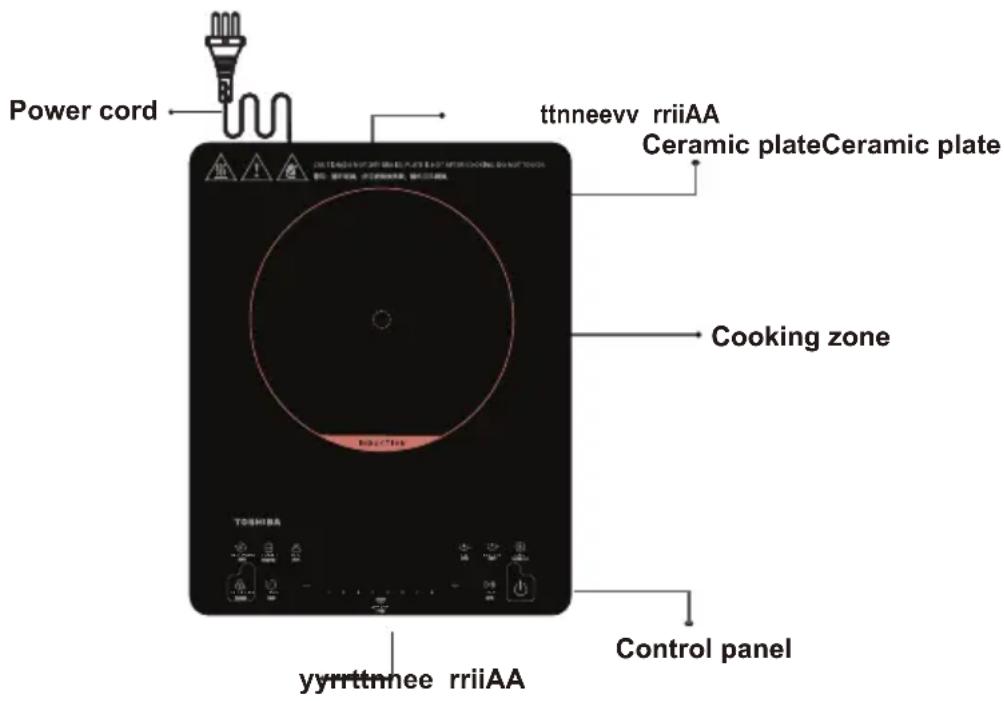
The induction cooker is able to meet various kinds of cooking demands by electromagnetic heating, high thermal efficiency, is safe and reliable, easy to clean.
Performance Parameters
| Model | Applied voltage/frequency | Rated power | Dimension (mm) | Weight(kg) |
| IC-S19RH | 220-240V~ 50/60Hz | 1900W | 360x290x45 | 2.65 |
III. OPERATION INSTRUCTIONS
Before using New Induction cooker
- Read this guide, taking special note of the "Safety Warnings" section.
- Remove any protective film that may still be on your ceramic plate.
Using the Touch Controls
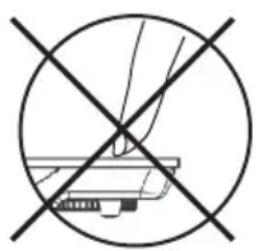
- The controls respond to touch, so you don't need to apply any pressure.
- Use the ball of your finger, not its tip
- You will hear a beep each time a touch is registered.
- Make sure the controls are always clean, dry, and that there is no object (e.g. a utensil or a cloth) covering them. Even a thin film of water may make the controls difficult to operate.
natural_image
Crosshair symbol of a printer with no text or labels
natural_image
Simple line drawing of a hand pressing a small electronic component (no text or symbols)Put the pot on the ceramic plate
- Make sure the air vents are not blocked and keep utensils away from the immediate surrounds of the ceramic plate.
- Make sure the cookware which has food or liquid is placed in the center of ceramic plate.
Plug in
●After the power supply is connect, a beep will be heard.
Switch on
- After pressing the " " button, the induction cooker is ready for working. Press the function button to start heating.
- After pressing the " " button, if no function button is pressed for 10 seconds, the induction cooker will switch off automatically.
- Under the working mode, if there is no proper pot on the ceramic plate, the induction cooker will not heat up and the alarm will sound to indicate that a pot is required. One minute later, it will switch off automatically.
III. OPERATION INSTRUCTIONS
Function
- After switching on the induction cooker, press the corresponding function button to select the desired cooking mode.
Function cooking mode instructions
Note: Power in each cooking mode is restricted complying with the cooking requirement and you can use power mode if higher wattage is required.
| Function Icon | Default cooking time | Default wattage | Adjustable cooking time range | Usage | |
| Power | +/- | 2 hours | 1600W | 1min-3hours | This mode can be used for manual.You can adjust the power by using +/- button. |
| Keep warm | [c6w2] | 2 hours | 200W | 1min-3hours | This mode can be used for keeping warm. |
| Simmer | [28A8] | 2 hours | 400W | 1min-3hours | This mode can be used for simmer. |
| Boil |  | 15 min | 1900W | - | This mode can be used for boiling water. |
| Fry | [wTA6] | 2 hours | 1300W | 1min-3hours | This mode can be used for fry. |
| Deep Fry |  | 2 hours | 1900W | 1min-3hours | This mode can be used for deep fry. |
 | 5min 1900WBoost | - | - | This mode allows obtaining directly the highest power level. | |
Pause ▷00
- Press the "Pause" button to stop heating.
When the induction cooker is in pause, press the “Pause” button again or select a cooking mode to quit the pause status and return to the normal heating process.
After setting Pause, the induction cooker stops heating.
After reaching the default pause time, if the pause state is not cancelled, the induction cooker may alarm and automatically switch off.
III. OPERATION INSTRUCTIONS
Timer
- To use the timer, press the “Timer” button. The digital screen will indicate “0:00”. During the several seconds, press the “+/-” buttons to adjust the cooking time. Each pressure increase or decrease the time of 1 minute. If you maintain the button longer, the time will increase or decrease by increments of 10 minutes. The timer can be set from 1 minute to 180 minutes. Once the time is set, the digital screen will flicker during several seconds before heating. To cancel the timer function, press again on the timer button.
ON/OFF ⏻
- When the operating time is over, the induction cooker switches off automatically.
Press the “ ⏻ ” button to turn off the appliance.
Note: Do not touch the surface of the ceramic while "H" is displayed, it means the temperature high.
While “L” is displayed, it means the temperature low.
How To Lock
- Press the “CHILD LOCK” button to start lock function. The “CHILD LOCK” indicator lights up. Now only the “ ” button can be used to switch off the appliance, all the other operations are forbidden. Press the “CHILD LOCK” button for several seconds to quit the lock function. The “lock” indicator turns off.
IV. COMPATIBLE COOKWARE

Iron oil frying pan

Stainless steel pot

Iron pan
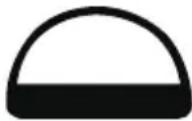
Iron kettle
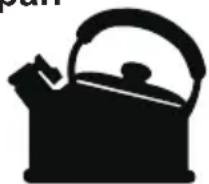
Enamel stainless steel kettle

natural_image
Silhouette of a cooking pot with a handle (no text or symbols)Enamel cooking utensil

Iron plate
- Requirement for pot materials: containing magnetic inducting materials.
- Shape requirement: plat bottom, with the diameter more than 15 cm and less than 18 cm.
- After the first use, some white spots would appear at the bottom of the pot. This is normal.
- Please pour some vinegar into the pot, heat it at about 60-80 °C, then wipe the spots away with brush.
- Incompatible pots material: glass, ceramic, aluminium, copper and other non magnetic material.
- If the pot removed, the induction cooker will stop heating immediately. After the buzzer sounds for 1 minute, it will go into-standby mode automatically.
V. CLEANING AND MAINTENANCE
- Before cleaning, please switch off the appliance first and then disconnect the power plug from the power outlet. Wait till the cooker plate of the induction cooker is not hot and start cleaning.
- After using the induction cooker for a long time, the opening of air inlet/air outlet will pile up with dust or other dirt, please wipe it with a soft dry cloth. Dust in the air inlet and outlet can be cleaned by using a soft brush or a mini vacuum cleaner.
Note: Please do not rinse it with water.
- For oil spots on the cooker plate, wipe the cooker plate by using a soft moist cloth with a little tooth paste or mild detergent. And then use a soft moist cloth to wipe it until no stain remains.
When not using it for a long time, please disconnect the power plug from the power outlet and protect the induction cooker from any dust or bugs.
VI. TROUBLESHOOTING
| Abnormalities | Key checking points and trouble shooting | |
| After plugging in the power cord and pressing the "ON/OFF" key. the indicator and display do not light up. | Is the power plug properly connected?Is the switch, power outlet, fuse or power cord damaged? | |
| The "ON/OFF" indicator lights up and the display works normally, but heating does not start. | Is the pot material proper?Is the appliance in a "Preset" working status?For other causes, please take the appliance to a repairing and maintenance site to be fixed. | |
| Heating suddenly stops during the process. | Is the temperature of the oil too high when frying dishes?Is the temperature of the surroundings very high?Is the air inlet or air outlet of the induction cooker blocked?Is the default heating time of the induction cooker over?The self-safety protection of the induction cooker starts, wait for several minutes and connect power to use it. | |
| Code of failure | E3 E6 EA | Wait a moment and press the "ON/OFF" button when the temperature of the hotplate becomes normal,the induction hotplate will operate as usual. |
| E7 E8 | Turn off the hotplate, when the voltage becomes normal, and then turn on the hotplate, it will operate as usual. | |
| E1 E2 E4U1E5 Eb | Please contact the special maintenance department. | |
| EmergencyDuring using, if there are some abnormal cases, please unplug immediately and disconnect power.For any failure of the product, please contact the special maintenance department or the customer service center. | ||
If problems occur with the product, please contact our specific repair and maintenance site or service center.
- Any problem caused by the following items is not included in the warranty:
- Damage caused by incorrect use. storing or maintenance by the customer.
- Disassembling or repairing the appliance by a repair agent that is not appointed by our company, resulting in damage to the appliance.
- The model number on the invoice is different from the one of the product to be repaired, or the model number on the invoice is modified.
- No valid invoice.
- Damage due to force majeure.
- Putting the induction cooker to commercial use.
- We are not responsible for accidents arising due to the use of our accessories not designed for utilisation with this product.
- Using the product in a non-household environment is not covered by the warranty scope.
9 Man-made issue or problems caused by incorrect use are not covered by the warranty scope. - For those products beyond the warranty, the customer service center of the company will still serve you warmly.
If there is technical amendment for the product, it will be edited into the updated version of the instruction manual. Please be aware that we will not inform customers of this separately. If the appearance or color of the product is modified, please refer to the real appliance as a standard.
用戶手冊
電磁爐
IC-S19RH
TOSHIBA

natural_image
Crosshair symbol with diagonal lines and a mechanical component outline, no text or labels present
natural_image
Simple line drawing of a hand pressing down on a mechanical component (no text or symbols)將鍋放在陶瓷板上
natural_image
Silhouette of a cooking pot with a lid and handle (no text or symbols)搪瓷炊具

鐵板


- I.SAFETY INSTRUCTIONS
- Warning
- Power Cord/Outlet Related
- Cautions
- Other matters
- II.PRODUCT INTRODUCTION
- OPERATION INSTRUCTIONS
- Before using New Induction cooker
- Using the Touch Controls
- Put the pot on the ceramic plate
- Plug in
- Switch on
- Function
- Function cooking mode instructions
- Pause ▷00
- Timer
- ON/OFF ⏻
- How To Lock
- COMPATIBLE COOKWARE
- CLEANING AND MAINTENANCE
- Note: Please do not rinse it with water.
- 用戶手冊
- 將鍋放在陶瓷板上
Brand : TOSHIBA
Model : IC-S19RH
Category : Cooker