
ARC-8050T3U-4A-88TB - Hard Drive Areca - Free user manual and instructions
Find the device manual for free ARC-8050T3U-4A-88TB Areca in PDF.


| Product Type | External RAID Enclosure |
| Model | ARC-8050T3U-4A-88TB |
| Brand | Areca |
| Interface | Thunderbolt 3 (USB-C) |
| Number of Bays | 8 |
| Supported Drive Form Factor | 3.5" and 2.5" SATA HDD/SSD |
| Maximum Raw Capacity | 88 TB (with 11 TB drives) |
| RAID Levels Supported | 0, 1, 5, 6, 10, 50, 60, JBOD |
| Data Transfer Rate | Up to 40 Gb/s (Thunderbolt 3) |
| Dimensions (H x W x D) | 200 x 150 x 250 mm |
| Weight | 5.5 kg |
| Power Supply | External AC adapter, 250W |
| Cooling Fan | 1 x 120mm fan |
| Hot-Swap Capability | Yes, with tool-less drive trays |
| Management Interface | Web-based GUI and LCD panel |
| Operating Temperature | 0°C to 40°C |
| Operating Humidity | 20% to 80% non-condensing |
| Included Accessories | Thunderbolt 3 cable, power adapter, drive keys, quick start guide |
| Safety Certifications | CE, FCC, RoHS |
| Warranty | 3 years |
| Main Functions | High-speed storage for video editing, backup, and data-intensive applications |
| Cleaning | Wipe with a dry, soft cloth; avoid liquids and abrasives |
| Spare Parts | Replacement fans, power supply, and drive trays available |
| Repairability | User-replaceable fan and power supply; drives easily swapped |
Frequently Asked Questions - ARC-8050T3U-4A-88TB Areca
User questions about ARC-8050T3U-4A-88TB Areca
0 question about this device. Answer the ones you know or ask your own.
Ask a new question about this device
Download the instructions for your Hard Drive in PDF format for free! Find your manual ARC-8050T3U-4A-88TB - Areca and take your electronic device back in hand. On this page are published all the documents necessary for the use of your device. ARC-8050T3U-4A-88TB by Areca.
USER MANUAL ARC-8050T3U-4A-88TB Areca
(4/6/8/12-bays Thunderbolt™ 3 RAID Storage)
Copyright and Trademarks
The information regarding products in this manual is subject to change without prior notice and does not represent a commitment on the part of the vendor, who assumes no liability or responsibility for any errors that may appear in this manual. All brands and trademarks are the properties of their respective owners. This manual contains materials protected under International Copyright Conventions. All rights reserved. No part of this manual may be reproduced in any form or by any means, electronic or mechanical, including photocopying, without the written permission of the manufacturer and the author.
FCC Statement
This equipment has been tested and found to comply with the limits for a Class B digital device, pursuant to part 15 of the FCC Rules. These limits are designed to provide reasonable protection against interference in a residential installation. This equipment generates, uses, and can radiate radio frequency energy and, if not installed and used in accordance with the instructions, may cause harmful interference to radio communications. However, there is no guarantee that interference will not occur in a particular installation.
Manufacturer's Declaration for CE Certification
We confirm ARC-8050T3U series has been tested and found comply with the requirements set up in the council directive on the approximation of the low of member state relating to the EMC Directive2004/108/EC. For the evaluation regarding to the electromagnetic compatibility, the following standards where applied:
EN 55022: 2006, Class B
EN 61000-3-2: 2006
EN 61000-3-3: 1995+A1: 2001+A2: 2005
EN 55024:1998+A1:2001=A2:2003
IEC61000-4-2: 2001
IEC61000-4-3: 2006
IEC61000-4-4: 2004
IEC61000-4-5: 2005
IEC61000-4-6: 2006
IEC61000-4-8: 2001
IEC61000-4-11: 2004
Contents
1. Introduction......8
1.1 Overview 8
1.2 Features 10
2. Installation....13
2.1 Before You First Installing.... 13
2.2 Summary of RAID Storage Setup Steps....14
- For macOS....14
- For Windows.... 15
2.3 RAID Storage View....16
2.4 Setting Up RAID Storage....23
2.4.1 Physically Install RAID Storage and Drives 23
2.4.2 Mac Users 32
2.4.2.1 Install Areca driver for Mac 32
2.4.2.2 Install the MRAID Utility 38
2.4.2.3 Configure RAID Volumes....43
2.4.2.4 Format and Partition RAID Volumes....46
2.4.2.5 Make A Bootable RAID Volume 48
2.4.2.6 Unmounting RAID Volumes 48
2.4.3 Windows Users 50
2.4.3.1 Install the Thunderbolt Software....50
2.4.3.2 Configure RAID Volumes....54
2.4.3.3 Format RAID Volumes 57
2.4.3.4 Unmounting RAID Volumes 57
3. ArcHTTP Configuration 59
- General Configuration 59
- Mail (Alert by Mail) Configuration 60
- SNMP Traps Configuration 61
- Rescan Device Configuration....63
- Collect Support Data 63
4. Web Browser-based Configuration 64
4.1 Start-up McRAID Storage Manager 65
- McRAID Storage Manager from Local Administration (In-Band) 65
- McRAID Storage Manager Through LAN Port (Out-of-Band)..66
4.2 McRAID Main Window 66
4.3 Main Menu 67
4.4 Quick Function....67
4.5 Raid Set Functions 68
4.5.1 Create Raid Set 68
4.5.2 Delete Raid Set 69
4.5.3 Expand Raid Set....70
4.5.4 Offline Raid Set....71
4.5.5 Rename Raid Set....71
4.5.6 Activate Incomplete Raid Set 72
4.5.7 Create Hot Spare 72
4.5.8 Delete Hot Spare....73
4.5.9 Rescue Raid Set 73
4.6 Volume Set Functions 75
4.6.1 Create Volume Set (0/1/10/3/5/6) 75
4.6.2 Create Raid30/50/60 (Volume Set 30/50/60) 80
4.6.3 Delete Volume Set....80
4.6.4 Modify Volume Set....81
4.6.4.1 Volume Growth 82
4.6.4.2 Volume Set Migration 82
4.6.4.3 Volume Write Protection 83
4.6.5 Check Volume Set 83
4.6.6 Schedule Volume Check 84
4.6.8 Download Volume Key File 85
4.7 Security Function 86
4.7.1 Create SED RAID Set 86
4.7.2 Delete SED RAID Set 87
4.7.3 Delete ISE RAID Set 87
4.7.4 Security Key Setup 88
4.7.4.1 SED Key Management-Creation 88
4.7.4.2 SED Key Management-Modification 89
4.7.5 Import Security Key....90
4.7.6 Erase Failed Disk 91
4.7.7 RevertSP....92
4.8 Physical Drive 93
4.8.3 Delete Pass-Through Disk 94
- System Beeper Setting 98
- Background Task Priority 98
- JBOD/RAID Configuration 98
- SATA NCQ Support 99
- HDD Read Ahead Cache 99
• Volume Data Read Ahead 99
- HDD Queue Depth 99
- Empty HDD Slot LED 99
- Max Command Length 100
- Auto Activate Incomplete Raid 100
- Disk Write Cache Mode 100
- Write Same For Initialization.... 100
- Hot Plugged Disk For Rebuilding 100
- Disk Capacity Truncation Mode.... 101
- Smart Option For HDD 101
- Smart Polling Interval 102
4.9.2 Advanced Configuration.... 102
- TLER Setting 103
- Timeout Setting 103
• Number of Retries 103
- Buffer Threshold 103
- Read Ahead Count.... 104
- Read Ahead Requests 104
- Amount of Read Ahead 104
- Number of AV Stream 104
- Optimize AV Recording.... 105
- Read Performance Margin.... 105
- Read And Discard Parity Data 107
- BIOS Selection.... 107
- Host Command Queue Mode.... 108
- Save SED Key In Controller 108
- Fail Disk For Reading Error 108
- Thunderbolt Receive Sleep Request 109
4.9.3 HDD Power Management 110
- Stagger Power On Control 110
- Time To Hdd Low Power Idle 111
- Time To Hdd Low RPM Mode 111
- SATA Power Up In Standby 111
- Delay for Phy to Stable 112
- SSD Stop Unit When Shutdown 112
4.9.4 Ethernet Configuration 113
- DHCP Function.... 113
- Local IP address.... 114
- Gateway IP address.... 114
- Subnet Mask 114
- HTTP Port Number.... 114
- Telnet Port Number 114
- SMTP Port Number 114
4.9.5 Alert By Mail Configuration 115
4.9.6 SNMP Configuration 115
4.9.7 NTP Configuration 116
- NTP Sever Address.... 116
- Time Zone.... 116
• Automatic Daylight Saving.... 117
4.9.8 View Events/Mute Beeper 117
4.9.9 Generate Test Event 117
4.9.10 Clear Events Buffer 118
4.9.11 Modify Password....118
4.9.12 Update Firmware 119
4.10 Information 120
4.10.1 Raid Set Hierarchy 120
4.10.1.1 Hdd Xfer Speed 120
4.10.2 SAS Chip Information....121
4.10.3 System Information 122
4.10.4 Hardware Monitor 122
Appendix A 123
Upgrading Flash ROM Update Process.... 123
Appendix B....126
Battery Backup Module (ARC-6120BA-T021-T3) 126
B-1 BBM Connector and Components 126
B-2 Status of BBM 126
B-3 Installation 127
Appendix C....132
SNMP Operation & Installation....132
Appendix D....137
Event Notification Configurations 137
A. Device Event....137
B. Volume Event....138
C. RAID Set Event 139
D. Hardware Monitor Event 139
Appendix E 141
Self-Encrypting Disk (SED) Encryption....141
Appendix F 147
Full Volume Encryption.... 147
Appendix G....152
RAID Concept 152
RAID Set....152
Volume Set.... 152
Ease of Use Features.... 153
- Foreground Availability/Background Initialization 153
• Online Array Roaming 153
• Online Capacity Expansion.... 153
• Online RAID Level and Stripe Size Migration 155
• Online Volume Expansion 156
High Availability 156
- Global/Local Hot Spares 156
• Hot-Swap Disk Drive Support.... 157 - Auto Declare Hot-Spare 157
- Auto Rebuilding 158
- Adjustable Rebuild Priority.... 158
High Reliability 159
- Hard Drive Failure Prediction.... 159
• Auto Reassign Sector 159 - Consistency Check 160
Data Protection 160
- Battery Backup 160
- Recovery ROM 161
Appendix H....162
Understanding RAID 162
RAID 0....162
RAID 1....163
RAID 10(1E)....164
RAID 3....164
RAID 5....165
RAID 6....166
RAID x0 166
Single Disk (Pass-Through Disk) 167
Summary of RAID Levels 168
1. Introduction
This section presents a brief overview of the Thunderbolt 3 desktop SAS/SATA RAID storages, ARC-8050T3U series.
1.1 Overview
Unleash Your Creativity Faster Than Ever
Thunderbolt™ 3 brings Thunderbolt to USB-C at speeds up to 40 Gbps, creating one compact port that does it all – delivering the fastest, most versatile connection to any dock, display, or data device. ARC-8050T3U is equipped with dual Thunderbolt 3 ports for connecting to any Thunderbolt 3-enabled host and offers an additional Thunderbolt 3 port for daisy-chaining other peripherals, while also supplying power for quick notebook charging. The Thunderbolt daisy-chaining allows connection of up to six devices, so customers can connect ARC-8050T3U for massive amounts of video storage with a single Thunderbolt connection to their host computer. If an ARC-8050T3U is plugged in a USB-C (or) USB X.X computer port, a USB device controller inside the ARC-8050T3U-enabled system is activated, and the inside USB device controller drives USB (2.0, 3.2 Gen 1, or 3.2 Gen 2) signals to the USB-C port. In this condition, the ARC-8050T3U Thunderbolt 3 port behaves exactly like a typical USB-C 3.2-enabled connector. The ARC-8050T3U also sports a full sized DisplayPort 1.4 video output on its rear, allowing for a quick and easy 8K 30Hz display setup.
Unparalleled Performance for 4K Workflow
ARC-8050T3U is the most complete 4/6/8/12-bay Thunderbolt 3 desktop SAS/SATA RAID storage with RAID control capabilities solution for both PC and Mac. ARC-8050T3U incorporated on-board RAID-On-Chip and ECC SDRAM memory to deliver true high performance hardware RAID protection against drive failure. This combination helps to provide a high performance storage device perfect for the video editor working with Real time multi-stream HD and 4K workflows. It is so quick it allows for 4K displays at the same time as daisy chaining ARC-8050T3U and doing a simultaneous 4K output and file transfers while maintaining maximum throughput.
Thunderbolt 3 and USB 3.2 Gen2 Ready
ARC-8050T3U Thunderbolt 3 port supports both Thunderbolt 3 & USB 3.2 Gen 2 protocol.
![graph LR A["Desktop Laptop"] --> B["Thunderbolt™ 3 port"] B --> C["Thunderbolt™ 3 USB-C cable"] C --> D["Server Rack"] E["Desktop Laptop"] --> F["USB-C port"] F --> G["USB 3.2 Gen2 USB-C cable"] G --> H["Server Rack"] I["Server Rack"] --> J["Server Rack"]](/content/2026/05/986595/images/93f50f9d4146e613b08815355c3cdf66a289f091eb78ac5add635360d2a9ca7b.jpg)
1.2 Features
Controller Architecture
- 800 MHz one core (for ARC-8050T3U-4) / 1.2 GHz dual core (for ARC-8050T3U-6/8/12) ROC for RAID core and SAS microcode
- 1GB DDR3-800 (for ARC-8050T3U-4) / 2GB on-board DDR3-1866 (for ARC-8050T3U-6/8/12) SDRAM with ECC protection
- Redundant flash image for adapter availability
- System status indication through LCD, LED and alarm buzzer
RAID Features
- RAID level 0, 1, 1E, 3, 5, 6, 10, 30, 50, 60, Single Disk or JBOD
- Multiple RAID selection
- Support up to 1MB stripe size
• Online array roaming
• Online RAID level/stripe size migration - Support global hot spare and local hot spare
- Instant availability and background initialization
- Advanced configuration for smooth data streaming
- Disk scrubbing/ array verify scheduling support
- Multiple pairs SSD/HDD disk clone function
- SSD automatic monitor clone (AMC) support
- SED (Self-encrypting drives) function support
- Support HDD firmware update
- Support for native 4K and 512 byte sector SAS and SATA device s
- Redundant flash image for adapter availability
- System status indication through LCD, LED and alarm buzzer
-
Complete configuration management suite
-
McRAID manager – browser-based management tool (LAN or Thunderbolt)
- ArcSAP manager – multi-language management software
- Push Buttons and LCD Display panel for setup and status
- Command Line Interface (CLI)- scriptable configuration tool
- API libraries support - combine GUI with user management utility
- SNMP support for remote monitoring
- SMTP support for email notification
System Environment
- Operating Temperature: 0 35° C
- Operating Humidity : 5% \~ 95 %, Non-condensing
Function Advantages
| Features Benefits | |
| USB-C Computer Port Compatibility Mode | Supports basic compatibility when ARC-8050T3U is connected to a USB-C (or) USB X.X computer port. |
| Bootable Drive Support Provides user the capability of adding bootable drive via Thunderbolt on Apple thunderbolt-capable machine. | |
| Advanced Configuration Provide optimized parameter to adjust controlled firmware behavior for smooth data streaming. | |
| Controller-level Hardware Encryption | Board-level hardware encryption manages any kinds of drives attached to ARC-8050T3U without impacting the performance for higher levels of security. (not available for 4-Bay) |
| Intelligent power On/Off function | Turns ARC-8050T3U power in unison with the host computer power status for data integrity. |
| Front Panel LCD and Buttons | Easy access for configuration and status report. |
| Network Interface Embedded | web server for remote control from one 10/100/1000 Ethernet (RJ-45). |
Product Features
| Thunderbolt 3 desktop SAS/SATA RAID storages | |||
| Model Name ARC-80 | 50T3U-6 ARC-8050T3 | U-8 ARC-8050T3U-12 | |
| Form Factor Desktop | 6-Bay Desktop 8-Bay | Desktop 12-Bay | |
| Disk Interface x 6 | / x 8 / x 1212Gb/s 2.5"/3.5" SAS/SATA | ||
| I/O Processor Dual | Core 1.2 GHz SAS ROC | ||
| On-Board Cache | 2GB DDR3-1866 | ||
| Expansion Support | SFF-8644 (2-lanes) | N/A | SFF-8644 (4-lanes) |
| Cooling Fan | 1 x 2700rpm | 2 x 2700rpm | |
| Power | 180W | 300W | 400W |
| Dimension(W/H/D) | 4.8 x 8.45 x 9.11 in(146 x 255 x 290mm) | 5.7 x 11.8 x 11.4 in(146 x 302 x 290mm) | 8.1 x 12.2 x 11.4 in(206 x 310 x 290mm) |
| Weight | 13.2 lbs/6.0Kg | 14.9 lbs/6.8Kg | 20.8 lbs/9.5Kg |
| DC_IN | N/A | ||
| RAID Level | 0, 1, 10, 3, 5, 6, 30, 50, 60, Single Disk, JBOD | ||
| Connection | Thunderbolt 3 x2/Display Port x1 | ||
| Computer Port Type | ThunderboltTM 3, USB-C, USB X.X | ||
| Thunderbolt 3 desktop SAS/SATA RAID storages | ||
| Model Name ARC-8050 | T3U-4 ARC-8050T3U-6M | |
| Form Factor Desktop 4 | -Bay Desktop 6-Bay | |
| Disk Interface | 4 x 6Gb/s 2.5"/3.5" SAS/SATA | 6 x 12Gb/s 2.5" SAS/SATA |
| I/O Processor One Core | 800 MHz SAS ROC Dual Core 1 | .2 GHz SAS ROC |
| On-Board Cache 1GB | DDR3-800 2GB DDR3-1866 | |
| Expansion Support N/A | SFF-8644 (2-lanes) | |
| Cooling Fan 1 x 2700rpm | ||
| Power 150W | ||
| Dimension (W/H/D) | 4.84 x 6.51 x 9.11 in (123 x 165.6 x 232mm) | |
| Weight | 8.0 lbs/3.6 Kg | |
| DC_IN | N/A | 4-pin XLR |
| RAID Level | 0, 1, 10, 3, 5, 6, Single Disk, JBOD | 0, 1, 10, 3, 5, 6, 30, 50, 60, Single Disk, JBOD |
| Connection | Thunderbolt 3 x2/Display Port x1 | |
| Computer Port Type | ThunderboltTM 3, USB-C, USB X.X | |
2. Installation
This section describes how to install the ARC-8050T3U Thunderbolt 3 RAID storage with host computer and disks.
2.1 Before You First Installing
Thanks for purchasing the ARC-8050T3U as your RAID data storage. The following manual gives simple step-by-step instructions for installing and configuring the ARC-8050T3U RAID storage.
Checklist
• 1 x ARC-8050T3U-4/6(M)/8/12 bays RAID storage unit
- 1 x 40Gbps Thunderbolt 3 Type-C cable
- 1 x RJ-45 LAN cable
- 1 x Power cord
• 16/24/32/48 x Drive mounting screws (4 per drive tray)
- 1 x Quick installation guide
System Requirements
- Computer with Thunderbolt 3 port (macOS 10.12 or higher, Windows 8/10 or higher)
- Computer with USB-C/USB X.X port only
You can connect your ARC-8050T3U device Thunderbolt 3 port to a host computer that supports one of the following interfaces.
- Thunderbolt 3 (⚡): Transfer rates up to 40Gb/s
- SuperSpeed USB 3.2 Gen 2 ( SS:Transfer rates up to 10Gb/s
- SuperSpeed USB 3.2 Gen 1 ( SS:Transfer rates up to 5Gb/s
- Hi-Speed USB 2.0 (●): Transfer rates up to 480 Mb/s
2.2 Summary of RAID Storage Setup Steps
- For macOS
Step 1. Physically Install the Hardware (Chapter 2.4.1)
- Install HDDs.
- Connect power cord.
- Connect Thunderbolt cable.
Step 2. Install the Thunderbolt Software Package (Chapter 2.4.2.1)
- Download the install_thunderbolt installer from the website at "https://www.areca.com.tw/support/downloads.html".
- Navigate to your Downloads folder and double-click the install thunderbolt software.
- Follow the installer on-screen steps to complete the installation.
Step 3. Configure RAID Volumes (Chapter 2.4.2.2)
- Double-click on the "MRAID" icon on the desktop.
- Double-click on the "ArcHTTP64".
- Locate "ARC-8050T3U Web Management" and launch the McRAID storage manager.
- Login User Name "admin" and the Password "0000".
- Click on the "Quick Create" to configure the volume.
- Follow the on-screen steps to complete the configuration.
Step 4. Format RAID Volumes (Chapter 2.4.2.3)
- macOS recognizes that a new disk is available.
- Follow the Disk Utility on-screen steps to initialize and partition your unit.
- Icons for each new partition show up on your desktop.
- They are now ready to use.
- For Windows
Step 1. Physically Install the Hardware (Chapter 2.4.1)
- Install HDDs.
- Connect power cord.
- Connect Thunderbolt cable.
Step 2. Install the Thunderbolt Software Package (Chapter 2.4.3.1)
- Download the install_thunderbolt installer from the website at "https://www.areca.com.tw/support/downloads.html".
- Double-click on the install_thunderbolt zipped file.
- Double-click on the "setup.exe" unzip file.
- Follow the installer on-screen steps to complete the installation.
Step 3. Configure RAID Volumes (Chapter 2.4.3.2)
- Right-click on the "Start" icon on the desktop.
- Click on the "MRAID".
- Click on the "ArcHTTPSrvGUI" to install the "ArcHTTP Task Bar".
- Double-click the "ArcHTTP Task Bar" on the Windows taskbar to launch the ArcHTTP Configuration.
- Locate "ARC-8050T3U Web Management" and launch the McRAID storage manager.
- Login User Name "admin" and the Password "0000".
- Click on the "Quick Create" to configure the volume.
- Follow the on-screen steps to complete the configuration.
Step 4. Format RAID Volumes (Chapter 2.4.3.3)
- Click "Start" => right-click "Computer" and select "Manage".
- Click "Disk Management" in the left pane.
- Scroll down to the bottom of the middle pane. Windows will display a list of new drives attached to your system with a label such as "Disk 1" or "Disk 2", etc.
- Right-click on the drive you want to partition and then again to format it.
- Once it's formatted, Windows automatically assigns the next available drive letter to it and then it will appear in Windows Explorer.
- They are now ready to use.
2.3 RAID Storage View
The following diagram is the ARC-8050T3U 4-bay RAID storage front view and rear view.

| Front View Rear View | |
| 1. Disk Activity LED2. Disk Fault / Link LED3. Power and Global Fault LED | 4. Thunderbolt & USB 3.2 Port15. Thunderbolt & USB 3.2 Port26. Display Port7. Reset Button8. LAN Port9. Power Connector10. System Fan11. LCD Panel with Keypad |
The following diagram is the ARC-8050T3U 6-bay RAID storage front view and rear view.
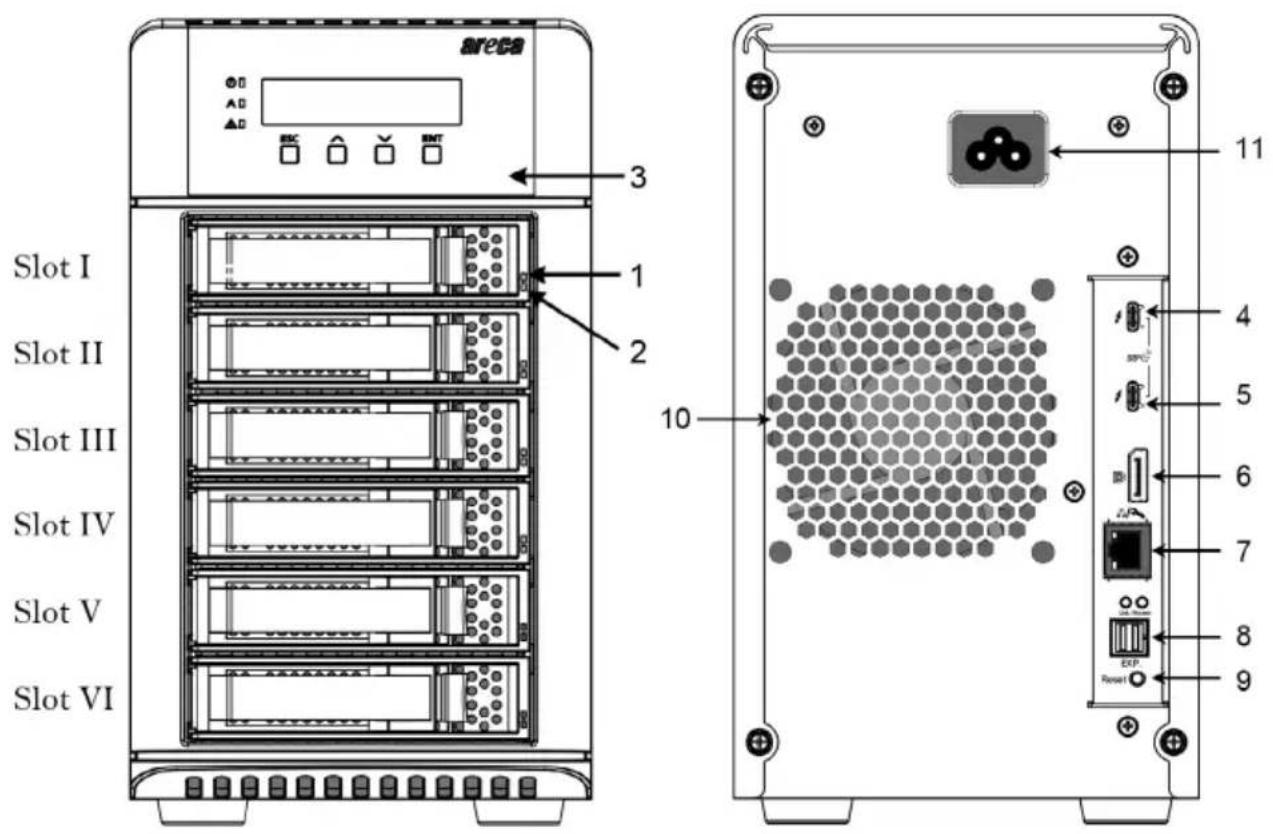
| Front View Rear View | |
| 1. Disk Activity LED2. Disk Fault / Link LED3. LCD Panel with Keypad | 4. Thunderbolt & USB 3.2 Port15. Thunderbolt & USB 3.2 Port26. Display Port7. LAN Port8. SAS Expansion Port9. Reset Button10. System Fan11. Power Connector |
The following diagram is the ARC-8050T3U-6M RAID storage front view and rear view.
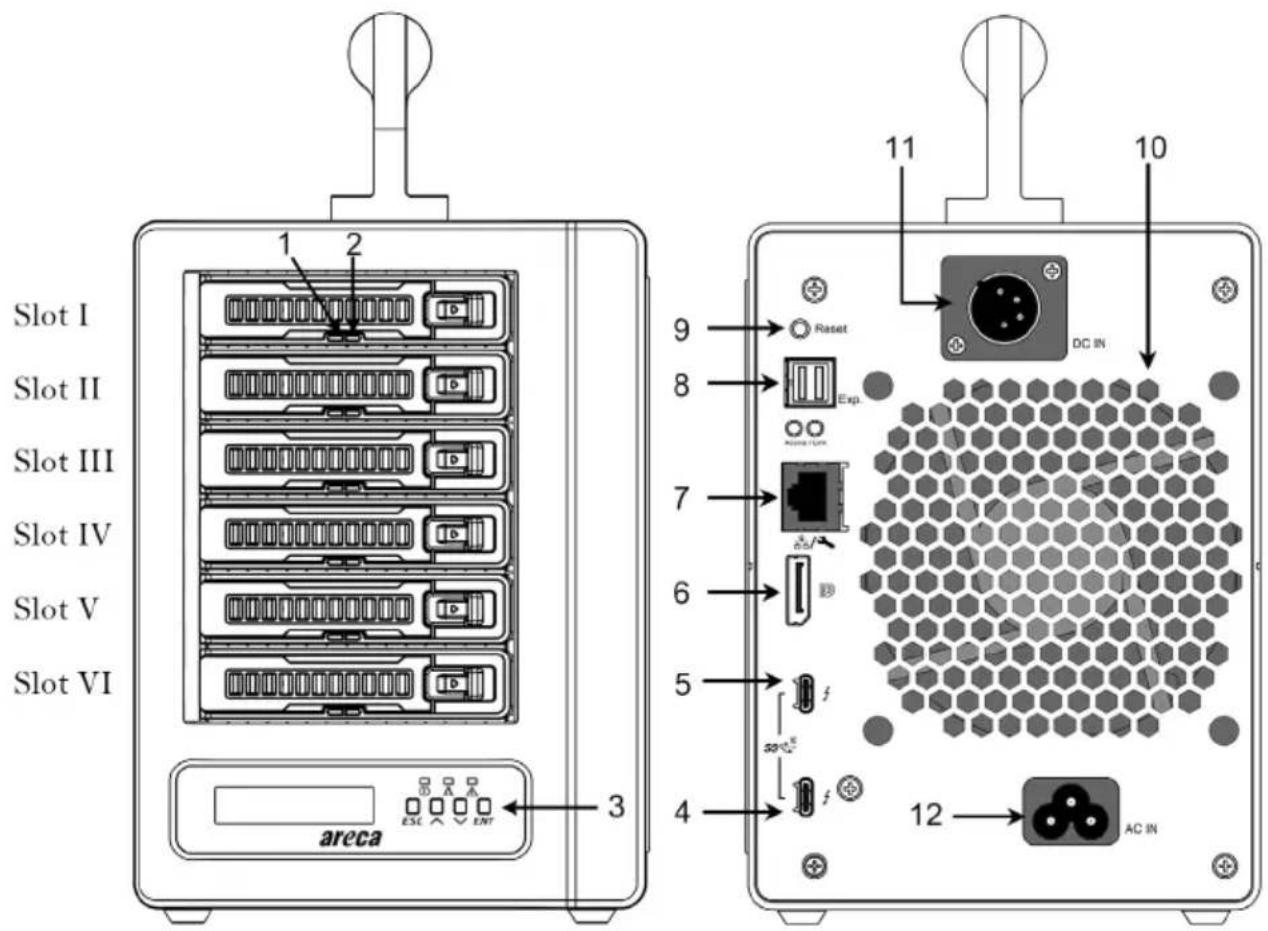
| Front View Rear View | |
| 1. Disk Activity LED2. Disk Fault / Link LED3. LCD Panel with Keypad | 4. Thunderbolt & USB 3.2 Port15. Thunderbolt & USB 3.2 Port26. Display Port7. LAN Port8. SAS Expansion Port9. Reset Button10. System Fan11. 4-Pin Male XLR (DC_IN)12. Power Connector (AC_IN) |
The following diagram is the ARC-8050T3U 8-bay RAID storage front view and rear view.

| Front View Rear View | |
| 1. Disk Activity LED2. Disk Fault/Link LED3. LCD Panel with Keypad | 4. Thunderbolt & USB 3.2 Port15. Thunderbolt & USB 3.2 Port26. Display Port7. LAN Port8. Reset Button9. System Fan110. System Fan211. Power Connector |
The following diagram is the ARC-8050T3U 12-bay RAID storage front view and rear view.
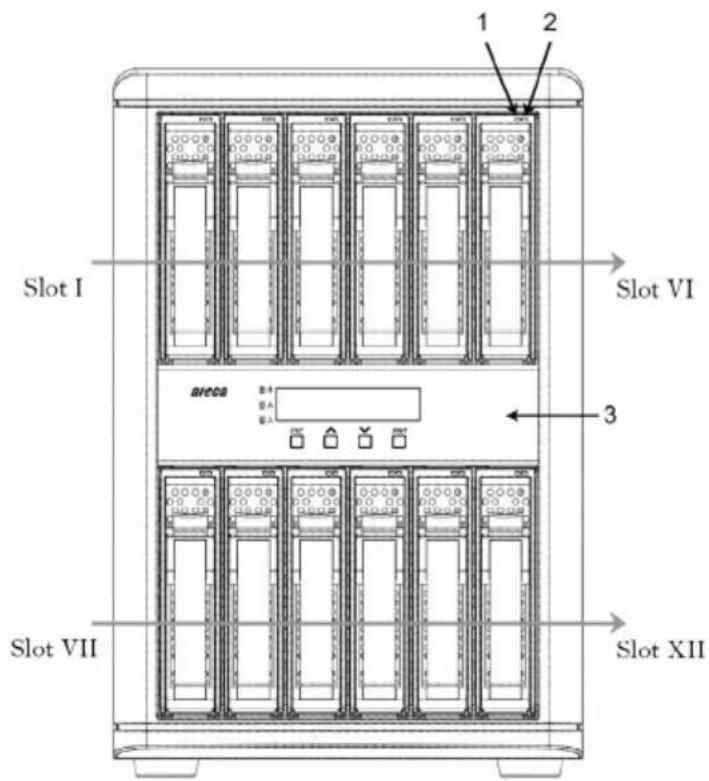
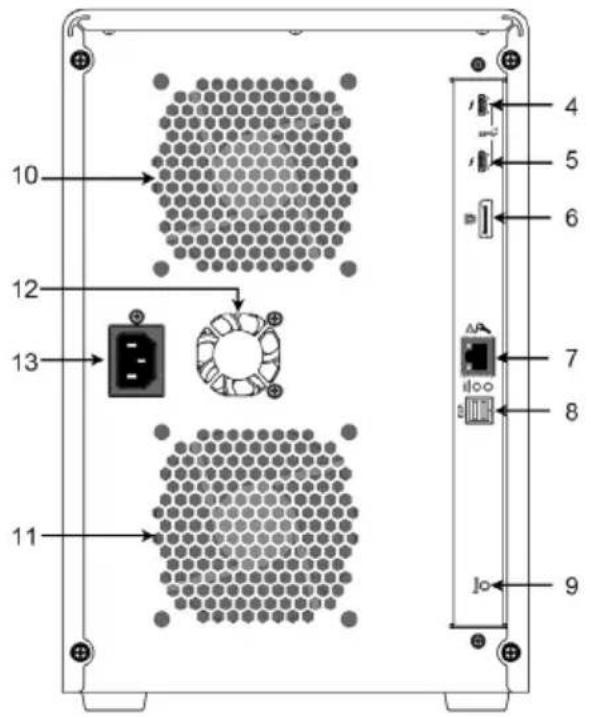
| Front View Rear View | |
| 1. Disk Activity LED2. Disk Fault/Link LED3. LCD Panel with Keypad | 4. Thunderbolt & USB 3.2 Port15. Thunderbolt & USB 3.2 Port26. Display Port7. LAN Port8. SAS Expansion Port9. Reset Button10. System Fan11. System Fan212. Power Supply Fan13. Power Connector |
- Disk Slot Numbers
To perform a disk hot-plug procedure, you must know the physical disk slot number for the drive that you want to install or remove. The number on the drive tray shows how RAID subsystem disk slots are numbered. Disk slot number is reflected in the RAID manager interface. The sequence of disk slots goes from the top of the enclosure to the bottom, from left to the right. (as shown in storage front view figures)
- Drive Tray LED Indicators

Figure 2-1, Activity/Fault LED (ARC-8050T3U-4/6/8/12)

Figure 2-2, Activity/Fault LED (ARC-8050T3U-6M)
The following table describes the RAID storage disk drive tray LED behavior.
| Tray LED Normal Status Problem Indication | ||
| 1. Activity LED (Blue) | 1. When the activity LED is lit, there is I/O activity on that disk drive.2. When the LED is not lit; there is no activity on that disk drive. | N/A |
| 2. Fault/Link LED (Red/Green) | 1. When the fault LED is lit, there is no disk present.2. When the link LED is lit, there is a disk present. | 1. When the fault LED is off, the disk is present and status is normal.2. When the fault LED is blinking (2 times/sec.), the disk drive has failed and should be hot-swapped immediately.3. When the activity LED is lit and fault LED is fast blinking (10 times/sec.) there is re-building activity on that disk drive. |
• LCD Panel LED Indicators
There are a variety of status conditions that cause the RAID storage panel monitoring LED to light. The front panel LCD comes with three (3) status-indicating LEDs. The LEDs on the front panel are defined, from top to bottom, Power, Busy, and Caution, as shown in Figure 2-3.
![graph TD A["Areca"] --> B["Power LED"] B --> C["Busy LED"] C --> D["Caution LED"] D --> E["ESC"] D --> F["ENT"] G["Areca Technology 192.169.1.100"] --> H["Power LED"] H --> I["Busy LED"]](/content/2026/05/986595/images/6a26312428851accb66f4200246af2be5b2a325c3875b9e3a1f4132caa0553f4.jpg)
Figure 2-3, LCD Panel LED
The following table provides a summary of the front panel LED.
| Panel LED Normal Status Problem Indication | ||
| 1. Power LED (Green) | Solid green, when power on. Unlit | when power on. |
| 2. Busy LED (Amber) | Blinking amber during host accesses RAID storage. | Unlit or never flicker. |
| 3. Caution LED (Red) | Unlit indicates that the RAID storage and all its components are operating correctly. | Solid indicates that one or more component failure/Urgent events have occurred. |
- Rear View Function Description
Thunderbolt 3 Ports: Use the included Thunderbolt 3 cable to connect to a Thunderbolt 3 port on your computer or other Thunderbolt 3 devices. Use the included USB Type-C cable on your USB-only computer.
Display Port: DisplayPort 1.4 is a digital display interface used to connect all displays with DisplayPort and Mini DisplayPort. DisplayPort is backwards compatible with HDMI, DVI, and VGA interfaces via an adapter (not included).
LAN Port: User can remote manage the RAID enclosure without adding any user specific software (platform independent) via standard web browsers directly connected to the 10/100Mbit RJ45 LAN port.
SAS Expansion Port: The ARC-8050T3U-6/6M/12 contains one expansion port that can connect up to 7 expander enclosures. The maximum drive no. is 256 through this RAID storage with 7 expander enclosures.
Rest Button: Intelligent power On/Off function on storage turns power in unison with the host computer power status. You can press and hold the "Reset Button" for 3 seconds to force the RAID storage power on or off in case you don't connect the host.
Power Connector: Use this connector to connect the included power cord.
XLR Connector: 4-pin XLR on the ARC-8050T3U-6M to accept alternative power from a 4pin XLR power source
2.4 Setting Up RAID Storage
Setting up your ARC-8050T3U RAID storage involves these main steps:
- Physically Install the RAID Storage and Drives
• Install the MRAID Software - Configure RAID Volumes
- Format RAID Volumes
- Unmounting RAID Volumes
Details about these steps are described in the following sections.
2.4.1 Physically Install RAID Storage and Drives
Please follow the steps below in order they are given to ensure that your ARC-8050T3U connected on your Thunderbolt computer.
Step 1. Install the Drives in the ARC-8050T3U Storage
Your RAID storage supports up to 4/6/8/12 x 3.5-inch disk drives or 4/6/8/12 x 2.5-inch SAS or SATA 6.0Gb/s drives, each one contained in its individual hole on the disk carrier. Each drive is hot-pluggable, allowing you to remove and insert drives without shutting down your RAID storage. Installation in this section describes how to install or remove 3.5 inch drives in your RAID storage.
- Gently slide the drive tray out from the ARC-8050T3U RAID storage.
- Install the drive into the drive tray and secure the drive to the drive tray by four of the mounting screws.

Figure 2-4-1. Installing 2.5-inch SAS/SATA Drive

Figure 2-4-2. Installing 3.5-inch SAS/SATA Drive
- After all drives are in the drive tray, slide all of them back into the ARC-8050T3U RAID storage and make sure you latch the drive trays.

Figure 2-5, Sliding Drive Tray into Enclosure
Step 2. Connecting Thunderbolt 3 Ports on RAID Storage
Thunderbolt connectors are provided on the back of the ARC-8050T3U RAID storage for connecting the array to Thunderbolt host or USB host.
• Thunderbolt Computer Port Connection
There are two Thunderbolt connectors on the rear of ARC-8050T3U RAID storage for connecting the array to Thunderbolt host and next Thunderbolt devices. Connect ARC-8050T3U RAID storage and Thunderbolt capable computer Thunderbolt port with the Thunderbolt 3 icon using the included Thunderbolt 3 cable as shown below:
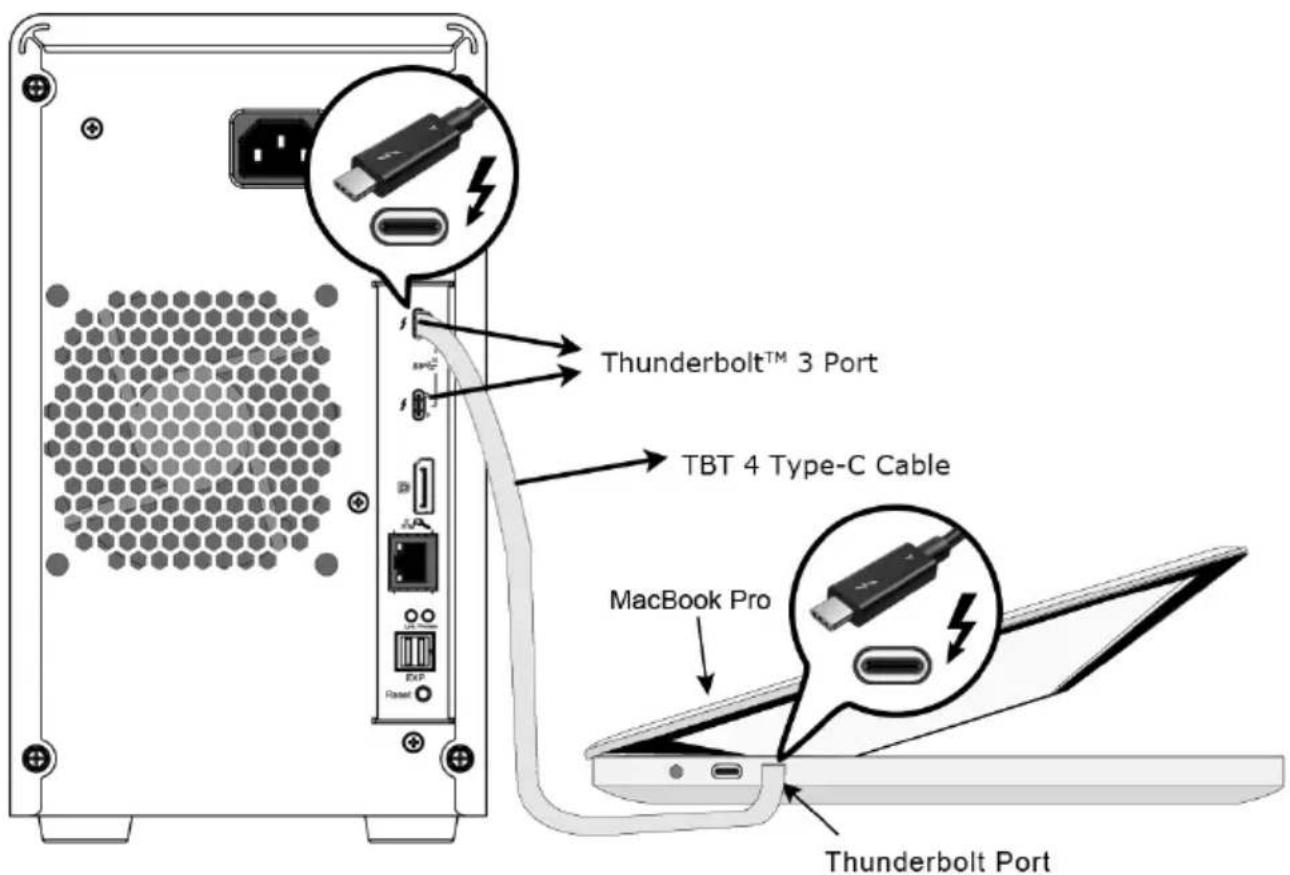
Figure 2-6, Connecting to Thunderbolt computer
Note:
Thunderbolt Daisy Chain Topologies
A single Thunderbolt technology daisy chain can have seven devices, including the computer. Connect the cable to one of the interface ports on the back of your ARC-8050T3U RAID storage and to your Thunderbolt capable computer. The additional port may be used to daisy chain compatible computer peripherals, such as hard drives, monitors, and much more.
![graph LR A["Mac Computer"] --> B["Server Rack"] B --> C["Server Rack with Monitor"] C --> D["Server Rack with Monitor"] D --> E["Server Rack with Monitor"] style A fill:#f9f,stroke:#333 style E fill:#bbf,stroke:#333](/content/2026/05/986595/images/0d0d4136c97dd22317aa2a06e6d2e760e8e9c64d4d71d29af32f3fe70222cfd1.jpg)
Figure 2-7, Thunderbolt Computer Daisy Chain
• USB-only Computer Port Connection
Your USB-only computer can recognize up to 1 volume when connecting any Thunderbolt 3 port on the ARC-8050T3U. Connect the cable to one of the Thunderbolt 3 ports on the back of your ARC-8050T3U RAID storage and to your USB-only capable computer. The additional port can't support the daisy chain function.
- Computer with a USB-C port Connect ARC-8050T3U RAID storage and USB-only computer USB-C port with the USB 3.2 Gen 1 or USB 3.2 Gen 2 icon using the included USB-C cable as shown below:
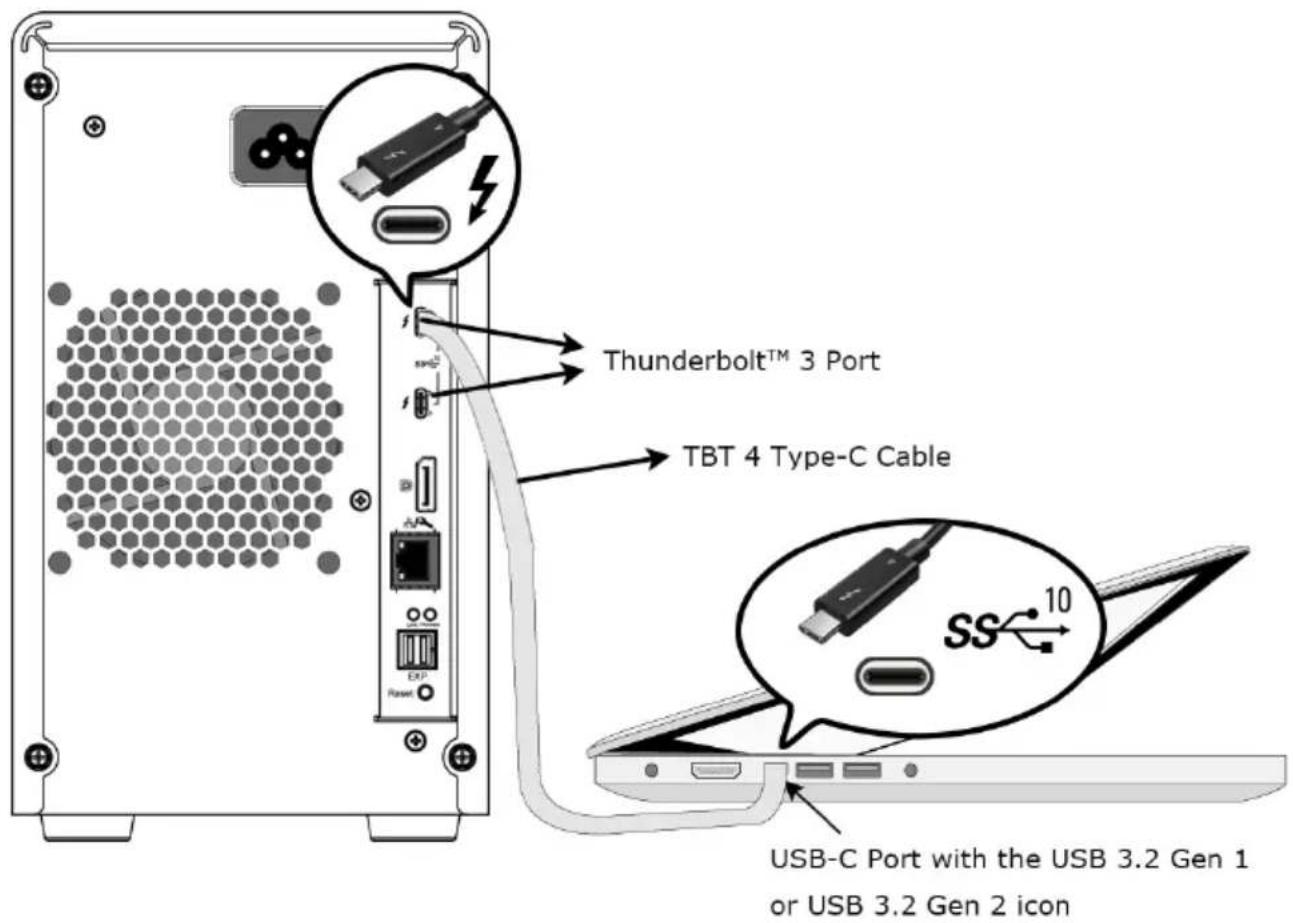
Figure 2-8, Connecting to computer USB-C port with the USB 3.2 Gen 1 or USB 3.2 Gen 2 icon
- Computer with a USB 3.2 Gen 1 or USB 2.0 port (Type A) Use the USB 3.2 (USB-C)-to-USB Type A cable for compatibility with USB-only computers that do not have a USB-C port. Connect ARC-8050T3U RAID storage and USB-only computer USB X.X port with the USB 3.2 Gen 1 (USB 3.0) or USB 2.0 icon using the optional USB 3.2 (USB-C) to USB Type A cable as shown below:
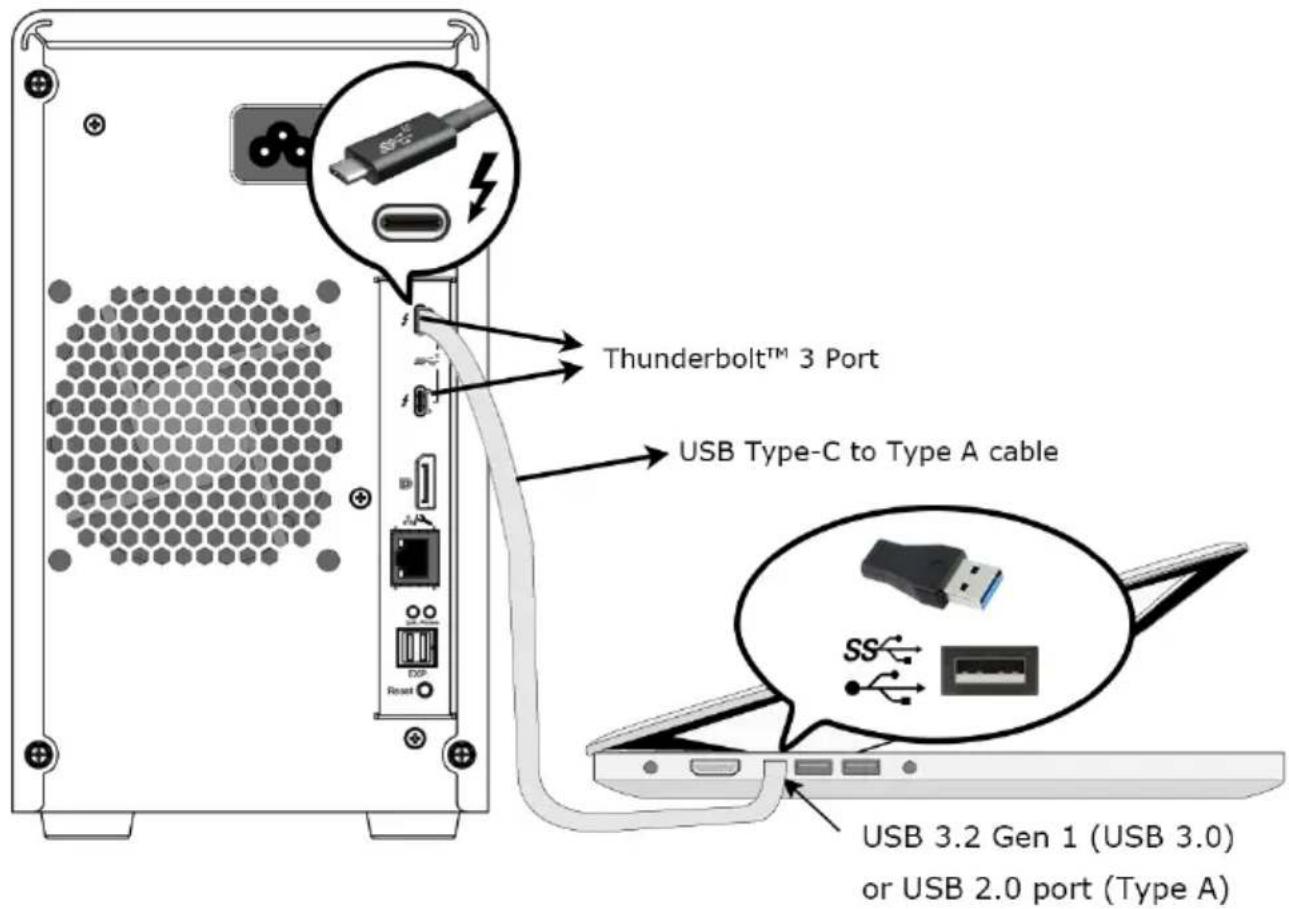
Figure 2-9, Connecting to computer with a USB 3.2 Gen 1 or USB 2.0 port (Type A)
Step 3. Expansion Connection (Optional)
The ARC-8050T3U-6/12 12Gb/s SAS RAID storages contain one expansion port that can connect up to 7 expander enclosures. The maximum drive no. is 256 through this RAID storage with 7 expander enclosures. Enclosures installed with SAS disks or SATA disks can be included in the same daisy-chain. The following figure shows how to connect the external SFF-8644 cable from the 12Gb/s SAS RAID storage to the external JBOD. Daisy-chains longer than the limitation of storages are not supported even if it may be workable.
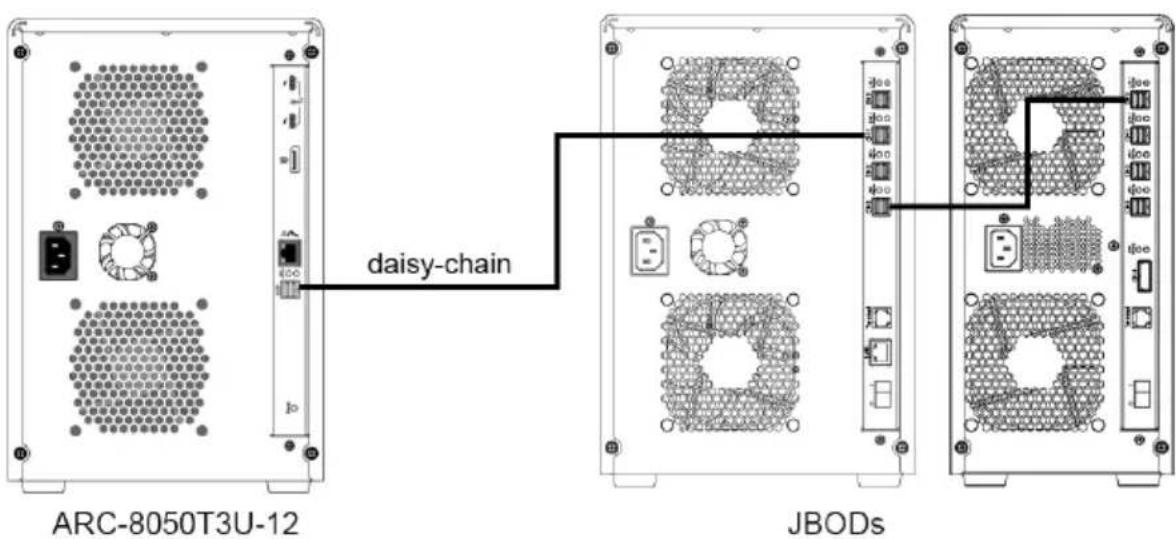
Figure 2-10, Module Daisy-chain
The following table is the maximum number of ARC-8050T3U-6/12 RAID storage supported:
| Disks/Enclosure | Expander Disks | Controller Volume | |
| Max No. 1 | 28 7 256 128 |
Note:
Turn on the JBOD first to make sure the ARC-8050T3U-6/12 RAID storage recognizes the drives in the JBOD.
Step 4. Connecting Monitor Port (Optional)
You can connect LAN port to the manager clinet system, if you want to configure and manage the RAID storage from the clinet system through out-of-band manager.
• LAN Port Connection
User can remote manage the RAID enclosure without adding any user specific software (platform independent) via standard web browsers directly connected to the 10/100Mbit RJ45 LAN port. Connect LAN port of the ARC-8050T3U using the included Ethernet cable and then to a LAN port or LAN switch.
Step 5. Connecting RAID Storage Power
• To power the RAID storage:
-
Using the included power cord, connect this power cord to a grounded electronic outlet and to the ARC-8050T3U RAID storage.
-
ARC-8050T3U RAID storage will automatically turn on when host computer power on status is received from the thunderbolt cable. It takes about 30 seconds to fully start up the RAID storage.
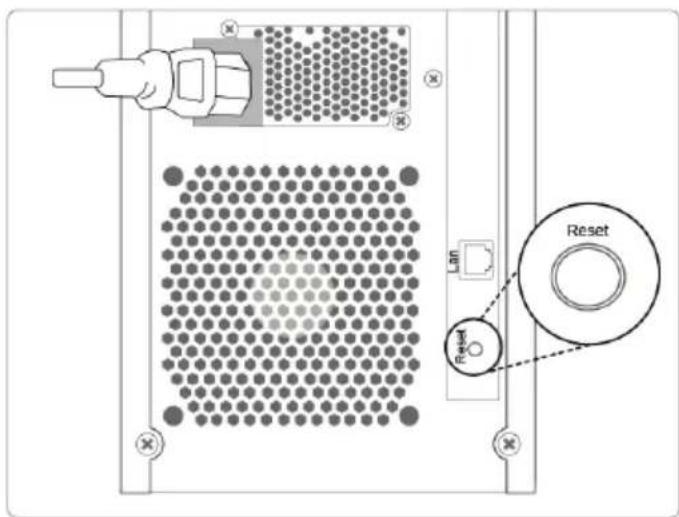
Figure 2-11, Connecting the Power to Enclosure
- ARC-8050T3U RAID storage automatically turns off when the computer to which it is attached sleeps or is disconnected.
• To power the ARC-8050T3U-6M using 4-Pin XLR D.C. Power Connections:
There is an industry standard 4-pin XLR on the ARC-8050T3U-6M to accept alternative power from a 4pin XLR power source (use battery power or supplied AC Adapter). There is no universal standard for this, however the most common convention for DC power on ARC-8050T3U-6M XLR 4-pin connectors is:
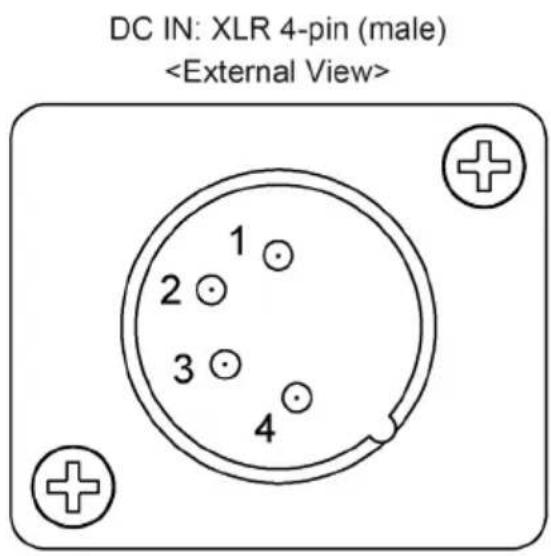
| pin 1 | GND (0V) |
| pin 2 | NC |
| pin 3 | NC |
| pin 4 | EXT DC (+11.5~15.5V) |
The connector on ARC-8050T3U-6M is male. Check and double check that the wiring is correct to your equipment before connecting DC power source to ARC-8050T3U-6M.
Note:
You can press and hold the "Reset" button for 3 seconds to force the RAID storage power on or off.
When you are finished installing the ARC-8050T3U RAID storage, you can set up the RAID volume using McRAID storage manager or LCD to set up RAID volumes.
2.4.2 Mac Users
2.4.2.1 Install Areca driver for Mac
On November 10, 2020, Apple revealed new Mac hardware with the revolutionary Apple Silicon M1 processors. Since external boot via 3rd party drivers is not allowed on Apple Silicon based Macs, the default Areca driver doesn't work on new M1 Mac, only for Intel-based Macs.
The macOS 11 had not been integrated any universal KEXTs into macOS, which means that users need to install universal KEXT to support Areca Thunderbolt devices on Apple Silicon. Areca universal KEXT's on Apple Silicon can be installed in /Library/ Extensions/, even if Areca RAID storage x86-only versions persists on the system in /System/Library/Extensions/. In order to use 3rd party kernel extensions on Apple Silicon Macs, users must enable system extensions by changing their Mac's Security Policy to Reduced Security and allow user management of kernel extensions from identified developers.
Installing Areca Driver for Apple M1 Mac in macOS 11.0 or higher Flow Chart
![graph TD A["Begin Installation of Driver/Utility"] --> B{Check Apple M1 Mac "Security Policy" = "Reduced Security"?} B -->|No| C["Step 1\n(1) Enter macOS Recovery Mode\n(2) Change "Security Policy" = "Reduced Security""] B -->|Yes| D["Step 2\nInstall Areca\nInstaller/Utility"] C…](/content/2026/05/986595/images/6163370b6dc7ed57a0aede45b84e84a0d0c332c4b42bb58eba2cf834d64ef7fb.jpg)
* If your mac version is below 11.0, you can skip this step Step 1. Start up your computer in macOS Recovery
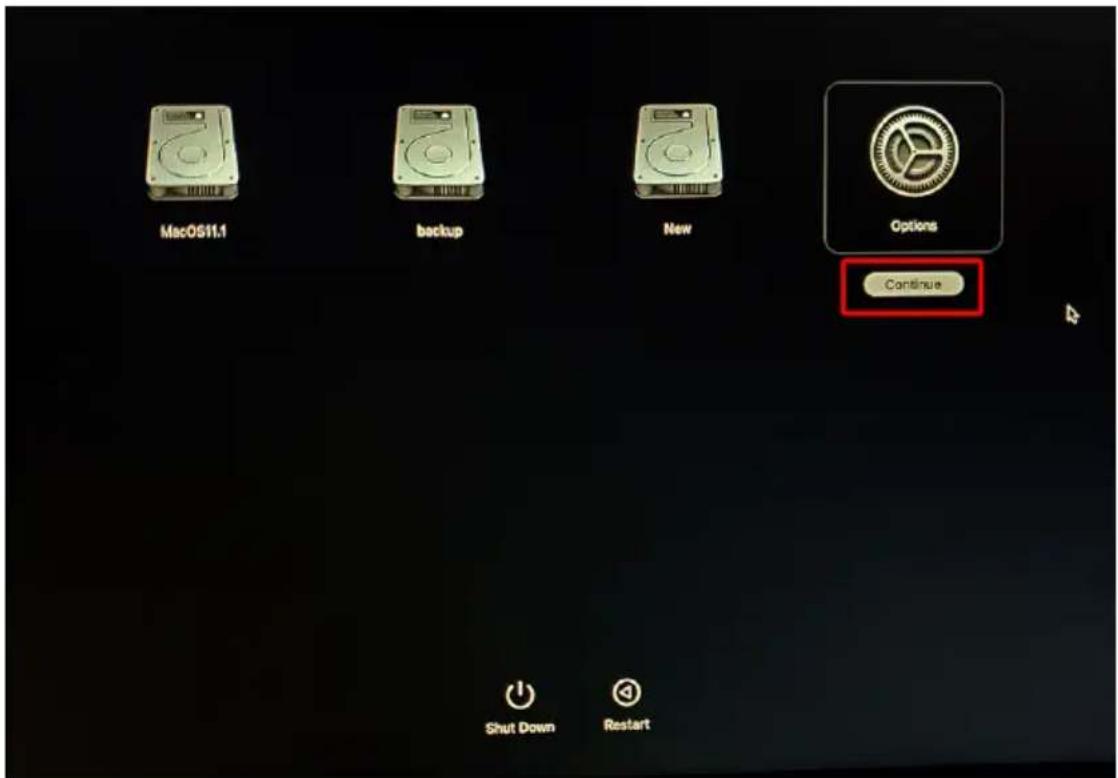
(1-1). Choose "Shut Down".
(1-2). Press and hold the power button on your Mac until you see "Loading startup options".
(1-3). Click "Options", then click "Continue". If requested, enter the password for an administrator account.
(1-4). In the Recovery app, choose Utilities > Startup Security Utility.

(1-5). Select the system you want to use to set the security policy and click "Security Policy". If the disk is encrypted with FileVault, click Unlock, enter the password and then click Unlock.

(1-6). Choose "Reduced Security" and enable "Allow user management of kernel extensions from identified developers".
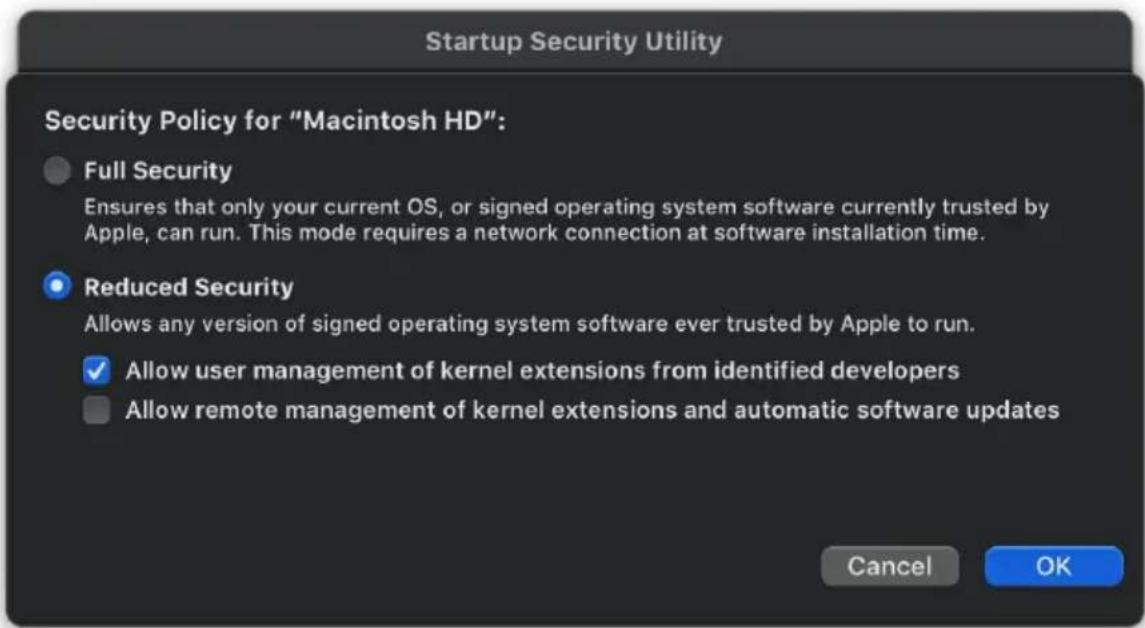
(1-7). Click "OK" and confirm the action by entering your administrator credentials.
(1-8). Restart your Mac for the changes to take effect.
Step 2. Installing Areca driver
(2-1). Download the driver from Areca website: https://www.areca.com.tw/support/downloads.html
(2-2). Double-click [ArcMSRu.pkg] in the mounted disk image to start.

Follow the installer on-screen steps to complete the installation.
(2-3). When Areca installation shows successful, system will pop the following "System Extension Updated" warning message: A program tried to load new system extension(s) signed by "Areca Technology corporation" but your security setting do not allow system extensions. To enable them, choose the "Open Security Preferences" to allow system extension.
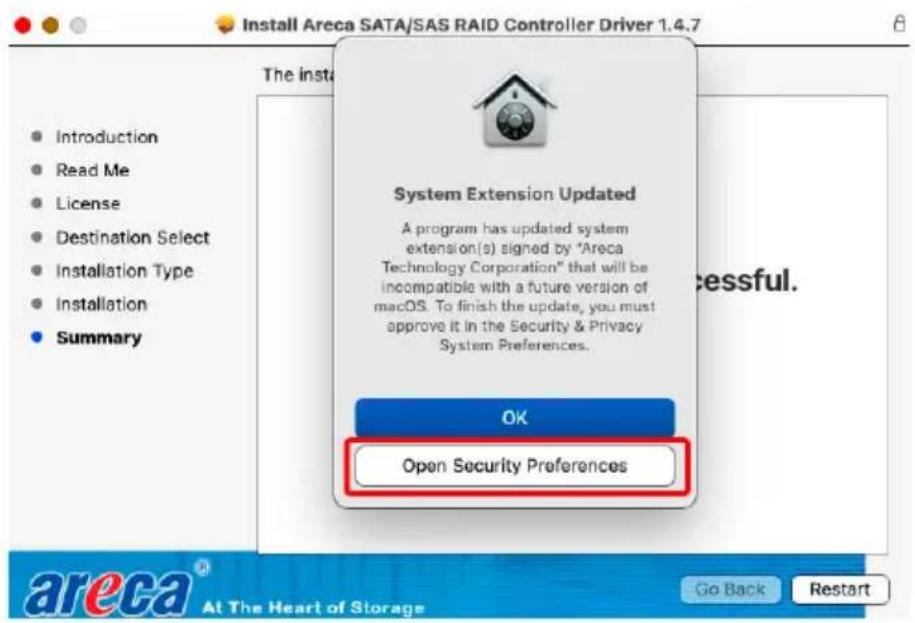
(2-5). On Security & Privacy's General page
- Make sure the message "System software from developer "Areca Technology Corporation" was blocked from loading."
- Make the setting to allow loading the driver. To unlock a preference pane, click the key icon at the lower left of the "Security & Privacy" screen. You are prompted to enter the password for the administrator account. Enter the information for "User Name" and "Password," then click "OK".
(2-6). Make sure "Areca Technology Corporation" is displayed as the developer and click "Allow".

* This message about being blocked is only displayed for only 30 minutes after installing the driver. When 30 minutes have passed after installing, the message is no longer displayed.
* In the following condition, no message is displayed. Loading of the driver is permitted.
- When a driver that has previously been allowed is reinstalled again.
- When you're using a Mac on which the driver was installed before now updating to macOS 11
A message prompting you to restart appears. Click "Restart".
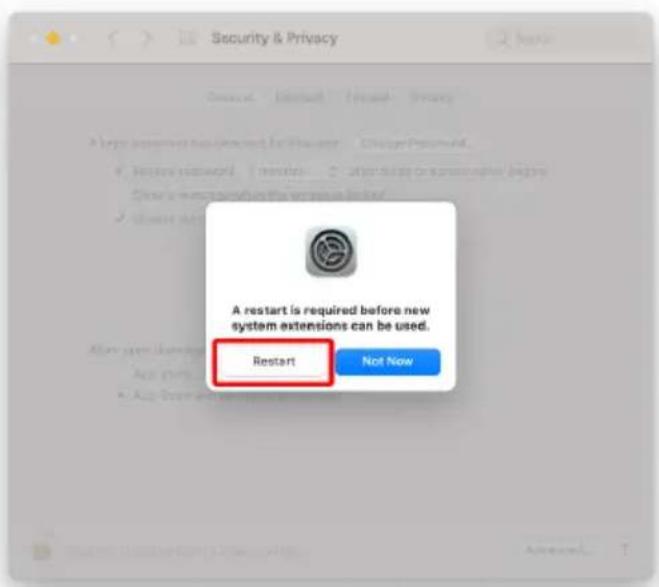
This completes installation of the driver.

2.4.2.2 Install the MRAID Utility
This section describes detailed instructions for installing the Areca Mac utility on your Apple Thunderbolt capable machine. You must have administrative level permissions to install macOS utility. This can be done in just a few steps!
- Download the install-mraid installer from the website at "https://www.areca.com.tw/support/downloads.html", the file name begins with "install-mraid" followed by the version control.
- Navigate to your Downloads folder and double-click the install-mraid software. The Installer will open.
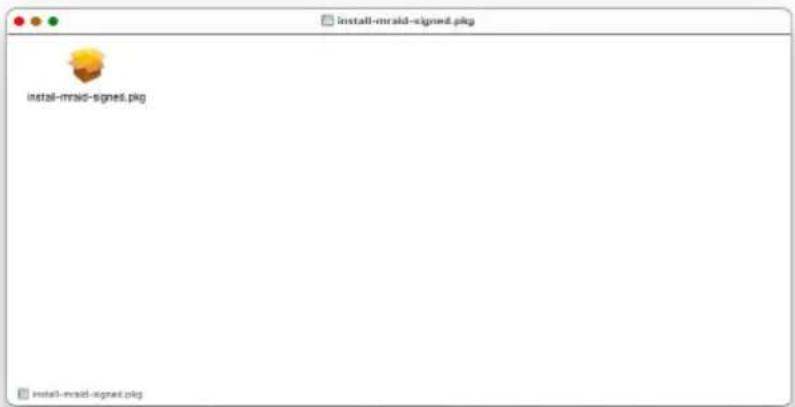
- Click on the "Continue" button to begin the installation.

- If you have no need to change the install location or select to install special components, you can skip the step 4-1 and step 4-2, just click on the "Install" button to continue the standard (default) installation procedure.

4-1. Click on the "Change Install Location" button to select the disk where you want to install the MRAID software.
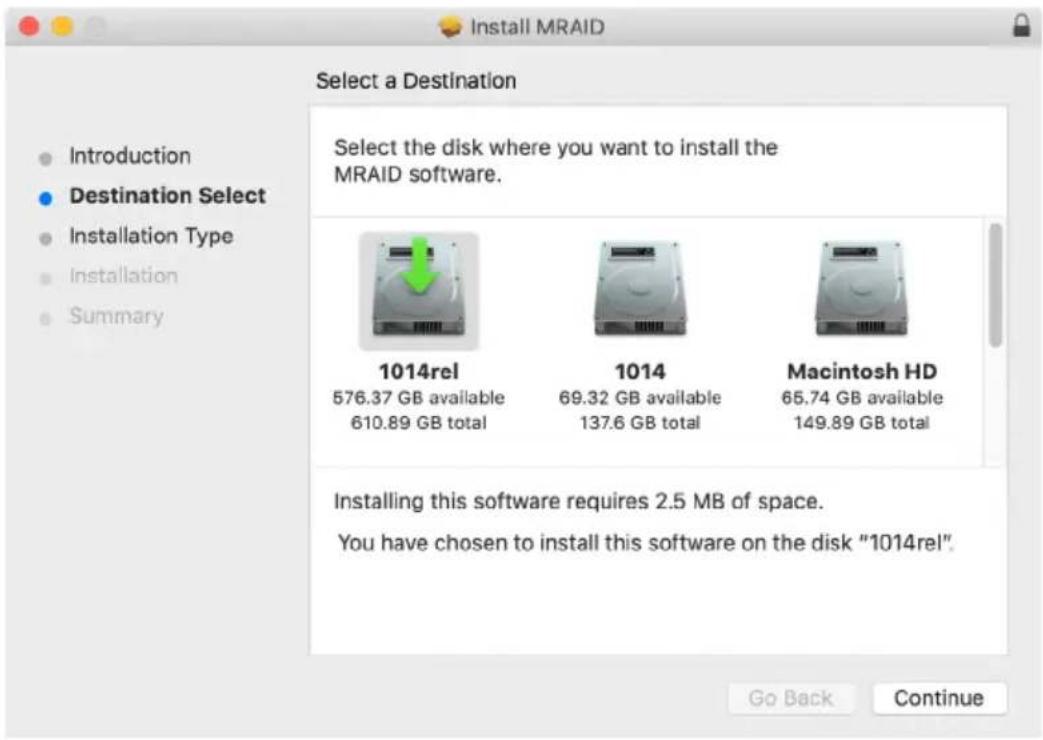
4-2, Click on the "Customize" button to choose special components. Click on an icon to install special components and click the "Install" button to continue.
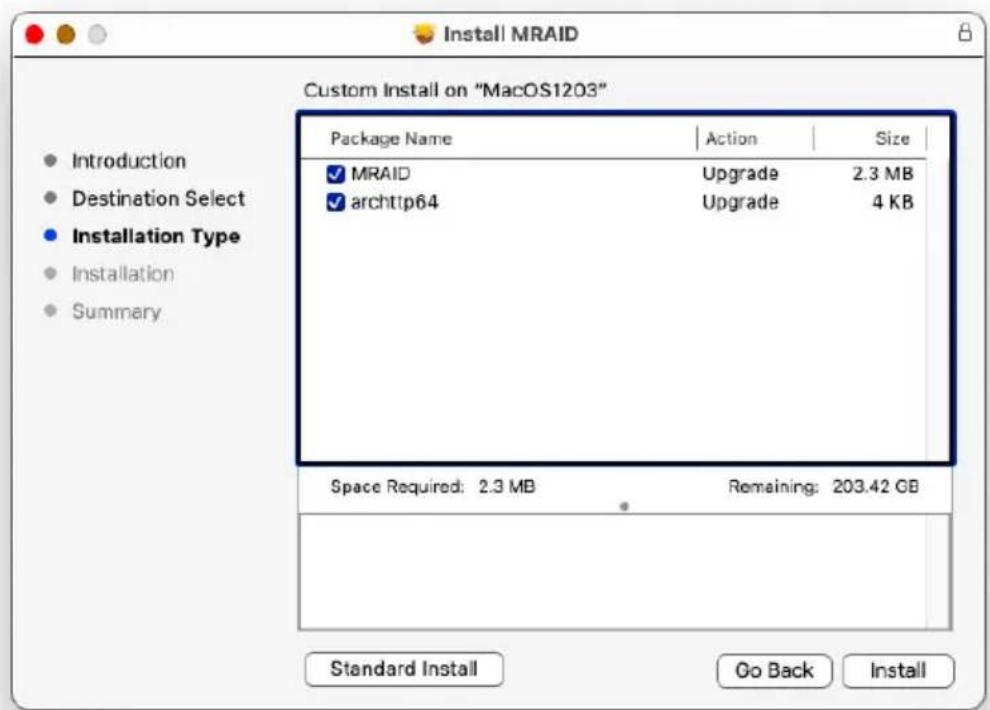
- MRAID is included below two applications for the ARC-8050T3U RAID storage.
- ArcHTTP has to be installed for GUI RAID console (McRAID storage manager) to run. It also runs as a service or daemon in the background that allows capturing of events for mail and SNMP traps notification. Refer to the chapter 3 ArcHTTP Configuration on ARC-8050T3U user manual, for details about the mail and SNMP traps configuration.
- CLI (Command Line Interface) provides the functionality available in MRAID storage manager through a Command Line Interface. You can set up and manage RAID storage inline. CLI performs many tasks at the command line. You can download CLI manual from Areca website.
- ArcHTTP64 is required for ArcHTTP running as a service or daemon, and have it automatically start the proxy for all controllers found.
- Enter your system password and click the "Install Software" button.
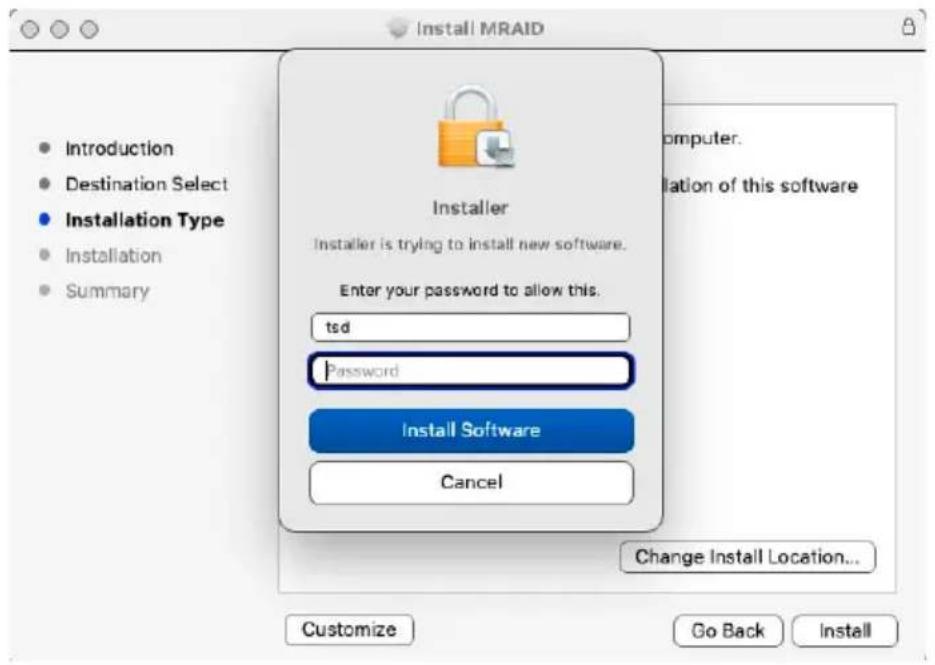
- The system will need to be restarted when the installation is complete. Click "Continue Installation" button.

- A program bar appears that measures the progress of the driver installation.

- When this screen shows, you have completed the installation and click on the "Restart" button to reboot your computer in order to complete installation.

- There is a MRAID folder icon showing on your desktop. The folder contains two items (ArcCLI64 and ArcHTTP64) that are for you to launch the MRAID storage manager.
If you have not yet installed the hardware, please follow the "2.4.1 Physically Install RAID Storage and Drives" section to install it. Otherwise, to begin the creation volume, go on the "2.4.2.3 Configure RAID Volumes" section to configure the volume.
2.4.2.3 Configure RAID Volumes
There are often multiple ways to accomplish the same configuration and maintenance tasks for your RAID storage. Your ARC-8050T3U RAID storage can be configured by one of the following methods:
- McRAID Storage Manager from ArcHTTP. (Thunderbolt port)
- McRAID Storage Manager Through LAN port.
- LCD Panel with Keypad.
• Method 1: McRAID Storage Manager From ArcHTTP
Start McRAID Storage Manager – Browser Edition
There is one "MRAID" icon showing on your desktop. Double-click on the "MRAID" icon to locate your ArcHTTP utility and CLI program file folder.
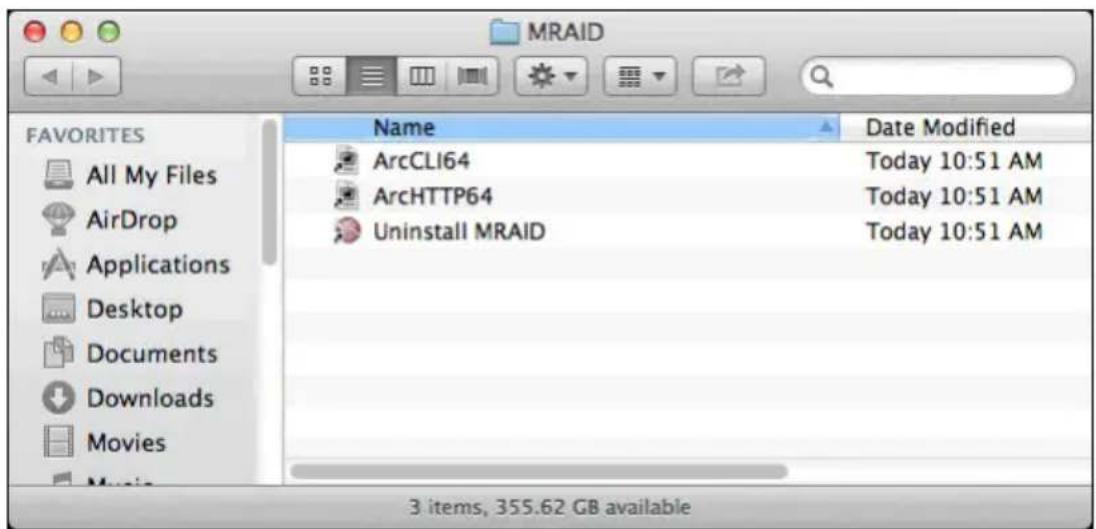
When you double-click on the "ArcHTTP64", it shows all RAID storages available on the system and create an individual RAID storage icon located on left column of the "ArcHTTP Configurations" screen.

Locate "ARC-8050T3U Web Management" and launch the selected McRAID storage manager. Enter RAID storage default User Name "admin" and the Password "0000" when the login page prompted for it. After logging in, the McRAID storage manager process starts.

Click on the "Quick Create" in the main menu, your volume is automatically configured based on the number of disks in your system. You can create a RAID set associated with exactly one volume set. The user can change the Raid Level, Capacity, Initialization Mode, and Stripe Size. A hot spare option is also created, depending on the exist configuration. Tick on the "Confirm The Operation" check box and click on the "Submit" button, the RAID set and volume set will start to initialize. If you prefer to customize your volume set, please use the "Raid Set Functions" and "Volume Set Functions". See chapter 4 of ARC-8050T3U user manual for information on customizing your RAID volumes using McRAID storage manager. Otherwise, to begin using the ARC-8050T3U right away, go on the next "Format the Volume" section to begin the formatting procedure.
- Method 2: McRAID Storage Manager Through LAN port User can remote manage the RAID storage directly connected to the 10/100Mbits RJ45 LAN port via standard web browsers. To configure ARC-8050T3U RAID storage using a LAN port, you need to know its IP address. The default IP address will be shown on the LCD initial screen. Launch your web browser-based McRAID storage manager by entering http://[IP Address] in the web browser. Enter RAID storage default User Name "admin" and the Password "0000" when the login page prompted for it. After logging in, the McRAID storage manager process starts. Follow the on-screen steps, responding as needed, to configure RAID volume. See the Chapter 4 of ARC-8050T3U user manual for information on customizing your RAID volumes using McRAID storage manager.
- Method 3: LCD Panel with Keypad You can use LCD front panel and keypad function to simply create the RAID volume. The LCD status panel also informs you of the disk array's current operating status at a glance. The LCD configuration is described in a separate manual: ARC-8050T3_LCD manual. You can download ARC-1009 (LCD Manual) from Areca website. The LCD provides a system of screens with areas for information, status indication, or menus. The LCD screen displays up to two lines at a time of menu items or other information. ARC-8050T3U RAID storage default User Name is "admin" and the Password is "0000".
The LCD initial screen is shown below:
![graph TD A["IP Address"] --> B["Status Display"] B --> C["Areca Technology 192.169.1.100"] C --> D["ESC"] C --> E["ENT"] C --> F["Keypad"] G["Company Name"] --> C H["Thermal Inductance Icon"] --> B](/content/2026/05/986595/images/7eec17ea79e6da3f106be8bd31d26832012e8c189839df5e39cc644501a2b9d5.jpg)
2.4.2.4 Format and Partition RAID Volumes
After the volume set is ready for system accesses, it needs to be partitioned, formatted, and mounted by the operating system.
When you create a volume through McRAID storage manager, the macOS recognizes that a new disk is avail, and displays a message asking what you next want to do. If the message does not show up, start the "Disk Utility" manually from the "Finder", use the "Go" menu and open the "Utilities" folder. Double-click on the "Disk Utility" program.
To format and partition your unit
- Formatting a drive in Disk Utility is easy, though Disk Utility uses a different term: Erase. When the Disk Utility window opens, find and select the desired drive in the sidebar that represents your RAID storage. This is how you prepare to erase and format the RAID storage.

Choose OS X Extended (Journaled) for the Format, and, for the Scheme, choose GUID Partition Map. You could also choose MS-DOS as the format, if you want to be able to use the drive on both a Mac and a PC. In that case, choose Master Boot Record for the Scheme. Click "Erase" button in the toolbar, and Disk Utility will erase and format the RAID storage. When it is complete, icons for this partition shows up on your desktop. It is now ready to use.
- You may want to divide a drive into more than one partition. When you do this, each partition is a volume, and each volume shows up as a separate drive on your Desktop. To partition a drive, select it in Disk Utility, and then click "Partition" in the toolbar. Disk Utility shows the RAID storage's space as a pie chart. By default, RAID storage only contain a single partition, but to add one, click the + icon; you'll see two partitions.

If you want to adjust their sizes, you can do so by dragging the circles dividing the partitions, or by typing a size into the Size field. When you click "Apply", Disk Utility erases the RAID storage and splits it into the number of partitions you have selected. Each partition will appear as a separate drive on your Desktop.
When a message asks you to confirm you want to partition the disk, click on the "Partition" button. This may take a couple of minutes, depending on the size of the drives in your RAID storage. When the partitioning is complete, icons for each new partition show up on your desktop. They are now ready to use.
2.4.2.5 Make A Bootable RAID Volume
You can follow the following procedures to add ARC-8050T3U RAID volume on Intel-based Mac bootable device listing.
- Set the BIOS selection in System Controls: Advance Configuration to "UEFI" option for Intel-based Mac boot.
- Download macOS Sierra and follow the https://support.apple.com/en-us/HT202796 link "How to set up and use an external Mac startup disk".
- Mac doesn't see devices that have Option ROM firmware until you load the firmware by pressing "Option-Shift-Command-Period" at the Startup Manager window.
- Do this each time you want to start up from ARC-8050T3U.
2.4.2.6 Unmounting RAID Volumes
To avoid possible data corruption, Areca recommends that ARC-8050T3U RAID storages volume(s) be properly unmounted from the computer prior to turning off the RAID storage or safely removing the Thunderbolt interface cable.
- Drag RAID storage volume(s) icon to the trash. The Trash will turn into an Eject arrow. This will assure that all data is properly cleared from the system memory before the volume is removed.
- When the volume icon disappears from the desktop, RAID storage can be disconnected from the computer.

2.4.3 Windows Users
2.4.3.1 Install the Thunderbolt Software
This section describes how to install the Thunderbolt software to your operating system. The software installation includes device driver, ArcHTTP and CLI utility.
In this scenario, you are installing the Thunderbolt software in an existing Windows system. You can use the installer to install driver, ArcHTTP and CLI at once or "Custom" to install special components. Follow the steps below to install the driver & utility for Windows.
- Download the install_thunderbolt installer from the website at "https://www.areca.com.tw/support/downloads.html", the file name begins with "install_thunderbolt" followed by the version control.
- Double-click on the zipped file that comes from the website to unzip it. Double-click on the "setup.exe" file for installing thunderbolt software.
- The screen shows Preparing to Install.

- The Thunderbolt Installer (or InstallShield Wizard) opens, preparing to install and click on the "Next" button to continue.
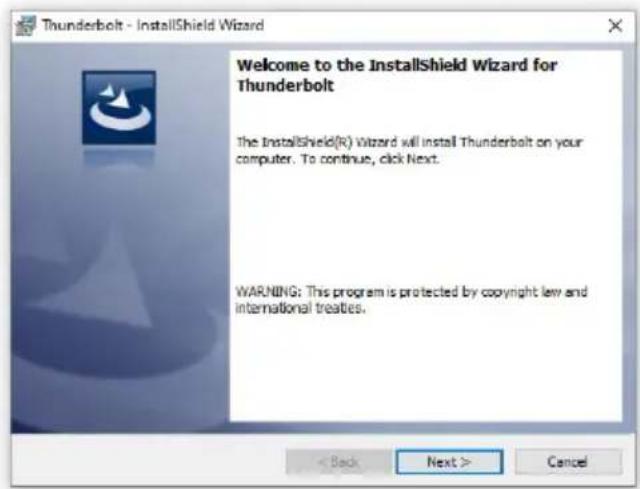
- When the License Agreement screen appears, read and agree to the license information; then let the InstallShield Wizard guide you through the installation process.

- On the Setup Type screen, use the settings to specify these things: and click on the "Next" button to continue.
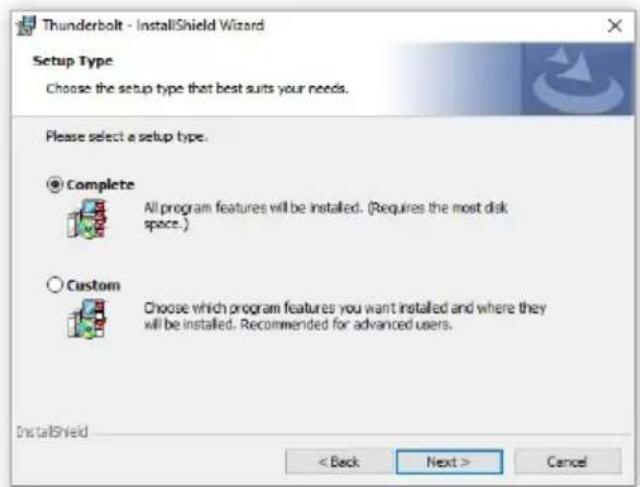
- "Complete" to install driver, ArcHTTP and CLI utility at once, check the first box.
- "Custom" to install special components and change the program directory. When this "Custom" check box is checked, go to the Custom Setup screen.
6-1. On the Custom Setup screen, click on an icon to install special components and click on the "Next" button to continue.
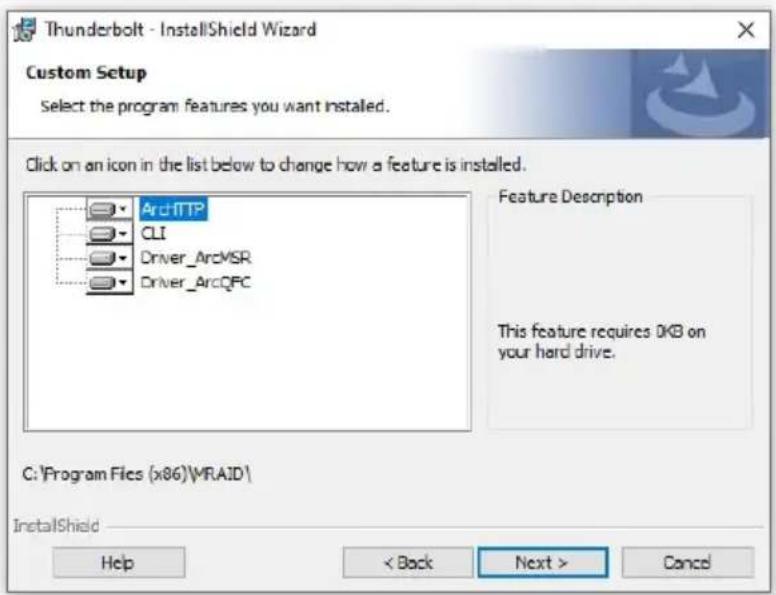
- Driver is required for the operating system to be able to interact with the ARC-8050T3U RAID storage.
- ArcHTTP has to be installed for GUI RAID console (McRAID storage manager) to run. It also runs as a service or daemon in the background that allows capturing of events for mail and SNMP traps notification. Refer to the chapter 3 ArcHTTP Configuration on ARC-8050T3U user manual, for details about the mail and SNMP traps configuration.
-
CLI (Command Line Interface) provides the functionality available in MRAID storage manager through a Command Line Interface. You can set up and manage RAID storage inline. CLI performs many tasks at the command line. You can download CLI manual from Areca website.
-
When you reach the installation page, click on the "Install" button to continue.

- A program bar appears that measures the progress of the driver installation.
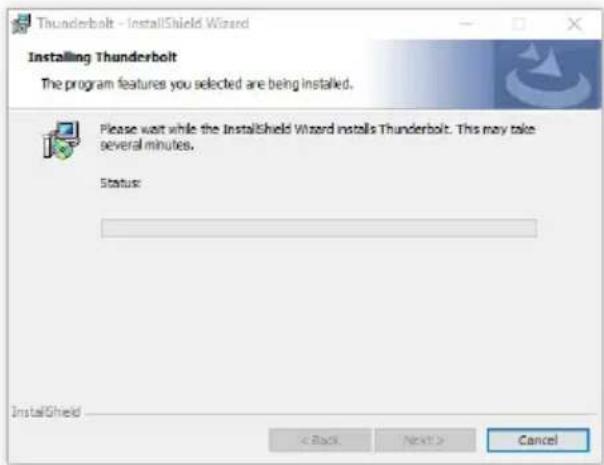
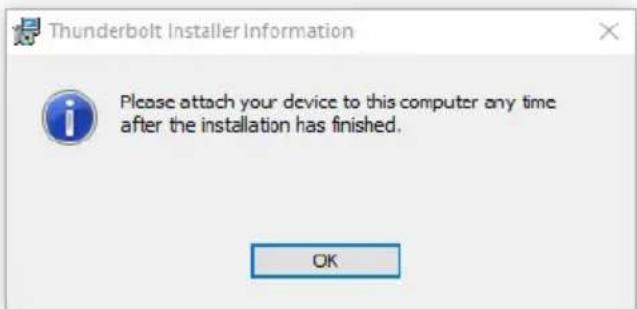
When this screen completes, you have completed the MRAID installation. If you have no ARC-8050T3U RAID storage unit yet connected or powered on, a "MRAID Installer Information" message displays.
- After installation is complete, click on the "Finish" button to exit the InstallShield Wizard.

- The ArcHTTP and CLI are installed at the same time on ARC-8050T3. Once ArcHTTP and CLI have been installed, the Arc-HTTP background task automatically starts each time when you start your computer. There is one MRAID icon showing on your "Programs" folder. This icon is for you to start up the McRAID storage manager (by ArcHTTP) and CLI utility. If you have not yet installed the hardware, please follow the "2.4.1 Physically Install RAID Storage and Drives" section to install it. Otherwise, to begin the creation volume, go on the "2.4.3.2 Configure RAID Volumes" section to configure the volume.
Note:
"For Windows, Install Driver First"
For Windows PC: the Thunderbolt certified device driver must be installed before plugging in the device for it to function properly.
2.4.3.2 Configure RAID Volumes
There are often multiple ways to accomplish the same configuration and maintenance tasks for your RAID storage. Your ARC-8050T3U RAID storage can be configured by one of the following methods:
- McRAID Storage Manager from ArcHTTP. (Thunderbolt port)
- McRAID Storage Manager Through LAN port.
- LCD Panel with Keypad.
• Method 1: McRAID Storage Manager From ArcHTTP
Start McRAID Storage Manager – Browser Edition
The "ArcHTTP Taskbar" icon shows on the button of system tray by default. Double click "ArcHTTP Taskbar" to launch the ArcHTTP Configuration screen. It automatically scans the localhost RAID units on the system and creates an individual RAID storage icon located in the left column screen. When you double click on a selected element the left column screen, child element belonged parent element appears. Locate "ARC-8050T3U Web Management" and launch the McRAID storage manager.

Locate "ARC-8050T3U Web Management" and launch the selected McRAID storage manager. Enter RAID storage default User Name "admin" and the Password "0000" when the login page prompted for it. After logging in, the McRAID storage manager process starts.
![Areca Technology Corporation [open all|close all] Raid System Console Quick Function Quick Create RAID Set Functions Volume Set Functions Physical Drives System Controls Information ■ Quick Create Raid/Volume Set Total Number Of Disks B Select Raid Level Raid 6 Maximum Capacity Allowed 2400 GB Selec…](/content/2026/05/986595/images/576e9b93515021d7a945a8e3678abef497ff9919bfc9b3c3bb46aaf19c57e743.jpg)
Click on the "Quick Create" in the main menu, your volume is automatically configured based on the number of disks in your system. You can create a RAID set associated with exactly one volume set. The user can change the Raid Level, Capacity, Initialization Mode, and Stripe Size. A hot spare option is also created, depending on the exist configuration. Tick on the "Confirm The Operation" check box and click on the "Submit" button, the RAID set and volume set will start to initialize. If you prefer to customize your volume set, please use the "Raid Set Functions" and "Volume Set Functions". See chapter 4 of ARC-8050T3U user manual for information on customizing your RAID volumes using McRAID storage manager. Otherwise, to begin using the ARC-8050T3U right away, go on the next "Format the Volume" section to begin the formatting procedure.
- Method 2: McRAID Storage Manager Through LAN port User can remote manage the RAID storage directly connected to the 10/100Mbits RJ45 LAN port via standard web browsers. To configure ARC-8050T3U RAID storage using a LAN port, you need to know its IP address. The default IP address will be shown on the LCD initial screen. Launch your web browser-based McRAID storage manager by entering http://[IP Address] in the web browser. Enter RAID storage default User Name "admin" and the Password "0000" when the login page prompted for it. After logging in, the McRAID storage manager process starts. Follow the on-screen steps, responding as needed, to configure RAID volume. See the Chapter 4 of ARC-8050T3U user manual for information on customizing your RAID volumes using McRAID storage manager.
- Method 3: LCD Panel with Keypad You can use LCD front panel and keypad function to simply create the RAID volume. The LCD status panel also informs you of the disk array's current operating status at a glance. The LCD configuration is described in a separate manual: ARC-8050T3_LCD manual. You can download ARC-1009 (LCD Manual) from Areca website. The LCD provides a system of screens with areas for information, status indication, or menus. The LCD screen displays up to two lines at a time of menu items or other information. ARC-8050T3U RAID storage default User Name is "admin" and the Password is "0000".
The LCD initial screen is shown below:
![graph TD A["IP Address"] --> B["Status Display"] B --> C["Areca Technology 192.169.1.100"] C --> D["ESC"] C --> E["ENT"] C --> F["Keypad"] G["Company Name"] --> C H["Thermal Inductance Icon"] --> B](/content/2026/05/986595/images/36d228ced98116c30e61f7313a76e3b732fbce62617e2818353edd1973097bcd.jpg)
2.4.3.3 Format RAID Volumes
After the volume set is ready for system accesses, it needs to be partitioned, formatted, and mounted by the operating system.
The following steps show how to make any new disk arrays or independent disks accessible to Windows system.
-
Click "Start" ==> right-click "Computer" and select "Manage".
-
Click "Disk Management" in the left pane.
-
Scroll down to the bottom of the middle pane. Windows will display a list of new drives attached to your system with a label such as "Disk 1" or "Disk 2", etc.
-
Right-click on the drive you want to partition and then again to format it.
-
Once it's formatted, Windows automatically assigns the next available drive letter to it and then it will appear in Windows Explorer.
2.4.3.4 Unmounting RAID Volumes
To avoid possible data corruption, Areca recommends that ARC-8050T3U RAID storages volume(s) be properly unmounted from the computer prior to turning off the RAID storage or safely removing the Thunderbolt interface cable.
To unmount ARC-8050T3U RAID storage from a Windows system:
- Click on the "Safely Remove Hardware and Eject Media" icon in the notification area, at the lower right-hand side of your screen, and then, in the list of devices, choose the Thunderbolt storage volume option that you want to remove.


Note:
You can also safely remove devices from the computer folder. Click the "Start" button, click "Computer", right-click the device you want to remove, and then click "Eject".
- Windows will display a notification telling you it's safe to remove the Thunderbolt storage volume. Now you can unplug the Thunderbolt cable.

3. ArcHTTP Configuration
This chapter describes how to configure the "System Function" of ArcHTTP. The ArcHTTP proxy utility runs as a service or daemon, and has it automatically start the proxy for all RAID storages found. This way the RAID storage can be managed remotely without having to sign in the server.
Start ArcHTTP- Browser Edition:
- In Windows, right-click on "Start" menu and choose "Programs". Clicking "MRAID" program icon starts the ArcHTTP utility (From the Start menu, choose Programs > MRAID > ArcHTTP).
- On a Mac, there is one MARID icon showing on your desktop. This icon is for you to start up the ArcHTTP utility.
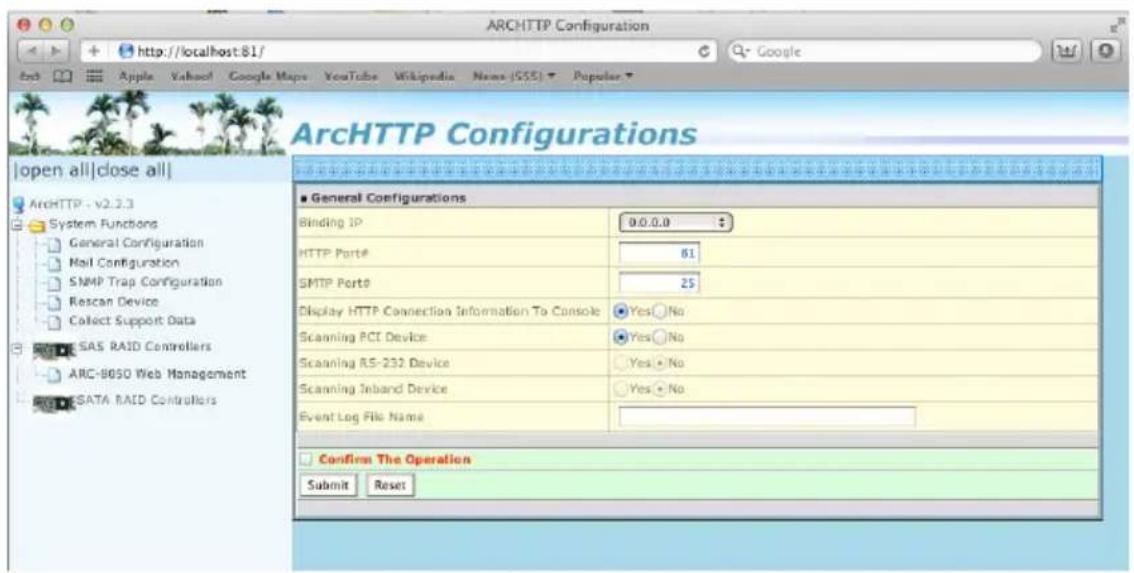
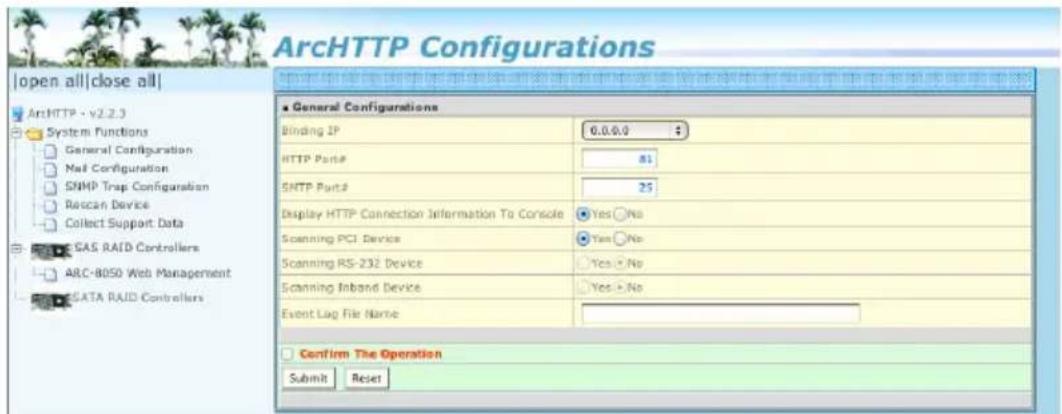
When you click the ArcHTTP, it shows all RAID storages available on the system and "System Function" on left column of the "ArcHTTP Configurations" screen. The ArcHTTP has also integrated the email notification and SNMP function for user to send SNMP traps and e-mail notifications. ArcHTTP configuration setting will store on a file name "ArcHTTPSrv.conf".
- General Configuration
Binding IP: Restrict ArcHTTP proxy server to bind only single interface (If more than one physical network in the server).
HTTP Port#: Value 1\~65535.
Display HTTP Connection Information To Console: Select "Yes" to show Http send bytes and receive bytes information in the console.
Scanning PCI Device: Select "Yes" for ARC-8050T3U RAID storage unit.
Scanning RS-232 Device: No.
Scanning Inband Device: No.
- Mail (Alert by Mail) Configuration
Many users require that email notifications be sent to the appropriate administrators when an alert is detected. To set up your mail servers, click on the the "Mail Configuration" link. The "SMTP Server Configurations" allows you to define settings for your mail server. This setup screen is shown as below:

1. SMTP Server Configuration
SMTP Server IP Address: Enter the SMTP server IP address which is not McRAID storage manager IP.
Ex: 192.168.0.2.
2. Mail Address Configurations
Sender Name: Enter the sender name that will be shown in the outgoing mail.
Ex: RaidController_1.
Mail address: Enter the sender email that will be shown in the outgoing mail, but don't type IP to replace domain name.
Ex: RaidController_1@areca.com.tw.
Account: Enter the valid account if your SMTP mail server requires authentication.
Password: Enter the valid password if your SMTP mail server requires authentication.
3. Event Notification Configurations
This step involves setting up of notification rules. Notification rules instruct ArcHTTP on the notifications that should be sent when certain types of alerts are detected.
MailTo Name: Enter the alert receiver name that will be shown in the outgoing mail.
Mail Address: Enter the receiver's e-mail address. This is the address you want the e-mail alerts sent to.
Ex: admin@areca.com.tw.
According to your requirement, set the corresponding event level: Disable Event Notification: No event notification will be sent.
Urgent Error Notification: Send only urgent events.
Serious Error Notification: Send urgent and serious events.
Warning Error Notification: Send urgent, serious and warning events.
Information Notification: Send all events.
Notification For No Event: Notify user if no event occurs within 24 hours.
• SNMP Traps Configuration
To enable the RAID storage to send the SNMP traps to client SNMP manager using the IP address assigned to the operating system, such as Net-SNMP manager, you can simply use the SNMP function on the ArcHTTP proxy server software. To enable the RAID storage SNMP traps sending function, click on the "SNMP Configuration" link. The ArcHTTP proxy only provide one direction to send the trap to the SNMP manager without needing to install the SNMP extension
agent on the host. If SNMP manager requests to query the SNMP information from RAID storage, please refer the Appendix C "SNMP Operation & Installation". The "SNMP traps Configuration" menu will show as following:
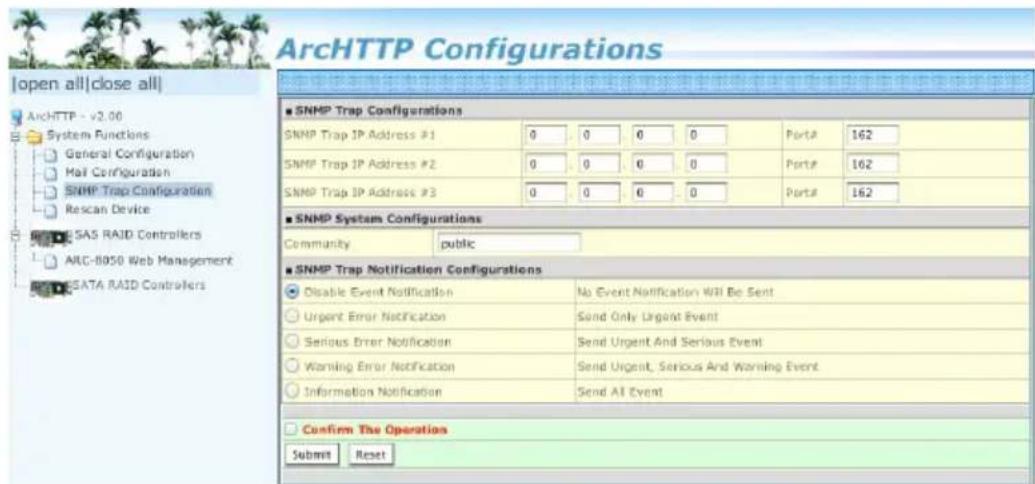
When you open the SNMP traps configuration page, you will see the following settings:
1. SNMP Trap Configurations
Enter the SNMP trap IP address.
2. SNMP System Configurations
Community name acts as a password to screen accesses to the SNMP agent of a particular network device. Type the community names of the SNMP agent in this field. Before access is granted to a request station, this station must incorporate a valid community name into its request; otherwise, the SNMP agent will deny access to the system. Most network devices use "public" as default of their community names. This value is case-sensitive.
3. SNMP Trap Notification Configurations
Before the client side SNMP manager application accepts the RAID storage traps, it is necessary to integrate the MIB into the management application's database of events and status indicator codes. This process is known as compiling the MIB into the application. This process is highly vendor-specific and should be well-covered in the User's Guide of your SNMP application. Ensure the compilation process successfully integrates the contents of the areca_sas.mib file into the traps database. Please refer to Appendix C of "SNMP Operation & Installation". The MIBs file resides at:
Note:
Event Notification Table refer to Appendix D. After you confirm and submit configurations, you can use "Generate Test Event" feature to make sure these settings are correct.
- Rescan Device Configuration
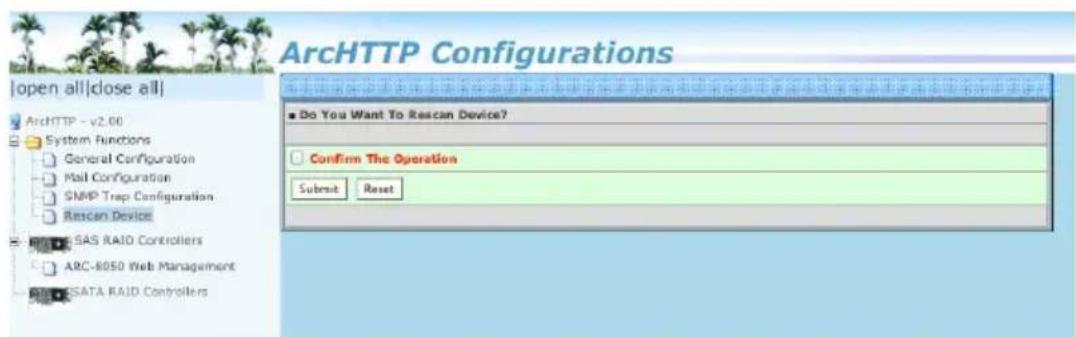
Let's assume you've put all Areca RAID storages to a system. The ArcHTTP scans the RAID storages on the system and create an individual RAID storage icon located on left column of the "ArcHTTP Configurations" screen. This adapter icon is for user to launch web browser RAID manager. If there is any RAID storage missed on the system start-up, you can use the "Rescan Device" function. The "Rescan Device" function is a procedure which forces the ArcHTTP to rescan the targets to allow a missed RAID storage to be added.
- Collect Support Data
Areca has added the "Collect Support Data" option on the ArcHTTP utility to download a support file (file name:ctlrxx-xxxxx.log) with all necessary information (system information, configuration, disk information, eventlog). The "Collect Support Data" function will be automatically started when ERROR or SERIOUS event occurred."
![ArcHTTP Configurations [open all]close all] ArchHTTP - v2.2.0 System Functions General Configuration Mail Configuration SNMP Trap Configuration Rascan Devices Collect Support Data SAS RAID Controllers ARC-9050 Web Management SATA RAID Controllers Do You Want To Collect Support Data? Confirm The Oper…](/content/2026/05/986595/images/0be17608aa9750a4ef1edfbe0ba1dc1bde9b789c8e5e663258611e146389cd52.jpg)
4. Web Browser-based Configuration
If you need to use a RAID volume from ARC-8050T3U RAID storage unit, you must first create a RAID volume by using LCD or McRAID storage manager. This chapter shows you how to set up RAID volumes using the McRAID storage manager application on a computer with an ARC-8050T3U RAID storage.
The McRAID storage manager is firmware-based utility, which is accessible via the web browser installed on your operating system. The web browser-based McRAID storage manager is a HTML-based application, which utilizes the browser (Safari, IE and Mozilla etc) installed on your monitor station. It can be accessed through the in-band Thunderbolt bus or out-of-band onboard LAN port. The in-band-Thunderbolt bus method can launch the web browser-based McRAID storage manager via ArcHTTP proxy server.
The firmware-embedded web browser-based McRAID storage manager allows local or remote to access it from any standard internet browser. The firmware-embedded SMTP manager monitors all system events and user can select either single or multiple user notifications to be sent with "Plain English" e-mails. The firmware-embedded SNMP agent allows remote to monitor events with no SNMP agent required. Use the McRAID storage manager to:
- Create RAID set
- Expand RAID set
- Define volume set
- Add physical drive
- Modify volume set
- Modify RAID level/stripe size
- Define pass-through disk drives
- Modify system function
- Update firmware
- Designate drives as hot spares
4.1 Start-up McRAID Storage Manager
With McRAID Storage Manager, you can:
- Locally manage a system containing a supported RAID storage that has Windows or macOS, ArcHTTP and a supported browser.
- Remote and managed systems must have a TCP/IP connection.
- McRAID Storage Manager from Local Administration (In-Band)
Once ArcHTTP and CLI have been installed, the ArcHTTP - back ground task automatically starts each time when you start your computer. There is one MARID icon showing on Mac "Desktop"

or one "ArcHTTP Taskbar" icon showing on Windows system tray. This icon is for you to start up the ArcHTTP (launch the McRAID storage manager). When you click on the ArcHTTP64 from MRAID or "ArcHTTP Taskbar" from system tray, it shows all RAID controllers available on the host system and create an individual RAID controller icon located on left column of the "ArcHTTP Configurations" screen. This RAID controller icon is for user to launch the selected RAID controller web browser McRAID storage manager.
The "Enter Network Password" dialog screen appears, type the User Name and Password. The RAID controller default User Name is "admin" and the Password is "0000". After entering the user name and password, press Enter key to access the McRAID storage manager.
- McRAID Storage Manager Through LAN Port (Out-of-Band)
ARC-8050T3U RAID storage also offers an alternative out-of-band method for McRAID storage manager. User can access the built-in configuration without running the ArcHTTP proxy server on the host system. The web browser-based McRAID storage manager is a HTML-based application, which utilizes the browser installed on your remote system. To ensure proper communications between the Thunderbolt RAID storage and McRAID storage manager, please connect the Thunderbolt RAID storage LAN port to any LAN switch port.
The RAID storage has embedded the TCP/IP & web browser-based McRAID storage manager in the firmware. User can remote manage the Thunderbolt RAID storage without adding any user specific software (platform independent) via standard web browsers directly connected to the 10/100Mbit RJ45 LAN port.
To configure Thunderbolt RAID storage on a remote machine, you need to know its IP address. The IP address is default shown on the LCD initial start-up screen. Launch your McRAID storage manager by entering http://[IP Address] in the web browser.
4.2 McRAID Main Window
The following login screen is displayed in the browser. This screen displays the initial start-up configuration.
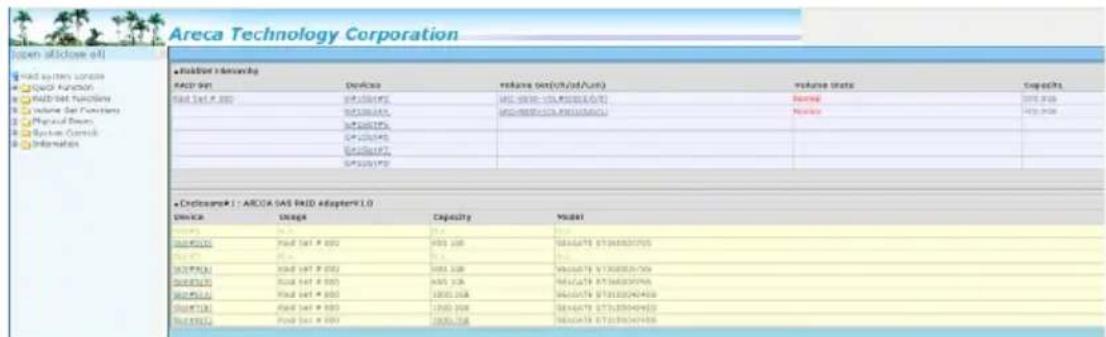
The RaidSet Hierarchy displays the "Raid Set List", "Volume Set List", and "Physical Disk List". The RAID set information, volume set information, and drive information can also be viewed by clicking on the "RAID Set Hierarchy" on the main menu screen.
- To display RAID set information, move the mouse cursor to the desired RAID set number, then click on it. The RAID set information will be displayed.
- To display volume set information, move the mouse cursor to the desired volume set number, then click it. The volume set information will be displayed.
- To display drive information, move the mouse cursor to the desired physical drive number, then click it. The drive information will be displayed.
4.3 Main Menu
The main menu shows all available functions, accessible by clicking on the appropriate link.
| Individual Category Description | |
| Quick Function Create a default configuration, which is based on the number of physical disks installed; it can modify the volume set Capacity, Raid Level, and Stripe Size. | |
| Raid Set Functions Create a customized RAID set. | |
| Volume Set Functions Create customized volume sets and modify the ex-isted volume sets parameter. | |
| Physical Drives Create pass through disks and modify the existing pass through drives parameters. Also provides the function to identify disk drives (blinking fault LED). | |
| System Controls Setting the RAID system configuration. | |
| Information Viewing the controller information. The Raid Set Hier-archy can be viewed through the “Raid Set Hierarchy” item. |
4.4 Quick Function
The Quick Create option configures the arrays with just a few steps. Although strives of different sizes may be used in the array, Quick Create will only operate upon drives of the same physical size.
The number of physical drives in the RAID storage determines the Raid Levels that can be implemented with the RAID set. You can
WEB BROWSER-BASED CONFIGURATION
create a RAID set associated with exactly one volume set. The user can change the Raid Level, Capacity, Initialization Mode, and Stripe Size. A hot spare option is also created, depending on the exist configuration. Tick on the "Confirm The Operation" check box and click on the "Submit" button in the "Quick Create" screen, the RAID set and volume set will start to initialize.

Note:
In "Quick Create", your volume set is automatically configured based on the number of disks in your system. Use the "Raid Set Functions" and "Volume Set Functions" if you prefer to customize your volume set, or RAID 30/50/60 volume set.
4.5 Raid Set Functions
Use the "Raid Set Function" and "Volume Set Function" if you prefer to customize your volume set. Manual configuration can provide full control of the RAID set settings, but it will take longer to complete than the "Quick Volume/Raid Setup" configuration. Select the "Raid Set Function" to manually configure the RAID set for the first time or delete and reconfigure existing RAID sets. (A RAID set is a group of disks containing one or more volume sets.)
4.5.1 Create Raid Set
To create a RAID set, click on the "Create Raid Set" link. A "Select The Drive For Raid Set" screen is displayed showing the drive(s) connected to the current controller and enclosures. Click on the selected physical drives within the current RAID set. Enter 1 to 15
alphanumeric characters to define a unique identifier for a RAID set. The default RAID set name will always appear as "Raid Set #".
Tick on the "Confirm The Operation" check box and click on the "Submit" button on the screen; the RAID set will start to initialize. If you have available disk member, you can repeat above procedures to define another RAID sets. The "Max 128 volumes" is the default mode for SAS RAID storage. The "Max 16 volumes" mode is used for support roaming this raidset to Areca SATA RAID controllers. The SATA RAID controller is designed to support up to 16 volumes only. You have to use "Max 16 volumes" on the raidset mode if you plan to roam this raidset between SAS RAID controller and SATA RAID controller.
![Areca Technology Corporation [open all] close all] Paid System Console Quick Function Quick Create RAID Set Functions Organic RAID Set Delta RAID Set Expand RAID Set Offline RAID Set Rename RAID Set Activate Incomplete RAID Create Hot Spars Delete Hot Spars Rescue RAID Set Volume Set Functions Physi…](/content/2026/05/986595/images/e9dddd258247eda7b28bec01f1c5ca8c5f74239ce366c143128960f0381f6724.jpg)
Note:
To create RAID 30/50/60 volume, you need create multiple RAID sets firstly with the same disk numbers on each RAID set.
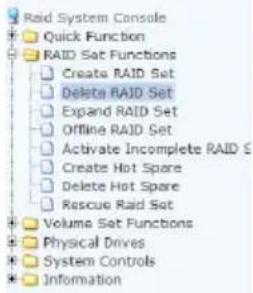
4.5.2 Delete Raid Set
To delete a RAID set, click on the "Deleted Raid Set" link. A "Select The Raid Set To Delete" screen is displayed showing all exist RAID sets in the current controller. Click the RAID set number which you want to delete in the select column on the delete screen. Then, tick on the "Confirm The Operation" check box and click on the "Submit" button in the screen to delete it. The volume sets included in the "Delete RAID Set". It will be deleted by this action. But for the Raid 30/50/60, you need to delete the volumes belonging to those RAID sets.

Areca Technology Corporation
[open all|close all]
4.5.3 Expand Raid Set
Instead of deleting a RAID set and recreating it with additional disk drives, the "Expand Raid Set" function allows the users to add disk drives to the RAID set that have already been created.
To expand a RAID set:
- Select the "Expand Raid Set" option. If there is an available disk, then the "Select SAS/SATA Drives For Raid Set Expansion" screen appears.
- Select the target RAID set by clicking on the appropriate radio button. Select the target disk by clicking on the appropriate check box.
- Click on the "Submit" button to start the expansion on the RAID set.
The new additional capacity can be utilized by one or more volume sets. The volume sets associated with this RAID set appear for you to have chance to modify RAID level or stripe size. Follow the instruction presented in the "Modify Volume Set" to modify the volume sets; operation system specific utilities may be required to expand operating system partitions.

Areca Technology Corporation
|open all|close all|

| Select The Raid Set For Raid Expansion | ||||
| Select | Raid Set Name | Member Disks | Raid State | Capacity |
| C | Raid Set # 000 | 1/1 | Rebuilding | 11000.0GB |
| C | Raid Set # 001 | 4/4 | Rebuilding | 20000.0GB |
| G | Raid Set # 002 | 5/5 | Normal | 150.0GB |
| C | Raid Set # 003 | 6/6 | Normal | 480.0GB |
| Submit | Reset | |||
Note:
- Once the "Expand Raid Set" process has started, user can not stop it. The process must be completed.
- If a disk drive fails during RAID set expansion and a hot spare is available, an auto rebuild operation will occur after the RAID set expansion completes.
- RAID 30/50/60 does not support the "Expand Raid set".
- RAID set expansion is a quite critical process, we strongly recommend customer backup data before expand. Unexpected accident may cause serious data corruption.
4.5.4 Offline Raid Set
This function is for customer being able to unmount and remount a multi-disk volume. All Hdds of the selected RAID set will be put into offline state, spun down and fault LED in fast blinking mode. User can remove those Hdds and insert new Hdds on those empty slots without needing power down the controller to perform the online array roaming.

4.5.5 Rename Raid Set
The default RAID set name will always appear as "Raid Set #" when it is first created by the controller. The "Rename Raid Set" function is for customer to rename the default RAID set name. To rename a RAID set from a group of RAID sets:
- Click on the "Rename Raid Set" link.
- Click the RAID set check box from the list that you wish to re-name. Click the "Submit" button. The following screen appears. Use this option to rename the RAID set name.
![Areca Technology Corporation [open all]close all] Raid System Console Quick Function RAID Set Functions Create RAID Set Delete RAID Set Expand RAID Set Offline RAID Set Rename RAID Set Activate Incomplete RAID Set Create Hot Spare Delete Hot Spare Rescue Raid Set Volume Set Functions Security Functi…](/content/2026/05/986595/images/888d09bfc1012e91c23fa67fa15f390ebe90f538171f1bf4ffd97a81796657b3.jpg)
4.5.6 Activate Incomplete Raid Set
If one of the disk drives is removed in power off state, the RAID set state will change to "Incomplete State". If the user wants to continue to operate the controller without power-off the RAID storage, the user can use the "Activate Incomplete Raid Set" option to active the RAID set. After the user completes this function, the Raid State will change to "Degraded Mode" and start to work. To activate the incomplete the RAID set, click on the "Activate Raid Set" link. A "Select The Raid Set To Activate" screen is displayed showing all RAID sets existing on the current controller. Click the RAID set number to activate in the select column. Click on the "Submit" button on the screen to activate the RAID set that had a disk removed (or failed) in the power off state. The RAID storage will continue to work in degraded mode.

4.5.7 Create Hot Spare
When you choose the "Create Hot Spare" option in the "Raid Set Function", all unused physical devices connected to the current controller appear. Select the target disk by clicking on the appropriate check box. Tick on the "Confirm The Operation" check box and click the "Submit" button in the screen to create the hot spares.
The "Create Hot Spare" gives you the ability to define a global or dedicated hot spare. Firmware default ("Global For SSD or HDD") only uses SSD to rebuild SSD array or HDD to rebuild HDD array. If you want rebuild a SSD array with a HDD, please configure the HDD as hotspare disk for both HDD and SSD ("Global For All") to activate the rebuilding of the new array. "Dedicated to RaidSet" and "Dedicated to Enclosure" can only be used with a specific RAID set or Enclosure. When a disk drive fails in the RAID set or enclosure with a dedicated hot spare is pre-set, data on the disk drive is rebuild automatically on the dedicated hot spare disk.
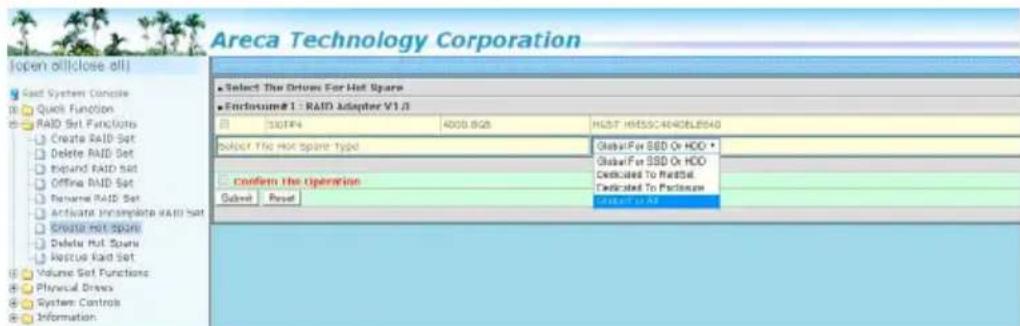
4.5.8 Delete Hot Spare
Select the target hot spare disk to delete by clicking on the appropriate check box. Tick on the "Confirm The Operation" check box and click the "Submit" button on the screen to delete the hot spares.
![Areca Technology Corporation [open all|close all] Raid System Console Quick Function RAID Set Functions Create RAID Set Delete RAID Set Expand RAID Set Offline RAID Set Activate Incomplete RAID S Create Hot Spare Delete Hot Spare Rescue Raid Set Volume Set Functions Physical Drives System Controls S…](/content/2026/05/986595/images/d1a3a41e8587a47a6d9d437d00802502c69037a3c10dc507ad2cac4cfdcd3f3b.jpg)
4.5.9 Rescue Raid Set
When the system is powered off in the RAID set update/creation period, the configuration possibly could disappear due to this abnormal condition. The “RESCUE” function can recover the missing RAID set information. The RAID storage uses the time as the RAID set signature. The RAID set may have different time after the RAID set is recovered. The “SIGANT” function can regenerate the signature for the RAID set.

Areca Technology Corporation
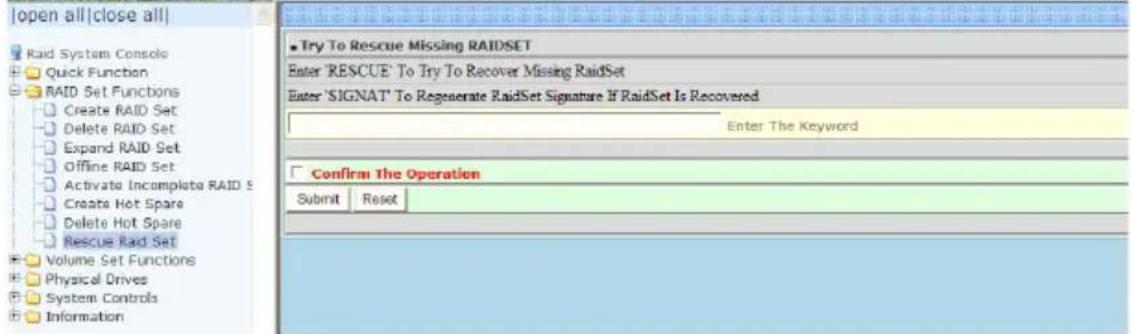
Caution:
Please contact us to make sure if you need to use rescue function. Improperly usage may cause configuration corruption.
4.6 Volume Set Functions
A volume set is seen by the host system as a single logical device. It is organized in a RAID level with one or more physical disks. RAID level refers to the level of data performance and protection of a volume set. A volume set capacity can consume all or a portion of the disk capacity available in a RAID set. Multiple volume sets can exist on a group of disks in a RAID set. Additional volume sets created in a specified RAID set will reside on all the physical disks in the RAID set. Thus each volume set on the RAID set will have its data spread evenly across all the disks in the RAID set.
The following is the volume set features for the RAID storage.
- Volume sets of different RAID levels may coexist on the same RAID set and up to 128 volume sets per controller.
- Up to 128 volume sets can be created in a RAID set.
- The maximum addressable size of a single volume set is not limited to 2TB, because the controller is capable of 64-bit LBA mode. However the operating system itself may not be capable of addressing more than 2TB.
See Areca website ftp://ftp.areca.com.tw/RaidCards/Documents/Manual_Spec/ Over2TB_050721.ZIP file for details.
4.6.1 Create Volume Set (0/1/10/3/5/6)
To create volume set from RAID set storage, move the cursor bar to the main menu and click on the "Create Volume Set" link. The "Select The Raid Set To Create On It" screen will show all RAID set number. Tick on a RAID set number that you want to create and then click on the "Submit" button.
The new create volume set attribute allows user to select the Volume Name, RAID Level, Capacity, Greater Two TB Volume Support, Initialization Mode, Strip Size, Cache Mode, Tagged Command Queuing, and SCSI Channel/SCSI ID/SCSI Lun.
![Areca Technology Corporation [open all|close all] Raid System Console Quick Function RAID Set Functions Volume Set Functions Create Volume Set Create Raid30/50/60 Delete Volume Set Modify Volume Set Check Volume Set Schedule Volume Check Stop Volume Check Download Volume Key File Physical Drives Sys…](/content/2026/05/986595/images/a1c942bd61cce956ad5ca5b6c16fea1593dc9945db1f1cffad35618c8562d600.jpg)
• Volume Name
The default volume name will always appear as "ARC-8050T3U-VOL". You can rename the volume set providing it does not exceed the 15 characters limit.
• Volume Raid Level
Set the Raid Level for the volume set. Highlight the desired RAID Level from the available RAID levels option.
There are two circumstances when you choose RAID level 1 function:
RAID 1-Simple Mirroring is also known as "two disk mirror"; If your RAID set has two disks, data written on one disk drive is simultaneously written to another disk drive.
RAID 1-Multi Mirroring is also known as "triple disk mirror"; If your RAID set has three disks, data written on one disk drive is simultaneously written to another two disk drives.
- Capacity
The maximum volume size is the default initial setting. Enter the appropriate volume size to fit your application.
- Greater Two TB Volume Support
Controller uses the "Greater Two TB Volume Support" sub-menu to set the volume capacity and sector size. Greater Two TB Volume Support option: "No", "64bit LBA" and "Use 4K Block".
-No
When this option is enabled, it keeps the volume size with max. 2TB limitation. For any hard disk drives working in the 4K native mode in the Raid set, the volume set directly sets and exposes 4KB sector size to the operating system.
-64bit LBA
This option uses 16 bytes CDB instead of 10 bytes. The maximum volume capacity is up to 512TB. For any hard disk drives working in the 4K native mode in the Raid set, the volume set directly sets and exposes 4KB sector size to the operating system. This option works on different OS which supports 16 bytes CDB.
-Use 4K Block
This option uses 16 bytes CDB and changes the sector size from default 512 bytes to 4k bytes. Windows XP only supports maximum volume capacity is up to 16TB.
- Initialization Mode
This option is used to define "Background Initialization", "Foreground Initialization" or "No Init (To Rescue Volume)". When "Background Initialization", the initialization proceeds as a background task, the volume set is fully accessible for system reads and writes. The operating system can instantly access to the newly created arrays without requiring a reboot and waiting the initialization complete. When "Foreground Initialization", the initialization proceeds must be completed before the volume set ready for system accesses. There is no initialization happened when you select "No Init" option. "No Init" is for customer to rescue volume without losing data in the disk.
- Stripe Size
This parameter sets the size of the stripe written to each disk in a RAID 0, 1, 10, 5, 6, 50 or 60 logical drive. You can set the stripe size to 4 KB, 8 KB, 16 KB, 32 KB, 64 KB, 128 KB, 256 KB, 512KB or 1M. A larger stripe size produces better read performance, especially if your computer does mostly sequential reads. However, if you are sure that your computer does random reads more often, select a smaller stripe size.
Note:
- RAID level 3 can't modify the cache stripe size.
- Roaming the stripe size 256K/512K/1M Raid Set to firmware version older than 1.52 will cause data corruption.
- Cache Mode
The RAID storage supports "Write Through" and "Write Back" cache.
• Volume Write Protection
When "Volume Write Protection" is enabled on the "Modify Volume Set", host commands fail if they are issued to a volume in that RAID controller and attempt to modify a volume's data or attributes. Volume Write Protection is used primarily for customer-initiated disaster recovery testing.
• Full Volume Encryption
ARC-8050T3U have featured with controller based hardware encryption function. Controller based hardware encryption describes the encryption of data occurring at the disk array controller before being sent to the disk drives. Since RAID controller is a natural central point of all data therefore encryption at this level is inherent and also reduces deployment complexity. ARC-8050T3U RAID controller has dedicated electronic circuitry for the cryptographic engine embedded in the ROC and operating at full channel speeds. The hardware encryption does not impact the performance of ARC-8050T3U RAID controller and can implement on any kinds of HDD that is transparent to the user, the OS, and applications.
Encrypting your volume can give your data an extra layer of protection be yond setting up a controller password. Encryption will conceal your volume's data and make accessing the files almost im possible for anyone who does not know your encryption key. Data saved in the volume will be hidden by Algorithm developed by Areca Technology. With this scramble process, no one can see and access into the hidden volume data without access key. ARC-8050T3U support 128- and 256-bit encryption keys using AES(a key size of 128, or 256 bits), or password (a variable key size). Each encryption key size causes
the algorithm to behave slightly differently, so the increasing key sizes not only offer a larger number of bits with which you can scramble the data, but also increase the complexity of the cipher algorithm. ARC-1882 adapters provide five new key options in the Full Volume Encryption: "Disable", "256Bit key, Password", "256Bit key, AES", "128Bit key, Password", "128Bit key, AES". You can generate the new key by CLI utility or API code function.
This volume encryption function can only work with ARC-1882 series with any kinds of HDD. You can follow below steps to enable the function.
- Create volume set with "Full Volume Encryption" capability in the web management.
- Use CLI "vsf genkey" command or API code to generate key file.
- Use "Download Volume Key File" in the web management or use CLI "vsf dlkey" command to download volume key file into firmware and unlock the volume.
- Follow step 3. to unlock volume if volume locked.
- Tagged Command Queuing
The “Enabled” option is useful for enhancing overall system performance under multi-tasking operating systems. The Command Tag (Drive Channel) function controls the SAS command tag queuing support for each drive channel. This function should normally remain “Enabled”. “Disabled” this function only when using SAS drives that do not support command tag queuing.
• SCSI Channel/SCSI ID/SCSI Lun
SCSI Channel: The RAID storage function is simulated as an external SCSI RAID controller. The host bus is represented as a SCSI channel. Choose the SCSI Channel.
SCSI ID: Each SCSI device attached to the SCSI card, as well as the card itself, must be assigned a unique SCSI ID number. A SCSI channel can connect up to 15 devices. The RAID storage is a large SCSI device. Assign an ID from a list of SCSI IDs. SCSI LUN: Each SCSI ID can support up to 8 LUNs. Most 6Gb/s SAS controllers treat each LUN like a SAS disk.
4.6.2 Create Raid30/50/60 (Volume Set 30/50/60)
To create 30/50/60 volume set from RAID set group, move the cursor bar to the main menu and click on the "Create Raid30/50/60" link. The "Select The Raid Set To Create Volume On It" screen will show all RAID set number. Tick on the RAID set numbers (same disk numbers per RAID set) that you want to create and then click on the "Submit" button.

The new create volume set attribute allows user to select the Volume Name, Raid Level, Capacity, Greater Two TB Volume Support, Initialization Mode, Stripe Size, Cache Mode, Tagged Command Queuing, and SCSI Channel/SCSI ID/SCSI Lun. Please refer to above section for details description of each item.
Note:
RAID level 30 50 and 60 can support up to two RAID set (two pairs), but it can not support expansion and migration.
4.6.3 Delete Volume Set
To delete a volume from RAID set, move the cursor bar to the main menu and click on the "Delete Volume Set" link. The "Select The Raid Set To Delete" screen will show all RAID set numbers. Click a RAID set number and the "Confirm The Operation" check box and then click the "Submit" button to show all volume set items in the selected RAID set.
![Areca Technology Corporation [open all|close all] Raid System Console Quick Function RAID Set Functions Volume Set Functions Create Volume Set Create Raid30/50/60 Delete Volume Set Modify Volume Set Check Volume Set Schedule Volume Check Stop Volume Check Physical Drives System Controls Information…](/content/2026/05/986595/images/75c0dd2fcb6cd051688d7f76698cdda12c486f249116c4d7f689c1399cc3b652.jpg)
Click a volume set number and the "Confirm The Operation" check box and then click the "Submit" button to delete the volume set.
4.6.4 Modify Volume Set
To modify a volume set from a RAID set:
- Click on the "Modify Volume Set" link.
- Click the volume set check box from the list that you wish to modify.
Click the "Submit" button. The following screen appears.

Use this option to modify the volume set configuration. To modify volume set attributes, move the cursor bar to the volume set attribute menu and click it. The "Enter The Volume Attribute" screen appears. Move the cursor to an attribute item and then click the attribute to modify the value. After you complete the modification, tick on the "Confirm The Operation" check box and click the "Submit" button to complete the action. The user can only modify the last volume set capacity.
4.6.4.1 Volume Growth
Use "Expand Raid Set" function to add disk to a RAID set. The additional capacity can be used to enlarge the last volume set size or to create another volume set. The "Modify Volume Set" function can support the "Volume Modification" function. To expand the last volume set capacity, move the cursor bar to the "Capacity" item and entry the capacity size. When finished the above action, click on the "Submit" button to complete the action. The last volume set starts to expand its capacity.
To expand an existing volume noticed:
- Only the last volume can expand capacity.
- When expand volume capacity, you can't modify stripe size or modify RAID level simultaneously.
- You can expand volume capacity, but can't reduce volume capacity size.
- After volume expansion, the volume capacity can't be decreased.
For greater 2TB expansion:
- If your system installed in the volume, don't expand the volume capacity greater 2TB, except your OS and controller can support boot up from a greater 2TB capacity device.
- Expand over 2TB used LBA64 mode. Please make sure your OS supports LBA64 before expand it.
4.6.4.2 Volume Set Migration
Migrating occurs when a volume set is migrating from one RAID level to another, when a volume set strip size changes, or when a disk is added to a RAID set. Migration state is displayed in the volume state area of the "RAID Set Hierarchy" screen.

Note:
- If the volume is RAID level 30, 50, or 60, you can not change the volume to another RAID level. If the volume is RAID level 0, 1, 10(1E), 3, 5, or 6, you can not change the volume to RAID level 30, 50, or 60.
- Power failure may damage the migration data. Please backup the RAID data before you start the migration function.
4.6.4.3 Volume Write Protection
When "Volume Write Protection" is enabled on the "Modify Volume Set", host commands fail if they are issued to a volume in that RAID controller and attempt to modify a volume's data or attributes. Volume Write Protection is used primarily for customer-initiated disaster recovery testing.
4.6.5 Check Volume Set
To check a volume set from a RAID set:
- Click on the "Check Volume Set" link.
- Click on the volume set from the list that you wish to check.
Tick on "Confirm The Operation" and click on the "Submit" button. Use this option to verify the correctness of the redundant data in a volume set. For example, in a system with dedicated parity, volume set check means computing the parity of the data disk drives and comparing the results to the contents of the dedicated parity disk drive. The checking percentage can also be viewed by clicking on "RAID Set Hierarchy" in the main menu.
![Areca Technology Corporation [open all|close all] ✓ Read System Console ✓ Quick Function ✓ RAID Set Functions ✓ Volume Set Functions ✓ Create Volume Set ✓ Create RAID30/50/60 ✓ Delete Volume Set ✓ Modify Volume Set ✓ Check Volume Set ✓ Schedule Volume Check ✓ Stop Volume Check ✓ Physical Drives ✓ Sy…](/content/2026/05/986595/images/a722f40a28020ed9d8a390c956502b75f6b458b97434f7e74b5064926d3fddb4.jpg)
4.6.6 Schedule Volume Check
A volume check is a process that verifies the integrity of redundant data. To verify RAID 3, 5, 6, 30, 50 or 60 redundancy, a volume check reads all associated data blocks, computes parity, reads parity, and verifies that the computed parity matches the read parity.
Volume checks are very important because they detect and correct parity errors or bad disk blocks in the drive. A consistency check forces every block on a volume to be read, and any bad blocks are marked; those blocks are not used again. This is critical and important because a bad disk block can prevent a disk rebuild from completing. We strongly recommend that you run consistency checks on a regular basis—at least once per week (set on "Scheduler"). Volume checks degrade performance, so you can also run them when the system is idle (set on "Checking After System Idle").
![Areca Technology Corporation [open all|close all] Rad System Console Quick Function RAID Set Functions Volume Set Functions Create Volume Set Create Raid30/50/60 Delete Volume Set Modify Volume Set Check Volume Set Schedule Volume Check Stop Volume Check Physical Drives System Controls Information S…](/content/2026/05/986595/images/879f4ce6a8dffb491dcea7bf9f73775e4ee1e92a0a095a7c04cbeb54e76828ef.jpg)
Note:
Please make sure of the inconsistency source generated by parity error or bad data block before you click the recovery method. Otherwise, you will lose the recovery data.
4.6.7 Stop Volume Set Check
Use this option to stop the "Check Volume Set" function.
4.6.8 Download Volume Key File
Get the key file which was generated by CLI "vsf genkey" command or API code for your ARC-8050T3U. You can follow below steps to download volume key file.
- To download volume key file into the firmware, move the mouse cursor to "Download Volume Key file" link and click it. The "Download Volume Encryption Key File" screen appears.
- Click "Browse". Look in the location to which the key file was generated. Select the file name and click "Open".
- Tick on "Confirm The Operation" and press the "Submit" button.
- After the key file download is completed, a bar indicator will show "Key File Has Been Downloaded Successfully".
![Areca Technology Corporation [open all|close all] Paid System Console Quick Function RAID Set Functions Volume Set Functions Create Volume Set Create RAID0/50/60 Delete Volume Set Modify Volume Set Check Volume Set Schedule Volume Check Stop Volume Check Download Volume Key File Physical drives Syst…](/content/2026/05/986595/images/eb298af54c9768a79ab6bd1491365e1a9abf27180a7fd2d26f7bc3d5ae672b7d.jpg)
4.7 Security Function
The “Security Function” on the new firmware supports Self-Encrypting Disks (SED) for protection of data against loss or theft of SEDs. Protection is achieved by the use of encryption technology on the drives. The McRAID storage management allows SED keys to be created and managed as well as create/delete RAID sets. The following section provides the “Security Function” instructions to perform the custom configuration tasks. All SED functions are integrated into the intuitive and user friendly McRAID manager interface for easy access. Choose this option from the main menu and then perform the operations listed below.
4.7.1 Create SED RAID Set

To create a SED RAID set, click on the "Create SED Raid Set" link. A "Select The Drive For SED RAID Set" screen is displayed showing the SED drive(s) connected to the current controller and enclosures. Click on the selected physical drives within the current RAID set. Enter 1 to 15 alphanumeric characters to define a unique identifier for a SED RAID set. The default RAID set name will always appear as "Raid Set #". Tick on the "Confirm The Operation" check box and click on the "Submit" button on the screen; the RAID set will start to initialize. If you have available disk member, you can repeat above procedures to define another RAID sets. The Max 128 Volumes is the default mode for RAID controller.
4.7.2 Delete SED RAID Set

A SED RAID Set is a RAID Set that has been locked on a controller that holds a security key. When you delete existing SED RAID sets, there has one option available to perform an Instant Secure Erase. The "Secure Erase The Member Disks" function is the process of permanently erasing all data on the SED disks and resetting the security attributes. The data on the SED disk is lost.
To delete a SED RAID set, click on the "Deleted Raid Set" link; a "Select The SED RAID Set To Delete" screen is displayed showing all exist SED RAID sets in the current controller. Click on the SED RAID set number which you want to delete in the select column on the delete screen. Then, tick on the "Confirm The Operation" check box and click on the "Submit" button in the screen to delete it. The volume sets included in the "Delete SED RAID Set". It will be deleted by this action. But for the Raid 30/50/60, you need to delete the volumes belonging to those SED RAID sets.
4.7.3 Delete ISE RAID Set

Instant Secure Erase (ISE) or Crypto Erase allows a drive to be instantly erased using industry-standard commands and options. An ISE RAID Set is a RAID Set that has been created by a group of ISE only SAS hard disks on a controller. When you delete existing SED RAID sets, there has one option available to perform an Instant Secure Erase. The "Secure Erase The Member Disks" function is the process of permanently erasing all data on the ISE disks and resetting the security attributes. The data on the ISE disk is lost.
To delete an ISE RAID set, click on the "Deleted ISE Raid Set" link. A "Select The ISE RAID Set To Delete" screen is displayed showing all exist ISE RAID sets in the current controller. Click on the RAID set num-ber which you want to delete in the select column on the delete screen. Then, tick on the "Confirm The Operation" check box and click on the "Submit" button in the screen to delete it. The volume sets included in the "Delete ISE RAID Set". It will be deleted by this action. But for the Raid 30/50/60, you need to delete the volumes belonging to those ISE RAID sets.
4.7.4 Security Key Setup
The Areca RAID controllers support Self-Encrypting Disks (SED) for protection of data against loss or theft of SEDs. Protection is achieved by the SED hard drive that automatically and continuously encrypts the data on the drive without any user interaction. There is one SED key per controller. You can manage the SED key under McRAID manager. Local SED key management in the controller firmware is designed to protect data from security breaches with minimal cost and complexity. The key can be escrowed in to a file using McRAID manager. Creating and managing SED key is an important part of the cryptographic process. The key must be kept secret from anyone who should not decrypt your data. This section describes how to generate and manage keys.
4.7.4.1 SED Key Management-Creation
There is one SED key per controller which stores in the controller flash memory. Areca provides both automatically or password methods to generate a key.
You can enter SED KEY from password to generate and upload the key for device unlocked and available to the Host.
- SED Key is generated automatically by internal random number for a SED RAID set use without needing a password input.
- SED Key is generated by user supplied password for a SED RAID set use.
- Enter SED key is only allowed when no key is set in controller. So that next time power up again, it will need to input the key from the "Enter SED Key By User Password" again.

4.7.4.2 SED Key Management-Modification
If you have evidence that the SED key is known to unauthorized users, you can change the SED key again. The 'Disable SED Key' function is used to clear SED key on controller and RAID set members.
![Areca Technology Corporation [open all|close all] Raid System Console Quick Function RAID Set Functions Volume Set Functions Security Functions Create SED RAID Set Delete SED RAID Set Delete ISE RAID Set Security Key Setup Import Security Key Erase Failed Disk RevertSP Physical Drives System Control…](/content/2026/05/986595/images/64353887a5f99b9bed61d1239dcd456902c1e7c98a9c293afcfa64c757ba236a.jpg)
WEB BROWSER-BASED CONFIGURATION
In some cases, you may want to export a SED key to store on removable media or to use on a different computer. If you want to create a backup copy of the SED key or use it on another computer, you must first export the SED key. Exporting the SED key puts it in a file (filename.bin) that you can then transfer to another computer or put in a safe place.

4.7.5 Import Security Key
SED RaidSet created on an Areca RAID adapters can be migrated to another RAID adapter. If you are importing a RaidSet originally secured with a SED key, you need to import the foreign SED key files to secure or unlock that RaidSet. The "Import Security Key" file is for Raidset Roaming or Change SED Key function. If you roam a RaidSet from old controller to another new (with Security Functions support), the foreign SED key file must be imported before it can be used.
![Areca Technology Corporation [open all|close all] Raid System Console Quick Function RAID Set Functions Volume Set Functions Security Function Create SED RAID Set Delete SED RAID Set Delete ISE RAID Set Security Key Setup Import Security Key Erase Failed Disk Revers S? Physical Drives System Control…](/content/2026/05/986595/images/970c76af2d3e8b32e4133219225ce4b98d50802c0408b3b5e1c6fdcb6d00a05e.jpg)
- Select the "Import/Roaming And Set SED Key" option to unlock the locked disk and change to foreign SED key.
- Select the "RaidSet Roaming Only" option to unlock the locked disk and personalize to new controller's SED key. If there is an existing SED key on new controller, RaidSet is updated with the new security key. If there is not an existing SED key on new controller, RaidSet is updated to unlock RaidSet.
4.7.6 Erase Failed Disk
To erase the failed encryption-capable physical disk, move the cursor bar to the main menu and click on the "Erase Failed Disk" link. The "Select The Device To Erase" screen will show all failed encryption-capable physical disks. Tick on the failed disk that you want to erase and then click on the "Submit" button. In case controller successfully performs an Instant Secure Erase, it will erase all data on the encryption-capable physical disk disks and reset the security attributes. The data on the encryption-capable physical disk is lost.

4.7.7 RevertSP
SED models will support the RevertSP feature which erases all data in all bands on the device and returns the contents of all SPs (Security Providers) on the device to their original factory state. In order to execute the RevertSP method the unique PSID (Physical Secure ID) printed on the drive label must be provided. PSID is not electronically accessible and can only be manually read from the drive label.

4.8 Physical Drive
Choose this option to select a physical disk from the main menu and then perform the operations listed below.
4.8.1 Create Pass-Through Disk
To create pass-through disk, move the mouse cursor to the main menu and click on the "Create Pass-Through" link. The relative setting function screen appears. A pass-through disk is not controlled by the RAID storage firmware; it can't be a part of a volume set. The disk is available to the operating system as an individual disk. It is typically used on a system where the operating system is on a disk not controlled by the RAID firmware. The user can also select the Volume Cache Mode, Write Protection, Tagged Command Queuing, and SCSI channel/SCSI_ID/SCSI_LUN for this pass-through disk.

4.8.2 Modify Pass-Through Disk
Use this option to modify the pass-through disk attribute. The user can modify the Cache Mode, Tagged Command Queuing, and SCSI Channel/ID/LUN on an existing pass-through disk. To modify the pass-through drive attribute from the pass-through drive pool, move the mouse cursor bar and click on the "Modify Pass-Through" link. The "Select The Pass Through Disk For Modification" screen appears mark the check box for the pass-through disk from the pass-through drive pool and click on the "Submit" button to select drive.

When the "Enter Pass-Through Disk Attribute" screen appears, modify the drive attribute values, as you want. After you complete the selection, mark the check box for "Confirm The Operation" and click on the "Submit" button to complete the selection action.
4.8.3 Delete Pass-Through Disk
To delete a pass-through drive from the pass-through drive pool, move the mouse cursor bar to the main menus and click the "Delete Pass Through" link. After you complete the selection, mark the check box for "Confirm The Operation" and click the "Submit" button to complete the delete action.
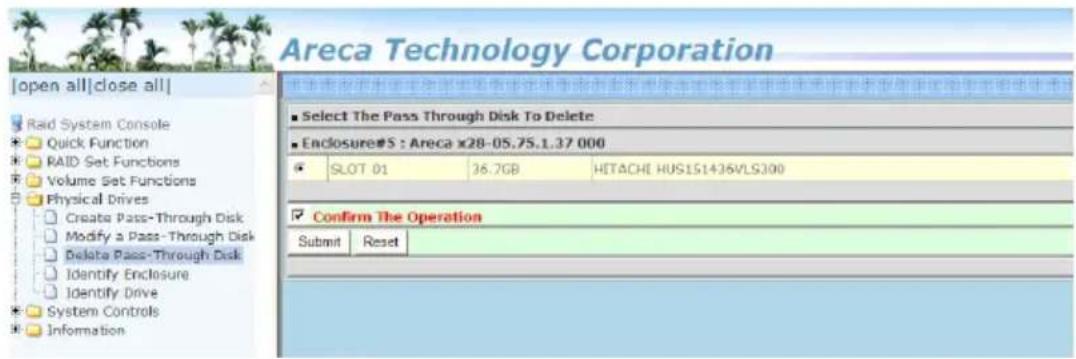
4.8.4 Clone Disk
Instead of deleting a RAID set and recreating it with larger disk drives, the "Clone Disk" function allows the users to replace larger disk drives to the RAID set that have already been created. Click the "Clone Disk" option on the "Physical Drives" link to enable the clone function. If there is an available disk, then the "Select The Drives For Cloning" screen appears. There are two "Clone Disk" function options: "Clone And Replace" and "Clone Only."
Clone Disk Procedure
- Select one of the members as the "Clone Source" (status indicated as Raid Set #) by clicking on the appropriate check box.
- Select a "Clone Target" (status indicated as Free or Hot Spare) by clicking on the appropriate check box.
- If you have available disk member, you can repeat above procedures to define another clone pair.
- Select Clone Type.
The pair number for both the "Clone Source" and the "Clone Target" will be indicated in the screen. Tick on the "Confirm The Operation" check box and click on the "Submit" button on the screen; the controller will automatically start the cloning process using the existing "stand-by" (Free or Hot Spare drive) to clone the source drive (the Raid Set member drive). The cloning process percentage will be indicated in the "Volume State" area of the "Volume Set Information" screen. Completion of the Clone function process will be indicated by a notification message on the event log.
4.8.4.1 Clone And Replace
You can enlarge your logical drives by copying and replacing all member drives with drives of higher capacity. The existing data in the logical drives is copied onto the new drives, and then the original members are marked as "Offlined".
4.8.4.2 Clone Only
The stand-by disk will clone the logical drives without substituting it. The status of the stand-by drive will be marked as "Off-lined" after the cloning process. The source drive will remain a member of the logical drive.
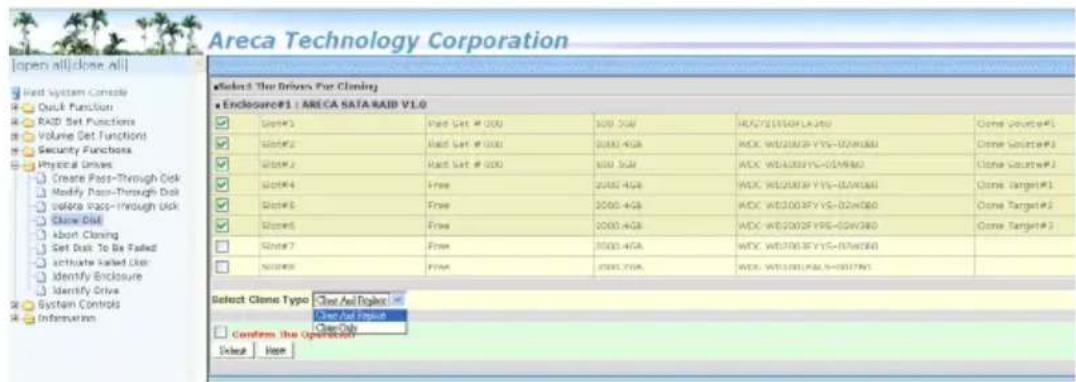
4.8.5 Abort Cloning
Use this function to stop the ongoing clone disk action.
![Areca Technology Corporation [open all|close all] Paid System Console Quick Function RAID Set Functions Volume Set Functions Physical Drives Create Pass-Through Disk Modify Pass-Through Disk Delete Pass-Through Disk Set Disk To Be Failed Activate Failed Disk Identify Enclosure Identify Drive System…](/content/2026/05/986595/images/e67dda7cf68996b4afb99e7675704ac1e895ec3a0e687438ae7cce77030c5727.jpg)
4.8.6 Set Disk To Be Failed
It sets a normal working disk as "failed" so that users can test some of the features and functions.
![Areca Technology Corporation [open all|close all] Paid System Console Clock Function RAID Set Functions Volume Set Functions Physical Drive Create Pass-Through Disk Modify Pass-Through Disk Delete Pass-Through Disk Set Disk To Be Failed Activate Failed Disk Identify Enclosure Identify Drive System C…](/content/2026/05/986595/images/7e228f8f486bd68371e150855b5196434f0c955f0564e44074e5eb7a65a3af87.jpg)
4.8.7 Activate Failed Disk
It forces the current "failed" disk in the system to be back online. "Activate Failed Disk" function has no effect on the removed disks, because a "removed" disk does not give the controller a chance to mark it as "failure".
Followings are considered as "Removed-Disk":
- Manually removed by user.
- Losing PHY connection due to bad connector, cable, backplane.
- Losing PHY connection due to disk fail.
Basically, in the eyes of the controller, the disk suddenly disappears due to whatever reason.
4.8.8 Identify Enclosure
To prevent removing the wrong enclosure, the selected Areca expander enclosure all disks fault LED indicator will light for physically locating the selected enclosure when the "Identify Enclosure" is selected. This function will also light the enclosure LED indicator, if it is existed.
![Areca Technology Corporation [open all|close all] Raid System Console Quick Function RAID Set Functions Volume Set Functions Physical Drivers Create Pass-Through Disk Modify Pass-Through Disk Delete Pass-Through Disk Set Disk To Be Failed Activate Failed Disk Identify Enclosure Identify Drive System…](/content/2026/05/986595/images/0469ea1384271ea067c634fee5677e778ae49a10372bf492e001dc73b622c640.jpg)
4.8.9 Identify Drive
To prevent removing the wrong drive, the selected disk fault LED indicator will light for physically locating the selected disk when the "Identify Selected Device" is selected.
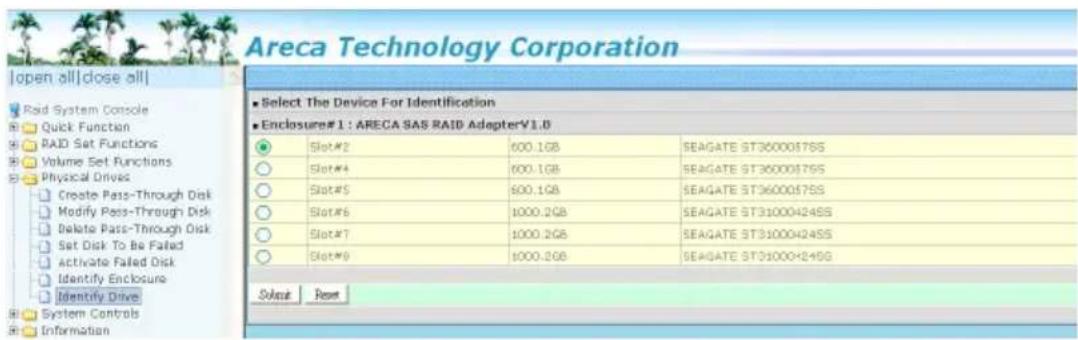
4.9 System Controls
4.9.1 System Config
To set the RAID system function, move the cursor to the main menu and click the "System Controls" link. The "Raid System Function" menu will show all items, and then select the desired function.

• System Beeper Setting
The "System Beeper Setting" function is used to "Disabled" or "Enabled" the RAID storage alarm tone generator.
• Background Task Priority
The "Background Task Priority" is a relative indication of how much time the controller devotes to a rebuild operation. The RAID storage allows the user to choose the rebuild priority (UltraLow, Low, Medium and High) to balance volume set access and rebuild tasks appropriately. For high array performance, specify a "Low" value.
• JBOD/RAID Configuration
JBOD is an acronym for "Just a Bunch Of Disk". A group of hard disks in a RAID box are not set up as any type of RAID configuration. All drives are available to the operating system as an individual disk. JBOD does not provide data redundancy. User needs to delete the RAID set, when you want to change the option from the RAID to the JBOD function.
- SATA NCQ Support
The controller supports both SAS and SATA disk drives. The SATA NCQ allows multiple commands to be outstanding within a drive at the same time. Drives that support NCQ have an internal queue where outstanding commands can be dynamically rescheduled or re-ordered, along with the necessary tracking mechanisms for outstanding and completed portions of the workload. The RAID storage allows the user to select the SATA NCQ support: "Enabled" or "Disabled".
- HDD Read Ahead Cache
Allow Read Ahead (Default: Enabled) — When Enabled, the drive's read ahead cache algorithm is used, providing maximum performance under most circumstances.
• Volume Data Read Ahead
The volume read data ahead parameter specifies the controller firmware algorithms which process the Read Ahead data blocks from the disk. The read ahead parameter is normal by default. To modify the value, you must set it from the command line using the Read Ahead option. The normal option satisfies the performance requirements for a typical volume. The disabled value implies no read ahead. The most efficient value for the controllers depends on your application. Aggressive read ahead is optimal for sequential access but it degrades random access.
- HDD Queue Depth
This parameter is adjusted the queue depth capacity of NCQ (SATA HDD) or Tagged Command Queuing (SAS HDD) which transmits multiple commands to a single target without waiting for the initial command to complete.
- Empty HDD Slot LED
The firmware has added the "Empty HDD Slot LED" option to setup the fault LED light "ON" or "OFF" when there is no HDD installed. When each slot has a power LED for the HDD installed identify, user can set this option to "OFF". Choose option "ON", the RAID storage will light the fault LED; if no HDD installed.
• Max Command Length
Max Command Length is used to set a "best" IO size for the RAID storage.
• Auto Activate Incomplete Raid
When some of the disk drives are removed in power off state or boot up stage, the RAID set state will change to "Incomplete State". But if a user wants to automatically continue to work while the RAID storage is powered on, the user can set the "Auto Activate Incomplete Raid" option to enable. The RAID state will change to "Degraded Mode" while it powers on.
- Disk Write Cache Mode
User can set the "Disk Write Cache Mode" to Auto, Enabled, or Disabled. "Enabled" increases speed, "Disabled" increases reliability.
- Write Same For Initialization
Drives that support the Write Same feature (SCT) can write to multiple drive sectors at once, improving initialization time. To take advantage of this feature, all the drives in the unit must support "Write Same" command. User can set the "SAS And SATA", "SAS Only", "SATA Only or "Disabled" for the controller initialization.
• Hot Plugged Disk For Rebuilding
It defines if the RAID array volume should start rebuilding or not when detects a disk is inserted/re-inserted during online. The options are: "Blank Disk Only", "Always", and "Disable". The default is "Blank Disk Only".
"Blank Disk Only" – it will trigger the rebuilding if and only if the inserted disk has not been in the RAID array before, which has no RAID signature on it. So when a previously removed disk is self re-inserted, it won't trigger the degraded RAID array to rebuild, and so that the administrator has a chance to identify this miss-behaving disk and replace it.
"Always" – it is what it was before. Whenever a disk is inserted/re-inserted whether new or previously existed, it always
triggers a rebuilding for the Degraded RAID set/Volume.
"Disable" – it will not trigger rebuilding regardless what sort of disk plugging in. When "Disable" and/or "Blank Disk Only" is selected, the re-inserted/previously removed disk will be identified as a disk in a separate RAID set with duplicated RAID-set# and with all the rest of RAID members missing.
- Disk Capacity Truncation Mode
RAID storage uses drive truncation so that drives from differing vendors are more likely to be able to be used as spares for each other. Drive truncation slightly decreases the usable capacity of a drive that is used in redundant units. The controller provides three truncation modes in the system configuration: "Multiples Of 10G", "Multiples Of 1G", and "Disabled".
"Multiples Of 10G" – If you have 120 GB drives from different vendors; chances are that the capacity varies slightly. For example, one drive might be 123.5 GB, and the other 120 GB. Multiples Of 10G truncates the number under tens. This makes same capacity for both of these drives so that one could replace the other.
"Multiples Of 1G" – If you have 123 GB drives from different vendors; chances are that the capacity varies slightly. For example, one drive might be 123.5 GB, and the other 123.4 GB. Multiples Of 1G truncates the fractional part. This makes capacity for both of these drives so that one could replace the other.
"Disabled" – It does not truncate the capacity.
- Smart Option For HDD
This option is used to increase the reliability of SSDs/HDDs by automatically copying data from a drive with potential to fail to a designated hot spare or newly inserted drive. The options are: "Failed The Drive", "Failed The Drive If Hot Sapre Exist", and "Alert Only". The default is "Alert Only".
"Failed The Drive" – controllers kill off the SMART fail drive immediately.
"Failed The Drive If Hot Sapre Exist" – controllers kill off the SMART fail disk if hot sapre dive is existed.
"Alert" – it will trigger alert when there happens a SMART fail drive.
• Smart Polling Interval
Besides the scheduled volume check, user can define the Smart Pulling Interval to pull the SMART status of each disk. The default is “on demand”. User can schedule every certain period of time interval to pull the SMART status of each disk. When SMART pulling is executed, disk activity will be temporally halted until the SMART parameter reading is finished. That is why you don’t want to set the “Smart Polling Interval” too frequent. What to use is up to the users to decide based on their applications and experimental results.
4.9.2 Advanced Configuration
To set the RAID storage advanced system function, move the cursor to the main menu and click the "Advanced Configuration" link. The "Advanced Configuration" menu will show all items, and then select the desired function.
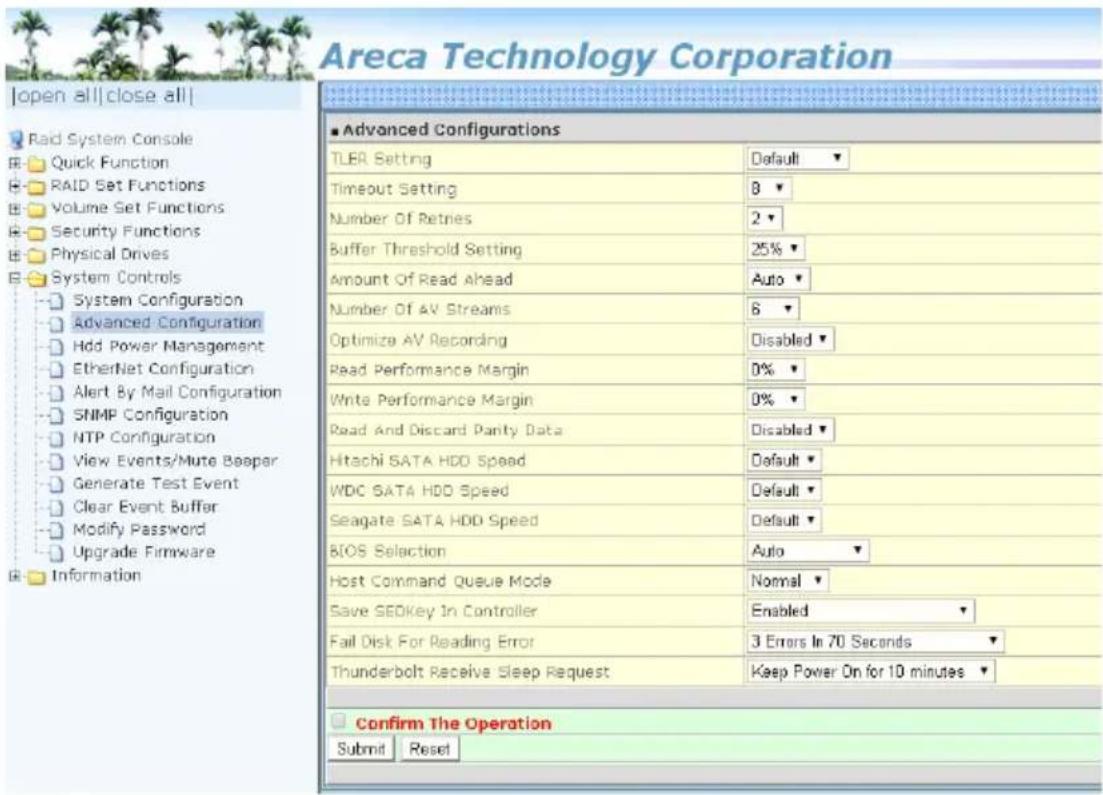
- TLER Setting
TLER (time-limited error recovery) functions provide support for WD Caviar RE (RAID) series disks. This is a new option from WD to support RAID features that were traditionally missing from standard desktop drives. TLER is a method of signaling the system RAID controller in the event that an error recovery process is taking longer than time-out specifications allow. This prevents the RAID controller from dropping the drive from the array during this period. Default value is manufacture setting. You can select between 5, 6 and 7 second. This feature is used to setup the HDD internal timeout value.
- Timeout Setting
Disk time-out is a registry setting that defines the time that RAID controller will wait for a hard disk to respond to a command. You can modify the retry value by entering a new value in the edit box beside this button and then selecting the button. Normally you should not need to modify this value. Default value is 8 seconds: You can select between 3\~8 second.
• Number of Retries
This setting determines the number of access that will be attempted before the current command from the RAID controller to the disk drive is aborted. You can modify the retry value by entering a new value in the edit box beside this button and then selecting the button. Normally you should not need to modify this value. There are two selections, either 2 retry or 3 retry.
- Buffer Threshold
This new feature there are 3 options; 25%, 50%, 75%. The percentage represents how much data should be kept in resident cache memory (how full cache should get) before controller starts to flush data onto the hard drives. If the buffer is set for 25%, then all 25% will be cached and is used for writing data. The remaining cache memory will be used for reading incoming write and other system overhead. Write buffer threshold for 5% is added for video recording. This option will push data to disk early.
This feature gives controller extra buffer time in case of slow response from the hard drives within a given time. Conse-
quently, this can prevent a pause in data flow and there will be continued data access and stream. This feature is very useful for the video streaming applications where there is high demand for constant non-stop data flow with no interruption due to lower performance of specific hardware.
- Read Ahead Count
The Read Ahead count is used to define how many times (1, 2, 3, ....., 10) of the "Amount of Read Ahead X Read Ahead Requests" data reading at a time. Default value is Auto: Controller will base on the HDD number to set the amount of Read Ahead Count value. You can select between Auto, 1, 2, ..... or 10.
- Read Ahead Requests
The Read Ahead Requests is used to define how many times (1, 2, 3) of the "Amount of Read Ahead" data reading at a time. Default value is 1. You can select between 1, 2, or 3.
- Amount of Read Ahead
Read-Ahead data is buffered in the RAID controller cache, however, thereby cutting down on the amount of I/O traffic to the disk. The Amount of Read Ahead defines how many data of reading at a time, making more efficient use of the RAID storage. This makes it possible to locate and re-issue the data without repetitive hard parsing activities.
The Amount of Read Ahead parameter is used to allocate an amount of memory in the cache memory the frequently executed queries and return the result set back to the host without real disk read execution. Default value is Auto: Controller will base on the HDD number to set the amount of Read Ahead value. You can select between 512KB \~ 16MB.
• Number of AV Stream
RAID controllers are required to have not only the function of processing ordinary data but also the function of dealing with AV (audio/video) stream data needing real-time processing. Since the bus cycle used in RAID controller was designed to transfer the computer data exactly, it was unsuitable for the transfer of AV stream needing great band widths. They are required to do some setting for the handshaking during the
processing of stream data. This setting is an object of transferring stream data efficiently on an existing RAID controller. Normally you should not need to modify this value. Default value is 6. You can select between 6\~256.
To decide how to set AV stream play out parameter, you need to check the Number of Stream, Amount of Read Ahead, and Total Cache Memory during runtime. You can try to adjust the three numbers to get the best performance as your requirement. Number of Stream shows the number of stream added to the system, Amount of Read Ahead shows the amount of Read Ahead data taken from the cache without real disk execution, and Total Cache Memory shows the total available memory being installed in the RAID controller.
- Optimize AV Recording
AV recording option is for video recording (no time limit), but if used in normal operation, performance may be degraded. This new feature there are 4 options; Disabled, Mode1, Mode2 and Mode 3. Default value is "Disabled". Our controller cache uses LRU method; there have no special memory capacity reserved for read or write. The Mode 1, 2 and 3 are used to define the command sorting method. The default sorting method is helpful for normal applications, but not useful for AV applications, so we have defined three different sorting methods for these special applications. To decide how to optimize AV stream recording parameter, you need to adjust the Optimize AV Recording, and Write Buffer Threshold during runtime.
- Read Performance Margin
The "Read Performance Margin" is for controller to reserve n% read margin during AV stream recording. It is designed to eliminate the frame drop and ensure to provide the smooth and stable performance on the application.
- Write Performance Margin
The "Write Performance Margin" is for controller to reserve n% write margin AV stream recording.
AJA Mode Usage:
- Controller needs to reboot when you adjust the following settings.
(1). Optimize For AV Recording: change any setting
(2). Read Performance Margin : No <-> X%
(3). Write Performance Margin : No <-> X%
- The following setting is changed for AJA mode, and reboot is required for the setting to take effect.
| Setting and Usage | |||
| Optimize AV Read Margin Write margin Description | |||
| Mode 3 Any Any R/W | AJA mode with | throttling, no sorting | |
| Mode Disabled/1/2 X | % X% R/W AJA | mode with | throttling and sorting |
| Mode Disabled/1/2 X | % No Read AJA | mode with | throttling and sorting |
| Mode Disabled/1/2 No | X% | Write AJA mode with throttling and sorting | |
. Under Optimize For AV Recording mode: 3
Read Performance Margin and Write Performance Margin are enabled with "No" setting is 0%, reboot is not required to change Read Performance Margin and Write Performance Margin
. If Read Performance Margin or Write Performance Margin are changed to X%, reboot is not required to change X% to Y%.
Buffer Threshold Setting: 25%
Optimize AV Recording: disabled
Example:
(1). Only write throttling is required
(a). Buffer Threshold Setting: 5%
(b). Optimize For AV Recording Mode left unchanged (Disabled)
(c). Read Performance Margin left unchanged (No)
(d). Write Performance Margin set to X%
(e). Reboot
(f). Adjust Write Performance Margin to fine tune the result (no reboot required)
(2). Read/Write Throttling is required and sorting is to be disabled
(1). Buffer Threshold Setting: 5%
(2). Optimize For AV Recording Mode set to 3
(3). Reboot
(4). Adjust Read/Write Performance Margin to fine tune the result (no reboot required)

- Read And Discard Parity Data
This function is used to determine if parity data is to be read and discarded. It is designed to eliminate the frame drop and ensure to provide the smooth and stable performance on the application.
- BIOS Selection
It combines the "Legacy BIOS" and "UEFI BIOS" and "EFI BIOS" into a single BIOS, and provide BIOS option in the GUI. In the old days, Areca provided separate BIOS files for each, and need to manually flash it in. Now flashing BIOS for different BIOS type is no longer needed, just make the BIOS selection in System Controls: Advance Configuration: BIOS Option. The controller provides three BIOS options.
"Legacy" – for motherboards that are using regular BIOS boot.
"UEFI" – for motherboards (especially Intel's motherboards) using UEFI boot
"EFI" – for Intel based MacPro boot
"Disable" – disable controller BIOS at POST (set to 0xFF)
==> If BIOS is to be disabled --> All data are 0xFF
- Host Command Queue Mode
This option is used to solve the problem with reads stalling that causes by out of order command completion. Choose the "Host Command Queue Mode" option="Ordered" on the "Advanced Configuration" if you want similar read/write throughputs. There the read and write get the same priority as they are scheduled and the reads are not pushed back.
- Save SED Key In Controller
If enable --> disable, clear SED Key saved in setup
If disable --> enable, if key exists, save to setup
If enable--->disable, the key will not remain in the flash. So that next time power up again, it will need to input the key from the CLI or McRAID manager. You can also import the key file (Import Security Key) or key-in the password (Enter SED Key By Password) from the GUI interface.
- Fail Disk For Reading Error
This option is available to improve the fail disk function if the disk has too many reading errors. This function is the option that RAID controller will kill off the HDD for reading error account setting value.
- 3 errors in 70 seconds: this option also includes 4 errors in 100 seconds, 5 errors in 120 seconds
- 6 errors in 2 minutes: this option also includes 8 errors in 180 seconds, 10 errors in 240 seconds
- 9 errors in 3 minutes: this option also includes 12 errors in 270 seconds, 15 errors in 360 seconds
- Reading Error Does Not Fail Disk
- Thunderbolt Receive Sleep Request
To the user, the system appears to be either on or off. There are no other detectable states. However, the system supports multiple power states that correspond to the power states defined in the Advanced Configuration and Power Interface (ACPI) specification. ARC-8050T3U RAID storage contains power On/Off controls on the controller. The Thunderbolt Receive Sleep Request function is used to define the ARC-8050T3U power state based on the host computer power state. The Thunderbolt Receive Sleep Request options are as follows:
- Turn Power Off (original mode)
The power On/Off controls can turn ARC-8050T3U power in unison with the host computer power state.
- Keep Power On for 10/20/40/60/90/120 minutes or always on
The ARC-8050T3U keeps on the time frame of setting when host computer enters sleep state (ACPI S1-S4 state). The ARC-8050T3U automatically turns off itself when it receives ACPI S5 state or is disconnected from host computer. Otherwise you still need to power it off by press Reset Button on the RAID storage.
<1> when sleep request, raid power is kept on, background process is also kept on
--> if cable unplugged or forced power off
==> stop background process, flush disk cache and power off
--> if host turns on, raid leaves this state and proceed to normal state
<2> if normal shutdown, force power off, cable unplug
--> normal power off: stop background process, flush disk cache and power off
4.9.3 HDD Power Management
Areca has automated the ability to manage HDD power based on usage patterns. The "HDD Power Management" allows you to choose a "Stagger Power On Control", "Low Power Idle", "Low RPM" and completely "Spins Down Idle HDD". It is designed to reduce power consumption and heat generation on idle drives. To set the HDD power management function, move the cursor to the main menu and click the "HDD Power Management" link. The "HDD Power Management" menu will show all items, and then select the desired function.

|open all|close all|
Raid System Console
E Quick Function
田 RAID Set Functions
Volume Set Functions
Security Functions
Physical Drives
System Controls
System Configuration
Advanced Configuration
Hdd Power Management
EtherNet Configuration
Alert By Mail Configuration
SNMP Configuration
NTP Configuration
View Events/Mute Beeper
Generate Test Event
Clear Event Buffer
Modify Password
1-□ Upgrade Firmware
图 Information
Areca Technology Corporation
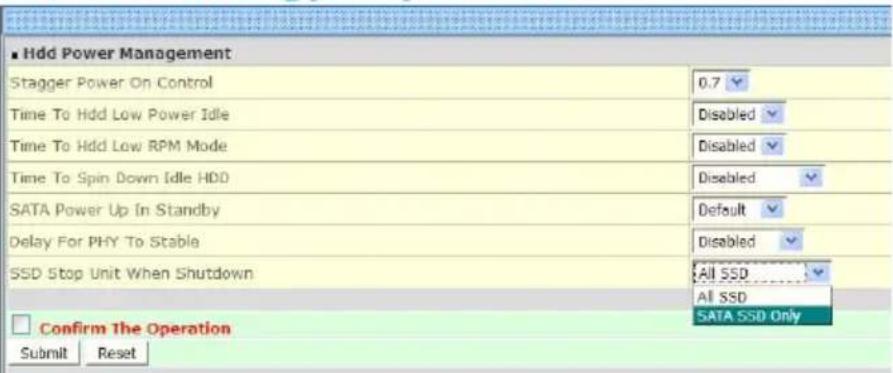
- Stagger Power On Control
In a PC system with only one or two drives, the power can supply enough power to spin up both drives simultaneously. But in systems with more than two drives, the startup current from spinning up the drives all at once can overload the power supply, causing damage to the power supply, disk drives and other system components. This damage can be avoided by allowing the host to stagger the spin-up of the drives. The SAS/SATA drives have supported the staggered spin-up capabilities to boost reliability. The staggered drive spin-up is a very useful feature for managing multiple disk drives in a storage. It gives the host the ability to spin up the disk drives sequentially or in groups, allowing the drives to come ready at the optimum time without straining the system power supply. The staggered drive spin-up in a multiple drive environment
also avoids the extra cost of a power supply designed to meet short-term startup power demand as well as steady state conditions.
With this option it gives the RAID storage the ability to spin up the disk drives sequentially staggered power up value. The values can be selected from 0.4 to 6 seconds per step which powers up one drive.
• Time To Hdd Low Power Idle
This option delivers lower power consumption by automatically unloading recording heads during the setting idle time. The values can be selected “Disabled” or within the range 2 to 7 minutes.
• Time To Hdd Low RPM Mode
This function can automatically spin disks at lower RPM if there have not been used during the setting idle time. The values can be selected “Disabled” or within the range 10 to 60 minutes.
• Time To Spin Down Idle HDD
This function can automatically spin down the drive if it hasn't been accessed for a certain amount of time. This value is used by the drive to determine how long to wait (with no disk activity, before turning off the spindle motor to save power). The values can be selected "Disabled" or within the range 1 to 60 minutes.
- SATA Power Up In Standby
SATA Power Up In Standby (power management 2 mode, PM2) is a SATA disk drive configuration which prevents the drive from automatic spinup when power is applied. "Enabled" option allows the drive to be powered-up into the Standby power management state to minimize inrush current at power-up and to allow the controller to sequence the spinup of devices. It is mainly for server/workstation environments operating in multiple-drive configurations.
- Delay for Phy to Stable
This function is used to increase the availability of the HDD unpredictable behavior. Delay timing can be set from 10 to 50 seconds, indicating the time that the controller waits, from the startup of the system until the hard drive is being detected. The default is Disabled.
- SSD Stop Unit When Shutdown
MAC M1/Pro panic when shutdown if Samsung PM1643A SAS SSD is used. PM1643a needs 6\~7 seconds for stop unit command, but MAC watchdog timeout will be triggered for about 2\~3 seconds.
Since the enterprise SSD has the power loss protection for in-process writes to the NAND are completed in the event of an unexpected power loss, firmware provides this option to skip stop unit for SAS SSD.
- SATA SSD stop unit (standby immediate) is required, windows will send this command
- SAS SSD stop unit seems optional, windows does not send stop unit for SAS SSD
4.9.4 Ethernet Configuration
Use this feature to set the controller Ethernet port configuration. A customer doesn't need to create a reserved space on the arrays before the Ethernet port and HTTP service are working. The firmware-embedded web browser-based RAID manager can access it from any standard internet browser or from any host computer either directly connected or via a LAN or WAN with no software or patches required. To configure the RAID controller Ethernet port, move the cursor bar to the main menu and click on the "System Controls" link. The "System Controls" menu will show all items. Move the cursor bar to the "Ethernet Configuration" item, and then select the desired function.


- DHCP Function
DHCP (Dynamic Host Configuration Protocol) is a protocol that lets network administrators manage centrally and automate the assignment of IP (Internet Protocol) configurations on a computer network. When using the internet's set of protocols (TCP/IP), in order for a computer system to communicate to another computer system, it needs a unique IP address. Without DHCP, the IP address must be entered manually at each computer system. DHCP lets a network administrator supervise and distribute IP addresses from a central point. The purpose of DHCP is to provide the automatic (dynamic) allocation of IP client configurations for a specific time period (called a lease period) and to eliminate the work necessary to administer a large IP network.
- Local IP address
If you intend to set up your client computers manually (no DHCP), make sure that the assigned IP address is in the same range as the default router address and that it is unique to your private network. However, it is highly recommend to use DHCP if that option is available on your network. An IP address allocation scheme will reduce the time it takes to set-up client computers and eliminate the possibilities of administrative errors and duplicate addresses. To manually configure the IP address of the controller, move the cursor bar to Local IP address item, then reassign the static IP address of the controller.
- Gateway IP address
A gateway is a node (a router) on a TCP/IP network that serves as an access point to another network. A default gateway is the node on the computer network that the network software uses when an IP address does not match any other routes in the routing table.
- Subnet Mask
A Subnet mask is a 32-bit number that masks an IP address, and divides the IP address into network address and host address.
- HTTP Port Number
To manually configure the "HTTP Port Number" of the controller, move the cursor bar to "HTTP Port Number" item, then reassign the default "HTTP Port Number" of the controller.
- Telnet Port Number
To manually configure the "Telnet Port Number" of the controller, move the cursor bar to "Telnet Port Number" item, then reassign the default "Telnet Port Number" of the controller.
- SMTP Port Number
To manually configure the "SMTP Port Number" of the controller, Move the cursor bar to "SMTP Port Number" item, then reassign the default "SMTP Port Number" of the controller.
Note:
If you configure the HTTP Port Number to 0, the HTTP console will be closed.
4.9.5 Alert By Mail Configuration
To configure the RAID storage e-mail function, move the cursor bar to the main menu and click on the "System Controls" link.
The "System Controls" menu will show all items. Move the cursor bar to the "Alert By Mail Configuration" item, and then select the desired function. This function can only be set via web-based configuration.
The firmware contains a SMTP manager monitoring all system events. Single or multiple user notifications can be sent via "Plain English" e-mails with no software required. (Please refer to SMTP Sever Configuration, Mail Address Configuration and Event Notification Configuration on chapter 3 "ArcHTTP Configuration").
![Areca Technology Corporation [open all|close all] Raid System Console Quick Function RAID Set Functions Volume Set Functions Physical Drives System Controls System Configuration Advanced Configuration Hold Power Management Ethernet Configuration Alert By Mail Configuration SNMP Configuration NTP Con…](/content/2026/05/986595/images/a7497c30e49c5a85f188939979e43229079424961fb280eafec25778eeb20594.jpg)
4.9.6 SNMP Configuration
Please refer to Appendix C of SNMP Operation & Installation.
4.9.7 NTP Configuration
The Network Time Protocol (NTP) is used to synchronize the time of a computer client or server to another server or reference time source, such as a radio or satellite receiver or modem. It provides accuracies typically within a millisecond on LANs and up to a few tens of milliseconds on WANs relative to Coordinated Universal Time (UTC) via a Global Positioning Service (GPS) receiver, for example:
![Areca Technology Corporation [open all|close all] Red System Console Quick Function RAID Set Functions Volume Set Functions Security Functions Physical Prives System Controls System Configuration Advanced Configuration Hdd Power Management EtherNet Configuration Alert By Mail Configuration SNIP Conf…](/content/2026/05/986595/images/3bee1d9137285087ba0ee5be6341d4bc6e5e69361c5f797d36f1b6998cecf6d4.jpg)
Note:
NTP feature works through onboard Ethernet port. So you must make sure that you have connected onboard Ethernet port.
• NTP Sever Address
The most important factor in providing accurate, reliable time is the selection of NTP servers to be used in the configuration file. Typical NTP configurations utilize multiple redundant servers and diverse network paths in order to achieve high accuracy and reliability. Our NTP configuration supports two existing public NTP synchronization subnets.
- Time Zone
Time Zone conveniently runs in the system tray and allows you to easily view the date and time in various locations around the world. You can also quickly and easily add your own personal locations to customize time zone the way you want.
• Automatic Daylight Saving
Automatic Daylight Saving will normally attempt to automatically adjust the system clock for daylight saving changes based on the computer time zone. This tweak allows you to disable the automatic adjustment.
4.9.8 View Events/Mute Beeper
To view the RAID storage's event information, click on the "View Event/Mute Beeper" link. The RAID storage "System events Information" screen appears. The mute beeper function automatically enable by clicking on "View Events/Mute Beeper".
![Areca Technology Corporation [open all] [close all] RAID System Console Quick Function RAID Set Functions Volume Set Functions Physical Drives System Controls System Configuration Advanced Configuration Hdd Power Management EtherNet Configuration Alert By Mail Configuration SNPP Configuration NTP Co…](/content/2026/05/986595/images/64434be25161ba5c3fe56e6080de395072c7ad45131f33d7cd885025696e27be.jpg)
Select this option to view the system events information: Time, Device, Event Type, Elapse Time and Errors. The RAID storage does not have a built-in real time clock. The time information is the relative time from the system time setting. The maximum event no. is 256 per controller.
4.9.9 Generate Test Event
Use this feature to generate events for testing purposes.
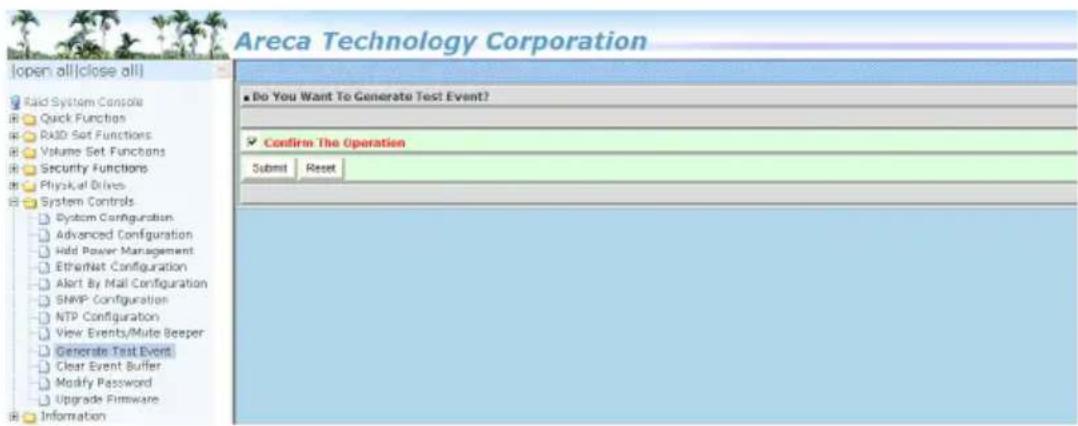
4.9.10 Clear Events Buffer
Use this feature to clear the entire events buffer information.
![Areca Technology Corporation [open all|close all] Raid System Console Quick Function RAID Set Functions Volume Set Functions Security Functions Physical Drives System Controls System Configuration Advanced Configuration Hold Power Management EtherNet Configuration Alert By Mail Configuration SNMP Co…](/content/2026/05/986595/images/7cea264df0e929f2ada991a86c390f926e312aa6055e1132bc55d86a36f232c2.jpg)
4.9.11 Modify Password
To set or change the RAID storage password, select "System Controls" from the menu and click on the "Modify Password" link. The "Modify System Password" screen appears.
The password option allows user to set or clear the RAID storage's password protection feature. Once the password has been set, the user can only monitor and configure the RAID storage by providing the correct password. The password is used to protect the RAID storage from unauthorized entry. The controller will check the password only when entering the main menu from the initial screen. The RAID storage will automatically go back to the initial screen when it does not receive any command in 5 minutes. Do not use spaces when you enter the password. If spaces are used, it will lock out the user.
To disable the password, leave the fields blank. Once the user confirms the operation and clicks the "Submit" button, the existing password will be cleared. Then, no password checking will occur when entering the main menu from the starting screen.

Note:
The manufacture default password is set to 0000.
4.9.12 Update Firmware
Please refer to the appendix A "Upgrading Flash ROM Update Process".

4.10 Information
4.10.1 Raid Set Hierarchy
Use this feature to view the RAID storage current RAID set, current volume set and physical disk information. The volume state and capacity are also shown in this screen.
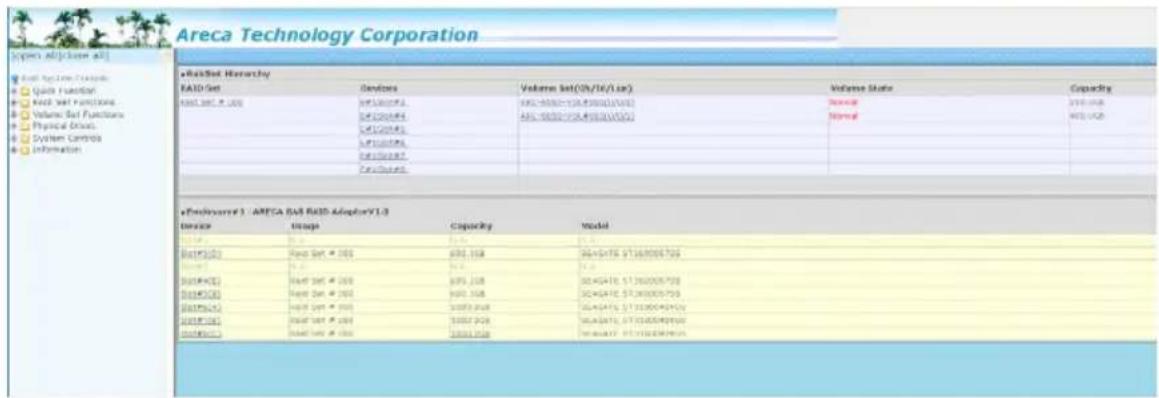
4.10.1.1 Hdd Xfer Speed
"Hdd Xfer Speed" is a firmware-level hard disk / SSD speed function that is used to measure the drive's performance. "Hdd Xfer Speed" will perform read tests without overwriting customer data. The read-only palimpsest benchmark of the disk is shown in the device information. If the value drops below the normal curve, something may be wrong with the disk. User can use "Set Disk To Be Failed" function from remote side to set a slow speed disk as "failed" so that volume will be not stuck by the slow speed disk after rebuild.
"Hdd Xfer Speed" result can be accessed by clicking on the "Device" from the "RAID set Hierarchy" you wish to scan, clicking on the "Show Result". This allows you to set up a scan environment which runs the test by clicking "Test Disk Speed" on the right screen setup option. If more than one drive is checked when you set the 'Disks To Be Tested', it will run that test for the number setting drives.
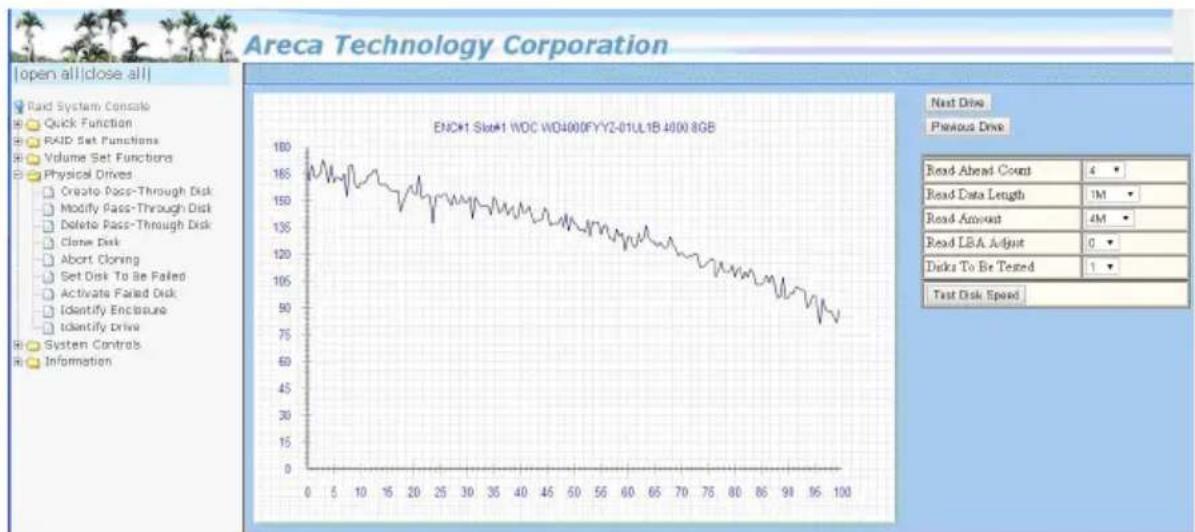
If there's a certain location in the hard drive that is getting poor performance, hard drive read benchmarks can help confirm this. Above is a screenshot of a palimpsest benchmark on a hard drive. The length time of firmware takes to complete the drive test depends on its size.
4.10.2 SAS Chip Information
To view the RAID storage's 6Gb/s SAS ROC chip information, move the mouse cursor to the main menu and click on the "SAS Chip Information" link. The RAID storage "SAS Chip Information" screen appears.
User can click on "controller: Areca ARC-8050T3" item on the "SAS Chip Information" screen. It will show statistic page for ports on the ROC controller. Click on the "Clear Error Log" to refresh the fully statistic page.

4.10.3 System Information
To view the RAID storage's system information, move the mouse cursor to the main menu and click on the "System Information" link. The RAID storage "RAID Subsystem Information" screen appears. Use this feature to view the RAID storage's system information. The controller name, controller firmware version, Boot ROM version, SAS firmware version, serial number, main processor, CPU instruction/data cache size, system memory size/speed, and current IP address appear in this screen.
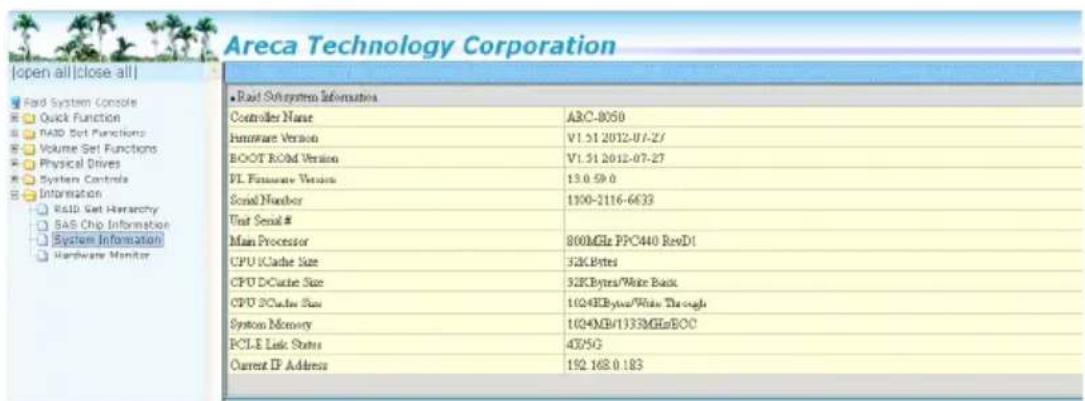
4.10.4 Hardware Monitor
The hardware monitor information of the enclosure attached in this controller is also shown on this screen.
![Areca Technology Corporation [open all|close all] □ Stop Auto Refresh ■ Controller H/W Monitor CPU Temperature 55.4C Controller Temp 40.4C 12V 12.261 V 5V 1.080 V 3.3V 3.368 V IO Voltage +1.6V 1.808 V DDR3 +1.5V 1.504 V CPU VCore +1.0V 1.010 V Amalog +1.0V 0.992 V DDR3 +0.75V 0.716 V Battery Status…](/content/2026/05/986595/images/d611a0e6866c1073745dbc98a26554f695ea8945f4b58263a390f02eb4c5a21a.jpg)
Appendix A
Upgrading Flash ROM Update Process
A-1 Overview
Since the ARC-8050T3U Thunderbolt RAID storage features flash ROM firmware, it is not necessary to change the hardware flash chip in order to upgrade the RAID firmware. The user can simply re-program the old firmware through the in-Band Thunderbolt port or out-of-band LAN port McRAID storage manager. New releases of the firmware are available in the form of a DOS file on Areca website. The files available at the FTP site for each model contain the following files in each version:
ARCXXXXNNNN.BIN: Software binary code ("XXXX" refers to the model name. "NNNN" refers to the software code type)
ARCXXXXBIOS.BIN:→ BIOS for system board using
ARCXXXXBOOT.BIN:→ RAID controller hardware initialization
ARCXXXXFIRM.BIN:→ RAID kernel program
ARCXXXXMBR0.BIN:→ Master Boot Record for supporting Dual
Flash Image in the ARC-8050T3U SAS RAID storage
Select the right file for the upgrade.
- For ARC-8050T3U-4, it uses the same firmware package of ARC-12X4 series RAID adapters.
- For ARC-8050T3U-6/6M/8/12, they use the same firmware package of ARC-1883 series RAID adapters.
Firmware release note contains the history information of the software code change. All these files in the firmware package are a part of the firmware. You should update all files in the package, no special update order needed. New firmware works after a system restart not instant available, so you can update all files before restart the system. The controller firmware is independent of the array; update firmware does not touch anything you stored in the array.
Note:
Please update all binary code (BIOS, BOOT, FIRM and MBR0) before you reboot system. Otherwise, a mixed firmware package may hang the controller.
A-2 Upgrading Firmware Through McRAID Storage Manager
Get the new version firmware for your RAID storage. For example, download the bin file from your OEM's web site onto the C: drive.
![Areca Technology Corporation [open all]close all] Rad System Console Quick Function RAID Set Functions Volume Set Functions Physical Drives System Controls System Configuration Hdd Power Management EtherNet Configuration Alert By Mail Configuration SNMP Configuration NTP Configuration View Events/Mu…](/content/2026/05/986595/images/54eb6f54745b223519807ebb3a072a6b7a72e85ae100b967df25dd11afc08251.jpg)
- To upgrade the RAID storage firmware, move the mouse cursor to "Upgrade Firmware" link. The "Upgrade The Raid System Firmware or Boot Rom" screen appears.
- Click "Browse". Look in the location to which the Firmware upgrade software was downloaded. Select the file name and click "Open".
- Tick on "Confirm The Operation" and press the "Submit" button.
- The web browser begins to download the firmware binary to the controller and start to update the flash ROM.
- After the firmware upgrade is complete, a bar indicator will show "Firmware Has Been Updated Successfully".
- After the new firmware package completes downloading, find a chance to restart the controller/computer for the new firmware to take effect.
The web browser-based McRAID storage manager can be accessed through the in-band Thunderbolt port or out-of-band LAN port.
The in-band method uses the ArcHTTP proxy server to launch the McRAID storage manager. The out-of-band method allows local or remote to access the McRAID storage manager from any standard internet browser via a LAN or WAN with no software or patches required.
Controller with onboard LAN port, you can directly plug an Ethernet cable to the controller LAN port. After network connected, you can find the current IP address in the LCD panel.
From a remote pc, you can directly open a web browser and enter the IP address. Then enter user name and password to login and start your management. You can find the firmware update feature from the "Upgrade Firmware" option on the "System Controls".
A-3 Upgrading Firmware Through CLI
This Command Line Interface (CLI) provides you to configure and manage the RAID storage components in Mac and Windows environment. The CLI is useful in environments where a graphical user interface (GUI) is not available. Through the CLI, you perform firmware upgrade that you can perform with the McRAID storage manager GUI. The controller has added protocol on the firmware for user to update the controller firmware package (BIOS, BOOT, FIRM and MBR0) through the CLI utility.
To update the controller firmware, follow the procedure below:
Parameter:
Fn: Firmware Updating.
Ex: Update Firmware And File Path Is In [C:\FW\ARC8050FIRM.BIN.]
Command: sys updatefw path=c:\fw\arc8050firm.bin [Enter]
Appendix B
Battery Backup Module (ARC-6120BA-T021-T3)
ARC-8050T3U RAID storage operates using cache memory. The Battery Backup Module is an add-on module that provides power to the RAID storage cache memory in the event of a power failure. The BBM monitors the write back cache on the RAID storage, and provides power to the cache memory if it contains data not yet written to the hard drives when power failure occurs.
B-1 BBM Connector and Components
This section provides the board layout and connector/jumper for the BBM.
• D13 (Green): light when BBM activated
• D14 (Red): light when BBM charging
• D15 (Green): light when BBM normal

B-2 Status of BBM
The BBM status will be shown on the web browser of "Hardware Monitor Information" screen.
![Areca Technology Corporation [open at|close all] Red System Control QoS Function RAID Set Functions Volume Set Functions Physical Drives System Controls Information RAID Set Numbers System Information Hardware Monitor Stop Auto Network Controller H/W Member CPU Identification 74.0°C Controller Temp…](/content/2026/05/986595/images/151a3518f7159c80c3ca5ffbd061b7bd93cd4d9e1f2dd11330639f00b4af17da.jpg)
B-3 Installation
- Make sure all power to the RAID storage is disconnected.
- Install the "six eaves copper pillars" on the three mounting position (NH1, NH2 and NH3) and secures it using flat head screws.

- Connector J1 is available for the optional battery backup module. Connect the BBM cable from this connector to the 12-pin (J6) battery connector on the RAID storage controller.

Figure B-1, J6 location of ARC-8050T3U-6
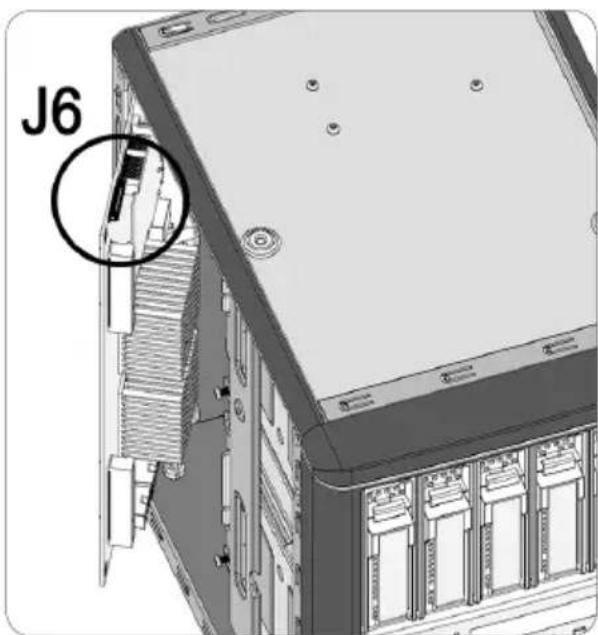
Figure B-2, J6 location of ARC-8050T3U-8/12
Since the J6 connector location of ARC-8050T3U-8/12 close to the cover, you need to push the controller board out within a narrow range for connecting the BBM cable.
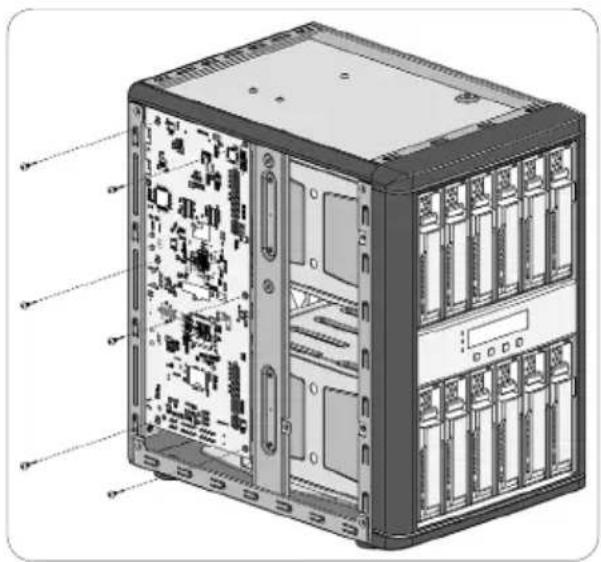
Figure B-3, loosening the screws on the controller board
Figure B-4,
push the board out within
a narrow range

Warning:
Be careful to push the controller board out within a narrow range until you can connect the BBM cable to the J6 connector.
Please do not pull the board out of the latch in order to avoid getting damage when reinstall the controller board.
- Integrators provide pre-drilled holes in their cabinet for securing the three "six eaves copper pillars" on the BBM using flat head screws.

Figure B-5, securing the BBM on ARC-8050T3U-8/12
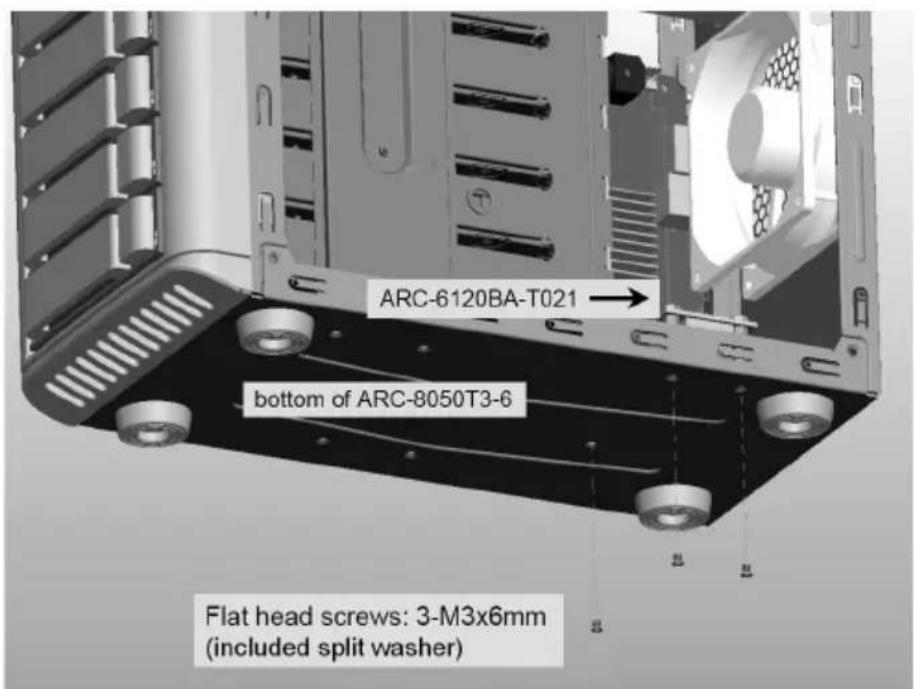
Figure B-6, securing the BBM on ARC-8050T3U-6
B-4 Battery Backup Capacity
Battery backup capacity is defined as the maximum duration of a power failure for which data in the cache memory can be maintained by the battery. The BBM's backup capacity duration can retain the cache content for a limited interval (typically 72 hours).
B-5 Operation
- Battery conditioning is automatic. There are no manual procedures for battery conditioning or preconditioning to be performed by the user.
- In order to make sure of all the capacity is available for your battery cells; allow the battery cell to be fully charged when installed for the first time. The first time charge of a battery cell takes about 24 hours to complete.
- Set the "Disk Write Cache Mode": Auto, if "Disk Write Cache" option does not set on the "Auto".
- Set the volume set "Cache Mode": Write-Back Cache.
B-6 Battery Functionality Test Procedure
- Write amount of data into controller volume, about 5GB or bigger.
- Waiting for few seconds, power failed system by remove the power cable
- Check the battery status, battery beeps every few seconds.
- Power on system, and login in the RAID storage.
- Check the controller event log; make sure the event shows controller boot up with power recovered.
B-7 Changing the Battery Backup Module
At some point, the LI-ION battery will no longer accept a charge properly. LI-ION battery life expectancy is anywhere from approximately 1 to 5 years.
- Power down the RAID storage properly. Make sure that cache memory has been flushed.
-
Remove all "Flat head screws" from the cabinet.
-
Disconnect the BBM cable from J6 on the RAID storage controller.
- Disconnect the battery pack cable from JP2 on the BBM.
- Install a new battery pack and connect the new battery pack to JP2.
- Connect the BBM to J6 on the RAID storage controller.
- Secure the "Flat head screws" into the BBM.
B-8 BBM Specifications
Mechanical
- Module Dimension (W x H x D) 37.3 x 13 x 81.6 mm
Environmental
- Operating Temperature * Temperature: 0°C to +40°C (Charge) 0°C to +55°C (Discharge) * Humidity: 45-85%, non-condensing
- Storage Temperature * Temperature: -20°C to +20°C (storing for less than 1year) -20°C to +40°C (storing for less than 3months) -20°C to +55°C (storing for less than 1month) * Humidity: 45-85%, non-condensing
• Electrical Input Voltage +3.6VDC
- On Board Battery Capacity 1880mAh (1 * 1880mAh) for ARC-8050T3U RAID storage
Appendix C
SNMP Operation & Installation
C-1 Overview
McRAID storage manager includes a firmware-embedded Simple Network Management Protocol (SNMP) agent and SNMP Extension Agent for the Areca RAID controller. An SNMP-based management application (also known as an SNMP manager) can monitor the disk array. An example of a SNMP management application is Hewlett-Packard's Open View, Net-SNMP or SNMPc. The SNMP extension agent can be used to augment the Areca RAID controller if you are already running an SNMP management application at your site.
C-2 SNMP Definition
SNMP, an IP-based protocol, has a set of commands for getting the status of target devices. The SNMP management platform is called the SNMP manager, and the managed devices have the SNMP agent loaded. Management data is organized in a hierarchical data structure called the Management Information Base (MIB). These MIBs are defined and sanctioned by various industry associations. Each type of device on your network has its own specific MIB file. The MIB file defines the device as a set of managed objects — values that can be read or changed by the SNMP manager. The MIB file enables the SNMP manager to interpret trap messages from devices. To make sense out of a trap that's sent by a device, the SNMP manager needs to have access to the MIB that describes the format and content of the possible traps that the device can send. The objective is for all vendors to create products in compliance with these MIBs so that inter-vendor interoperability can be achieved. To be available for the SNMP manager, a command adds the MIB file for each of devices to the MIB database. This enables the devices to be managed via the SNMP manager.
The following figure illustrates the various components of an SNMP-based management architecture.
Manager Application
Managed Resource Definition
Service Layer and Protocols
Physical Managed Object
![graph TD A["Event Configuration Performance"] --> B["MIB"] B --> C["SNMP Agent"] C --> D["Network resources"]](/content/2026/05/986595/images/7118c5833d72687ee95eb00b36611d8437383fc53a98fdc17621fd468f6605fa.jpg)
C-3 SNMP Installation
Perform the following steps to install the Areca RAID controller SNMP function into the SNMP manager. The installation of the SNMP manager is accomplished in several phases:
Step 1. Installing the SNMP manager software on the client
Installing the SNMP manager software on the client. This installation process is well-covered in the User's Guide of your SNMP manager application.
Step 2. Compiling the MIB description file with the management
Placing a copy of the RAID controller's MIBs file in a directory which is accessible to the management application and compile the MIB description file with the SNMP management application database. Before the manager application accesses the Areca RAID controller, it is necessary to integrate the MIB into the management application's database of events and status indicator codes. This process is known as "compiling" the MIB into the application. This process is highly vendor-specific and should be well-covered in the User's Guide of your SNMP manager application. Ensure the compilation process successfully integrates the contents of the areca_sas.mib file into the traps database. The MIBs file resides at:
Each RAID storage needs to have its own MIBs file. Areca provides 4 RAID storage MIBs file for users. User can request it if more controllers install on one system.
Note:
- The MIB compiler may be not installed by default with SNMP manager.
- Some SNMP managers have unique rule on the format of MIB files, you may need to refer the error message to modify the mib file to be able to met the software requirement.
Step 3. SNMP Service Method
With Areca series RAID controllers, there are 2 service methods to get SNMP: in-band Thunderbolt port and onboard NIC.
- Service Method-1: Using in-band Thunderbolt port (ArcHTTP proxy server)
Pay attention to these:
- Do not check mark the option: "SNMP Through PCI".
- Make sure you have the latest driver and ArcHTTP, from this URL https://www.areca.com.tw/support/downloads.html
-
ArcHTTP supports sending "traps" only, do not support the "get" command.
-
Service Method-2: Using onboard LAN port.
Pay attention to these:
- Do not check mark the option: "SNMP Through PCI".
- Do need to fill out the "SNMP Trap Config".
C-3-1 Using ArcHTTP
The HTTP management software (ArcHTTP) runs as a service or daemon, and has it automatically start the proxy for all controllers found. This way the controller can be managed remotely without having to sign in the server. The ArcHTTP has also integrated the ability of sending SNMP trap. Please reference the manual Chapter 3 "ArcHTTP Configuration" section to install and setup its configuration.
To enable the controller to send the SNMP traps to client SNMP manager using the IP address assigned to the operating system, such as Net-SNMP manager, you can simply use the SNMP function on the ArcHTTP proxy server utility. To enable the RAID controller SNMP traps sending function, configure the "SNMP Traps Configuration" options on the "ArcHTTP Configurations". The ArcHTTP proxy only provides one direction to send the trap to the SNMP manager without needing to install the SNMP extension agent on the host. For detailed information on using ArcHTTP proxy server utility to send the SNMP traps, please see "SNMP Traps Configuration" section on chapter 3 "ArcHTTP Configuration".
If SNMP manager requests to query the SNMP information from RAID controller, please refer the C-3-2 section "Using Onboard NIC".
C-3-2 Using Onboard NIC Installation
With the built-in LAN port, you can add SNMP function onto your the RAID storage. You can use the browser-based manager to setup the firmware-based SNMP configuration. To launch the browser-based RAID controller SNMP function, click on the "System Controls" link. The "System Controls" menu will show available items. Select the "SNMP Configuration" item. The following screen is the firmware-embedded SNMP configuration setup screen using browser-based manager:

The firmware-embedded SNMP agent manager monitors all system events and the SNMP function becomes functional with no agent software required. When you open the "SNMP Configuration" link, you will see the following settings:
1. SNMP Trap Configurations
Enter the SNMP Trap IP Address.
2. SNMP System Configurations
Community name acts as a password to screen accesses to the SNMP agent of a particular network device. Type in the community names of the SNMP agent. Before access is granted to a request station, this station must incorporate a valid community name into its request; otherwise, the SNMP agent will deny access to the system. Most network devices use "public" as default of their community names. This value is case-sensitive. The system Contact, Name and Location that will be shown in the outgoing SNMP trap.
3. SNMP Trap Notification Configurations
Please refer to Appendix D of Event Notification Configurations.
Appendix D
Event Notification Configurations
The controller classifies disk array events into four levels depending on their severity. These include level 1: Urgent, level 2: Serious, level 3: Warning and level 4: Information. The level 4 covers notification events such as initialization of the controller and initiation of the rebuilding process; Level 2 covers notification events which once have happen; Level 3 includes events which require the issuance of warning messages; Level 1 is the highest level, and covers events that need immediate attention (and action) from the administrator. The following lists sample events for each level:
A. Device Event
| Event Level Meaning Action | |||
| Device Inserted Warning HDD inserted | |||
| Device Removed Warning HDD removed | |||
| Reading Error Warning HDD reading error Keep Watch | Watching HDD status, may be it caused by noise or HDD unstable. | ||
| Writing Error Warning HDD writing error Keep Watching HDD status, may be it caused by noise or HDD unstable. | |||
| ATA Ecc Error Warning HDD BCC error Keep Watching HDD status, may be it caused by noise or HDD unstable. | |||
| Change ATA Mode | Warning HDD change ATA mode | Check HDD connection | |
| Time Out Error | Warning HDD time out | Keep Watching HDD status, may be it caused by noise or HDD unstable. | |
| Device Failed | Urgent | HDD failure | Replace HDD |
| PCI Parity Error Serious PCI parity error If only happen once, it may be caused by noise. If always happen, please check power supply or contact to us. | |||
| Device Failed(SMART) | Urgent | HDD SMART failure | Replace HDD |
| PassThrough Disk Created | Inform | Pass Through Disk created | |
| PassThrough Disk Modified | Inform | Pass Through Disk modified | |
| PassThrough Disk Deleted | Inform | Pass Through Disk deleted | |
B. Volume Event
| Event Level Meaning Action | |||
| Start Initialize Warning Volume initialization has started | |||
| Start Rebuilding Warning Volume rebuilding has started | |||
| Start Migrating Warning Volume migration has started | |||
| Start Checking Warning Volume parity checking has started | |||
| Complete Init Warning Volume initialization completed | |||
| Complete Rebuild Warning Volume rebuilding completed | |||
| Complete Migrate Warning Volume migration completed | |||
| Complete Check Warning Volume parity checking completed | |||
| Create Volume Warning New volume created | |||
| Delete Volume Warning Volume deleted | |||
| Modify Volume Warning Volume modified | |||
| Volume Degraded Urgent Volume degraded Replace HDD | |||
| Volume Failed Urgent Volume failure | |||
| Failed Volume Revived Urgent Failed volume revived | |||
| Abort Initialization Warning Initialization been abort | |||
| Abort Rebuilding Warning Rebuilding aborted | |||
| Abort Migration Warning Migration aborted | |||
| Abort Checking Warning Parity check aborted | |||
| Stop Initialization Warning Initialization stopped | |||
| Stop Rebuilding Warning Rebuilding stopped | |||
| Stop Migration Warning Migration stopped | |||
| Stop Checking Warning Parity check stopped | |||
C. RAID Set Event
| Event Level Meaning Action | |||
| Create RaidSet Warning | New | RAID set created | |
| Delete RaidSet Warning | Raidset deleted | ||
| Expand RaidSet Warning | Raidset expanded | ||
| Rebuild RaidSet Warning | Raidset rebuilding | ||
| RaidSet Degraded | Urgent Raidset degraded Replace HDD | ||
D. Hardware Monitor Event
| Event Level Meaning Action | |||
| DRAM 1-Bit ECC | Urgent | DRAM 1-Bit ECC error | Check DRAM |
| DRAM Fatal Error | Urgent DR | RAM fatal error encountered | Check the DRAM module and replace with new one if required. |
| Controller Over Temperature | Urgent Ab | normally high temperature detected on controller (over 60 degree) | Check air flow and cooling fan of the enclosure, and contact us. |
| Hdd Over Temperature | Urgent Ab | normally high temperature detected on Hdd (over 55 degree) | Check air flow and cooling fan of the enclosure. |
| Fan Failed | Urgent Cooling Fan # failure or speed below 1700RPM | Check cooling fan of the enclosure and replace with a new one if required. | |
| Controller Temp. Recovered | Serious | Controller temperature back tonormal level | |
| Hdd Temp. Recovered | Serious | Hdd temperature back tonormal level | |
| Raid Powered On | Warning | RAID power on | |
| Test Event | Urgent | Test event | |
| Power On With Battery Backup | Warning | RAID power on with battery backuped | |
| Incomplete RAID Discovered | Serious | Some RAID set member disks missing before power on | Check disk information to find out which channel missing. |
| HTTP Log In Serious | a HTTP | login detected | |
| Telnet Log Serious | a Telnet | login detected | |
| InVT100 Log In Serious | a VT | 100 login detected | |
| API Log In Serious | a API login | detected | |
| Lost Rebuilding/MigrationLBA | Urgent | Some rebuilding/migration raidset member disks missing before power on. | Reinserted the missing member disk back, controller will continued the incomplete rebuilding/migration. |
Appendix E
Self-Encrypting Disk (SED) Encryption
The "Security Function" on the firmware supports Self-Encrypting Disks (SED) for protection of data against loss or theft of SEDs. Protection is achieved by the use of encryption technology on the drives. The McRAID storage management allows SED keys to be created and managed as well as create/delete RAID sets.
Self-Encrypting Disk (SED) Encryption Flow Chart
![graph TD A["1<br>Create SED RAID Set"] --> B["2<br>Create Volume Set"] B --> C["3<br>SED Key Creation<br>(1) Automatically<br>(2) Password"] C --> D["4<br>Self-Encrypting Disk (SED)<br>Encryption Ready"] D --> E{Key Management} E -->|Store| F["6<br>Exporting SED Key"] E -->|Change| G["5<br>Generate…](/content/2026/05/986595/images/ce07ac6ba0668cb1b85b1a5d8f5f5853515efa684a090cb5aea2981fa00376fc.jpg)
Step 1. Create SED RAID Set

Step 2. Create Volume Set
Create volume set in the web management.
![Areca Technology Corporation [open all|close all] Raid System Console Quick Function RAID Set Functions Volume Set Functions Create Volume Set Create Rad30/50/60 Delete Volume Set Modify Volume Set Check Volume Set Schedule Volume Check Stop Volume Check Download Volume Key File Physical Drives Syst…](/content/2026/05/986595/images/959aab5104a8509009587f0efef9a6881c9b46213ca15e1d390a8abf59533d85.jpg)
Step 3. SED Key Creation
There is one SED key per controller. You can create the SED key under McRAID manager. The key can be escrowed in to a file using McRAID manager. There is one SED key per controller which stores in the controller flash memory. Areca provides both automatically or password methods to generate a key.
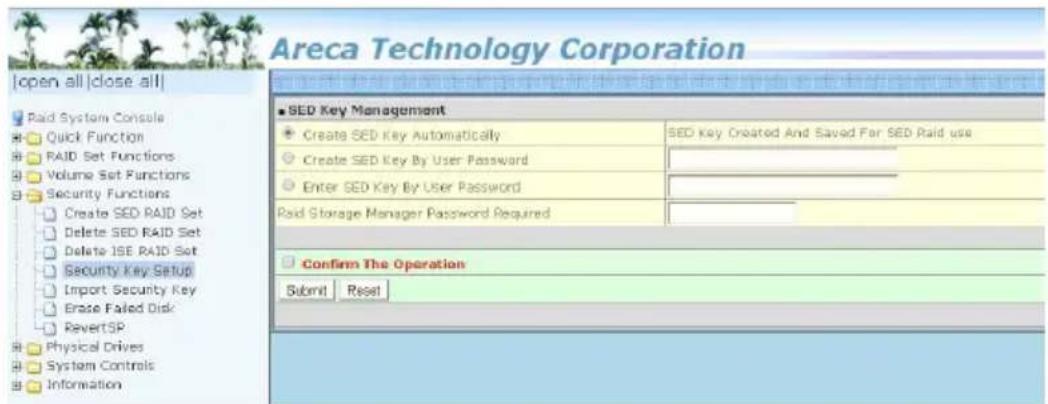
Step 4. Self-Encrypting Disk (SED) Ready
Now, whenever you write data to the drive (e.g. create a file and save it to the SED volume), it gets encrypted with the SED key. And whenever you read data from the drive (e.g. access a file stored on the SED), it's decrypted with the same SED key.
Step 5. Generate New SED Key
If you have evidence that the SED key is known to unauthorized users, you can change the SED key again. Areca provides both automatically or password methods to generate a New key to replace the foreign SED key.

Step 6. Exporting SED Key
In some cases, you may want to export a SED key to store on removable media or to use on a different computer. If you want to create a backup copy of the SED key or use it on another computer, you must first export the SED key.
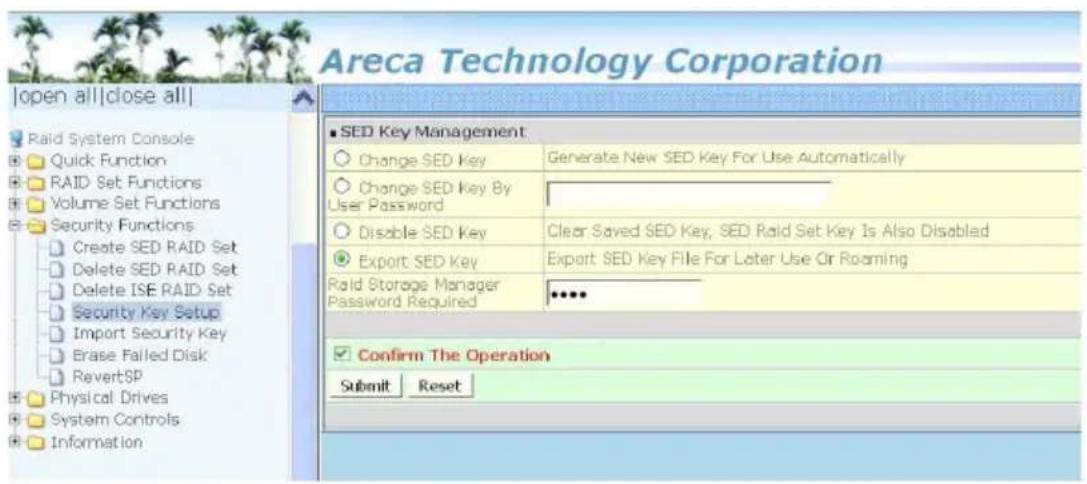
Exporting the SED key puts it in a file (SEDKEY256.BIN) that you can then transfer to another computer or put in a safe place.
![Areca Technology Corporation [open all|close all] Raid System Console Quick Function RAID Set Functions Volume Set Functions Security Functions Create SED RAID Set Delete SED RAID Set Delete IEC RAID Set Security Key Setup Import Security Key Erase Failed Disk HavertSir Physical Drives System Contro…](/content/2026/05/986595/images/1d93bb506cf869f2b15ab17997dff276e45c4f1af13e53254114c835897c62ec.jpg)
The key file (SEDKEY256.BIN) is stored on the specific location.
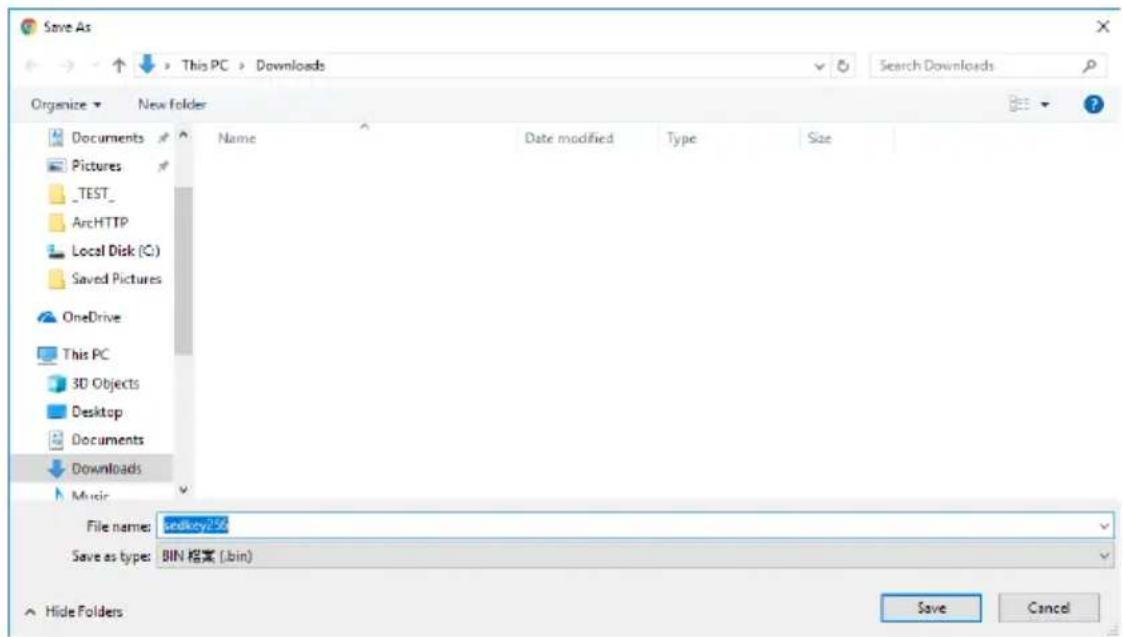
Without the proper authentication key (SED key), even if the SED RAID set is removed and placed in another new RAID controller, the data remains inaccessible.
Step 7. Clean Saved SED Key
The 'Disable SED Key' function is used to clear SED key on controller and RAID set members.

Areca Technology Corporation
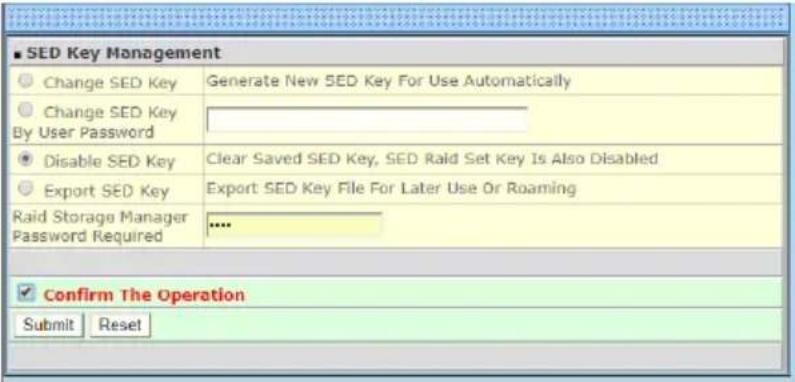
- Save SEDKey In Controller
There is one SED key per controller which stores in the controller flash memory. You can disable the SED Key saved in controller flash using "Save SEDKey In Controller" on the Advanced Configurations. So that next time power up again, it will ask for key again.
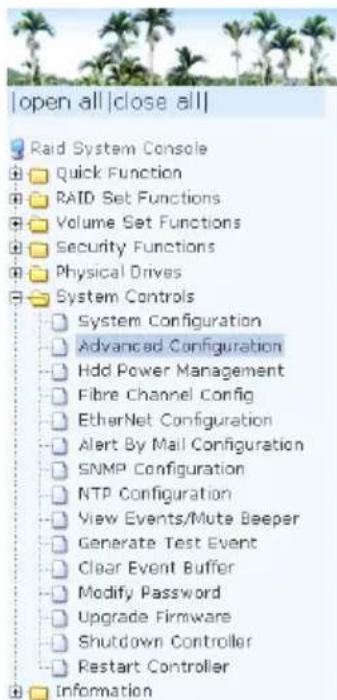
Areca Technology Corporation
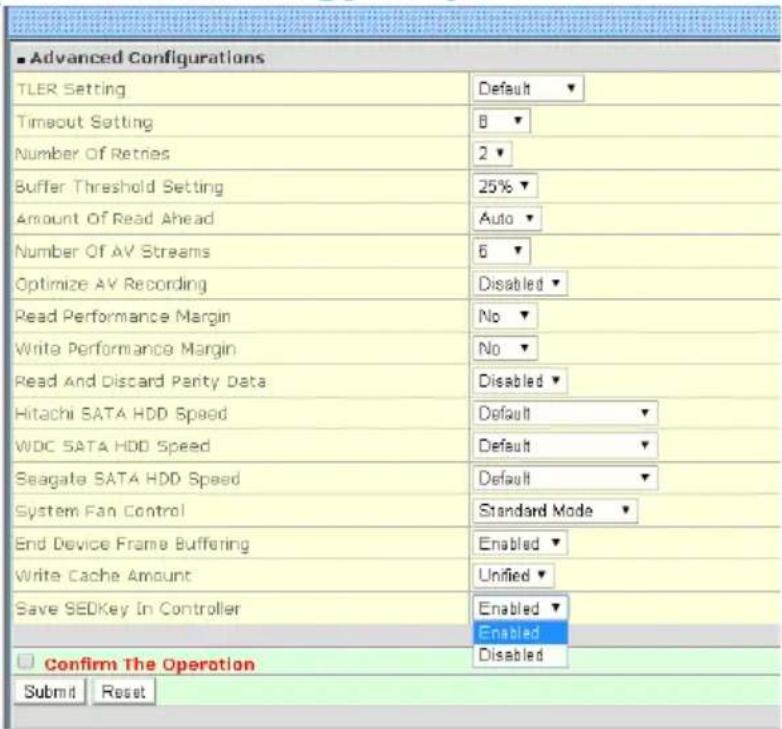
If enable --> disable, clear SED Key saved in setup
If disable --> enable, if key exists, save to setup
If you setup from enable--->disable, the key will not remain in the flash. So that next time power up again, it will need to input the key from the CLI or McRAID manager again. The controller volume will be in the lock stage. It will be not available to the OS.
After your run the CLI to upload the key, volume will be unlocked and available to the OS. You can also import the key file (Import Security Key) or key in the password (Enter SED Key By User Password) from the GUI interface.
(1) Import Security Key

(2) Enter SED Key By User Password

Appendix F
Full Volume Encryption
ARC-8050T3U RAID storages have featured with controller based hardware encryption function. Controller based hardware encryption describes the encryption of data occurring at the disk array controller before being sent to the disk drives. The hardware encryption does not impact the performance of ARC-8050T3U RAID storages and can implement on any kinds of HDD that is transparent to the user, the OS, and applications. You can follow below steps to enable the function.
Full Volume Encryption Flow Chart
![graph TD A["1<br>Create RAID Set"] --> B["2-1<br>Create Volume Set"] B --> C["3<br>Generate Key File<br>(1) CLI "Vsf genkey" or<br>(2) API Code"] C --> D["4<br>Download Volume Key File"] D --> E{Unlock Volume?} E -->|Enable "Full Volume Encryption"| B E -->|Unlock| D](/content/2026/05/986595/images/d139ac7023d5a38590b70462cab31d66d47e57163ac2e68c83e9509c83218f52.jpg)
Step 1. Create RAID Set
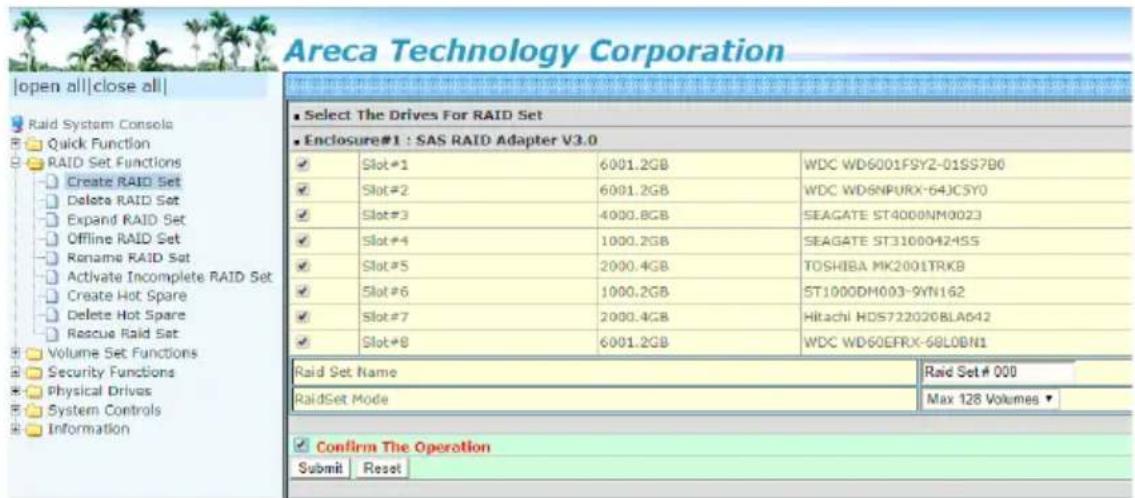
Step 2. Create Volume and Enable "Full Volume Encryption"
Create volume set with "Full Volume Encryption" capability in the web management.
![Areca Technology Corporation [open all|close all] Raid System Console Quick Function RAID Set Functions Volume Set Functions Create Volume Set Create Raid30/50/60 Delete Volume Set Modify Volume Set Check Volume Set Schedule Volume Check Stop Volume Check Download Volume Key File Security Functions…](/content/2026/05/986595/images/caeb2c4bacef0e46382af455252c3afc276ce7cca1e1d3a6f29bc142d18b3ad1.jpg)
ARC-1883 adapters provide five new key options in the 'Full Volume Encryption:"Disable", "256Bit key, Password", "256Bit key, AES", "128Bit key, Password", "128Bit key, AES".
In the Volume Set Information, it is recorded "Encrypted, Locked" status.

The encrypted volume is not visible in the system Disk Management.
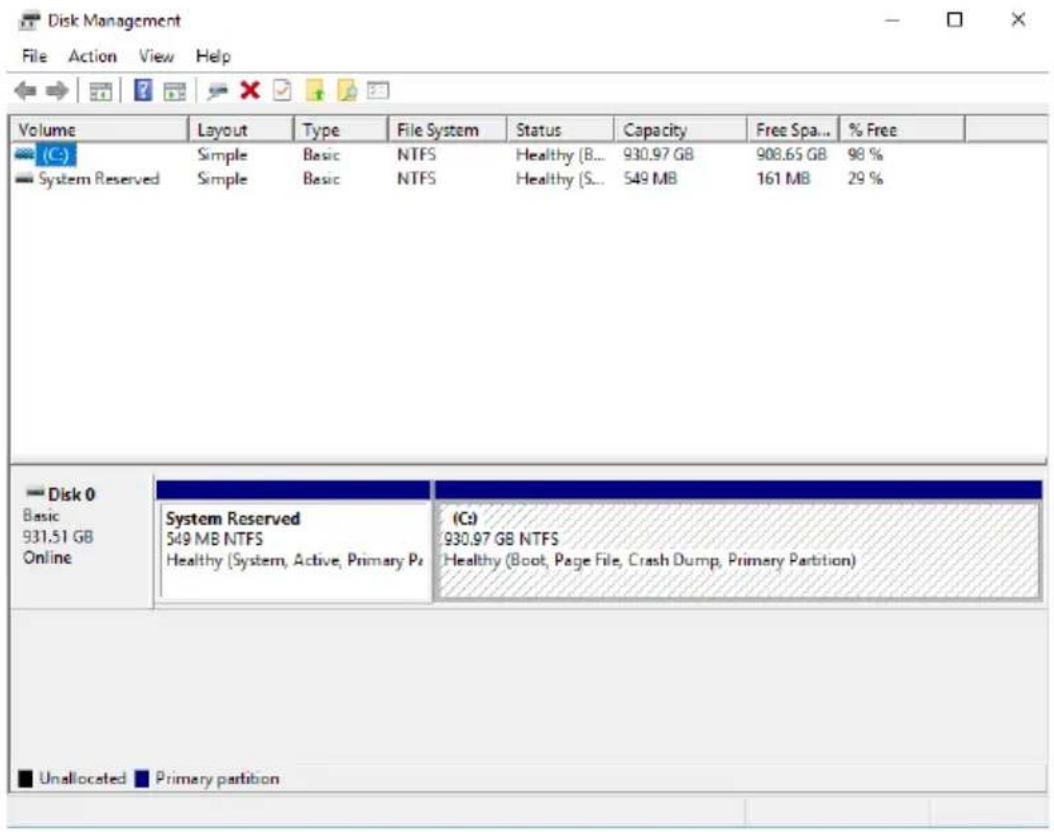
Step 3. Generate Key File
You can generate the new key by CLI utility or API code function.
The key file is stored on the C:\key

Step 4. Download Volume Key File
Use "Download Volume Key File" in the web management or use CLI "vsf dlkey" command to download volume key file into firmware and unlock the volume.

After you submit the key file, the following message is shown:
![Areca Technology Corporation [open all|close all] Raid System Console Quick Functions RAID Set Functions Volume Set Functions Create Volume Set Create Raid30/50/60 Delete Volume Set Modify Volume Set Check Volume Set Schedule Volume Check Stop Volume Check Download Volume Key file Security Functions…](/content/2026/05/986595/images/c81f516faa556870aab2442c3657948d4fa5c7e26681f1e70d2308060aef5b74.jpg)
In the Volume Set Information, it is changed to "Encrypted, Unlocked" status.

The unencrypted volume is visible in the system Disk Management.

Follow step 4. to unlock volume if volume locked.
Appendix G
RAID Concept
RAID Set
A RAID set is a group of disks connected to a RAID controller. A RAID set contains one or more volume sets. The RAID set itself does not define the RAID level (0, 1, 1E, 3, 5, 6, 10, 30, 50 60, etc); the RAID level is defined within each volume set. Therefore, volume sets are contained within RAID sets and RAID Level is defined within the volume set. If physical disks of different capacities are grouped together in a RAID set, then the capacity of the smallest disk will become the effective capacity of all the disks in the RAID set.
Volume Set
Each volume set is seen by the host system as a single logical device (in other words, a single large virtual hard disk). A volume set will use a specific RAID level, which will require one or more physical disks (depending on the RAID level used). RAID level refers to the level of performance and data protection of a volume set. The capacity of a volume set can consume all or a portion of the available disk capacity in a RAID set. Multiple volume sets can exist in a RAID set. For the RAID controller, a volume set must be created either on an existing RAID set or on a group of available individual disks (disks that are about to become part of a RAID set). If there are pre-existing RAID sets with available capacity and enough disks for the desired RAID level, then the volume set can be created in the existing RAID set of the user's choice.
RAID set 1 (3 Individual Disks)

Disk 0

Disk 1

Disk 2
Free Space
Volume 1 (RAID 5)
Volume 0 (1E)
In the illustration, volume 1 can be assigned a RAID level 5 of operation while volume 0 might be assigned a RAID level 1E of operation. Alternatively, the free space can be used to create volume 2, which could then be set to use RAID level 5.
Ease of Use Features
- Foreground Availability/Background Initialization
RAID 0 and RAID 1 volume sets can be used immediately after creation because they do not create parity data. However, RAID 3, 5, 6, 30, 50 or 60 volume sets must be initialized to generate parity information. In Background Initialization, the initialization proceeds as a background task, and the volume set is fully accessible for system reads and writes. The operating system can instantly access the newly created arrays without requiring a reboot and without waiting for initialization to complete. Furthermore, the volume set is protected against disk failures while initialing. If using Foreground Initialization, the initialization process must be completed before the volume set is ready for system accesses.
• Online Array Roaming
RAID controllers store RAID configuration information on the disk drives. The controller therefore protects the configuration settings in the event of controller failure. Online array roaming allows the administrators the ability to move a complete RAID set to another system without losing RAID configuration information or data on that RAID set. Therefore, if a server fails, the RAID set disk drives can be moved to another server with an Areca RAID controllers and the disks can be inserted in any order.
• Online Capacity Expansion
Online Capacity Expansion makes it possible to add one or more physical drives to a volume set without interrupting server operation, eliminating the need to backup and restore after reconfiguration of the RAID set. When disks are added to a RAID set, unused capacity is added to the end of the
RAID set. Then, data on the existing volume sets (residing on the newly expanded RAID set) is redistributed evenly across all the disks. A contiguous block of unused capacity is made available on the RAID set. The unused capacity can be used to create additional volume sets.
A disk, to be added to a RAID set, must be in normal mode (not failed), free (not spare, in a RAID set, or passed through to host) and must have at least the same capacity as the smallest disk capacity already in the RAID set.
Capacity expansion is only permitted to proceed if all volumes on the RAID set are in the normal status. During the expansion process, the volume sets being expanded can be accessed by the host system. In addition, the volume sets with RAID level 1, 10, 3, 5 or 6 are protected against data loss in the event of disk failure(s). In the case of disk failure, the volume set changes from “migrating” state to “migrating+degraded” state. When the expansion is completed, the volume set would then transition to “degraded” mode. If a global hot spare is present, then it further changes to the “rebuilding” state.
The expansion process is illustrated as following figure.

RAID controller redistributes the original volume set over the original and newly added disks, using the same fault-tolerance configuration. The unused capacity on the expand RAID set can then be used to create an additional volume set, with a different fault tolerance setting (if required by the user.)
After Array Expansion (Adding One Disk)

Disk 0
40 GB

Disk 1
40 GB

Disk 2
40 GB

Disk 3
40 GB
Free Space = 80GB Volume 1 = 40GB(D:) Volume 0 = 40GB(C:)
Array-A 160GB
• Online RAID Level and Stripe Size Migration
For those who wish to later upgrade to any RAID capabilities, a system with online RAID level/stripe size migration allows a simplified upgrade to any supported RAID level without having to reinstall the operating system.
The RAID controllers can migrate both the RAID level and stripe size of an existing volume set, while the server is on-line and the volume set is in use. Online RAID level/stripe size migration can prove helpful during performance tuning activities as well as when additional physical disks are added to the RAID controller. For example, in a system using two drives in RAID level 1, it is possible to add a single drive and add capacity and retain fault tolerance. (Normally, expanding a RAID level 1 array would require the addition of two disks). A third disk can be added to the existing RAID logical drive and the volume set can then be migrated from RAID level 1 to 5. The result would be parity fault tolerance and double the available capacity without taking the system down. A forth disk could be added to migrate to RAID level 6. It is only possible to migrate to a higher RAID level by adding a disk; disks in an existing array can't be reconfigured for a higher RAID level without adding a disk.
Online migration is only permitted to begin, if all volumes to be migrated are in the normal mode. During the migration process, the volume sets being migrated are accessed by the host system. In addition, the volume sets with RAID level 1, 1E, 10, 3, 5 or 6 are protected against data loss in the event
of disk failure(s). In the case of disk failure, the volume set transitions from migrating state to (migrating+degraded) state. When the migration is completed, the volume set transitions to degraded mode. If a global hot spare is present, then it further transitions to rebuilding state.
• Online Volume Expansion
Performing a volume expansion on the controller is the process of growing only the size of the latest volume. A more flexible option is for the array to concatenate an additional drive into the RAID set and then expand the volumes on the fly. This happens transparently while the volumes are online, but, at the end of the process, the operating system will detect free space at after the existing volume.
Windows, NetWare and other advanced operating systems support volume expansion, which enables you to incorporate the additional free space within the volume into the operating system partition. The operating system partition is extended to incorporate the free space so it can be used by the operating system without creating a new operating system partition.
You can use the Diskpart.exe command line utility, included with Windows Server 2003 or the Windows 2000 Resource Kit, to extend an existing partition into free space in the dynamic disk.
Third-party software vendors have created utilities that can be used to repartition disks without data loss. Most of these utilities work offline. Partition Magic is one such utility.
High Availability
• Global/Local Hot Spares
A hot spare is an unused online available drive, which is ready for replacing the failure disk. The hot spare is one of the most important features that RAID controllers provide to deliver a high degree of fault-tolerance. A hot spare is a spare physi-
cal drive that has been marked as a hot spare and therefore is not a member of any RAID set. If a disk drive used in a volume set fails, then the hot spare will automatically take its place and he data previously located on the failed drive is reconstructed on the hot spare.
Dedicated hot spare is assigned to serve one specified RAID set. Global hot spare is assigned to serve all RAID set on the RAID controller. Dedicated hot spare has higher priority than the global hot spare. For this feature to work properly, the hot spare must have at least the same capacity as the drive it replaces. The host spare function only works with RAID level 1, 1E, 3, 5, 6, 10, 30, 50, or 60 volume set.
The "Create Hot Spare" option gives you the ability to define a global/dedicated hot spare disk drive. To effectively use the hot spare feature, you must always maintain at least one drive that is marked as a global hot spare.
Important:
The hot spare must have at least the same capacity as the drive it replaces.
• Hot-Swap Disk Drive Support
The RAID controller chip includes a protection circuit that supports the replacement of SAS/SATA hard disk drives without having to shut down or reboot the system. A removable hard drive tray can deliver "hot swappable" fault-tolerant RAID solutions. This feature provides advanced fault tolerant RAID protection and "online" drive replacement.
• Auto Declare Hot-Spare
If a disk drive is brought online into a system operating in degraded mode, the RAID controllers will automatically declare the new disk as a spare and begin rebuilding the degraded volume. The Auto Declare Hot-Spare function requires that the smallest drive contained within the volume set in which the failure occurred.
In the normal status, the newly installed drive will be reconfigured an online free disk. But, the newly-installed drive is automatically assigned as a hot spare if any hot spare disk was used to rebuild and without new installed drive replaced it. In this condition, the Auto Declare Hot-Spare status will be disappeared if the RAID storage has since powered off/on.
The Hot-Swap function can be used to rebuild disk drives in arrays with data redundancy such as RAID level 1, 1E, 3, 5, 6, 10, 30, 50 and 60.
- Auto Rebuilding
If a hot spare is available, the rebuild starts automatically when a drive fails. The RAID controllers automatically and transparently rebuild failed drives in the background at user-definable rebuild rates. If a hot spare is not available, the failed disk drive must be replaced with a new disk drive so that the data on the failed drive can be automatically rebuilt and so that fault tolerance can be maintained.
RAID controllers will automatically restart the system and rebuilding process if the system is shut down or powered off abnormally during a reconstruction procedure condition. When a disk is hot swapped, although the system is functionally operational, the system may no longer be fault tolerant. Fault tolerance will be lost until the removed drive is replaced and the rebuild operation is completed.
During the automatic rebuild process, system activity will continue as normal, however, the system performance and fault tolerance will be affected.
- Adjustable Rebuild Priority
Rebuilding a degraded volume incurs a load on the RAID storage. The RAID controllers allow the user to select the rebuild priority to balance volume access and rebuild tasks appropriately. The Background Task Priority is a relative indication of how much time the controller devotes to a background operation, such as rebuilding or migrating.
RAID controller allows user to choose the task priority (Ultra Low (5%), Low (20%), Medium (50%), High (80%)) to balance volume set access and background tasks appropriately. For high array performance, specify an Ultra Low value. Like volume initialization, after a volume rebuilds, it does not require a system reboot.
High Reliability
- Hard Drive Failure Prediction
In an effort to help users avoid data loss, disk manufacturers are now incorporating logic into their drives that acts as an "early warning system" for pending drive problems. This system is called SMART. The disk integrated controller works with multiple sensors to monitor various aspects of the drive's performance, determines from this information if the drive is behaving normally or not, and makes available status information to RAID storage firmware that probes the drive and look at it.
The SMART can often predict a problem before failure occurs. The controllers will recognize a SMART error code and notify the administer of an impending hard drive failure.
• Auto Reassign Sector
Under normal operation, even initially defect-free drive media can develop defects. This is a common phenomenon. The bit density and rotational speed of disks is increasing every year, and so are the potential of problems. Usually a drive can internally remap bad sectors without external help using cyclic redundancy check (CRC) checksums stored at the end of each sector.
The RAID controller drives perform automatic defect reassignment for both read and write errors. Writes are always completed - if a location to be written is found to be defective, the drive will automatically relocate that write command to a new location and map out the defective location. If there is a re-
coverable read error, the correct data will be transferred to the host and that location will be tested by the drive to be certain the location is not defective. If it is found to have a defect, data will be automatically relocated, and the defective location is mapped out to prevent future write attempts.
In the event of an unrecoverable read error, the error will be reported to the host and the location will be flagged as being potentially defective. A subsequent write to that location will initiate a sector test and relocation should that location prove to have a defect. Auto Reassign Sector does not affect disk storage performance because it runs as a background task. Auto Reassign Sector discontinues when the operating system makes a request.
- Consistency Check
A consistency check is a process that verifies the integrity of redundant data. To verify RAID 3, 5, 6, 30, 50 or 60 redundancy, a consistency check reads all associated data blocks, computes parity, reads parity, and verifies that the computed parity matches the read parity.
Consistency checks are very important because they detect and correct parity errors or bad disk blocks in the drive. A consistency check forces every block on a volume to be read, and any bad blocks are marked; those blocks are not used again. This is critical and important because a bad disk block can prevent a disk rebuild from completing. We strongly recommend that you run consistency checks on a regular basis—at least once per week. Note that consistency checks degrade performance, so you should run them when the system load can tolerate it.
Data Protection
- Battery Backup
The RAID controllers are armed with a Battery Backup Module (BBM). While a Uninterruptible Power Supply (UPS) protects most servers from power fluctuations or failures, a BBM pro-
vides an additional level of protection. In the event of a power failure, a BBM supplies power to retain data in the RAID controller's cache, thereby permitting any potentially dirty data in the cache to be flushed out to secondary storage when power is restored.
The batteries in the BBM are recharged continuously through a trickle-charging process whenever the system power is on. The batteries protect data in a failed server for up to three or four days, depending on the size of the memory module. Under normal operating conditions, the batteries last for three years before replacement is necessary.
- Recovery ROM
RAID controller firmware is stored on the flash ROM and is executed by the I/O processor. The firmware can also be updated through the RAID controllers Thunderbolt port or Ethernet port without the need to replace any hardware chips. During the controller firmware upgrade flash process, it is possible for a problem to occur resulting in corruption of the controller firmware. With our Redundant Flash Image feature, the controller will revert back to the last known version of firmware and continue operating. This reduces the risk of system failure due to firmware crash.
Appendix H
Understanding RAID
RAID is an acronym for Redundant Array of Independent Disks. It is an array of multiple independent hard disk drives that provides high performance and fault tolerance. The RAID controller implements several levels of the Berkeley RAID technology. An appropriate RAID level is selected when the volume sets are defined or created. This decision should be based on the desired disk capacity, data availability (fault tolerance or redundancy), and disk performance. The following section discusses the RAID levels supported by the RAID controllers.
The RAID controllers makes the RAID implementation and the disks' physical configuration transparent to the host operating system. This means that the host operating system drivers and software utilities are not affected, regardless of the RAID level selected. Correct installation of the disk array and the controller requires a proper understanding of RAID technology and the concepts.
RAID 0
RAID 0, also referred to as striping, writes stripes of data across multiple disk drives instead of just one disk drive. RAID 0 does not provide any data redundancy, but does offer the best High-speed data throughput. RAID 0 breaks up data into smaller blocks and then writes a block to each drive in the array. Disk striping enhances performance because multiple drives are accessed simultaneously; the reliability of RAID level 0 is less because the entire array will fail if any one disk drive fails.
![graph TD A["Array Management"] --> B["RAID 0: Striping"] B --> C1["A0"] B --> C2["B0"] B --> C3["C0"] B --> C4["D0"] C1 --> D1["A1"] C2 --> D2["B1"] C3 --> D3["C2"] C4 --> D4["D2"] D1 --> E1["A2"] D2 --> E2["B2"] D3 --> E3["C3"] D4 --> E4["D3"] style A fill:#f9f,stroke:#333 style B fill:#ccf,stroke:…](/content/2026/05/986595/images/b7e9d73abb73fb254469adeab4a581440e6651dffcb0dc5aa268afadebeb81ce.jpg)
RAID 1
RAID 1 is also known as “disk mirroring”; data written on one disk drive is simultaneously written to another disk drive. Read performance will be enhanced if the array controller can, in parallel, access both members of a mirrored pair. During writes, there will be a minor performance penalty when compared to writing to a single disk. If one drive fails, all data (and software applications) are preserved on the other drive. RAID 1 offers extremely high data reliability, but at the cost of doubling the required data storage capacity.
![graph TD A["Array Management"] --> B["RAID1: Mirroring"] B --> C["A0 B0 C0 D0"] C --> D["Disk 1"] B --> E["A0 B0 C0 D0"] E --> F["Disk 2"] style A fill:#f9f,stroke:#333 style B fill:#ccf,stroke:#333 style C fill:#cfc,stroke:#333 style D fill:#fcc,stroke:#333 style E fill:#fcc,stroke:#333 note1["Logi…](/content/2026/05/986595/images/b4638c23367d8062bc205c4eafdb652a5dd69bd303af7de05cdd5073c230a2bf.jpg)
RAID 10(1E)
RAID 10(1E) is a combination of RAID 0 and RAID 1, combining stripping with disk mirroring. RAID Level 10 combines the fast performance of Level 0 with the data redundancy of level 1. In this configuration, data is distributed across several disk drives, similar to Level 0, which are then duplicated to another set of drive for data protection. RAID 10 has been traditionally implemented using an even number of disks, some hybrids can use an odd number of disks as well. Illustration is an example of a hybrid RAID 10(1E) array comprised of five disks; A, B, C, D and E. In this configuration, each strip is mirrored on an adjacent disk with wrap-around. Areca RAID 10 offers a little more flexibility in choosing the number of disks that can be used to constitute an array. The number can be even or odd.
![graph TD A["Logical Disk"] --> B["Array Management"] B --> C1["A1"] B --> C2["A3"] B --> C3["A6"] B --> C4["A8"] B --> C5["A9"] B --> C6["A7"] B --> C7["A10"] B --> C8["A10"] C1 --> D1["Disk A"] C2 --> D2["Disk B"] C3 --> D3["Disk C"] C4 --> D4["Disk D"] C5 --> D5["Disk E"] C6 --> D6["Disk D"] C7 --…](/content/2026/05/986595/images/8e5cb7d8fb2848811f55be32618fc82583738a72b94f4d3186549a4bf309bc1e.jpg)
RAID 3
RAID 3 provides disk striping and complete data redundancy though a dedicated parity drive. RAID 3 breaks up data into smaller blocks, calculates parity by performing an exclusive-or on the blocks, and then writes the blocks to all but one drive in the array. The parity data created during the exclusive-or is then written to the last drive in the array. If a single drive fails, data is still available by computing the exclusive-or of the contents corresponding strips of the surviving member disk. RAID 3 is best for applications that require very fast data- transfer rates or long data blocks.
![graph TD A["Array Management"] --> B["RAID3: Bit-Interleaved Parity"] B --> C1["A0"] B --> C2["B0"] B --> C3["C0"] B --> C4["D0"] C1 --> D1["D1"] C2 --> D2["D2"] C3 --> D3["D3"] C4 --> D4["D4"] C1 --> D2 C2 --> D3 C3 --> D4 C4 --> D5["D5"] D1 --> E1["Disk 1"] D2 --> E2["Disk 2"] D3 --> E3["Disk 3"]…](/content/2026/05/986595/images/a31563336b3139f8eac68a42f1b9021b80b64cab8b3c3c8c1b92cccb22e46d0c.jpg)
RAID 5
RAID 5 is sometimes called striping with parity at byte level. In RAID 5, the parity information is written to all of the drives in the controllers rather than being concentrated on a dedicated parity disk. If one drive in the system fails, the parity information can be used to reconstruct the data from that drive. All drives in the array system can be used for seek operations at the same time, greatly increasing the performance of the RAID system. This relieves the write bottleneck that characterizes RAID 4, and is the primary reason that RAID 5 is more often implemented in RAID arrays.
![graph TD A["Array Management"] --> B["RAID 5 : Block-Interleaved Distributed-Parity"] B --> C1["0 Parity"] B --> C2["1 Parity"] B --> C3["2 Parity"] B --> C4["3 Parity"] B --> C5["4 Parity"] B --> C6["A0-A3, Disk 1"] B --> C7["B0-B4, Disk 2"] B --> C8["C0-C3, Disk 3"] B --> C9["D0-D4, Disk 4"] B -->…](/content/2026/05/986595/images/3a36bd0621cbd52c2ac04c2fcbce5ac9dca98e5657f96935964735f4766aee30.jpg)
RAID 6
RAID 6 provides the highest reliability. It is similar to RAID 5, but it performs two different parity computations or the same computation on overlapping subsets of the data. RAID 6 can offer fault tolerance greater than RAID 1 or RAID 5 but only consumes the capacity of 2 disk drives for distributed parity data. RAID 6 is an extension of RAID 5 but uses a second, independent distributed parity scheme. Data is striped on a block level across a set of drives, and then a second set of parity is calculated and written across all of the drives.
![graph TD A["Logical Disk"] --> B["Array Management"] B --> C["RAID 6 : P+Q Redundancy"] C --> D1["A0: Disk 1"] C --> D2["B0: Disk 2"] C --> D3["C0: Disk 3"] C --> D4["D0: Disk 4"] C --> D5["E0: Disk 5"] C --> D6["F0: Disk 6"] D1 --> E1["A1: Disk 1"] D2 --> E2["B1: Disk 2"] D3 --> E3["C2: Disk 3"] D4…](/content/2026/05/986595/images/1657f816b583404ac94fcc82de465b9a07541681ff6431d4c5aea7d0a10ae6e9.jpg)
RAID x0
RAID level-x0 refers to RAID level 00, 100, 30, 50 and 60. RAID x0 is a combination multiple RAID x volume sets with RAID 0 (striping). Striping helps to increase capacity and performance without adding disks to each RAID x array. The operating system uses the spanned volume in the same way as a regular volume. Up to one drive in each sub-volume (RAID 3 or 5) may fail without loss of data. Up to two drives in each sub-volume (RAID 6) may fail without loss of data. RAID level x0 allows more physical drives in an array. The benefits of doing so are larger volume sets, increased performance, and increased reliability.
The following illustration is an example of a RAID level x0 logical drive.
![graph TD A["Array Management"] --> B["RAID X0: Striping"] B --> C1["RAID X Volume, X=0,10(1E), 3, 5, 6"] B --> C2["RAID X Volume, X=0,10(1E), 3, 5, 6"] D["Logical Disk"] -.-> A](/content/2026/05/986595/images/398a33b402a72284e8d174add8ee66ac3d4d9d23aa7a3c460f8f47b593e72910.jpg)
Important:
RAID level 00, 100, 30, 50 and 60 can support up to eight RAID set. If volume is RAID level 00, 100, 30, 50, or 60, you can't change the volume to another RAID level. If volume is RAID level 0, 1, 10(1E), 3, 5, or 6, you can't change the volume to RAID level 00, 100, 30, 50, or 60.
JBOD
(Just a Bunch Of Disks) A group of hard disks in a RAID box are not set up as any type of RAID configuration. All drives are available to the operating system as an individual disk. JBOD does not provide data redundancy.
Single Disk (Pass-Through Disk)
Pass through disk refers to a drive that is not controlled by the RAID firmware and thus can not be a part of a RAID volume. The drive is available to the operating system as an individual disk.
Summary of RAID Levels
ARC-8050T3U Thunderbolt RAID storage supports RAID Level 0, 1, 10(1E), 3, 5, 6, 30, 50 and 60. The following table provides a summary of RAID levels.
| RAID Level Comparison | |||
| RAID Level | Description Disks | Requirement (Minimum) | Data Availability |
| 0 Also known as striping. Data distributed across multiple drives in the array. There is no data protection. | 1 No data Protection | ||
| 1 Also known as mirroring. All data replicated on 2 separated disks. N is almost always 2. Due to this is a 100 % duplication, so is a high costly solution. | 2 Up to one disk failure | ||
| 10(1E) Also known as mirroring and striping. Data is written to two disks simultaneously, and allows an odd number or disk. Read request can be satisfied by data read from wither one disk or both disks. | 3 Up to one disk failure in each sub-volume | ||
| 3 Also known Bit-Interleaved Parity. Data and parity information is subdivided and distributed across all data disks. Parity information normally stored on a dedicated parity disk. | 3 Up to one disk failure | ||
| 5 Also known Block-Interleaved Distributed Parity. Data and parity information is subdivided and distributed across all disk. Parity information normally is interspersed with user data. | 3 Up to one disk failure | ||
| 6 RAID 6 provides highest reliability, but not widely used. Similar to RAID 5, but does two different parity computations or the same computation on overlapping subsets of the data. The RAID 6 can offer fault tolerance greater that RAID 1 or RAID 5 but only consumes the capacity of 2 disk drives for distributed parity data. | 4 Up to two disk failure | ||
| 30 RAID | 30 is a combination multipleRAID 3 volume sets with RAID 0 (striping) | 6 Up to | one diskfailure in eachsub-volume |
| 50 RAID | 50 is a combination multipleRAID 5 volume sets with RAID 0 (striping) | 6 Up to | one diskfailure in eachsub-volume |
| 60 RAID | 60 is a combination multipleRAID 6 volume sets with RAID 0 (striping) | 8 Up to | two diskfailure in eachsub-volume |
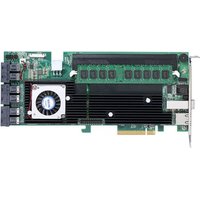
- COPYRIGHT AND TRADEMARKS
- FCC STATEMENT
- MANUFACTURER'S DECLARATION FOR CE CERTIFICATION
- CONTENTS
- INTRODUCTION......8
- INSTALLATION....13
- ARCHTTP CONFIGURATION 59
- WEB BROWSER-BASED CONFIGURATION 64
- APPENDIX E 141
- APPENDIX F 147
- APPENDIX G....152
- APPENDIX H....162
- INTRODUCTION
- 1.1 OVERVIEW
- UNLEASH YOUR CREATIVITY FASTER THAN EVER
- UNPARALLELED PERFORMANCE FOR 4K WORKFLOW
- THUNDERBOLT 3 AND USB 3.2 GEN2 READY
- 1.2 FEATURES
- CONTROLLER ARCHITECTURE
- RAID FEATURES
- SYSTEM ENVIRONMENT
- INSTALLATION
- 2.1 BEFORE YOU FIRST INSTALLING
- CHECKLIST
- SYSTEM REQUIREMENTS
- 2.2 SUMMARY OF RAID STORAGE SETUP STEPS
- FOR MACOS
- FOR WINDOWS
- 2.3 RAID STORAGE VIEW
- DISK SLOT NUMBERS
- DRIVE TRAY LED INDICATORS
- LCD PANEL LED INDICATORS
- REAR VIEW FUNCTION DESCRIPTION
- 2.4 SETTING UP RAID STORAGE
- 2.4.1 PHYSICALLY INSTALL RAID STORAGE AND DRIVES
- STEP 1. INSTALL THE DRIVES IN THE ARC-8050T3U STORAGE
- STEP 2. CONNECTING THUNDERBOLT 3 PORTS ON RAID STORAGE
- THUNDERBOLT COMPUTER PORT CONNECTION
- NOTE
- THUNDERBOLT DAISY CHAIN TOPOLOGIES
- USB-ONLY COMPUTER PORT CONNECTION
- STEP 3. EXPANSION CONNECTION (OPTIONAL)
- STEP 4. CONNECTING MONITOR PORT (OPTIONAL)
- LAN PORT CONNECTION
- STEP 5. CONNECTING RAID STORAGE POWER
- TO POWER THE RAID STORAGE
- TO POWER THE ARC-8050T3U-6M USING 4-PIN XLR D.C. POWER CONNECTIONS
- 2.4.2 MAC USERS
- 2.4.2.1 INSTALL ARECA DRIVER FOR MAC
- IF YOUR MAC VERSION IS BELOW 11.0, YOU CAN SKIP THIS STEP STEP 1. START UP YOUR COMPUTER IN MACOS RECOVERY
- STEP 2. INSTALLING ARECA DRIVER
- 2.4.2.2 INSTALL THE MRAID UTILITY
- 2.4.2.3 CONFIGURE RAID VOLUMES
- 2.4.2.4 FORMAT AND PARTITION RAID VOLUMES
- TO FORMAT AND PARTITION YOUR UNIT
- 2.4.2.5 MAKE A BOOTABLE RAID VOLUME
- 2.4.2.6 UNMOUNTING RAID VOLUMES
- 2.4.3 WINDOWS USERS
- 2.4.3.1 INSTALL THE THUNDERBOLT SOFTWARE
- 2.4.3.2 CONFIGURE RAID VOLUMES
- 2.4.3.3 FORMAT RAID VOLUMES
- 2.4.3.4 UNMOUNTING RAID VOLUMES
- ARCHTTP CONFIGURATION
- GENERAL CONFIGURATION
- MAIL (ALERT BY MAIL) CONFIGURATION
- SMTP SERVER CONFIGURATION
- MAIL ADDRESS CONFIGURATIONS
- EVENT NOTIFICATION CONFIGURATIONS
- SNMP TRAPS CONFIGURATION
- SNMP TRAP CONFIGURATIONS
- SNMP SYSTEM CONFIGURATIONS
- SNMP TRAP NOTIFICATION CONFIGURATIONS
- RESCAN DEVICE CONFIGURATION
- COLLECT SUPPORT DATA
- WEB BROWSER-BASED CONFIGURATION
- 4.1 START-UP MCRAID STORAGE MANAGER
- MCRAID STORAGE MANAGER THROUGH LAN PORT (OUT-OF-BAND)
- 4.2 MCRAID MAIN WINDOW
- 4.3 MAIN MENU
- 4.4 QUICK FUNCTION
- 4.5 RAID SET FUNCTIONS
- 4.5.1 CREATE RAID SET
- 4.5.2 DELETE RAID SET
- 4.5.3 EXPAND RAID SET
- 4.5.4 OFFLINE RAID SET
- 4.5.5 RENAME RAID SET
- 4.5.6 ACTIVATE INCOMPLETE RAID SET
- 4.5.7 CREATE HOT SPARE
- 4.5.8 DELETE HOT SPARE
- 4.5.9 RESCUE RAID SET
- CAUTION
- 4.6 VOLUME SET FUNCTIONS
- 4.6.1 CREATE VOLUME SET (0/1/10/3/5/6)
- VOLUME NAME
- VOLUME RAID LEVEL
- CAPACITY
- GREATER TWO TB VOLUME SUPPORT
- NO
- 64BIT LBA
- USE 4K BLOCK
- INITIALIZATION MODE
- STRIPE SIZE
- CACHE MODE
- VOLUME WRITE PROTECTION
- FULL VOLUME ENCRYPTION
- TAGGED COMMAND QUEUING
- SCSI CHANNEL/SCSI ID/SCSI LUN
- 4.6.2 CREATE RAID30/50/60 (VOLUME SET 30/50/60)
- 4.6.3 DELETE VOLUME SET
- 4.6.4 MODIFY VOLUME SET
- 4.6.4.1 VOLUME GROWTH
- TO EXPAND AN EXISTING VOLUME NOTICED
- FOR GREATER 2TB EXPANSION
- 4.6.4.2 VOLUME SET MIGRATION
- 4.6.4.3 VOLUME WRITE PROTECTION
- 4.6.5 CHECK VOLUME SET
- 4.6.6 SCHEDULE VOLUME CHECK
- 4.6.7 STOP VOLUME SET CHECK
- 4.6.8 DOWNLOAD VOLUME KEY FILE
- 4.7 SECURITY FUNCTION
- 4.7.1 CREATE SED RAID SET
- 4.7.2 DELETE SED RAID SET
- 4.7.3 DELETE ISE RAID SET
- 4.7.4 SECURITY KEY SETUP
- 4.7.4.1 SED KEY MANAGEMENT-CREATION
- 4.7.4.2 SED KEY MANAGEMENT-MODIFICATION
- 4.7.5 IMPORT SECURITY KEY
- 4.7.6 ERASE FAILED DISK
- 4.7.7 REVERTSP
- 4.8 PHYSICAL DRIVE
- 4.8.1 CREATE PASS-THROUGH DISK
- 4.8.2 MODIFY PASS-THROUGH DISK
- 4.8.3 DELETE PASS-THROUGH DISK
- 4.8.4 CLONE DISK
- CLONE DISK PROCEDURE
- 4.8.4.1 CLONE AND REPLACE
- 4.8.4.2 CLONE ONLY
- 4.8.5 ABORT CLONING
- 4.8.6 SET DISK TO BE FAILED
- 4.8.7 ACTIVATE FAILED DISK
- 4.8.8 IDENTIFY ENCLOSURE
- 4.8.9 IDENTIFY DRIVE
- 4.9 SYSTEM CONTROLS
- 4.9.1 SYSTEM CONFIG
- SYSTEM BEEPER SETTING
- BACKGROUND TASK PRIORITY
- JBOD/RAID CONFIGURATION
- SATA NCQ SUPPORT
- HDD READ AHEAD CACHE
- VOLUME DATA READ AHEAD
- HDD QUEUE DEPTH
- EMPTY HDD SLOT LED
- MAX COMMAND LENGTH
- AUTO ACTIVATE INCOMPLETE RAID
- DISK WRITE CACHE MODE
- WRITE SAME FOR INITIALIZATION
- HOT PLUGGED DISK FOR REBUILDING
- DISK CAPACITY TRUNCATION MODE
- SMART OPTION FOR HDD
- SMART POLLING INTERVAL
- 4.9.2 ADVANCED CONFIGURATION
- TLER SETTING
- TIMEOUT SETTING
- NUMBER OF RETRIES
- BUFFER THRESHOLD
- READ AHEAD COUNT
- READ AHEAD REQUESTS
- AMOUNT OF READ AHEAD
- NUMBER OF AV STREAM
- OPTIMIZE AV RECORDING
- READ PERFORMANCE MARGIN
- WRITE PERFORMANCE MARGIN
- AJA MODE USAGE
- EXAMPLE
- HOST COMMAND QUEUE MODE
- SAVE SED KEY IN CONTROLLER
- FAIL DISK FOR READING ERROR
- THUNDERBOLT RECEIVE SLEEP REQUEST
- 4.9.3 HDD POWER MANAGEMENT
- ARECA TECHNOLOGY CORPORATION
- STAGGER POWER ON CONTROL
- TIME TO HDD LOW POWER IDLE
- TIME TO HDD LOW RPM MODE
- TIME TO SPIN DOWN IDLE HDD
- SATA POWER UP IN STANDBY
- DELAY FOR PHY TO STABLE
- SSD STOP UNIT WHEN SHUTDOWN
- 4.9.4 ETHERNET CONFIGURATION
- DHCP FUNCTION
- LOCAL IP ADDRESS
- GATEWAY IP ADDRESS
- SUBNET MASK
- HTTP PORT NUMBER
- TELNET PORT NUMBER
- SMTP PORT NUMBER
- 4.9.5 ALERT BY MAIL CONFIGURATION
- 4.9.6 SNMP CONFIGURATION
- 4.9.7 NTP CONFIGURATION
- NTP SEVER ADDRESS
- TIME ZONE
- AUTOMATIC DAYLIGHT SAVING
- 4.9.8 VIEW EVENTS/MUTE BEEPER
- 4.9.9 GENERATE TEST EVENT
- 4.9.10 CLEAR EVENTS BUFFER
- 4.9.11 MODIFY PASSWORD
- 4.9.12 UPDATE FIRMWARE
- 4.10 INFORMATION
- 4.10.1 RAID SET HIERARCHY
- 4.10.1.1 HDD XFER SPEED
- 4.10.2 SAS CHIP INFORMATION
- 4.10.3 SYSTEM INFORMATION
- 4.10.4 HARDWARE MONITOR
- APPENDIX A
- UPGRADING FLASH ROM UPDATE PROCESS
- A-1 OVERVIEW
- A-2 UPGRADING FIRMWARE THROUGH MCRAID STORAGE MANAGER
- A-3 UPGRADING FIRMWARE THROUGH CLI
- APPENDIX B
- BATTERY BACKUP MODULE (ARC-6120BA-T021-T3)
- B-1 BBM CONNECTOR AND COMPONENTS
- B-2 STATUS OF BBM
- B-3 INSTALLATION
- WARNING
- B-4 BATTERY BACKUP CAPACITY
- B-5 OPERATION
- B-6 BATTERY FUNCTIONALITY TEST PROCEDURE
- B-7 CHANGING THE BATTERY BACKUP MODULE
- B-8 BBM SPECIFICATIONS
- MECHANICAL
- ENVIRONMENTAL
- APPENDIX C
- SNMP OPERATION & INSTALLATION
- C-1 OVERVIEW
- C-2 SNMP DEFINITION
- C-3 SNMP INSTALLATION
- STEP 1. INSTALLING THE SNMP MANAGER SOFTWARE ON THE CLIENT
- STEP 2. COMPILING THE MIB DESCRIPTION FILE WITH THE MANAGEMENT
- STEP 3. SNMP SERVICE METHOD
- C-3-1 USING ARCHTTP
- C-3-2 USING ONBOARD NIC INSTALLATION
- APPENDIX D
- DEVICE EVENT
- APPENDIX E
- SELF-ENCRYPTING DISK (SED) ENCRYPTION
- STEP 2. CREATE VOLUME SET
- STEP 3. SED KEY CREATION
- STEP 4. SELF-ENCRYPTING DISK (SED) READY
- STEP 5. GENERATE NEW SED KEY
- STEP 6. EXPORTING SED KEY
- STEP 7. CLEAN SAVED SED KEY
- SAVE SEDKEY IN CONTROLLER
- IMPORT SECURITY KEY
- ENTER SED KEY BY USER PASSWORD
- APPENDIX F
- STEP 2. CREATE VOLUME AND ENABLE "FULL VOLUME ENCRYPTION
- STEP 3. GENERATE KEY FILE
- STEP 4. DOWNLOAD VOLUME KEY FILE
- APPENDIX G
- RAID CONCEPT
- RAID SET
- VOLUME SET
- EASE OF USE FEATURES
- FOREGROUND AVAILABILITY/BACKGROUND INITIALIZATION
- ONLINE ARRAY ROAMING
- ONLINE CAPACITY EXPANSION
- ONLINE RAID LEVEL AND STRIPE SIZE MIGRATION
- ONLINE VOLUME EXPANSION
- HIGH AVAILABILITY
- GLOBAL/LOCAL HOT SPARES
- IMPORTANT
- HOT-SWAP DISK DRIVE SUPPORT
- AUTO DECLARE HOT-SPARE
- AUTO REBUILDING
- ADJUSTABLE REBUILD PRIORITY
- HIGH RELIABILITY
- HARD DRIVE FAILURE PREDICTION
- AUTO REASSIGN SECTOR
- CONSISTENCY CHECK
- DATA PROTECTION
- BATTERY BACKUP
- RECOVERY ROM
- APPENDIX H
- UNDERSTANDING RAID
- RAID 0
- RAID 1
- RAID 10(1E)
- RAID 3
- RAID 5
- RAID 6
- RAID X0
- JBOD
- SINGLE DISK (PASS-THROUGH DISK)
- SUMMARY OF RAID LEVELS
Brand : Areca
Model : ARC-8050T3U-4A-88TB
Category : Hard Drive