ARC-8050T3U-4A-72TB - Hard Drive Areca - Free user manual and instructions
Find the device manual for free ARC-8050T3U-4A-72TB Areca in PDF.


Pick your language and provide your email: we'll send you a specifically translated version.
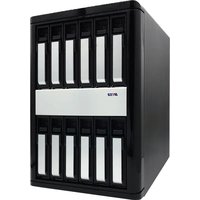
| Product Type | RAID Storage System |
| Model | ARC-8050T3U-4A-72TB |
| Brand | Areca |
| Total Raw Capacity | 72 TB |
| Number of Drive Bays | 4 |
| Drive Form Factor | 3.5-inch SATA/SAS |
| Supported RAID Levels | RAID 0, 1, 5, 6, 10, 50, 60, JBOD |
| Host Interface | Thunderbolt 3 (USB-C) |
| Data Transfer Rate | Up to 40 Gbps (Thunderbolt 3) |
| Power Supply | External AC adapter, 100-240V, 50/60Hz |
| Power Consumption | Approximately 50W (idle), 80W (active) |
| Cooling | 1 x 120mm silent fan |
| Dimensions (W x H x D) | 7.9 x 7.3 x 11.8 inches (200 x 185 x 300 mm) |
| Weight | Approximately 12.1 lbs (5.5 kg) without disks |
| Operating Temperature | 41°F to 95°F (5°C to 35°C) |
| Manageability | Web-based GUI, LCD panel, email alerts |
| Security | Password protection, encryption (AES-256) optional |
| Warranty | 3 years limited warranty |
| Included Accessories | Thunderbolt 3 cable, power adapter, quick start guide |
Frequently Asked Questions - ARC-8050T3U-4A-72TB Areca
What is the maximum capacity supported by the ARC-8050T3U-4A-72TB?
The unit comes pre-populated with 72TB total raw capacity using four 18TB drives. You can replace drives with larger ones up to 24TB each for up to 96TB (RAID 0) or less depending on RAID level.
Which RAID levels does this enclosure support?
It supports RAID 0, 1, 5, 6, 10, 50, 60, and JBOD. You can configure via the web interface or LCD panel.
Can I use this drive with a Windows PC?
Yes, the Thunderbolt 3 interface is compatible with Windows 10/11 and macOS. You may need to install the Areca RAID management software.
How do I replace a failed hard drive?
The drives are hot-swappable. Simply unlatch the tray, remove the failed drive, insert a new one, and the RAID will rebuild automatically if configured.
Is there a way to monitor the system health?
Yes, via the web-based GUI or the built-in LCD panel. You can also configure email alerts for drive failures or temperature warnings.
Does this unit support encryption?
Hardware encryption (AES-256) is optionally supported with the purchase of a license or specific drive models. Check the Areca website for details.
What is the noise level of this enclosure?
It uses a single 120mm fan that operates quietly. Under normal load, it is around 25 dB, similar to a whisper.
Can I daisy-chain multiple units?
Yes, the Thunderbolt 3 port supports daisy-chaining up to 6 devices. Ensure adequate power and cable length.
What is the power consumption in standby?
In standby mode, power consumption drops to approximately 15W. The drives spin down after a set period of inactivity.
How do I reset the administrator password?
If you forget the password, press and hold the reset button on the rear panel for 10 seconds using a paperclip. This restores factory defaults.
User questions about ARC-8050T3U-4A-72TB Areca
0 question about this device. Answer the ones you know or ask your own.
Ask a new question about this device
No questions yet. Be the first to ask one.
Download the instructions for your Hard Drive in PDF format for free! Find your manual ARC-8050T3U-4A-72TB - Areca and take your electronic device back in hand. On this page are published all the documents necessary for the use of your device. ARC-8050T3U-4A-72TB by Areca.
USER MANUAL ARC-8050T3U-4A-72TB Areca

Manual assistant
Powered by Anthropic
Waiting for your message
Product information
Brand : Areca
Model : ARC-8050T3U-4A-72TB
Category : Hard Drive