ARC-4038-12 - Hard Drive Areca - Free user manual and instructions
Find the device manual for free ARC-4038-12 Areca in PDF.


| Product Type | Hard Drive Enclosure |
| Brand | Areca |
| Model | ARC-4038-12 |
| Form Factor | 3U Rackmount |
| Number of Bays | 12 |
| Drive Interface | SAS 3.0 / SATA III |
| Backplane | Supports 12Gb/s SAS |
| RAID Support | Hardware RAID via optional controller |
| Host Interface | Mini-SAS HD (SFF-8644) |
| Cooling | 3 x 80mm hot-swappable fans |
| Power Supply | Dual redundant 400W (80+ Gold) |
| LED Indicators | Power, status, activity per drive |
| Dimensions (W x H x D) | 19 x 5.2 x 26 inches |
| Weight | 29.5 lbs (13.4 kg) without drives |
| Material | Heavy-duty steel chassis |
| Operating Temperature | 0°C to 35°C |
| Humidity | 20% to 80% non-condensing |
| Cleaning | Use a dry cloth; avoid liquids |
| Safety Features | Over-current, over-voltage, short-circuit protection |
| Spare Parts | Fan modules, power supplies, drive trays available separately |
Frequently Asked Questions - ARC-4038-12 Areca
User questions about ARC-4038-12 Areca
0 question about this device. Answer the ones you know or ask your own.
Ask a new question about this device
Download the instructions for your Hard Drive in PDF format for free! Find your manual ARC-4038-12 - Areca and take your electronic device back in hand. On this page are published all the documents necessary for the use of your device. ARC-4038-12 by Areca.
USER MANUAL ARC-4038-12 Areca
Areca ARC-4038 series
8/12-Bays 12Gb/s SAS Tower JBOD Enclosure
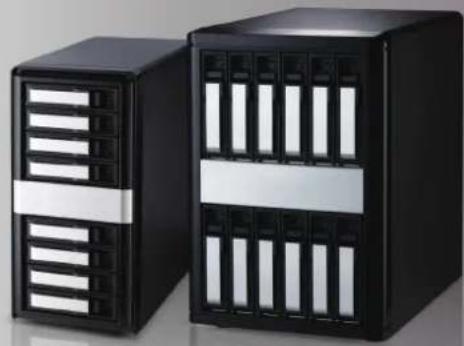
natural_image
Two black server units with ventilation grilles, one front and one side, displayed against a plain background (no text or symbols visible)Step 1: Unpack the ARC-4038 Unit
Inspect ARC-4038 JBOD enclosure. If it appears damaged, or if any items of the contents listed below are missing or damaged, please contact your dealer or distributor.
Checklist
- 1 x Power cord
• 1 x RJ11 to RS-232 DB9 cable
• 32/48 x drive mounting screws (4 per drive tray)
• 1 x ARC-4038 series quick installation guide
Step 2: Install SAS/SATA Drives
Secure the drive to the tray by four of the mounting screws.
Step 3: Slide the Drives into Enclosure
Step 4: Connect to Host Computer or Next JBOD
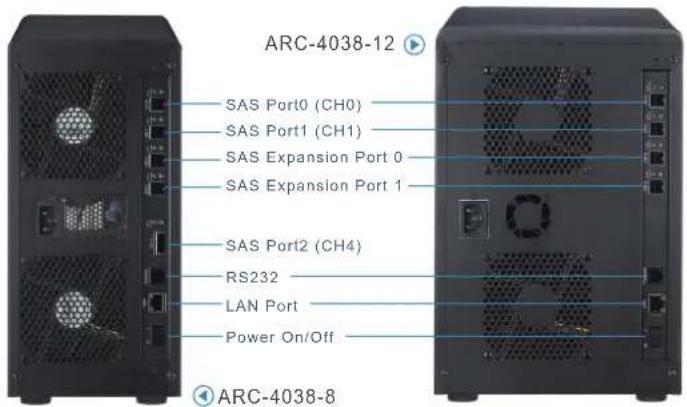
There are four SFF-8644 connectors and one SFF-8088 connector (8 bays only) on the rear of ARC-4038.
Host Port Connection
Connect ARC-4038 to a single host using a SFF-8644 cable.
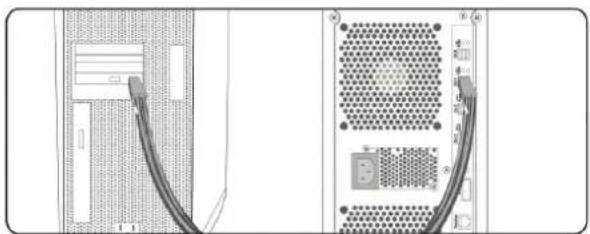
natural_image
Diagram showing two cable connections from a device wall to a server rack (no text or symbols present)Expansion Port Connection
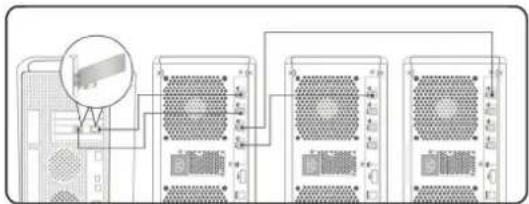
ARC-4038 contains two expansion ports. Expansion ports may support being attached to SAS initiator ports, SAS and/or SATA target ports, and to other JBOD.
Step 5: Connect RS232C Monitor Port
The ARC-4038 JBOD enclosure can be configured via a VT-100 compatible terminal or a PC running a VT-100 terminal emulation program. You can attach a serial (Character-Based) terminal or server com port to the SAS JBOD enclosure for access to the text-based setup menu.
Step 6: Power Up the JBOD Enclosure
Step 7: Configure JBOD Enclosure
The default configuration is suitable for general purposes. Please see the Command Line Interface (CLI) functions on the manual if you want to change the default configuration.
If you need more detail information, please download ARC-4038 user manual from the website below:
- http://www.areca.com.tw/products/12gsasjbod.htm
- http://www.areca.com.tw/support/main.htm
Product Features
ARC-4038-8
| Form Factor | Desktop 8-bay Desktop 12-bay | |
| Disk Port | 8 x 12Gb/s SAS/SATA 12 x 12Gb/s SAS/SATA | |
| External Port | 4 x SFF-8644 & 1 x SFF-8088 | 4 x SFF-8644 |
| Cooling Fan | 2 x 2700rpm 2 x 2700rpm | |
| Power Supply | 270W 400W | |
| Dimension(W/H/D) | 5.7 x 11.8 x 11.4 in (146x302x290 mm) | 8.1 x 12.2 x 11.4 in (206x310x290 mm) |
| Weight | 14.9 lbs / 6.8Kg | 20.8 lbs / 9.5Kg |
| Management | 1 x 6-pin UART RJ-11 connector / 1 x RJ-45 LAN connector | |



At the Heart of Storage
TEL:886-2-87974060 FAX: 886-2-87975970
Technical Support: support@areca.com.tw
Sales Information: sales@areca.com.tw