
AXT901 - Wireless Microphone SHURE - Free user manual and instructions
Find the device manual for free AXT901 SHURE in PDF.


| Product Type | Wireless Microphone Receiver (2-channel) |
| Brand | Shure |
| Model | AXT901 |
| Frequency Range | 470-698 MHz (varies by region) |
| Dimensions (H x W x D) | 44 x 483 x 375 mm (1.73 x 19 x 14.8 in) |
| Weight | 4.1 kg (9.0 lbs) |
| Power Supply | External power supply, 100-240 V AC, 50/60 Hz |
| Power Consumption | 36 W max |
| Audio Output | XLR (balanced), 1/4" (unbalanced), AES3 digital |
| Frequency Response | 20 Hz - 20 kHz |
| Dynamic Range | 120 dB (typical) |
| RF Sensitivity | -93 dBm (typical) |
| Display | Backlit LCD, 2.3" (58 mm) |
| Key Features | Dual-channel diversity reception, Ethernet networking, AES-256 encryption |
| Antenna Type | External (BNC connectors), diversity antennas |
| Remote Control | Via Shure Wireless Workbench software |
| Operating Temperature | 0°C to 45°C (32°F to 113°F) |
| Storage Temperature | -20°C to 60°C (-4°F to 140°F) |
| Cleaning Instructions | Wipe with a dry, soft cloth; do not use solvents |
| Safety Notes | Use only supplied power supply; avoid exposure to rain or moisture |
Frequently Asked Questions - AXT901 SHURE
User questions about AXT901 SHURE
0 question about this device. Answer the ones you know or ask your own.
Ask a new question about this device
Download the instructions for your Wireless Microphone in PDF format for free! Find your manual AXT901 - SHURE and take your electronic device back in hand. On this page are published all the documents necessary for the use of your device. AXT901 by SHURE.
USER MANUAL AXT901 SHURE
Axient Charging Module
Online user guide for AXT901 and AXT902 charging modules.
Version: 1.1 (2024-K)
Table of Contents
| Installation | 4 | ||
| AXT901 AXT902 Axient Charging Module | 3 | Included Components | 4 |
| AXT901 and AXT902 Charging Modules | 3 | Certifications | 4 |
| WARNING | 3 |
AXT901 AXT902
Axient Charging Module
AXT901 and AXT902 Charging Modules
These charging modules are for use with Shure AXT900, AXT903, and AXT904 battery chargers.
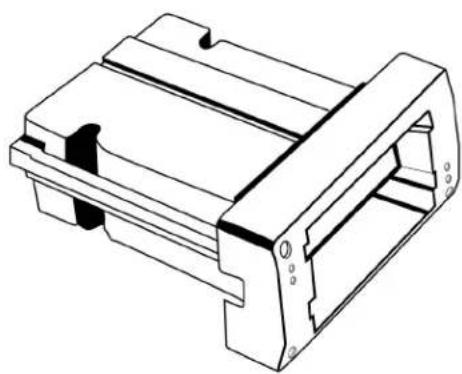
natural_image
Technical line drawing of a mechanical component with no visible text or symbolsAXT901 Axient Bodypack Charging Module
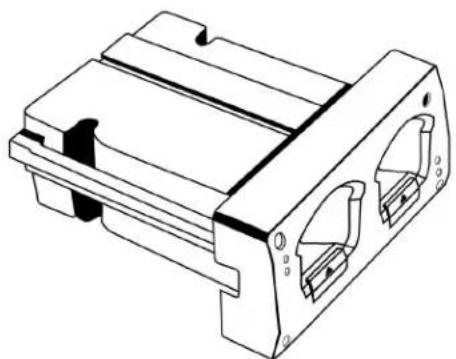
natural_image
Technical line drawing of a mechanical component with two internal slots and mounting holes (no text or symbols)AXT902 Axient Handheld Charging Module
WARNING
- Battery packs may explode or release toxic materials. Risk of fire or burns. Do not open, crush, modify, disassemble, heat above 140°F (60°C), or incinerate.
• Follow instructions from manufacturer
- Only use Shure charger to recharge Shure rechargeable batteries
- WARNING: Danger of explosion if battery incorrectly replaced. Replace only with same or equivalent type.
- Never put batteries in mouth. If swallowed, contact your physician or local poison control center
- Do not short circuit; may cause burns or catch fire
- Do not charge or use battery packs other than Shure rechargeable batteries
- Dispose of battery packs properly. Check with local vendor for proper disposal of used battery packs.
- Batteries (battery pack or batteries installed) shall not be exposed to excessive heat such as sunshine, fire or the like
- Do not immerse the battery in liquid such as water, beverages, or other fluids.
- Do not attach or insert battery with polarity reversed.
- Keep away from small children.
- Do not use abnormal batteries.
- Pack the battery securely for transport.
WARNING: Danger of explosion if incorrect battery replaced. Operate only with AA batteries.
Installation
Handheld and bodypack charging modules may be installed interchangeably into the charger.
Caution! Remove power and batteries when installing charging modules.
• To remove a module, remove the four (4) mounting screws and pull.
• To install, slide the module into the housing (noting the orientation of the guide rails) until it is flush with the housing.
- Replace the screws.
Included Components
Mounting Screws (8) for Charger Modules (30B13476)
Certifications
Meets essential requirements of the following European Directives:
• WEEE Directive 2012/19/EU, as amended by 2008/34/EC
• RoHS Directive EU 2015/863
Note: Please follow your regional recycling scheme for batteries and electronic waste
Brand : SHURE
Model : AXT901
Category : Wireless Microphone