USER MANUAL RB194ACRS SAMSUNG
Refrigerator user manual
English
imagine the possibilities

text_image
energy
ENERGY STAR
Thank you for purchasing this Samsung product.
To receive more complete service,
please register your product at
www.samsung.com/register
Features of your new Refrigerator
KEY FEATURES OF YOUR NEW REFRIGERATOR
Your Samsung Refrigerator comes equipped with various innovative storage and energy-efficient features.
- Twin Cooling System
The Refrigerator and Freezer have separate evaporators. Due to this independent cooling system, the Freezer and Refrigerator cool more efficiently.
Additionally, this separate air flow system prevents food odor of one compartment from seeping into other compartments.
- Bigger & Wider Space
The wide shelf area provides enough space for larger items.
The wide freezer drawer also provides enough space for 2\~3 turkeys.
- Secure Auto Close
The Secure Auto Close feature will automatically close a door that is slightly open.
• Digital Display and Temperature Control
- Door Alarm
A helpful beeper alerts you if a door is ajar.
- Easy Handle
Freezer door can be opened with less effort.
- Energy Star
This Energy star labeled product may save you money on your energy costs.

For easy future reference, write the model and serial number down. You will find your model number and serial number on the left side of the refrigerator.
Model # ____
Serial # ____
Before using your new Samsung Refrigerator, please read this manual thoroughly to ensure that you know how to safely and efficiently operate the features and functions that your new appliance offers. Because the following instructions cover RB194**, 196**, RB214** & RB216**, the characteristics of your Refrigerator may differ slightly from the Refrigerator described in this manual. If you have any questions, contact us at 1-800-SAMSUNG or find help and information online at www.samsung.com.
What the icons and signs in this user manual mean :
WJ  | Hazards or unsafe practices that may result in severe personal injury or death. |
CA  | Hazards or unsafe practices that may result in minor personal injury or property damage. |
CA  | To reduce the risk of fire, explosion, electric shock, or personal injury when using your refrigerator, follow these basic safety precautions: |
|
 | | Do NOT attempt. |
 | | Do NOT disassemble. |
 | | Do NOT touch. |
| [DYBY] | | Follow directions explicitly. |
 | | Unplug the power plug from the wall socket. |
 | | Make sure the machine is grounded to prevent electric shock. |
 | | Call the service center for help. |
 | | Notice |
These warning signs are here to prevent injury to you and others.
Please follow them explicitly.
Keep this manual in a safe place for future reference.
☐ For Refrigerator Installation
SEVERE WARNING SIGNS ⚠️WARNING

Do not damage parts containing Refrigerant. If they are damaged, it may cause a fire or explosion. Do not touch the refrigerator if it is damaged. Follow the items below and contact the store where the refrigerator was purchased or a Samsung Appliance Service Center. (Tel 1-800-SAMSUNG)
- Open the windows and air the room. (Do not use a ventilating fan.)
- Avoid using flammable or electric appliances.
SEVERE WARNING SIGNS ⚠️WARNING - CONT'D
Do not install the Refrigerator in a damp place or place where it may come in contact with water.
- Wet and/or deteriorated insulation of the internal electrical parts may cause electric shock or fire.

The Refrigerator must be safely grounded
- Always make sure that you have grounded the Refrigerator before attempting to investigate or repair any part of the appliance. Power leakages can cause severe electric shock.
Never use gas pipes, telephone lines or other potential lightning attractors as an electrical ground.
- Improper use of the grounding plug can result in a risk of electric shock. If it is necessary to use an extension cord to power the Refrigerator, use only a 3-wire extension cord that has a 3-blade ground plug and a 3-slot receptacle that will accept the plug on the appliance. The marked rating of the extension cord should be AC 115V\~120V, 10A, or more. Additionally, if a grounding adapter is used, make sure the receptacle box is also fully grounded.

The appliance must have sufficient space around it. (Refer to page 10 for the best location.)
- When refrigerant leaks, it is possible to cause a fire or explosion.
CAUTION SIGNS

Do not place the refrigerator directly in sunlight.
The appliance must be positioned for easy access to power source.
The appliance must be placed on the level surface of hard material.
- Placing on an unlevel surface may cause it to tip over, resulting in injury or property damage.
Do not use casters under the Refrigerator on a surface that is easily damaged.
- When moving the Refrigerator, spread out a protector such as cardboard carton under the Refrigerator. (Refer to page 10 for flooring.)
Power Plug
Contact the retailer where you purchased the appliance for if you have a power plug problem.
SEVERE WARNING SIGNS ⚠️WARNING
Do not plug several appliances into the same power receptacle.
- Large appliances draw a lot of power. Powering more than one appliance or machine from a single power source could cause overheating and a fire.
Make sure that the power plug is not kinked or damaged by the back of the Refrigerator.
- A damaged power plug may overheat and cause a fire.
Do not handle the power plug with wet hands.
• It may cause an electric shock.
Insert the power plug into the socket completely.
- Incomplete inserting may cause a fire by electric shock or heat.
Do not use the power plug if the plug or power cord is damaged.
• It may cause a fire or electric shock.
Do not damage power plug or cord, or push the Refrigerator backward.
- Bending and binding the power cord, or pushing Refrigerator backward may cause a fire or electric shock by wire damage.
Do not put undue stress on the power cord or place heavy articles on it.
- Placing heavy articles on the power cord may create the risk of explosion or fire.
Do not use the loose socket.
- There is a risk of electric shock or fire. Have the plug looked at by a licensed electrician.
Never unplug your Refrigerator by pulling on the power cord.
- Always grip the power cord firmly and pull straight out from the outlet. Yanking or pulling on the power cord may cause a short-circuit, fire and/or electric shock.
- A damaged power cord must be replaced by the manufacturer, a certified service agent or qualified service personnel.
CAUTION SIGNS
Do not use a wet or damp cloth when cleaning the plug.
Remove any dust or foreign matter from the power plug pins.
- A dirty power plug can increase the risk of fire.
If the power cord is damaged, it must be replaced by the manufacturer, a certified service agent or qualified service personnel.
☐ For Usage of Refrigerator
SEVERE WARNING SIGNS ⚠️WARNING
Do not spray water directly into or on the outside of the Refrigerator/Freezer drawer.
• Water could get into the interior machine parts and cause electric shock.
Do not use aerosols near the Refrigerator.
- Aerosols used near the Refrigerator may cause an explosion or fire.
Do not store volatile or flammable substances in the Refrigerator.
- Storing benzene, thinner, alcohol, ether, LP gas and other such products may cause explosions.
Do not store pharmaceutical products, scientific materials and temperature-sensitive products in the refrigerator.
- Products that require exact temperature controls should not be stored in the Refrigerator.
Do not put a container filled with water without cap on the Refrigerator.
- If it spills, it may cause fire or electric shock.
Do not store articles on the top of the appliance.
- When you open or close the door, the articles may fall and cause personal injury and/or damage to surrounding objects.
Do not put your hands or legs/foot under the appliance.
- Any sharp edges may cause personal injury.
Do not use any electric appliance inside the refrigerator.
- In case of refrigerant leak, it may cause a fire and explosion.
Do not touch the Refrigerator or power plug, and air the room with opening window if any flammable gas (propane gas, city gas, etc.) leaks.
- An explosion may occur due to a electrical contact spark and cause fire or injury.
Do not disassemble or repair the Refrigerator by yourself.
- You may run the risk of fire, appliance malfunctions and/or personal injury. Call your nearest service center for help from a qualified service technician.
Unplug the Refrigerator and stop the operation if there is any problem or failure.
SEVERE WARNING SIGNS WARNING - CONT'D

Unplug the Refrigerator when it is checked for problem.
Unplug the Refrigerator before changing the interior light.
- Changing the light while the Refrigerator is plugged in may cause electric shock.
If the Refrigerator will not be used for a long period of time (for example, over several months), unplug the power from the wall.
• Over time, deterioration in the power cord insulation may cause fire.

Do not overfill the Refrigerator with food and drinks.
- In an overfull Refrigerator, heavy, fragile, bulky or breakable items may fall out and cause personal injury and/or damage to surrounding objects.
Do not put bottles or glass containers in the Freezer drawer.
- When the contents freeze and then expand, the glass may break and cause personal injury or leave dangerous glass shards in the Freezer.
Do not allow children to climb, stand or hang on shelves and handles of the Refrigerator. They could damage the Refrigerator and seriously injure themselves. Do not sit on the freezer door. The door may break. Do not allow children to climb into the freezer basket.

If you notice a chemical or burning plastic smell or see smoke, unplug the Refrigerator immediately and contact your Samsung Electronics Service Center.

After your Refrigerator is in operation, do not touch the cold surfaces in the Freezer compartment. Particularly when hands are damp or wet, skin may adhere to these extremely cold surfaces.
- Skin may stick to the surface and you may get frostbite.
Do not touch the rails of freezer drawer. (RB216, RB196)
- When the drawer is moving, a finger can be caught by the rail and get injured.
CAUTION SIGNS

CAUTION

If the Refrigerator is disconnected from the power supply, you should wait for at least five minutes before plugging it back in.
If you have a long vacation planned, empty the Refrigerator and turn it off.
- Wipe excess moisture from the inside and leave the doors open to keep odor and mold from developing.
CAUTION SIGNS CAUTION - CONT'D
Service warranty and Modification
- Any changes or modifications performed by a 3rd party on this finished appliance is not covered under Samsung warranty service, nor can Samsung be responsible for safety issues that result from 3rd party modifications.
Children can get trapped inside Refrigerators.
Before you throw away your old Refrigerator or Freezer, make sure that you;
• Take off the doors.
- Leave all shelves in places so that children may not easily climb inside and shut the door while they are inside.

This appliance is not intended for use by small children or infirm persons without capable, adult supervision. Small children should be supervised when using the appliance.
☐ When Moving or Transporting the Refrigerator
SEVERE WARNING SIGNS ⚠️WARNING

Do not damage the refrigerant circuit around the refrigerator.
If it is damaged, the refrigerant may leak and cause a fire and explosion.
Do not touch the refrigerant if it is damaged, and follow the below items and contact the store where you buy it or Samsung Appliance SVC Center (Tel : 1-800-SAMSUNG).
- Open the windows and air the room. (Do not use the ventilating fan.)
- Avoid to use the flammable or electric appliances as possible.
SETTING UP YOUR REFRIGERATOR
10
10 Getting ready to install the refrigerator
11 Installation of the water line
11 Removing the refrigerator doors
14 Leveling the refrigerator
15 Using the control panel
16 Controlling the temperature
17 Parts and Features
20 Storing food in the refrigerator
20 Storing food in the freezer drawer
21 Removing and relocating the refrigerator accessories
22 Removing the freezer accessories
23 Cleaning the refrigerator
24 Changing the interior light
TROUBLESHOOTING
25
25 Troubleshooting
WARRANTY
26
27 Warranty
GETTING READY TO INSTALL THE REFRIGERATOR
Congratulations on your purchase of this Samsung Refrigerator. We hope you enjoy the state-of-art features and efficiencies that this new appliance offers.
Selecting the best location for the Refrigerator
- A location with easy access to the water supply.
- A location without direct exposure to sunlight.
- A location with level (or nearly level) flooring.
- A location with enough space for the Refrigerator doors to open easily.
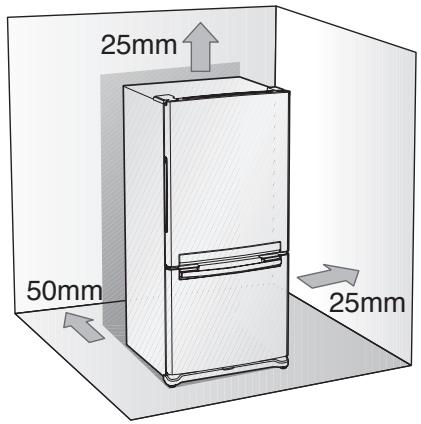
- Allow sufficient space to the right, left, back and top for air circulation. If the Refrigerator does not have enough space, the internal cooling system may not work properly.
- Please ensure that appliance can be moved freely in the event of maintenance & service.
text_image
25mm
50mm
25mm
First thing! Make sure that you can easily move your Refrigerator to its final location by measuring doorways (both width and height), thresholds, ceilings, stairways, etc.
The following chart details the exact height and depth of Samsung Refrigerator.
| Model | RB194**RB196** | RB214**RB216** |
| Width (inch/mm) | 31 18 / 810 |
| Depth (inch/mm) | with door | 27 18 / 709 | 29 18 / 759 |
| without door | 24 38 / 620 | 26 38 / 671 |
| Height (inch/mm) | with hinge | 70 / 1778 | 70 / 1778 |
| without hinge | 68 18 / 1750 | 68 18 / 1750 |

- Allow clearance to the right, left, back and top when installing. This will help reduce power consumption and keep your energy bills lower.
- If you install the Refrigerator where is below 10^(50^) , it may not function in optimum level.
When moving your refrigerator
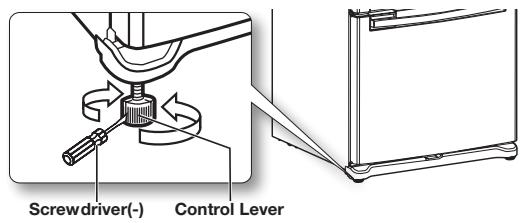
To prevent floor damage be sure the front leveling legs are in the up position(above the floor).
Refer to ‘Leveling the refrigerator’ in the manual (on page 14)
text_image
Screwdriver(-)
Control Lever
FLOORING
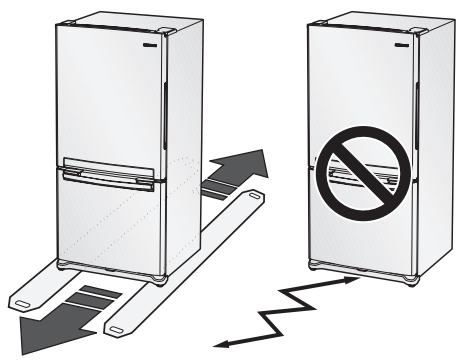
For proper installation, this refrigerator must be placed on a level surface of hard material that is the same height as the rest of the flooring. This surface should be strong enough to support a fully loaded refrigerator, or approximately 106kg(223lbs). To protect the finish of the flooring, cut a large section of the cardboard carton and place under the refrigerator where you are working. When moving the refrigerator, be sure to pull it straight out and return it to position by pushing it straight in.
text_image
Diagram showing two refrigerators with directional arrows and a prohibition sign, indicating cooling or anti-reinforcement behavior.
Some installations require door/drawer removal to transport the Refrigerator to its final location.
Do not remove the door/drawer if it is not needed. Before removing the door/drawer make sure you read following items.
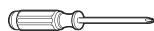
Phillips Head Driver(+)
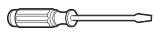
Flat Head Driver(-)
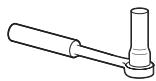
Socket Wrench (10mm) (for bolts)
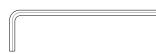
Hex Wrench (4.75mm) (for Mid hinge)

Hex wrench (4mm) (for Mid hinge shaft)
Disconnect power to the Refrigerator before remove door or drawer.

- Be careful not to drop the door and door scratch and damage while removing the door/drawer.
- Be careful not to get injured while removing the door/drawer.
• After reattaching the door/drawer:
It is possible to have sweat by air leakage.
It is possible to have uneven door alignment.
It is possible to have more energy bills.
Setting up your Refrigerator
Removal of the fridge door
Be careful not to drop and scratch the fridge door while removing the fridge door!
text_image
Hinge Cover
SAMSUNG
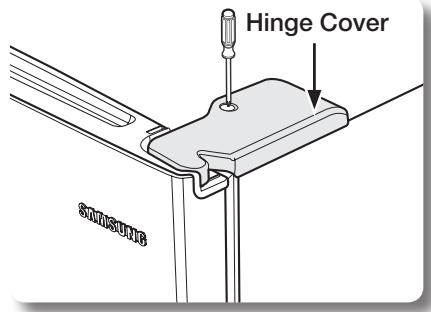
- After removing the screw, remove the upper Hinge Cover.
text_image
SAMSUNG
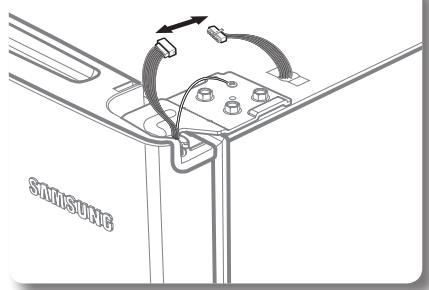
- Disconnect electric wire on the top of the refrigerator.
natural_image
Technical diagram showing a mechanical assembly with a lever and three inserted components (no text or labels)
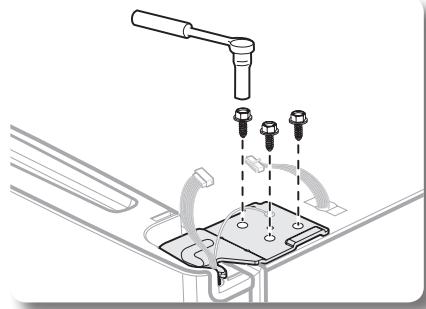
- With the 10mm wrench, remove the three bolts that hold the hinge on the top of the refrigerator.
text_image
ground wire
SAMSUNG
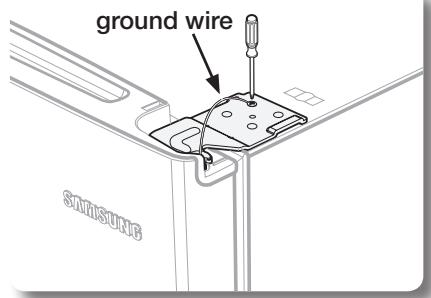
- Remove the screw that holds the ground wire.
natural_image
Diagram of a cable being inserted into a device component, showing rope routing and a label 'STRAWBEE' (no text or symbols on the diagram itself)
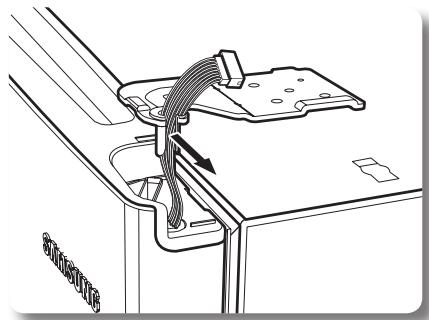
- Separate Hinge from electric wire and ground wire as shown above.
natural_image
Illustration of a hand pressing down on a door panel with an arrow indicating motion (no text or symbols)
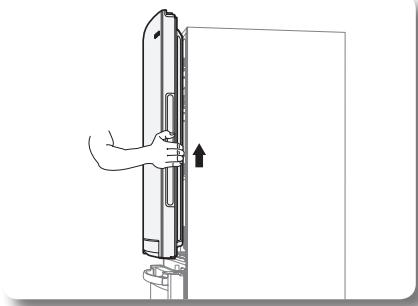
- Remove the fridge door by lifting it upward.
Be careful not to drop and scratch the fridge door.
Removal of the freezer door (SWING TYPE - RB214,RB194)
natural_image
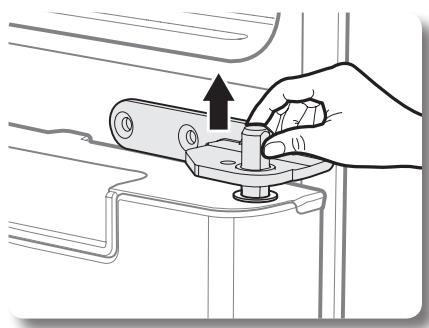
Illustration of a hand turning a valve with an upward arrow (no text or symbols)
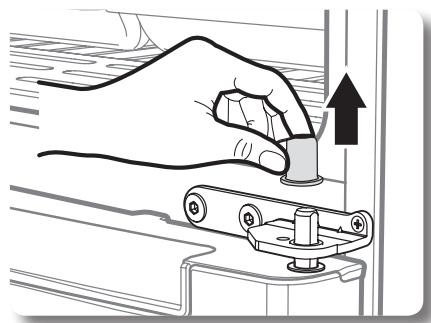
- Separate the Cap on the Middle Hinge.
text_image
Middle Hinge
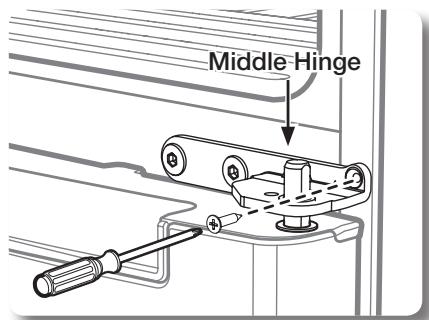
- After removing one screw and two bolts, remove the Middle Hinge. (Unscrew the screws with the screwdriver(+) and hex bolts with the 4.75mm hex wrench.)

natural_image
Illustration of a hand using a tool to adjust or install a mechanical component with screws and brackets (no text or symbols)
natural_image
Illustration of a hand using a mechanical switch to adjust a component (no text or symbols present)
- Remove the Middle Hinge connected to the Freezer.
natural_image
Illustration of hands holding a rectangular device with an upward arrow, no text or symbols present
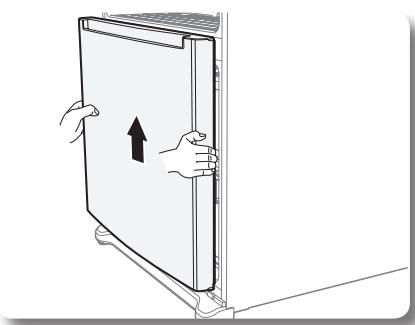
- Remove the Freezer door by lifting it upward.
Be careful not to drop and scratch the Freezer door
natural_image
Illustration of a hand using a tool to adjust or install a mechanical component (no text or symbols visible)
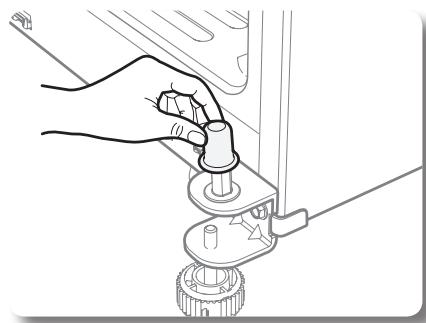
- Remove the Cap on the Bottom Hinge.
Removal of the freezer door (DRAWER TYPE - RB216,RB196)
natural_image
Illustration of a hand using a tool to press or install a mechanical component, with an upward arrow indicating motion (no text or symbols present)
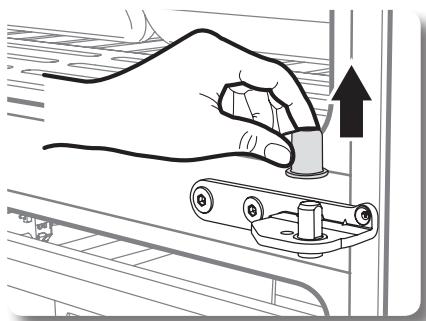
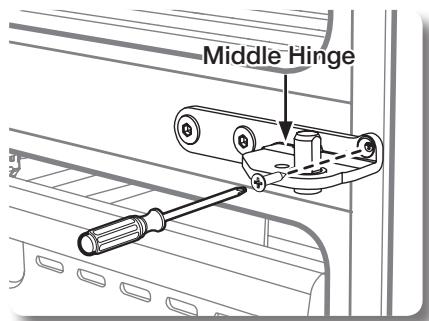
- Separate the Cap on the Middle Hinge.
text_image
Middle Hinge
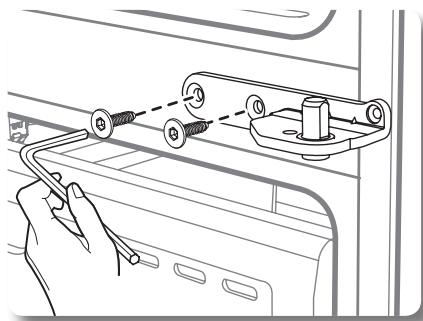
- After removing one screw and two hex bolts, remove the Middle Hinges. (Unscrew the two hex bolts with the 4.75mm hex wrench.)
natural_image
Line drawing of a hand holding a cable with attached components, no text or symbols present
natural_image
Line drawing of hands inserting a component into a refrigerator drawer (no text or symbols)
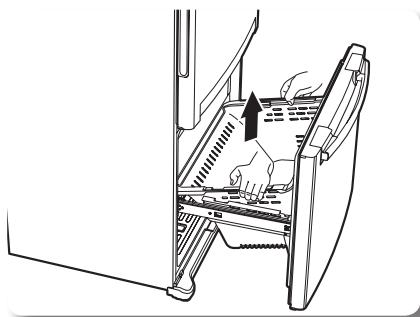
- After opening the Freezer door, remove the drawer box.
natural_image
Technical line drawing of a door handle assembly with mounting holes and a lever (no text or symbols)
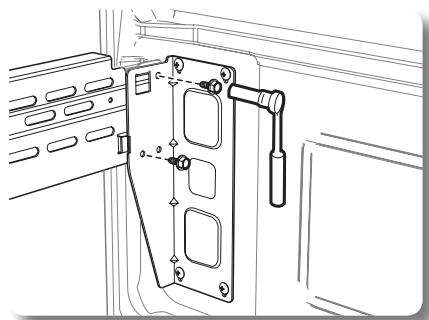
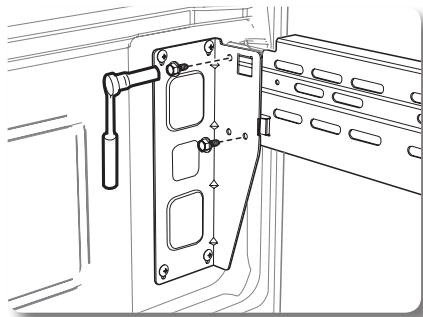
- With the 10mm wrench, remove two bolts connecting the rail with the door.
natural_image
Technical line drawing of a door lock mechanism with mounting holes and handle (no text or symbols)
Setting up your Refrigerator
Removal of the freezer door (DRAWER TYPE - RB216,RB196) - CONT'D
natural_image
Technical line drawing of a mechanical device with no visible text or symbols
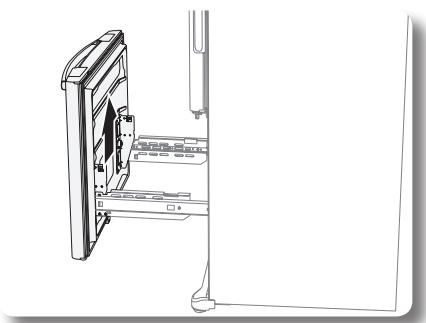
- Remove the Freezer door from the rails.
LEVELING THE REFRIGERATOR
After putting the doors back on the Refrigerator, make sure the Refrigerator is level so that you can make final adjustments.
If the Refrigerator is not level, it will not be possible to get the doors perfectly even.
Also it is possible to sweat in the refrigerator and ask more energy bills.
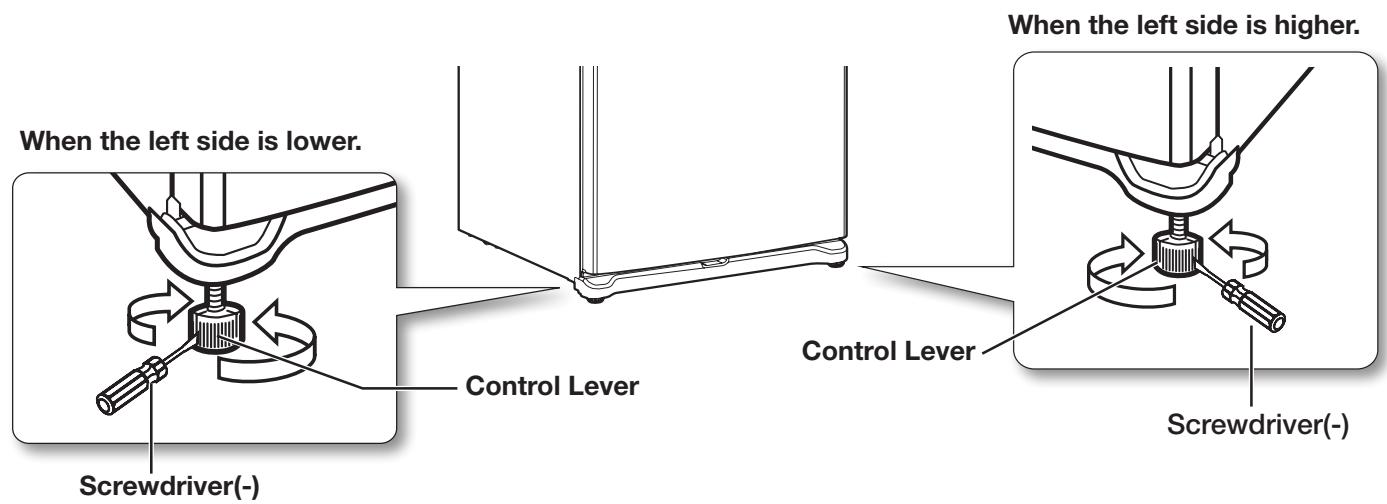
For example, when the left side is lower than the right side, insert a flat-blade screwdriver into a notch on the left control lever, and turn it clockwise or counter clockwise to level the door.
Turning it clockwise to raise the refrigerator and counterclockwise to lower it.
For the left side is higher, do it with right lever.

Both control levers must be surely touching the floor to avoid the possible personal injury or property damage because of tipping.
text_image
When the left side is lower.
Screwdriver(-)
Control Lever
When the left side is higher.
Control Lever
Screwdriver(-)
Operating your SAMSUNG Refrigerator
USING THE CONTROL PANEL
text_image
Power Freeze
Freezer
Alarm Off
Freezer
Power Freeze
Alarm Off
Child Lock
88°c
Fridge
88°c
Power Cool
Power Cool
Fridge
Child Lock Hold 3 sec
4
5
6
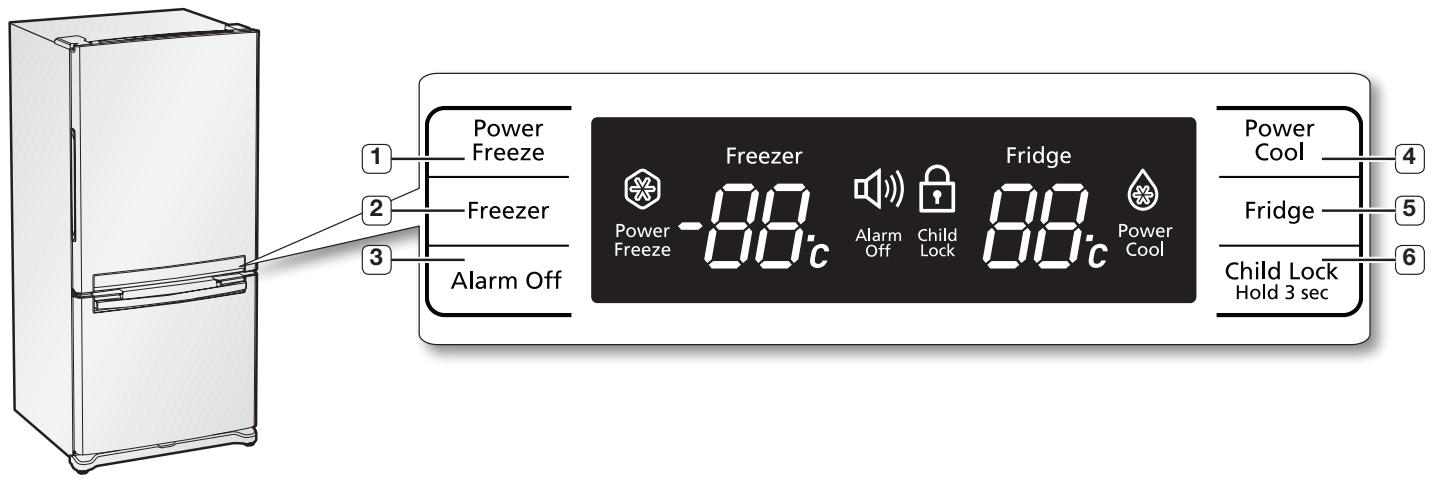
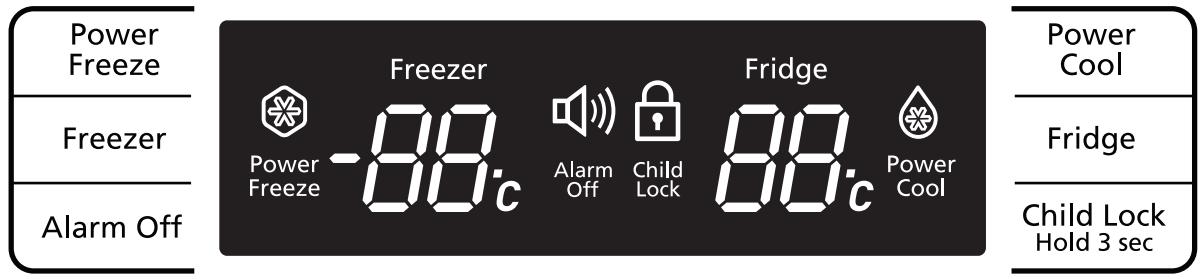
Temperature & Function select / control panel
| (1) Power Freeze Button | Press this button to freeze food quickly.(Power Freeze will last 2 and a half hours.) |
| (2) Freezer Button | Freezer temperature set button.Press this button to set the Freezer temp between -14°C and -25°C.(At initial power on, the default setting is -19°C.) |
| (3) Alarm Off Button | When the Alarm Off Button is pressed, alarm will not sound in case of door open.Use this button only when it is needed. |
| (4) Power Cool Button | Press this button to cool the food in the fridge quickly.(Power Cool will shut off when -4°C is reached or after 2 and a half hours. |
| (5) Fridge Button | Fridge temperature set button.Press this button to set the Fridge temperature in 1°C intervals between 7°C and 1°C.(At initial power on, the default setting is 3°C.) |
| (6) Child Lock Hold 3 sec Button | When pressing this button for 3 sec., the display function is locked or unlocked.(Key lock or unlock) |
Operating your SAMSUNG Refrigerator
CONTROLLING THE TEMPERATURE
text_image
Power
Freeze
Freezer
Alarm Off
Power
Freeze
-88°c
Alarm
Off
Child
Lock
Fridge
88°c
Power
Cool
Power Cool
Fridge
Child Lock
Hold 3 sec
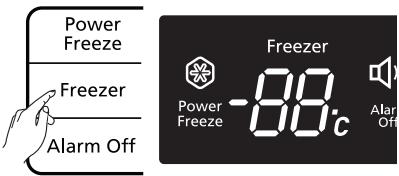
Controlling the freezer temperature
If you want to control the freezer temperature, follow as below.
Press the Freezer Button (Refer the picture)
- The temperature can be set in 1^ C interval between -25^ C and -14^ C.
- Each time the Freezer Button is pressed, the temperature setting will change as follows;
$$
(- 1 9 ^ {\circ} \mathrm{C} \rightarrow - 2 0 ^ {\circ} \mathrm{C} \rightarrow - 2 1 ^ {\circ} \mathrm{C} \rightarrow - 2 2 ^ {\circ} \mathrm{C} \rightarrow - 2 3 ^ {\circ} \mathrm{C} \rightarrow - 2 4 ^ {\circ} \mathrm{C} \rightarrow - 2 5 ^ {\circ} \mathrm{C} \rightarrow - 1 4 ^ {\circ} \mathrm{C} \rightarrow - 1 5 ^ {\circ} \mathrm{C} \rightarrow - 1 6 ^ {\circ} \mathrm{C} \rightarrow - 1 7 ^ {\circ} \mathrm{C}
$$
$$
\rightarrow - 1 8 ^ {\circ} \mathrm{C} \rightarrow - 1 9 ^ {\circ} \mathrm{C})
$$
When selecting the temperature, the set temperature is displayed initially for 5 seconds, then the actual temperature is displayed.
(There may be slight difference between the set temperature and displayed actual temperature, but it will be corrected to the set temperature automatically.)
text_image
Power
Freeze
Freezer
Alarm Off
Freezer
Power
Freeze
-88°C
Alarm
Off
- The Freezer temperature will change depending on the number of door openings, quantity of food, ambient temperature, etc.
- Temperature of each shelve in the freezer may be different.
- The temperature display will blink when freezer temperature increases due to frequent door opening, keeping warm food, etc.
(Blinking will stop when the refrigerator reaches normal temperature. If for some reason it does not stop after a long period of time, contact a Samsung service center.)
Controlling the fridge temperature
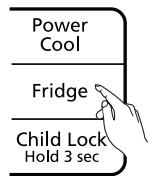
If you want to control the fridge temperature, follow as below.
Press the Fridge Button (Refer the picture)
- The temperature can be set in 1^ C interval between 1^ C and 7^ C.
- Each time the Fridge Button is pressed, the temperature setting will change as follows;
$$
(3 ^ {\circ} \mathrm{C} \rightarrow 2 ^ {\circ} \mathrm{C} \rightarrow 1 ^ {\circ} \mathrm{C} \rightarrow 7 ^ {\circ} \mathrm{C} \rightarrow 6 ^ {\circ} \mathrm{C} \rightarrow 5 ^ {\circ} \mathrm{C} \rightarrow 4 ^ {\circ} \mathrm{C} \rightarrow 3 ^ {\circ} \mathrm{C})
$$
When selecting the fridge temperature, the set temperature is displayed initially for 5 seconds, then the actual temperature is displayed. (There may be slight difference between the set temperature and displayed actual temperature, but it will be corrected to the set temperature automatically.)
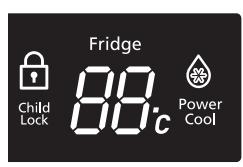
- The Fridge temperature will change depending on the number of door openings, quantity of food, ambient temperature, etc.
- Temperature of each shelf or container in the fridge may be different.
- The temperature display will blink when fridge temperature is increases due to frequent door opening, keeping warm food, etc.
(Blinking will stop when the refrigerator reaches normal temperature. If for some reason it does not stop after a long period of time, contact a Samsung service center.)
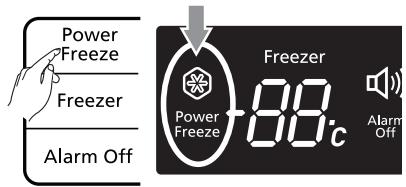
If you want to speed up the cooling in the Freeze (Power Freeze)
Press the Power Freeze Button. (Refer the picture.)
- The power Freeze light on the display goes on (see the arrow mark) and this function begins to operate regardless of the set freezer temperature.
Press the Power Freeze Button again to cancel this function.
- The light goes off and it operates at the set freezer temperature again.
text_image
Power
Freeze
Freezer
Alarm Off
Freezer
88°C
Alarm
off
- The Power Freeze function operates for 2 and a half hours regardless of the set temperature.
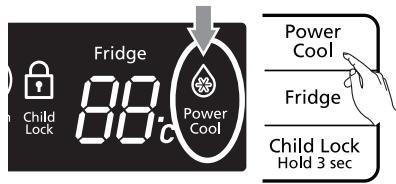
If you want to speed up the cooling in the Fridge (Power Cool)
Press the Power Cool Button. (Refer the picture.)
- The Power cool light on the display goes on (see the arrow mark) and this function begins to operate regardless of the set fridge temperature.
Press the Power Cool Button again to cancel this function.
- The light goes off and it operates at the set fridge temperature again.
text_image
Child Lock
Fridge
88°C
Power Cool
Power Cool
Fridge
Child Lock
Hold 3 sec
- The Power Cool function operates for 2 and a half hours regardless of the set temperature.
Operating your SAMSUNG Refrigerator
Cooling Off Mode ("OF & OF" code on the display)

This function is for store display refrigerators. It is not for customer use.

In Cooling Off Mode, the refrigerator works but doesn't make cool air. To cancel this mode, press the Power Freeze and Freezer buttons at the same time for 3 seconds until a “Ding-dong” sound is heard and the unit will now cool.

flowchart
graph LR
    A["Cooling Off mode"] --> B["Power Freeze"]
    A --> C["Freezer"]
    A --> D["Alarm Off"]
    B --> E["Freezer -88°C"]
    C --> E
    D --> E
    E --> F["Alarm Off"]
    E --> G["Child Lock"]
    E --> H["Fridge -88°C"]
    H --> I["Power Cool"]
    H --> J["Fridge"]
    H --> K["Child Lock Hold 3 sec"]
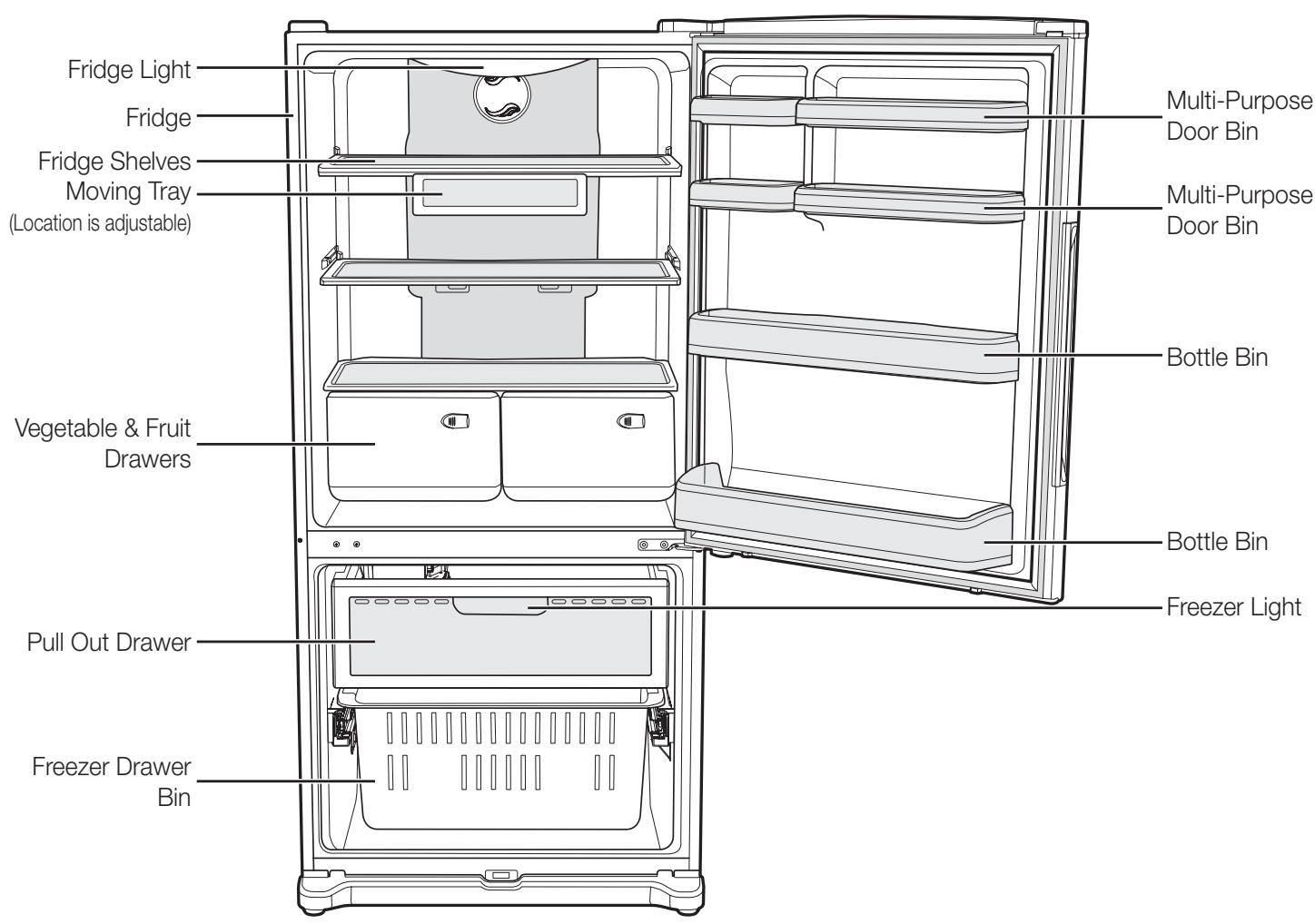
Use this page to become more familiar with the parts and features of the Refrigerator.
text_image
Fridge Light
Fridge
Fridge Shelves
Moving Tray
(Location is adjustable)
Multi-Purpose
Door Bin
Multi-Purpose
Door Bin
Bottle Bin
Vegetable & Fruit
Drawers
Bottle Bin
Freezer Light
Pull Out Drawer
Freezer Drawer
Bin
Operating your SAMSUNG Refrigerator
STORING FOOD IN THE REFRIGERATOR
The Samsung Refrigerator has been designed to provide you with maximum space saving features and functions. Here are some of the customized compartments we have created to keep your food fresher longer. In order to further prevent odor from seeping into the ice compartment, stored food should be wrapped securely and as airtight as possible.
| Moving Tray | Can be used to store small dairy items like butter or margarine, yogurt or cream cheese bricks | 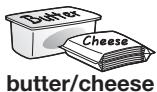 |
| Bottle Bin | Designed to handle large, bulky items such as gallons of milk or other large bottles and containers. | 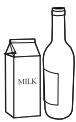 |
| Fridge Shelves | Designed to be crack-resistant, the shelves can be used to store all types of food and drinks. Circular marks on the glass surface are a normal phenomenon and can usually be wiped clean with a damp cloth. | 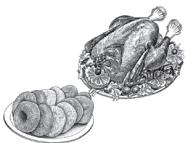 |
| Vegetable & Fruit Drawers | Used for preserving the freshness of your stored vegetables and fruits. This drawer has been specifically designed to control the level of humidity within the compartment. Keep vegetables and fruits separate when possible. | 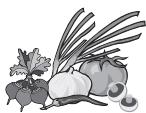 |
Do not place any large articles of food under the lamp in the Refrigerator. An air sensor is located near the lamp and if the sensor is blocked, your Refrigerator may become too cold. Please place Vegetable and Fruits in the Vegetable and Fruits Drawers to avoid freezing them. If the food in your Refrigerator becomes frozen, please set the temperature higher.
STORING FOOD IN THE FREEZER DRAWER
| Pull Out Drawer | Best used to store meats or dry foods. Stored food should be placed in a container or wrapped securely using plastic wrap or other suitable wrapping materials. | 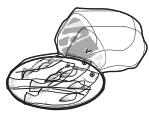 |
| Freezer Drawer Bin | Can be used to store meat and dry foods. Stored food should be placed in a container or wrapped securely using plastic wrap or other suitable wrapping materials. | 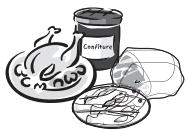 |
Bottles should be stored tightly together so that they do not tip and fall out when the Refrigerator door is opened.
If you plan to go away for a long time, empty the Refrigerator and turn it off. Wipe the excess moisture from the inside of the appliance and leave the doors open. This helps keep odor and mold from developing.
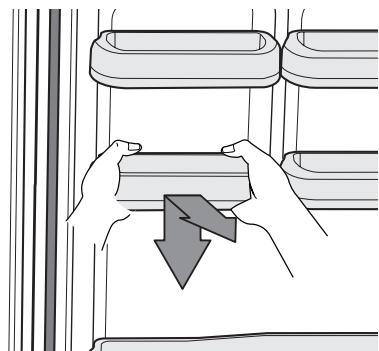
1. Door Bins
To remove - Simply lift the bin up and pull straight out.
To replace - Slide it in above the desired location and push down until it stops.
Injury may occur if the door bins are not firmly inserted.
Do not allow children to play with bins. Sharp corners of the bins may cause injury.

Do not adjust a bin full of foods.
Dust removal method -Remove the guard and wash in water.
natural_image
Illustration of hands holding a device with a downward arrow, no text or symbols present
2. Fridge shelves
To remove - When pulling out the shelf, if it does not slide out easily, lift it up slightly and pull out again.
To replace - When pushing in the shelf, if it does not slide in easily, lift it up slightly and push in again.
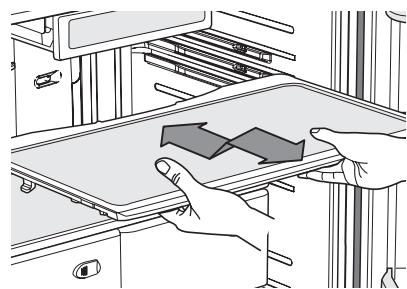
natural_image
Illustration of hands operating a mechanical device with a directional arrow (no text or symbols)
The Glass shelves are heavy.
Use special care when removing them.
3. Vegetable & Fruit Drawers
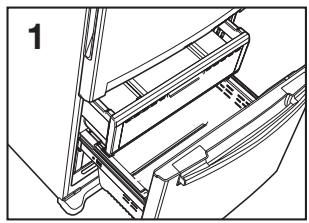
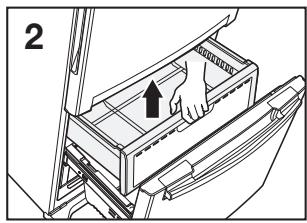
To remove - Pull the drawer out to full extension. Tilt up the front of the drawer and pull straight out.
(Refer to picture 1\~3)
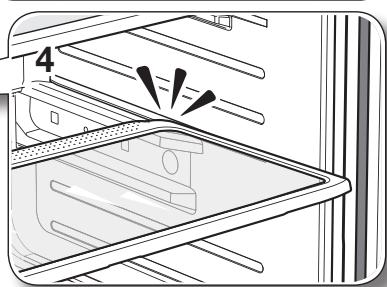
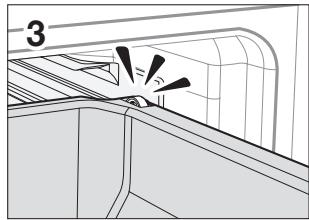
To replace - Insert the drawer into the frame rails and push back into place.
(Refer to picture 4)
natural_image
Diagram of a refrigerator drawer with one drawer open and showing a black arrow indicating direction (no text or symbols present)
natural_image
Line drawing of a refrigerator drawer with an open drawer and a black arrow indicating direction (no text or symbols)
natural_image
Illustration of hands installing a tablet on an appliance rack inside a refrigerator (no text or symbols visible)
natural_image
Diagram of a refrigerator interior showing door, seats, and ventilation slots (no text or symbols)

The drawers need to be removed before the glass shelf above them can be lifted out.
Operating your SAMSUNG Refrigerator
REMOVING THE FREEZER ACCESSORIES
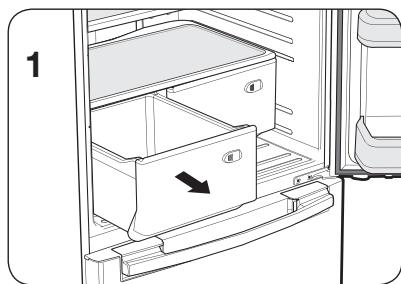
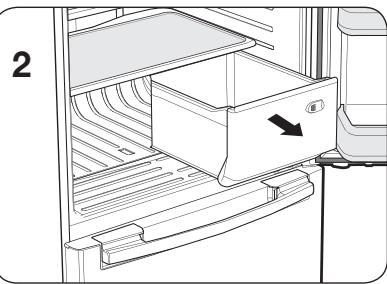
1. Pull Out Drawer
To remove - Pull the drawer out to full extension.
Tilt up rear of drawer and lift straight out.
(Refer to picture 1 & 2)
Open the freezer door fully and remove the drawer.
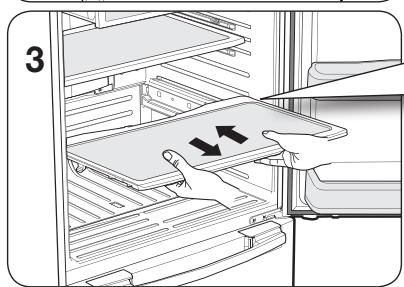
To replace - Place the drawer onto the rails by tilting it up. Lower the drawer into place until it is horizontal and slide the drawer in.
(Refer to picture 3)
natural_image
Technical line drawing of a mechanical assembly with no visible text or symbols
natural_image
Illustration of a hand inserting into a drawer into a filing cabinet (no text or symbols visible)
natural_image
Technical line drawing of a mechanical component with no visible text or symbols
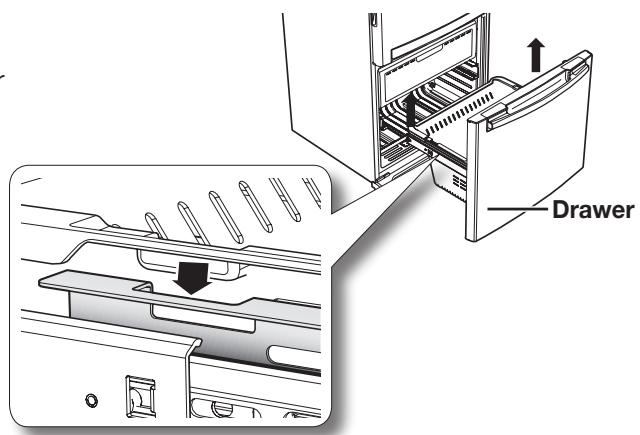
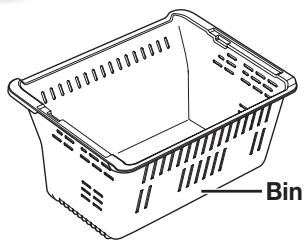
2. Freezer Drawer Bin
To remove - Pull the drawer out fully. Tilt up the rear of the bin and lift it out to remove.
To replace - Place the bin into the rail assembly.
When replacing, place the drawer bin holder into the hole of the rail
text_image
Drawer
natural_image
Line drawing of a rectangular shopping basket with perforated sides and label 'Bin' on the side (no other text or symbols)
CLEANING THE REFRIGERATOR
Caring for your Samsung Refrigerator prolongs the life of your appliance and helps keep it odor and germ-free.
Cleaning the Interior
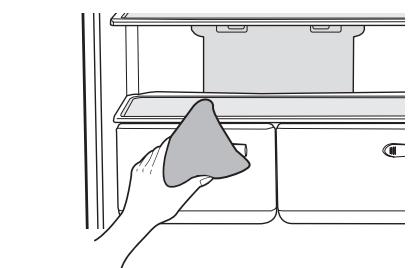
Clean the inside walls and accessories with a mild detergent and then wipe dry with a soft cloth. You can remove the drawers and shelves for a more thorough cleaning. Just make sure to dry drawers and shelves before putting them back into place.
Cleaning the Exterior
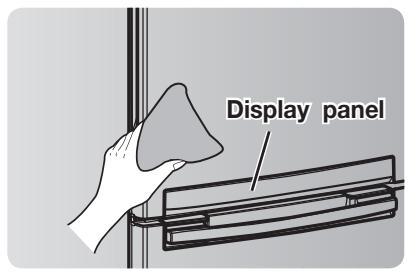
Wipe the display panel with damp, clean, soft cloth. Do not spray water directly on the surface of the Refrigerator.
The doors, handles and cabinet surfaces should be cleaned with a mild detergent and then wiped dry with a soft cloth. To keep your appliance looking its best, the exterior should be polished once or twice a year.
Caution Do not use Benzene, Thinner, car detergent, or Clorox for cleaning. They may damage the surface of the appliance and may cause fire.
Cleaning the Rubber door seals
If the rubber door seals are dirty, the doors may not close properly, and the Refrigerator will not operate efficiently. Keep the door seals free of grit or grime by cleaning the doors with a mild detergent and damp cloth. Wipe dry with a clean, soft cloth.
Cleaning behind the Refrigerator
To keep cords and exposed parts free of dust and dirt accumulation, vacuum behind the appliance once or twice a year.
CAUTION Do not remove the back cover. Doing so may cause an electric shock.
natural_image
Line drawing of a hand cleaning a cabinet drawer with a cloth (no text or symbols)
text_image
Display panel
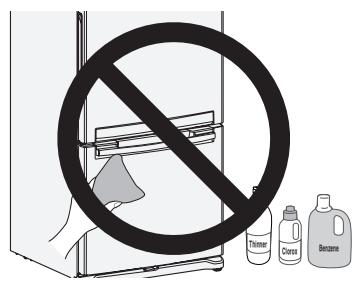
text_image
No
Trimmer
Cloros
Benzene
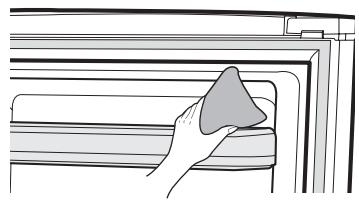
natural_image
Illustration of a hand cleaning a wall-mounted shelf with a cloth (no text or symbols)
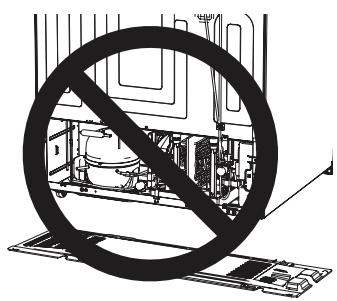
natural_image
Diagram of an appliance with a prohibition symbol crossed out, showing internal components without any text or labels.
Operating your SAMSUNG Refrigerator
CHANGING THE INTERIOR LIGHTS

Electric Shock Hazard
WARNING Before changing any of the interior lights, either unplug the refrigerator or turn off power at the circuit breaker or fuse box. Failure to do so could cause electric shock resulting in death, personal injury, or damage to the appliance.
Refrigerator Light Replacement
- Unplug the power cord from the outlet.
- Open the refrigerator door.
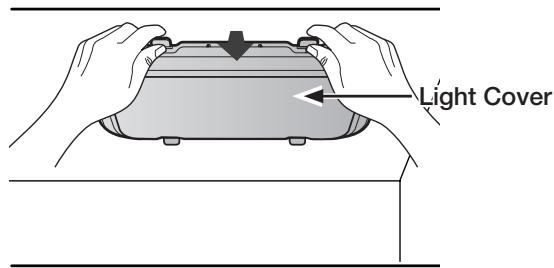
- Pull the light cover down while pushing it backwards to remove it.
- Disconnect the housing connector.
- Change the LED from the light cover
- Install the light cover, close the door, and plug in the power cord.
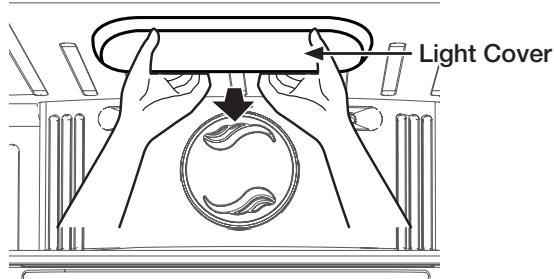
text_image
Light Cover

Replacement LED is available from your nearest service center. If you need to change LED, contact our service center
Freezer Light Replacement
- Unplug the power cord from the outlet.
- Open the freezer door.
- Pull the shield down while pushing it backwards to remove it.
- Disconnect the housing connector.
- Change the LED from the light cover.
- Install the light cover, close the door, and plug in the power cord.
text_image
Light Cover
Troubleshooting
| PROBLEM | SOLUTION |
| The Refrigerator does not work at all or it does not chill sufficiently. | Check that the power plug is properly connected.Is the temperature control on the display panel set to the correct temperature?Try setting it to a lower temperature.Is the Refrigerator in direct sunlight or located near a heat source?Is the back of the Refrigerator so close to the wall that air cannot keep circulating?(Refer to page 10 for the best location.) |
| The food in the Refrigerator is frozen. | Is the temperature control on the display set to the correct temperature?Try setting it to a warmer temperature.Is the temperature in the room too low?Did you store the food too close to the air vent at the back of the Refrigerator? Move the food away from the air vent. |
| You hear unusual noise or sounds. | Check that the Refrigerator is level and stable.Is the back of the Refrigerator too close to the wall and therefore keeping air from circulating?Was anything dropped behind or under the Refrigerator?A “ticking” sound is heard from inside the Refrigerator. It is normal and occurs because various accessories are contracting or expanding according to the temperature of the Refrigerator interior. |
| You hear water bubbling in the Refrigerator. | This is normal. The bubbling comes from the Refrigerator coolant liquid circulating through the Refrigerator. |
| There is a bad smell in the Refrigerator. | Check for spoiled food.Foods with strong odors(for example, fish) should be tightly covered.Clean out your Freezer periodically and throw away any spoiled or suspicious food. |
| Frost forms on the walls of the Freezer. | Is the air vent blocked? Remove any obstructions so air can circulate freely.Allow sufficient space between the foods stored for efficient air circulation.Is the Freezer drawer closed properly? |
| Water dispenser is not functioning.(Water dispenser models only) | Is the water line connected and the shut-off valve opened?Has the water supply line tubing been crushed or kinked?Make sure the tubing is free and clear of any obstruction.Is the water tank frozen because the Refrigerator temperature is too low?Try selecting a warmer setting on the main display panel. |
In case the need for servicing arises
Do not hesitate to call any Samsung Authorized Service Center nearby giving them your name, address and telephone number when your product is not functioning properly.
Limited Warranty for Original Purchaser
This Samsung product is warranted by Samsung Electronics Canada, Inc. (hereafter referred to as SECA) against manufacturing defects in material or workmanship for the following periods:
Labor : 1 year (in-home)
Parts : 1 year
Compressor : 5 year
SECA further warrants that if this product fails to operate properly within the specified warranty period and the failure is due to improper workmanship or defective material, SECA will repair or replace the product at its option.
All warranty repairs or part replacements must be performed by a SECA Authorized Service Center. (To find the nearest SECA Service Center, call 1-800-SAMSUNG (7267864) or visit our web site at www.samsung.com/ca)
Obligation to the Original Owner
The original dated sales receipt must be retained by the customer and is the only acceptable proof of purchase. It must be presented to a SECA Authorized Service Center at the time service is requested before warranty services are rendered. On all carry-in models, transportation to and from the Authorized Service Center is the responsibility of the customer.
Exclusions of the Warranty
This warranty does not cover damage due to accident, fire, flood, and/or other Acts of God, misuse, incorrect line voltage, improper installation, improper or unauthorized repairs, commercial use, or damage that occurs during shipping. Customer adjustments which are explained in this owner's manual are not covered under the terms of this warranty. This warranty will automatically be voided for any unit found with a missing or altered serial number. This warranty is valid only on products purchased and used in the Canada.
Samsung Electronics Canada Inc., Customer Service
55 Standish Court Mississauga, Ontario L5R 4B2
Canada
Customer Care Center 1-800-SAMSUNG(7267864)
Customer Care Center fax. 1-866-436-4617
If you have any questions or comments relating to Samsung products, please contact the SAMSUNG customer care center.
SAMSUNG ELECTRONICS CANADA, INC.
55 STANDISH COURT MISSISSAUGA, ONTARIO L5R 4B2 CANADA
In an effort to promote recycling this user manual is printed on recycled paper.



