
SR-JK11H - Car kit PAC - Free user manual and instructions
Find the device manual for free SR-JK11H PAC in PDF.


| Product Type | Car Stereo Kit |
| Model | SR-JK11H |
| Brand | PAC |
| Compatibility | Universal Fit for Most Vehicles |
| Dimensions (W x H x D) | 178 mm x 50 mm x 100 mm |
| Weight | 0.5 kg |
| Power Supply | 12V DC (Negative Ground) |
| Audio Formats Supported | MP3, WMA, WAV, AAC |
| Bluetooth Version | 4.2 (Hands-Free & Audio Streaming) |
| USB Port | 1 x USB 2.0 (up to 32GB) |
| Auxiliary Input | 3.5 mm AUX |
| Radio Tuner | FM/AM (RDS Compatible) |
| Display | LCD with Backlight |
| Remote Control | Included (IR) |
| Maximum Power Output | 4 x 50 Watts |
| Equalizer | Preset EQ Modes (Rock, Pop, Classic, etc.) |
| Maintenance | Clean with soft, dry cloth. Avoid liquids. |
| Safety Features | Anti-shock Mechanism, Fuse Protection (15A) |
| Spare Parts Access | Remote, Wiring Harness, Mounting Sleeve Available |
| Repairability | Replaceable Fuse & External Components; Service Center Recommended |
| Warranty | 1 Year Limited Warranty |
Frequently Asked Questions - SR-JK11H PAC
User questions about SR-JK11H PAC
0 question about this device. Answer the ones you know or ask your own.
Ask a new question about this device
Download the instructions for your Car kit in PDF format for free! Find your manual SR-JK11H - PAC and take your electronic device back in hand. On this page are published all the documents necessary for the use of your device. SR-JK11H by PAC.
USER MANUAL SR-JK11H PAC
Works with Apple CarPlay
androidauto™
((SiriusXM) READY)
Bluetooth®
HDMI®
Apple CarPlay is a trademark of Apple Inc. Use of the Apple CarPlay logo means that a vehicle user interface meets Apple performance standards. Apple is not responsible for the operation of this vehicle or its compliance with safety and regulatory standards. Please note that the use of this product with iPhone, iPod, or iPad may affect wireless performance.
"Made for iPod," "Made for iPhone," and "Made for iPad" mean that an electronic accessory has been designed to connect specifically to iPod, iPhone, or iPad, respectively, and has been certified by the developer to meet Apple performance standards. Apple is not responsible for the operation of this device or its compliance with safety and regulatory standards. Please note that the use of this accessory with iPod, iPhone, or iPad may affect wireless performance. iPad, iPhone, iPod nano, and iPod touch are trademarks of Apple Inc., registered in the U.S. and other countries.
Visit StingerElectronics.com for updates and further detailed information.
TECHNICAL SUPPORT:
800-477-2267
support@aampglobal.com
CUSTOMER SOLUTIONS:
800-477-2267
customersolutions@aampglobal.com
Stinger is a Power Brand of AAMP Global
15500 Lightwave Drive, Suite 202
Clearwater, Florida 33760
SiriusXM and all related marks and logos are trademarks of Sirius XM Radio Inc. All rights reserved.
Android, Android Auto, Google Play and other marks are trademarks of Google LLC.
The Bluetooth word mark and logos are registered trademarks owned by Bluetooth SIG, INC. and any use of such marks by AAMP Global is under license.
HDMI, the HDMI Logo, and High-Definition Multimedia Interface are trademarks or registered trademarks of HDMI Licensing LLC in the United States and other countries
Stinger and the Stinger logo are trademarks or registered trademarks of AAMP Global in the United States and other countries.
AGREEMENT: End user agrees to use this product in compliance with the instructions and terms of use and with all State and Federal laws. STINGER provides instructions and safety warnings with respect to this product and disclaims all liability for any use not in conjunction with those instructions or other misuse of its product. If you do not agree, please discontinue use and contact STINGER. This product is intended for off-road use and passenger use only.

HEIGH10·
Enjoy the ride
CONTENTS
The Basics......4
Getting Started....6
AM/FM Radio....8
Bluetooth Phone....9
Pairing a Device....10
BT Device Settings.....11
Contacts/Call Log.....12
Bluetooth Music....13
SiriusXM ^® 14
SiriusXM Replay™....17
SiriusXM Lock Code.....18
USB Media....19
Apple CarPlay ^® 20
Android Auto™......21
iPod....22
HDMI....23
AV In....23
Cameras....24
Navigation....25
Display Off....25
Settings.....26
Clock....26
System Settings.....26
Illumination....27
Backgrounds.....28
Display....28
Tabs....28
Camera....29
Audio Settings....30
Equalizer....31
Factory EQ....31
Crossover....32
Time Correction....33
Toslink....34
Gain/Volume....34
Reset Button....35
Trouble Shooting....36
Specifications....38
THE BASICS


HEIGH10·
GETTING STARTED

POWER UP!
With vehicle ignition in the ON or ACC position, Press and Hold the knob for 2 seconds to power ON/OFF.
The source will automatically default to the last source used prior to powering down.
You can adjust the audio volume at start-up in Sound Settings on page 34.
The Information Bar is located at the top of the screen. Depending on the SOURCE, it will provide information or content sensitive controls. Also, displays time, phone info and may contain BACK ARROW and EXIT buttons.
Customizable TABS can be accessed by swiping the up arrow ▲ at the bottom of the screen. Tabs give direct access to sources/settings and can be customized in Settings > Tabs on page 28.

The active Tab will be highlighted and sources that are not available will be dimmed out. Once the Tabs are opened, the will auto-close after 5 seconds or press the down arrow ▼ to close the tabs.
SELECTING A SOURCE
To select a source, press the HOME button.
The HOME MENU displays all Sources, along with Settings, Audio, Display and Camera options.
SOURCES that are not currently available are grayed out.
QUICK TIP
There are multiple ways to scroll... Swipling Up/Down, Up/Down Arrows

SETTING THE TIME
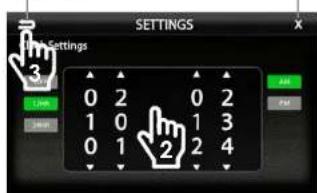
1) Touch and Hold the Time Display on the Information Bar for 2 seconds to access the clock settings.
2) Swipe or click arrows to set time and format.
3) Touch the BACK ARROW or EXIT to save and exit.


Back Arrow Exit

HEIGH10·
AM/FM RADIO
Bluetooth PHONE
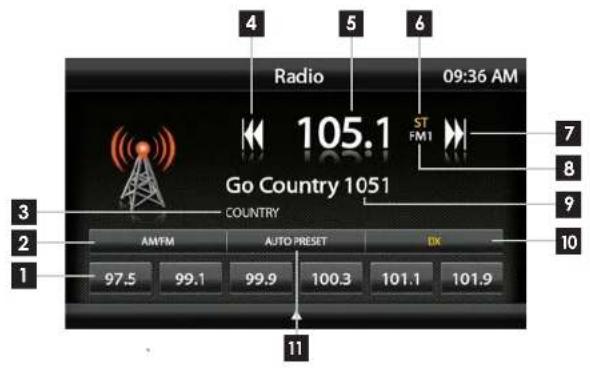
Press the HOME BUTTON > Radio to select the Radio
1 Station Presets - To assign a preset, go to desired station, press and hold a preset location until preset button highlights and station frequency appears. A total of 18 FM and 12 AM stations can be stored in memory.
2 AM/FM - Press to cycle through AM/FM presets (FM1-FM2-FM3-AM1-AM2)
3 PTY Program Type - Indicates radio station type.
4 Tune/Seek Down - Press and release to Tune Down. Press and hold to Seek the next available radio station.
5 Station Display - Displays current frequency.
6 ST Indicator - Indicates when current radio station is in Stereo.
7 Tune/Seek Up - Press and release to Tune Up. Press and hold to Seek the next available radio station.
8 Preset Bank - Indicates current preset bank.
9 RT Info- station/title/artist information
10 DX/LOC - changes the radio tuner sensitivity. Touch to toggle between Distant (DX) and Local (LOC).
11 Auto Preset - Touch to automatically set the 6 presets with current location radio stations.
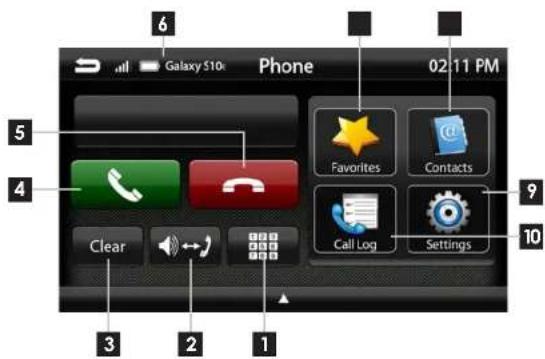
Press the HOME BUTTON > Phone to select the Phone
1 Number Pad - Touch to launch the number pad for dialing phone numbers.
2 Speaker/Phone - Switches phone calls between the car speakers and the phone handset.
3 Clear - Clear/delete last number entered.
4 Call/Answer - Dials the number entered on the phone or on the number pod. Answers incoming call.
5 End/Decline - Press to end active call or decline incoming call.
6 Device Info - Displays the name of the currently paired device, signal strength and battery status.
7 Favorites - Customizable list of favorite contacts.
8 Contacts - List of contacts from paired phone. Not supported by all phones.
Settings - List of devices and settings. Add or Delete devices.
10 Call Log - Recent Dialed, Received and Missed calls.

HEIGH10·
Bluetooth PHONE Bluetooth PHONE
Pairing a Device
1 Select Settings from the Phone main menu to go to BT Device Settings.
2 Select Devices ▶ on the BT Device settings page.
Place your device in Discoverable Mode.
3 Select ADD on the Devices page
4 Select your device from the list.
NOTE!
If your device does not appear in the device list, confirm it is discoverable and select Retry
5 Select Connect to initiate pairing

1

2

3
5

4
6 Select Pair when prompted.
Confirm Key Code on device and select Pair on device.
If prompted, select Allow to share contacts

6
NOTE!
Once a device is paired, it will automatically connect whenever the system is turned on and the device is within range. To manually connect or connect to a different device go to Phone > Settings > Devices
BT Device Settings
Once a device is paired and connected, settings can be set on the BT Device Settings page.
Devices ▶
Access list of all devices in memory. Connect/Add/Delete devices.
Auto Connect [ON/OFF]
Set to ON if you want the device to automatically connect when the system is turned on.
Pin Code [CHANGE]
Change the pin code for Bluetooth connection. The default pin code is "1234"
Microphone [Internal/External]
Set to External if external microphone is installed. Set to internal to use the microphone located on the front of the display.
Microphone Gain [0-6]
Adjusts the volume (sensitivity) of the microphone when using hands free phone.

![PAC SR-JK11H - Microphone Gain [0-6] - 2](/content/2026/05/985292/images/2ebd3bb94fb51e3fbc55590cbce60ecb5dd86cd29d18f9e4f0eb0a2ce76867d3.jpg)
HEIGH10·
Bluetooth PHONE
Bluetooth MUSIC
Contacts
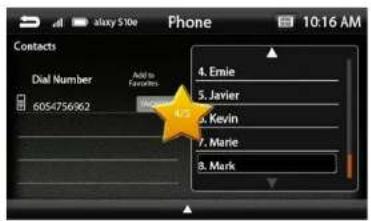
While a device is paired, Contacts can be accessed by selecting Contacts from the Phone main menu. It may take several minutes to load all contacts. When a contact is selected from the list, all associated numbers (Home/Work/Mobile) will be displayed on the left side of the screen. Touch the number you want to dial.
To add a contact number to the Favorites list, touch FAVORITES next to the contact phone number and it will be added to your Favorites list.
The Favorites list can be accessed from the Phone main menu.
To Search your contact list, select the keyboard icon on the Information Bar.
Call Log
The Call Log lists recently Dialed, Received and Missed calls. Touch the contact or phone number to dial a number.
Search Contacts


4

Press the HOME BUTTON > BT Music to select the BT Music source
1 Next Track/Program - Touch to advance to the Next track/Program.
2 Play/Pause - Touch to play or pause the audio.
3 Previous Track/Program - Touch once to restart current track, touch again for Previous track.
4 Song/Program Information - Displays information for the current track.

HEIGH10·
®Satelite Radio (OPTIONAL)
Only SiriusXM brings you more of what you love to listen to, all in one place. Get over 140 channels, including commercial-free music plus the best sports, news, talk, comedy and entertainment. Welcome to the world of satellite radio. A SiriusXM Vehicle Tuner and Subscription are required. For more information, visit www.siriusxm.com
Activating your SiriusXM Subscription
After installing your SiriusXM Connect Vehicle Tuner and antenna, power on your radio and select SiriusXM mode. You should be able to hear the SiriusXM preview channel on Channel 1. If you cannot hear the preview channel, please check the installation instructions to make sure your SiriusXM Connect tuner is properly installed.
After you can hear the preview channel, tune to Channel 0 to find the Radio ID of your tuner. In addition, the Radio ID is located on the bottom of the SiriusXM Connect Vehicle Tuner and its packaging. You will need this number to activate your subscription. Write the number down for reference.
Note: the SiriusXM Radio ID does not include the letters I, O, S or F.
In the USA, you can activate online or by calling SiriusXM Listener care:
- Visit www.siriusxm.com/activatenow
• Call SiriusXM Listener Care at 1-866-635-2349
For Canadian Subscriptions, please contact:
- Visit www.siriusxm.ca/activatexm
• Call XM customer Care at 1-877-438-9677
As part of the activation process, the SiriusXM satellites will send an activation message to your tuner. When your radio detects that the tuner has received the activation message, your radio will display: Subscription Updated. Once subscribed, you can tune to channels in your subscription plan. Note, the activation process usually takes 10 to 15 minutes, but may take up to an hour. Your radio will need to be powered on and receiving the SiriusXM signal to receive the activation message.
SiriusXM Satellite RadioSiri

Press the HOME BUTTON > SiriusXM to select the SiriusXM source.
1 Channel Presets - To assign a preset, go to desired channel, press and hold a preset location until preset button highlights and channel name appears. A total of 18 channels can be stored in memory.
2 Channel Down/Up- Touch to go to previous channel / advance to next channel. Touching and holding either button will rapidly browse through the channels.
3 Signal Strength - Displays tuner signal strength, 0-3 bars.
4 Keypad - Touch to display keypad for direct channel number entry.
5 SiriusXM Info - Displays current channel category, channel number and preset bank number.
6 Channel Info- Displays channel name, song/content info.
7 Pause/Play - Pause live broadcast / Play stored audio
8 LIVE- Select to return to live broadcast when listening to stored audio.
9 Fast Forward/Track Up- Move forward through stored audio
10 Rewind/Track Down - Move backwards through stored audio
11 CAT - Touch to display a list of channel Categories.
12 CH - Touch to display a list of available channels with channel information.
13 BAND - Press to cycle through SXM preset banks [SXM1-SXM2-SXM3]

HEIGH10·
SiriusXM Satellite Radio SiriusXM
Satelite Radio
Channels [CH]
Displays a list of available SiriusXM channels in numerical order. Swipe up/down to navigate, touch to select desired channel. Selecting Content Info, Artist or Song buttons will toggle the information displayed.

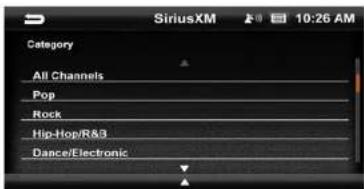
Categories [CAT]
Displays a list of channel categories. When a category is selected, a list of matching channels will display. Selecting All Channels will display all channels in numerical order.
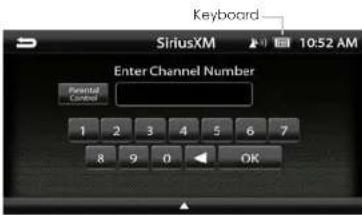
Direct Tuning
Selecting the Keypad Icon on the Information Bar will launch a numeric keypad for direct channel number entry. (See Page 18 for Parental Control function)
SiriusXM Replay™
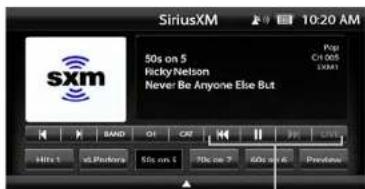
Replay allows you to pause, rewind and replay up to 1 hour of live SiriusXM Satellite Radio.
Pressing Pause or Rewind while listening to a live broadcast will enable Replay mode.
The Replay Time Bar will appear when Replay is active.
When you reach the end of the stored audio buffer, you will return to the live broadcast. Or, touch the LIVE button in the Replay view to return to the live broadcast of the current channel.
Replay Controls
Touch for Previous Song Touch & Hold for Rewind


Touch for Next Song Touch & Hold for Fast Forward

1 2
① Current Replay Point
2 Buffer Range (Light Blue line)
3 Replay Range
4 Time to Live
Replay Controls

HEIGH10·
SiriusXM Satellite Radio
USB Media
Parental Control
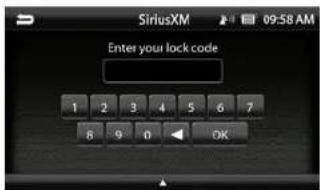
The SiriusXM Parental Control feature allows you to prevent access to inappropriate mature content for a younger listener. When enabled, the Parental Control feature requires you to enter a passcode to access the channels that are rated as Mature Channels.
By default, all channels are Unlocked and the Lock Code is 1234
Lock Mature Channels:
- Touch the Keyboard icon on the Information Bar.
- Touch the Parental Control button.
- Select Lock Mature Channels
- Enter 4 digit lock code.
Unlock Mature Channels:
- Touch the Keyboard icon on the Information Bar.
- Touch the Parental Control button.
- Select Unlock Mature Channels
- Enter 4 digit lock code.
Set/Change Lock Code:
Select Sel Lock Code, enter old code and then enter new code.
Reset Lock Code:
To reset the Lock Code to default code (1234) Go to System Settings > Load Defaults. The reset process takes 5-7 minutes and will reset ALL saved settings to factory default.
Keyboard Icon

Parental Control


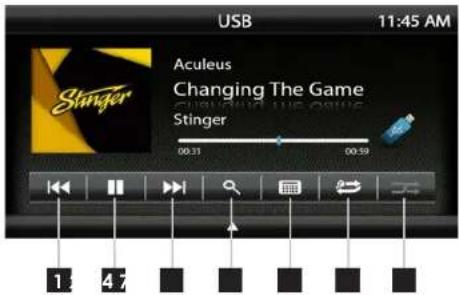
With a USB drive plugged in - press the HOME BUTTON > USB to select USB.
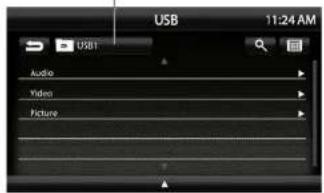
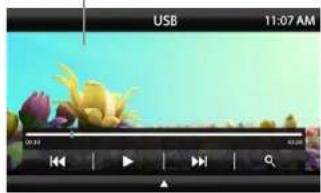
From the USB Root Menu you can browse Audio, Video and Image files. See page 39 for a list of supported file types.
Touch to select a file to view/play.
1 Previous Track - Touch once to restart current track, touch again for Previous track.
2 Play/Pause - Touch to play or pause the audio.
3 Next Track - Touch to advance to the Next track.
4 Browse - browse artist, album or songs.
5 Keyboard - direct input song search
6 Repeat - Press once to repeat the current track (1), press again to repeat album/folder (F).
7 Shuffle - Plays tracks in random order.
USB Root Menu
Video / Image Files

HEIGH10·
Apple CarPlay®
Set up Apple CarPlay
You can use Apple CarPlay to get directions, make calls, send and receive messages, and more.
You need an iPhone 5 or later to use Apple CarPlay. Also, make sure that you're in an area that supports Apple CarPlay and that Siri is on. To turn on Siri on your phone, go to Settings > Siri & Search.
With the your vehicle running, plug your iPhone into the Apple CarPlay USB port. Apple CarPlay will launch automatically.
If your iPhone is already plugged into the USB, press the HOME BUTTON > Apple CarPlay to launch Apple CarPlay.
NOTE: If Apple CarPlay will not launch, see Troubleshooting.
The display will show available apps. Only apps that are supported by Apple CarPlay will appear.
To add, remove, or customize the order that the apps are in on your iOS device:
-
Go to Settings > General, and tap CarPlay.
-
Select UN1880
-
Select Customize
-
Use the add or delete icons to add or remove apps. Tap and drag an app to change the icon order.
To exit Apple CarPlay, press the Slinger Main Menu icon.
For details about Apple CarPlay, visit https://support.apple.com/en-us/HT205634
CarPlay Home

Toggle CarPlay Home / Dashboard
CarPlay Dashboard
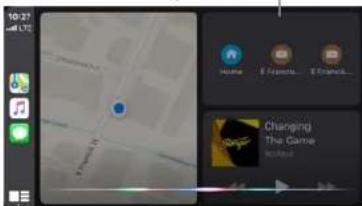
Press & Hold for Siri

Ask Siri for what you need. Press the Voice Control button or The Home/
Dashboard button in Apple CarPlay until Siri appears on the display, then say what you need.

Android Auto™
Set up Andriod Auto
Make sure your phone is running Android 5.0 (Lollipop) or later. Download the Android Auto app from Google Play on your device. Once the app is installed, open the app and follow the setup steps.
Connect your phone
Before you connect your phone for the first time, turn on your car. Make sure it's in park (P) and that you have time to set up Android Auto.
-
Unlock your phone's screen.
-
Connect your phone using a USB cable.
-
Your phone might ask you to download or update certain apps, like Google Maps.
-
Review the Safety Information and Android Auto permissions to access your apps.
-
Tum on notifications for Android Auto. For the best experience, we recommend accepting all requests.
Your phone's Bluetooth will be turned on automatically when Android Auto is connected to the car via USB.
To exit Android Auto, touch the Exit icon.
For details about AndroidAuto, visit https://www.android.com/auto/
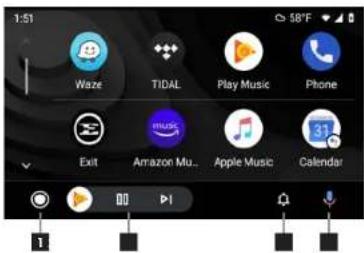
1 Home Button
2 Audio Controls
3 Notifications
4 Voice Command

HEIGH10·
iPod®
HDMI INPUT

Press the HOME BUTTON > HDMI to switch to the HDMI input.
The HDMI input can be used for an external DVD player, streaming sticks, media players, smartphone mirroring.
You can only view HDMI content with the vehicle in Park and the parking brake ON.
When viewing HDMI content, the Information Bar will auto-hide. To access the Information Bar, touch anywhere on the screen.

natural_image
Scenic river landscape at dusk with hills and bridge, no visible text or symbolsAV IN
Press MENU > iPod to select iPod as the source.
1 Previous Track - Touch once to restart current track, touch again for Previous track.
2 Play/Pause - Touch to play or pause the audio.
3 Next Track - Touch to advance to the Next track.
4 Browse - browse artist, album or songs.
5 Keyboard - direct input song search
6 Repeat - Press once to repeat the current track (1), press again to repeat album/folder (F).
7 Shuffle - Plays tracks in random order.
iPod Root Menu
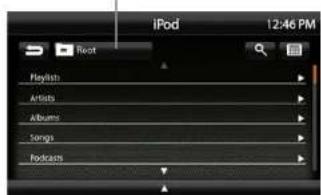
Return to Track Detail View

Browse and Select by
Artists, Albums, Playlists, Songs...
Press the HOME BUTTON > AV IN to switch to the AV input.
You can only view the AV input with the vehicle in Park and the parking brake ON.
When viewing the AV IN, the Information Bar will auto-hide. To access the Information Bar, touch anywhere on the screen.

WARNING!
Driver is prohibited by law from viewing a video signal on any In-dash monitor while the vehicle is in motion.

HEIGH10·
CAMERAS
Press the HOME BUTTON > Cameras to access Cameras
If there are optional cameras installed, you may view them at anytime using the camera selection bar at the bottom of the screen.
To Exit camera view, touch the Back Arrow.
Note: For Irigerred side cameras that turn on automatically with the turn signals, you can override and close the camera view by touching the screen.
Mute On Reverse
The Mute on Reverse feature will mute all audio while in Reverse, touch the speaker icon to toggle between mute ON/OFF.
Settings > Camera Settings
Cam1-4 Label
[REAR-OUTSIDE-AUX-INSIDE-BED-TRAILER] Allows custom labeling for multiple cameras
Cam 1-3 Trigger [ON-OFF]
Set individual camera triggers ON/OFF
Cam 4 Trigger [ON-OFF-VSS]
Set Camera 4 trigger ON, OFF or Vehicle Speed Sense.
Use VSS Mode when parallel parking aid is desired (front camera and VSS wire need to be connected).
On VSS Mode, the front camera will turn on after shifting from Reverse gear and remain On until the speed reaches above SMPH or the display is touched.
Reverse Camera Audio [ON-OFF]
When set to ON and a microphone is connected, back up camera audio will be heard through the vehicle's speakers.

natural_image
Front view of a highway with navigation controls (Left, Front, Rear, Right) and vehicle icons on the road (no readable text or symbols)Mute On Reverse Active





iGO NAVIGATION
(OPTIONAL)
To access the optional Navigation, press the NAVIGATION BUTTON on the side of the display or press the HOME BUTTON >Navigation
The User Manual for iGO Navigation can be found on StingerElectronics.com
To add navigation, ask your dealer about Stinger's pre-loaded iGO Navigation SD Card (Part Number: SE-P14).
Press the HOME BUTTON > Display Off to turn off LCD.
This is useful at night to prevent eye fatigue.
Tap the screen anywhere to return to regular display.

DISPLAY OFF

natural_image
Completely black image with no visible content or text.
HEIGH10·
SETTINGS
SETTINGS
Press the HOME BUTTON > Settings
to access the Settings main menu.
Clock
System Settings
Illumination
Background
Display Settings
Sound Settings
Tabs
Camera Settings
EXIT current screen

Settings > System Settings > Apple CarPlay
Device Mode [OFF-CarPlay-iPod]
Determines how iPhone will be used when plugged into USB port. OFF is charging only.
Mic Gain [LOW-MED-HIGH]
Sets microphone gain (sensitivity) when using Apple CarPlay.

Settings > Clock
Clock Settings [OFF-12HR-24HR]
Select time format. Swipe or click answers to set time.
-BACK to previous screen

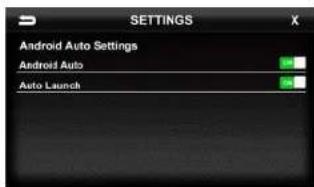
Settings > System Settings > Android Auto
Android Auto [ON-OFF]
Set to OFF for charging only with Android devices.
Auto Launch [ON-OFF]
When set to ON, Android Auto will automatically launch when compatible Android device is plugged into USB port.
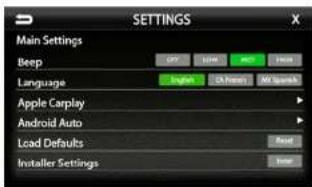
Settings > System Settings
Beep [OFF-LOW-MED-HIGH]
Sets volume of confirmation beeps.
Language [ENGLISH FRENCH SPANISH] Set display language
Apple CarPlay [See Page 27]
Android Auto [See Page 27]
Load Defaults [RESET]
Selecting Reset will reset all settings to factory defaults. This process takes 5-7 minutes and system must NOT be shut down during the reset.
Installer Settings [ENTER]
See Installation Guide or Firmware Update
instructions for more information.
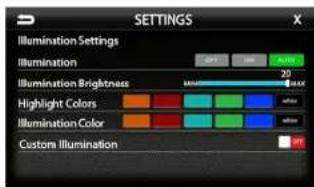
Settings > Illumination
Illumination[OFF-ON-AUTO]
Turn button illumination ON/OFF. Set to AUTO for buttons to illuminate only when vehicle lights are on.
Illumination Brightness[0-20]
Set brightness of button illumination
Highlight Colors
[AMBER-RED-AQUA-GREEN-BLUE-WHITE] Set on-screen highlight color.
Illumination Color
[AMBER-RED-AQUA-GREEN-BLUE-WHITE] Set button illumination color.
Custom Illumination [OFF-ON]
When Custom illumination is set to ON, allows custom illumination color based on RGB values.

Stinger
HEIGH10·
SETTINGSSE1
Settings > Background
Allows you to change the background image. Touch image thumbnail to select. You can upload up to 3 of your own images. To upload an image(s), copy images onto a USB thumb drive and connect drive to one of the USB ports. Touch the @ symbol and select file. Images should be JPG or PNG file format and 1024*600 resolution

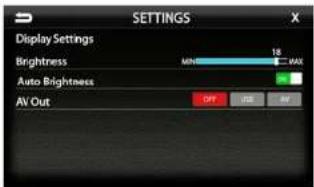
Settings > Display Settings
Brightness [0-20]
Adjust Day and Night brightness of LCD display. To adjust Night brightness level, turn on vehicles lights and then adjust brightness.
Auto Brightness [ON-OFF]
When set to ON, display screen will automatically dim when vehicle lights are turned on.
AV [OFF-USB-AV]
Determines which source is routed to the AV outputs.
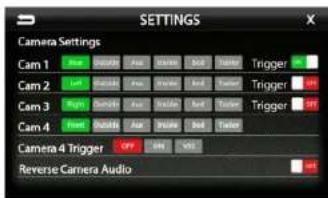
Settings > Camera Settings
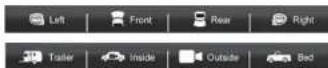
Com1-4 Label
[REAR-OUTSIDE-AUX-INSIDE-BED-TRAILER] Allows custom labeling for multiple cameras
Cam 1-3 Trigger [ON-OFF]
Set individual camera triggers ON/OFF
Set Camera 4 Trigger ON, OFF or Vehicle Speed Sense.
Use VSS Mode when parallel parking aid is desired (front camera and VSS wire need to be connected).
On VSS Mode, the front camera will turn on after shifting from Reverse gear and remain On until the speed reaches above 5MPH or the display is touched.
Reverse Camera Audio [ON-OFF]
When set to ON and a microphone is connected, back up camera audio will be heard through the vehicle's speakers.

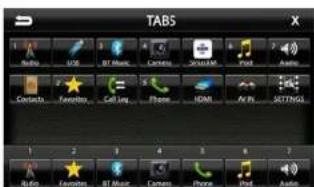
Settings > Tabs
The Tabs are customizable and can be configured to include favorite sources or settings.
To Program a Tab:
1) Select a Tab position (1-7) on the bottom row 2) Select the desired source or setting from the options on the top rows.

HEIGH10·
SOUND SETTINGS
SOUND SETTINGS
4

Settings > Sound Settings
Balance [-9 - 0 - 9]
Using the Left and Right arrows, adjusts the speaker balance Left/Right.
2 Fader [-9 - 0 - 9] Using the Up and Down arrows fades the speakers Front/Rear.
3 Center Press to set balance and fade to zero (0)
4 Audio Menu Bar Access to Equalizers, Crossovers and Time Correction
5 Advanced Settings
Access to gain/volume settings. Toslink, microphone settings. (See page 34)
6 Loudness [ON-OFF]
When ON, boosts low and high frequencies when listening at lower volume
7 Subwoofer [ON-OFF]
Turns subwoofer output ON/OFF
8 Phase [0°-180°] Changes phase of subwoofer signal.
9 Sub Level [0-15] Adjusts volume level of subwoofer output.
Sound Settings > Equalizer
Selecting Equalizer from the Audio Menu Bar will bring up the 15 band graphic equalizer and presets. Frequency adjustments can be made by touching and sliding the frequency sliders up/cown. Once the desired sound is achieved, it can be saved as a Preset.
Saving EQ Settings
There are 6 user Presets that can be used to save EQ settings. This is useful for having EQ settings for different types of music, volume levels or for different sources.
When you are done adjusting the EQ, touch and hold a Preset location to save the settings. The Preset will highlight.


bar
| Category | Audio | Suffix | Noise | Decocean | Sound Synthesis | Audio Plus | |---|---|---|---|---|---|---| | 25 | 0.0 | 0.0 | 0.0 | 0.0 | 0.0 | 0.0 | | 47 | 0.0 | 0.0 | 0.0 | 0.0 | 0.0 | 0.0 | | 60 | 0.0 | 0.0 | 0.0 | 0.0 | 0.0 | 0.0 | | 81 | 0.0 | 0.0 | 0.0 | 0.0 | 0.0 | 0.0 | | 103 | 0.0 | 0.0 | 0.0 | 0.0 | 0.0 | 0.0 | | 126 | 0.0 | 0.0 | 0.0 | 0.0 | 0.0 | 0.0 | | 159 | 0.0 | 0.0 | 0.0 | 0.0 | 0.0 | 0.0 | | 182 | 0.0 | 0.0 | 0.0 | 0.0 | 0.0 | 0.0 | | 215 | 0.0 | 0.0 | 0.0 | 0.0 | 0.0 | 0.0 | | 248 | 0.0 | 0.0 | 0.0 | 0.0 | 0.0 | 0.0 | | 271 | 0.0 | 0.0 | 0.0 | 0.0 | 0.0 | 0.0 | | Final: | Filter: | | | | | | | | | | | | | | | | | | | | | | | | | | | | | | | | | | | | | | | | | | | | | | | | | | | | | | | | | | | | | | | | | | | | | | | | | | | | | | | | | | | | | | | | | | | | | | | | | | | | | | | | | | | | | | | | | | | | | | | | | | | | | | | | | | | | | | | | | | | | | | | | | | | | | | | | . | | | | | |Sound Settings > Factory EQ
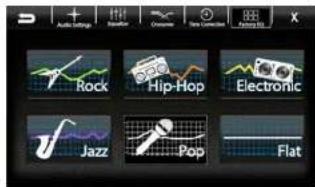
Selecting Factory EQ from the Audio Menu Bar will access factory equalizer presets for different music types.
Rock - Hip-Hop - Electronic - Jazz - Pop
When a Factory EQ preset is selected, it can be fine-tuned using the Equalizer and then re-saved as a User Preset.

HEIGH10·
SOUND SETTINGS SOUND SETTINGS
Sound Settings > Crossover
Selecting Crossover from the Audio Menu Bar will access the internal electronic variable crossover. Crossover settings can be saved and recalled via Presets.
Front / Rear / Subwoofer Channels Select Front, Rear or Subwoofer to set crossover.
Slope [6dB-12dB-18dB]
Adjusts the slope of the crossover.
Frequency
[BYPASS-25-40-63-80-100-160-250Hz] Adjusts crossover frequency. Front and Rear channels are High Pass and Subwoofer is Low Pass.
Level [-12 - 0]
Adjusts signal level. Channel levels can be adjusted regardless of crossover settings.
Saving Crossover Settings
There are 6 user Presets that can be used to save Crossover settings.
When you are done adjusting the Crossover, touch and hold a Preset location to save the settings. The Preset will highlight.
Graphical representation of crossover Slope, Frequency and Level.

Front Channel = Blue Rear Channel = Orange Subwoofer = Green Active(Selected) = Yellow
Sound Settings > Time Correction
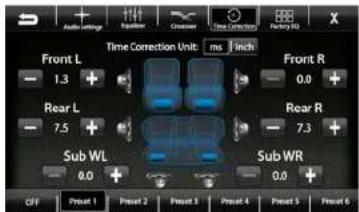
Selecting Time Correction from the Audio Menu Bar will access the Time Correction settings. Time Correction settings can be saved and recalled via Presets.
Time Correction compensates for the uneven distances between the speakers and a listeners ears. Time Correction delays signals from the closest speaker(s), so that all the sound arrives at the listening position at the same time, giving the listener a more accurate, life like stereo image.
To set Time Correction, select a listening position, for example the drivers seat headrest. Then measure from each speaker to the listening position. Set Units to inch and input speaker distance values into the appropriate positions using the +/- buttons.
Saving Time Correction Settings
There are 6 user Presets that can be used to save settings. When you are done adjusting the Time Correction, touch and hold a Preset location to save the settings. The Preset will highlight.
Select milliseconds or inches


HEIGH10·
SOUND SETTINGS
Settings > Sound Settings > Advanced Settings
Selecting Advanced Settings ▶ from the Audio Settings screen will access the following settings:
Defeat [ON-OFF]
When set to ON, this will defeat/bypass all equalizer, crossover, speakers settings. This is useful when connecting to a DSP.
Default Audio Settings [Reset] Press to reset all audio settings to default.
Toslink(Optical Out) [ON-OFF]
Turns variable digital output ON/OFF
Microphone Selection [INTERNAL-EXTERNAL] Select External if external microphone is installed. Select internal to use built-in microphone.

Source Gain Settings ▶
Selecting Source Gain from the Advanced Audio Settings will allow gain/volume adjustments for individual sources. For example, if AM/FM is much louder than BT Music, lower AM/FM and/or raise BT Music to even out volume levels.

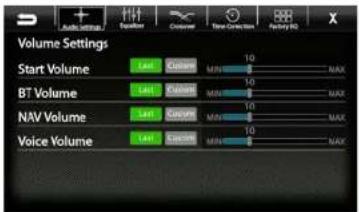
Volume Settings ▶
Selecting Volume Settings from the Advanced Audio Settings will access the following Volume settings:
Arrow down for additional sources
Start Volume [LAST-CUSTOM]
LAST will be same level as when unit was shut off. CUSTOM will be a preset level adjusted below.
Volume Slider [0-40]
Adjusts CUSTOM volume level to specific level.
The Volume Mode is adjustable for Bluetooth(BI). Navigation(NAV) and Voice using the same procedure.
Reset Button
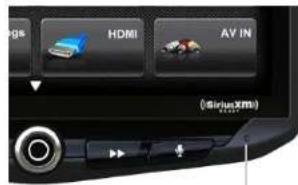
The Reset Button is located on the lower right hand corner of the display. To reset the unit the power must be on, use a paper clip or similar to push the reset button for 2 seconds and release. The reset will take a few minutes, do not turn of power during this time.
Reset Button

HEIGH10·
TROUBLE SHOOTING
Black Screen with Audio
Touch the screen anywhere as it may have been turned off, see page 25. Ensure the cables on the back of the screen are fully locked into place and also properly connected at the back of the radio module. Check for damaged/kinked cables.
Display Image Is Inverted
Press and Hold the HOME BUTTON for 5 seconds. The Display Orientation page will appear, select desired orientation.
Bluetooth
Device will not Pair
Ensure Bluetooth is turned ON in your device settings. Delete all unused devices. Delete any "Slinger" device. Restar1/Reboot device and try pairing again. (Page: 10)
Music Volume is low
- Turn up volume on device
- Turn up volume on head unit.
- Turn up BT Volume Gain (Page: 34)
Phone Volume is low
- Tum up volume on device
- Turn up volume on head unit.
- Tum up BT Volume Gain (Page: 34)
- Turn up Mic Gain (Page: 11)
Video/Cameras
Rear Camera not displaying in reverse - Make sure rear camera trigger is ON (Page: 29)
- If display is showing NO SIGNAL in reverse,
ensure camera RCA is plugged into
correct RCA input (CAMERA IN). - Confirm camera has power and ground.
- Confirm camera trigger is receiving positive12V.
Note: NTSC and PAL video formats only.
SiriusXM Satellite RadioGene
Check Antenna
The radio has detected a fault with the SiriusXM antenna. The antenna cable may be either disconnected or damaged. - Verify that the antenna cable is connected to the SiriusXM Connect Vehicle Tuner. - Inspect the antenna cable for damage and kinks.
Replace the antenna if the cable is damaged. SiriusXM products are available at your local car audio retailer or online at www.shop.siriusxm.com.
Check Tuner
The radio is having difficulty communicating with the SiriusXM Connect Vehicle Tuner. The tuner may be disconnected or damaged. - Verify that the SiriusXM Connect Vehicle Tuner cable is securely connected to the radio.
No Signal
The SiriusXM Connect Vehicle Tuner is having difficulty receiving the SiriusXM satellite signal.
- Verify that your vehicle is outdoors with a clear view of the sky.
- Verify that the SiriusXM magnetic mount antenna is mounted on a metal surface on the outside of the vehicle.
- Move the SiriusXM antenna away from any obstructions. Inspect the antenna cable for damage and kinks.
- Consult the SiriusXM Connect Vehicle tuner installation manual for more information on antenna installation.
Replace the antenna if the cable is damaged. SiriusXM products are available at your local car audio retailer or online at www.shop.siriusxm.com.
Channel Locked
The channel that you have requested is Locked by the radio Parental Control feature. See the Parental Control section on Page 18 for more information on the Parental Control feature and how to access locked channels.
Subscription Updated
The radio has detected a change in your SiriusXM subscription status.
- Press anywhere on the screen to clear the message.
In the U.S.A., visit www.siriusxm.com or call 1-866-635-2349 if you have questions about your subscription. In Canada, visit www.
siriusxm.ca or call 1-877-438-9677 if you have questions about your subscription.
Channel Unavailable
The channel that you have requested is not a valid SiriusXM channel or the channel that you were listening to is no longer available. You may also see this message briefly when first connecting a new SiriusXM Connect Vehicle tuner. Visit www.siriusxm.com for more information about the SiriusXM channel lineup. title, exists.
Memory End
This message will display when the beginning of stored audio has been reached. You cannot rewind any further.
Memory Full
The stored audio memory has become full while audio was paused. Resume playback.
Channel Unsubscribed
The channel that you have requested is not included in your SiriusXM subscription package or the channel that you were listening to is no longer included in your SiriusXM subscription package.
In the U.S.A., visit www.siriusxm.com or call 1-866-635-2349 if you have questions about your subscription package or would like to subscribe to this channel. In Canada, visit www.siriusxm.ca or call 1-877-438-9677.
TROUBLE SHOOTING
Apple CarPlaySiriusXM Satellit
Apple CarPlay will not start/launch
- Ensure you are using a Apple certified cable
- Make sure you are plugged into USB #1(top)
- Make sure Apple CarPlay is turned ON (Page 20)
Android Auto
Android Auto
- Ensure you are using a USB certified cable
- Make sure Android Auto app is
downloaded and installed on your device. - Make sure you are plugged into USB #1(top)
- Make sure Android Auto is turned ON (Page 21)

HEIGH10·
SPECIFICATIONS SPECIFICATIONS
GENERAL
Operating Voltage: 9.0VDC to 18VDC
Grounding system; Negative Ground
Max current consumption; 10A fused
DIMENSIONS
Radio Module:
178 mm x 100 mm x 116 mm (W x H x D)
Display:
247.2 mm x 180.6 mm x 48.5 mm (W x H x D)
DISPLAY
10-inch Diagonal
16:9 aspect ratio
1024×600
Pixels: 1,843,200
Active area 222.72 (W) x 125.28 (H) mm
Operating Temperature (C) -20° to 70°
AUDIO
Peak power output: 50W x 4ch/4Ω
Load impedance: 4Ω nominal / 2Ω allowable
Continuous power output:
25W x 4ch/4Ω 20Hz to 20KHz,
1%THD of 14.4V
Audio output level (max): 4.0V preout
EQ: (15-band)
25Hz/40Hz/63Hz/100Hz/160Hz/250Hz/400Hz/
630Hz/1KHz/1.6KHz/2.5KHz/4KHz/6.3KHz/
10KHz/16KHz
Gain: ±12dB (2dB/slep)
HPF: 25Hz/40Hz/63Hz/80Hz/100Hz/160Hz/250Hz
Slope: 6dB, 12dB, 18dB
AUDIO (CONT)
Subwoofer Preout
LPF: 25Hz/40Hz/63Hz/80Hz/100Hz/160Hz/250Hz
Slope: 6dB, 12dB, 18dB
Gain: -14dB to 7dB (1dB/step)
Phase: 0 or 180
Speaker level: ±9dB (1dB/slop)
Time Alignment: 0 to 133 step (inch/ms)
USB
USB 2.0
Max current supply 1.5A
USB Class:
MSC (Mass Storage Class),
MTP (Media Transfer Protocol)
File system: FAT32, NTFS
BLUETOOTH
V4.2 dual
4dBm Class2
2.4GHz to 2.48GHz
FM TUNER
87.9MHz to 107.9MHz
Usable sensitive 0dB (mono S/N: 30dB)
SNR: 65dB
AM TUNER
530KHz to 1710KHz
Usable sensitive 0dB (mono S/N:20dB)
SNR 58dB
CAMERA(S) VIDEO INPUTS
NTSC OR PAL video formats
HDMI INPUT
Supported HDMI Resolutions:
640*480p, 720*480p, 1280*720p,
1920*1080i, 1920^1080p
TOSLINK (OPTICAL)
Output: 48khz Variable
BACKGROUND IMAGE (USER)
File Format: JPG / PNG
Resolution: 1024 x 600
File size is not limited
AUDIO/VIDEO FORMATS
AUDIO
MPEG-1 Audio Layer-3 (.mp3)
FLAC (.flac)
MPEG-2 Advanced Audio (.aac)
MPEG-4 Audio (.m4a)
Windows Audio (.wav)
OGG Audio (.ogg)
VIDEO
QuickTime (.mov)
MPEG-4 Video (.mp4)
Microsoft AVI (.avi)
MPG Video (.mpg)
MPEG Video 1/2 (.mpeg)
VOB DVD (.vob)
Flash Video (.lv)
IMAGE
JPEG (.jpg)
CompuServe GIF (.gif)
PNG (.png)
JPEG (jpeg)
Bitmap (.bmp)
HEIGH10®
FEATURES
■ 10-Inch 1024 x 600 HD Digital Touchscreen with 16.7M colors
Apple CarPlay®
Google Android Auto™
SiriusXM-Ready® with Replay (SiriusXM Connect Vehicle Tuner and Subscription required)
■ AM/FM Radio - PTY / RT information
■ High power 4 x 50W (peak) built-in amplifier
■ 4V 6ch RCA audio outputs with subwoofer control
■ Toslink (Optical) Variable Audio Output
■ 15 Band Adjustable EQ with 6 user presets
■ 1 HDMI rear input
■ 2 USB rear inputs 1.5amp output
- Handsfree Bluetooth® 4.2 A2DP with aptX™
■ Built-in MicroSD card slot for optional iGO Navigation
■ 4 Camera Video inputs with wired triggers
■ Rear camera input with Mic Audio input
■ Hardwired remote control ready
- Customizable display backgrounds
■ Shallow 1-DIN chassis mounting design

- Bluetooth®
- HDMI®
- Visit StingerElectronics.com for updates and further detailed information.
- TECHNICAL SUPPORT:
- CUSTOMER SOLUTIONS:
- HEIGH10·
- CONTENTS
- THE BASICS
- POWER UP!
- SELECTING A SOURCE
- QUICK TIP
- SETTING THE TIME
- Press the HOME BUTTON > Radio to select the Radio
- Press the HOME BUTTON > Phone to select the Phone
- Bluetooth PHONE Bluetooth PHONE
- Pairing a Device
- NOTE!
- BT Device Settings
- Devices ▶
- Auto Connect [ON/OFF]
- Pin Code [CHANGE]
- Microphone [Internal/External]
- Microphone Gain [0-6]
- Bluetooth PHONE
- Bluetooth MUSIC
- Contacts
- Call Log
- ®Satelite Radio (OPTIONAL)
- Activating your SiriusXM Subscription
- SiriusXM Satellite RadioSiri
- SiriusXM Satellite Radio SiriusXM
- Satelite Radio
- Channels [CH]
- Categories [CAT]
- Direct Tuning
- SiriusXM Replay™
- Replay Controls
- SiriusXM Satellite Radio
- USB Media
- Parental Control
- Lock Mature Channels:
- Unlock Mature Channels:
- Set/Change Lock Code:
- Reset Lock Code:
- Apple CarPlay®
- Set up Apple CarPlay
- Android Auto™
- Set up Andriod Auto
- WARNING!
- CAMERAS
- Mute On Reverse
- Settings > Camera Settings
- SETTINGS
- Press the HOME BUTTON > Settings
- Settings > System Settings > Apple CarPlay
- Settings > Clock
- Settings > System Settings > Android Auto
- Settings > System Settings
- Settings > Illumination
- Stinger
- SETTINGSSE1
- Settings > Background
- Settings > Display Settings
- Settings > Tabs
- SOUND SETTINGS
- Settings > Sound Settings
- Sound Settings > Equalizer
- Saving EQ Settings
- Sound Settings > Factory EQ
- SOUND SETTINGS SOUND SETTINGS
- Sound Settings > Crossover
- Saving Crossover Settings
- Sound Settings > Time Correction
- Saving Time Correction Settings
- Settings > Sound Settings > Advanced Settings
- Defeat [ON-OFF]
- Source Gain Settings ▶
- Volume Settings ▶
- Start Volume [LAST-CUSTOM]
- Volume Slider [0-40]
- Reset Button
- TROUBLE SHOOTING
- Black Screen with Audio
- Display Image Is Inverted
- Bluetooth
- Device will not Pair
- Music Volume is low
- Phone Volume is low
- Video/Cameras
- SiriusXM Satellite RadioGene
- Check Antenna
- Check Tuner
- No Signal
- Channel Locked
- Subscription Updated
- Channel Unavailable
- Memory End
- Memory Full
- Channel Unsubscribed
- Apple CarPlaySiriusXM Satellit
- Apple CarPlay will not start/launch
- Android Auto
- SPECIFICATIONS SPECIFICATIONS
- GENERAL
- DIMENSIONS
- DISPLAY
- AUDIO
- AUDIO (CONT)
- USB
- FM TUNER
- AM TUNER
- CAMERA(S) VIDEO INPUTS
- HDMI INPUT
- TOSLINK (OPTICAL)
- BACKGROUND IMAGE (USER)
- AUDIO/VIDEO FORMATS
- VIDEO
- IMAGE
- HEIGH10®
- FEATURES
Brand : PAC
Model : SR-JK11H
Category : Car kit