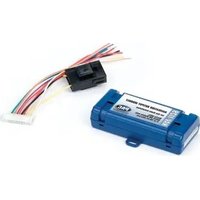
NAV-1129 - Car kit PAC - Free user manual and instructions
Find the device manual for free NAV-1129 PAC in PDF.


| Product Type | Car Kit |
| Brand | PAC |
| Model | NAV-1129 |
| Category | Car Kit |
| Dimensions (approx.) | 10 x 5 x 3 cm |
| Weight (approx.) | 80 g |
| Material | ABS plastic |
| Power Source | 12V DC (cigarette lighter) |
| Input Voltage | 12V DC |
| Output Voltage | 5V DC |
| Charging Current (max) | 2.1A |
| Device Compatibility | Smartphones up to 6.5 inches |
| Mounting Options | Suction cup (windshield) and adhesive disc (dashboard) |
| Rotation | 360-degree swivel |
| Cable Length | 1.2 m |
| LED Charging Indicator | Yes (red when charging, blue when idle) |
| Safety Certifications | CE, RoHS |
| Operating Temperature | -10°C to 60°C |
| Storage Temperature | -20°C to 70°C |
| What's in the Box | 1 Car Kit, 1 USB car charger, 1 suction mount, 1 adhesive disc, 1 user manual |
| Warranty | 1 year |
Frequently Asked Questions - NAV-1129 PAC
User questions about NAV-1129 PAC
0 question about this device. Answer the ones you know or ask your own.
Ask a new question about this device
Download the instructions for your Car kit in PDF format for free! Find your manual NAV-1129 - PAC and take your electronic device back in hand. On this page are published all the documents necessary for the use of your device. NAV-1129 by PAC.
USER MANUAL NAV-1129 PAC
The NAV-1129 interface is a multi-purpose, multi vehicle installation accessory. This interface is compatible with 2006 and newer GM cars/trucks/suv's using the GMLAN data bus (11bit or 29bit). The provided output signals are vehicle speed sensor output (VSS), reverse output, parking brake on/off, illumination, and retained accessory power (R.A.P.)
Uses:
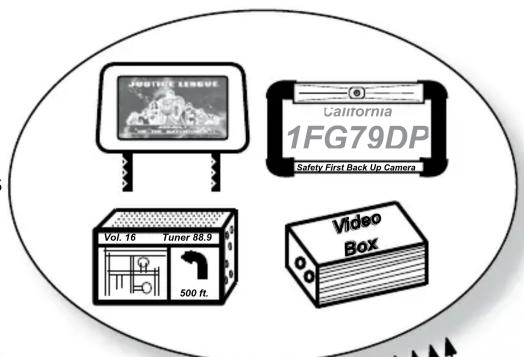
- Replacing the radio with a navigation system which uses the vehicles reverse and VSS wires for accuracy.
- Adding a backup camera to the factory navigation system needing R.A.P. and reverse activation wires.
• Installing a DVD or video entertainment system needing R.A.P. and illumination wires.
Installation:
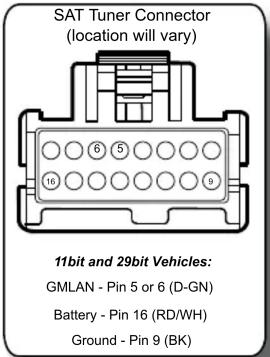
Only 3 wires need to be connected to the vehicles wiring; GMLAN data, Battery +12v and Ground. All other wires are either not used or connected to the installed aftermarket device. There are 3 suggested locations below to connect these wires. All connectors are viewed from the pin side. The color of the factory wires may vary but the pin locations will remain the same. This interface can be connected to any 1 of these 3 locations which ever is most convenient for the installation.
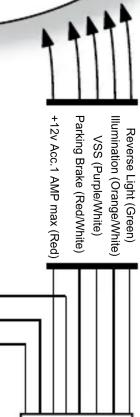
Connections:
- White/Red - GMLAN data
- Yellow - Battery +12v
• Red - R.A.P. Output (12v) 1amp MAX - Black - Ground
- Red/White - Parking Brake Output (-)
• Purple/White - VSS Output
• Orange/White - Illumination Output (+) - Green - Reverse Output (+)

flowchart
graph TD
    A["White/Red - GMLAN data"] --> B["Yellow - Battery +12v"]
    B --> C["Red - R.A.P. Output (12v) 1amp MAX"]
    C --> D["Black - Ground"]
    D --> E["Red/White - Parking Brake Output (-)"]
    E --> F["Purple/White - VSS Output"]
    F --> G["Orange/White - Illumination Output (+)"]
    G --> H["Green - Reverse Output (+)"]
    I["High Current 12v (Fused)"] --> J["85 87 86"]
    J --> K["Ground"]
    K --> L["87a"]
    L --> M["30"]
    M --> N["New High Current Output"]
    O["Diode 1N4005 or equivalent"] --> P["Ground"]
    Q["Location 1 Location 2 Location 3"] --> R["End"]


NAV-1129

Pacific Accessory Corporation
White/Red - GMLAN Data
Yellow - Battery +12v
Red - R.A.P. Output (12v) 1amp MAX
Black - Ground
Red/White - Parking Brake Output (-)
Purple/White - VSS Output
Orange/White - Illumination Output (+)
Green - Reverse Output (+)
www.pac-audio.com
DISCLAIMER: Under no circumstances shall the manufacturer or the distributors of the NAV-1129 be held liable for consequential damages sustained in connection with the NAV-1129. The manufacture and its distributors will not, nor will they authorize any representative or any other individual to assume obligation or liability in relation to the NAV-1129 other than its replacement.
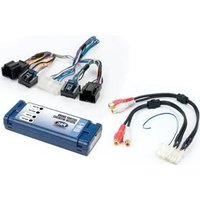


Brand : PAC
Model : NAV-1129
Category : Car kit