IS-52 - Toaster Imarflex - Free user manual and instructions
Find the device manual for free IS-52 Imarflex in PDF.


| Product Type | Toaster |
| Brand | Imarflex |
| Model | IS-52 |
| Dimensions (approx) | 28 x 18 x 20 cm |
| Weight (approx) | 1.2 kg |
| Power Supply | 220-240V, 50/60Hz, 800-1000W |
| Number of Slots | 2 |
| Browning Control | Adjustable with 6 levels |
| Functions | Toast, reheat, defrost, cancel |
| Additional Features | Self-centering racks, high lift lever, crumb tray |
| Material | Stainless steel/plastic housing |
| Color | White or black (depending on variant) |
| Cleaning and Maintenance | Unplug, empty crumb tray regularly, wipe exterior with damp cloth |
| Safety Features | Auto shut-off, non-slip feet, cool-touch exterior |
| Spare Parts and Repairability | Replacement crumb tray available; repair by qualified technician |
| General Information | Suitable for household use only; not for commercial use |
Frequently Asked Questions - IS-52 Imarflex
User questions about IS-52 Imarflex
0 question about this device. Answer the ones you know or ask your own.
Ask a new question about this device
Download the instructions for your Toaster in PDF format for free! Find your manual IS-52 - Imarflex and take your electronic device back in hand. On this page are published all the documents necessary for the use of your device. IS-52 by Imarflex.
USER MANUAL IS-52 Imarflex
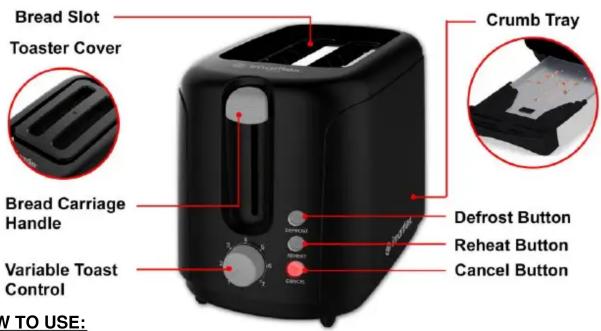
- Press down the bread carriage handle to start toasting. Cancel Button will light up.
*Note:
- Toasting cycle can be cancelled at any time by pressing the "Cancel" button.
-
Do not touch the unit while toasting is in process, the unit surface is hot.
-
The toasted breads will automatically pop-up after the toasting cycle.
CANCEL BUTTON - Press the cancel button to cancel the toasting cycle.
REHEAT BUTTON
- Put a slice bread into the bread slots.
- Select the desired toast from Toast#1 – Light Toast up to Toast#7 – Dark Toast.
- Press down the bread carriage handle then press the reheat button. Cancel and Reheat buttons will light up.
DEFROST BUTTON - Toasting bread directly from freezer.
- Put a slice bread into the bread slots.
- Select the desired toast from Toast#1 – Light Toast up to Toast#7 – Dark Toast.
- Press down the bread carriage handle then press the defrost button. Cancel and defrost buttons will light up.
CLEANING AND MAINTENANCE:
- Make sure to unplug and allow the unit to cool down before moving or cleaning. Use a wet damp cloth to clean the unit.
- Pull-out the Crumb Tray on the bottom of the unit, wash thoroughly.
- Do not use abrasive materials to avoid scratches.
Reminder: Please do not forget to fill up and send the warranty card with receipt to our email address imarflexfb@evergoodinc.com
Distributed By: Evergood Unlimited Corp.
901 G.Masangkay St., Manila
Made in China

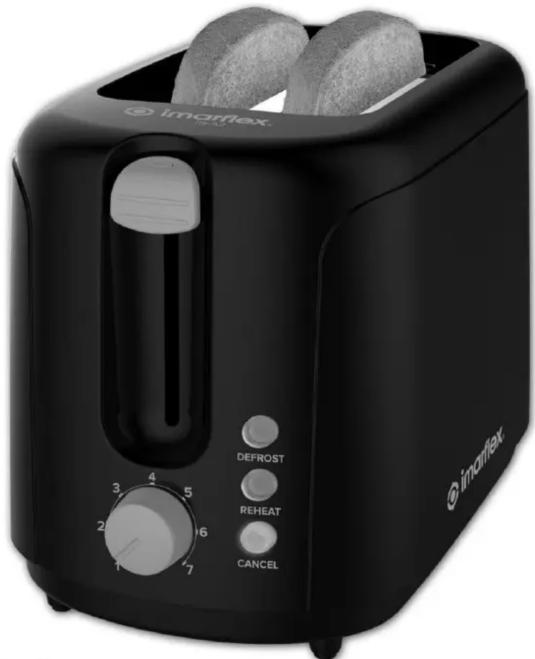
2-slice Pop-up TOASTER
natural_image
Black IMARflex toaster with two round food items, no visible text or symbols on the device itself.
• Defrost & Reheat Function
• Hygienic Toaster Cover
- Slide-out Crumb Tray
When using electrical appliances, basic safety precautions should always be followed, including the following:
-
Read all instruction carefully.
-
Before using the unit, check if the voltage indicated corresponds with the convenience outlet (230Va.c.).
-
Do not use any appliance with a damaged cord or plug. If the cord is damaged it must be replaced with the same type and size or bring the unit to the nearest authorized service center.
-
Put the unit on stable surface, keep it away from the edge of counter or hang it on a safe place to avoid accident.
-
Keep curtains, furniture, flammable materials, etc. away from the unit and from the convenience outlet where the unit is plugged in.
-
Do not place on or near gas stove, electric burner or in a heated oven.
-
Do not disassemble or insert any sharp object into the unit.
-
Do not insert bread with aluminum or plastic wrapper or and thick bread to avoid electric shock or fire.
-
Do not allow cord to touch hot surface of the unit.
-
Avoid touching the Pop-up Toaster when toasting is in progress.
-
Children should be supervised to ensure that they do not play with the appliance.
-
This appliance is not intended to use by persons (including children) with reduced physical, sensory or mental capabilities, or lack of experience and knowledge, unless they have been given supervision or instruction concerning the use of the appliance by a person responsible for their safety.
-
Do not loop the cord around the unit after use.
- Do not immerse the unit in water.
- Do not use this unit other than its intended use.
- The unit is designed for household use, and intended for biscuits and bread toasting only.
- In case of malfunctions, please bring the unit to nearest Customer Service Center.
- The appliances are not intended to be operated by means of an external timer or separate remote-control system.
- For household use only, not intended for any business purposes.
- Save this instruction for future reference.
- CAUTION: In order to avoid a hazard due to inadvertent resetting of the thermal cutout, this appliance must not be supplied through an external switching device, such as a timer, or connected to a circuit that is regularly switched on and off by the utility.
DESCRIPTION OF PARTS:
HOW TO USE:
- Plug the unit into the convenience outlet.
- Put a slice of bread into the bread slots (Insert two slices of bread at a time). *Note: Place the crumb tray properly before use.
- Select the desired toast from Toast#1 – Light Toast up to Toast#7 – Dark Toast.
*Note: Results will differ according to the type of bread. For continuous toast, the bread may become darker than the first set. Adjust the setting according to the desired toast setting.
Brand : Imarflex
Model : IS-52
Category : Toaster