IS-72 - Toaster Imarflex - Free user manual and instructions
Find the device manual for free IS-72 Imarflex in PDF.


| Product Type | 2-Slice Toaster |
| Brand | Imarflex |
| Model | IS-72 |
| Rated Voltage | 230 V a.c., 60 Hz |
| Power Consumption | 750 W |
| Box Dimensions (W x D x H) | 283 x 154 x 188 mm |
| Net Weight | 1.13 kg |
| Browning Control | Variable, 4 settings (1 = light, 4 = dark) |
| Defrost Function | Yes (separate defrost and toast setting) |
| Cancel Function | Yes, by turning browning control to 'Stop' |
| Auto Pop-Up | Yes, when toast is done |
| Number of Slots | 2 |
| Crumb Tray | Removable, pull-down at bottom |
| Cleaning | Wipe with damp cloth; wash crumb tray; do not use abrasives |
| Safety Features | Auto shut-off, cool-touch exterior, non-slip feet |
| Power Cord Length | Approximately 0.8 m |
| Warranty | Warranty card included; register for service |
| Usage | Household use only; for bread and biscuits |
| Not Suitable For | Bread with aluminum or plastic wrappers, thick bread |
| Repairability | Refer to authorized service center for repairs |
Frequently Asked Questions - IS-72 Imarflex
User questions about IS-72 Imarflex
0 question about this device. Answer the ones you know or ask your own.
Ask a new question about this device
Download the instructions for your Toaster in PDF format for free! Find your manual IS-72 - Imarflex and take your electronic device back in hand. On this page are published all the documents necessary for the use of your device. IS-72 by Imarflex.
USER MANUAL IS-72 Imarflex
CLEANING AND MAINTENANCE
- Make sure to unplug and allow the unit to cool down before moving or cleaning. Use a wet damp cloth in cleaning the unit.
- Pull-down the Crumb Tray on the bottom of the unit, wash thoroughly.
- Do not use abrasive materials to avoid scratches.

2-slice
TOASTER

REMINDER: Please do not forget to fill up and send the warranty card

imarflex®
In Every Home.
www.imarflex.com
SPECIFICATION
MODEL NO. : IS-72
RATED VOLTAGE : 230 Va.c. 60Hz
POWER CONSUMPTION : 750 watts
BOX DIMENSION : 283x154x188mm
WEIGHT : 1.13kg
IMPORTANT SAFEGUARDS
When using electrical appliances, basic safety precautions should always be followed, including the following:
- Read all instruction carefully.
- Before using the unit, check if the voltage indicated corresponds with the convenience outlet (230Va.c.).
- Do not use any appliance with a damaged cord or plug. If the cord is damaged it must be replaced with the same type and size or bring the unit to the nearest authorized service center.
- Put the unit on stable surface, keep it away from the edge of counter or hang it on a safe place to avoid accident.
- Keep curtains, furniture, flammable materials, etc. away from the unit and from the convenience outlet where the unit is plugged in.
- Do not place on or near gas stove, electric burner or in a heated oven.
- Do not disassemble or insert any sharp object into the unit.
- Do not insert bread with aluminum or plastic wrapper or and thick bread to avoid electric shock or fire.
- Do not allow cord to touch hot surface of the unit.
- Avoid touching the Pop-up Toaster when toasting is in progress.
- Children should be supervised to ensure that they do not play with the appliance.
- This appliance is not intended to use by persons (including children) with reduced physical, sensory or mental capabilities, or lack of experience and knowledge, unless they have been given supervision or instruction concerning the use of the appliance by a person responsible for their safety.
- Do not loop the cord around the unit after use.
- Do not immerse the unit in water.
-
Do not use this unit other than its intended use.
-
The unit is designed for household use, and intended for biscuits and bread toasting only.
- In case of malfunctions, please bring the unit to nearest Customer Service Center.
- The appliances are not intended to be operated by means of an external timer or separate remote control system.
- For household use only, not intended for any business purposes.
- Save this instruction for future reference.
DESCRIPTION OF PARTS
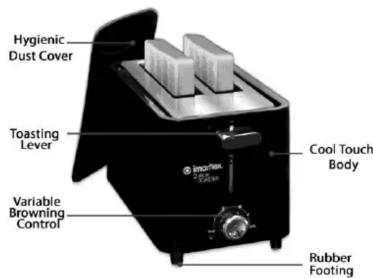
HOW TO USE
- Plug the unit into the convenience outlet.
- Put slice bread into the bread slot (it can insert two slices at a time).
- Set the variable browning control, there are 4 settings, 1 is for light toast and 4 is for dark brown.
Note: Toasting color for one slice is darker than the double bread at the same setting. If toasted continuously, toasting color for the latter bread is darker. - Press down the toasting lever until it locks, and toast will begin at once.
Note: Toasting process can be cancelled at any time by setting the variable browning control to "Stop" button. -
Once the bread is done to pre-set color, the bread will pop-up automatically.
Defrost and Toasting Control -
For frozen bread, if you desire to defrost and toast the bread at the same time just set the variable browning control knob into

Brand : Imarflex
Model : IS-72
Category : Toaster