
Voice Tracer VTR5160 - Dictaphone PHILIPS - Free user manual and instructions
Find the device manual for free Voice Tracer VTR5160 PHILIPS in PDF.


| Product Type | Digital Voice Recorder (Dictaphone) |
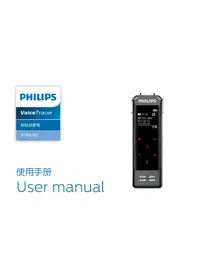
| Model | Philips Voice Tracer VTR5160 |
| Dimensions (W×H×D) | 40 × 142 × 27.2 mm |
| Weight (with battery) | 107.4 g |
| Power Source | Rechargeable battery via USB; charging current ≤0.5A |
| Memory Support | Micro SD card (4 GB to 64 GB) |
| Recording Parameters | Sampling rate 32 kHz, bit rate 192 kbps, format MP3 |
| Signal-to-Noise Ratio | 88 dB |
| Microphone | 14 mm Capacitive Independent Suspension Diaphragm Head |
| Key Functions | One-touch recording, realtime voice to text, singing mode, live broadcast, unaccompanied singing, DIY audio effects, mouse function |
| Playback | Playback of last recorded file or DIY effect |
| Connectivity | USB, line-in, line-out, earphone jack |
| System Requirements | Windows 10/8/7/Vista/XP/2000, Mac OS X, Linux; USB port |
| Operating Temperature | 5 °C to 45 °C |
| Air Humidity | 10% to 90% (non-condensing) |
| Safety | Do not expose to rain/water; avoid excessive heat; hearing protection with earphone |
| Maintenance | Keep dry, dust-proof, shockproof; recharge regularly; do not disassemble |
| Spare Parts / Repairability | SD card, earphone, cables; contact dealer for support; not user-serviceable |
| Warranty | 1 year (see warranty card) |
Frequently Asked Questions - Voice Tracer VTR5160 PHILIPS
User questions about Voice Tracer VTR5160 PHILIPS
0 question about this device. Answer the ones you know or ask your own.
Ask a new question about this device
Download the instructions for your Dictaphone in PDF format for free! Find your manual Voice Tracer VTR5160 - PHILIPS and take your electronic device back in hand. On this page are published all the documents necessary for the use of your device. Voice Tracer VTR5160 by PHILIPS.
USER MANUAL Voice Tracer VTR5160 PHILIPS

注意
I.1 Product Features 23
2 Important 24
2.1 Safety 24
2.2 Hearing protection 24
3 Your VoiceTracer 25
- I What's in the gift box? 25
3.2 Overview 25
4 Start to Use 26
4.1 Power on/off 26
5 Recording 27
5.1 Recording 27
6 Realtime Voice to Text
6.1 PC software 28
7 Entertainment & Leisure
32
7.1 Singing mode 32
7.2 Live broadcast mode 32
8 DIY Audio Effect Production 34
9 Playback Mode 35
10 Mouse Function 36
II Explanations to the indicators 37
12 Frequently Asked Questions 38
12.1 Unable to switch on the device 38
12.2 Unable to record with the device 38
12.3 The device cannot play recorded audio 38
12.4 The device cannot hear the mike sound or is unaccompanied 38
12.5 Other notes 38
13 Technical Parameters 39
13.1 Memory 39
13.2 System Requirements 39
13.3 Dimensions and Weight 39
13.4 Operating conditions 39
I Welcome
Welcome to the world of Philips! We are honored by your choice and purchase of Philips' products. You can have Philips' comprehensive technical supports from our website, e.g. user's manuals, software downloading and warranty information etc.
www.philips.com
1.1 Product Features
- One-touch recording on multiple scenes and multiple modes;
• Realtime voice to text, suitable for meetings and speeches;
• Live recording, sound recording, and music recording;
• Device for leisure, entertainment, singing, live broadcasting, and unaccompanied singing with DIY sound effects - Unique quick mouse button functionality.
2 Important
2.1 Safety
- To avoid a short circuit, do not expose the product to rain or water.
- Do not expose the device to excessive heat caused by heating equipment or direct sunlight.
Attention! Before using the device, please read this User's Manual carefully. The company shall not be liable for any data loss due to erroneous operation or causes of a force majeure. Special attention should be given to correct operations and files back up.
2.2 Hearing protection
Observe the following guidelines when using your earphone:
- Adjust to suitable volume; do not use the earphone for a long time.
- You must remember never to turn the volume up beyond your tolerance.
- Do not turn up the volume so high that you can't hear what's around you.
- Be cautious and stop using our earphone in hazardous situaitons.
3 Your VoiceTracer
3.1 What's in the gift box?

3.2 Overview

①Power on/off ②Play
③SD card ④Microphone
⑤K1 key/left mouse button ⑥Sound effect key
⑦Treble & bass button ⑧Trackball
⑨K2 button/right mouse button ⑩Volume button
①Lock button ②Record button
③Special sound effect key ④DIY button
⑤Line-in ⑥Earphone
⑦Line-out ⑧USB
4 Start to Use
4.1 Power on/off
Press the power button for 2 to 3 seconds to turn on or turn off the device. The K1 LED indicator lights up when the device is turned on, and then the K2 LED will light up. When the K2 LED indicator is off, the device enters the K1 singing mode.
(I)Slide the sound effect button ⑥ up to the top to reach the maximum reverberation and slide it down to the bottom for minimum reverberation.
(2)Slide the volume button ⑩ up to the top to reach maximum volume and slide it down to the bottom for minimum volume.
(3)Slide the treble & bass button ⑦ up to the top to reach treble and slide it down to the bottom for bass.
(4) When sliding the lock button ⑪ to the "A" position, the device will be switched to the smart mode which is automatically adjusted for optimal effect. In this mode, the sound effect button and the treble & bass button will be locked and cannot be adjusted. When sliding it to "M", the buttons will be unlocked and can function normally.
5 Recording
When you use VTR5160 for the first time, please read the following instructions CAREFULLY.
(I) Make sure the SD card is inserted into the microphone.
(2) Make sure the SD card functions normally (Formatting is recommended before use).
(3) Make sure the SD card has enough memory.
(4) Make sure the microphone is fully charged.
(5)The device cannot support line-out recording
5.1 Recording
I. Long press "Record" button to start recording and K1, and K2 LED lights will be on together. When recording starts, K1 and K2 LED lights will flash alternately.
2. Short press the "Record" button to save and exit the recording. The LED indicators of K1 and K2 will no longer blink alternately. The device returns to the karaoke mode.
6 Realtime Voice to Text
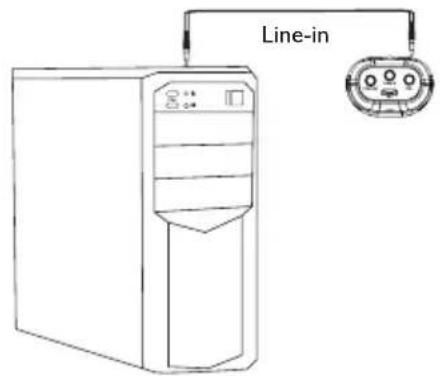
(1) Connection to laptops: Use a line-out wire to connect the device with a laptop. Plug one end of the wire into the Line-out of the device and the other end into the headphone jack of the laptop. The connection diagram is shown in the following figure:

(2) Connection to desktop computers: Use a line-in wire to connect the device with a desktop computer. Plug one end of the wire into the headphone jack of the device and the other end into the MIC jack of the computer.
6.1 PC software
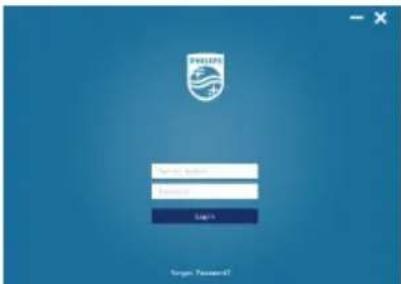
(I) Please insert the CD into the PC CD-ROM and copy the fles "VTR5160" from CD to PC. Then open the "VTR5160" directory and double click "to enter into registration interface. Then enter the correct product serial number and the Initial password(123456), click Login to use, as shown below:
(2) Before using the PC-side software, please set the device to voice-to-text mode. Long press the K1 button in the normal standby to enter the voice-to-text mode, In this mode, the K1 and K2 LED indicators will light up at the same time.
(3)Line-in wire with three-section end while Line-out wire with four-section end, as shown below:

line-in

line-out
(4) If the computer does not have a disk drive, please enter the link to download the software as follow:
Link:http://nmapi.car-boy.com.cn/VoiceTracer/VTR5160.rar
(5)If you still have questions,please call 400 800 7890 for help.
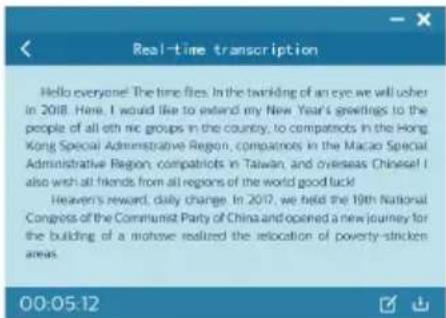
Main interface: recording icon, voice file to text icon, real-time voice to text icon, catalog, language selection icon, as shown below:

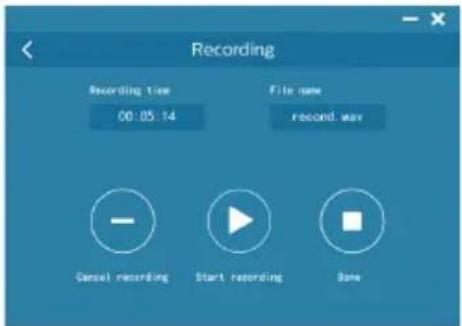
Recording interface: start recording, pause recording and save recording
Voice file to text: Select a voice file recorded in this software to convert voice into text. In this mode, you may save and edit text.

Reminder
• After installing and downloading the PC software, please ensure that the network is connected.
- If the computer prompts to install the framework of framwork4.0, you need to install it to use it. URL:https://www.microsoft.com/enus/download/confirmation.aspx?id=17851

Note
- When the network connection is unstable and the signal is poor, it will affect the speed and accuracy of translation. So that the PC software is recommended to use when the network is good.
Voice to text: In the voice to text interface, you can save and edit text.
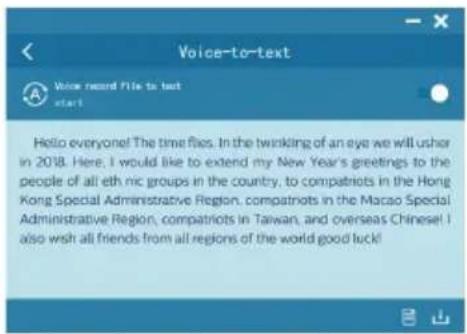
File browsing: You can browse recorded files and text files. You may convert recorded voice into text and browse through it.

7 Entertainment & Leisure
7.1 Singing mode
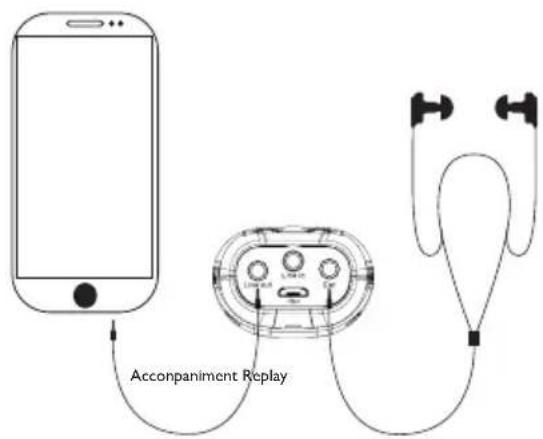
Short press the KI button to enter the karaoke mode. In this mode, connect the line-out and open the phone's singing apps such as (singing it, K-pop, etc.). You can adjust the re-verb, treble & bass and volume to achieve an optimal singing effect. The line-out connection is shown below:
7.2 Live broadcast mode
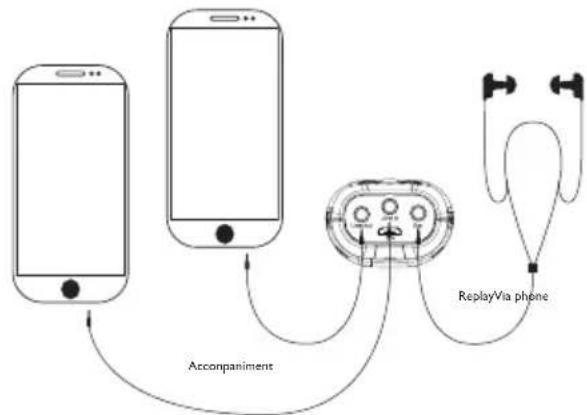
Short press KI button to enter into the live broadcast mode. In this mode, you can adjust the reverb, treble & bass and volume to achieve an optimal singing effect. The line connection is shown below:

Note
- You can gain voice entertainment effect by short pressing Pre-Tone and DIY buttons in the unaccompanied singing mode and live broadcasting mode.
7.3 Unaccompanied Singing Mode
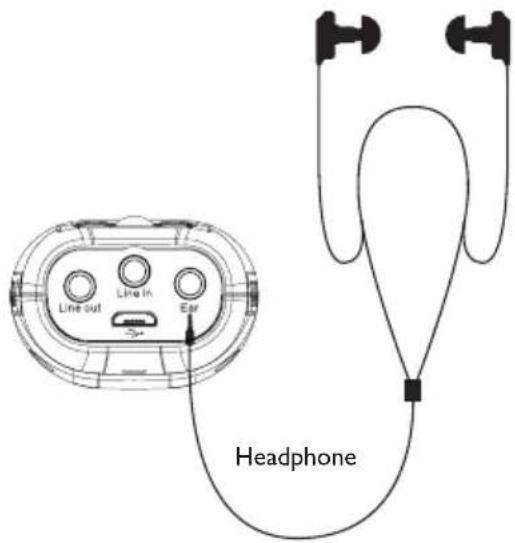
Short press K2 button to start the unaccompanied singing mode. In this mode, you can adjust the reverb, treble & bass and volume to achieve an optimal unaccompanied singing effect. The line connection is shown below:

Note
- You can gain voice entertainment effect by short pressing Pre-Tone and DIY buttons in the unaccompanied mode and singing mode.
8 DIY Audio Effect Production
(I)Long press "DIY" button to enter recording. The K1 and K2 LED indicators will both light up at the same time. When recording starts, the K1 and K2 indicators will flash alternately while the "breath light" remains red.
(2) Short press "DIY" button to save and exit recording. Audio effect production will be saved automatically and exit in "30 seconds".
9 Playback Mode
Recording playback: In the standby mode, short press PLAY button to play back the current recording file. DIY audio effect playback: Short press “DIY” to play back the current DIY file.

Reminder
- This device only plays the last recorded file.
10 Mouse Function
VTR5160 may be used as a mouse. Once connected to the computer, you can slide the trackball to select the menu, move it to the item you want to open, click the K1 button twice to open the window/file. Press the K2 button to select (Equivalent to the right button for opening the menu).

Reminder
- Do not disconnect the microphone from the computer while tranfering files into or out of the microphone. When the microphone is connected to the computer, you can short press the PLAY button to exit the USB mode.
II Explanations to the indicators
- When the device is being recharged, the red light will keep flashing. When the battery is full, the light will remain red without flashing.
- When battery is low, the red light will flash three times before the device is turned off.
- When the card is out of order, the K1 and K2 indicators will light up continuously.
- When the card is full, the K1 and K2 indicators will flash three times before the recording exits automatically.
12 Frequently Asked Questions
Answers to the frequently asked questions are listed here to solve simple problems that may occur with the VTR5160 model. If the problem cannot be solved, please contact the dealer or visit our official.
website:
www.philips.com/support.
12.1 Unable to switch on the device
- The battery is empty. Connect USB to charge it. Then check again.
12.2 Unable to record with the device
• The Microphone SD memory card is full.
• The SD card is not inserted.
12.3 The device cannot play recorded audio
- Make sure the SD card is inserted into the microphone.
- Check if the SD card has any audio file to play.
12.4 The device cannot hear the mike sound or is unaccompanied
- Check whether the connection with the mobile phone is successful;
- Check whether the microphone sound is turned down;
- Check whether the device is switched to the K2 unaccompanied singing mode.
12.5 Other notes
- Pay attention to waterproof, dust-proof, shockproof, fire prevention;
• Regularly charge the product; - Can not be disassembled and modified without authorization, any resulting function, safety issues borne by the user.
13 Technical Parameters
13.1 Memory
It supports 4G to 64G micro SD
13.2 System Requirements
Operating system:
Windows 10/Windows 8/Windows 7/Vista/XP/2000, Mac OS
X, Linux
Port: USB
Recording parameters: sampling rate 32khz, bit rate 192kbps, format MP3
Signal to noise ratio: 88db
Charging current: ≤0.5A
Pickup: 14mm Capacitive Independent Suspension Diaphragm Head
13.3 Dimensions and Weight
Width * Height* Length: 40×142×27.2(mm)
Weight (with battery): 107.4 (g)
13.4 Operating conditions
Temperature: 5°–45°C
Air humidity: 10% – 90%, no condensation
Warranty card
质保书

year warranty
一年质保
Type: VTR5160
Serial nr:
Date of purchase
购买日期
Dealer's name, address and signature
销售商名称、地址及签字
www.philips.com/welcome
This document is printed on chlorine free produced paper Data subject to change without notice
This product was brought to the market by Speech Processing Solutions GmbH or one of its affiliates, further referred to in this document as SPS, which is the manufacturer of the product. SPS is the warrantor in relation to the product with which this booklet was packaged.
For China only
只限中国地区
Printed in China


© 2018 Speech Processing Solutions GmbH.
Register your product and get support at
www.philips.com/welcome

- 注意
- I WELCOME
- 1.1 PRODUCT FEATURES
- 2 IMPORTANT
- 2.1 SAFETY
- 2.2 HEARING PROTECTION
- 3 YOUR VOICETRACER
- 3.1 WHAT'S IN THE GIFT BOX
- 3.2 OVERVIEW
- 4 START TO USE
- 4.1 POWER ON/OFF
- 5 RECORDING
- 5.1 RECORDING
- 6 REALTIME VOICE TO TEXT
- 6.1 PC SOFTWARE
- REMINDER
- NOTE
- 7 ENTERTAINMENT & LEISURE
- 7.1 SINGING MODE
- 7.2 LIVE BROADCAST MODE
- 7.3 UNACCOMPANIED SINGING MODE
- 8 DIY AUDIO EFFECT PRODUCTION
- 9 PLAYBACK MODE
- 10 MOUSE FUNCTION
- II EXPLANATIONS TO THE INDICATORS
- 12 FREQUENTLY ASKED QUESTIONS
- 12.1 UNABLE TO SWITCH ON THE DEVICE
- 12.2 UNABLE TO RECORD WITH THE DEVICE
- 12.3 THE DEVICE CANNOT PLAY RECORDED AUDIO
- 12.4 THE DEVICE CANNOT HEAR THE MIKE SOUND OR IS UNACCOMPANIED
- 12.5 OTHER NOTES
- 13 TECHNICAL PARAMETERS
- 13.1 MEMORY
- 13.2 SYSTEM REQUIREMENTS
- 13.3 DIMENSIONS AND WEIGHT
- 13.4 OPERATING CONDITIONS
- WARRANTY CARD
- 质保书
Brand : PHILIPS
Model : Voice Tracer VTR5160
Category : Dictaphone