
X4 - Loudspeaker BLUEANT - Free user manual and instructions
Find the device manual for free X4 BLUEANT in PDF.


| Product Type | Portable Bluetooth Speaker |
| Brand | BlueAnt |
| Model | X4 |
| Dimensions (HxWxD) | 7.2 x 7.2 x 7.2 cm |
| Weight | 290 g |
| Power Source | Rechargeable lithium-ion battery, 2000 mAh |
| Charging | USB-C, 5V/2A, full charge in about 3 hours |
| Bluetooth Version | Bluetooth 5.0 |
| Waterproof Rating | IPX7 (immersible up to 1m for 30 minutes) |
| Output Power | 10W RMS |
| Frequency Response | 80Hz - 20kHz |
| Playback Time | Up to 12 hours at 50% volume |
| Inputs/Ports | USB-C charging port, 3.5mm AUX input |
| Microphone | Built-in with echo cancellation for hands-free calls |
| Controls | Power, Volume +/-, Play/Pause, Bluetooth pairing, Speakerphone |
| Materials | Rubberized exterior with fabric grille and metal accents |
| Color Options | Black, Blue, Red, Green, White |
| What's in the Box | X4 Speaker, USB-C charging cable, 3.5mm audio cable, carrying strap, quick start guide |
| Cleaning | Wipe with a soft dry cloth. Do not use harsh chemicals. Ensure charging port is dry before charging. |
| Safety Warnings | Do not expose to extreme temperatures. Do not disassemble. Use only approved charger. |
| Repairability | Designed for recycling. No user-serviceable parts. Contact BlueAnt support for issues. |
| General Information | Ideal for outdoor use, showers, poolside. Pair with any Bluetooth device. Supports voice assistants. |
Frequently Asked Questions - X4 BLUEANT
User questions about X4 BLUEANT
0 question about this device. Answer the ones you know or ask your own.
Ask a new question about this device
Download the instructions for your Loudspeaker in PDF format for free! Find your manual X4 - BLUEANT and take your electronic device back in hand. On this page are published all the documents necessary for the use of your device. X4 by BLUEANT.
USER MANUAL X4 BLUEANT
natural_image
Black and white photo of a BlueAnt heat sink with a microphone, no visible text or symbols on the device body.X4
User Manual

natural_image
Close-up of a black BlueAnt air purifier with hexagonal grille and control buttons (no visible text or symbols on main body)Welcome
Thank you for purchasing the BlueAnt X4. Please read through this manual to get the most out of your X4 speaker.
Inside the box
You will find the accessories in the tray at the top.

natural_image
Line drawing of a blue antermostat oven with control panel and buttons (no text or symbols)X4

natural_image
Line drawing of a handheld device labeled 'BlueAnt' with a cross mark on the handle (no additional text or symbols)1 x Microphone
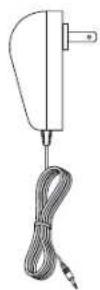
1 x Rapid Charger
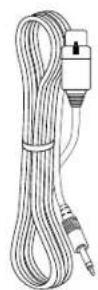
1 x Microphone Cable

1 x Manual pack
Get to know your BlueAnt X4 speaker
Button functions
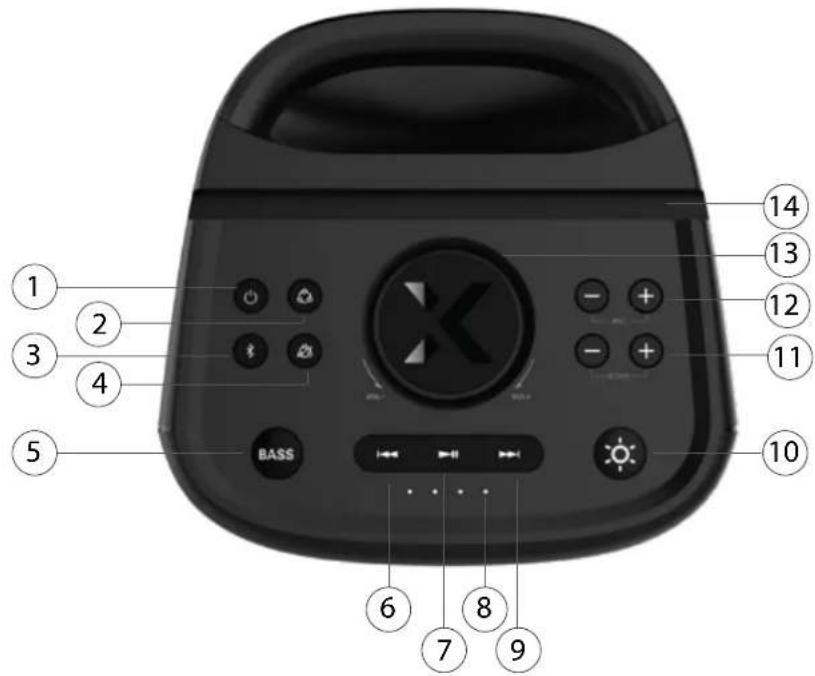
Back of X4

| Item | Button | Function |
| 1 |  | ON/OFF |
| 2 |  | Connect Party Mode |
| 3 |  | Bluetooth Mode |
| 4 | [WWZY] | Disconnect Party Mode |
| 5 |  | Bass Boost button |
| 6 |  | Skip back a track |
| 7 |  | Play/Pause a track |
| 8 | [DB0H] | Battery Indicator |
| 9 | [25OT] | Skip forward a track |
| 10 | [382T] | 5 Light Mode Control |
| 11 | E | Mic Echo Control |
| 12 | [4508] | Mic volume control |
| 13 | [BYK4] | Volume Dial |
| 14 Phone |  Tablet slot holder Tablet slot holder | |
| 15 | [7T06]DC IN | Charge port |
| 16 |  DC OUT DC OUT | Powerbank |
| 17 | [6SW4]DC OUT | Microphone port |
Let's get started
1. Charging the X4
Please use the supplied rapid charger to charge the X4. The charge port _DCIN can be found at the rear of the speaker. A full charge will take around 1.5 hours. The four battery indicators will light up during charging.
2. Pairing the speaker to your phone or device (Bluetooth mode)
-
Press the ON/OFF button ⏻ to enter Bluetooth mode.
-
The speaker will turn on and say "Bluetooth".
-
On your phone or device, look for "BlueAnt X4" under the Bluetooth settings menu. Click on "BlueAnt X4" on your phone.
-
Once paired, the speaker will say "Connected". You are now ready to play some music!
3. Powering the speaker On/Off
Press ⏻ button to power on/off the speaker (1.5 seconds). Each time the speaker powers on, it will reset to 25% volume. After 10 mins with no connection, the X4 will automatically power off to conserve battery.
4. Using the buttons for playing music
| Item | Button Function | |
| 18 | Turn the volume dial clockwise to increase volume and anti-clockwise to decrease volume | |
| 19 | Click to skip back a track | |
| 20 | Click to Play/Pause a track | |
| 21 | Click to skip forward a track | |
N.B. You can also use your phone to control music and volume

Let's get started cont'd
5. LED light modes
With five built-in LED light modes, the X4 lights can be changed to suit the mood and the music. Simply press the LED button ⚙️ to toggle through each mode.

natural_image
Black square digital camera with colorful lens (no visible text or symbols)
natural_image
Black and white photo of a blue brand air purifier with green accent (no visible text or symbols)
natural_image
Black and yellow portable electronic device with a circular lens (no visible text or symbols)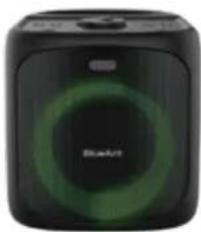
natural_image
Black square electronic device with green circular design and 'BlueArt' logo (no readable text or symbols beyond branding)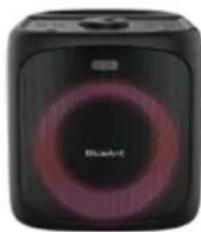
natural_image
Black and purple portable sound kit with 'Bluebird' branding (no visible text beyond brand name)
natural_image
Black Bluetooth device with no visible text or symbols on its body- Press the Bass Boost button BASS to change from Standard EQ to Bass Boost. This will give you another 3dB of bass.
- Press again to go back to Standard EQ. Each time the X4 is powered on, it will reset to Standard EQ.
See Sections 13 & 14 (Pages 8 & 9) to learn how you can enhance the bass even more, by positioning the speaker (for indoor use).
7. Reconnect and disconnect Bluetooth devices
- Press the Bluetooth button ✝ for 1 second to re-connect to the last paired device.
- Press and hold the Bluetooth button ✝ for 3 seconds to disconnect the current Bluetooth connected phone. The X4 will prompt "disconnected". Then other Bluetooth devices can find and pair with the X4.
Let's get started cont'd
8. Battery life and play time
- The X4 has a play time of around 12 hours at 50% volume.
- When used at 100% volume the play time is 5-6 hours.
- To use the X4 at 100% volume for long periods, please use the supplied rapid charger.
- Battery life will vary based on type of music, level of bass and environmental factors.
- 4 lights - Battery fully charged.
9. Powerbank - For charging your phone
- The X4 has a built in powerbank function ~OUT (on the back of the X4) with an output of the 5V1A.
- Use of the powerbank function will lower the overall play time of the X4.
- When the X4 battery is very low the powerbank function will turn off to conserve power.
Do not expose the X4 speaker to liquid whilst playing or charging, as doing so may be dangerous, and result in permanent damage to the speaker or charger.
The X4 is IP54 Sweatproof/Splashproof, but only when the port cover is closed.
Using the microphone
11. Using the microphone
To avoid feedback, please do not point the microphone at the speaker or bring the microphone within 30cm of the speaker.
- Connect the cable to the microphone as per the below, Diagram A.
- Plug the microphone into the microphone input, on the back of the X4.
- The microphone features an ON/OFF switch. Please ensure the microphone is in the ON position to use it.
- Increase or decrease microphone volume and echo, as per the table below.

natural_image
Pure technical line drawing of a mechanical component without any text or symbolsDiagram A
Insert microphone cable into the microphone as shown in the diagram. Push until it clicks into place.
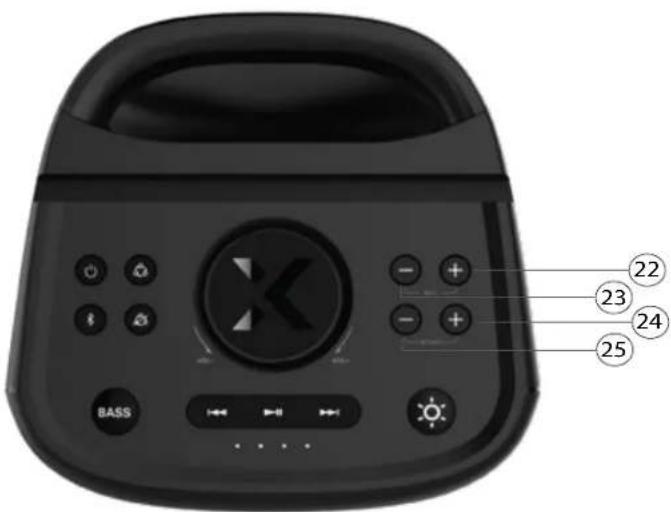
N.B. When the Mic and Echo levels reach 0 or 10, the X4 will make a 'DING' sound to notify you.
| Item | Button | Function |
| 22 | + | Click to increase the MIC volume gradually or press and hold to the MIC volume continuously. |
| 23 | - | Click to decrease the MIC volume gradually or press and hold to decrease the MIC volume continuously. |
| 24 | + | Click to increase the Echo effect gradually or press and hold to increase the Echo effect continuously. |
| 25 | - | Click to decrease the Echo effect gradually or press and hold to increase the Echo effect continuously. |
Party Mode
12. Party Mode - Pairing two or up to 100 X4 speakers together
Before we begin with Party Mode, please pair your phone to the X4. Party Mode allows for the connection of up to 100 X4 speakers simultaneously. See page 3 for pairing instructions.
Party Mode Controls
- When in Party Mode, the master speaker controls the Music, Volume, EQ and Lights.
• These cannot be controlled from any of the slave speakers, only the master speaker. - The slave speakers can control their own microphone volume, echo levels and their own power on/off.
Party Mode Pairing
- The button to the right of the power button, is the Party Mode connection button 📄.
- To pair, press and hold the Party Mode connection button 📁 until the X4 announces 'Party mode pairing'. This takes about 4 seconds.
- Next, power on then press and hold the Party Mode connection button 📋, on the next speaker you wish to pair in Party Mode. This speaker will say, 'Party Mode pairing'. Then let go of the button. The speakers will connect and announce, 'Party Mode connected'. This may take up to 1 minute.
- You can tell which speaker is the master speaker, because the Party Mode connection button flashes. On the slave speakers, the Party Mode connection button is solid and does not flash.
Party Mode Disconnection
- The button below the Party mode connection button is the Party mode disconnection button 📄.
- To disconnect Party mode, press and hold the Party Mode disconnection button 25 until the X4 announces, 'Party Mode disconnected'. This takes about 4 seconds.
- The speakers will work independently when Party Mode is disconnected.
Power Off
- When in Party Mode, if the slave speaker is powered off, it will only turn off itself.
- In Party mode when the master speaker is powered off, it will turn off all connected speakers.
Party Mode cont'd
13. Enhancing the bass through speaker positioning (indoors)
The X4 has a rear firing port to extend the low frequency bass response.
If maximum bass is your thing, try these tips and tricks for speaker placement indoors.


Party Mode cont'd
14. Party mode with two speakers
Pair multiple X4 speakers together and place them in corners of the room,
FOR OUT OF THIS WORLD BASS.

BlueAnt
HELP & SUPPORT
Visit support.blueantwireless.com
Email: care@blueantwireless.com
Contact: 1300 669 049
Register your BlueAnt product for warranty and new product updates at register.blueantwireless.com
100% AUSTRALIAN
DESIGNED & OWNED


www.blueantwireless.com

- Welcome
- Inside the box
- Get to know your BlueAnt X4 speaker
- Let's get started
- Charging the X4
- Pairing the speaker to your phone or device (Bluetooth mode)
- Powering the speaker On/Off
- Using the buttons for playing music
- Let's get started cont'd
- LED light modes
- Reconnect and disconnect Bluetooth devices
- Battery life and play time
- Powerbank - For charging your phone
- Using the microphone
- Using the microphone
- Diagram A
- Party Mode
- Party Mode - Pairing two or up to 100 X4 speakers together
- Party Mode Controls
- Party Mode Pairing
- Party Mode Disconnection
- Power Off
- Party Mode cont'd
- Enhancing the bass through speaker positioning (indoors)
- Party mode with two speakers
- BlueAnt
Brand : BLUEANT
Model : X4
Category : Loudspeaker