
KNH-750 - Headphones Klip Xtreme - Free user manual and instructions
Find the device manual for free KNH-750 Klip Xtreme in PDF.


| Product Type | Wireless Over-Ear Headphones |
| Brand | Klip Xtreme |
| Model | KNH-750 |
| Driver Size | 40 mm |
| Impedance | 32 Ω |
| Frequency Response | 20 Hz - 20 kHz |
| Bluetooth Version | 5.0 |
| Wireless Range | 10 m (33 ft) |
| Battery Type | Rechargeable Lithium-Ion, 500 mAh |
| Battery Life | Up to 20 hours |
| Charging Time | Approx. 2 hours |
| Dimensions (W x H x D) | 18 x 20 x 5 cm (7.1 x 7.9 x 2.0 in) |
| Weight | 250 g (8.8 oz) |
| Microphone | Built-in, with noise isolation |
| Controls | On-ear controls (volume, track, answer call) |
| Foldable Design | Yes |
| Material | Plastic and metal, leatherette ear cushions |
| Maintenance | Clean with a soft, dry cloth; avoid liquids |
| Safety | Do not use at high volume for extended periods |
| Spare Parts | Replacement ear cushions and charging cable available |
| Repairability | Battery and ear pads can be replaced |
Frequently Asked Questions - KNH-750 Klip Xtreme
User questions about KNH-750 Klip Xtreme
0 question about this device. Answer the ones you know or ask your own.
Ask a new question about this device
Download the instructions for your Headphones in PDF format for free! Find your manual KNH-750 - Klip Xtreme and take your electronic device back in hand. On this page are published all the documents necessary for the use of your device. KNH-750 by Klip Xtreme.
USER MANUAL KNH-750 Klip Xtreme
ENGLISH
WARNINGS
AUDIO PRODUCT WARNING!
Please keep in mind that permanent hearing loss may result from long-term exposures to sounds at high volumes. It is recommended to use as low a volume as possible.
This product might be capable of delivering sounds at loud volumes and high-pitched audible tones. Under certain circumstances, exposure to such loud sounds can result in permanent hearing loss damage. The volume level may vary based on the conditions such as audio source you are using, volume settings and the environment. Avoid prolonged use of headset at excessive sound pressure levels.
You can reduce the risk of hearing damage by following these safety guidelines.
1. Prior to using this product, follow these steps:
- Before using this product, make sure to turn the volume control to its lowest level.
- Put the headsets on.
- Slowly adjust the volume control to a comfortable level.
2. During the use of this product

- Keep the volume at a comfortable or lowest level possible.
- If increased volume setting is necessary, adjust the volume control slowly.
- Ringing in the ears may be an indication that the sound level is too high.
- Stop using the product if it causes great discomfort.
BATTERY WARNING!
- "Caution"-Unless otherwise specified in the user manual or quick start guide, the battery in your product cannot be removed or replaced by the user. Any attempt to do so is risky and may result in damage of self and product.
- Use of other batteries may present a risk of fire or explosion and the warranty will be voided..
CHARGER WARNING!
- Do not use a wall charger with more than 5VDC/1A output.
- When you disconnect the power cord, grasp and pull the plug, not the cord. Never use a charger that is damaged.
- Avoid charging your product in extremely high or low temperatures. Avoid using the charger in damp areas.
I. Introduction
Thank you for purchasing the Hi-Fi-KNH-750 stereo headphones with Bluetooth® wireless technology. We encourage you to read this user manual thoroughly to get the most of this innovative wireless device.
Highlights
• Hybrid Active-Noise-Cancelling ANC ^(3)
Four microphones (two on each earcup) integrate feedforward and feedback ANC technologies simultaneously for a unique listening experience
• Multi-mode Noise Cancellation
with Touchless transparency activation
Switch between Low and High levels for a tailored noise-cancelling experience or enable the touchless transparency mode to listen to your surroundings just by placing your hand close to the earcup
• Extended playback times
Up to 44 hours with Bluetooth ^® and ANC enabled, and 63 hours when ANC is off
• Google Assistant and Siri compatible
Activate voice access to music, Information and much more by simply tapping the multifunction button twice
- Multipoint pairing
Connect up to two audio sources and seamlessly switch between both without linking them again
• Sound that sets you free
Experience the latest Bluetooth® V5.1 streaming technology
• High-fidelity acoustics
Delivered through premium neodymium drivers
- HD microphone
Filters ambient noise for clearer hands-free calls
- Full on-board controls
For power and hybrid ANC features, including music and phone call management
- Flexible listening
Music can be enjoyed endlessly in wired mode with the detachable auxiliary one-sided cable
- KlipXtreme app
Enhance your listening experience from the palm of your hand
• Crafted for comfort
Ultralightweight design, featuring swiveting ear cups with soft leatherette cushions
- Foldable design
for easy portability in its attractive carbon fiber hard case
Package content
• Active Noise Cancelling headphones
• 3.5mm audio cable
- USB-C charging cable
• Hard carrying case
- User's guide
II. Product overview

- Transparency mode sensor
- NC microphone
- NC indicator
- Status indicator
- USB Type-C charging port
- Built-in microphone
- 3.5mm input jack
- Previous / Volume down
- Next /Volume up
10: Power (multifunction) button: Pairing mode, On/off, Play/pause, Answer
and end a call, Reject a call, Call transfer and Voice Assistance function - Noise cancelling button / Transparency mode button
- Adjustable headband
III. Product components
Controls and functions
| Control Function LED indicator | ||
| Power (multifunction) button | Power On:Press and hold this button○ for approximately 3 seconds.Power Off:Press and hold this button○ for approximately 3 seconds.Pairing mode:Press and hold this button○ for approximately 3 seconds with the headset off4. Play/Pause:Press this button○ once to play and pause media.5. Answer an incoming call:Briefly press this button○ once to answer a phone call (music will be paused).6. End a call:Press this button○ once to end a call (music will resume).7. Reject a call:Press this button○ for 2 seconds to reject an incoming call.8. Redial:Press this button○ three times to dial the last number called.9. Transfer a call:While on an active call, press and hold this button○ for 2 seconds to switch devices, from the headset to the mobile phone.10. Voice Assistant:Press this button○ two times to enable the voice assistance for Siri or Google. Press it again to disable it. | The red and blue LED blinks alternately.The red LED blinks twiceThe LED will blink red and blue alternately when in pairing mode and will change to blinking blue once it has paired successfully. |
| +:Volume up/next track button | 1. Press this button+once to increase the audio level of the headphones.2. Press and hold this button+to play the next track. | |
| Control Function LED indicator | ||
| Volumedown/previoustrack button | Press this button— once to decrease theaudio level of the headphones.Press and hold this button— to play theprevious track. | |
| Noise reductionMedium/High/Off | Press the ANC button to toggle among:Low noise reductionHigh noise reduction andNormal mode | Solid green LED = ANC onNormal = LED offVoice prompts will be heardwhen switching among thedifferent modes |
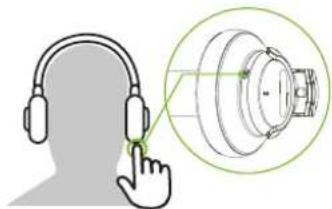
| Transparency mode | There are two methods to activate theTransparency mode:Method 1 = touchless1. The touchless sensor allows the activation ofthe transparency mode by placing the handclose to the left earcup 0.4 to 0.7in away).2. Once you move your hand away, the devicewill return to the mode it was previously set.Method 2 = using the headset control1. Press the ANC button for 2 seconds topermanently activate the transparency function.2. In this case, the touchless sensor reversesthe controls: that is, by placing the hand closeto the earcup, it will cancel the transparencymode, while moving it away, it will cause theactivation of the transparency mode instead. | Transparency= solid greenA voice prompt will be heardwhen enabling this mode |
IV. Basic operation
a. Charging your headphones
- Plug one end of the supplied USB-C Type cable to your headphones USB-C port and the other end into the USB port of your computer or to a 5VDC/1A USB power adapter to fully charge the battery*.
Note: The headphones' battery should be initially charged for at least 4 hours. Thereafter, the battery will take about 4 hours to recharge. - While the headphones are being charged, the LED glows red. The LED will turn blue once the battery has reached full capacity ^4 .
- When the red LED starts blinking 2 times every 5 seconds, it means that the battery is low and needs to be recharged.
- Make sure that the headphones are fully charged before using them for the first time.
b. Auxiliary wired connection
- With the headset On or Off, insert the 3.5mm cable to play in Auxiliary mode. Plug one end of the supplied 3.5mm cable to your headphones and the other end to the 3.5mm auxiliary port in your input source.
- The LED indicator on the headset will turn off and the headset will automatically switch to auxiliary in mode.
iOS users
V. Advanced operation
a. Pairing the headset with your mobile device
- Turn on the headset by pressing and holding the power button. The LED light will start blinking red and blue indicating that it has entered into the Bluetooth® interface and is ready to be paired.
- Next, set your Bluetooth® mobile device to "discover" the wireless headphones.
- Place both devices not more than one meter away from each other.
- The instructions below will apply depending on the type of smartphone you have.
a. Android platform
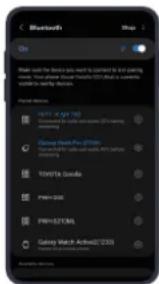
On your mobile phone, tap the newly discovered audio device (Hi-Fi KNH-750) being displayed in the Bluetooth ^® list. The headset is now ready to be used wirelessly.
b. iOS platform
On your mobile phone, look and select the newly discovered audio device (Hi-Fi KNH-750). Two connected devices will appear. This is normal. One is for the audio channel while the LE one relates to its connection to the app.
Note: For security purposes, IOS requires the device to be listed twice on the Bluetooth ^® settings screen.

- If you have a lower Bluetooth® version, you may be prompted to enter the passkey 0000 (4 zeros).
- If pairing is successful, the LED will glow blue. If after 60 seconds the pairing process fails, please turn off the headset and repeat steps 1 through 5 described above.
- The headset will enter into the Standby mode and will eventually turn off automatically after 5 minutes if there is no matching device available for pairing. Note: The headset will automatically re-pair to the last known connected device immediately after is powered on.
- To unpair the headset from your phone, go to Settings > Bluetooth and find the device name in the list of devices. Select Forget or Unpair.
b. Connecting to two Bluetooth® devices
- Once the headset has paired with the first Bluetooth ^® compatible device, momentarily disconnect the headset from that first mobile device.
- The blue and red LED on the headphones will start alternating to indicate that the device has entered into the pairing mode.
- Using the second mobile or Bluetooth® device, set it to "discover" the wireless headphone.
- On your mobile device, tap the newly discovered headphone (Hi-Fi KNH-750) to establish the wirelessly connection.
- Next, return to the first Bluetooth ^® compatible device that was originally connected to and search for the (Hi-Fi KNH-750) headphone once again to reconnect.
- Now, the headphones can be actively connected to the two devices at the same time.
c. Noise cancelling
Note: The Noise cancelling function and the transparency mode can be used only in Bluetooth® mode, and while the headset is powered on.
- Press the ANC button to turn this feature ON. The Noise Cancelling Indicator will turn green.
- Press the ANC button to toggle among:
Low noise reduction
High noise reduction and
Normal mode
d. Auxiliary connection
- Yo may plug the 3.5mm audio cable if cabled listening.
- The Bluetooth ^® mode and other buttons will be disabled while the device is wired to the 3.5mm aux jack.
e. Transparency feature
Switch to Transparency mode when you want to remain attentive to your surroundings or talk to people nearby without taking off the headphones.
As previously described, the headset features two different methods for activating this feature:
- Touchless method: When the headset is powered on, cover the ANC sensor (#1 left side) with your hand (between 0.4 to 0.7 in away) to enable the transparency function using the touchless sensor. Remove your hand to disable this function.

- Button activated: Having the headset powered on, press the ANC button 2 seconds to permanently enable the transparency function. The ANC LED will turn solid green. Press the ANC button again to disable this function on the headset.
VI. Using the wireless headset
a. Answering and ending a call using your mobile device
- When there is an incoming call, an alert tone will be heard through the headphones. Press the multifunction button once to pick it up. You may also press the answer button on your smartphone to take the call (music will be paused).
- To end a call, simply press the multifunction button once again. Likewise, you may also finish the call directly using the end key on your mobile (music will resume automatically).
- To reject an incoming call, press and hold the multifunction button for about 2 seconds.
- Press and hold the multifunction button if during an active call, you want switch (or transfer) such call from the headset to the mobile phone.
b. Music playback
- Briefly press the play/pause (multifunction) button to start and stop audio playback.
- Press and hold the + and - buttons for 2 seconds to go to the next or previous track.
- Press the + or - buttons once to increase or decrease the volume on the headphones.
- When listening to music using your smartphone, playback will pause to allow the call to go through.
- As soon as you hang up, music playback will resume automatically.
VII. The KlipXtreme App
- Start by downloading the application from Google Play, App store or the Klip Xtreme website.
Note: This application is designed to fully function with the KNH-750 only.

natural_image
Green 'X' symbol on black background, no text or symbols present- To pair the device, click on the white icon located on the top left corner of screen.
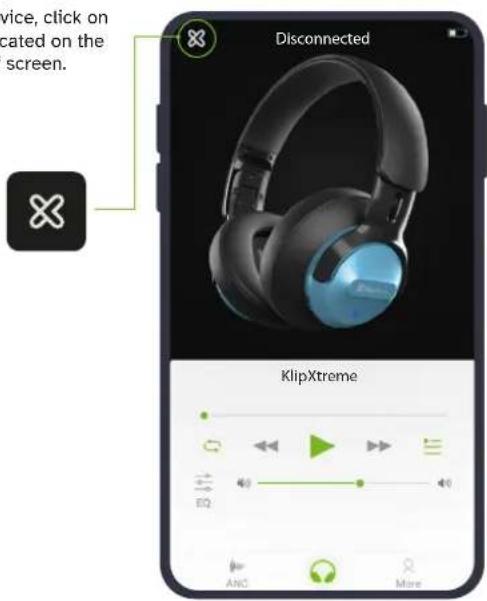
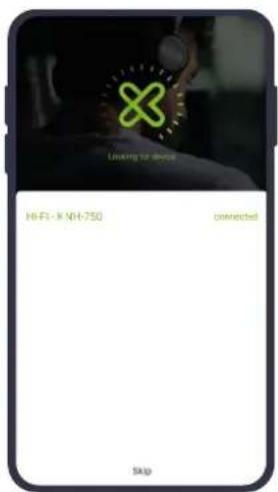
- The application will start looking for the device. Once detected, click on the product name to connect.

4. The KlipXtreme logo will then change to green. This means that the headset is ready to be managed through the application.
- The main interface, identified with the 🔒 icon, shows the device's charge status and primary control buttons.
Such includes: Battery icon, Play/Pause, Previous Track, Next Track, Volume up or down, Random and Sequence playback options.
iOS platformAndroid platform


- The Equalizer can be accessed through the main interface or by clicking the More icon located on the bottom right corner of the screen.
The equalizer features a selection of 8 preset sound effects.
It also allows users to adjust the decibels of each range, letting them boost or cut the frequencies based on their individual preferences.
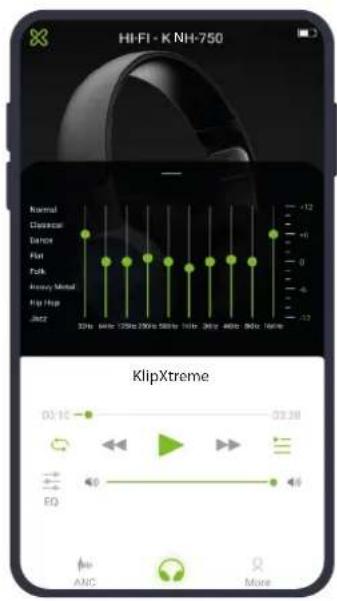
- The Noise Cancelling feature can be accessed through the main interface or by clicking the More icon located on the bottom right corner of the screen. Use it to turn this function on or off, select the noise reduction level and to enable the Transparency mode.

8. Additional settings:
The More icon provides access to new parameters and also to some functions also available in the main interface.
a. Profile creation: You can customize an account with a unique name, password and photo to access different playlists.
b. Equalizer menu, as previously explained in point 6.
c. Noise cancelling menu, as previously explained in point 7.
d. About us: Displays important information about the Klip Xtreme brand as well as the current version of the application.
e. Klipxtreme: Contains a direct link to the brand's website, in English or Spanish.

Playlist setting
By clicking on the icon, you have the option of choosing or creating a profile. Once done, go back to the main interface and click on the Playlist icon. Different playlists can be created using audio files stored in your mobile device.
-
Click on the playlist icon to access all tracks and songs currently saved in the phone's internal memory.
-
Next, click on the folder icon to create a music list. Assign a name and tap on Confirm.
-
Then select the music folder you just created.
-
Click on the + icon to select from the Playlist the tracks you wish to add.
-
Finish by clicking on the back arrow. The list will be saved. You may create as many music folders as you wish.
-
Finally, you can use the pencil, trash can and plus icons to either edit, delete or configure a new folder in your app.

VIII. Troubleshooting
a. The headphones are not turning on.
- Charge the headphones. If they don't turn on even after charging, contact customer service for help.
b. The headphones are not charging.
- Check if the supplied USB charging cable has been properly connected to the headphones and the power source.
- Verify if the power source is on and properly connected.
- If using a USB charging cable different from the one supplied, make sure that it is properly connected and functioning.
c. The headphones are not pairing.
- Check if the Bluetooth® device is powered on.
- Verify if the Bluetooth® mode is enabled on the device.
- Check if both devices are within 1 meter from each other.
- Verify if the Bluetooth ^® device is compatible with the headphones.
d. Music will not play through the headphones.
- Check if the headphones and the Bluetooth® device are powered on.
- Verify if there is music playing on your Bluetooth® device.
- Check the volume level on your Bluetooth® device.
e. There is distortion, lag or interference in the connection.
- Check if there is a 2.4GHz device close to the headphones or Bluetooth® device.
- Verify that both devices are placed within the recommended distance.
- Verify if the Bluetooth® version of the source you are using is older than the version on the headphones, such scenario may cause a sudden disconnection.
f. Difficulty in listening to a caller when receiving a call.
- Check if the headphones are connected to the Bluetooth ^® device.
- Verify if the Bluetooth® mode is enabled on your device.
- Check the volume level on your Bluetooth® device.
- If used in auxiliary mode, verify that the audio cable is properly connected to the headset.
IX. Care and maintenance
HEADSET DEVICE
- Always unplug the product from the charger before cleaning
- It is recommended to clean the product by wiping with a dry soft cloth. The cord may only be dry-dusted.
BUILT-IN BATTERY CARE
- This product is powered by a rechargeable battery. The full performance of a new battery is achieved only after two or three complete charge and discharge cycles.
- The battery can be charged and discharged hundreds of times, but will eventually wear out. Do not leave a fully charged battery connected to charger, since overnight charging may shorten its lifetime.
- Unplug the charger from the electrical plug and product when not in use.
- If left unused, a fully charged battery will lose its charge over time.
- Leaving the product in hot or cold places such as in a closed car in the summer and winter conditions, will reduce the capacity and lifetime of the battery.
- Always try to keep the battery between 15 and 25 degrees Celsius (59 and 77 degrees Fahrenheit). A product with a hot or cold battery may not work temporarily, even when the battery is fully charged.
- Charge/power the headset according to the instructions supplied with the product.
Technical specifications
| MPN | KNH-750 |
| Headphone | |
| Type | Active Noise Cancelling Headphones ^3) with Bluetooth ^4) Wireless Technology |
| Form factor | Over ear |
| ANC reduction | 20 to 25dB |
| Driver unit | 40mm |
| Magnet | Neodymium |
| Maximum power output | Two drivers of 30mW each |
| Frequency | 20Hz-20kHz |
| Impedance | 32Ω ± 15% |
| Sensitivity | 113.5 ± 3dB (S.P.L. at 1 kHz) |
| Microphone | |
| Form factor | Built-in |
| Directivity | Omnidirectional |
| Impedance | 2000Ω |
| Sensitivity | -33dB |
| Connectivity | |
| Connection type | Bluetooth ^5) V5.1 and 3.5mm aux input port |
| Wireless RF frequency | 2.402GHz—2.480GHz |
| Wireless range | Up to 33ft ^1) |
| Bluetooth profiles | Qualified to Bluetooth ^6 V5.1 |
| Battery | |
| Type | Rechargeable lithium-ion, 800mAh, 3.7V |
| Charging time | Up to 4 hrs |
| Runtime | |
| BT on, ANC off | Up to 63 hrs with volume level at 50% ^2 ; Up to 49 hrs with volume level at 100% ^2 |
| BT on, ANC on | Up to 44 hrs with volume level at 50% ^2 ; Up to 39 hrs with volume level at 100% ^2 |
| Stand-by time | 500 hrs |
| Charging input | USB C - USB type A charging cable: 5VDC/1A |
| Special features | |
| Active Noise Cancelling | Hybrid, with touchless transparency mode |
| Voice recognition | Siri and Google Assistant compatible |
| Mobile APP | Klip Xtreme, Google Play and Apple Store |
| Design | Foldable, swiveling ear cups |
| Carrying case | Premium hard case |
| Cord type | Single sided, removable |
| Unit material | Ultralightweight aluminum + PVC |
| Earcups | High-grade leatherette soft cushion |
| Additional information | |
| Product dimensions (LxWxH) | 7.68 x 3.86 x 7.87 in |
| Product weight | 0.73 lb |
| Cable length | 5 ft |
| Warranty | One year |
(1) Range estimate is based on an area free and clear of obstacles and interference, and within the line-of-sight between both Bluetooth® V5.1 devices.
(2) Estimated battery run time may vary depending on the volume settings ANC status and the type of audio being played.
(3) Active noise-cancelling capability reduces unwanted ambient noise.
Precautions
- Do NOT drop, hit or shake the device.
- Never try to disassemble, repair or modify the headset yourself, or push objects of any kind into the product, as this may cause short circuits which could result in a fire or electric shock.
- None of the components can be replaced or repaired by users. Only authorized personnel may open the product.
- This product is not a toy-never allow children to play with this product and always store the product out of reach of children.
- Protect the cords from being damaged or pinched.
- Discontinue to use the product if it overheats, has been dropped or damaged, exposed to water or if it has a damaged cord or plug.
- Do not use cleaning products that contain benzene, solvents or alcohol.
- Do NOT expose headset to excessive heat or to direct sunlight for long periods of time.
- Do NOT store the device in a place with high humidity or dust.
- Do NOT place heavy objects on top of the headset.
- Do NOT use near a microwave oven or wireless LAN products.
FCC statement
This equipment has been tested and found to comply with the limits for a Class B digital device, pursuant to part 15 of the FCC Rules. These limits are designed to provide reasonable protection against harmful interference in a residential installation. This equipment generates, uses, and can radiate radio frequency energy and, if not installed and used in accordance with the instructions, may cause harmful interference to radio communications. However, there is no guarantee that interference will not occur in a particular installation. If this equipment does cause harmful interference to radio or television reception, which can be determined by turning the equipment off and on, the user is encouraged to try to correct the interference by one or more of the following measures:
- Reorient or relocate the receiving antenna.
- Increase the separation between the equipment and receiver.
- Connect the equipment into an outlet on a circuit different from that to which the receiver is connected.
- Consult the dealer or an experienced radio/TV technician for help.
ESPAÑOL
¡ADVERTENCIAS!
ADVERTENCIA RELATIVA A PRODUCTOS DE AUDIO
b. Plataforma iOS
natural_image
Illustration of a person wearing headphones with a magnified inset showing the ear component (no text or symbols)natural_image
Green X-shaped symbol on black background (no text or numbers)natural_image
Black and blue headband headphones with blue logo (no visible text or symbols on the device itself)
klipxtreme
KlipXtreme® is a registered trademark. All rights reserved. The Bluetooth® word mark is owned by Bluetooth SIG, Inc. Google is the registered trademark of Google, Inc. Siri is the registered trademark of Apple, Inc. Klip Xtreme is not affiliated with or endorsed by these companies. Other trademarks and trade names are those of their respective owners. Any mention of such is only intended for identification purposes, and is not to be construed as a claim to any rights pertaining to, sponsorship by, or affiliation with, those brands. Made in China.
- WARNINGS
- AUDIO PRODUCT WARNING!
- You can reduce the risk of hearing damage by following these safety guidelines.
- Prior to using this product, follow these steps:
- During the use of this product
- BATTERY WARNING!
- CHARGER WARNING!
- Introduction
- Highlights
- Package content
- Basic operation
- a. Charging your headphones
- b. Auxiliary wired connection
- iOS users
- Advanced operation
- a. Pairing the headset with your mobile device
- b. Connecting to two Bluetooth® devices
- c. Noise cancelling
- d. Auxiliary connection
- e. Transparency feature
- Using the wireless headset
- a. Answering and ending a call using your mobile device
- b. Music playback
- The KlipXtreme App
- Additional settings:
- Playlist setting
- Troubleshooting
- a. The headphones are not turning on.
- b. The headphones are not charging.
- c. The headphones are not pairing.
- d. Music will not play through the headphones.
- e. There is distortion, lag or interference in the connection.
- f. Difficulty in listening to a caller when receiving a call.
- Care and maintenance
- HEADSET DEVICE
- BUILT-IN BATTERY CARE
- Precautions
- FCC statement
- ¡ADVERTENCIAS!
- ADVERTENCIA RELATIVA A PRODUCTOS DE AUDIO
- b. Plataforma iOS
- klipxtreme
Brand : Klip Xtreme
Model : KNH-750
Category : Headphones