
Euphoria - Keyboard Dreadbox - Free user manual and instructions
Find the device manual for free Euphoria Dreadbox in PDF.


| Product Type | Analog Synthesizer Keyboard |
| Brand | Dreadbox |
| Model | Euphoria |
| Keyboard Type | 37-key (mini) with velocity sensitivity |
| Sound Engine | Fully analog, 2 VCOs, 1 VCF, 1 VCA, 2 LFOs |
| Effects | Built-in reverb and delay |
| Polyphony | Monophonic (paraphonic mode available) |
| Connectivity | MIDI In/Out/Thru, USB, Audio Out (3.5mm TRS), Headphone Out (3.5mm) |
| Power Supply | 9V DC center-positive (2.1mm barrel), battery operation possible (6x AA) |
| Dimensions | Approx. 400 x 250 x 80 mm |
| Weight | Approx. 2.2 kg |
| Construction | Metal chassis with wooden side panels |
| Display | LED indicator for power and LFO activity |
| Controls | Knobs for VCO1/2 pitch, VCF cutoff/resonance, VCA level, LFO rate/depth, reverb/delay mix |
| Modulation | Patch points for external control (CV/Gate) |
| Arpeggiator | Built-in arpeggiator with up/down/random modes |
| Sequencer | 16-step sequencer with note, gate, and modulation tracks |
| Maintenance | Use a dry cloth to clean surface; avoid liquids. Keep away from dust and extreme temperatures. |
| Safety | Do not open the device. Use only specified power adapter. Keep out of reach of children. |
| Spare Parts | Contact Dreadbox support for replacement knobs, power supply, or keybed repairs. |
| Warranty | 2 years limited warranty (check local regulations) |
| Included Accessories | USB cable, power adapter, user manual |
Frequently Asked Questions - Euphoria Dreadbox
User questions about Euphoria Dreadbox
0 question about this device. Answer the ones you know or ask your own.
Ask a new question about this device
Download the instructions for your Keyboard in PDF format for free! Find your manual Euphoria - Dreadbox and take your electronic device back in hand. On this page are published all the documents necessary for the use of your device. Euphoria by Dreadbox.
USER MANUAL Euphoria Dreadbox
Euphoria: From the Ancient Greek terms ευφορία: εὐ eu meaning "well" and φέρω pherō meaning "to bear". It is the experience (or affect) of pleasure or excitement and intense feelings of well-being and happiness.
USER'S MANUAL

Useful Notes
- To create vibe sounds (just plain straight forward phase shifts) use the 8-stage output with 0 feedback.
- Great for creating FM! Just send an oscillator into the manual CV input.
- Use the guitar input not only to drive low level signals, but also to distort the effect
dre:adbox
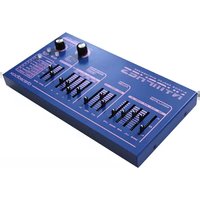


Brand : Dreadbox
Model : Euphoria
Category : Keyboard