
Darkness - Audio effect pedal Dreadbox - Free user manual and instructions
Find the device manual for free Darkness Dreadbox in PDF.


| Product Type | Analog Stereo Reverb Pedal |
| Dimensions | 121 x 66 x 51 mm |
| Weight | 0.4 kg |
| Power Supply | 9V DC, center negative, 100 mA minimum |
| Controls | Mix, Decay, Dampen, Tone, Level |
| Inputs | 2 x 1/4" TS (Left/Mono, Right) |
| Outputs | 2 x 1/4" TS (Left, Right) |
| Bypass | True Bypass |
| Reverb Types | Spring, Plate, Hall, Room, Reverse |
| Audio Quality | 24-bit / 48 kHz (digital conversion in analog path) |
| Current Draw | 100 mA |
| Construction | Aluminum enclosure, powder coated |
| Warranty | 2 years limited |
| Included Accessories | None (power supply sold separately) |
| Maintenance | Wipe with dry cloth; avoid moisture |
| Safety | Use only with specified power supply |
| Spare Parts | Contact Dreadbox for parts |
| Repairability | Serviceable by qualified technician |
| General Info | Designed and assembled in Greece |
Frequently Asked Questions - Darkness Dreadbox
User questions about Darkness Dreadbox
0 question about this device. Answer the ones you know or ask your own.
Ask a new question about this device
Download the instructions for your Audio effect pedal in PDF format for free! Find your manual Darkness - Dreadbox and take your electronic device back in hand. On this page are published all the documents necessary for the use of your device. Darkness by Dreadbox.
USER MANUAL Darkness Dreadbox
Darkness, is the polar opposite of brightness and understood as a lack of illumination or an absence of visible light. Also Scotus (σκότος), primordial Greek god of darkness.
9VDC center pin negative
standard effect pedals power
natural_image
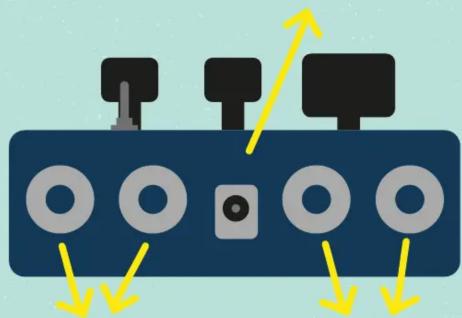
Diagram of a device panel with four circular components and yellow directional arrows indicating movement or force (no text or symbols)Stereo OutputStereo Inj
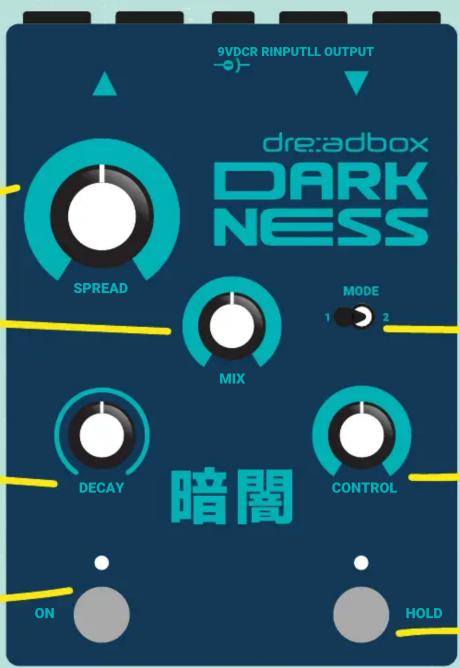
Reverb Spread
Also known as size
Effect Mix
Dry/wet balance. A 50/50 setting is achieved at 3 'oclock. At max, the dry signal is off
Decay amount
Also known as feedback
ON/OFF footswitch
or Page 2
While holding this footswitch down, allows you to access Page 2, where you can control some additional parameters (for more info check the next page)
Change what the Control knob affects
This allows you change what the control knob affects, but can also engage some different playing modes (depending on your Page)
Control knob
This affects a different parameter, depending on the Mode switch and Page (for more info check the next page)
Hold footswitch / or Page 3
Pressing this, will loop 150ms of your input signal. While holding it down allows you to access Page 3- the Gate parameters (for more info check the next page)
STEREO REVERB
DARK NESS
暗闖
1. Getting started
Connect your instrument (or audio signal) into the L and R INPUTS, on the back side. If your instrument or audio is mono (a guitar for example) just connect it to any of the inputs.
Then connect the output of the pedal to your amp or monitors/mixer. If you only need to use a mono output, you can use any of the L or R OUTPUT jacks.
Finally, use a 9VDC, center negative standard effect pedal's power supply with at least 150mA. Darkness is not a True By Pass effect, and requires power in order to allow sound to pass through it.
2. Using Darkness
On power up, the pedal will remember your last setting and will begin with it by default. To activate the effect, just press the ON footswitch swiftly. Remember that the controls are set on a JUMP mode, meaning that their value will not change unless you move them.
The HOLD footswitch will loop the next (after the button is pressed) 150ms of you current input. If no singal is send, this will not have anythign to loop, thus the switch will kill the effect.
While on hold, no new input is processed, but you can still use the controls to process the looped sound.
There are 3 control pages:
A. The main controls page that include the actual controls you read on the panel.
B. The secondary controls page, that you can access while holding the ON footswitch down
C. The GATE controls page, which you can access while holding the HOLD foot-witch down
For a detailed visual view, check next page.
MAIN PAGE
- Spread: Reverb size
- Mix: Dry / Wet balance
- Decay: Reverb decay time
- Control:
It depends on the Mode switch position
switch on 1 = Shifter semitone (+/-12). 50% is no pitch
switch on 2 = Shifter mix
SECONDARY CONTROLS PAGE
- Spread: No Function
- Mix = Reverb filter. Left for Low Pass Right for High Pass
- Decay = LFO depth. No LFO at 50%. Left for Sample and Hold, Right for Triangle
- Control = LFO rate. The LFO always targets the Spread.
- Mode switch = Tails On/Off. Left is Off. Having the tails On, will allow the Reverb Tail to be audible, even if the effect is turned OFF via the Left footswitch.
GATE CONTROLS PAGE
- Spread: No Function
- Mix = Threshold. Controls the ease that the gate closes
- Decay = Attack time. After the gate opens, controls the time it will take for the effect to reach the max programmed volume
- Control = Release time. After the gate closes, controls the time it will take for the effect close
- Mode switch = Gate On/Off. Left is Off. Having the Gate Off, the knobs will have no effect.
SPECIFICATIONS
- CMOS Buffered Bypass
- 9VDC center pin negative supply 150mA at least
-True stereo
- All IN/OUT are TS mono jacks
- dimensions: 14x10x5 cm
- weight: 0,525 kg
dre:adbox
MAIN PAGE

SECONDARY CONTROLS

GATE CONTROLS

DARK NESS
STEREO REVERB
暗聞
dre:adbox


Brand : Dreadbox
Model : Darkness
Category : Audio effect pedal