
Imperious KWH-251 - Headphones Klip Xtreme - Free user manual and instructions
Find the device manual for free Imperious KWH-251 Klip Xtreme in PDF.


| Product Type | Over-Ear Headphones |
| Brand | Klip Xtreme |
| Model | Imperious KWH-251 |
| Driver Size | 40 mm |
| Frequency Response | 20 Hz - 20 kHz |
| Impedance | 32 Ω |
| Sensitivity | 105 dB |
| Connectivity | Wired (3.5 mm jack, USB for RGB) |
| Microphone | Built-in noise-cancelling mic |
| Controls | In-line remote with volume and mute |
| Cable Length | 2.5 m |
| Weight | 280 g |
| Dimensions (Headphones) | 200 x 180 x 80 mm |
| Compatibility | PC, Mac, PlayStation, Xbox, Nintendo Switch, Mobile |
| Sound Features | Surround sound (virtual 7.1) |
| Lighting | RGB LED with multiple modes |
| Ear Cushions | Memory foam with leatherette |
| Headband | Adjustable, padded |
| Power | USB-powered (for RGB) – no battery |
| Cleaning | Wipe with dry cloth; avoid liquids |
| Safety | Keep away from water; use at moderate volume to prevent hearing damage |
| Spare Parts / Repairability | Replaceable ear pads and cable; contact support for parts |
Frequently Asked Questions - Imperious KWH-251 Klip Xtreme
User questions about Imperious KWH-251 Klip Xtreme
0 question about this device. Answer the ones you know or ask your own.
Ask a new question about this device
Download the instructions for your Headphones in PDF format for free! Find your manual Imperious KWH-251 - Klip Xtreme and take your electronic device back in hand. On this page are published all the documents necessary for the use of your device. Imperious KWH-251 by Klip Xtreme.
USER MANUAL Imperious KWH-251 Klip Xtreme
Thank you for purchasing the KWH-251 v2 stereo headphones with Bluetooth® wireless technology. We encourage you to read this quick installation guide thoroughly to get the most of this innovative wireless device.
Main features
- Superior sound quality delivered through high-performance 40mm drivers
- Long-lasting 22-hour battery life, with about 100 hours of stand-by time*
• Only 2.5 hours for quick battery recharge - Cushioned leatherette headband that conveniently extends for maximum comfort
- Ultra-lightweight design with comfortable swiveling ear cups, that fold flat to be easily carried in the protective case
• Full on-board controls for power, music and phone call management - LED multicolor lights with different lighting patterns, which can be turned off completely
- Bluetooth® V. 5.0 platform, for greater wireless range and based on an area free and clear of obstacles and interference between both Bluetooth® V5.0 devices.
• Built-in USB-C port for swift wired charging
* Estimated battery run time may vary depending on each user's playlist, usage and volume settings.
Package content
- Wireless headphones
- USB-C charging cable
• 3.5mm audio cable - Protective carrying case
- User's manual
II. Product components
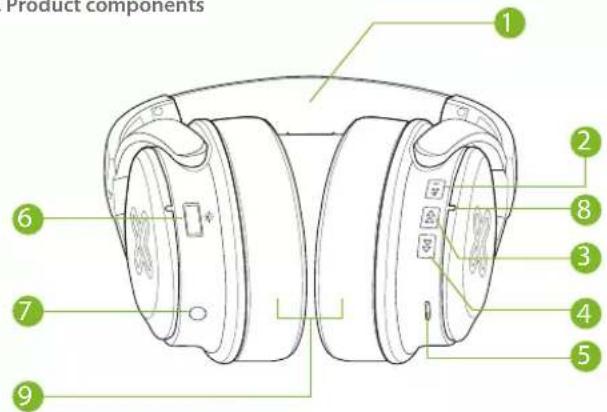
I. Adjustable headband
2. Power On/Off - Multifunction button
3. Volume down/previous track button
4. Volume up/next track button
5. USB-C charging port
6. Lights On/Off button
7. 3.5mm auxiliary input jack
8. LED status indicator (Bluetooth® mode)
9. Cushioned ear pads
| Button | Function Operation instruction | |
| Power On/Off - MFB | Power on | Press and hold this button for about 2-3 seconds to turn on the device. Keep this button pressed until a voice prompt is heard indicating that the headphones are in pairing mode. |
| Power off | Press and hold this button for about 2-3 seconds to turn off the device. | |
| Play/Pause | Briefly press this button to play and pause media. | |
| Redial the last number called | Press and hold this button for about 1 second to redial the last number called (on supported devices). | |
| Button | Function Operation instruction | |
| Hands-free mode- Answering a call | Press this button once to answer an incoming call (music will be paused). | |
| Hands Free mode- Hanging up a call | Press this button once to end a call (music will resume). | |
| Hands-free mode- Rejecting a call | Press and hold this button for about 1 second to reject an incoming call. | |
| Hands Free mode- Call waiting | a. Press and hold this button for about 1 second to place a current call on hold and answer an incoming call.b. Press and hold this button for about 1 second again to switch between the call on hold and the connected one.c. Press this button once to end the call. | |
| Volume + | Volume up | Press and hold this button to increase the audio level of the headphones. |
| Next media source | Press this button briefly to play the Next track. | |
| Volume - | Volume down | Press and hold this button to decrease the audio level of the headphones. |
| Previous media source | Press this button briefly to play the Previous track. | |
-
USB-C charging port: Insert the USB-C plug here to recharge the battery.
-
Lights On/Off button: Press this button to turn the lights on or off, and to cycle through the lighting patterns.
a. Press this button briefly to turn ON the lights on the headphones logo.
b. Press it twice to have a solid lighting pattern (PULSE MODE) beating at the sound of the music.
c. Press this button for a third time and the lighting pattern will change colors (white, red, blue, green, purple, yellow and teal) in five-second intervals.
d. Setting the lighting color: Press this button for about 3 seconds to cycle through the different colors, stop on the color you want and this will be the color the logo will stay ON and the color of the running effect.
c. Setting brightness level: Press this button to switch the intensity of the lights from full to half brightness. Turning the lights to a lower intensity level will help to save battery life.
-
3.5mm auxiliary input jack: Use it for wired playback.
-
LED indicator light:
The LED turns red when the headphones are being charged.
The LED will blink blue and red alternatively when the headphones are in pairing mode.
The LED will blink alternatively blue when the headphones are in BT mode.
III. Basic operation
Charging your headphones
- Plug one end of the supplied USB-C cable to your headphones USB-C port and the other end into the USB port of your computer or to a 5VDC 500mA USB adapter to fully charge the battery*.
- The headphones battery has to be initially charged for at least 3 hours. Thereafter, the battery will take about 2 hours to recharge.
- Make sure that the headphones are fully charged before using them for the first time.
- When battery is low it will emit a low battery prompt, to remind you to recharge the headphones.
*Do not use a USB fast charging or PD adapters with an output power greater than 5V or you will damage your headphones and void the warranty.
IV. Auxiliary wired connection
- Plug one end of the supplied 3.5mm cable to your headphones and the other end to the 3.5mm auxiliary port in your input source.
- Set the desired volume on the input source. The volume controls on the headphone will not operate when they are connected to an external wired audio source.
V. Advanced operation
Pairing the headset with your mobile phone
- Press and hold this button for about 2-3 seconds to turn on the device. Keep this button pressed until a voice prompt is heard indicating that the headphones are in pairing mode. The LED light will blink alternatively blue and red.
- Next, set your Bluetooth ^® mobile device to "discover" the wireless headphones.
- Place both devices not more than one meter away from each other.
- On your mobile phone, tap the newly discovered audio device KWH-251 v2 being displayed in the Bluetooth® list.
- When the mobile device asks if you want to pair with it, click Yes or OK to accept.
- The LED light will blink alternatively in blue to indicate that the Bluetooth ^® connection is successful.
-
If after 60 seconds the pairing process fails, please repeat steps 1 through 6 described above.
-
The headset will enter into Standby mode and will eventually turn off automatically after five minutes if there is no Bluetooth® device available for pairing. "Power off" will be heard to confirm this action.
VI. Using the wireless headset
a. Answering and ending a call using your mobile phone
- When there is an incoming call, an alert tone will be heard through your headphones. Briefly press the Power/Multifunction button to pick it up. You may also press the answer button on your cellular phone to take the call.
- To end a call, simply press the Power/Multifunction button once again. Likewise, you may also finish the call directly using the end key on your cell phone.
- To reject or ignore an incoming call, press the Power/Multifunction button for about 1 second.
- If you want to redial the last number called, press and hold the Power/Multi-function button for about 1 second (on supported devices).
-
Call waiting feature:
-
If you have an incoming call while you are on another call, press and hold this button for about 1 second to place the current call on hold and answer the incoming call.
- Press and hold this button again for about 1 second to switch between the call on hold and the call you are actually on.
- Press this button once to end the call.
b. Music playback
-
Briefly press the Power/Multifunction button to play and pause audio playback.
-
Press the ▶ or ◀ buttons for 1 second to go to the Next or Previous track.
-
Press and hold the ▶ or ◀ buttons for more than 1 second to increase or decrease the audio level on the headphones.
-
When listening to music using your mobile phone, playback will pause to allow the call to go through.
-
As soon as you hang up, music playback will resume automatically.
VII. Troubleshooting
a. The headphones are not turning on.
- Charge the headphones. If they don't turn on even after charging, contact customer service for help.
b. The headphones are not charging.
- Check if the supplied USB charging cable has been properly connected to the headphones and the power source.
- Check if the power source is on and properly connected.
- If using a USB power adapter different from the one supplied, make sure it is properly connected and functioning.
c. The headphones are not pairing.
- Check if the Bluetooth® device is power on.
- Check if the Bluetooth ^® mode is enabled on the Bluetooth ^® device.
- Check both devices are within 1 meter from each other.
- Check if the Bluetooth ^ device is compatible with the headphones.
d. Music will not play through the headphones.
- Check if the headphones and Bluetooth ^ device are powered on.
- Check if there is music playing on your Bluetooth® device.
- Check the volume level on your Bluetooth® device.
e. There is distortion, lag or interference in the connection
- Check if there is a 2.4GHz device close to the headphones or Bluetooth® device.
- Check both devices are placed within the recommended distance.
f. Difficulty in listening to a caller when receiving a call
- Check if the headphones are connected to the Bluetooth® device.
- Check if the Bluetooth ^® mode is enabled on your device.
- Check the volume level on your Bluetooth ^® device.
Technical specifications
| MPN KWH-2S1 | |
| Headphone | |
| Form factor | On-ear |
| Driver unit | 40mm |
| Maximum power output | 30mW |
| Frequency | 20Hz-20KHz |
| Impedance | 32 ±15% (S.P.L at 1KHz) |
| Sensitivity | 96dB±3dB |
| Buttons | Power On/Off-Multifunction, Volume+/Next song, Volume-/Previous song,Lights On/Off |
| Microphone | |
| Form factor | Built-in |
| Directivity | Omnidirectional |
| Frequency | 50-16KHZ |
| Impedance | 2.2K |
| Sensitivity | -42dB±3dB |
| Input voltage | 5VDC/500mA |
| Volume control | Yes, in right ear cup |
| Connectivity | |
| Connection type | Bluetooth*V5.0, 3.5mm auxiliary-in |
| Wireless RF frequency | 2.402-2.480GHz |
| Wireless range | Up to 80ft** |
| Battery | |
| Battery type | 3.7VDC, 800mAh |
| Battery charging time | Up to 2.5 hours |
| Battery run time | Up to 22 hours* |
| Battery standby time | About 100 hours |
| Other features | |
| LED lights | Multicolor adjustable LED lights with on/off capability and running lighting effects |
| Additional Information | |
| Material | ABS |
| Product dimensions | 6.3x3.3x7.8in |
| Product weight | 7oz |
| Cable type and length | USB-C: 31in3.5mm cable: 4ft |
| Warranty | One year |
* Estimated battery run time may vary depending on each user's playlist, usage and volume settings.
**Range estimate is based on an area free and clear of obstacles and interference, and within the line of sight between both Bluetooth® V5.0 devices.
Precautions
- Do NOT drop, hit or shake the device.
- Do NOT disassemble, repair or modify the headphones yourself.
- Do not use cleaning products that contain benzene, solvents or alcohol.
- Do NOT expose headphones to excessive heat or to direct sunlight for long periods of time.
- Do NOT store the device in a place with high humidity or dust.
- Do NOT place heavy objects on top of the headphones.
- Do NOT use near a microwave oven or wireless LAN products.
FCC statement
This equipment has been tested and found to comply with the limits for a Class B digital device, pursuant to part 15 of the FCC Rules. These limits are designed to provide reasonable protection against harmful interference in a residential installation. This equipment generates, uses, and can radiate radio frequency energy and, if not installed and used in accordance with the instructions, may cause harmful interference to radio communications. However, there is no guarantee that interference will not occur in a particular installation. If this equipment does cause harmful interference to radio or television reception, which can be determined by turning the equipment off and on, the user is encouraged to try to correct the interference by one or more of the following measures:
• Reorient or relocate the receiving antenna.
- Increase the separation between the equipment and receiver.
- Connect the equipment into an outlet on a circuit different from that to which the receiver is connected.
- Consult the dealer or an experienced radio/TV technician for help.
Notes
I. Introducción
KlipXtreme® is a registered trademark. All rights reserved. The Bluetooth® word mark is owned by Bluetooth SIG, Inc. Other trademarks and trade names are those of their respective owners. Any mention of such is only intended for identification purposes, and is not to be construed as a claim to any rights pertaining to, sponsorship by, or affiliation with, those brands. Made in China.
- Main features
- Package content
- Basic operation
- Charging your headphones
- Auxiliary wired connection
- Advanced operation
- Pairing the headset with your mobile phone
- Using the wireless headset
- a. Answering and ending a call using your mobile phone
- b. Music playback
- Troubleshooting
- a. The headphones are not turning on.
- b. The headphones are not charging.
- c. The headphones are not pairing.
- d. Music will not play through the headphones.
- e. There is distortion, lag or interference in the connection
- f. Difficulty in listening to a caller when receiving a call
- Precautions
- FCC statement
- Introducción
Brand : Klip Xtreme
Model : Imperious KWH-251
Category : Headphones