
T65 - Loudspeaker EARISE - Free user manual and instructions
Find the device manual for free T65 EARISE in PDF.


| Product Type | Portable Bluetooth Speaker |
| Brand | EARISE |
| Model | T65 |
| Dimensions (HxWxD) | 19 x 10 x 10 cm (7.5 x 3.9 x 3.9 in) |
| Weight | 540 g (1.19 lb) |
| Power Source | Built-in rechargeable lithium-ion battery 1800 mAh |
| Connectivity | Bluetooth 5.0, AUX input, USB playback |
| Wireless Range | Up to 10 m (33 ft) |
| Output Power | 10 W RMS |
| Frequency Response | 80 Hz - 20 kHz |
| Battery Life | Up to 12 hours at moderate volume |
| Charging Time | Approximately 3 hours via micro USB |
| Water Resistance | IPX5 (splash-proof) |
| Driver Size | 2 x 52 mm full-range drivers + passive radiator |
| Controls | Power, volume +/- , play/pause, track skip, hands-free calling |
| Built-in Microphone | Yes, for speakerphone |
| Supported Audio Formats | MP3, WMA, WAV, FLAC (via USB) |
| Color Options | Black, Blue, Red (may vary) |
| Included Accessories | Micro USB charging cable, AUX cable, user manual |
| Cleaning Instructions | Wipe with a dry, soft cloth. Do not use abrasive cleaners or immerse in water. |
| Safety Warnings | Do not disassemble, expose to extreme temperatures, or use with damaged cables. |
| Repairability | Battery can be replaced by a professional. Speaker is not intended for user repair of other parts. |
| Compliance | CE, FCC, RoHS |
Frequently Asked Questions - T65 EARISE
User questions about T65 EARISE
0 question about this device. Answer the ones you know or ask your own.
Ask a new question about this device
Download the instructions for your Loudspeaker in PDF format for free! Find your manual T65 - EARISE and take your electronic device back in hand. On this page are published all the documents necessary for the use of your device. T65 by EARISE.
USER MANUAL T65 EARISE
natural_image
Interior view of a futuristic electronic device with a central blue 3D screen and control panel (no visible text or symbols)WARNING 01
DISPLAY SCREEN 02
- Do not place in humid environment or expose to rain. Avoid severe collisions.
- Keep the product away from high temperature and open flame environment to prevent dangers such as battery explosion.
- Do not open the cabinet of the product, or it will cause machine damage and other accidents.
- For maintenance, contact the service station or professional personnel if needed.
- Can only be replaced with the same or equivalent type of battery.
- In order to avoid charging issues, the product must be charged with the original USB cable. Accidents and machine damage caused by using other charging cable will not covered by warranty.
DISPLAY SCREEN
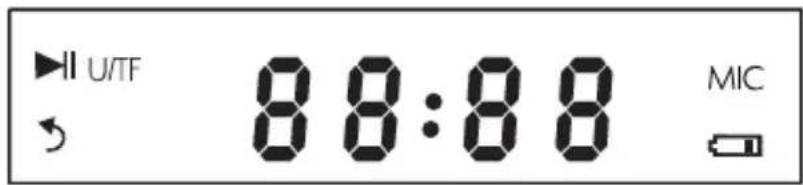
- ▶I: With a USB flash drive or TF card inserted, this symbol will light up when music is paused. As for AUX in or FM radio mode, this symbol will light up when music is muted.
- U/TF: When a USB flash drive or TF card inserted, this symbol will light up.
- ↗: Single cycle.
4.88:88: When using the AUX function, "LINE IN" will be displayed on the screen; When in the FM radio mode, it will display the number of current channel; When playing music via a USB flash drive or TF card, it will display the song playing time; When in Bluetooth mode, it will display "BLUE"; "PAUS" will be displayed on the screen when music is paused. - MIC: When the microphone is in use, this symbol will light up.
- ☐: This symbol will light up when there's only a few power left. The volume will automatically decrease to about 70%. Please use the including charging cable to charge the machine.
THE OPERATION PANEL

01 Mic Volume Control
02 1/4" Mic In Jack
03 USB Flash Drive Slot
04 TF Card Slot
05 Display Screen
06 AUX In Jack
07 USB 5V Charging Port
08 Power On/Off
09 Master Volume Control
10 Mode
11 Repeat
12 Light On/Off
13 Previous Track
14 Play/Pause
15 Next Track
BLUETOOTH
- Power on the speaker. The default mode is Bluetooth. The screen display shows "BLUE" and it will flash.
2 Turn on the device's Bluetooth, search for "EARISE T65", and click to pair. - A voice prompt "Bluetooth connected" to be heard indicates a successful connection. The display "BLUE" stops flashing.
- Disconnect Bluetooth: Press and hold the "◆1" button to disconnect Bluetooth.
LIGHT
- The light will be default on when power on.
2 Press and hold the "LIGHT" button to turn off or turn on again. - There are 3 light modes: default, breathing, quick-flashing.
- Note: The lighton the operation panel will not be off unless power off the machine.
REPEAT
- The repeat function only work when a TF card or USB flash drive inserted.
2Press the "REP" button to select a loop mode.
3.There are 2 modes: ONE (single song cycle), ALL (loop all playlist of all folders).
FM RADIO
- Press the "MODE" button to switch to FM radio mode. The FM range is 87.5MHz-108.0MHz.
- Press and hold the "▶" button to automatically search for FM stations. The station will be saved automatically, the display screen shows "P01", "P02", etc. It is suggested to search for radio stations automatically the first time you use it.
- When searching for stations, you can stop searching by pressing the "▶" button.
- After searching, press "▶▶|" or "|◀◀" button to select a saved station.
- If you are listening to a saved station "P05" in which FM range is 92.0MHz, press and hold "▶▶" button to searching stations from 92.0MHz to 108.0MHz, and the found station will be saved automatically as "P06"; press and hold "◀◀" button to searching stations from 87.5MHz to 92.0MHz, and the found station will be saved automatically as "P04".
TF Card / USB
- Press the "MODE" button to switch to USB / TF mode.
- Insert a USB flash drive / TF card, the speaker will automatically start playing the existing music from the first song. The display shows "U / TF" in the upper left corner.
- The song file format must be MP3 \ WMA \ WAV \ FALC.
-
The USB flash drive must have a capacity of 8G to 32G.
-
The USB flash drive must be USB 2.0 and the file system must be FAT32.
- If the USB flash drive is formatted and the file system is not FAT32, it will not work properly.
AUX IN
- The speaker has a 3.5 mm AUX jack for connecting non-Bluetooth devices.
- (Not including cable) One end of the cable is plugged into the AUX jack, and the other end is connected to the audio output port of the device, such as a computer, mobile phone and amplifier.
- The speaker will automatically switch to AUX IN mode.
Alternatively, you can switch to the AUX IN mode by pressing the "MODE" button.
HOW TO CHARGE YOUR T65
| Graphical | Method | Steps |
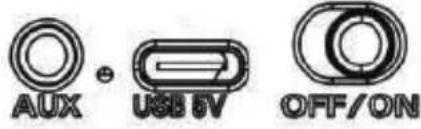 | Charge the T65 Machine Directly | 1. There is an included USB charging cable.2. One end of the USB cable is connected to the USB 5V charging port on the speaker and the other end is connected to the power outlet. (The power adapter is not included)3. When charging, the red light indicator is on. It will go off after fully charged. |
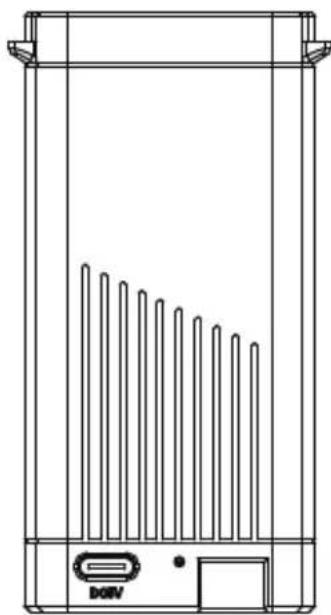 | Charge the External Li-ion Battery | 1. Use the included USB charging cable to charge the external battery.2. One end of the USB cable is connected to the external battery and the other end is connected to the power outlet. (The power adapter is not included)3. When charging, the red light indicator will flashing. It will go off after fully charged. |
 | Replace the External Li-ion Battery | 1. There are 2pcs external Li-ion batteries included.2. Pinch the top buckle of the battery with your thumb and index finger.3. Please note the side with a sticker indicating "this side up".4. Push the battery into the bottom of the battery slot.5. Release your fingers, you will hear a "click" sound, indicating that the battery is placed correctly. |
SPECIFICATION
Peak Power Output: 30W
R.Frequency: 90Hz-20KHz
Built-in Li-ion Battery: 3.7V / 2400mAh
External Li-ion Battery: 2pcs 3.7V / 3600mAh
Drive Unit: 5.25"3Ω
S/N Ratio: ≥60dB
DC Input: USB 5V
Power Supply: AC 100-240V
Dimension: L280*W200*H340mm (11" x 7.9" x 13.4")
WHAT'S IN THE BOX
1 x T65 PA Speaker
2 x Wireless Microphones (Batteries not included)
2 x External Li-ion Batteries
1 x USB Charging Cable
1 x User Manual
WARRANTY
EARISE guarantees one and a half years warranty and 60 days hassle-free return. We provides lifetime technical support. Please reach us via support@eariseshop.com.
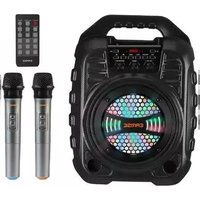
Brand : EARISE
Model : T65
Category : Loudspeaker