
TPU600-G2 - Hand blender Bogen - Free user manual and instructions
Find the device manual for free TPU600-G2 Bogen in PDF.


| Product Type | Hand blender (immersion blender) |
| Brand | Bogen |
| Model | TPU600-G2 |
| Power Consumption | 600 W |
| Voltage / Frequency | 220-240 V, 50/60 Hz |
| Speed Settings | Variable (with turbo boost) |
| Blending Shaft Material | Stainless steel |
| Cable Length | 1.2 m |
| Dimensions (L x W x H) | 40 x 8 x 8 cm |
| Weight | 1.2 kg |
| Main Functions | Mixing, pureeing, blending soups and sauces |
| Cleaning | Removable shaft for dishwasher safe cleaning |
| Safety Features | Safety lock, soft start |
| Spare Parts Availability | Replacement shafts and accessories available |
| Warranty | 2 years |
Frequently Asked Questions - TPU600-G2 Bogen
User questions about TPU600-G2 Bogen
0 question about this device. Answer the ones you know or ask your own.
Ask a new question about this device
Download the instructions for your Hand blender in PDF format for free! Find your manual TPU600-G2 - Bogen and take your electronic device back in hand. On this page are published all the documents necessary for the use of your device. TPU600-G2 by Bogen.
USER MANUAL TPU600-G2 Bogen
TPU600-G2 Telephone Paging Amplifier
Installation and Use Guide
WARNING: To reduce the risk of fire or electric shock, do not expose this apparatus to rain or moisture.
The apparatus shall not be exposed to dripping or splashing and that no objects filled with liquids, such as vases, shall be placed on apparatus.
The mains plug is used as disconnect device. The mains plug of apparatus should not be obstructed OR should be easily accessed during intended use. To be completely disconnect the power input, the mains plug of apparatus shall be disconnected from the mains.
CAUTION: DO NOT INSTALL OR PLACE THIS UNIT IN A BOOK CASE, BUILT-IN CABINET, OR IN ANOTHER CONFINED SPACE.
ENSURE THAT THE UNIT IS WELL VENTILATED. TO PREVENT THE RISK OF SHOCK OR FIRE HAZARD DUE TO OVER HEATING.
ENSURE THAT CURTAINS AND ANY OTHER MATERIALS DO NOT OBSTRUCT THE VENTILATION VENTS.
Always comply with the following basic safety precautions when installing and using the unit:
- Read these instructions.
- Keep these instructions.
- Heed all warnings.
- Follow all instructions.
-
DO NOT use this apparatus near water.
-
Clean only with dry cloth.
-
DO NOT block any ventilation openings. Install in accordance with the manufacturer's instructions.
-
DO NOT install near any heat sources such as radiators, heat registers, stoves, or other apparatus (including amplifiers) that produce heat.
-
DO NOT defeat the safety purpose of the polarized or grounding-type plug. A polarized plug has two blades with one wider than the other. A grounding-type plug has two blades and a third grounding prong. The wide blade, or the third prong, are provided for your safety. If the provided plug does not fit into your outlet, consult an electrician for replacement of the obsolete outlet.
-
Protect the power cord from being walked on and/or pinched, particularly at plugs, convenience receptacles, and the point where they exit from the apparatus.
-
Only use attachments/accessories which are specified by the manufacturer.
-
Unplug this apparatus during lightning storms or when unused for long periods of time.
-
Refer all servicing to qualified service personnel. Servicing is required when the apparatus has been damaged in any way, such as power-supply cord or plug is damaged, liquid has been spilled or objects have fallen into the apparatus, the apparatus has been exposed to rain or moisture, does not operate normally, or has been dropped.
This equipment is not suitable for use in locations where children are likely to be present. Equipment is intended for use only in a restricted access area.
CAUTION
RISK OF ELECTRIC SHOCK DO NOT OPEN
CAUTION: TO PREVENT THE RISK OF ELECTRIC SHOCK, DO NOT REMOVE ANY FRONT/BACK COVERS OR PANELS. NO USER-SERVICEABLE PARTS ARE NSIDE. REFER ANY SERVICING TO QUALIFIED PERSONNEL.

The lightning flash with arrowhead symbol, within an equilateral triangle, is intended to alert the user to the presence of uninsulated "dangerous voltage" within the product's enclosure that may be of sufficient magnitude to constitute a risk of electric shock to persons.

The exclamation point within a unilateral triangle is intended to alert the user to the presence of important operating and maintenance (servicing) instructions.

WARNING:
The apparatus shall be connected to a mains socket outlet with a protective earthing connection.
To reduce the risk of fire or electric shock, do not expose this apparatus to rain or moisture.
The apparatus shall not be exposed to dripping or splashing and that no objects filled with liquids, such as vases, shall be placed on the apparatus.
Where the mains plug or an appliance coupler is used as the disconnect device, the disconnect device shall remain readily operable.
Minimum distances 10cm around the apparatus for sufficient ventilation.
The ventilation should not be impeded by covering the ventilation openings with items, such as newspapers, table-cloths, curtains, etc.
No naked flame sources, such as lighted candles, should be placed on the apparatus.
The use of apparatus in moderate climates.
TPU600-G2 Amplifier Front Panel
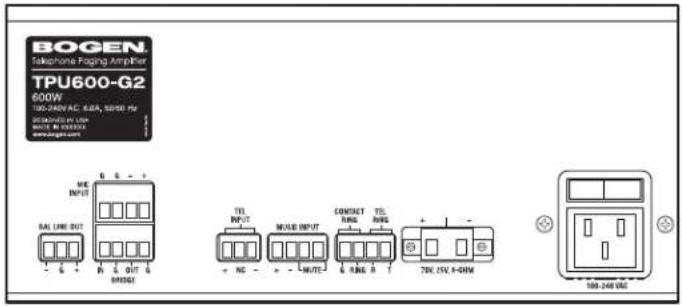
TPU600-G2 Amplifier Rear Panel
Introduction
This document describes the Bogen TPU600-G2 Telephone Paging Amplifier. It is a full-featured, wall- or rack-mounted amplifier that provides inputs for a dry-loop, 600-ohm telephone page signal, a background music source, and a low-impedance microphone. Automatic background music mute is provided when making a telephone page. The background music mute level during a page is adjustable, and the music slowly fades back in after the page is completed. A Normally Open (NO) contact closure music mute control input is provided for use with push-to-talk microphones. An Automatic Level Control (ALC) system limits the output level of the telephone page channel so that differences in the volume of the paging party's voice will be less noticeable. Bass and treble controls are provided for adjusting the quality of the output signal. An Audio Enhancement (ENHANCE) feature is also provided to improve the clarity of the output signal by regenerating the higher-frequency harmonics that are normally lost through the telephone system. The TPU amplifier includes a built-in night ringer that can be triggered by either a standard (analog) telephone ring signal or an external contact closure. The night ringer mutes the background music, but does not affect pages.
Package Contents
• Telephone Paging Amplifier unit
• Rack Mount Kit (NQ-RMK03)
• Wall Mounting Ears Kit
- Security Cover
• Installation and Use Guide
Before you start
Review the contents of the box. Read through this entire manual to understand how this product installs and operates.
This equipment IS NOT suitable for use in locations where children are likely to be present.
Equipment is intended for use only in a restricted access area.
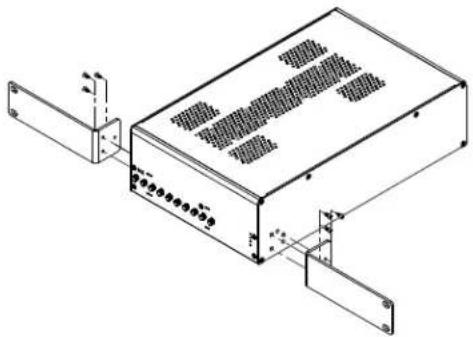
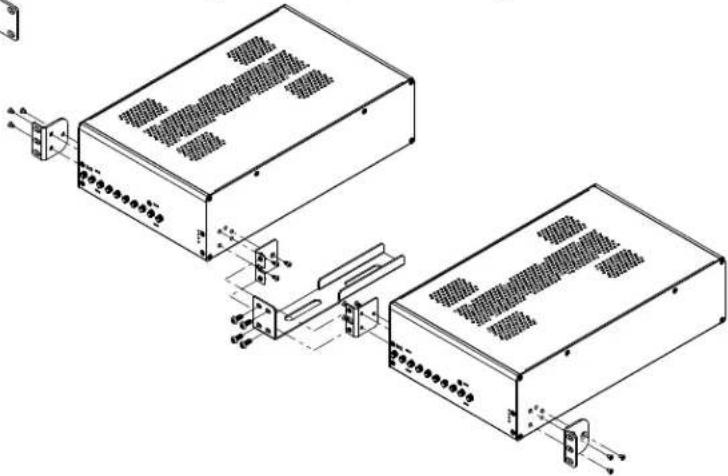
Figure 1: Single Unit Rack Mounting
natural_image
Isometric line drawing of an electronic device with ports and connectors (no text or symbols)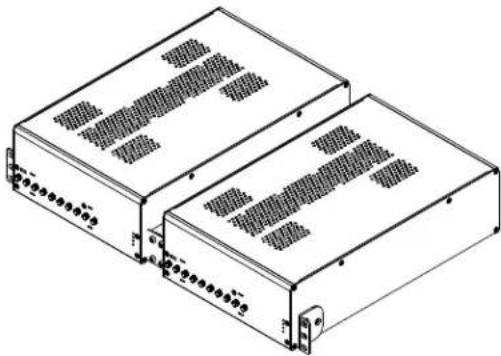
natural_image
Technical line drawing of two rectangular electronic modules with ventilation grilles (no text or symbols)Figure 2: Side-by-Side Mounting
natural_image
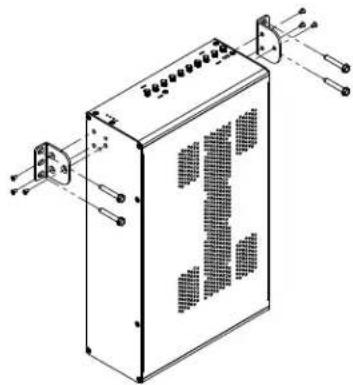
Technical line drawing of a rectangular electronic device with mounting brackets and ventilation grilles (no text or symbols)Figure 3: Wall Mounting
natural_image
Technical line drawing of two electronic device modules connected via a cable and connector (no text or symbols present)Rack Mounting
The TPU600-G2 can be rack-mounted through the use of a single-unit Rack Mount Kit (P/N: NQ-RMK03), which is included. Use the supplied screws to attach the brackets to each side of the amplifier, as shown in Figure 1. If mounting two amplifiers side-by-side in a 19-inch rack, use the optional NQ-RMK04 joining bracket between the two amplifiers along with the supplied Rotatable Mounting Ears Kit (see Figure 2).
Wall Mounting
To wall-mount the amplifiers, use the included Rotatable Mounting Ears Kit. Attach the mounting ears to each side of the amplifier as shown in Figure 3. Ensure the rubber feet are not attached to the amplifier. Attach the assembled unit to the wall using the appropriate user-provided fasteners.
Ventilation
When rack-mounted, allow 1-RU spacing (1.75 inches) between units for proper ventilation.
The ventilation should not be impeded by covering the ventilation openings with items, such as newspapers, tablecloths, curtains, etc.
Security Cover
The security cover prevents settings from being accidentally changed. To secure this cover to the amplifier, line up the cover slats to the slat holes on the amplifier and push the cover into place (see Figure 4). To remove the security cover to make adjustments to the settings, squeeze the top and bottom cover slats simultaneously and gently pull the cover away from the unit.
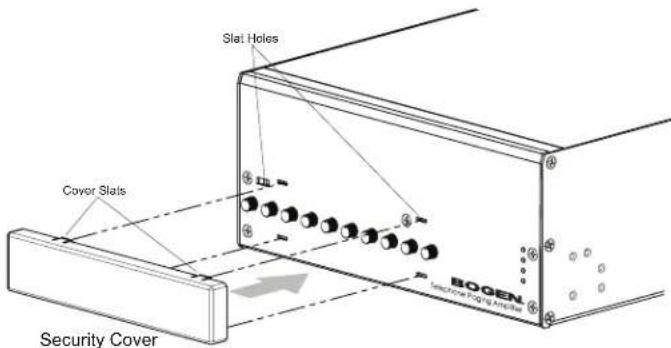
Figure 4: Installing the Security Cover
Input Wiring Connections
IMPORTANT: Before making any connections or wiring changes to the amplifier or any equipment connected to the amplifier, make sure that the amplifier is NOT powered on.
All signal input and control wiring is made to the pluggable Phoenix type connectors on the rear panel.
Music Input
An input is provided for the connection of a background music source. The music input is a mono unbalanced input, so the music source's output should be unbalanced and mono.
Microphone Input
A low-impedance dynamic microphone input is provided in this amplifier. It is designed to work with a push-to-talk dynamic microphone, like Bogen's DDU250 microphone. Connect the balanced dynamic microphone's signal wires to MIC INPUT +/- . Black wires typically connect to the “−” terminal, while white or red wires connect to “+”. Connect the shield wire from the microphone to the adjacent GND terminal.
Music Mute for the microphone input is not voice-activated (VOX). The Music Mute terminals must be shorted to mute the music input during a microphone page. A normally open contact set, like the one provided on the DDU250 microphone, is required for this function.
TEL Input
The telephone input is a 600-ohm, dry-loop, balanced input available at the TEL INPUT + and – connections. Voice-Activated (VOX) music mute is provided when making a telephone page. See “Control Knobs” on page 8 for instructions on how to set the VOX sensitivity (VOX SENSE) trigger threshold.
TPU600-G2
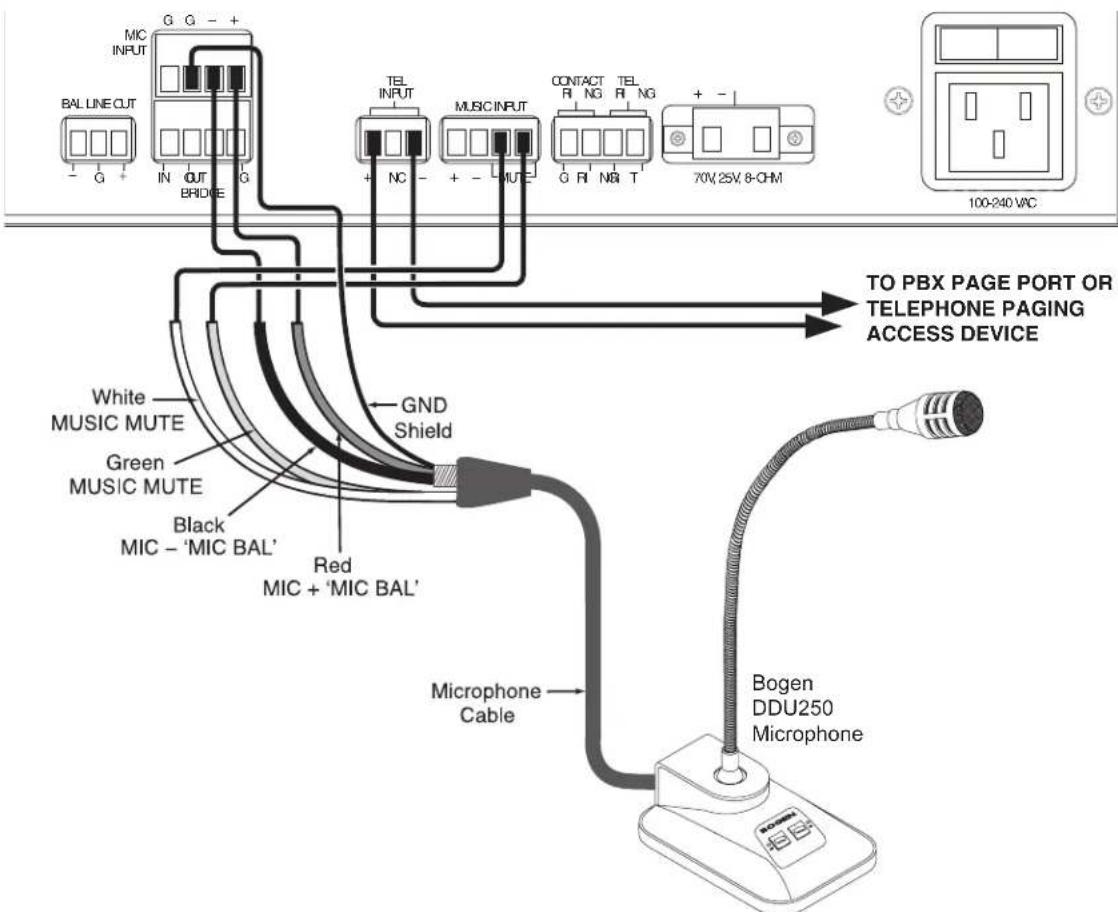
Figure 5: Wiring for TEL Input and Microphone Connection
Night Ringer Connection
Either a standard analog telephone ring signal (90–105V AC, 20–30 Hz) or an external contact closure activates the night ringer function of the amplifier. To activate the night ringer using standard analog telephone ring, connect the analog station's tip lead to the TEL RING "T" terminal, and connect the ring lead to the "R" terminal. If using an external contact closure, connect the closure pair across the CONTACT RING and GND terminals. The night ringer follows the cadence of the activating signal.
Bridging Inputs
Bridging inputs (see Figure 6) are provided to ease interconnection of multiple TPU Series amplifiers. Bridging permits two amplifiers to be used in tandem with one another to increase the total output power of the system, thereby permitting additional speakers to be added. For example, when two 600-watt amplifiers are bridged, the total output capacity of the combined TPU600-G2 system is 1200 watts. However, bridging does not increase the size of the load a TPU600-G2 can individually handle. Once bridged, each amplifier will amplify the inputs present on both amplifiers. The level control of a particular input on an amplifier will control the volume of this signal on both amplifiers. The cable used to bridge amplifier inputs should not exceed 20 feet in length.
NOTE: Any combination of TPU series amplifiers can be bridged together to achieve a desired power output level; however, you can only bridge together a maximum of two (2) TPU-series amplifier units.
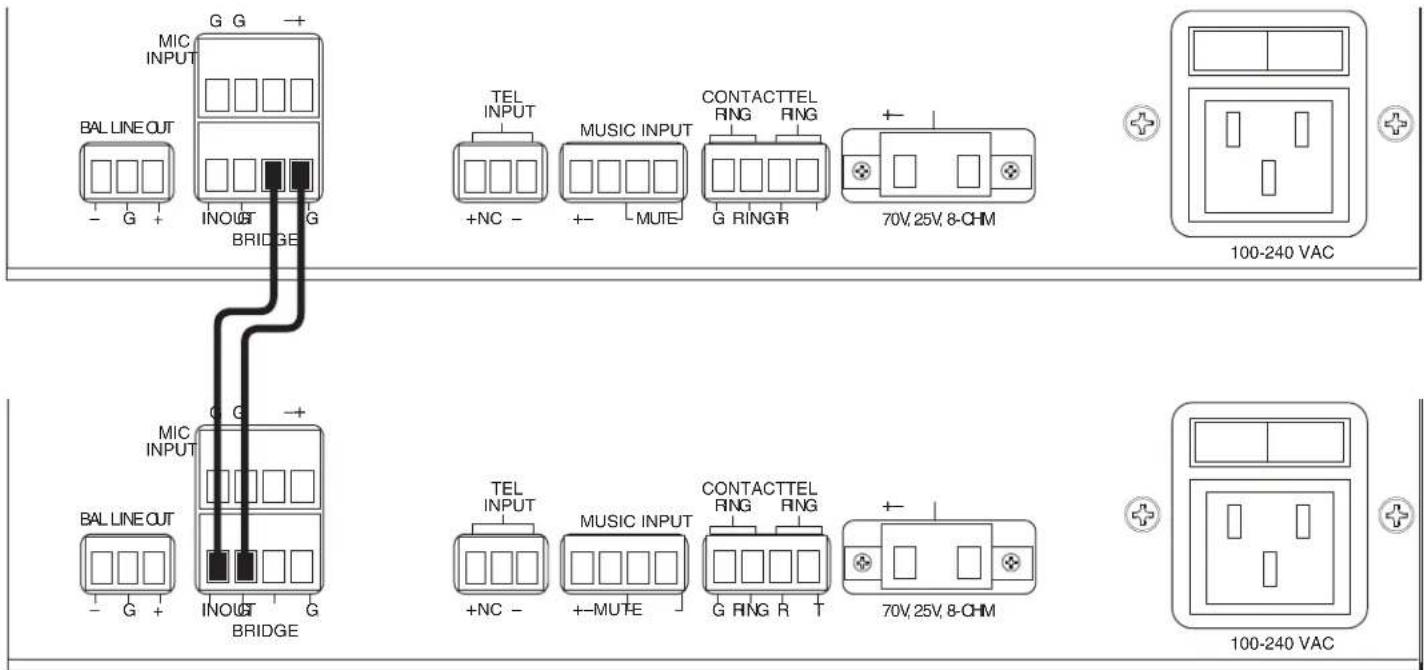
Figure 6: Bridge Inputs
Output Wiring Connections
All output wiring connections are made to the rear panel. Loosen the two Phillips-head screws on each side of the Phoenix-style plug to connect speaker wiring (see Figure 6).
Balanced Line Output
The Balanced Line Output (BAL LINE OUT) is a line-level low-impedance balanced output that can connect to an outboard amplifier input. It carries the same signal that is sent to the inboard TPU amplifier, but includes the gain settings and controls of the TPU preamp. Any volume changes necessary for the Balanced Line Output should be adjusted at the outboard amplifier.
Speaker Connection
IMPORTANT: Before making any connections or wiring changes to the amplifier, or any equipment connected to the amplifier, make sure that the amplifier is NOT powered on.
The TPU600-G2 amplifiers feature a single output connector for 8-ohm, 25V, and 70V speakers.
NOTICE
The minimum impedance of this 70V/8Ω high-impedance system should not be less than 8Ω (ohms). The combined total power of each speaker tap must not exceed 80% of the rated amplifier power. Failure to observe minimum speaker impedance will cause the amplifier to self-protect until the speaker configuration is corrected.
Operation
Indicator LEDs
POWER ○
PROTECT ○
CLIP ○
LIMIT ○
The green POWER LED illuminates whenever AC power is applied to the amplifier via the power switch on the rear panel.
The red PROTECT LED illuminates when the amplifier encounters a short circuit or an overtemp low-impedance speaker load causing thermal shutdown.
The red CLIP LED illuminates whenever the speaker output-signal level approaches its maximum level. This indicator is used when setting volume levels. Maximum output level is achieved when the CLIP indicator flashes intermittently on loud peaks of the input signal. If the indicator illuminates steadily, the output signal volume is set too high and distortion is occurring. Decrease the volume control for the appropriate input until the indicator flashes only occasionally.
The red LIMIT LED illuminates whenever the power amplifier is preventing square wave signal output when overdriven, reducing distortion and protecting loudspeakers.
Control Knobs
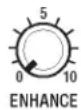
The ENHANCE control adjusts the amount of Audio Enhancement effect mixed in to the page signal. To use this function, the ENHANCE switch on the front panel must be set to ON. Setting this switch to OFF bypasses the Audio Enhancement effect and makes the control inoperable. With the ENHANCE switch turned ON, make a page and rotate the control until the audio sounds crisp and clear.
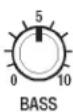
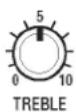
BASS and TREBLE controls are provided to adjust the high-frequency and low-frequency response of the paging system. Reference position 5 (or 12 o'clock) is provided for these controls. When set to this position, the frequency response of the system will be flat. Set the controls to the customer's satisfaction. Clockwise rotation increases (boosts) the response and counterclockwise reduces (cuts) the response. Increasing bass and/or treble can cause output signal peaks to increase. Check the CLIP LEVEL indicator after making adjustments and lower the music input volume if excess clipping occurs.
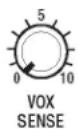
The VOX SENSE control should be set so that only the desired TEL input signal is above the threshold level, while any background or other line signal noise is below it. When a TEL input signal is detected, the music channel will be muted.
To set this feature, first rotate the control fully clockwise. Next, while making a page announcement and talking at a low level, rotate the control counterclockwise to the point where the sound is not choppy or missing parts of words (but not to the maximum counterclockwise position). Setting the control to full counterclockwise will defeat the auto music mute.
If the background music shuts down when no page is in progress, then line noise is triggering music mute. Rotate the control clockwise until the music is restored.
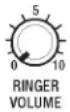
RINGER VOLUME adjusts the level of the night ringer tone output. The MUSIC LEVEL volume control should first be set to the customer's satisfaction. When adjusting this level, the CLIP LEVEL indicator should be observed to ensure that the amplifier signal is not distorted.
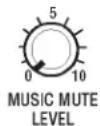
MUSIC MUTE LEVEL adjusts the level of the background music heard during a paging announcement. The fully counterclockwise position provides maximum muting (no background music). The background music mute level should be set to the customer's satisfaction, but the page announcement should be heard distinctly above the background music.
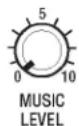
MUSIC LEVEL adjusts the level of the background music output. The background music level should be set to an acceptable level without overdriving the system. When adjusting this level, the CLIP LEVEL indicator should be observed to ensure that the amplifier signal is not distorted.
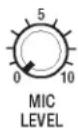
MIC LEVEL adjusts the level of the microphone page output.
CAUTION: To prevent feedback the microphone should not be placed near any paging loudspeakers.
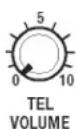
TEL VOLUME adjusts the level of the telephone page output. When adjusting this level, the CLIP LEVEL indicator should be observed to ensure that the amplifier signal is not distorted.
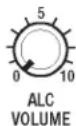
The Automatic Level Control (ALC) VOLUME controls the level at which the amplifier will begin to limit the output signal.
Adjustment Procedure
- Disable ALC by turning ALC VOLUME to the maximum counterclockwise position.
- Make a page, speaking softly, yet distinctly. Set the TEL VOLUME control to the desired paging level during this page.
- Make another page, speaking relatively loudly this time. Rotate the ALC control clockwise while making the page, until it has the same loudness as the first page.
NOTE: The TEL Volume and the ALC controls work together to set the output level.
NOTE: The CLIP indicator should not show excessive clipping during loud pages. If this is occurring, the ALC VOLUME must be adjusted until clipping is at a nominal level.
Specifications
Technical Specifications
Power Output.... 600W RMS
Frequency Response ..... 20 Hz to 22 kHz ±1dB
Distortion .... Less than 1%
Hum & Noise ..... (20 Hz to 20 kHz) Music: -54 dB; TEL: -54 dB; MIC: -50 dB
Sensitivity ..... Music: 250 mV; Tel: -14 dBm (170mV); MIC: -50 dBv (3.1mV); E.I.N. -119 dBv
Tone Control .... Bass: ±9dB @ 100Hz; Treble: ±9 dB @ 10 kHz
Inputs (all via pluggable Phoenix-style connectors):
Tel.... 600-ohm balanced line, transformer-isolated
Music.... Hi-Z source
Mic .... Lo-Z balanced (dynamic only)
Music Mute .... Mutes music when shorted
Contact Ring .... Sounds night ringer tone when customer-supplied dry contacts are closed
Tel Ring .... Sounds night ringer in response to 90V ring signal
Bridging .... Permits bridging of two amplifiers to increase the total output power
Output
Speaker 8-ohm, 25V, 70V
Balanced Line Level ..... 600-ohm Telephone line
Controls and Indicators ..... CLIP, PROTECT, POWER, and LIMIT LEVEL LED indicators. ENHANCE, TREBLE, BASS, VOXSENS, RINGER VOLUME, MUSIC MUTE, MUSIC VOLUME, MIC VOLUME, TEL VOLUME, ALC controls
Overload Protection .... All models have thermal and electronic overload protection
Power Requirements ..... 100–240 VAC, 50/60 Hz, 6.0 A
Thermal Emissions
(Full Power) 294 BTU/hr
Dimensions* 8.00" W x 3.43" H x 13.48" D
Product Weight 6.2 lbs
Compliance
Note: This equipment has been tested and found to comply with the limits for a Class A digital device, pursuant to part 15 of the FCC Rules. These limits are designed to provide reasonable protection against harmful interference when the equipment is operated in a commercial environment. This equipment generates, uses, and can radiate radio frequency energy and, if not installed and used in accordance with the instruction manual, may cause harmful interference to radio communications. Operation of this equipment in a residential area is likely to cause harmful interference in which case the user will be required to correct the interference at his own expense.
Limited Warranty; Exclusion of Certain Damages
Bogen TPU600-G2 Telephone Paging Amplifier is warranted to be free from defects in material and workmanship for five (5) years from the date of sale to the original purchaser. Any part of the product covered by this warranty that, with normal installation and use, becomes defective (as confirmed by Bogen upon inspection) during the applicable warranty period, will be repaired or replaced by Bogen, at Bogen's option, provided the product is shipped insured and prepaid to: Bogen Factory Service Department, 4570 Shelby Air Drive, Suite 11, Memphis, TN 38118 USA. Repaired or replacement product will be returned to you freight prepaid. This warranty does not extend to any of our products that have been subjected to abuse, misuse, improper storage, neglect, accident, improper installation or have been modified or repaired or altered in any manner whatsoever, or where the serial number or date code has been removed or defaced.
THE FOREGOING LIMITED WARRANTY IS BOGEN'S SOLE AND EXCLUSIVE WARRANTY AND THE PURCHASER'S SOLE AND EXCLUSIVE REMEDY. BOGEN MAKES NO OTHER WARRANTIES OF ANY KIND, EITHER EXPRESS OR IMPLIED, AND ALL IMPLIED WARRANTIES OF MERCHANTABILITY OR FITNESS FOR A PARTICULAR PURPOSE ARE HEREBY DISCLAIMED AND EXCLUDED TO THE MAXIMUM EXTENT ALLOWABLE BY LAW. Bogen's liability arising out of the manufacture, sale or supplying of products or their use or disposition, whether based upon warranty, contract, tort or otherwise, shall be limited to the price of the product. IN NO EVENT SHALL BOGEN BE LIABLE FOR SPECIAL, INCIDENTAL OR CONSEQUENTIAL DAMAGES (INCLUDING, BUT NOT LIMITED TO, LOSS OF PROFITS, LOSS OF DATA OR LOSS OF USE DAMAGES) ARISING OUT OF THE MANUFACTURE, SALE OR SUPPLYING OF PRODUCTS, EVEN IF BOGEN HAS BEEN ADVISED OF THE POSSIBILITY OF SUCH DAMAGES OR LOSSES. Some States do not allow the exclusion or limitation of incidental or consequential damages, so the above limitation or exclusion may not apply to you. This warranty gives you specific legal rights, and you may also have other rights which vary from State to State.
Products that are out of warranty will also be repaired by the Bogen Factory Service Department – same address as above or call 201-934-8500. The parts and labor involved in these repairs are warranted for 90 days when repaired by the Bogen Factory Service Department. All shipping charges in addition to parts and labor charges will be at the owner's expense. All returns require a Return Authorization number. For most efficient warranty or repair service, please include a description of the failure.
1/2020
NOTES

- TPU600-G2 Telephone Paging Amplifier
- CAUTION
- RISK OF ELECTRIC SHOCK DO NOT OPEN
- WARNING:
- Introduction
- Package Contents
- Before you start
- Rack Mounting
- Wall Mounting
- Ventilation
- Security Cover
- Input Wiring Connections
- Music Input
- Microphone Input
- TEL Input
- Night Ringer Connection
- Bridging Inputs
- Output Wiring Connections
- Balanced Line Output
- Speaker Connection
- NOTICE
- Operation
- Indicator LEDs
- Control Knobs
- Adjustment Procedure
- Specifications
- Technical Specifications
- Output
- Thermal Emissions
- Compliance
- Limited Warranty; Exclusion of Certain Damages
- NOTES
Brand : Bogen
Model : TPU600-G2
Category : Hand blender