
C100 - Hand blender Bogen - Free user manual and instructions
Find the device manual for free C100 Bogen in PDF.


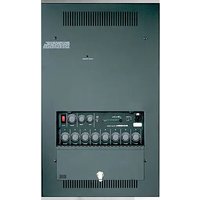
| Type | Commercial Amplifier |
| Brand | Bogen |
| Model | C100 |
| Power Output (RMS) | 100W |
| Frequency Response (Transformer) | 70 Hz – 16 kHz (±2 dB) @ 1% max |
| Frequency Response (Direct 4-Ohm) | 20 Hz – 20 kHz (±1 dB) @ 0.5% max |
| Inputs | 2 MIC Lo-Z balanced (screw), 2 AUX Hi-Z (RCA), TEL 600-ohm balanced (screw) |
| Outputs | Speaker screw terminals (4Ω direct, 16Ω, 25V, 70V), Tape/Booster RCA, WMT1A RCA |
| Controls | MIC1, MIC2/AUX1, AUX2 volume; Bass & Treble ±11 dB; TEL volume; VOX sensitivity |
| Dimensions | 14.5" W x 3.75" H x 11" D |
| Weight | 19 lb |
| Power Requirements | 120V AC, 60 Hz, 220W |
| Thermal Emissions | 399.6 BTU/hr |
| Hum & Noise (MIC input) | 55 dB below rated output |
| Hum & Noise (AUX/TEL input) | 70 dB below rated output |
| Input Sensitivity (MIC) | 600 μV |
| Input Sensitivity (AUX) | 85 mV |
| Input Sensitivity (TEL) | 75 mV |
| Included Accessories | Instruction manual |
| Optional Accessories | RPK50 rack mount kit, WMT1A matching transformer |
| Safety & Cleaning | Use dry cloth; do not expose to rain/moisture; refer servicing to qualified personnel |
| Warranty | 2 years limited |
| Approvals | UL listed to UL 60065 (US and Canada) |
Frequently Asked Questions - C100 Bogen
User questions about C100 Bogen
0 question about this device. Answer the ones you know or ask your own.
Ask a new question about this device
Download the instructions for your Hand blender in PDF format for free! Find your manual C100 - Bogen and take your electronic device back in hand. On this page are published all the documents necessary for the use of your device. C100 by Bogen.
USER MANUAL C100 Bogen
Classic Series Amplifiers C35, C60, & C100 Models
Installation and Use Manual
Notice: Every effort was made to ensure that the information in this guide was complete and accurate at the time of printing. However, information is subject to change.
WARNING: To reduce the risk of Fire or Electric Shock, Do Not Expose this apparatus to rain or moisture.
Apparatus shall not be exposed to dripping or splashing and no objects filled with liquids, such as vases shall be placed on the apparatus.
WARNING: Only connect unit to AC mains outlet providing protective earthing connection.
NOTE: Mains plug or an appliance coupler are used as disconnect devices from the mains and shall remain readily accessible and operable.
CAUTION: These servicing instructions are for use by qualified service personnel only. To reduce the risk of electric shock, do not perform any servicing other than that contained in the operating instructions unless you are qualified to do so.
Always follow these basic safety precautions when installing and using the unit:
IMPORTANT SAFETY INSTRUCTIONS
- Read these instructions.
- Keep these instructions.
- Heed all warnings.
- Follow all instructions.
-
Do not use this apparatus near water.
-
Clean unit with dry cloth.
-
Do not block any ventilation openings. Install in accordance with the manufacturer's instructions.
-
Do not install near any heat sources such as radiators, heat registers, stoves, or other apparatus (including amplifiers) that produce heat.
-
Do not defeat the safety purpose of the polarized or grounding-type plug. A polarized plug has two blades with one wider than the other. A grounding-type plug has two blades and a third grounding prong. The wide blade, or the third prong, are provided for your safety. If the provided plug does not fit into your outlet, consult an electrician for replacement of the obsolete outlet.
-
Protect the power cord from being walked on or pinched particularly at plugs, convenience receptacles, and the point where they exit from the apparatus.
-
Only use attachments/accessories specified by the manufacturer.
-
Unplug this apparatus during lightning storms or when not used for long periods of time.
-
Refer all servicing to qualified service personnel. Servicing is required when the apparatus has been damaged in any way, such as power-supply cord or plug is damaged, liquid has been spilled or objects have fallen into the apparatus, the apparatus has been exposed to rain or moisture, does not operate normally, or has been dropped.



CAUTION: TO PREVENT THE RISK OF ELECTRIC SHOCK, DO NOT REMOVE ANY FRONT/BACK COVERS OR PANELS. NO USER-SERVICEABLE PARTS INSIDE. REFER SERVICING TO QUALIFIED PERSONNEL.
The lightning flash with arrowhead symbol, within an equilateral triangle, is intended to alert the user to the presence of uninsulated "dangerous voltage" within the product's enclosure that may be of sufficient magnitude to constitute a risk of electric shock to persons.
The exclamation point within an equilateral triangle is intended to alert the user to the presence of important operating and maintenance (servicing) instructions.
Page
PANEL DESCRIPTIONS ......2-3
Classic Series Front Panel 2
Classic Series Rear Panel ....3
INSTALLATION ....4
Package Contents....4
Ventilation ....4
Rack Mounting ....4
CONNECTIONS ....5
Input Connections 5
Microphone Connections ....5
Auxiliary 5
AUX Muting 5
TEL....5
Output Connections ....5
Speakers, General 5
Speakers, Low-Impedance....5
Tape/Booster Connection ....5
WMT1A Connection ....5
OPERATION 6-7
Front Panel Controls....6
Power 6
Input Volume Controls ....6
MIC2, AUX1 Mode Switch 6
Bass and Treble Controls....6
Rear Panel Controls 7
TEL Volume Control 7
VOX Sensitivity Control ....7
SPECIFICATIONS 8
TROUBLESHOOTING....9
LIMITED WARRANTY ....10
ACCESSORIES....10
Classic Series Front Panel
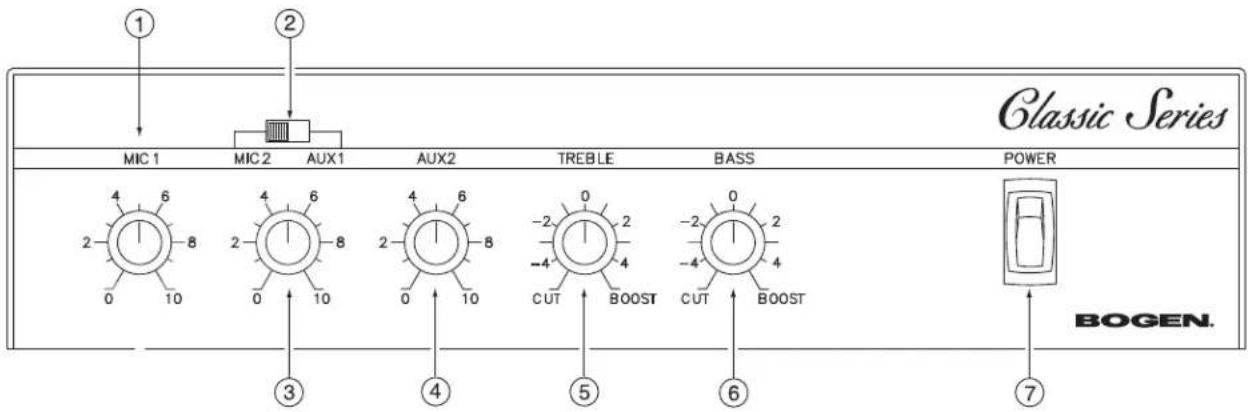
- MIC1 Level Control
Individual level control for a dedicated microphone input.
- MIC2/AUX1 Mode Switch
Switch selects either the MIC2 or AUX1 connection as the active input.
- MIC2/AUX1 Level Control
Individual level control for a dedicated microphone input or for an auxiliary input depending on input mode selected.
- AUX2 Level Control
Individual level control for a dedicated auxiliary input.
- Treble Control
Controls the amount of cut or boost of treble frequencies above 10 kHz.
- Bass Control
Controls the amount of cut or boost of bass frequencies below 100 Hz.
- Power
AC Power switch. Illuminates when ON.
Classic Series Rear Panel
Models C35/60

1. Amplifier Output
Screw terminal strip containing all available speaker outputs.
2. Tape/Booster
RCA unbalanced signal level/output.
3. WMT1A
RCA output connection for Bogen's 600-ohm balanced line matching transformer Model WMT1A.
4. AUX Terminal
Screw terminal connection that allows externally controlled muting of AUX inputs with a contact closure.
5. Microphone Inputs
Screw terminal strip containing the MIC1 and MIC2 balanced, low-impedance inputs. (MIC2 is switch-selectable.)
6. Auxiliary Inputs
RCA unbalanced, AUX1 and AUX2 high-impedance inputs. (AUX1 is switch-selectable.)
7. TEL Input
Screw terminal input for 600-ohm balanced telephone signal.
8. VOX Sensitivity Control
Variable control for adjusting TEL input signal level trigger point for automatic muting of AUX input.
9. TEL Volume Control
Adjusts the telephone input paging level.
Package Contents
• Classic Series Amplifier
- Instruction Manual
Ventilation
When using a shelf or table mount, the amplifier should stand alone with no equipment on top of it or below it.
Rack Mounting
A rack mount bracket kit (Model RPK50) is available as an accessory. (Not included.)
Input Connections
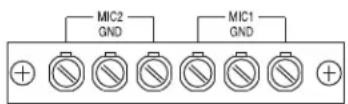
Microphone Connections
These inputs are for two low-impedance balanced dynamic microphones. Connect cable shield to center screw marked "GND."
Auxiliary
The AUX inputs provide unbalanced RCA inputs for connection to external signal-level equipment.
AUX Muting
For this function, a customer-supplied, normally-open contact closure (switch) must be connected to the AUX2 and MUTE terminals. When the contacts are closed, the AUX2 input will be muted. Typically activated by a switch in a push-to-talk style microphone. AUX 1, if selected, is not mutable by contact closure.
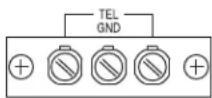
TEL
Connect the telephone line to the two outside terminals and the shield, if used, to the center terminal. TEL input signal will trigger automatic muting of AUX 1 and AUX 2. Input impedance is 600-ohm and is transformer balanced. Input is for "Dry" audio signals only, no DC voltage on the signal.


Output Connections
Speakers, General
The amplifier may be used with most conventional speaker systems. Connect one speaker lead to the screw terminal that corresponds to the impedance of the type of speakers used in the system and the other lead to the COM terminal. If the line is shielded, connect the shield to GND.
Connecting the GND to the COM terminal when using the transformer-coupled outputs references the transformer output to ground. Disconnecting the GND terminal from COM allows the transformer output to float electrically. This is sometimes useful under certain conditions where a ground connection is undesirable. It is generally a good idea to short the GND to the COM terminal regardless of output type (Trans or Direct).
Speakers, Low-Impedance
To connect a 4-ohm speaker, remove the the 4-ohm link and connect the speaker between 4-ohm and GND.
Tape/Booster Connection
To record the amplifier program, connect a patch cord from the TAPE/BOOSTER output jack to the input of a recording device. Can also be connected to the input of a booster amplifier.
WMT1A Connection
This output jack is directly connected to the 25V speaker tap and permits the connection of Bogen's general-purpose matching transformer (WMT1A). The WMT1A steps the signal down by a 5:1 ratio, giving you a 600-ohm balanced signal that can drive long cable runs.
Models C35/60

Model C100


Front Panel Controls
Power
The front panel ON/OFF switch applies power to the amplifier and is illuminated when power is ON.
Input Volume Controls
Each input module may be individually controlled by its corresponding volume control knob.
MIC2, AUX 1 Mode Switch
Activates the corresponding input that it is switched to, MIC2 or AUX1. The other input is inactive and any connections to the inactive input will not work.
Bass and Treble Controls
The Bass and Treble controls are used to adjust the tonal balance of the amplifier output. The center position of these controls provides flat frequency response. Counterclockwise rotation of these controls reduces the bass or treble response, while clockwise rotation increases such response.
The treble control has a cut/boost range of +/- 11 dB at frequencies above 10 kHz and provides a roll off after 20 kHz to reduce gain above the audio range.
The bass control has a cut/boost range of +/- 11 dB at frequencies below 100 Hz. When driving speakers using the direct-coupled output terminals, the bass filter's response is flat to 20 Hz.


Rear Panel Controls
TEL Volume Control
The TEL VOLUME control on the rear panel adjusts the TEL input's paging level. It does not affect the microphone level. Rotate the control counterclockwise to decrease the level. Rotate the control clockwise to increase the level.

VOX Sensitivity Control
When an input signal (such as voice) is detected through the TEL input, the music channels (AUX1 and AUX2) will be muted. The VOX Sensitivity control should be set so that only the desired signal is above the threshold level, while noise and unwanted signal is below it. To adjust the sensitivity of this circuit:
- Rotate the control fully clockwise. While making a page announcement and talking at a low level, the sound should not be choppy nor missing parts of words. If it is choppy, or if intelligibility is poor, rotate the control counterclockwise to the point where the sound is clear and crisp (but not to the maximum counterclockwise position).
- If the background music shuts down when no page is in progress, rotate the control clockwise until the music is restored.

Power Output (RMS)
C35: 35W
C60: 60W
C100: 100W
Frequency Response
& Distortion
Transformer†: 70 Hz to 16 kHz (± 2 dB) @ 1% max.
4-Ohm Direct Output: 20 Hz to 20 kHz ( ± 1 dB) @ 0.5% max.
Hum and Noise
MIC Input: 55 dB below rated output
AUX Input: 70 dB below rated output
TEL Input: 70 dB below rated output
Tone Control Action
Bass: +/- 11 dB @ 100 Hz
Treble: +/- 11 dB @ 10 kHz
Input Sensitivity
MIC Lo-Z Balanced: 600 μV
AUX: 85 mV
TEL: 75 mV
Outputs 8 ohms (C35 & C60 models only), 16 ohms, 25V, and 70V transformer-isolated balanced or unbalanced; 4 ohms direct unbalanced
Output Connections: Speaker screw terminal strip, TAPE/BOOSTER RCA jack; WMT1A RCA jack
Input Connections: (2) MIC Lo-Z screw terminals; (2) AUX Hi-Z RCA jacks, TEL screw terminals
Controls: MIC1, MIC2/AUX1 (switch selected), AUX 2, BASS, TREBLE, TEL, VOX
Thermal Emissions (Full Power)
C35: 119.5 BTU/hr.
C60: 228.8 BTU/hr.
C100: 399.6 BTU/hr.
Power Requirements: 120V AC, 60 Hz
AC Line Draw
C35: 85W
C60: 148W
C100: 220W
Dimensions: 14 12 " W x 3 ^3 /4" H x 11" D (all models)
Product Weight
C35: 15 lb.
C60: 17 lb.
C100: 19 lb.
Approvals: Listed to UL Standard 60065 for U.S. and Canada
† Measured @ 2 dB below FRP
All specifications subject to change without notice.
| PROBLEM CONDITION CAUSE | ||
| NO SOUND | Power Switch Indicator is OFF. | Amplifier not plugged in.AC outlet dead.Power switch off.Circuit breaker tripped. |
| Power Switch Indicator is ON. | No signal from source.Volume turned down.Speakers not connected correctly.Link jumper not set correctly (pg. 5). | |
| DISTORTED SOUND | Power Switch Indicator is ON.Volume Controls are turned up.Unit is extremely hot.Little volume. | Partial short on the output. Checkspeakers and wires. |
| Power Switch Indicator is ON.Volume up. Good volume. | Signal from source is already distorted.Input signal too large for input type (reducesignal level applied to input).Poor speaker connections.Transformer output load on wrong tap.Bass control boosted too much.Output too great for speakers, reduce level. | |
| POORLOW FREQ.RESPONSE(NO BASS) | Power Switch Indicator is ON.Volume controls are in normal,operational position. | Speakers wired out of phase.Bass control set to cut.Note:Transformer-coupled speakershave less bass response. |
| NOISE/HUM | Power Switch Indicator is ON.Volume controls are in normal,operational position. | Poor electrical connections at input.Shields of cables not connected.Input cable routed near AC cables, powertransformer, or other EMI radiating devices.Electrically noisy devices operating on thesame AC circuit.Poor equipment grounding.- Ensure that all AC safety grounds areconnected.- Make sure that all components inaudio chain are tied to the sameground. |
Limited Warranty; Exclusion of Certain Damages
The Bogen Classic Series Amplifiers are warranted to be free from defects in material or workmanship for two (2) years from the date of sale to the original purchaser. Any part of the product covered by this warranty that, with normal installation and use, becomes defective will be repaired or replaced by Bogen, at our option, provided the product is shipped insured and prepaid to: Bogen Factory Service Department, 50 Spring Street, Ramsey, NJ 07446, USA. The product will be returned to you freight prepaid. This warranty does not extend to any of our products that have been subjected to abuse, misuse, improper storage, neglect, accident, improper installation or have been modified or repaired or altered in any manner whatsoever, or where the serial number or date code has been removed or defaced.
THE FOREGOING LIMITED WARRANTY IS BOGEN'S SOLE AND EXCLUSIVE WARRANTY AND THE PURCHASER'S SOLE AND EXCLUSIVE REMEDY. BOGEN MAKES NO OTHER WARRANTIES OF ANY KIND, EITHER EXPRESS OR IMPLIED, AND ALL IMPLIED WARRANTIES OF MERCHANTABILITY OR FITNESS FOR A PARTICULAR PURPOSE ARE HEREBY DISCLAIMED AND EXCLUDED TO THE MAXIMUM EXTENT ALLOWABLE BY LAW. Bogen's liability arising out of the manufacture, sale or supplying of products or their use or disposition, whether based upon warranty, contract, tort or otherwise, shall be limited to the price of the product. In no event shall Bogen be liable for special, incidental or consequential damages (including, but not limited to, loss of profits, loss of data or loss of use damages) arising out of the manufacture, sale or supplying of products, even if Bogen has been advised of the possibility of such damages or losses. Some States do not allow the exclusion or limitation of incidental or consequential damages, so the above limitation or exclusion may not apply to you. This warranty gives you specific legal rights, and you may also have other rights which vary from State to State.
Products that are out of warranty will also be repaired by the Bogen Factory Service Department -- same address as above or call 201-934-8500. The parts and labor involved in these repairs are warranted for 90 days when repaired by the Bogen Factory Service Department. All shipping charges in addition to parts and labor charges will be at the owner's expense. All returns require a Return Authorization number.
7/22/2008
Accessories

natural_image
Two black metal-framed panels with mounting holes, shown from different angles (no text or symbols visible)RPK50 - Rack Mounting Kit
- Adapts Classic Series amps (Models C35, C60, and C100) for 19" rack mounting, 2 rack spaces (3-1/2")
- Heavy gauge steel construction

natural_image
Exterior view of a device with a black plug and cable (no text or symbols visible)WMT1A - Matching Transformer
• Hi-Z, 10k-ohm primary impedance
- Lo-Z, 600-ohm secondary impedance, balanced with center tap
- Matches high-impedance unbalanced or low-impedance balanced signals
- Jumper selection allows line level signal to microphone level signal conversion


- Classic Series Amplifiers C35, C60, & C100 Models
- IMPORTANT SAFETY INSTRUCTIONS
- CAUTION: TO PREVENT THE RISK OF ELECTRIC SHOCK, DO NOT REMOVE ANY FRONT/BACK COVERS OR PANELS. NO USER-SERVICEABLE PARTS INSIDE. REFER SERVICING TO QUALIFIED PERSONNEL.
- PANEL DESCRIPTIONS ......2-3
- INSTALLATION ....4
- CONNECTIONS ....5
- OPERATION 6-7
- SPECIFICATIONS 8
- TROUBLESHOOTING....9
- LIMITED WARRANTY ....10
- ACCESSORIES....10
- Classic Series Rear Panel
- Amplifier Output
- Tape/Booster
- WMT1A
- AUX Terminal
- Microphone Inputs
- Auxiliary Inputs
- TEL Input
- VOX Sensitivity Control
- TEL Volume Control
- Package Contents
- Ventilation
- Rack Mounting
- Input Connections
- Microphone Connections
- Auxiliary
- AUX Muting
- TEL
- Output Connections
- Speakers, General
- Speakers, Low-Impedance
- Tape/Booster Connection
- WMT1A Connection
- Front Panel Controls
- Power
- Input Volume Controls
- MIC2, AUX 1 Mode Switch
- Bass and Treble Controls
- Rear Panel Controls
- TEL Volume Control
- VOX Sensitivity Control
- Power Output (RMS)
- Frequency Response
- & Distortion
- Hum and Noise
- Tone Control Action
- Input Sensitivity
- Thermal Emissions (Full Power)
- AC Line Draw
- Product Weight
- Limited Warranty; Exclusion of Certain Damages
- Accessories
- RPK50 - Rack Mounting Kit
- WMT1A - Matching Transformer
Brand : Bogen
Model : C100
Category : Hand blender