
Galacta Pro - Mouse KRUX - Free user manual and instructions
Find the device manual for free Galacta Pro KRUX in PDF.


| Product Type | Gaming Mouse |
| Model | Galacta Pro |
| Brand | KRUX |
| Connection Type | Wired USB 2.0 |
| Cable Length | 1.8 m braided cable |
| Sensor Type | Optical |
| DPI Range | Up to 7200 DPI (adjustable) |
| Number of Buttons | 6 programmable buttons |
| Scroll Wheel | Yes, with LED indicator |
| Lighting | RGB customizable |
| Weight | Approx. 100 g |
| Dimensions (L x W x H) | 126 x 66 x 40 mm |
| Power Source | USB bus powered |
| Compatibility | Windows 7/8/10/11, macOS, Linux |
| Warranty | 2 years limited warranty |
| Cleaning Instructions | Wipe with a soft, dry cloth; avoid liquids |
| Repairability | Not user-serviceable; contact support |
Frequently Asked Questions - Galacta Pro KRUX
User questions about Galacta Pro KRUX
0 question about this device. Answer the ones you know or ask your own.
Ask a new question about this device
Download the instructions for your Mouse in PDF format for free! Find your manual Galacta Pro - KRUX and take your electronic device back in hand. On this page are published all the documents necessary for the use of your device. Galacta Pro by KRUX.
USER MANUAL Galacta Pro KRUX
natural_image
Line drawing of a computer mouse with red control buttons and a magnified inset showing the blade structure (no text or symbols)
X — REPLACEABLE BUTTONS AND TOP COVER

natural_image
Illustration of a computer mouse with a magnified view of its internal structure (no text or symbols)X — CHARGING AND BATTERY SAVING FUNCTION

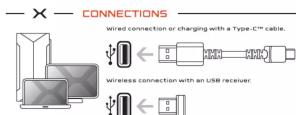
GALACTA PRO
GAMING MOUSE

Use and warranty limitations: - The product should be used according to its intended purpose, incorrect use can damage the product
and endanger the life of the user; - excessive humidity, dust and other contaminations can result in product damage which is not
covered by the warranty; - Avoid exposure to canal changes ambient temperature. Should they occur wait around 30 minutes
before using the product until temperature is leveled; You can find the warranty terms and conditions at https://kruxtech/
- You can find the warranty, terms and conditions of hyper金融危机.
SOFTWARE:

natural_image
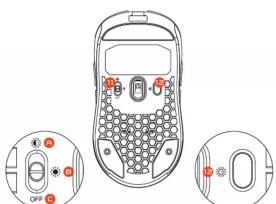
Line drawing of a computer mouse with red control buttons and a magnified inset showing the blade structure (no text or symbols)- Włącznik
natural_image
Illustration of a computer mouse with a magnified view of its internal components (no text or symbols present)
ŁADOWANIE ORAZ FUNKCJE
ZARZĄDZANIA BATERIĄ



Brand : KRUX
Model : Galacta Pro
Category : Mouse