Crato Pro RGB KRX0085 - Keyboard KRUX - Free user manual and instructions
Find the device manual for free Crato Pro RGB KRX0085 KRUX in PDF.


Pick your language and provide your email: we'll send you a specifically translated version.
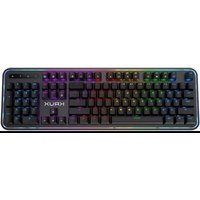
| Product Type | Mechanical Gaming Keyboard |
| Model | Crato Pro RGB KRX0085 |
| Brand | KRUX |
| Dimensions (L x W x H) | 440 x 130 x 40 mm |
| Weight | 900 g |
| Connectivity | USB-A, Wired |
| Cable Length | 1.8 m |
| Switch Type | Mechanical (Red/Blue/Brown optional) |
| Backlighting | Per-key RGB, 16.8 million colors |
| Key Rollover | N-Key Rollover |
| Polling Rate | 1000 Hz |
| OS Compatibility | Windows, macOS, Linux |
| Power Source | USB bus power (5V, 500mA) |
| Special Features | Multimedia keys, gaming mode, anti-ghosting |
| Maintenance | Clean with soft, dry cloth; avoid liquids |
| Safety Precautions | Avoid exposure to water, extreme temperatures; unplug when not in use |
| Spare Parts & Repairability | Keycaps and switches are replaceable; contact support for parts |
| Warranty | 2 years limited warranty |
| Country of Origin | China |
| Package Contents | Keyboard, user manual, warranty card |
Frequently Asked Questions - Crato Pro RGB KRX0085 KRUX
How do I change the RGB lighting on the KRUX Crato Pro RGB keyboard?
You can change the RGB lighting using the dedicated software (downloadable from the KRUX website) or via onboard controls. Press 'FN + LED' keys to cycle through presets.
Can I use this keyboard with a PS5 or Xbox?
The keyboard is compatible with consoles via USB, but full RGB and software features may only work on PC. Basic typing should work on PS5 and Xbox.
Is the keyboard waterproof?
No, the keyboard is not waterproof. Avoid spilling liquids. If spilled, disconnect immediately and dry thoroughly.
How do I clean the keyboard?
Unplug the keyboard. Use a soft, dry cloth or compressed air to remove dust. For deeper cleaning, slightly dampen a cloth with water or isopropyl alcohol and gently wipe keys.
What switches does the Crato Pro RGB use?
The keyboard uses mechanical switches, typically available in red (linear), blue (clicky), or brown (tactile) options. Check your specific variant.
Can I replace the keycaps?
Yes, the keycaps are standard Cherry MX compatible and can be replaced with aftermarket keycaps.
How do I set up macros?
Use the KRUX control software to record macros. Assign them to specific keys via the software interface.
Why are some keys unresponsive?
Check the USB connection. Try plugging into a different port. Ensure the keyboard is not in gaming mode (lock key). If issue persists, contact support.
What is the warranty period?
The keyboard comes with a 2-year limited warranty. Keep the receipt for support.
How do I update the firmware?
Download the firmware updater from the KRUX website. Connect the keyboard, run the updater, and follow on-screen instructions. Do not disconnect during update.
User questions about Crato Pro RGB KRX0085 KRUX
0 question about this device. Answer the ones you know or ask your own.
Ask a new question about this device
No questions yet. Be the first to ask one.
Download the instructions for your Keyboard in PDF format for free! Find your manual Crato Pro RGB KRX0085 - KRUX and take your electronic device back in hand. On this page are published all the documents necessary for the use of your device. Crato Pro RGB KRX0085 by KRUX.
USER MANUAL Crato Pro RGB KRX0085 KRUX

Manual assistant
Powered by Anthropic
Waiting for your message
Product information
Brand : KRUX
Model : Crato Pro RGB KRX0085
Category : Keyboard