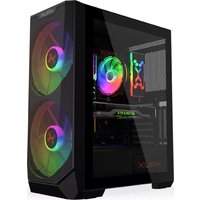
Vortex KRX0094 - Computer Case KRUX - Free user manual and instructions
Find the device manual for free Vortex KRX0094 KRUX in PDF.


| Product Type | Computer Case |
| Brand | KRUX |
| Model | Vortex KRX0094 |
| Form Factor | Mid Tower |
| Motherboard Compatibility | ATX, Micro-ATX, Mini-ITX |
| Power Supply Type | Standard ATX (bottom mount) |
| Expansion Slots | 7 |
| Drive Bays - 3.5"/2.5" | 2x 3.5" (or 2.5"), 2x 2.5" dedicated |
| Fan Support - Front | 3x 120mm or 2x 140mm |
| Fan Support - Top | 2x 120mm |
| Fan Support - Rear | 1x 120mm |
| Radiator Support - Front | 240mm/280mm |
| Radiator Support - Top | 240mm |
| Radiator Support - Rear | 120mm |
| Max CPU Cooler Height | 160 mm |
| Max GPU Length | 350 mm |
| Max PSU Length | 200 mm |
| Material | Steel, Tempered Glass side panel |
| Dimensions (H x W x D) | 420 x 210 x 440 mm |
| Weight | 5.0 kg |
| I/O Ports | 2x USB 3.0, 2x USB 2.0, Audio/Mic |
| Dust Filters | Front, top, bottom |
| Color | Black |
| Side Panel Type | Tempered Glass |
| Included Fans | None (optional) |
Frequently Asked Questions - Vortex KRX0094 KRUX
User questions about Vortex KRX0094 KRUX
0 question about this device. Answer the ones you know or ask your own.
Ask a new question about this device
Download the instructions for your Computer Case in PDF format for free! Find your manual Vortex KRX0094 - KRUX and take your electronic device back in hand. On this page are published all the documents necessary for the use of your device. Vortex KRX0094 by KRUX.
USER MANUAL Vortex KRX0094 KRUX
FANS ASSEMBLING [OPTIONAL]

FANS ASSEMBLING [OPTIONAL]

U'ASSEMBLING

MOTHERBOARD ASSEMBLING


PSU ASSEMBLING


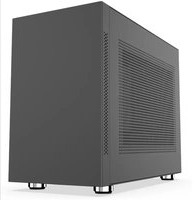

Brand : KRUX
Model : Vortex KRX0094
Category : Computer Case