
THD50 - Kitchen scale Taylor - Free user manual and instructions
Find the device manual for free THD50 Taylor in PDF.


| Product Type | Kitchen Scale |
| Brand | Taylor |
| Model | THD50 |
| Dimensions (Approx.) | 20 x 15 x 3 cm (7.9 x 5.9 x 1.2 in) |
| Weight (Approx.) | 300 g (10.6 oz) |
| Power Source | 2 x AAA batteries (not included) |
| Maximum Capacity | 5 kg (11 lb) |
| Graduation | 1 g (0.1 oz) |
| Display | LCD screen |
| Platform Material | Stainless steel |
| Functions | Tare (zero), auto-off, unit conversion (g/kg/oz/lb) |
| Auto-Off | Yes, after 2 minutes of inactivity |
| Operating Temperature | 0°C to 40°C (32°F to 104°F) |
| Cleaning Instructions | Wipe with a damp cloth; do not immerse in water |
| Warranty | 1 year limited warranty |
Frequently Asked Questions - THD50 Taylor
User questions about THD50 Taylor
0 question about this device. Answer the ones you know or ask your own.
Ask a new question about this device
Download the instructions for your Kitchen scale in PDF format for free! Find your manual THD50 - Taylor and take your electronic device back in hand. On this page are published all the documents necessary for the use of your device. THD50 by Taylor.
USER MANUAL THD50 Taylor
One Year Limited Warranty
Taylor warrants this product to be free from defects in material or workmanship for one (1) year from date of original purchase. It does not cover damages or wear resulting from accident, misuse, abuse, commercial use, or unauthorized adjustment and/or repair. If service is required, do not return to retailer.
Do not return to retailer. Should this product require service (or replacement at our option) please pack the item carefully and return it prepaid, along with store receipt showing date of purchase and a note explaining reason for return to:
TAYLOR. PRECISION PRODUCTS
2220 Entrada Del Sol Las Cruces, New Mexico 88001
There are no expressed warranties except as listed above. This warranty gives you specific legal rights, and you may also have other rights which vary from state to state.
Made to our exact specifications in China www.taylorusa.com
TAYLOR. THD32, THD32D THD50, THD100
Heavy Duty Mechanical Portion Control Scales
Precision Performance since 1851

Instruction Manual
Congratulations on your purchase of a Taylor ^® Heavy Duty Mechanical Portion Control Scale. Your Taylor ^® Scale is an example of superior design and craftsmanship. Please read this instruction manual carefully before use. Keep these instructions handy for future reference.
Assembly
- The THD32 and THD32D models are shipped with their platforms wrapped in a corrugated insert with wing nuts holding them in. Remove the wing nuts and attach the platform to the top of the post, securing with the wing nuts.
- The platform will assemble or is assembled to the inverted "U" shape post on top of the scale. Remove the (2) wood inserts that are taped to the posts and discard. (all models)
General Operation
- Place the scale on a hard, level surface.
- Before using the scale, allow it to reach room temperature, then perform the following steps:
A. Place weight on scale and allow pointer to come to rest.
B. Remove weight and allow pointer to come to rest.
C. After repeating this cycle two or three times, adjust pointer to zero using adjustment knob located on top of scale body, beneath platform, and repeat the adjustments until zero is stabilized. - If scale is relocated, readjustment to zero may be required. To do so, repeat above steps. When weighing, evenly distribute weight on platform.
Dashpot Feature (Model THD32D only)
This model has an adjustable air dampener (dashpot) that reduces the platform oscillations when a weight is applied. It is adjusted by the factory for proper operation. If adjustment is necessary:
- While facing the scale, turn it so the left side is facing you. Remove one screw at the top of the side panel, tip it outward and lift up to
remove. The dashpot is attached to the rear panel of the scale case.
- There is a red slotted head brass screw with a coil spring under it. Turn the screw clockwise to increase the dampening affect and counter clockwise to lessen. Be careful when tightening to prevent bottoming the adjustment screw and potentially stripping the threads in the plastic body of the dashpot.
- Reinstall the cover by placing the 2 tabs at its bottom into the slots in the scale case and attach at the top with one screw as it was.
Care and Maintenance
- The body and mechanism are not dishwasher safe. Immersing the scale in water may trap liquid between lens and body that can not be effectively dried-out. Damage will void warranty.
- Caution...An occasional wiping with a soft cloth and mild soap will keep your Taylor ^® scale clean and attractive. Do not use abrasive cleaners. Your Taylor ^® scale does not require oiling or lubrication of any kind.
- Do not tamper with unit's internal components. Doing so will invalidate the warranty on this unit and may cause damage. The unit contains no user-serviceable parts.
- The lens can be removed by first pulling the bezel away from the scale case (see Fig. 1), then remove the lens (see fig. 2). You can clean the inside of the lens this way, but be careful to not bend the red pointer. Do the reverse to reattach.

natural_image
Illustration of a hand using a balance scale to measure a weight, showing dial and pointer (no text or symbols)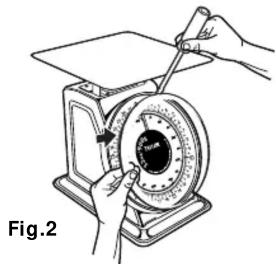
natural_image
Illustration of hands operating a mechanical device with a dial and pointer (no text or symbols)


Brand : Taylor
Model : THD50
Category : Kitchen scale