
PFA - Hi-Fi System Speco Technologies - Free user manual and instructions
Find the device manual for free PFA Speco Technologies in PDF.


| Product Type | Hi-Fi System |
| Brand | Speco Technologies |
| Model | PFA |
| Dimensions (W x H x D) | 430 x 140 x 350 mm |
| Weight | 5.2 kg |
| Power Supply | AC 100-240 V, 50/60 Hz |
| Power Consumption | 80 W |
| Output Power | 2 x 50 W RMS |
| Frequency Response | 20 Hz - 20 kHz |
| Speaker Configuration | 2-way bass reflex |
| Connectivity | AUX input, USB port, Bluetooth 5.0 |
| Supported Media | CD, FM/AM radio, USB playback |
| Display | LCD screen with white backlight |
| Remote Control | Included |
| Equalizer | Preset EQ modes (Rock, Pop, Jazz, etc.) |
| Additional Features | Headphone jack, clock/timer |
| Material | MDF cabinet with vinyl finish |
Frequently Asked Questions - PFA Speco Technologies
User questions about PFA Speco Technologies
0 question about this device. Answer the ones you know or ask your own.
Ask a new question about this device
Download the instructions for your Hi-Fi System in PDF format for free! Find your manual PFA - Speco Technologies and take your electronic device back in hand. On this page are published all the documents necessary for the use of your device. PFA by Speco Technologies.
USER MANUAL PFA Speco Technologies
INSTRUCTION MANUAL INSTRUCTION MANUAL

FOR ASSISTANCE OR REPAIR SERVICE CONTACT:

200 New Highway, Amityville, NY 11701-0726
631-957-8700 Toll Free: 1-800-645-5516
www.specotech.com
Speco Technologies is constantly developing and improving products. We reserve the right to modify product design and specifications without
notice and without incurring any obligation. Rev.4/02:20.
We are not responsible for typographical errors.
©2018 Speco Technologies All rights reserved.
P-FA
DIGITAL FM AM/TUNER
PROFESSIONAL SERIES PROFESSIONAL SERIES
WARNING
TO PREVENT FIRE OR SHOCK HAZARD, DO NOT USE THIS PLUG WITH AN EXTENSION CORD, RECEPTACLE OR OTHER OUTLET UNLESS THE BLADES CAN BE FULLY INSERTED TO PREVENT BLADE EXPOSURE. TO PREVENT FIRE OR SHOCK HAZARD, DO NOT EXPOSE THIS APPLIANCE TO RAIN OR MOUSTURE. TO PREVENT ELECTRICAL SHOCK, MATCH WIDE BLADE PLUG TO WIDE SLOT FULLY INSERTED.

This lightning flash with arrowhead symbol, within an equilateral triangle, is intended to alert the user to the presence of uninsulated "dangerous voltage" within the products enclosure that may be or sufficient magnitude to constitute a risk of electric shock to persons.
CAUTION

Warning: To reduce the risk of electric shock, do not remove cover (or back). There are no user-serviceable parts inside. Refer servicing to qualified service personnel.

The exclamation point within an equilateral triangle is intended to alert the user to the presence of important operating and maintenance (servicing) instructions in the literature accompanying the appliance.
IMPORTANT SAFETY INSTRUCTIONS
- Read these instructions.
- Keep these instructions.
- Head all warnings.
- Follow all instructions.
- Do not use this apparatus near water.
- Clean only with drycloth.
- Do not block any ventilation openings. Install in accordance with the manufacturer's instructions.
- Do not install near any heat sources such as radiators, heat registers, stoves, or other apparatus (including amplifiers) that produce heat.
- Do not defeat the safety purpose of the polarized or grounding type plug. A polarized plug has two blades with one wider than the other. A grounding type plug has two blades and a third grounding prong. The wide blade and the third prong are provided for your safety. If the provided plug does not lit into your outlet, consult an electrician for replacement of the obsolete outlet.
-
Protect the power cord from being walked on or pinched, particularly at the plugs, convenience receptacles, and at the point where they exit from the apparatus.
-
Only use attachments/accessories specified by the manufacturer
-
Use only with the cart, stand, tripod, bracket, or table specified by the manufacturer, or sold with the apparatus. When a cart is used, use caution when moving the cart/apparatus combination to avoid injury from tip-over.

- Unplug the apparatus during lightning storms or when unused for long periods of time.
- Leave all servicing to qualified personnel. Servicing is required when the apparatus has been damaged in any way, such as power supply cord or plug is damaged, liquid has been spilled or objects have fallen into the apparatus, or apparatus has been exposed to rain or moisture, does not operate normally, or has been dropped.
- This appliance shall not be exposed to dripping or splashing water and no object filled with liquid such as vases shall be placed on the apparatus.
- Caution: to prevent electrical shock, match wide blade plug to wide slot and fully insert.
- Please keep a well ventilates environment around the entire unit.
P-FA

P-FA

SPECIFICATIONS
TUNER SECTION
Tuning Range. FM 87.5MHz 108.0MHz AM 530KHz-1620KHz
Antenna Input FM 300 ohms Twin Lead or 75 ohms Coax AM Single Conductor Lead Wire
Usable Sensitivity FM 2uV, AM4.5uV
Signal to Noise Ratio. FM 60dB AM 50dB
Output Level
Line Output Level 775mV (0dBm) Unbalanced
Music on hold Output Level 775mV (0dBm) balanced
Memory Back-up....For 45 days (After AC Power Off)
GENERAL
Power Source
AC 120V 230V 50/60Hz
DC 12V - 24V DC
Power Consumption 15W
Dimensions.... 420 (W) 44 (H) 210 (D) mm
16.5 (W) × 1.7 (H) × 8.3 (D) in
Weight (Net) 6.6lbs (3Kg)
For rack mounting use included rack mount kit
NOTE: Specifications and design subject to change without notice.
P-FA
9
PROFESSIONAL SERIES AMPLIFIER

P-FA
Welcome
Congratulations and thank you for your purchase of the PFA Digital multifunction commercial tuner. These tuners are designed to provide quality sound
reproduction and to produce the best and highest quality audio at an affordable price. We wish you great enjoyment and satisfaction when using your tuner, whether you are an installer or reinforcement engineer.
Unpacking and Installation
Although it is neither complicated to install nor difficult to operate your tuner,
a few minutes of your time is required to read this manual for a properly wired
Installation and familiarity with its many features. Please take great care in
unpacking your tuner and do not discard the carton or other packing materials. These may be needed when moving your tuner or in the unlikely event it ever becomes necessary return your tuner for service. To avoid damage, never place the unit near radiators, in front of heating vents, in direct sunlight, or in excessively humid or dusty locations. Connect your tuner as illustrated in the following page.
Features
- 6+6+6 FM Presets.
- 6+6 AM Presets.
- Tuner retains Presets When Power is Off.
• Large LCD Digital Display.
• SCAN and SEEK Functions.
• Auto Store Memory Function (A/PS). - Preset Memory SCAN Function (A/PS).
• Signal Strength Meter.
• Balanced Music on hold Output.
• Unbalanced RCA Output
• AC and DC 12-24V operation.
• Standard 1 Rack Unit EIA Rack Chassis.
P-FA
2
SERVICE AND MAINTEANCE
The use of solid state circuitry and advanced manufacturing techniques built in your unit results in very high reliability. Under normal operating conditions, your amplifier should not require service other than an occasional external cleaning. Keep the original carton and packing material to use if you need to return your unit for service. Merchandise to be returned for out-of-warranty or in-warranty repair requires prior written authorization. Please write or call toll free 1-800-645-5516 (or in METRO NEW YORK 631-957-8700). We request you enclose a packing slip with the shipment with a complete description of the problem and dated proof of purchase, if in warranty. When shipping the unit to the factory, please be sure to pack the unit well enough to withstand rough handling and use return shipping label supplied by Speco Technologies. Ship the unit, FREIGHT PREPAID, TO:
200 NEW HIGHWAY- P.O. BOX 726 AMITYVILLE, NEW YORK 11701-0726
When ordering parts, please give a description or the part number, if available. Direct your order to the PARTS DEPARTMENT. We will then advise total cost for remittance including shipping and handling.

Speco technologies
200 New Highway P.O. Box 726
Amityville, N.Y. 11701-0726
U.S.A
TEL:631-957-8700,1-800-645-5516
www.specotech.com
P-FA
3
CONNECTIONS
Typical input and output wiring is shown in figure.

P-FA
8
CONNECTION OF THE ANTENNA AND THE GROUND CABLE
AM/FM ANTENNA
AM/FM broadcasting is weakened by hills and valleys, around tall buildings and in iron-reinforced buildings.
INSTALLATION OF FM ANTENNA USING 300 OHM TWIN LEAD
Connect the leads from the antenna of the terminals marked 300 ohm. Rotate antenna to direction of strongest reception. (Fig. 1-1)
INSTALLATION OF AM/FM ANTENNA USING COAXIAL CABLE (75 OHM)
Connect center conductor to 75 ohm terminal and shield to GND.
INDOOR ANTENNA
In regions where AM/FM broadcasting is heard comparatively well due to the near proximity of stations, you can receive broadcasting of good quality by using a T-type (FM dipole) antenna. Mount the antenna at the best location for reception after connecting it to the terminals marked 300 ohm. (Fig. 1-1)

P-FA
7
FRONT PANEL CONTROLS
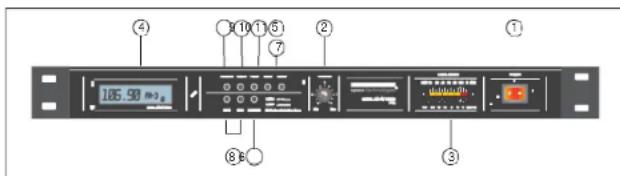
1. POWER SWITCH (MAIN &TUNER DISPLAY)
Pressing this switch to ON will light LCD/LED indicator and supply power to the unit.
2. VOLUMECONTROL
This control is used for adjusting output level min - max (0dB - 50dB)
3. OUTPUT LED LEVELDISPLAY
This display indicates the output level in 3dB increments.
4. TUNERDISPLAY
Indicates frequency of station selected.
5. SEEK UP/DOWN TUNINGCONTROL
These buttons are used to manually tune stations.
6. BAND SELECTOR AM OR FM /EQ
This switch is used for selecting AM 1, or 2, or FM 1, 2 or 3.
Tone control (EQ) Lou-n, Lou-f
7. SCAN/UP MONITOR (SEEK)
When SCAN/UP button is pressed, the frequency increases by one channel step with station detection.
If a valid signal is detected, the current frequency blinks every 0.5 sec for 5 seconds.
The scan/up will automatically continue until the scanning function is released. the tuner will remain at the selected frequency.
8. MEMORY SWITCH
1) Directly accesses the preprogrammed station within the selected frequency band.
2) Performs preset memory read/write functions:
- WRITE function: If one of the M2-M3 buttons are pressed for more than 2 seconds, the current frequency will be stored to corresponding memory area.
- When saving a station, the tuner will mute for 0.5 seconds.
- READ function: If one of the M2-M3 buttons are pressed for less than 2
P-FA
4
seconds, the tuner will tune to the frequency stored in memory.
P-FA
7
P-FA
4
9. MUTE / POWER
MUTE on/off control button.
When "MUTE" is displayed on LCD panel, all outputs are muted.
Power switch LCD displayed off and output off
10. CH PRESETTINGSTATIONS
The unit can store a total of 18 preset for FM band & 12 preset for AM.
When a station is stored, a preset number is assigned to the station. Use the preset number to tune in to a preset station directly
Ex1) Current receiving frequency: FM1, CH3.
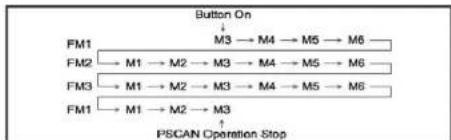
flowchart
graph TD
    A["Button On"] --> B["M3 → M4 → M5 → M6"]
    C["FM1"] --> D["M1 → M2 → M3 → M4 → M5 → M6"]
    E["FM2"] --> F["M1 → M2 → M3 → M4 → M5 → M6"]
    G["FM3"] --> H["M1 → M2 → M3 → M4 → M5 → M6"]
    I["FM1"] --> J["M1 → M2 → M3"]
    K["PSCAN Operation Stop"] --> L["End"]
11. PS/AS
1).PS/AS to auto scan the station
- If A/PS button is pressed aging during preset memory scan operation, it stop preset memory scan operation and maintain the current frequency.
2). Auto store memory function descriptions
During SEEK UP operation with station detection, if any station is detected, then this detected station is automatically stored to the corresponding preset memory area in regular frequency.
- Current receiving frequency is preset memory: From current channel to M6.
- Current receiving frequency is not preset memory: From M1 to M6.
- During auto store memory, output signals are muted and flashing channel number(1Hz, duty) till finished this function.
- When this operation is finished, it performs preset memory scan operation for one time.
P-FA
5
REAR PANEL CONTROLS

1. ACINLET
AC 120V or 220V AC Voltage operation. Then plug AC cord into AC outlet.
2. FUSE HOLDER (AC)
The fuse holder contains the AC power fuse. Replace only with same type fuse when it is blown. If it continuously blows, stop replacing fuse and refer servicing to qualified personnel.
| VOLTAGE | AC 120 V | AC 220 V |
| FUSE RATING | 0.5A'250V | 0.25A'250V |
3. ANTENNA TERMINALS
AM/FM Terminal: You can connect 75 ohm coaxial cable or 300 ohm TV cable according to the antenna system you have. You may also use an FM dipole antenna in strong signal areas, (included)
GND Terminal: Ground this terminal if noise or hum is present and when using an outdoor antenna.
NOTE: When using an outdoor antenna (FM or AM) always provide for lightning protection.
4. OUTPUTRCA
For connection to an amplifier AUX input.
5. MUSIC ON HOLD OUTPUT TERMINALS
These terminals are to be used for connection to a telephone system for music on hold. (600 ohm)
6. DC 12-24V INPUT SCREW TERMINAL
This is terminals for DC 12-24V battery power supply, when unexpected AC power failure.
IMPORTANT NOTICE:
Please note the "+,"-" polarity connecting DC 24V. For the connection of battery connect "+" polarity terminal after "-" polarity terminal connection
P-FA
6
- WARNING
- CAUTION
- IMPORTANT SAFETY INSTRUCTIONS
- SPECIFICATIONS
- TUNER SECTION
- GENERAL
- PROFESSIONAL SERIES AMPLIFIER
- Welcome
- Unpacking and Installation
- Features
- SERVICE AND MAINTEANCE
- CONNECTIONS
- CONNECTION OF THE ANTENNA AND THE GROUND CABLE
- AM/FM ANTENNA
- INSTALLATION OF FM ANTENNA USING 300 OHM TWIN LEAD
- INSTALLATION OF AM/FM ANTENNA USING COAXIAL CABLE (75 OHM)
- INDOOR ANTENNA
- FRONT PANEL CONTROLS
- POWER SWITCH (MAIN &TUNER DISPLAY)
- VOLUMECONTROL
- OUTPUT LED LEVELDISPLAY
- TUNERDISPLAY
- SEEK UP/DOWN TUNINGCONTROL
- BAND SELECTOR AM OR FM /EQ
- SCAN/UP MONITOR (SEEK)
- MEMORY SWITCH
- MUTE / POWER
- CH PRESETTINGSTATIONS
- PS/AS
- REAR PANEL CONTROLS
- ACINLET
- FUSE HOLDER (AC)
- ANTENNA TERMINALS
- OUTPUTRCA
- MUSIC ON HOLD OUTPUT TERMINALS
- DC 12-24V INPUT SCREW TERMINAL
- IMPORTANT NOTICE:
Brand : Speco Technologies
Model : PFA
Category : Hi-Fi System