4000 - Sports Watch Swami - Free user manual and instructions
Find the device manual for free 4000 Swami in PDF.


| Product Type | Sports Watch |
| Brand | Swami |
| Model | 4000 |
| Display Type | Digital LCD |
| Water Resistance | 50 meters (5 ATM) |
| Case Diameter | 45 mm |
| Case Thickness | 12 mm |
| Band Width | 22 mm |
| Band Material | Silicone |
| Weight | 80 g |
| Power Source | CR2032 Battery |
| Battery Life | Approximately 2 years |
| Functions | Time, Date, Stopwatch, Alarm, Backlight, Lap Memory, Heart Rate Monitor (optional) |
| Backlight | LED with EL backlight |
| Alarm | Daily alarm with snooze |
| Chronograph | 1/100 second accuracy, up to 24 hours |
| Countdown Timer | 1 minute to 24 hours |
| Memory | 100 lap memories |
| Operating Temperature | -10°C to 60°C |
| Maintenance | Clean with a soft dry cloth; avoid solvents |
| Safety Warnings | Not suitable for diving; remove if skin irritation occurs |
| Spare Parts Availability | Contact Swami customer service |
| Repairability | Battery replacement by authorized service center |
| General Information | Swami 4000 sports watch designed for active lifestyles |
Frequently Asked Questions - 4000 Swami
User questions about 4000 Swami
0 question about this device. Answer the ones you know or ask your own.
Ask a new question about this device
Download the instructions for your Sports Watch in PDF format for free! Find your manual 4000 - Swami and take your electronic device back in hand. On this page are published all the documents necessary for the use of your device. 4000 by Swami.
USER MANUAL 4000 Swami
MACEDON, NY 14502-9191
[ PLEASE PLACE INSIDE ENVELOPE ]

SWAMI 4000
GOLF GPS
IZZO
GOLF
REGISTER YOUR SWAMI 4000
FILL OUT THE INFORMATION BELOW OR GO TO
WWW.IZZO.COM/SWAMIREGISTRATION
NAME: ____
ADDRESS:
EMAIL:
PHONE: ( ) ____
DATE PURCHASED: ____ / ____ / ____

TABLE OF CONTENTS
Thank You for Choosing Swami 4000 ....2
Warranty 2
- General Description of Hardware ....3
1.1 Screen Display Description ....3
1.2 Basic Specifications ....4
1.3 Accessories List ....5
1.4 Charging Description ......6
- Getting Started ....7
2.1 Start Menu 7
2.2 Power Off 7
- Using Swami on the Course 8
3.1 Course Selection 8
3.2 Play Mode 8
3.3 Electronic Score Card ......9
3.4 Shot Distance 9
3.5 Editing Green Location 10
- Swami Settings ...... 11
4.1 Unit - Yard/Meter 11
4.2 Reset Round Time 12
4.3 Backlight Setting 12
4.4 Language 13
4.5 Set Time 13
4.6 Time Format 14
4.7 Model Info 14
1 Table of Contents
Caution 15
About GPS 16
Using Conditions ...... 16
Questions & Answers ....17
Registration Card 18
Thank You for Choosing Swami 4000
Compact design and friendly interface allow Swami 4000 to be your best electronic caddie, which can help you to swing more strategically and manage shot distances easily. In order to ensure the best performance of the product and extend its service life, please read these instructions before using your Swami 4000.
Warranty / Return Policy
SWAMI is warranted to be free from defects for up to 90 days from your purchase date. Software updates are free of charge. Izzo cannot refund your purchase. Izzo will replace any defective unit within the warranty period. Please call Swami Support at 800-777-7899 to request a Return Authorization. All defective product must be returned to:
Izzo Golf
1635 Commons Parkway
Macedon, NY 14502
Please include a note with your Name, Address, Phone # and the Return Authorization #. Your replacement SWAMI will be shipped once we receive and diagnose the returned unit.
Table of Contents / Warranty
1. General Description of Hardware
1.1 Screen Display Description

Key Description:
- Enter / Power Key: To turn power on/off, Enter any selected option.
• Page Key: To switch between screens in Play Mode, set start point of swing distance and correct course.
• Up (Forward) Key: Scroll Up
• Down (Backward) Key: Scroll Down
1.2 Basic Specifications
| Number of courses stored +25,000 Worldwide | |
| Receiving chip High sensibility receiving chip | |
| Satellite Location Time | |
| Hot Start (last used less than 1 hour) < 30 seconds | |
| Warm Start (last used less than a few hours) < 1 minute | |
| Cold Start (first time use or rarely used) < 3 minutes | |
| Power | |
| Battery Type Rechargeable Lithium Battery (1100mAh) | |
| Duration About 10-11 hours | |
| Charging Time About 4-5 hours | |
| Interface | |
| USB interface, accessible to computer Yes | |
| Volume Length 97 x width 53.6 x thickness 22 (mm) | |
| Weight About 3.17 oz | |
| Display Size 1.8 inches | |
| Water Resistant Yes IPX6 | |
| Operation Temperature Limits | 0 degrees Celsius to +60 degrees Celsius |
1.3 Accessories List
Thank you for purchasing Swami 4000. Please confirm whether your Swami 4000 contains the following items:
AC charger
natural_image
Close-up of a black cable with a small USB port (no text or symbols visible)USB Chord
natural_image
Black plastic mechanical component (no visible text or symbols)Belt Clip

natural_image
Silhouette of a dark, rounded object with a small protrusion on top (no text or symbols)Protective Case
* Should any item above be missing, please contact Izzo golf.
Izzo Golf
1635 Commons Parkway
Macedon, NY 14502
www.izzo.com
1-800-777-7899
1.4 Charging Instructions
- A rechargeable lithium battery is built in the body of Swami 4000.
- Insert one end of the USB connection line into the connection port under the back rubber cover and insert the other end of the line into the AC charger. Then plug the AC charger into a power outlet.
- It needs 4-5 hours to charge the battery after its power has been drained.
- A Swami 4000 can be used for about 12 hours after charging fully. And it can be still used for 8 hours when power reduces and the battery symbol shows two bars. When the battery symbol shows one bar, it is still available for two-hour use.
- Battery can be charged before being completely drained, but please do not charge it excessively.
- The best and fastest charging method is to charge the battery after the device is powered off.
- While unit is turned off the charging screen will show a battery with bars repeatedly blinking. When the bars stop blinking, unit is totally charged.
- Please cover the connection port with rubber cover on the GPS unit when finished charging.
- The device is equipped with auto power saving function; if it is not used for 30 minutes, the power will turn off automatically.
2. Getting Started
2.1 Start Menu

Press and hold [Enter] for 3 seconds until the power is on. Three options will show on the Start Menu: Play, Settings and Power off. You can move the mark by pressing the [Up] and [Down] keys. To execute the selected item after moving the mark to it, press the [Enter] key. To return to the Start Menu page at anytime, press and hold [Enter] for a few seconds.
2.2 Power Off

To turn the unit off, use the [Up] and [Down] keys to select Power Off and press [Enter].
3. Using Swami on the Course
3.1 Course Recognition

After you turn on your unit, select Play option from Start Menu and press [Enter]. The Swami 4000 will search for surrounding courses that the device supports. When the device has found the courses, it will list them. Use the [Up] and [Down] keys to select your golf course, then press the [Enter] key.
(Note: First time use may take several minutes to locate the satellite, please reference Satellite Location Time in the Basic Specifications chart on page 4).
3.2 Play Mode

Press the [Up] and [Down] keys if you need to change the hole number. Play Mode will now display the distance to the Front, Center and Back side of putting green for current hole.
Auto Hole Advance*: Swami 4000 will automatically switch to the next hole without the use of the [Up] and [Down] keys.
*This feature will only work if the Swami is physically brought onto the putting green for each hole. The Swami recognizes that you have finished your current hole and will switch to the next hole automatically. If the Swami is not brought onto the putting surface, user will need to manually switch to next hole.
3.3 Electronic Score Card
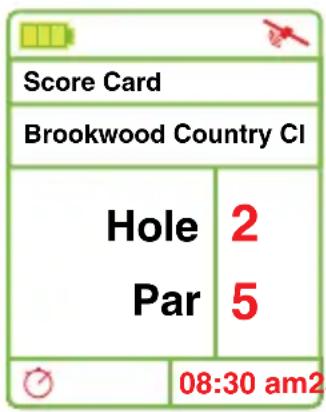
Score card will provide relevant information for each hole of the golf course. Press [Page] key when at the Play Mode screen to access the scorecard. Information displayed by the score card menu is as following:
- Course Name
- Hole Number (will change according to the hole number selected on Play Mode screen)
- Par
- Round Time (bottom left corner) (see page 12 for more info)
3.4 Shot Distance

Shot Distance Mode allows the user to measure the distance of each shot easily and precisely. While at the Play Mode screen, press [Enter] to go to Shot Distance Mode.
Before making a shot, press the [Page] key for several seconds to set start point, the value will be reset to 0. While walking to your ball, the screen will display the distance from the start position instantly. Press[Enter] key to hold the calculation for mark. To start a new measurement, press the [Enter] key to release from Hold. Press and hold [Page] to reset for a new start point.
Note: The shot distance function can also be used to find the distance between any two points on the course. For example the distance between a tee box and a bunker.
3.5 Editing Front, Center & Back Green Locations

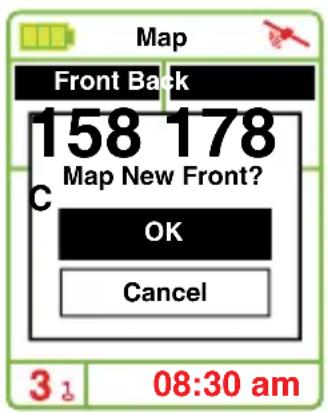
To make changes to the Swami 4000 green locations, you must be on the hole you would like to edit. To begin, press and hold [Page] key for 3 seconds while on the Play Mode screen. The top of the screen will read "Map" while editing the green locations.
- Use the [Up] and [Down] keys to select the Front, Center or Back of green. (Note: The yardage of the front, center or back of the green will begin blinking when selected).
- Next, stand with Swami 4000 at the point of new green location. (Example: If you are editing the front of the green, stand with the Swami 4000 at the point you wish to mark as the new front of the green).
- Press [Enter] key while at the new location of the green. A pop up message asking "Map New Front?" will appear. Use the [Up] and [Down] keys to confirm the new location. Swami will change the GPS location after you select [OK].
- The new location where the GPS unit is located should read "0" yards. (Example: If you edited the front of the green, you are now standing 0 yards between you and the front of the green). This change will be saved on your Swami 4000 for future use.
4. Swami Settings
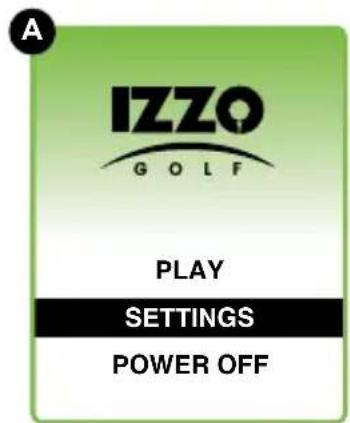

From the (A) Start Menu, use the [Up] and [Down] keys to select Settings and press [Enter] key to access (B) Settings Menu.
4.1 Unit – Yard/ Meter

Swami 4000 allows user to change distance measurements between yard and meter. Select Meter/Yard option on the Setting Menu and press [Enter] to change the measurement. (Note: Y = Yard and M = Meter). When desired option is selected, press and hold [Enter] key for a few seconds to return to the Start Menu.
11 Swami Settings
4.2 Reset Round Time

After selecting Play in the Start Menu, a timer begins to record your round time. You can see this timer in the bottom left hand corner of Setting Menu screen. To reset that timer, select Reset Round Time in the Setting Menu and press [Enter]. To return to the Start Menu, press and hold [Enter] key for a few seconds. To view current round time during golf round, go to the score card menu (see page 9).
4.3 Backlight Control
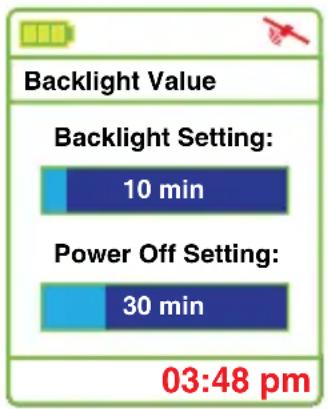
Swami 4000 can provide auto backlight off function to save power; if you don't touch any key for a specific time period, screen will turn to dark automatically. Select the Backlight Control option on the Setting Menu and press the [Enter] key. Use the [Up] key to edit the backlight duration; use the [Down] key to edit the power off duration. To return to the Setting Menu screen, press [Enter] key.
4.4 Language

To edit the language of the device, select the Language option in the Setting Menu. Use the [Up] and [Down] keys to find the desired language, then press the [Enter] key to select it.
The following languages are available:
(English, ChineseS, ChineseT, French, German, Italian, Japanese, Korean, Spanish, Swedish).
4.5 Time Set
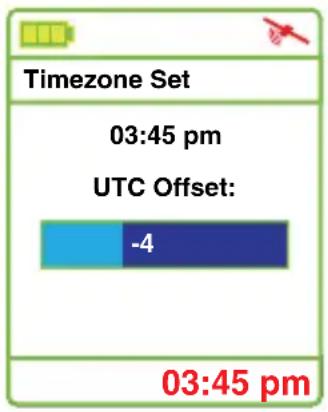
Swami 4000 will set present time zone automatically according to relevant data of GPS satellites; but you can adjust the daylight saving time of your location. Select Time Zone Set from the Setting Menu. You can increase and reduce the time with [Up] and [Down] keys. Press [Enter] when finished.
4.6 Time Format

The Swami 4000 provides two Time Format options. You can choose from 12 Hour and 24 Hour. To edit, use the [Up] and [Down] keys to select Time Format from the Settings Menu. Press the [Enter] key to change between 12H and 24H. Press and hold the [Enter] key to return to the Start Menu.
4.7 Model Info

To view the Swami 4000 GPS unit model information, select Model Info from the Setting Menu screen. There you can view the (Model Number, Memory, Version, Brand and Serial number) of unit. To return to the Setting Menu screen, press the [Enter] key.
CAUTION
Global Position System (GPS) was developed and is managed by United States Department of Defense (DOD) that is responsible for its normal operation and position precision control; the U.S. is entitled to affect function or position precision of the whole system without prior notification or announcement based on its political considerations or safety of national defense.
In order to use SWAMI 4000 correctly and safely, you must be aware of some specific knowledge; please read the following attentions in the manual prior to operating the device:
- SWAMI 4000 was only designed for the purpose of leisure and recreation and it isn't applicable for industrial or special measurement.
- SWAMI 4000 is only an auxiliary device, so we will not take any legal liability of accidents due to mistaken operation or wrong judgment by using SWAMI 4000 for measurement.
- Please do not try to dissemble SWAMI 4000 or repair any part of the device discreetly.
- Please do not place SWAMI 4000 in a place exposing to direct sunlight or high temperature.
About GPS
Global Position System (GPS) is a satellite system developed by the Department of Defense of US. GPS consists of 32 satellites that circle the earth and are 11,000 miles away from the ground. These satellites make two circles of the earth per day and emit signals of extremely low power which will be received and recorded by 5 ground stations. These ground stations will use precise time signals to confirm accurate position of each satellite. Your GPS receiver can “pick” signals sent out by the satellites. An accurate latitude, longitude and height can be determined through calculation on positions and distances of at least 4 satellites.
WAAS (Wide Area Augmentation System) can enhance the precision of GPS. It is designed by Federal Aviation Administration of US and mainly used to enhance precision of GPS on a plane. WAAS is combined with extra ground station groups which were set up in the places located precisely. These ground stations can work together with a master console so as to improve accuracy of satellite signals and reduce errors to about 3 meters.
Using Conditions
As Swami 4000 uses GPS, it is available only in the places that can receive satellite signals, excluding places indoor or in water.
QUESTIONS & ANSWERS
| Situations Possible | Problems Solutions | |
| The device cannot be started | A. Battery voltage is too low.B. You didn’t press and hold the [Enter] key for 3 seconds. | A. Charge the battery.B. Press and hold the [Enter] key until the power is on. |
| The device cannot detect satellites | A. Time for accessing satellite signal is not enough.B. The device is being started indoors. | A. Check whether the satellite icon keeps blinking; if it stops blinking, the satellite location has been fixed.B. Keep the device in an open space without building shelter. |
If you have any other questions or concerns, please call 1-800-777-7899 or go to www.IZZO.com.
- SWAMI 4000
- GOLF GPS
- IZZO
- GOLF
- REGISTER YOUR SWAMI 4000
- TABLE OF CONTENTS
- Table of Contents
- Thank You for Choosing Swami 4000
- Warranty / Return Policy
- General Description of Hardware
- Screen Display Description
- Key Description:
- Accessories List
- Charging Instructions
- Getting Started
- Start Menu
- Power Off
- Using Swami on the Course
- Course Recognition
- Play Mode
- Electronic Score Card
- Shot Distance
- Editing Front, Center & Back Green Locations
- Swami Settings
- Unit – Yard/ Meter
- Swami Settings
- Reset Round Time
- Backlight Control
- Language
- The following languages are available:
- Time Set
- Time Format
- Model Info
- CAUTION
- About GPS
- Using Conditions
Brand : Swami
Model : 4000
Category : Sports Watch