Izzo Golf - Sports Watch Swami - Free user manual and instructions
Find the device manual for free Izzo Golf Swami in PDF.


| Product Type | Sports Watch |
| Brand | Swami |
| Model | Izzo Golf |
| Battery Life | Approximately 8 hours |
| Charging Time | Approximately 4 hours |
| GPS | Yes (GPS and WAAS) |
| Display | Backlit LCD |
| Distance Measurement | Yards or Meters (selectable) |
| Hole Information | Front, Center, Back distances |
| Hole Navigation | Up/Down keys |
| Power Down Timer | 30 min, 1 hr, 2 hr, or off |
| Sleep Time | 30 sec, 1 min, 2 min, or off |
| Brightness | Adjustable (1 to 5) |
| Daylight Saving | On/Off |
| Color Mode | Reverse Color option |
| Accessories Included | Charging cable, Carabiner |
| Warranty | 90 days limited; extended 1 year with registration |
| Compliance | FCC Part 15 |
Frequently Asked Questions - Izzo Golf Swami
User questions about Izzo Golf Swami
0 question about this device. Answer the ones you know or ask your own.
Ask a new question about this device
Download the instructions for your Sports Watch in PDF format for free! Find your manual Izzo Golf - Swami and take your electronic device back in hand. On this page are published all the documents necessary for the use of your device. Izzo Golf by Swami.
USER MANUAL Izzo Golf Swami
USER GUIDE
TABLE OF CONTENTS
Thank You for Choosing Swami Sport 2
Warranty 2
Registration 2
- General Description of Hardware ....3
1.1 Device Layout ....3
1.2 Accessories List ....3
1.3 Charging Instructions ....4
- Getting Started ....4
2.1 Main Menu 4-5
2.2 Play Golf 5
2.3 Using Swami on the Course ....5
- Swami Settings ....6
3.1 Settings Menu 6
3.2 Sleep Time 6
3.3 Power Down 6
3.4 Brightness 6
3.5 Daylight Saving 7
3.6 Meters/Yards 7
3.7 Factory Reset 7
3.8 About 7
3.9 Back 7
Caution 8
About GPS 8
Using Conditions 8
FCC Statement 8
Thank You for Choosing Swami Sport
Its compact design and user friendly interface allow the Swami Sport to be your best electronic caddie, helping you better manage shot distances and choose the right club. In order to ensure the best performance of the product and maximize its service life, please review this guide before using your Swami Sport.
Warranty / Return Policy
SWAMI is warranted to be free from defects for up to 90 days from your purchase date. Software updates are free of charge. Izzo will replace any defective unit within the warranty period. Please call Swami Support at 800-777-7899 to request a Return Authorization. All defective product must be returned to:
Izzo Golf
ATTN: Returns Dept.
1635 Commons Parkway
Macedon, NY 14502
Please include a note with your Name, Address, Email, Phone and Return Authorization #. Your replacement Swami will be shipped once we process and diagnose the returned unit.
REGISTRATION
Please register your Swami Sport to receive update notifications and qualify for an extended 1 year warranty.
Go to: www.izzo.com/swamiregistration
1. GENERAL DESCRIPTION OF HARDWARE
1.1 DEVICE LAYOUT
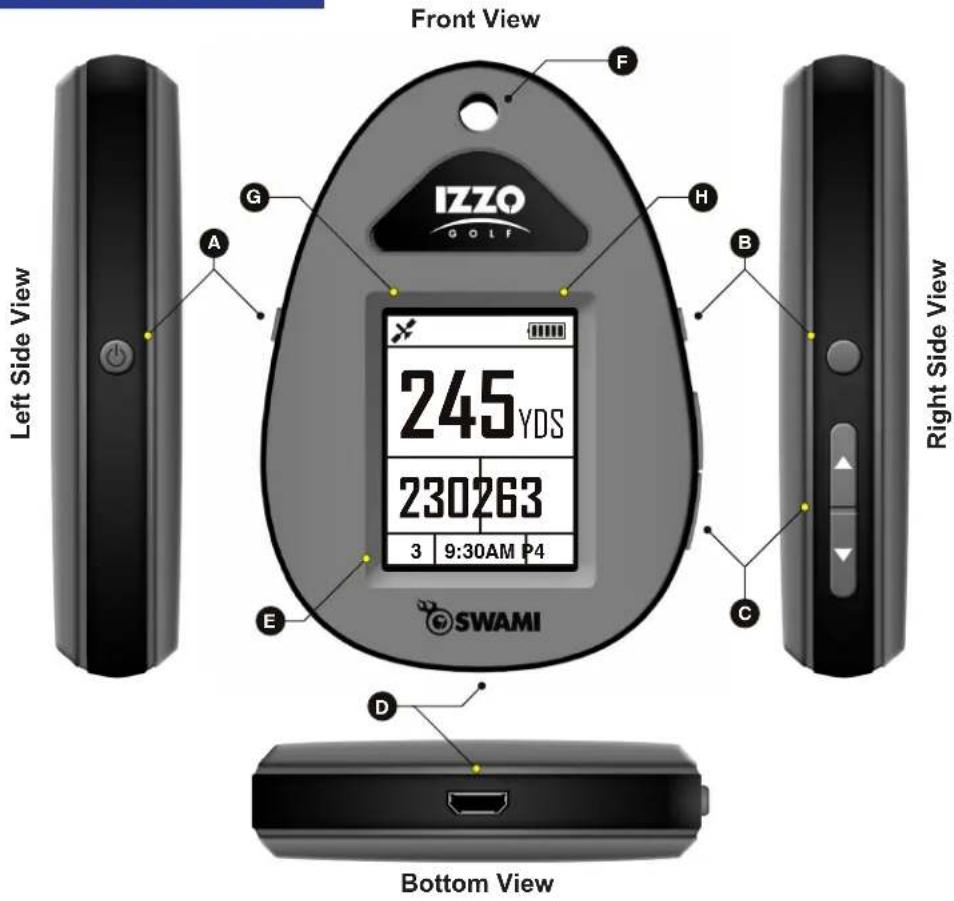
Play Mode Screen Display

- Satellite Icon
- Distance to Center of Green
- Distance to Front of Green
- Hole Number
- Time
- Battery Life
- Distance to Back of Green
- Hole Par
1.2 ACCESSORIES LIST
Please confirm whether your Swami Sport contains the following items:
- Charging Cable
- Caribiner

natural_image
Black USB cable with a numbered marker (1) on the left, no text or symbols on the cable itself.
natural_image
Simple black circular outline on white background with number 2 in top-left corner (no text or symbols within the circle)A.

Power On
Press and hold key until display screen turns on.
Power Off
Press and hold key until display screen turns off.
B.

Select Key
Press to select desired options and features.
C.
Up/Down Keys
Press to navigate between holes, courses or options.
Charging PortD.
Display ScreenE.
Caribiner Attachment HoleF.
G.

Satellite Icon
Represents an active satellite connection.
H.

Battery Icon
Represents remaining battery life.
1.3 CHARGING INSTRUCTIONS

2. GETTING STARTED
2.1 MAIN MENU

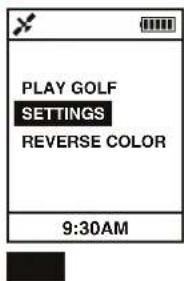


To turn on your Swami Sport, press and hold the Power (A) key until the display screen illuminates. After power up the Main Menu will appear.
To toggle between options on the Main Menu, use the Up/Down Keys (C). To select desired option, once highlighted, press the Select (B) key.
To return to the Main Menu at anytime, press and hold the Select (B) key for 3 seconds and release.
Main Menu Options:
Play Golf: Initiate GPS connection and start round. Settings: Edit features of the Swami Sport. Reverse Color: Invert screen color.
To Reverse Color of the Swami Sport display, use the Up/Down (C) keys to highlight the Reverse Color option, then press the Select (B) key. (Fig. 3)
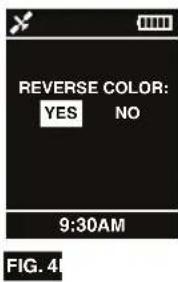
Use the Up/Down (C) keys to toggle between Yes and No options. When desired option is highlighted, press the Select (B) key. (Fig. 4)
The Reverse Color feature allows for contrasting display during Play Mode. (Fig. 5, 6)
Take Charging Cable (I) included in the package and insert Micro USB Connector (J) into the Charging Port (D), located on the bottom of the device (Fig. 1).
Take the USB Connector (K) end of the cable and insert into your computer's USB port (Fig. 1).
Note: Your computer must be turned on in order for device to charge.
When device is charging, the Display Screen (E) will display the Battery Icon (H) with the bars pulsating. (Fig. 1).
Battery life is approx. 8 hours. Fully depleted battery will require 4 hours to charge.
Note: We recommend charging the unit after each round, if possible.
Note: Please refer to page 3 for device Layout and Key Locations/Descriptions.
Note: To power down the Swami Sport at anytime, press and hold the Power (A) key, until the display turns off.
Note: Acquiring a satellite connection may take up to 3 minutes, depending on when the unit was used last:
Hot Start (Used Minutes Ago) < 30 Sec. Warm Start (Used Hours Ago) < 1 Min. Cold Start (Used Days Ago) < 3 Min.
2.2 PLAY GOLF!
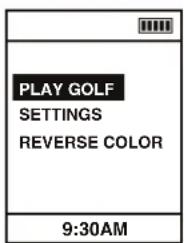
FIG. 1

The image is too blurry to recognize any text content.
To Start Round, select the Play Golf option on the Main Menu by pressing the Select (B) key (Fig. 1). The unit will begin acquiring a GPS signal (Fig. 2).
After a GPS signal has been acquired, a list of surrounding courses will appear. Use the Up/Down Keys (C) to toggle between courses. Press the Select (B) key to choose the desired course. (Fig. 3)
Note: When an active GPS signal is acquired, the Satellite Icon (G), located in the top left corner will appear. (Fig. 3)

The Ground Truth image displays a single, solid horizontal line. According to Rule 2 (UNDERSCORE & LINE RULES), this is a stylistic or background line, not a placeholder underscore. Therefore, the OCR result must ignore it and output nothing or only meaningful text. The provided OCR content is "____", which consists of four underscores. This is an incorrect interpretation of the line as a placeholder, violating the rule that stylistic lines must be ignored. The OCR has hallucinated underscores where none should exist based on the GT's visual context. Hence, the OCR result is inconsistent with the Ground Truth.

FIG. 4
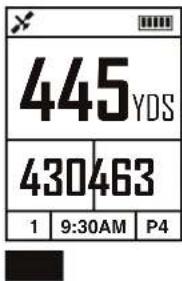
After the desired course is selected the unit will display Green Distances, Hole Number, Hole Par and Time. (Fig. 4) If necessary you may need to advance to the desired Hole Number by using the Up/Down (C) keys.
To end round, press the Select (B) key to access the Play Menu (Fig. 5). Use the Up/Down (C) keys to highlight the Main Menu option, then press the Select (B) key.
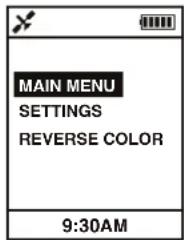
FIG. 5
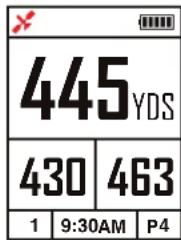
FIG. 6
Note: If Satellite Icon (G) is red and blinking, this implies a weak GPS signal. For optimal performance, ensure that the Swami Sport has a clear view of the sky at all times. Tall buildings, obstructions and heavy foliage can cause temporary satellite connection issues. (Fig. 6)
Note: Please refer to page 3 for device Layout and Key Locations/Descriptions.
Note: Please remember to power down the unit after finishing play, to conserve battery life.
Note: Any green 1000+ yards away will display "999" yards.
Note: To access the Play Menu during Play Mode, press the Select (B) key once.
2.3 USING SWAMI ON THE COURSE

- Satellite Icon
- Distance to Center of Green
- Distance to Front of Green
- Hole Number
- Time
- Battery Life
- Distance to Back of Green
- Hole Par
While in Play Mode the Swami Sport will display all the information listed to the left for every hole (Fig. 1). Including Front, Center and Back to the green.
To navigate between holes, use the Up/Down (C) keys. The Hole Number (4) is located at the bottom left of the display screen. (Fig. 1)
Note: To access the Play Menu during Play Mode, press the Select (B) key once.
3. SWAMI SETTINGS
3.1 SETTINGS MENU

FIG. 1

The image is too blurry to recognize any text content.
3.2 SLEEP TIME

FIG. 1

FIG. 2
3.3 POWER DOWN
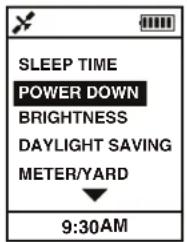
FIG. 1

The image is too blurry to recognize any text content.
3.4 BRIGHTNESS

FIG. 1

The image is too blurry to recognize any text content.
To access the Settings Menu, when at the Main Menu, use the Up/Down (C) keys to highlight the Settings option, then press the Select (B) key. (Fig. 1)
To access the Settings Menu features while in Play Mode, press the Select (B) key once, use the Up/Down (C) keys to highlight the Settings option, then press the Select (B) key.
Once the Settings Menu appears, you can navigate between options using the Up/Down (C) keys. (Fig. 2)
The Sleep Time option allows you to set the amount of time the backlight of the screen stays lit. This helps conserve battery life during play. Choose between 30 Seconds, 1 Minute, 2 Minutes or Off. The Off option means the display screen will never go dark.
To access the Sleep Time option use the Up/Down (C) keys to highlight Sleep Time, then press the Select (B) key. (Fig. 1)
Use the Up/Down (C) keys to toggle between options, when desired option is highlighted, press the Select (B) key. (Fig. 2)
When Sleep Time is enabled, if the display screen is dark, press the Select (B) or Up/Down (C) keys to illuminate the screen. The backlighting will stay on based on the Sleep Time option selected.
The Power Down option allows you to set an auto shut off based on the amount of time the unit is idle. This option will help conserve battery life. In the event the Swami Sport is left on, the unit will Power Down automatically at the selected time. Options are 30 minutes, 1 Hour, 2 Hour or Off. The Off option means the unit will not automatically turn off and will have to be powered down manually.
To access the Power Down option, use the Up/Down (C) keys to highlight Power Down, then press the Select (B) key. (Fig. 1)
Use the Up/Down (C) keys to toggle between options, when option desired is highlighted, press the Select (B) key. (Fig. 2)
The Brightness option allows you to control the brightness of the display screen.
To access the Brightness option use the Up/Down (C) keys to highlight Brightness, then press the Select (B) key. (Fig. 1)
Use the Up/Down (C) keys to toggle between a brightness range of 1 thru 5, with 5 being the brightest. When you reach the desired brightness, press the Select (B) key. (Fig. 2)
Note: To return to the Setting Menu at any time, press and hold the Select (B) key for 3 seconds and release. To return to the Main Menu from the Setting Menu, press and hold the Select (B) key for 3 seconds and release.
Note: When accessing the Main Menu during Play Mode, Swami Sport will return to Play Mode automatically in 5 seconds if no options are selected. To return manually press and hold the Select (B) key for 3 seconds and release.
3.5 DAYLIGHT SAVINGS
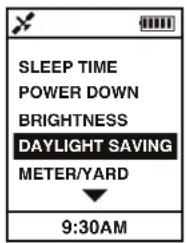
FIG. 1
The image is too blurry to recognize any text content.
3.6 METER / YARD

FIG. 1

The image is too blurry to recognize any text content.
3.7 FACTORY RESET

FIG. 1

The image is too blurry to recognize any text content.
3.8 ABOUT

FIG. 1
The image is too blurry to recognize any text content.
3.9 BACK

FIG. 1

FIG. 2
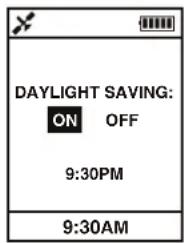
The Daylight Saving option allows you to enable or disable daylight savings time on your Swami Sport.
To access the Daylight Saving option, use the Up/Down (C) keys to highlight Daylight Saving, then press the Select (B) key. (Fig. 1)
Use the Up/Down (C) keys to toggle between On and Off options. When desired option is highlighted, press the Select (B) key. (Fig. 2)
The Meter/Yard option allows you to set which distance metric units you prefer.
To access the Meter/Yard option, use the Up/Down (C) keys to highlight Meter/Yard, then press the Select (B) key. (Fig. 1)
Use the Up/Down (C) keys to toggle between Yard and Meter options. When desired option is highlighted, press the Select (B) key. (Fig. 2)
The Factory Reset option allows you to reset all data to original factory settings.
To access the Factory Reset option, use the Up/Down (C) keys to highlight Factory Reset, then press the Select (B) key. (Fig. 1)
Use the Up/Down (C) keys to toggle between Yes and No options. When desired option is highlighted, press the Select (B) key. (Fig. 2)
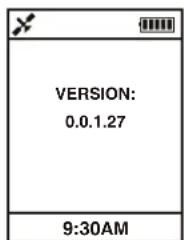
The About option indicates the firmware version of the unit. This feature is only used for troubleshooting purposes.
To access the About option, use the Up/Down (C) keys to highlight About, then press the Select (B) key. (Fig. 1)
To return to the the Settings Menu, press the Select (B) key.
The Back option allows you to navigate back to the Main Menu.
To access the Back option of the Swami Sport, use the Up/Down (C) keys to highlight Back, then press the Select (B) key. (Fig. 1)
You will be brought back to the Main Menu. (Fig. 2)
Note: To return to the Setting Menu at any time, press and hold the Select (B) key for 3 seconds and release. To return the Main Menu from the Setting Menu, press and hold the Select (B) key for 3 seconds and release.
CAUTION
Global Position System (GPS) was developed and is managed by the United States Department of Defense (DOD) and is responsible for its normal operation and position precision control; the U.S. is entitled to affect function or position precision of the whole system without prior notification or announcement based on its political considerations or national defense.
In order to use SWAMI Sport correctly and safely, you must be aware of some specific items; please read the following attentions in the manual prior to operating the device:
- SWAMI Sport was only designed for the purpose of leisure and recreation and it isn't applicable for industrial or special measurement.
- SWAMI Sport is only an auxiliary device, so we will not take any legal liability for accidents due to mistaken operation or wrong judgment by using SWAMI Sport for measurement.
- Please do not try to disassemble SWAMI Sport or repair any part of the device discreetly.
About GPS
Global Position System (GPS) is a satellite system developed by the Department of Defense. GPS consists of 32 satellites that circle the earth and are 11,000 miles away from the ground. These satellites make two circles of the earth per day and emit signals of extremely low power which will be received and recorded by 5 ground stations. These ground stations will use precise time signals to confirm accurate position of each satellite. Your GPS receiver can "pick" signals sent out by the satellites. An accurate latitude, longitude and height can be determined through calculation on positions and distances of at least 4 satellites.
WAAS (Wide Area Augmentation System) can enhance the precision of GPS. It is designed by the Federal Aviation Administration and is mainly used to enhance precision of GPS on a plane. WAAS is combined with extra ground station groups that were set up in the precisely located places. These ground stations can work together with a master console so as to improve accuracy of satellite signals and reduce errors to about 3 meters.
Using Conditions
As Swami Sport uses GPS, it is available only in the places that can receive satellite signals, excluding indoor places and under water.
FCC Statement
Modifications not expressly approved by Izzo Golf could void authority to operate the equipment.
This device complies with Part 15 of the FCC Rules. Operation is subject to the following two conditions:
- This device may not cause harmful interference.
- This device must accept any interference received, including interference that may cause undesired operation. Changes or modifications not expressly approved by the party responsible for compliance could void the user's authority to operate the equipment.
NOTE: This equipment has been tested and found to comply with the limits for a Class B digital device, pursuant to Part 15 of the FCC Rules. These limits are designed to provide reasonable protection against harmful interference in a residential installation.
This equipment generates uses and can radiate radio frequency energy and, if not installed and used in accordance with the instructions, may cause harmful interference to radio communications. However, there is no guarantee that interference will not occur in a particular installation. If this equipment does cause harmful interference to radio or television reception, which can be determined by turning the equipment off and on, the user is encouraged to try to correct the interference by one or more of the following measures:
- Reorient or relocate the receiving antenna.
- Increase the separation between the equipment and receiver.
- Connect the equipment into an outlet on a circuit different from that to which the receiver is connected.
- Consult the dealer or an experienced radio/TV technician for help.



If you have any other questions or concerns, please call 1-800-777-7899 or go to www.IZZO.com.
- TABLE OF CONTENTS
- Thank You for Choosing Swami Sport
- Warranty / Return Policy
- REGISTRATION
- GENERAL DESCRIPTION OF HARDWARE
- DEVICE LAYOUT
- ACCESSORIES LIST
- CHARGING INSTRUCTIONS
- GETTING STARTED
- MAIN MENU
- Main Menu Options:
- SWAMI SETTINGS
- SETTINGS MENU
- SLEEP TIME
- POWER DOWN
- BRIGHTNESS
- DAYLIGHT SAVINGS
- METER / YARD
- FACTORY RESET
- ABOUT
- BACK
- CAUTION
- About GPS
- Using Conditions
- FCC Statement
Brand : Swami
Model : Izzo Golf
Category : Sports Watch