USB2+1 - DJ Equipment Citronic - Free user manual and instructions
Find the device manual for free USB2+1 Citronic in PDF.


| Product Type | DJ Controller / Mixer |
| Brand | Citronic |
| Model | USB2+1 |
| Categories | DJ Equipment |
| Dimensions (approx) | 250 x 150 x 50 mm |
| Weight (approx) | 0.8 kg |
| Power Supply | USB bus-powered or 5V DC adapter (not included) |
| Main Functions | USB audio interface, 2-channel mixing, headphone monitoring, playback control |
| Inputs | 2 x RCA line, 1 x USB Type-B |
| Outputs | 1 x RCA master, 1 x 3.5mm headphone |
| Sample Rate | 48 kHz |
| Bit Depth | 16-bit |
| Frequency Response | 20 Hz - 20 kHz |
| Signal-to-Noise Ratio | >90 dB |
| Total Harmonic Distortion | <0.01% |
| Headphone Impedance | 32 ohms |
| Compatible Systems | Windows, macOS, Linux |
| Maintenance | Wipe with a dry, soft cloth; avoid liquids |
| Safety Precautions | Do not expose to moisture, heat or strong magnetic fields |
| Spare Parts / Accessories | USB cable, optional 5V power supply |
| Repairability | No user-serviceable parts inside; contact authorized service |
Frequently Asked Questions - USB2+1 Citronic
User questions about USB2+1 Citronic
0 question about this device. Answer the ones you know or ask your own.
Ask a new question about this device
Download the instructions for your DJ Equipment in PDF format for free! Find your manual USB2+1 - Citronic and take your electronic device back in hand. On this page are published all the documents necessary for the use of your device. USB2+1 by Citronic.
USER MANUAL USB2+1 Citronic
Caution: Please read this manual carefully before operating
Damage caused by misuse is not covered by the warranty
Introduction
Thank you for choosing the Citronic USB2+1 audio interface as your digital recording equipment. This device has been developed to provide a versatile platform for your computer-based audio workstation. Please read and follow the enclosed instructions to achieve the best results from your USB2+1 interface.
Front & rear panels
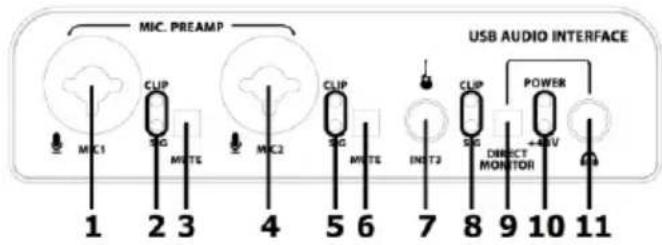
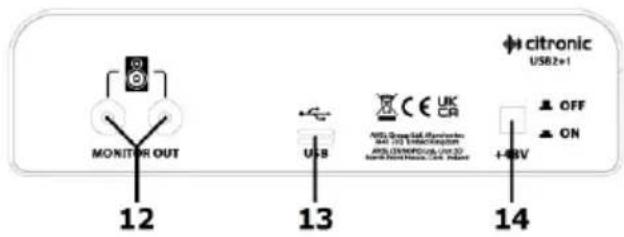
- Microphone input 1 (6.3mm jack / XLR)
- Input 1 Signal and Clip LEDs
- Input 1 MUTE switch
- Microphone input 2 (6.3mm jack / XLR)
- Input 2 Signal and Clip LEDs
- Input 2 MUTE switch
-
Instrument input 3 (6.3mm jack)
-
Input 3 Signal and Clip LEDs
- Direct Monitor switch
- Power and +48V phantom power LEDs
- Headphones output 6.3mm stereo jack
- Monitor line output L+R RCA
- USB type-C connection to PC (and power)
- +48V phantom power on/off switch
Top panel
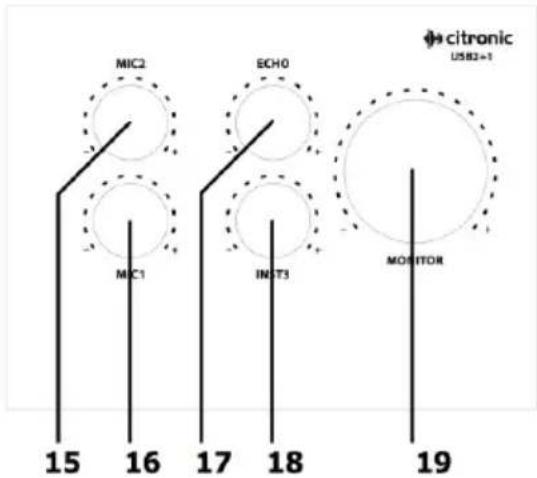
- Microphone 2 level control
- Microphone 1 level control
- Echo mix control
- Instrument input 3 level control
- Monitor level control
Connection
Connect recording microphones to MIC1 and MIC2 inputs via unbalanced 6.3mm plug or balanced XLR.
Enable +48V on the rear panel for condenser microphones that require this.
Line inputs may also be connected to these inputs but the level controls may respond differently.
Connect instruments, such as electric guitar, bass or keyboards to the Instrument 3 input via 6.3mm plug.
Connect stereo headphones (recommended 32Ω) to the Headphones output on the front panel.
Connect studio monitors to the L+R Monitor Out RCA sockets on the rear panel.
Connect the USB type-C connection on the rear panel to your Mac or PC computer USB port.
Operation
Ensure all level controls are turned down initially and set up the USB2+1 for recording to the computer.
The USB2+1 is powered directly from the computer's USB port and does not require any other power.
To avoid confusion, ensure that any other USB audio devices are disconnected or disabled for initial setup.
Within the audio settings of your PC or Mac computer, see that the system recognizes a USB audio device.
The USB2+1 is seen as a generic USB audio device, which can be selected for input source or output device (or both) within the recording software as required.
Once the audio device is set up and selected, check each input channel in turn for output to the computer by selecting "record" in the software and increasing the level of the selected USB2+1 input.
Continue increasing the level for that input until there is adequate signal for recording, whilst ensuring that the CLIP LED is not lighting more than momentarily. The SIG LED should be lit consistently when a signal is playing but if the CLIP LED is lighting persistently, the level control should be reduced until it is only lit for an instant.
The output returned to the USB2+1 from the computer can be heard through any connected monitors or headphones by increasing the level on the large MONITOR rotary control. To hear the inputs directly before they are processed by the computer, press in the DIRECT MONITOR switch, which routes the inputs directly to the monitoring section. Leaving this switch out listens to the output from the computer.
In the absence of other effects processing, the USB2+1 also has a preset inbuilt echo effect that can be introduced by increasing the ECHO rotary control as desired.
To avoid loud noises, turn down level controls and the inputs of connected equipment before disconnecting.
| Power supply | 5Vdc (from USB) |
| Connection | USB type-C |
| Controls | Mic1, Mic2, Inst3, Effect, Monitor |
| Input connections | 2 x mic XLR/Jack, 1 x 6.3mm instrument jack |
| Phantom power | +48V switchable to XLR inputs |
| Frequency response | 10Hz - 30kHz (-0.5dB) |
| Input impedance: instrument | 1M Ohm |
| Input impedance: mic (or line) | 3k Ohm |
| Max. input sound level | Mic or Instrument +2dBu, Line +22dBu |
| Dynamic range | 100dB (A-weighted) |
| Sampling format | 48kHz, 16-bit |
| Monitor outputs | Headphones (stereo 6.3mm jack), Line out (L+R RCA) |
| Dimensions | 160 x 110 x 57mm |
| Weight | 529g |

Disposal: The "Crossed Wheelie Bin" symbol on the product means that the product is classed as Electrical or Electronic equipment and should not be disposed with other household or commercial waste at the end of its useful life. The goods must be disposed of according to your local council guidelines.
Errors and omissions excepted. Copyright© 2022. AVSL Group Ltd.
Unit 2-4 Bridgewater Park, Taylor Rd. Manchester. M41 7JQ
AVSL (EUROPE) Ltd, Unit 3D North Point House, North Point Business Park, New Mallow Road, Cork, Ireland
Brand : Citronic
Model : USB2+1
Category : DJ Equipment