CDA-HD14018G - Separator Comprehensive - Free user manual and instructions
Find the device manual for free CDA-HD14018G Comprehensive in PDF.


| Product Type | 1x4 HDMI UHD Splitter |
| Brand | Comprehensive |
| Model | CDA-HD14018G |
| Video Bandwidth | 600 MHz / 18 Gbps |
| Input Ports | 1 × HDMI (Female) |
| Output Ports | 4 × HDMI (Female) |
| Supported Resolutions | Up to 4K2K@60Hz (YUV444), also 1080p@60 3D, VESA up to QSXGA@60 |
| HDCP Compliance | HDMI 2.0, HDCP 2.2, DVI 1.0 |
| Audio Formats | LPCM 7.1CH, Dolby TrueHD, DTS-HD Master Audio |
| EDID Control | Smart EDID with STD and TV modes |
| Power Supply | 5V/2A DC, US/EU standards, CE/FCC/UL certified |
| Power Consumption (Max) | 10 W |
| Dimensions (W x D x H) | 63 mm × 163 mm × 16 mm |
| Weight | 275 g |
| Chassis Material | Metal |
| Operating Temperature | 0 °C to 40 °C (32 °F to 104 °F) |
| Storage Temperature | -20 °C to 60 °C (-4 °F to 140 °F) |
| Relative Humidity | 20% to 90% RH (non-condensing) |
| ESD Protection | ±8 kV air-gap discharge, ±4 kV contact discharge |
| Package Contents | 1× Splitter, 1× 5V/2A Power Adapter, 1× Manual |
| Cleaning | Unplug before cleaning; wipe with a soft, dry cloth. Avoid liquids. |
| Safety | Use only provided power adapter. Do not expose to moisture or heat sources. |
| Spare Parts / Reparability | No user-serviceable parts inside. Contact Comprehensive for repairs. |
Frequently Asked Questions - CDA-HD14018G Comprehensive
User questions about CDA-HD14018G Comprehensive
0 question about this device. Answer the ones you know or ask your own.
Ask a new question about this device
Download the instructions for your Separator in PDF format for free! Find your manual CDA-HD14018G - Comprehensive and take your electronic device back in hand. On this page are published all the documents necessary for the use of your device. CDA-HD14018G by Comprehensive.
USER MANUAL CDA-HD14018G Comprehensive
Comprehensive® Connectivity Company
CDA-HD14018G
1x4 HDMI Full UHD 4K60 18Gb Splitter (YUV:444)
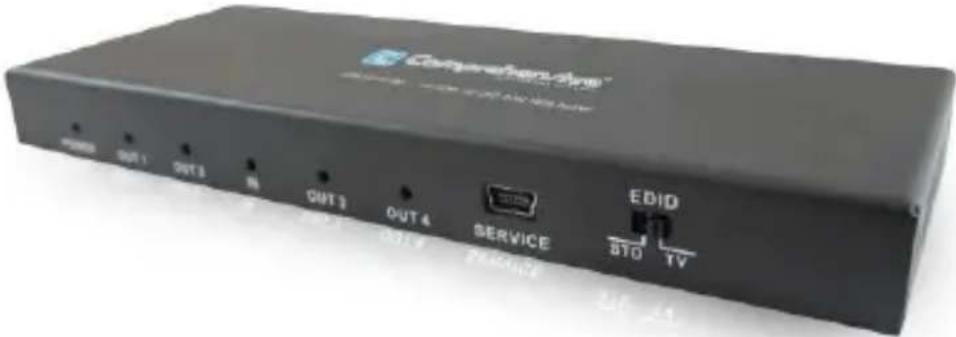
User manual
V1.0ep
Thank you for purchasing this product. For optimum performance and safety, please read these instructions carefully before connecting, operating or adjusting this product. Please keep this manual for future reference.
I. Introduction
This 1 by 4 HDMI UHD Splitter with HDCP 2.2 is an advanced solution for splitting a single HDMI input to four HDMI outputs. It provides high performance audio and video output through HDMI cables. Up to 4K2K@60Hz (YUV444) resolution and is capable of receiving and transmitting up to 18Gbps of bandwidth with no data loss. Supporting the latest features you can be assured of reliable and high quality HDMI distribution.
II. Features
- Compliant with HDMI2.0, HDCP2.2 and DVI 1.0;
- Support video format up to 4k2k@30Hz with 24bit RGB/YcbCR 4:4:4/YCBCR 4:2:2,and up
to 4k2k@60Hz with 12bit YCBCR 4:4:4;
- Support 3D frame sequential video format up to 1080p@60;
- Support high resolution VESA mode video format up to QSXGA@60Hz;
- Supports LPCM 7.1CH, Dolby TrueHD, and DTS-HD Master Audio;
- Supports smart EDID control;
III. Package
- UHD 1x4 HDMI Splitter 1PC
- 5V2A DC Power adapter 1PC
- Operation Manual 1PC
IV. Specifications
- Video Bandwidth 600MHz/18Gbps
- Input Ports 1 × HDMI (Female type)
-
Output Ports 4 × HDMI (Female type),
-
Output Resolution 480i \~1080p50/60, 4Kx2K@24/30, 4k2k@60Hz
- ESD Protection Human Body model: ±8 kV (air-gap discharge)
±4 kV (contact discharge) - Power Supply 5V/2A DC (US/EU standards, CE/FCC/UL certified)
- Dimensions 63 mm (W) × 163 mm (D) × 16 mm (H)
- Weight 275 g
- Chassis Material Metal
- Operating Temperature 0 °C\~40 °C/ 32 °F\~104 °F
- Storage Temperature -20^ 60^/-4^ 140^
- Relative Humidity 20\~90 % RH (non-condensing)
- Power Consumption (Max) 10W
V. Operation controls and Functions
Front Panel & Rear Panel
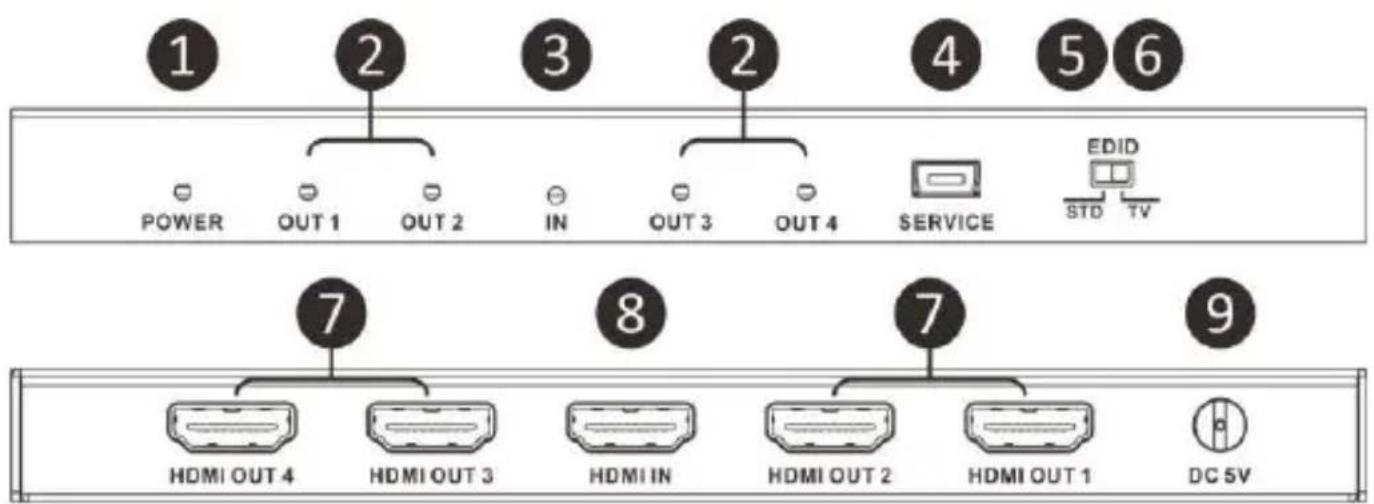
- POWER LED: Blue LED will illuminate when the device is connected with power supply.
- OUT LED: Blue LEDs will light up to indicate which HDMI outputs are connected to an active TV/display/monitor.
-
IN LED: Blue LED will illuminate once the source is connected to the device.
-
SERVICE: Manufacturer use only.
-
EDID STD: When in "STD" mode, the unit will use its own built-in EDID settings. In this mode, the video output will be set to 1080p@60Hz and the audio output at LPCM 2CH Stereo. Use this mode if there are display problems in TV Mode.
- EDID TV: When in "TV" mode, the unit will read the EDID settings of the display device connected to HDMI OUT 1. If it detects a 4K2K capable EDID setting it will transmit the signal in that format to all outputs. If no 4K2K capable EDID is detected then the unit will output the best resolution that all displays can support.
- HDMI OUT 1\~4: Connect each of the HDMI outputs to an HDMI display for simultaneous HDMI distribution, or cascade the output to another transmitter.
- HDMI IN: Connect the input port to the HDMI or DVI (adapter not included) output of your source device with an HDMI cable.
- DC 5V: Plug the 5V DC power supply into the unit & connected the adaptor to an AC outlet.
VI. Application Example
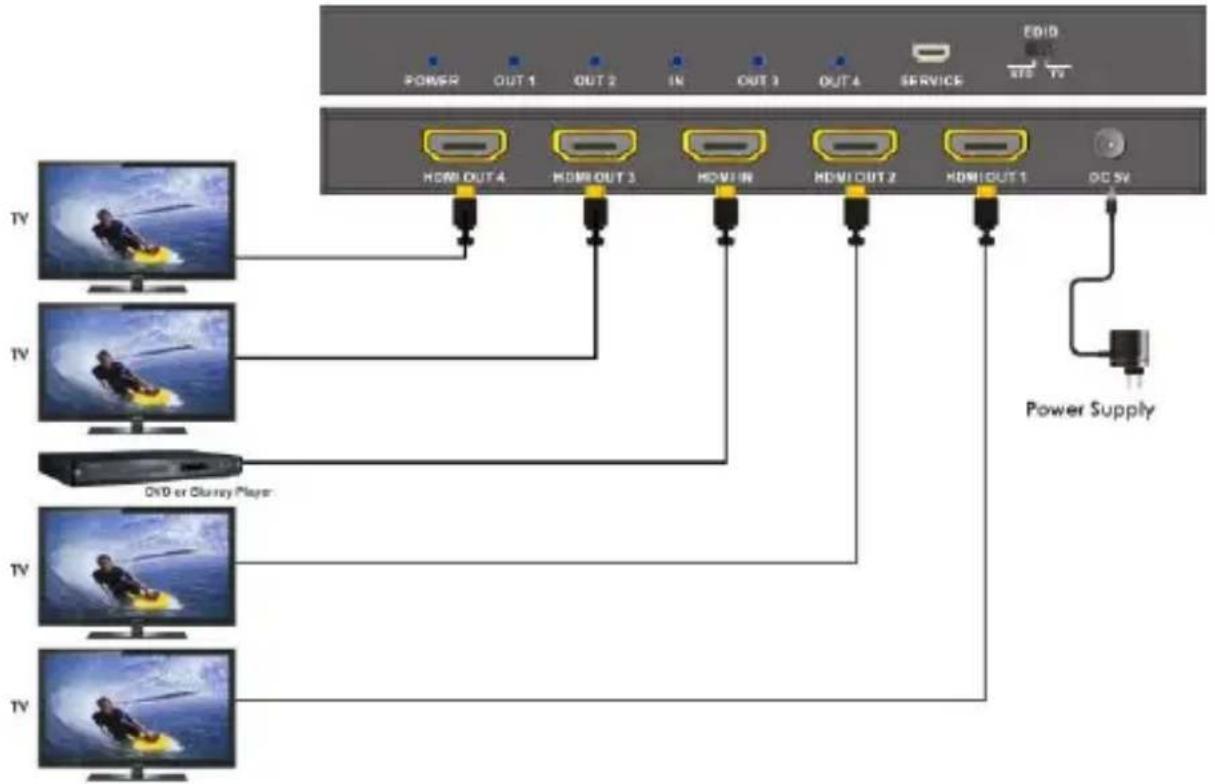
flowchart
graph TD
    A["Power Supply"] --> B["HDM OUT 4"]
    A --> C["HDM OUT 3"]
    A --> D["HDM IN"]
    A --> E["HDM OUT 2"]
    A --> F["HDM OUT 1"]
    B --> G["TV"]
    C --> H["TV"]
    D --> I["TV"]
    E --> J["TV"]
    F --> K["TV"]
    G --> L["TV"]
    H --> M["TV"]
    I --> N["TV"]
    J --> O["TV"]
    K --> P["TV"]

Comprehensive
80 Little Falls Road, Fairfield, NJ 07004 | Phone: 800.526.0242 | Fax: 201.814.0510 | www.ComprehensiveCo.com
Brand : Comprehensive
Model : CDA-HD14018G
Category : Separator