
RXBC5V - Receiver Salus - Free user manual and instructions
Find the device manual for free RXBC5V Salus in PDF.


| Product Type | RF Receiver |
| Brand | Salus |
| Model | RXBC5V |
| Dimensions | 86 x 86 x 30 mm |
| Weight | 120 g |
| Power Supply | 2 x AAA 1.5V batteries (not included) |
| Battery Life | Approximately 1 year |
| Frequency | 868 MHz |
| Range | Up to 30 meters (open field) |
| Compatible Thermostats | Salus RT500, RT510, RT520 |
| Functions | Receives on/off signals, controls heating/cooling system |
| Installation | Wall mounting using screws or adhesive pads |
| Maintenance | Clean with a soft, dry cloth |
| Safety | For indoor use only, low voltage |
| Certification | CE, RoHS |
| Spare Parts | Replacement batteries (AAA) |
| Repair Information | No user-serviceable parts; contact dealer |
| Operating Temperature | 0°C to 40°C |
| Humidity | 10% to 90% non-condensing |
Frequently Asked Questions - RXBC5V Salus
User questions about RXBC5V Salus
0 question about this device. Answer the ones you know or ask your own.
Ask a new question about this device
Download the instructions for your Receiver in PDF format for free! Find your manual RXBC5V - Salus and take your electronic device back in hand. On this page are published all the documents necessary for the use of your device. RXBC5V by Salus.
USER MANUAL RXBC5V Salus
Dodworth Business Park South,
Whinby Road, Dodworth,
Barnsley S75 3SP, UK.
T:+44(0)1226323961
E: sales@salus-tech.com

Computime

www.salus-controls.com
SALUS Controls is a member of the Computime Group
Maintaining a policy of continuous product development SALUS Controls plc reserve the right to change specification, design and materials of products listed in this brochure without prior notice.
For PDF Installation guide please go to
www.salus-manuals.com
Issue Date: August 2017 V01
C∈EAC


SALUS®
CONTROLS
RXBC5V - RF Boiler Control

natural_image
White industrial electrical component with '5V' branding and mounting holes, set against a blue background (no readable text or symbols beyond branding)Installation
Pairing the RXBC5V

natural_image
Hand holding a white electronic device with a circular dial and 'LOGIC+ COMBION' label (no readable text on device or background)- Connect the electrical plug.

Press the "SYNC" button for 3 seconds until LED starts flashing

natural_image
Close-up of hands installing a circular device on a white appliance panel (no visible text or symbols)- Push fit boiler control into housing.
- Power up the boiler and check the correct operation.

The RXBC5V is ready to be paired with your compatible SALUS device.
Note: Once paired please close the boiler control panel
Introduction
The RXBC5V boiler module 868MHz is a receiver with 5V DC to control ON/OFF of Boiler or other heat system via the RF signal transmitted from the thermostat.
Product Compliance
This product complies with the essential requirements and other relevant provisions of Directives (RED) 2014/53/EU and 2011/65/EU. The full text of the EU Declaration of Conformity is available at the following internet address: www.salus-controls.com.

868MHz-868.8MHz; <13dBm
Safety Information
Use in accordance with the regulations. Indoor use only. Keep your device completely dry. Disconnect your device before cleaning it with a dry cloth.
Terminal connections
| Terminal | Identifier Description |
| 1 DC + | DC power supply (+) |
| 2 DC - | DC power supply (-) |
| 3 COM | Common input |
| 4 NO Normal Open | |
| 5 NC Normal Closed |
Compatibility
The RXBC5V is compatible with the following SALUS products

natural_image
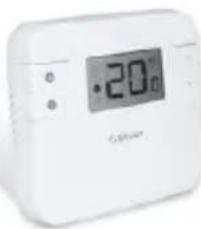
White digital temperature controller with display showing 20°C and 'Census' logo (no readable text beyond branding)RT310TX

natural_image
White industrial fan switch with control knob (no visible text or symbols)ERT20TX

RT510TX
natural_image
White digital temperature controller with display showing 20°C (no visible text or symbols beyond branding)RT310iTX

natural_image
Black digital alarm clock with visible time and control buttons (no readable text or symbols)iT500BM
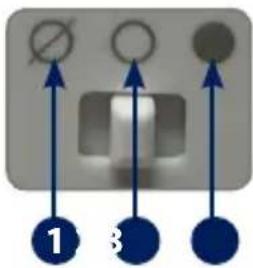
Switch Position
1 The boiler receiver is off.
2 AUTO. RX will automatically receive the RF signal from your compatible SALUS device and controls relay output.
3 Manual mode - Manual Override (Note this mode will run your boiler continuously)
Installation
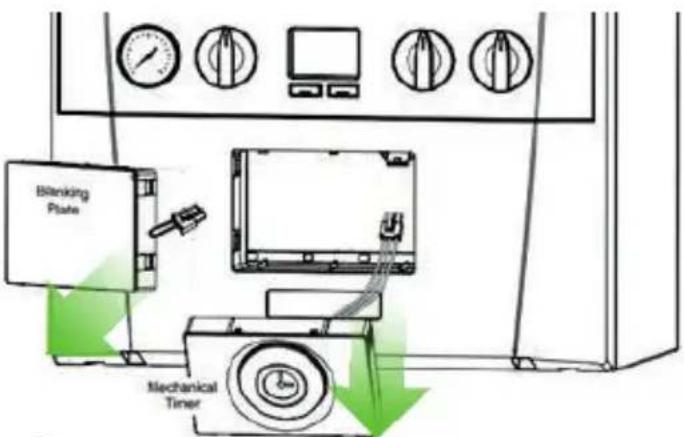

Note: When removing blanking plate also remove visible thermostat link plug do not remove any internal link.
- Ensure boiler is isolated and switched off.
- Pull down control panel cover.
- Remove existing mechanical timer and unscrew from plate.
- Reverse the procedure to install the RXBC5V.

natural_image
Close-up of a hand inserting wires into an open electrical enclosure (no visible text or symbols)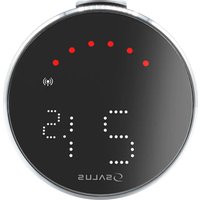
Brand : Salus
Model : RXBC5V
Category : Receiver