CP228 - Thermostat Salus - Free user manual and instructions
Find the device manual for free CP228 Salus in PDF.


Pick your language and provide your email: we'll send you a specifically translated version.
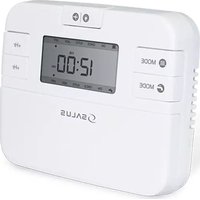
| Product Type | Programmable Thermostat |
| Brand | Salus |
| Model | CP228 |
| Dimensions (H x W x D) | 130mm x 90mm x 30mm |
| Weight | 150 g |
| Power Supply | 2 x AA Alkaline Batteries |
| Battery Life | Approximately 1 year |
| Display Type | Digital LCD |
| Temperature Range | 5°C to 30°C |
| Accuracy | ±0.5°C |
| Programmable Schedules | 7-day, 4 time periods per day |
| Frost Protection | Yes, automatic at 5°C |
| Manual Override | Yes, temporary or permanent |
| Holiday Mode | Yes, countdown timer |
| Keypad Lock | Yes, child lock |
| Low Battery Indication | Yes, icon on display |
| Compatibility | Gas, oil, electric heating systems |
| Mounting | Wall-mounted with screws or adhesive |
| Maintenance | Clean with dry soft cloth; avoid liquids |
| Spare Parts / Repairability | Not available; replace unit if faulty |
Frequently Asked Questions - CP228 Salus
How do I install the CP228 thermostat?
Mount the thermostat on a wall at about 1.5m height, away from heat sources. Connect the wires according to your heating system. Insert 2 AA batteries and switch on.
How do I set the time and day?
Press the Menu button, use arrows to set time and day, confirm with OK.
How can I program a heating schedule?
Go to Menu > Schedule. For each day, set up to 4 time periods with desired temperatures. Use Copy to copy settings to other days.
What does the frost protection mode do?
If the room temperature drops below 5°C, the heating turns on automatically to prevent freezing.
How do I manually override the schedule?
Press the + or - buttons to adjust temperature temporarily. The override lasts until the next scheduled period. For permanent override, hold Manual until icon appears.
How do I change the batteries?
Remove the front cover, take out old batteries, insert new AA batteries, and replace the cover. Settings are retained.
How do I reset the thermostat to factory defaults?
Press and hold the Menu button for 5 seconds, then confirm reset. All schedules and settings will be erased.
Why does the display show 'Lo' or 'Hi'?
'Lo' indicates room temperature below 0°C; 'Hi' indicates above 50°C. This is normal for extreme temperatures; the thermostat will function correctly when temperature returns to range.
Can I use the CP228 with electric floor heating?
Yes, the thermostat is compatible with most heating systems including electric floor heating, as long as the switching current is within its rating (max 3A resistive).
How do I lock the keypad?
Press and hold the Down arrow for 3 seconds. The lock icon appears. Repeat to unlock.
User questions about CP228 Salus
0 question about this device. Answer the ones you know or ask your own.
Ask a new question about this device
No questions yet. Be the first to ask one.
Download the instructions for your Thermostat in PDF format for free! Find your manual CP228 - Salus and take your electronic device back in hand. On this page are published all the documents necessary for the use of your device. CP228 by Salus.
USER MANUAL CP228 Salus
Manual assistant
Powered by Anthropic
Waiting for your message
Product information
Brand : Salus
Model : CP228
Category : Thermostat