
INN-519 - Air Conditioning Innoliving - Free user manual and instructions
Find the device manual for free INN-519 Innoliving in PDF.


| Product Type | Portable Air Conditioner |
| Brand | Innoliving |
| Model | INN-519 |
| Cooling Capacity | 9000 BTU/h (approx. 2.6 kW) |
| Heating Function | No (Only cooling) |
| Power Consumption (Cooling) | 900 W |
| Voltage / Frequency | 220-240 V ~ 50 Hz |
| Refrigerant | R410A |
| Air Flow Rate | 350 m³/h |
| Dimensions (W x D x H) | 45 x 38 x 70 cm |
| Weight | 22 kg |
| Noise Level | ≤ 55 dB(A) |
| Functions | Cooling, Fan, Dehumidification, Sleep Mode, Timer (1-24h) |
| Control Type | Remote Control + Control Panel |
| Display | LED |
| Air Filter | Washable Mesh Filter |
| Water Drainage | Self-evaporating + manual drainage option |
| Installation Kit | Window sealing kit included |
| Energy Efficiency Class | A |
| Safety Features | Overheat protection, tip-over switch |
| Spare Parts Available | Remote control, filter, drainage hose |
| Maintenance | Clean filter every 2 weeks, drain water regularly |
Frequently Asked Questions - INN-519 Innoliving
User questions about INN-519 Innoliving
0 question about this device. Answer the ones you know or ask your own.
Ask a new question about this device
Download the instructions for your Air Conditioning in PDF format for free! Find your manual INN-519 - Innoliving and take your electronic device back in hand. On this page are published all the documents necessary for the use of your device. INN-519 by Innoliving.
USER MANUAL INN-519 Innoliving
innoliving easy tech, easy life
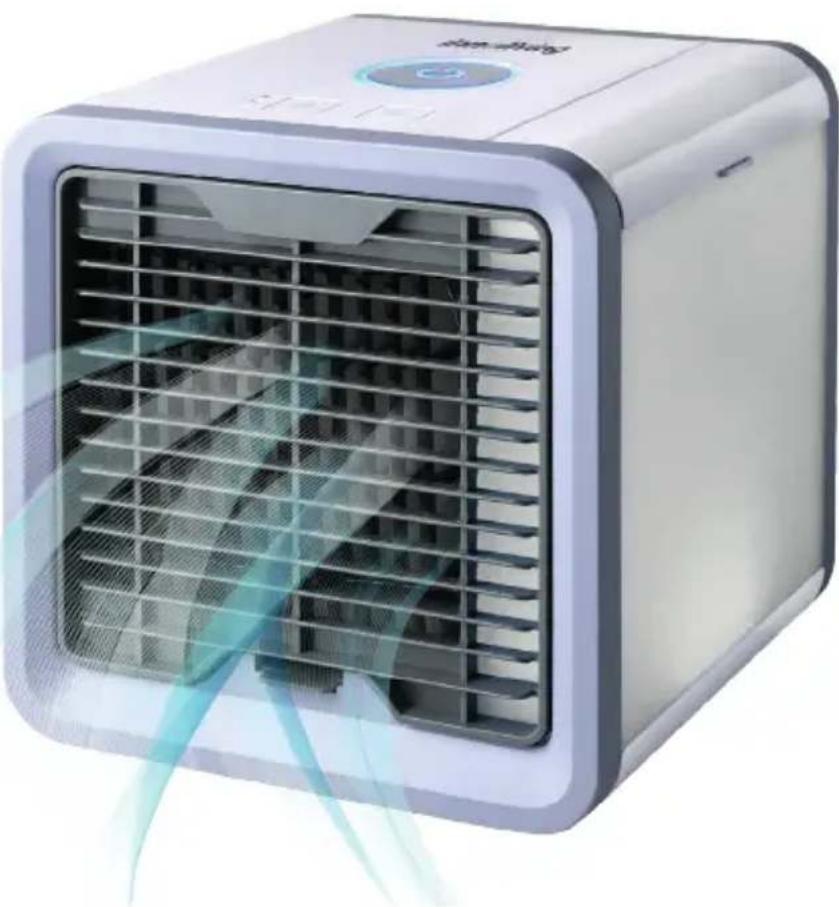
RAFFRESCATORE COMPACT
natural_image
White 3D cube-shaped air conditioner unit with blue airflow visualization (no text or symbols)INN-519
MANUALE D'USO
USER MANUAL
PRIMA DELL'USO LEGGERE ATTENTAMENTE IL SEGUENTE MANUALE DI ISTRUZIONI E CONSERVARLO PER FUTURE CONSULTAZIONI.
natural_image
Exterior view of a server unit with ventilation slots and a power outlet, labeled Fig 1 (no text or symbols on the device itself)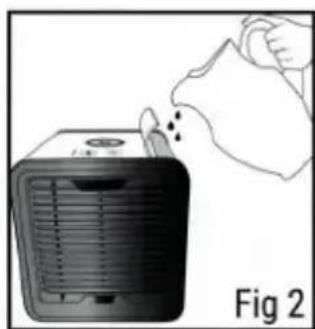
natural_image
Illustration of a hand removing or removing a small device into a container, labeled Fig 2 (no text or symbols on the device itself)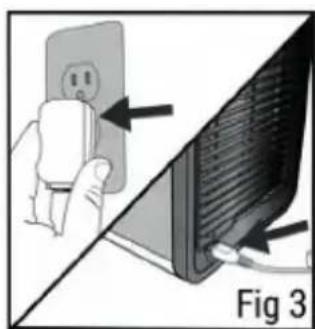
natural_image
Diagram showing a hand inserting a power outlet into a computer monitor, with no visible text or symbols.natural_image
Illustration of a handheld electronic device with a button and indicator lights (no text or symbols)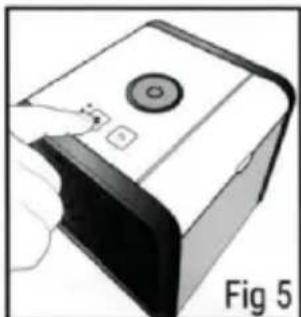
natural_image
Illustration of a device with a circular button and two buttons, labeled Fig 5 (no text or symbols on the device itself)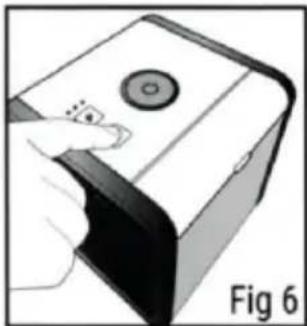
natural_image
Illustration of a hand interacting with a device labeled Fig 6 (no text or symbols on the device itself)natural_image
Diagram showing a hand inserting a component into a device labeled Fig 7 (no text or symbols on the diagram itself)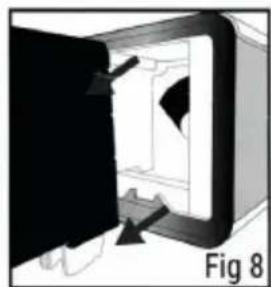
natural_image
Diagram of a door opening with arrows indicating direction, labeled Fig 8 (no text or symbols on the diagram itself)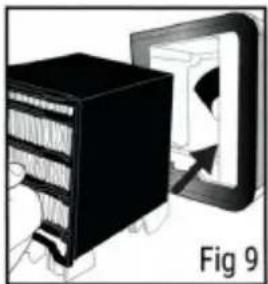
natural_image
Illustration of a server rack with an arrow pointing to a device (no text or symbols)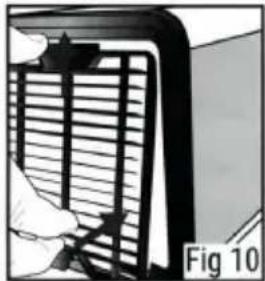
natural_image
Diagram of a mechanical component with a vertical bar and base, labeled Fig 10 (no text or symbols on the diagram itself)ETICHETTA DATI:

BEFORE USE PLEASE READ CAREFULLY THE FOLLOWING ISTRUCTION MANUAL AND KEEP IT FOR FUTURE REFERENCES.
Before using the appliance, carefully read instruction manual and in particular safety warnings and comply with them. Keep this manual for the entire life of the device for reference.
If safety instructions are not followed it can cause incidents and the warranty will be cancelled, and the manufacturer will be declined from any responsibility.
WARNINGS
- The packing materials (plastic bags, cartons, polyester Etc.) should not be left at the reach of children since they are potential sources of danger and must be disposed according to current laws.
- Before use, be sure USB cable is not damage. If the cable is damaged, replace it with an equivalent one.
- The device must be used only for the main it has been designed; it is to say home use air cooler. Any other use is considered non-compliant and therefore dangerous.
- This device can be used by children over the age of 8 and by people with reduced physical sensorial, mental capabilities or with luck of experience or knowledge if under supervision or if they have been given use instructions and if they understand the risks involved. Cleaning operations and maintenance cannot be done by children, unless they over the age of eight and under supervision. Keep the device and the cable out of the reach of children under 8 years old.
- Be sure children do not play with the device.
- Remove the USB cable from USB port when the device is OFF.
- Always be sure the USB cable is completely inserted in the USB port before turning the device ON.
- Place the product only on plane and stable surfaces, avoid inclined surfaces.
- Do not use the device at open air or next to bath tubes, pools, showers etc.
- Water level inside the tank should never be over the board of the tank itself. Be
sure not to add water while the device is ON. Pour water in the tank or remove water from the tank when the product is OFF and disconnected from USB port.
- Do not insert foreign objects inside the device. Do not insert fingers or other object in the grill to avoid mechanical risk during use. Do not block air inlets or outlets.
- Do not add chemical or metallic products inside the water tank. Those components can cause damages to the product and compromise the correct use.
- Elders and children should avoid prolonged exposure to the direct flow of the device.
- Do not let the device exposed to direct sun light for a long period of time.
- Do not use aggressive detergents to clean the product
- Do not let the device and/or the cable in contact with heated surfaces.
- This device should be used only for the aim it has been designed.
- Avoid to let the devise drop
- If there should be problems with device contact the authorized customer care centre. Do not try to repair the product
- Do not use the device if it has fallen or if there are visible signs of damage or loss. Avoid impacts or falls.
- Use the device in a well aired place. During use, the device should be positioned at least 20 cm far from walls, in order to guarantee the correct functioning of air sockets. The device should not be placed under or over a tent or similar. Do not cover the device with blankets or similar during use.
- Do not place the USB cable under carpets, fabrics or similar. Keep out of transition areas or where there is falling or obstacle risks.
- Do not place objects on the device.
- Switch off the device before removing USB cable from USB port.
- Do not move the cooler when the tank is full of water.
- Use clean water or distilled water to fill in the water tank.
- The product works better in no smog and no polluted environments. The presence of dust particles or dirt reduces product lifetime.
- It is suggested the use in dried environments, if the device is used in a damp environment, pay attention to not let water be in contact with the device.
- In case of loss or outlet of water, switch off the device and disconnect from USB port and let dry for at least 24 hours before use it again.
- Do not place the cooler under direct sunlight for prolonged time.
- Do not place the cooler next to fire or hot sources.
- In case the device is not used for a prolonged time, empty the tank, switch on the device and set maximum speed for at least 4 hours. This procedure allows to dry the filter and inside parts of the device.
- Always use the USB original cable supplied with the product.
- Do not touch the cable or the product connected to the USB port with damp hands.
- Always disconnect the cooler from USB cable for cleaning and maintenance operation, for filter replacement or to move the cooler.
- Do not turn upside down the device
- Do not submerge the cooler in water or other liquids.
PRODUCT DESCRIPTION
USE INSTRUCTIONS
- Place the cooler on a plane and stable surface for example a table, writing desk or shelf. It is suggested a raised surface like a table, writing desk or shelf to obtain a better performance of the product.
- Let the filter absorb water for at list 3 minutes before using the product. In this way it is possible to obtain faster a cool air flow.
- The cooler works continuatively for about 8 hours with a filled water tank and a low-level speed. Even with empty tank, the cooler keeps on cooling air for a few minutes, until the filter will be damp.
HOW TO USE
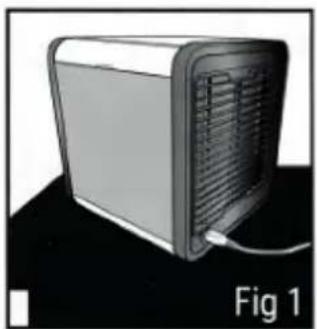
- Place the product on a flat and stable surface (see pic 1)
- Open the water tank compartment and fill it in water (see pic 2). Use a measuring cup or a tiny jug.
- Insert the USB cable on the back of the device and the USB plug in the USB port (for example of a computer)
natural_image
3D rendering of a server unit with ventilation slots and a cable, labeled Fig 1 (no text or symbols on the device itself)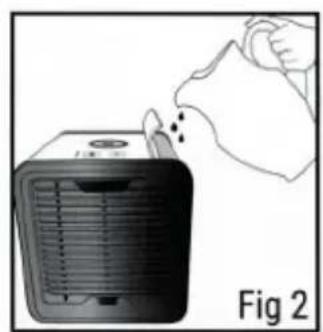
natural_image
Illustration of a hand removing or removing a heater into a cooler (no text or symbols)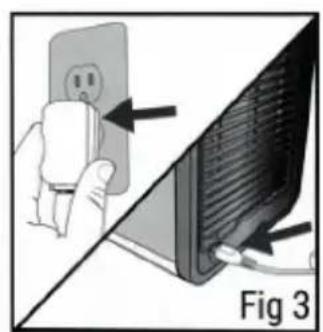
natural_image
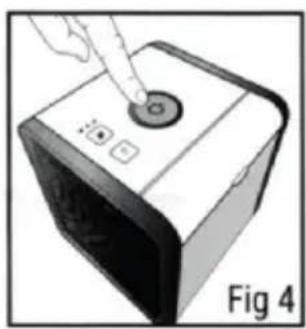
Diagram showing a hand holding an electrical outlet connected to a computer monitor, with arrows pointing to the screen (no text or symbols present)- Press ON/OFF bottom to switch on the cooler (see pic 4)
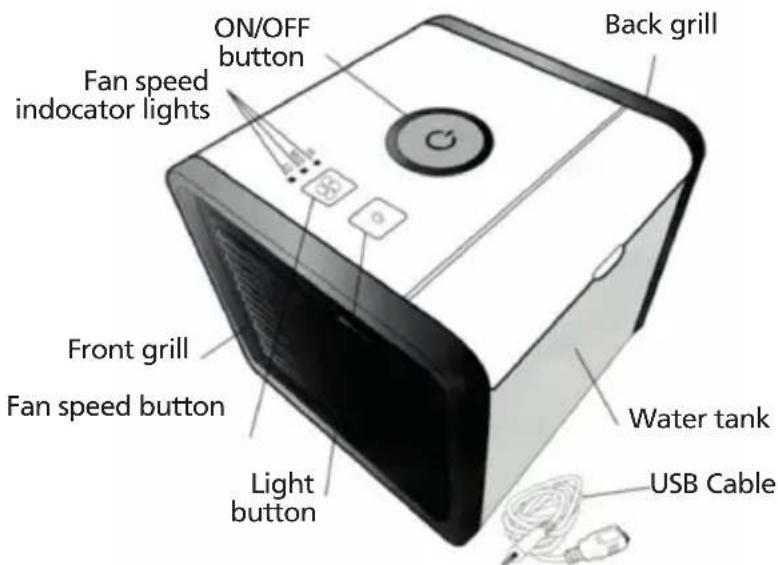
- Set ventilation speed pushing the bottom ✝, selecting LOW, MEDIUM or HIGH. The warning lights next to the bottom indicate the selected speed level.
-
Select the light colour, pushing 🎨 button. It is possible to select a fixed colour or a cyclic mode that show a sequence of colours. (see pic 6)
-
The available colours are: blue, red, white, teal, purple, yellow, green, cyclic mode.
- To switch off the device push ON/OFF bottom again.
WARNING: it is suggested to make the cooler work at the higher speed for at least 5 minutes before switching off the device to let it dry.
natural_image
Illustration of a hand pressing a button on a device (no text or symbols visible)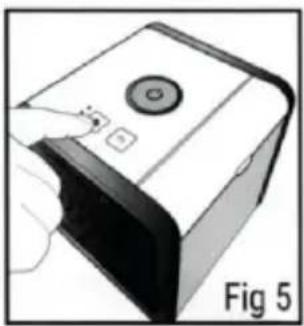
natural_image
Illustration of a device with a button and indicator finger, labeled Fig 5 (no text or symbols on the device itself)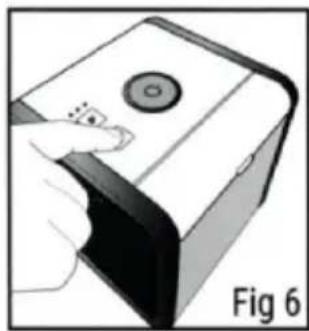
natural_image
Illustration of a hand interacting with a device labeled Fig 6 (no text or symbols on the device itself)CLEANING AND MAINTENANCE
Before any maintenance or cleaning operation switch off the device, pull off the plug from the socket or disconnect electric source.
Never clean the components of the product with flammable liquids. Steams could cause fire or explosions. It is suggested to clean water tank at least once a week with a damp cloth and dry with a dried and soft cloth. Clean the outside of the device with a damp cloth a part from the setting panel and dry with a soft cloth. Do not use abrasive detergents. Be sure the device has been accurately dried before proceeding with normal use. Clean the control panel with a dried and soft cloth. Collected dust in the filter can obstacle a correct air flow. It is suggested to substitute the filter every 6 months or when the cooler does not work properly. To buy the filter consult customer care service available for Italy (0712133550) or the online shop website www.inshopping.it
FILTER REPLACEMENT
- Disconnect the cooler from USB port
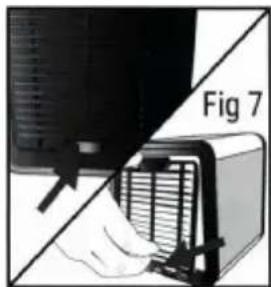
- Push up the releasing button in the front grill, lift and remove the grill (see pic 7)
- Take the filter and let it flow gently out of the cooler (see pic 8)
- Place a new filter inside (see pic 9)
- Insert the higher part of the grill in the cooler and fix it pushing and releasing release bottom (see pic 10)
natural_image
Diagram showing a hand holding a device with a grid array, labeled 'Fig 7' (no text or symbols on the diagram itself)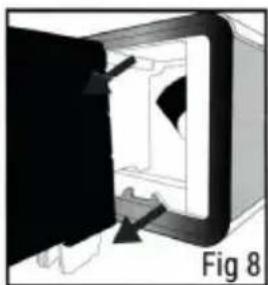
natural_image
Diagram of a door opening with arrows indicating direction, labeled Fig 8 (no text or symbols on the diagram itself)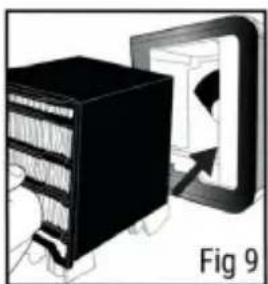
natural_image
Illustration of a server rack connected to a computer monitor, labeled Fig 9 (no text or symbols on the diagram itself)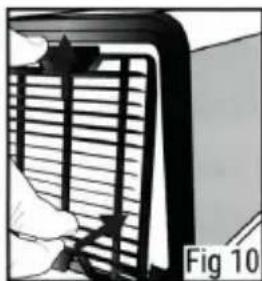
natural_image
Illustration of a person using a laptop to interact with a wall-mounted screen (no text or symbols visible)Innoliving Spa
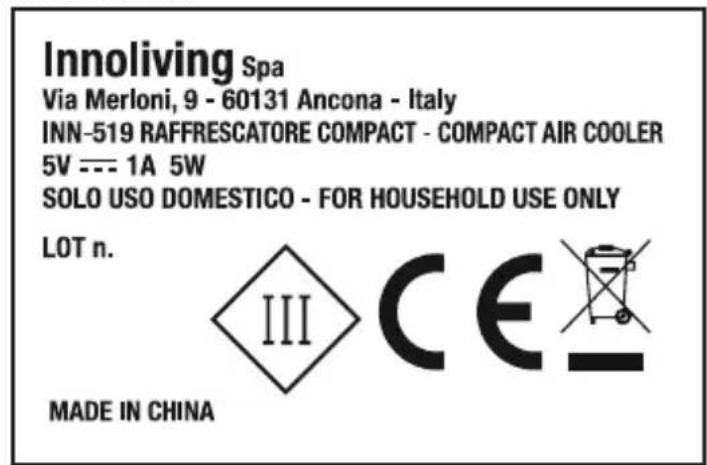
Via Merloni, 9 - 60131 Ancona - Italy INN-519 RAFFRESCATORE COMPACT - COMPACT AIR COOLER 5V --- 1A 5W SOLO USO DOMESTICO - FOR HOUSEHOLD USE ONLY
LOT n.
MADE IN CHINA
RATING LABEL:

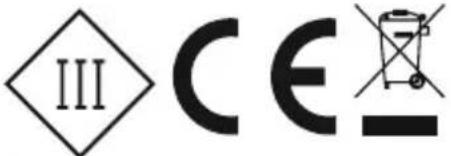
This product complies with all the applicable European regulations
Class III insulated electrical appliance
INFORMATION TO USERS according to Legislative Decree No. 49 of March 14, 2014 "2012/19/UE Implementation of the Directive on Waste Electrical and Electronic Equipment (WEEE)"
The crossed-out dustbin symbol indicates that the product at the end of its life must be collected separately from other waste. The user should, therefore, take the equipment with the essential components at the end of its useful life to the separate collection center of electronic and electrical waste, or return it to the retailer when purchasing new equipment of equivalent type, in ratio of one to one, or one to zero for devices with larger side less than 25 CM. The separate collection for the decommissioned equipment for recycling, treatment and environmentally compatible disposal contributes to avoid possible negative effects on the environment and human health and promotes recycling of the materials. Improper disposal of the product by the user entails the application of administrative sanctions according to Legislative Decree No. 49 of 14 March 2014.
innoliving easy tech, easy life
Innoliving Spa
Via Merloni, 9
60131 Ancona Italy
Tel 0712133550
www.innoliving.it
MADE IN CHINA
CE
- innoliving easy tech, easy life
- RAFFRESCATORE COMPACT
- PRIMA DELL'USO LEGGERE ATTENTAMENTE IL SEGUENTE MANUALE DI ISTRUZIONI E CONSERVARLO PER FUTURE CONSULTAZIONI.
- ETICHETTA DATI:
- BEFORE USE PLEASE READ CAREFULLY THE FOLLOWING ISTRUCTION MANUAL AND KEEP IT FOR FUTURE REFERENCES.
- WARNINGS
- PRODUCT DESCRIPTION
- USE INSTRUCTIONS
- HOW TO USE
- CLEANING AND MAINTENANCE
- FILTER REPLACEMENT
- Innoliving Spa
Brand : Innoliving
Model : INN-519
Category : Air Conditioning