
JFA03 - Measurement HAGER - Free user manual and instructions
Find the device manual for free JFA03 HAGER in PDF.


| Product Type | Digital Multimeter |
| Brand | Hager |
| Model | JFA03 |
| Dimensions | Approx. 180 x 80 x 40 mm |
| Weight | Approx. 300 g (including battery) |
| Power Supply | 9V battery (6F22 or equivalent) |
| DC Voltage Range | 200 mV to 1000 V (with manual/auto ranging) |
| AC Voltage Range | 200 mV to 750 V |
| DC Current Range | 200 µA to 10 A |
| Resistance Range | 200 Ω to 200 MΩ |
| Continuity Test | Audible beep for resistance < 50 Ω |
| Diode Test | Yes |
| Display | LCD, 3 1/2 digits (2000 counts) |
| Safety Rating | CAT II 1000V / CAT III 600V |
| Operating Temperature | 0°C to 40°C |
| Storage Temperature | -10°C to 50°C |
| Maintenance | Wipe with a dry cloth; replace battery when low battery indicator appears |
| Safety Precautions | Do not exceed rated voltage/current; use proper probe tips; remove test leads before opening case |
| Spare Parts | Test lead set, 9V battery |
| Reparability | Fuse (F 500mA/250V) replaceable; no user-serviceable parts inside except battery and fuse |
| General Information | Designed for electrical measurements in household and light industrial applications |
Frequently Asked Questions - JFA03 HAGER
User questions about JFA03 HAGER
0 question about this device. Answer the ones you know or ask your own.
Ask a new question about this device
Download the instructions for your Measurement in PDF format for free! Find your manual JFA03 - HAGER and take your electronic device back in hand. On this page are published all the documents necessary for the use of your device. JFA03 by HAGER.
USER MANUAL JFA03 HAGER
| Accuracy 0.4% | |
| Burden <2VA per channel | |
| Mounting DIN rail 35mm | |
| Operating Temperature | -10°C...+45°C |
| Storage Temperature | -25°C...+70°C |
SAFETY PRECAUTIONS

Safety related notification, symbols and instructions that appear in this operating manual or on the equipment must be strictly followed to ensure the safety of personnel as well as the instrument.
- If the equipment is not used in a manner specified by the manufacturer it may impair the protection provided by the equipment.
- Do not use the equipment if there is any mechanical damage
- Do not exceed the device’s maximum limits of rating
- No repairs, maintenance or adjustments are possible
- Read complete instruction prior to installation or operation of the unit
- The equipment in its installed state must not come into close proximity to any heating sources, oils, steam, caustic vapours or other unwanted process by-products
- Do not use in hazardous or classified location where explosion or other dangers can be triggered by the device
INSTALLATION

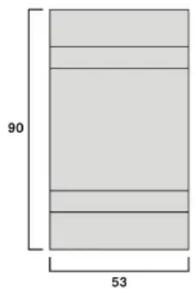
bar_stacked
| Segment | Value | |---|---| | Top Left | 90 | | Bottom Left | 53 | | Bottom Right | 53 | The label '90' is positioned above the bottom segment of the bar, indicating it represents the total length of the top segment. The label '53' is below the bottom segment of the bar.
WIRING GUIDELINES

Risk of electric shock!
Only to be installed by a competent person.
- Hager JFA 03 shall only be used with meters and RJ45 cables references from Hager
- To prevent the risk of electrocution, always isolate and lock out the power supply to the equipment prior to undertaking any work
- Always confirm absence of supply prior to starting work using appropriate voltage detection equipment
- Wiring shall be done strictly according to the terminal layout. Confirm that all connections are correct before energizing the equipment

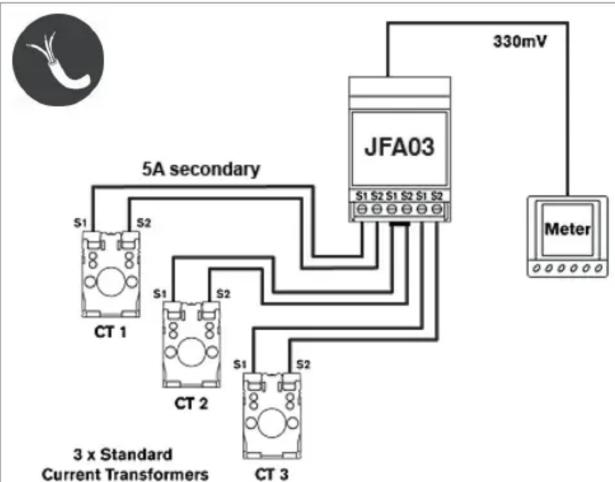
flowchart
graph TD
    A["3 x Standard Current Transformers"] -->|S1 S2| B["JFA03"]
    A -->|S1 S2| C["CT 1"]
    A -->|S1 S2| D["CT 2"]
    A -->|S1 S2| E["CT 3"]
    B --> F["330mV"]
    E --> F
    G["Meter"] --> F

Brand : HAGER
Model : JFA03
Category : Measurement