
MM81 - Blender Qtx - Free user manual and instructions
Find the device manual for free MM81 Qtx in PDF.


| Product Type | Mini Audio Mixer |
| Model | MM81 |
| Brand | QTX |
| Input Impedance | 3.3k Ohms |
| Inputs | 8 x 6.3mm jack (microphone level) |
| Outputs | 1 x 6.3mm jack (mono) |
| Weight | 621g (without battery) |
| Dimensions | 150 x 108 x 64mm |
| Power Supply | 9V battery (PP3 included) or optional 12Vdc 200mA adaptor |
| Output Level | +4dB nominal (+8dB max) |
| Output Impedance | 600 Ohms |
| Controls | Master volume, 8 channel volumes, power switch |
| Indicators | Power LED (green), Clip LED (red) |
| Connectors | 6.3mm jack (all inputs and output) |
| Battery Life | Varies with usage; replace when low |
| Safety Features | Polarity protection on DC input; clip indicator prevents distortion |
| Maintenance | Clean with dry cloth; avoid moisture; remove battery if unused |
| Warranty | Damage from misuse not covered |
| Disposal | Electronic waste – recycle per local guidelines |
Frequently Asked Questions - MM81 Qtx
User questions about MM81 Qtx
0 question about this device. Answer the ones you know or ask your own.
Ask a new question about this device
Download the instructions for your Blender in PDF format for free! Find your manual MM81 - Qtx and take your electronic device back in hand. On this page are published all the documents necessary for the use of your device. MM81 by Qtx.
USER MANUAL MM81 Qtx
Item ref: MM41 170.202UK
MM81 170.203UK
LM41 170.204UK
LM82 170.205UK
Mini Mixers
User Manual
Version 1.1

Caution: Please read this manual carefully before operating
Damage caused by misuse is not covered by the warranty
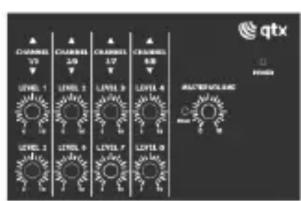
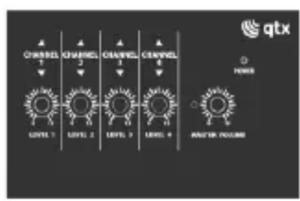
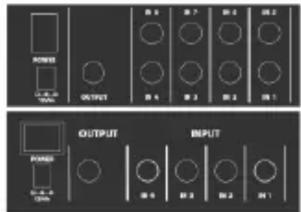
Thank you for choosing the QTX mini mixer series as part of your audio system. These convenient, compact units are designed to provide a useful solution for combining several mic or line signals into a single sound system.
Please read and keep this guide to help get the best results and avoid damage to your mini mixer.
The QTX mini mixers can be powered by a 9V battery or optional 12Vdc power adaptor.
To insert a 9V PP3 battery, unscrew the cover on the base of the mixer, connect the battery clip and replace cover.
Alternatively, connect a 12Vdc 200mA (min) adaptor to the rear DC input, ensuring the correct polarity.
With the power switched off at the rear and all volume controls turned down, connect all inputs via 6.3mm jack.
MM41 and MM81 models have inputs to match microphone level. LM41 and LM82 models require line level inputs.
All inputs will be mixed to a single output except the LM82 mixer, which feeds 4 inputs to each of 2 outs for stereo.
Connect the output jack(s) to the sound system or recording device.
Switch the power on and turn up Master Volume part way. The power LED will illuminate.
Increase each input channel volume in turn, checking the level through the connected equipment.
When all inputs are balanced as required, adjust the Master Volume to the required level.
Ensure that the red LED beside the Master Volume control does not light other than momentarily.
If this LED stays on longer than this, reduce the Master volume.
Specifications
| Model | MM41 | MM81 | LM41 | LM82 |
| Input impedance | 3.3k Ohms | 3.3k Ohms | 20k Ohms | 20k Ohms |
| Inputs | 4 x 6.3mm jack | 8 x 6.3mm jack | 4 x 6.3mm jack | 8 x 6.3mm jack |
| Outputs | 1 x 6.3mm jack | 1 x 6.3mm jack | 1 x 6.3mm jack | 2 x 6.3mm jack |
| Weight | 533g (no battery) | 621g (no battery) | 533g (no battery) | 621g (no battery) |
| Battery | 9V battery (PP3 supplied) | |||
| Power adaptor | 12Vdc, 200mA (optional) | |||
| Output level | +4dB (+8dB max.) | |||
| Output impedance | 600 Ohms | |||
| Dimensions | 150 x 108 x 64mm | |||


Disposal: The “Crossed Wheelie Bin” symbol on the product means that the product is classed as Electrical or Electronic equipment and should not be disposed with other household or commercial waste at the end of its useful life. The goods must be disposed of according to your local council guidelines.
Errors and omissions excepted. Copyright© 2021. AVSL Group Ltd.
Unit 2-4 Bridgewater Park, Taylor Rd. Manchester. M41 7JQ
AVSL (EUROPE) Ltd, Unit 3D North Point House, North Point Business Park, New Mallow Road, Cork, Ireland.


Brand : Qtx
Model : MM81
Category : Blender