
GD-115BT - Hi-Fi System GEMINI - Free user manual and instructions
Find the device manual for free GD-115BT GEMINI in PDF.


| Product Type | 15-inch 2-Way Powered Speaker System |
| Model | GD-115BT |
| Brand | Gemini |
| Power Supply | AC mains with voltage selector (115V/230V) |
| Bluetooth | Yes, with BT Pair and BT Link for stereo pairing |
| Audio Channels | 3 (Channel 1, 2, 3 with independent volume controls) |
| Microphone Inputs | Two combo XLR/1/4" TRS inputs with Mic/Line switch |
| Aux Inputs | 1/8" TRS and RCA stereo inputs |
| Mix Output | Balanced XLR output |
| Equalizer | Bass and Treble controls, ±12dB range |
| Master Volume | Yes |
| Clip Indicator | LED clip indicator |
| Cabinet Material | Wood composite with metal grille |
| Color | Black |
| Cooling | Convection |
| Operating Environment | Temperate climate, indoor use only |
| Certifications | FCC Part 15, CE |
| Warranty | 1-year limited |
| Included Accessories | Power cord, user manual |
| Cleaning | Damp cloth only, no solvents |
| Service | Authorized service only |
Frequently Asked Questions - GD-115BT GEMINI
User questions about GD-115BT GEMINI
0 question about this device. Answer the ones you know or ask your own.
Ask a new question about this device
Download the instructions for your Hi-Fi System in PDF format for free! Find your manual GD-115BT - GEMINI and take your electronic device back in hand. On this page are published all the documents necessary for the use of your device. GD-115BT by GEMINI.
USER MANUAL GD-115BT GEMINI
natural_image
Black and red portable device with blue circular lens and 'gemini' branding (no readable text or symbols beyond branding)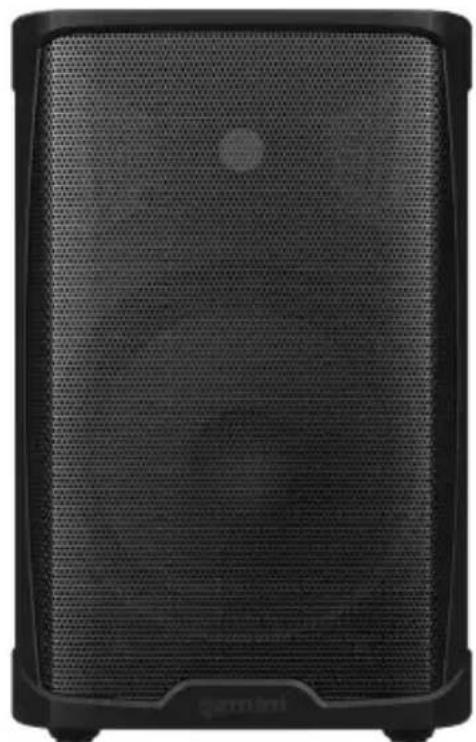
natural_image
Close-up of a black electronic device with mesh grille and front-mounted buttons (no visible text or symbols)GD-L115BT GD-115BT
| 2 | gemini® GD Series |
CONTENTS
Product Introduction ....4
Precautions....5
GD-115BT Features & Back Panel....6
GD-L115BT Features & Back Panel....7
Bluetooth and Light system operation 8
Warranty information 9
Legality and Safety.... 10
Declaration of Conformity.... 11
Spanish Manual....12
| 4 | gemini ^ GD Series |
| IntroductionThank you for purchasing our GD Series Complete High-Power Speaker System. With the proper care & maintenance, your unit will provide years of reliable, uninterrupted service. The GD Series is backed by a 1-year limited warranty*.Preparing For First UsePlease ensure that you find these accessories included with your GD Series speaker:(1) Speaker(1) Power Cord(1) Operating InstructionsCaution(i) All operating instructions should be read before using this equipment.(ii) To reduce the risk of electrical shock, do not open the unit. There are no user replaceable parts inside.Please refer servicing to a qualified GEMINI service technician. Do not attempt to return this equipment to your dealer.(iii) Do not expose this unit to direct sunlight or to a heat source such as a radiator or stove.(iv) This unit should be cleaned only with a damp cloth. Avoid solvents or other cleaning detergents.(v) When moving this equipment, it should be placed in its original carton and packaging. This will reduce the risk of damage during transit.(vi) Do not expose this unit to water or heat.(vii) Do not use cleaning products or lubricants on the controls or switches. | |
Precautions
Please read carefully before proceeding
Always follow the basic precautions listed below to avoid the possibility of serious injury or even death from electrical shock, short-circuiting, damages, fire, or other hazards.
- Read Instructions: All the safety and operating instructions should be read before the product is operated.
- Retain Instructions: The safety and operating instructions should be retained for future reference. All the safety and operating instructions should be read before the product is operated.
- Heed Warnings: All warnings on the product and in the operating instructions should be adhered to.
- Follow Instructions: All operating and use instructions should be followed.
- Cleaning: The product should be cleaned only with a polishing cloth or a soft dry cloth. Never clean with furniture wax, benzene, insecticides or other volatile liquids since they may corrode the cabinet.
- Water And Moisture: Do not use this product near water, for example, near a bathtub, wash bowl, kitchen sink, or Laundry tub; in a wet basement; or near a swimming pool; and the like.
- Do Not Open: Do not open the device or attempt to disassemble the internal parts or modify them in any way. The device contains no user-serviceable parts. If it should appear to be malfunctioning, discontinue use immediately and have it inspected by qualified GEMINI service personnel.
- Replacement Parts: When replacement parts are required, be sure the service technician has used replacement parts specified by the manufacturer or have the same characteristics as the original part. Unauthorized substitutions may result in fire, electric shock, or other hazards.
- Location: If you use a stand, check the stand's specifications and make sure that it is sturdy enough to support the weight of the speaker. You may need to limit the number of people around the placed stand, to avoid toppling the device or causing damage to the internal components. Also, be sure to keep the following cautions.
- Use the speaker stands with their legs fully opened.
- Mount only one speaker on each speaker stand.
– Tighten fastening screws securely.
- Remove the speakers from the stands before moving the stands or adjusting their height.
- Add weight such as sand bags around the stand legs to prevent them from falling over.
- Use the stand at a maximum height of 140cm (55").
- If you use the socket of a subwoofer to allow mounting of a satellite speaker, use a pole 100cm max. with an outer diameter of 35mm (1 - 3 / 8^m) .
- When transporting the device, always use two or more people.
- Before moving the device, remove all connected cables.
- Do not use the speaker's handles for suspended installation. Doing so can result in damage or injury.
- Do not expose the device to excessive dust or vibrations, or extreme cold or heat (such as in direct sunlight, near a heater) to prevent the possibility of panel disfiguration or damage to the internal components.
- Do not place the device in an unstable position where it may accidentally fall over.
- Rigging Safety: The CEMINI Rigging System's provisions for use require that it be installed in accordance with the following specifications. Before you begin installation:
- Ensure that points where you have chosen to mount (for example a chain hoist) on the stage roof or venues ceiling comply with accident prevention and that the safety standards authority has certified them for the full load.
- Inspect all components to ensure they are in good working order, taking care that all tracks, trusses and connecting components (cables, fittings) are undamaged.
- Use only the parts specified in this operating manual! Be sure to protect cabinets against rain and moisture when they are deployed outdoors
- If parts of the load-bearing equipment have been deformed, it is up to the manufacturer to determine if they are repairable.
The principle requirement for safe handling and trouble-free operation of this rigging system is a thorough understanding of fundamental operating safety and safety regulations. This operating manual contains the most vital instructions concerning the safe operation of the enclosures
- Connections: Before connecting the device to other devices, turn off the power for all devices. Before turning the power on or off for all devices, set all volume levels to minimum.
6
gemini®
GD Series
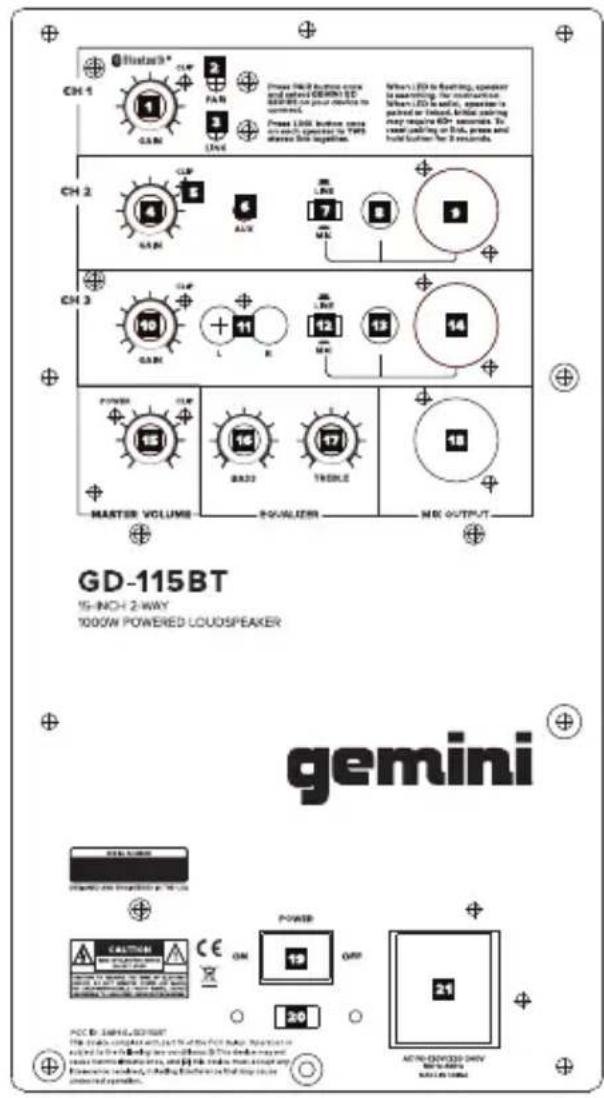
GD-115BT Features
-
Channel 1 volume : Adjusts the loudness of the source connected to CH1
-
BT Pair : Activates pairing mode to connect a phone, tablet, or other external media source.
-
BT Link: Allows user to link another GD series speaker via bluetooth to create a stereo pair.
-
Channel 2 volume : Adjusts the loudness of the source connected to CH2
-
Clip LED: Indicates audio clipping.
-
AUX input (TRS): Connect a digital media player, etc. to this 1/8" stereo input.
7/12.Mic/Line input switch: Allows user to choose the MIC or Line signal input.
8/13. Mic/Line input: Connect a microphone or line signal to this 1/4" TRS input
9/14: Mic/Line input: Connect a microphone or line signal to this XLR input
10: Channel 3 volume : Adjusts the loudness of the source connected to CH3
11: AUX Input (RCA): Connect a CD player, mixer, or other media source to this line level RCA input.
15: Master volume : Adjust the loudness of the whole system.
16: Bass EQ: Controls the bass(low) frequencies of speaker at a range between -12dB to +12dB.
17: Treble EQ: Controls the treble(high) frequencies of speaker at a range between -12dB to +12dB.
18: Mix Out: Use this XLR output to create a wired connection to another powered speaker, etc.
19: Power ON/OFF Switch: Turns unit on or off.
20: Voltage Switch : Allows user to change the AC voltage input.
21: AC Power Input: Mains power supply(supplied with speaker) plugs in here.
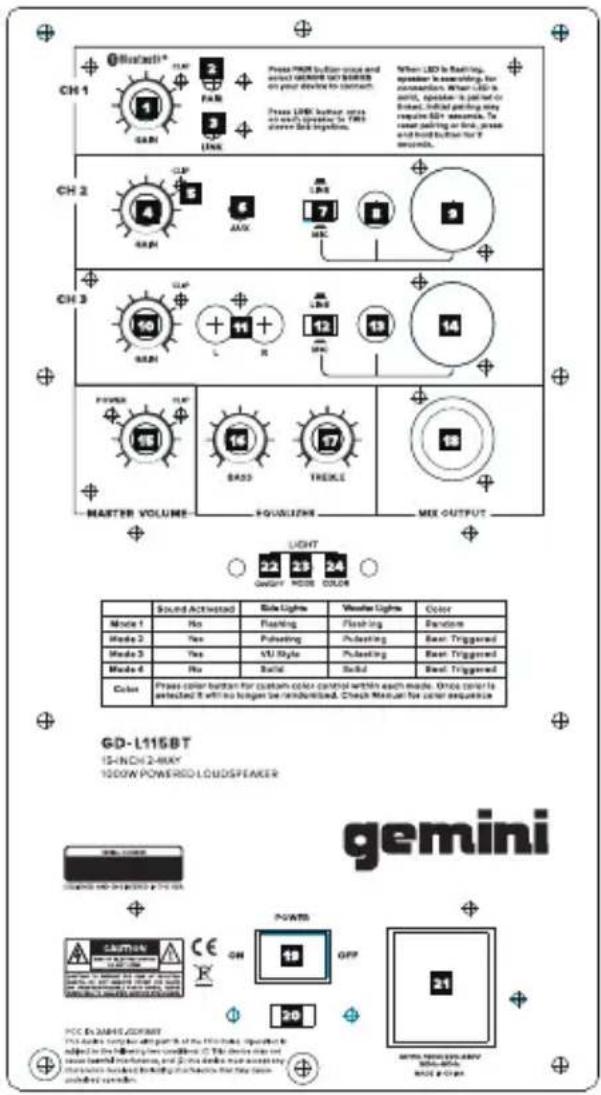
GD-L115BT Features
-
Channel 1 volume : Adjusts the loudness of the source connected to CH1
-
BT Pair : Activates pairing mode to connect a phone, tablet, or other external media source.
-
BT Link: Allows user to link another GD series speaker via bluetooth to create a stereo pair.
-
Channel 2 volume : Adjusts the loudness of the source connected to CH2
-
Clip LED: Indicates audio clipping.
-
AUX input (TRS): Connect a digital media player, etc. to this 1/8" stereo input.
7/12. Mic/Line input switch: Allows user to choose the MIC or Line signal input.
8/13. Mic/Line input: Connect a microphone or line signal to this 1/4" TRS input
9/14: Mic/Line input: Connect a microphone or line signal to this XLR input
10: Channel 3 volume : Adjusts the loudness of the source connected to CH3
11: AUX Input (RCA): Connect a CD player, mixer, or other media source to this line level RCA input.
15: Master volume : Adjust the loudness of the whole system.
16: Bass EQ: Controls the bass(low) frequencies of speaker at a range between -12dB to +12dB.
17: Treble EQ: Controls the treble(high) frequencies of speaker at a range between -12dB to +12dB.
18: Mix Out: Use this XLR output to create a wired connection to another powered speaker, etc.
19: Power ON/OFF Switch: Turns unit on or off.
20: Voltage Switch : Allows user to change the AC voltage input.
21: AC Power Input: Mains power supply(supplied with speaker) plugs in here.
22: Light Power ON/OFF button: Turns the light system on or off.
23: Light Mode: Changes the lighting modes for the front mounted speaker lighting.
24: Light Color: Cycles the color of the front mounted speaker lighting.
| 8 | gemini® | GD Series |
| BluetoothBT Pairing – Pairing your portable device to the GD Series is easy. First, make sure your device has Bluetooth turned on, and that the GD Series is connected to Mains power and turned on.On the back of the GD Series , you'll find a button labeled "BT PAIR" (4). Press this button and the speaker will enter search mode and begin looking for your portable device. You will hear a tone to indicate the GD Series is in pairing mode, and the BT Status LED (6) will be blinking.On your portable device, look for a new Bluetooth speaker named "Gemini GD Series" and connect to it. No PIN code will be necessary. Once connected, the GD Series will emit a high-pitched tone, and the BT Status LED will light solid blue to indicate there is now a device connected. You are now able to stream music to your GD Series.If you would like to disconnect your portable device from the GD Series , simply press the BT PAIR button again. You will hear a low-pitched tone, and the BT Status LED will blink slowly to tell you there are no portable devices connected.BT Linking – If you purchased 2 GD Series speakers, you can connect them wirelessly using Bluetooth to create a stereo pair. This is done via the BT LINK feature. Please note that BT LINK will ONLY work if you have 2 GD Series speakers.To link 2 GD Series speakers, first make sure that both speakers are connected to Mains power and turned on.On the speaker you intend to use as your "master" speaker, press the button labeled "BT LINK" (5). The BT Status LED (6) will begin blinking from blue to green, and you will begin to hear the speaker emit a low-pitched tone every 5 seconds. This is to tell you the speaker is in search mode.Now, go to the other speaker and press the BT LINK button. The 2 GD Series speakers will find each other and you'll hear a tone to indicate the speakers are now linked.If you accidentally hit the BT LINK button, don't worry. The GD Series will exit search mode automatically in 60 seconds. | LightingThe GD-L115BT has a spectacular, built-in light show on the front of the speaker, capable of dancing in time to the music with multi-colored patterns and flashes, turning any room into a nightclub.Mode – The Mode button (23) allows you to cycle through the following 4 lighting modes.Mode 1 -Flashing: This pattern animates the light Bar and woofer light flashes the speaker at 80 beats per minute.Mode 2 -Pulsating: It is a sound reactive mode that pulses the lighting brightness along with the music.Mode 3 -VU style: It is a sound reactive mode that pulses the light bars along with the music.Mode 4 -Solid: This mode turns the lights on solid.Color – The Color button (27) allows you to cycle the colors of the lights on the GD-L115BT through all the available options. There are usually 13 options for solid colors, plus a "random" mode that lights the ring and speaker in different colors.If you would like to return from a selected color to the default random mode, just press and hold the Color button for 2 seconds. | |
GD Series
gemini®
Warranty and Repair
All Gemini products are designed and manufactured to the highest standards in the industry. With proper care and maintenance, your product will provide years of reliable service.
Limited Warranty
a. GEMINI guarantees its products to be free from defects in materials and workmanship for one (1) year from the original purchase date.
b. This limited warranty does not cover damage or failure caused by abuse, misuse, abnormal use, faulty installation, improper maintenance or any repairs other than those provided by an authorized INNOVATIVE CONCEPTS AND DESIGN LLC.
c. There are no obligations of liability on the part of GEMINI for consequential damages arising out of or in connection with the use or performance of the product or other indirect damages with respect to loss of property, revenues, of profit, or costs of removal, installation, or reinstallation. All implied warranties for GEMINI, including implied warranties for fitness, are limited in duration to one (1) year from the original date of purchase, unless otherwise mandated by local statutes.
Return/Repair
a. Please call our helpful Customer Service Representatives at 732-346-0061, and they will be happy to give you a Return Authorization Number (RMA) and the address of an authorized service center closest to you.
b. After receiving an RMA, include a copy of the original sales receipt, with defective product and a description of the defect. Send by insured freight to: Gemini and use the address provided by your customer service representative. Your RMA must be written on the outside of the package, or processing will be delayed indefinitely!
c. Service covered under warranty will be paid for by Gemini and returned to you. For non-warranted products, Gemini will repair your unit after payment is received. Repair charges do not include return freight. Freight charges will be added to the repair charges.
d. On warranty service, you pay for shipping to Gemini, we pay for return shipping within the continental United States. Alaska, Hawaii, Puerto Rico, Canada, Bahamas, and the Virgin Islands will be charged for freight.
c. Please allow 2-3 weeks for return of your product. Under normal circumstances your product will spend no more than 10 working days at Gemini. We are not responsible for shipping times.
LEGALITY & SAFETY
The device is not intended for use by people (including children) with reduced physical, sensory or mental capacity. People who have not read the manual, unless they have received an explanation by someone responsible for their safety, should not use this unit. Children should be monitored to ensure that they do not play with the device. The device should always be readily accessible. The device should not be exposed to water. No objects filled with liquids, such as vases, shall be placed on the device. Always leave a minimum distance of 10 cm around the unit to ensure sufficient ventilation. Open flame sources, such as candles, should not be placed on top of the device. The device is intended for use only in a temperate climate. At full volume, prolonged listening may damage your hearing and cause temporary or permanent deafness, hearing drone, tinnitus, or hyperacusis. Listening at high volume is not recommended. One hour per day is not recommend either. Switch the device off where the use of the device is not allowed or where there is a risk of causing interference or danger - for examples: on an aircraft, or near medical equipment, fuel, chemicals or blasting sites. Check the current laws and regulations regarding the use of this device in the areas where you drive. Do not handle the device when driving. Concentrate fully on driving. All wireless devices are susceptible to interference which may affect their performance. All our devices conform to international/national standards and regulations, and we aim to limit user exposure to electromagnetic fields. These standards and regulations were adopted after the completion of extensive scientific research. This research established no link between the use of the mobile headset and any adverse effects on health if the device is used in accordance with standard practices. Only qualified people are authorized to install or repair this product. Only use batteries, chargers and other accessories which are compatible with this equipment. Do not connect incompatible products. T his equipment is not waterproof. Keep it dry. Keep your device in a safe place, out of the reach of young children. The device contains small parts which may present a choking hazard to kids.
DECLARATION OF CONFORMITY
Safety And EMC Compliance Specifications
EN 550322:2015 Electromagnetic compatibility for multimedia devices: Radiation requirements
EN 550355:2017 Electromagnetic compatibility of multimedia devices: Anti-interference requirements
EN 61000-4-2:2009 Electrostatic discharge reactance (Ambient E2-standard B, 4 kV contact, 8 kV air discharge)
EN 61000-4-3:2006+A1:2008+A2:2010 Radio-frequency ELECTROMAGNETIC interference (AMBIENT E2, standard A)
EN 61000-4-4:2012 Electrical rapid transient/burst immunity (standard B)
EN 61000-4-5:2014+A1:2017 Surge immunity (standard B)
EN 61000-4-6:2014 Immunity from conductive disturbance caused by radio frequency fields (Standard A)
EN 61000-4-11:2004+A1:2017 Voltage sags, short breaks, and voltage variations
EN 62368-1:2014+A11:2017 Audio and video, information technology and communications technology equipment: Security requirements
FCC Compliance Statement
This device complies with Part 15 of the FCC Rules.
The operation is subject to the following two conditions:
(1) This device may not cause harmful interference, and
(2) This device must accept any interference received, including interference that may cause undesired operation.
Note: This equipment has been tested and found to comply with the limits for a class B digital device, pursuant to Part 15 of the FCC Rules. These equipment generates uses and can radiate radio frequency energy and if not installed and used in accordance with the instructions, may cause harmful interference to radio communications. However, there is no guarantee that interference will not occur in a particular installation. If this equipment does cause interference to radio or television reception, which can be determined by turning the equipment off and then on, the user is encouraged to try to correct the interference by one or more of the following
measures:
- Reorient or relocate the receiving antenna.
- Increase the separation between the equipment and receiver.
- Connect the equipment to a different outlet so that the equipment and receiver are on different branch circuits.
- Consult the dealer or an experienced radio/TV technician for help.
FCC ID: 2AE6G-GD115BT
12
gemini®
GD Series
Introducción
GD-115BT
15-INCH 2-WAY



MCN-03W12D-240V BOMA BOMA MASC NOSKA
[Non-Text]
GD-L115BT características
If you experience problems with this unit, call 732-346-0081 for Gemini customer service. Do not attempt to return this equipment to your dealer.
Parts of the design of this product may be protected by worldwide patents. Information in this manual is subject to change without notice and does not represent a commitment on the part of the vendor. Gemini shall not be liable for any loss or damage whatsoever arising from the use of information or any error contained in this manual. No part of this manual may be reproduced, stored in a retrieval system or transmitted, in any form or by any means, electronic, recommended that all maintenance and service on this product is performed by Gemini or its authorized agents. Gemini will not accept liability for loss or damage caused by maintenance or repair performed by unauthorized personnel.
WWW.GEMINISOUND.COM
REV 2020-12/19
- CONTENTS
- Precautions
- Please read carefully before proceeding
- gemini®
- GD Series
- GD-115BT Features
- GD-L115BT Features
- Warranty and Repair
- Limited Warranty
- Return/Repair
- LEGALITY & SAFETY
- DECLARATION OF CONFORMITY
- Safety And EMC Compliance Specifications
- FCC Compliance Statement
- Introducción
- GD-L115BT características
Brand : GEMINI
Model : GD-115BT
Category : Hi-Fi System