
EPA2406FP - NAS ENGENIUS - Free user manual and instructions
Find the device manual for free EPA2406FP ENGENIUS in PDF.


| Product Type | Network Attached Storage (NAS) |
| Brand | EnGenius |
| Model | EPA2406FP |
| Form Factor | Rackmount 2U |
| Number of Bays | 6 |
| Compatible Drive Types | 3.5" SATA HDD / 2.5" SATA SSD |
| Processor | Intel Celeron J4125 Quad-Core 2.0 GHz (burst up to 2.7 GHz) |
| Memory | 4 GB DDR4 (expandable to 8 GB) |
| Storage Capacity | Up to 120 TB (6 x 20 TB HDD) |
| RAID Support | RAID 0, 1, 5, 6, 10, JBOD |
| Network Interfaces | 2 x 2.5 Gigabit Ethernet (RJ45) |
| USB Ports | 2 x USB 3.2 Gen1 (Type-A) |
| Power Supply | Internal 200W 80+ Bronze |
| Dimensions (W x D x H) | 440 x 360 x 88 mm (19" rackmount) |
| Weight | 11.5 kg (without drives) |
| Operating Temperature | 0°C to 40°C |
| Cooling | 2 x 92mm quiet fans with smart speed control |
| Max Concurrent Connections | Up to 512 |
| Supported File Systems | ext4, Btrfs |
| Key Features | Dual 2.5GbE, 6-bay, RAID, snapshot, cloud backup, AES-NI encryption |
| Management | Web-based UI, mobile app, SNMP, CLI |
| Supported Protocols | SMB, NFS, AFP, FTP, WebDAV, iSCSI |
| Backup Solutions | Local, remote rsync, cloud (Google Drive, S3) |
| Security | Encryption, firewall, antivirus, user access control |
| Maintenance | Drive hot-swap, firmware update, email alerts |
| Included Accessories | Power cord, Ethernet cable, rack mount ears, screws, quick start guide |
Frequently Asked Questions - EPA2406FP ENGENIUS
User questions about EPA2406FP ENGENIUS
0 question about this device. Answer the ones you know or ask your own.
Ask a new question about this device
Download the instructions for your NAS in PDF format for free! Find your manual EPA2406FP - ENGENIUS and take your electronic device back in hand. On this page are published all the documents necessary for the use of your device. EPA2406FP by ENGENIUS.
USER MANUAL EPA2406FP ENGENIUS
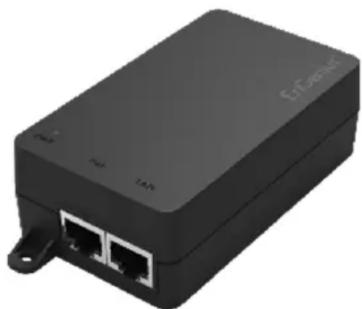
Powered by EnGenius Single Port Power-over-Ethernet (PoE) adapter solution is ideal for installers to deploy PoE devices scalable, and to reduce maintenance cost and labor fee.
The ideal solution could assist installers to solve the limitation in designing networks is the availability of power source. The EnGenius PoE adapter allows delivery of both data and power to compatible Access Points or device over a single Ethernet cable, allowing deployment of them exactly when users needed to provide the best wireless coverage and at much lower installation cost.
Besides built-in networking facility, EPA series is also equipped with short-circuit and overload protection to assure the securable and reliable connection for Access Points or other PoE devices. By sending direct current (DC) output, Ethernet terminals which need more power such as wireless LAN high power device, IP media center, and web camera are powered remotely.
natural_image
Black wireless router device with two Ethernet ports and a terminal block (no visible text or symbols)Features
Scalable deployment by powering devices from up to 100 meter (328 feet) remote-end
Significantly reduce maintenance cost and labor fee
Physical Interfaces
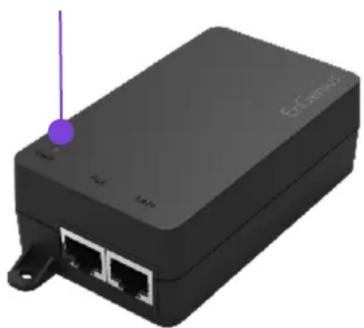
LED INDICATORS
natural_image
3D rendering of a black network device with two ports and a purple antenna (no visible text or symbols)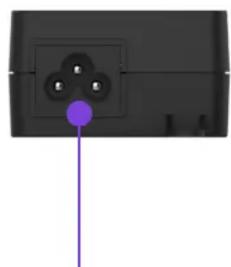
natural_image
Close-up of a black electrical outlet with three pins and a purple connector (no text or symbols visible)AC Connector
POE
Technical Specifications Single Port Power-over-Ethernet (PoE) Adapter
| Model | EPA2406FP | EPA2406GP | EPA2406GR | EPA2410GP |
| Power Specification | ||||
| Input Voltage 100V~240V AC | ||||
| Input Current | 0.4A @ 120V AC | 0.4A @ 120V AC | 0.4A @ 120V AC | 0.7A @ 120V AC |
| AC Input Frequency 50-60Hz | ||||
| Max. Output Power | 14.4W | 14.4W | 14.4W | 24W |
| Power Line | Pin4(Vdc+)&Pin5(Vdc+); Pin7(Vdc-)&Pin8(Vdc-) | |||
| Data Specifications | ||||
| Ethernet Ports Std. | 10/100 Mbit/s | 10/100/1000 Mbit/s | ||
| Data Lines | Pin1(Rx+)&Pin2(Rx-); Pin3(Tx+)&Pin6(Tx-) | |||
| Protection Level | ||||
| Surge Protection | L-L: 1KV; L-G: 2KV | L-L: 2KV; L-G: 4KV | ||
| ESD | Contact 4KV; Air: 8KV | |||
| Other Protection | Over-voltage and over-current protection; Short-circuit protection | |||
| Physical Interfaces & Indicators | ||||
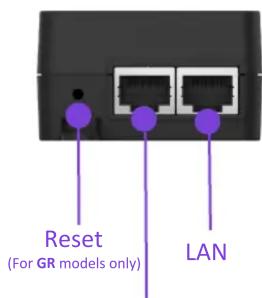
| Ethernet Ports | 1 x 10/100/1000 Data input; 1 x 10/100/1000 Data & power output | |||
| AC Connector | 1 x IEC 320C6 AC connector (US, EU, UK, AU) | |||
| LED Indicator | Power on : Green | |||
| Mechanical & Environment | ||||
| Dimension | 100mm x 58.4 mm x 33.4 mm (3.9" x 2.27" x 1.3") | |||
| Weight (Adapter Only) | 112g (3.95oz) | 112g (3.95oz) | 112g (3.95oz) | 144g (5.08 oz) |
| Temperatures | Storage: -20 ~ 70°C (-4 ~ 158 °F), Operation: 0 ~ 40°C (42 ~ 140 °F) | |||
| Compliance Regulatory | ||||
| CB | IEC 60950-1: 2005+A1+A2 | |||
| UL | UL 60950-1 2 | |||
| FCC | FCC Subpart15 B | |||
| CE | EN 55032:2012/AC:2013, EN 55024: 2010 | |||
| RCM | AS/NZS60950.1: 2011/Amdt 1: 2012 | |||
| Warranty | ||||
| 1 year hardware warranty | ||||
Technical Specifications Single Port Power-over-Ethernet (PoE) Adapter
| Model | EPA5006GP | EPA5006GR | EPA5006GAT | EPA5012GP |
| Power Specification | ||||
| Input Voltage 100V~240V AC | ||||
| Input Current | 0.8A @ 120V AC | 0.8A @ 120V AC | 0.8A @ 120V AC | 1.12A @ 120V AC |
| AC Input Frequency 50-60Hz | ||||
| Max. Output Power | 32.8W | 32.8W | 30W | 60W |
| Power Line | Pin4(Vdc+)&Pin5(Vdc+); Pin7(Vdc-)&Pin8(Vdc-) | |||
| Data Specifications | ||||
| Ethernet Ports Std. 10/100/1000 Mbit/s | ||||
| Data Lines | Pin1(Rx+)&Pin2(Rx-); Pin3(Tx+)&Pin6(Tx-) | |||
| Protection Level | ||||
| Surge Protection | L-L: 2KV; L-G: 4KV | |||
| ESD | Contact 4KV; Air: 8KV | |||
| Other Protection | Over-voltage and over-current protection; Short-circuit protection | |||
| Physical Interfaces & Indicators | ||||
| Ethernet Ports | 1 x 10/100/1000 Data input; 1 x 10/100/1000 Data & power output | |||
| AC Connector | 1 x IEC 320C6 AC connector (US, EU, UK, AU) | |||
| LED Indicator | Power on : Green | |||
| Mechanical & Environment | ||||
| Dimension | 100mm x 58.4 mm x 33.4 mm (3.9" x 2.27" x 1.3") | |||
| Weight (Adapter Only) | 144g (5.08 oz) | 144g (5.08 oz) | 154g (5.44 oz) | 186g (6.56oz) |
| Temperatures | Storage: -20 ~ 70°C (-4 ~ 158 °F ), Operation: 0 ~ 40°C (42 ~ 140 °F ) | |||
| Compliance Regulatory | ||||
| CB | IEC 60950-1: 2005+A1+A2 | |||
| UL | UL 60950-1 2nd | |||
| FCC | FCC Subpart15 B | |||
| CE | EN 55032:2012/AC:2013, EN 55024: 2010 | |||
| RCM | AS/NZS60950.1: 2011/Amdt 1: 2012 | |||
| Warranty | ||||
| 1 year hardware warranty | ||||
Compliant Models
| Model | EPA2406FP | EPA2406GP | EPA2406GR | EPA2410GP |
| Compliant AP List | ENS202(EXT)(v2) | ENS500-AC | ||
| ENS202(EXT) | ENS500EXT-AC | |||
| ENS500(EXT) | EnStation5-AC | |||
| ENH200(EXT) | ENS202(EXT) | ENS500-AC(EXT)(v2) | ||
| ENH202(v2) | ENS500(EXT) | EnStation5-AC(v2) | ENS620EXT | |
| ENH500(v2) | ENH200(EXT) | ENH500(v3) | ||
| EnStation5 | ENH202(v2) | |||
| ENH500(v2) | ||||
| EnStation5 |
| Model | EPA5006GP | EPA5006GR | EPA5006GAT | EPA5012GP |
| Compliant AP List | EAP1250 | EAP1250 | ||
| EAP1300 | EAP1300 | |||
| EAP1300(EXT) | EAP1300(EXT) | |||
| EAP1750H | EAP1750H | |||
| EAP2200 | EAP2200 | |||
| ECB1750 | ECB1750 | |||
| ENS1750 | ENS1750 | |||
| EnStationAC | EnStationAC | |||
| EWS330AP | EWS330AP | |||
| EWS355AP | EWS355AP | EWS860AP | ||
| EWS357AP | ENH1350EXT | EWS357AP | EWS870AP | |
| EWS360AP | ENStationAC(v2) | EWS360AP | EWS871AP | |
| EWS370AP | EWS370AP | ENH1750EXT | ||
| EWS371AP | EWS371AP | |||
| EWS377AP | EWS377AP | |||
| EWS385AP | EWS385AP | |||
| EWS511AP | EWS511AP | |||
| EWS550AP | EWS550AP | |||
| EWS660AP | EWS660AP | |||
| ECW120 | ECW120 | |||
| ECW220 | ECW220 | |||
| ECW230 | ECW230 |
HQ, Taiwan
www.engeniusnetworks.com
Costa Mesa, California, USA | (+1) 714 432 8668
www.engeniustech.com
Dubai, UAE | (+971) 4 357 5599
Singapore | (+65) 6227 1088
www.engeniustech.com.sg
Miami, USA | (+1) 305 887 7378
pg.engeniustech.com es.engeniustech.com
Eindhoven, Netherlands | (+31) 40 8200 888
www.engeniusnetworks.eu
EnGenius®
Features and specifications subject to change without notice. Trademarks and registered trademarks are the property of their respective owners. These limits are designed to provide reasonable protection against harmful interference in a residential installation. This equipment generates, uses, and can radiate radio frequency energy and, if not installed and used in accordance with the instructions, may cause harmful interference to radio communications. Operation of this equipment in a residential area is likely to cause harmful interference in which case the user will be required to correct the interference at his/her own expense. Prior to installing any surveillance equipment, it is your responsibility to ensure the installation is in compliance with local, state and federal video and audio surveillance and privacy laws.
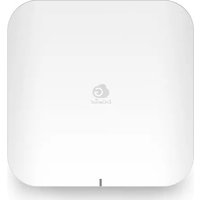
Brand : ENGENIUS
Model : EPA2406FP
Category : NAS