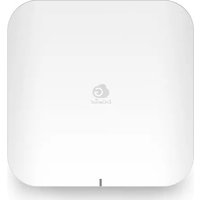
ECW536 - Network Equipment ENGENIUS - Free user manual and instructions
Find the device manual for free ECW536 ENGENIUS in PDF.


Pick your language and provide your email: we'll send you a specifically translated version.
| Product Type | Wireless Access Point |
| Model | ECW536 |
| Brand | EnGenius |
| Dimensions (W x D x H) | 180 mm x 180 mm x 35 mm |
| Weight | 0.5 kg |
| Power Supply | PoE (802.3af) or 12V DC |
| Wi-Fi Standards | 802.11a/b/g/n/ac/ax (Wi-Fi 6) |
| Frequency Bands | Dual-band 2.4 GHz & 5 GHz |
| Maximum Data Rate | Up to 1.8 Gbps (2.4 GHz: 600 Mbps, 5 GHz: 1.2 Gbps) |
| Ethernet Ports | 1x 10/100/1000 Mbps Gigabit Ethernet port |
| Antenna Type | Internal omnidirectional |
| Mounting | Wall or ceiling mount (bracket included) |
| Management | Web interface, SNMP, EnGenius Cloud |
| Security Features | WPA3, WPA2-Enterprise, MAC filtering, VLAN |
| Advanced Features | Mesh networking, VLAN tagging, QoS, load balancing |
| Operating Temperature | 0°C to 40°C |
| Humidity | 10% to 90% non-condensing |
| Certifications | FCC, CE, RoHS |
| Package Contents | Access point, mounting bracket, screws, quick start guide |
Frequently Asked Questions - ECW536 ENGENIUS
What is the EnGenius ECW536 and what is it used for?
The EnGenius ECW536 is a Wireless Access Point designed for indoor use. It provides high-speed Wi-Fi 6 connectivity for businesses and homes, supporting multiple devices with improved efficiency.
How do I set up the ECW536?
Connect the access point to a PoE switch or use the included power adapter. Access the web interface via its IP address (default: 192.168.1.1) or use the EnGenius Cloud app for initial configuration.
Can the ECW536 be used as a standalone router?
No, the ECW536 is an access point only. It requires a router or gateway to provide network routing and DHCP services.
What is the maximum coverage range of the ECW536?
Coverage depends on environment, but typically up to 200 m² (2,150 sq ft) in open spaces. Obstacles like walls reduce range.
Does the ECW536 support Power over Ethernet (PoE)?
Yes, it supports 802.3af PoE, allowing both data and power over a single Ethernet cable. Ensure your PoE switch provides sufficient power.
How can I reset the ECW536 to factory defaults?
Use a paperclip to press and hold the reset button on the device for about 10 seconds until the LED flashes. All settings will be restored to default.
What security protocols does the ECW536 support?
It supports WPA3, WPA2-Enterprise, and WPA2-PSK. You can also enable MAC address filtering and VLAN for enhanced security.
Can I create a mesh network with multiple ECW536 units?
Yes, the ECW536 supports mesh networking when used with other EnGenius devices. Enable mesh mode in the web interface or cloud app.
What is the warranty period for the ECW536?
EnGenius offers a limited lifetime warranty on hardware. Check with your retailer for specific terms.
How do I update the firmware on the ECW536?
In the web interface, go to Management > Firmware Upgrade. Upload the latest firmware from EnGenius's support page. You can also enable automatic updates via the cloud.
User questions about ECW536 ENGENIUS
0 question about this device. Answer the ones you know or ask your own.
Ask a new question about this device
No questions yet. Be the first to ask one.
Download the instructions for your Network Equipment in PDF format for free! Find your manual ECW536 - ENGENIUS and take your electronic device back in hand. On this page are published all the documents necessary for the use of your device. ECW536 by ENGENIUS.
USER MANUAL ECW536 ENGENIUS
Manual assistant
Powered by Anthropic
Waiting for your message
Product information
Brand : ENGENIUS
Model : ECW536
Category : Network Equipment