
One - CD Player Chord - Free user manual and instructions
Find the device manual for free One Chord in PDF.


| Product Type | CD Player |
| Brand | Chord |
| Model | One |
| Dimensions (W x H x D) | 430 x 100 x 300 mm (16.9 x 3.9 x 11.8 in) |
| Weight | Approx. 4.5 kg (9.9 lbs) |
| Power Supply | AC 120V/230V, 50/60Hz (auto-select) |
| Power Consumption | 15 W (standby < 0.5 W) |
| Disc Compatibility | CD, CD-R, CD-RW |
| Playback Functions | Play, Pause, Stop, Skip, Repeat (1/All/Off), Shuffle, Program |
| Audio Outputs | RCA (stereo), Optical digital (TOSLINK) |
| Frequency Response | 20 Hz - 20 kHz (±0.5 dB) |
| Signal-to-Noise Ratio | > 100 dB |
| Total Harmonic Distortion | < 0.002% |
| Remote Control | Infrared remote included |
| Display | Backlit LCD display |
| Disc Loading | Top-loading or slot-loading (typical: slot-loading) |
| Maintenance | Clean with soft dry cloth; use lens cleaner disc for laser |
| Safety Certifications | CE, FCC, RoHS |
| Spare Parts Availability | Remote control, power cord, optical cable (user-replaceable) |
| Repairability Index | Moderate; laser assembly and transport mechanism serviceable |
Frequently Asked Questions - One Chord
User questions about One Chord
0 question about this device. Answer the ones you know or ask your own.
Ask a new question about this device
Download the instructions for your CD Player in PDF format for free! Find your manual One - Chord and take your electronic device back in hand. On this page are published all the documents necessary for the use of your device. One by Chord.
USER MANUAL One Chord
Thank you for buying a Chord Electronics product.
Before you start to enjoy your CD player, please take a couple of minutes to read how to connect your audio equipment and loudspeakers and how to maximise your listening experience.
inventory
As well as your ONE and this user manual, you should also have received the following items.
- 'CD' remote control
- Mains cable
- Chord guarantee registration card
- Remote control manual
This unit complies with 21 CFR 1040.10 and 1040.11
when setting up
To ensure that your CD player works efficiently and safely, please pay particular attention to the following issues.
ventilation
Your Chord player should have at least 5cm of clear space all around it to ensure a free flow of air at all times. We do not recommend that you place ONE directly on a carpet.
mains lead and plug
All Chord equipment comes supplied with the correct mains lead and plug. This should be used at all times.
if you need to fit a plug for UK/Europe
Connect the blue wire to the neutral terminal
Connect the brown wire to the live terminal
Connect the yellow/green wire to the earth terminal
if you need to fit a plug for US/Canada
Connect the white wire to the neutral terminal
Connect the black wire to the live terminal
Connect the green to the earth terminal
earthing issues in Europe
In some European countries a hum may occur if your ONE is connected to mains sockets that do not have an earth. If this is the case please ensure that:
-
Your player is connected via a multi-way mains block, which contains an earth point at each socket outlet. This is to ensure that the chassis metalwork of each item is connected together.
-
We recommend that an earthing method for your building be implemented.
-
Use the connecting points on your Chord unit and connect to an available earth point.
Safety Warnings
It is important that your player is earthed at all times via its own mains lead. Failure to do this may be hazardous. The power supply components within the player are designed to operate at lethal voltages and energy levels. Circuit designs that embody these components conform to applicable safety requirements. Precautions must be taken to prevent accidental contact with power-line potentials. Do not connect grounded test equipment.
Caution: This product employs a laser that emits both visible and invisible radiation. Removal of the top cover or tampering with any of the enclosed electronics may result in exposure to hazardous levels of laser radiation that could cause eye damage. To prevent injury this product should be returned for qualified service to Chord Electronics Ltd.
There are no user serviceable parts within the ONE CD player. Unauthorised tampering or dismantling of this product will invalidate the warranty and could cause injury.
mains connection
The mains connector of ONE is at the back of the unit. Plug the female end (socket) of the mains cable into the power connector of the player, and the male end (plug) of the mains cable into mains wall socket or mains extension socket.

Mains Connector and Switch
powering up
Press the left-hand side of the power switch labelled 'I'. ONE will now power up.
If ONE has no disc loaded, the top panel display with read "NO DISC"; if a disc has been loaded then the number of tracks and length of the CD will be shown. Please allow a short time for ONE to read the disc's Table of Contents (TOC). During this time the display will indicate "-- ----"
powering down - long-term
- Press the STANDBY button on the remote control to put ONE into STANDBY.
- Press the right-hand side of the power switch labelled 'O'.
powering down - short-term
For everyday use there is no need to power ONE down completely.
Press the STANDBY button on the remote control to put ONE into its Standby mode.
connecting your equipment

Right RCA output

Left RCA output

S/DIF2 OUTPUT

Right XLR output

Left XLR output
ONE - rear panel connections
All the output connections of ONE are situated on the rear panel of the player.
Analogue outputs
ONE has both RCA-phono and balanced XLR analogue outputs, together with BNC digital S/DIF2 output.
Chord recommend the use of balanced analogue cables over RCA-phono wherever possible, as this allows improved signal-noise performance and immunity to noise pickup from outside the system.
Digital outputs
ONE uses a BNC connector with 75ohm impedance for digital audio. Although less common than RCA-phono digital connectors, BNC connectors exhibit consistent impedance behaviour and are essential for the correct transfer of digital audio data.
If your digital-analog converter only has RCA-phono coaxial digital inputs, it is worth having a cable made by a specialist manufacturer. Please avoid RCA-BNC adaptors as they will undoubtedly impair the sound quality. In all cases a correctly screened cable should be used.
using ONE with QBD76
ONE digital output
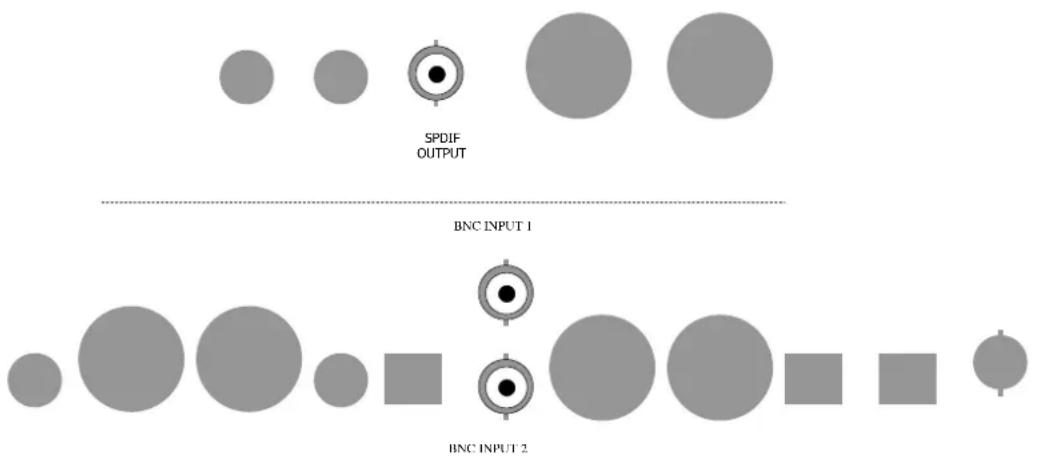
QBD76 dual data inputs
QBD76
Connect the S/DIF2 output from the ONE to either BNC INPUT on the QBD76.
If you have more than one source with coaxial output please ensure that the other source is switched OFF when listening to the ONE (and turn ONE off when listening to the other source).
We strongly advise that you use 75ohm hard-wired BNC-BNC cables and avoid BNC-RCA adaptors wherever possible, to avoid problems of impedance mismatch and signal reflections.
RAM buffer settings for QBD76
ONE has been designed as the ultimate reference CD source for the world's finest digital-analogue converters, such as our own QBD76. As such, ONE should be significantly less reliant on QBD76's RAM buffer than many designs; you may still find improved performance in your system when using the buffer. Please refer to the QBD76 manual for further details.
everyday use of your ONE
Loading and removing discs
Loading the disc
Firstly open the lid using the handle at the back of the player. Grab the handle firmly between forefinger and thumb, then push upwards.
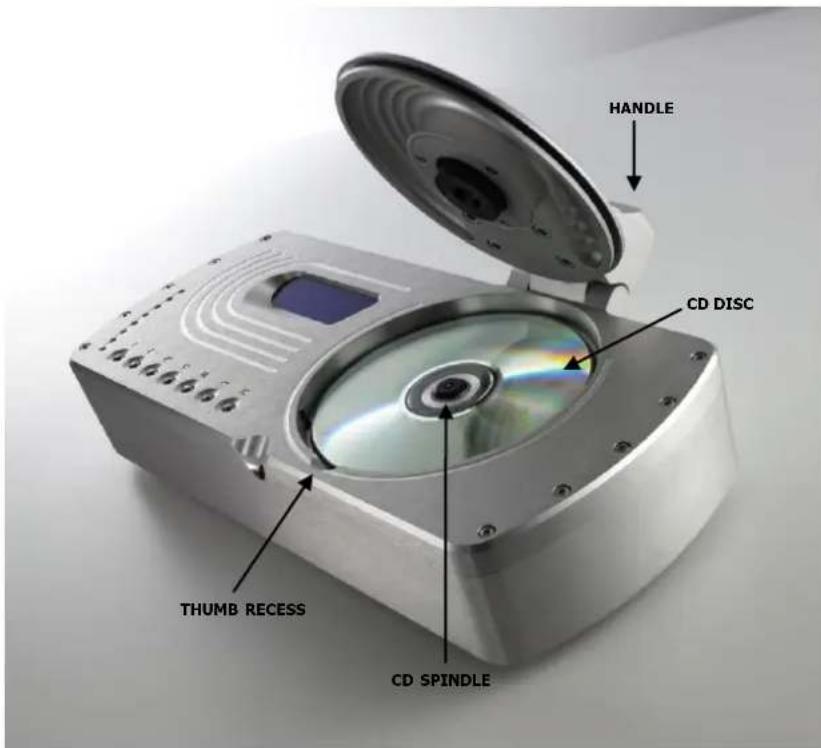
ONE - top view
Placing the disc
Place the disc gently but firmly in the CD housing so that the centre of the disc sits right on the spindle. Now close the lid using the handle. Wait a short time for ONE to read the disc Table of Contents before you press Play.
Removing discs
Using your forefingers, push the disc towards the back of the player as shown by the arrow above, so that the disc rises gently over the CD spindle. You should now be able to lift the disc out with your thumb.
basic operation

ONE - top panel controls
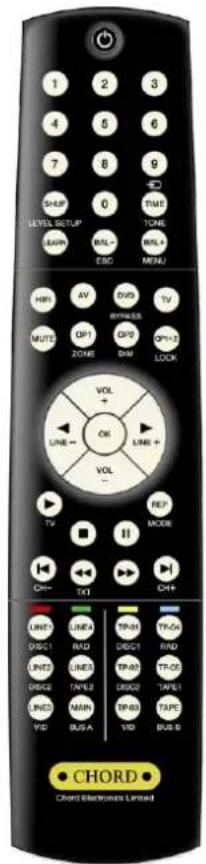
ONE - remote control

For your convenience some CD functions can be accessed from the top panel and all the functions on the supplied remote control.
PLAY
To play the disc from the beginning, press "Play" (▶).
To select a particular track, press the track number eg. 6, followed by the "Play" button.
STOP
To stop the disc, press "Stop" (■).
PAUSE
To pause the disc at a particular time, press "Pause" (■). Play can be resumed by pressing either "Play" or "Pause".
To select the next or previous track, press Next Track (▶) or Previous Track (◀).
To search through the disc in either direction, hold down Search Back◀◀ ) or Search Forward (▶▶)
To speed up the search, press the "FAST" key once while Search Back or Search Forward are held down. The FAST key has no effect if pressed on its own.
STANDBY
Press the STANDBY button to put ONE into Standby and to wake it up again.
TIME
Normally the player will display the time elapsed on the track you are playing.
Press 'TIME' once and it will now show total time elapsed on the disc and display TOTAL; press 'TIME' again and the player will show the time remaining on the disc and display TOTAL REM. Press TIME once again to return the display to normal.
advanced functions
Program Mode - Programming a track selection –
Press the track number (eg. 7) followed by the “OK” button, then the next track (eg. 4) followed by “OK”, and so on until all tracks have been programmed. To play your selection, press PLAY.
If you press the "OK" button before entering a track number, an error message "ERR" will appear on the top panel display.
When in program mode, PROGRAM will be shown on the display. The Previous Track, Next Track and Search functions will all work as normal, but will move around between the tracks you have programmed.
The STOP button, if pressed once, returns the player to the beginning of the programmed selection. If you press STOP a second time then you will exit program mode and your track selection will be lost.
REPEAT
While the disc is playing, press "REPEAT" once to repeat the whole disc. REPEAT will be shown on the top panel display. Previous Track, Next Track and Search will work as normal in this mode.
Press 'REPEAT' again to repeat a particular track; REPEAT1 will now be shown on the display. If you press Previous or Next track; if you Search past the beginning or end of the track; or if you press STOP, you will exit repeat mode.
Pressing 'REPEAT' for a third time will exit repeat mode.
SHUFFLE
Press 'SHUF' and the player will play tracks in random order until all tracks have been played. RANDOM will be shown on the top panel display.
If you want random play to continue indefinitely, press 'SHUF' and then 'REP'. Play will now continue until you press STOP.
frequently asked questions about ONE
How do I use ONE with my DSP8000/R?
For optimal performance, use ONE and QBD76 in conjunction with your DSP8000/R as outlined in the DSP8000 manual and pages 7-8 of this manual. When connecting ONE to DSP8000AV directly, use the stereo balanced XLR input for best performance. For the best sonic transparency, configure this input to 'Bypass' instead of 'DSP'.
If the stereo balanced input is already being used by another source such as the Chord Symphonic phono stage, you could either use the stereo analogue inputs, or the L/R pair of the 7.1 bypass input.
What gain level should I use with ONE and my Chord preamplifier?
For PRIMA, gain 0.5 is suggested.
For CPA series preamplifiers, gain 1.5 is suggested.
The best settings will depend on the output levels from your other sources. The user selectable gain is intended to allow the user to 'even up' the levels from several source components. Note that CPA 2500 and CPM 2650 do not feature a user-adjustable gain section.
For full details please refer to the Preamplifiers/Choral Series manuals.
Why does my ONE run warm?
Advanced digital circuitry tends to generate a good deal of heat! Your ONE is made from a solid billet of Aluminium, which acts like a giant heat sink, and removes the need for fans as found on many electronic devices. So if the case is warm to the touch, there is no cause for concern.
Product Specification
Frequency Response: 20Hz - 20kHz +/- 0.2dB
Signal-noise ratio: 106dB A-weighted
Channel Separation: 100dB @ 1kHz
Total Harmonic Distortion: < 0.003% 20Hz to 20kHz
DAC Architecture: 24-bit 192kHz Delta-Sigma, 128x oversampling
Laser Mechanism: Philips CD-Pro2M
Analogue Outputs: 2 x RCA-phono single ended, 2 x XLR balanced
Digital Outputs: 1x BNC digital Coaxial SPDIF
Finish Options: Satin Silver, Satin Black, Brilliant Gold or Silver Chord badge
Mains Power: 50v AC through to 260v AC Auto line adjust
Dimensions (mm): 335 x 105 x 170 (W x H x D)
Weight: 7 Kg
The above specification is subject to change by Chord Electronics Ltd without any prior notice
Chord Electronics Limited
The Pumphouse
Farleigh Bridge
Farleigh Lane
East Farleigh
Kent ME16 9NB
Tel: +44 (0)1622 721444
Fax: +44 (0)1622 721555
Email: sales@chordelectronics.co.uk
http://www.chordelectronics.co.uk
CHORD
- inventory
- when setting up
- ventilation
- mains lead and plug
- if you need to fit a plug for UK/Europe
- if you need to fit a plug for US/Canada
- earthing issues in Europe
- Safety Warnings
- mains connection
- powering up
- powering down - long-term
- powering down - short-term
- connecting your equipment
- ONE - rear panel connections
- Analogue outputs
- Digital outputs
- using ONE with QBD76
- QBD76
- RAM buffer settings for QBD76
- everyday use of your ONE
- Loading the disc
- Placing the disc
- Removing discs
- basic operation
- PLAY
- STOP
- PAUSE
- STANDBY
- TIME
- advanced functions
- Program Mode - Programming a track selection –
- REPEAT
- SHUFFLE
- frequently asked questions about ONE
- Product Specification
- Chord Electronics Limited
Brand : Chord
Model : One
Category : CD Player