
SC15838N - Vacuum Cleaner SWAN - Free user manual and instructions
Find the device manual for free SC15838N SWAN in PDF.


| Brand | Swan |
| Model | SC15838N |
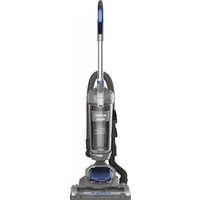
| Product Type | Upright Vacuum Cleaner with Bagless Dust Tank |
| Power Supply | 220-240 V, 50/60 Hz (UK plug 13 A max) |
| Motor Protection | Thermal cut-off automatic shut-off |
| Filtration System | Washable foam filter and filter screen |
| Dust Tank Capacity | Not specified |
| Accessories Included | Crevice tool, dusting brush, upholstery tool, 2-in-1 upholstery tool, flexible telescoping crevice tool, turbo pet brush |
| Main Features | Height adjustment for bare floors to high pile carpet, cord storage, handle release, step-on power switch, accessory storage on back |
| Maintenance | Empty dust tank after each use, clean filters monthly, clear blockages, maintain brushroll |
| Spare Parts Availability | Yes, various parts with part numbers (e.g., SC15836N-01 to SC15836N-13) |
| Warranty | 2 years |
Frequently Asked Questions - SC15838N SWAN
User questions about SC15838N SWAN
0 question about this device. Answer the ones you know or ask your own.
Ask a new question about this device
Download the instructions for your Vacuum Cleaner in PDF format for free! Find your manual SC15838N - SWAN and take your electronic device back in hand. On this page are published all the documents necessary for the use of your device. SC15838N by SWAN.
USER MANUAL SC15838N SWAN
Follow caution information wherever you see this symbol.
When using an electrical appliance, basic precautions should always be followed, including the following:
READ ALL INSTRUCTIONS BEFORE USING THIS VACUUM CLEANER
Failure to follow the warnings and instructions may result in electric shock, fire and/or serious injury.
WARNING
This vacuum cleaner is intended for household use only and NOT for commercial or industrial use.
- Only use the vacuum cleaner indoors on dry surfaces and keep the area you're cleaning well lit.
- Keep fingers, hair and loose clothing away from moving parts and openings whilst using the vacuum cleaner.
- Use only Eureka | Swan recommended tools and accessories with this vacuum cleaner.
- Don't use the vacuum cleaner if it has been dropped, damaged or left outdoors.
- Don't run over the power cord or use the vacuum cleaner if the power cord or plug is damaged.
- Don't handle the plug or use the vacuum cleaner with wet hands.
- Don't pull or carry the vacuum cleaner by the power cord.
- Don't use the power cord as a handle, pull the power cord around corners, sharp edges or close a door over the power cord.
- Don't unplug vacuum cleaner by pulling on the power cord.
- Turn off all controls on the vacuum cleaner before disconnecting or connecting the power cord.
• Always make sure the filters are in place before use. - Always switch off the vacuum cleaner before disconnecting or connecting the hose and accessories.
- Keep all openings clear and free from debris as this may affect the air flow/suction.
• Always replace the fuse in the plug with the same type and rating.
eureka | Swan
IMPORTANT SAFEGUARDS
- Always protect the power cable from heated surfaces and open flames.
- This appliance can be used by children aged from 8 years and above and persons with reduced physical, sensory or mental capabilities or lack of experience and knowledge if they have been given supervision or instruction concerning use of the vacuum cleaner in a safe way and understand the hazards involved. Children shall not play with the vacuum cleaner. Cleaning and user maintenance shall not be made by children without supervision.
- Don't vacuum up any flammable or combustible materials (lighter fluid, petrol, kerosene etc.) or use the vacuum cleaner in an area with explosive vapours or liquid.
- Don't vacuum up hot coals, cigarette butts, matches or smoking hot, burning items or use in an area where there may be harmful fluids (chlorine, bleach, and ammonia drain cleaner).
- Don't attempt to remove blockages with sharp objects as this may cause damage to the vacuum cleaner.
- Don't vacuum up hard or sharp objects such as glass, nails, screws or coins etc.
- Don't use the vacuum cleaner with incorrect voltage as this may result in damage or injury to the user. The correct voltage is listed on the rating label.
- Take extra care when positioning and using the vacuum cleaner on the stairs.
- Use only CE marked 13 amp extension cords, non-approved extension cords may overheat. Care should be taken to arrange the extension cord as it can be a trip hazard.
- Store the vacuum cleaner in a cool, dry area. If filters have been cleaned as per user guide instructions ensure they are thoroughly dry before storing away.
Please keep instructions for future reference
eureka | Swan
UNPACKING
Carefully unpack and inspect your new Eureka | Swan vacuum cleaner for shipping damage.
Each unit is tested and thoroughly inspected before shipping. For instructions regarding any shipping damage, call the Eureka | Swan Customer Service HELPLINE at 0333 220 6050 immediately.

Make sure your vacuum cleaner is switched off and unplugged when cleaning, removing or refitting parts.
eureka
Swan
WHAT'S IN THE BOX?

natural_image
Illustration of a box with an arrow indicating downward motion (no text or symbols)
Important
safeguards

natural_image
Line drawing of a vacuum cleaner with handle and base mount (no text or symbols)Vacuum cleaner

natural_image
Illustration of a coiled hose with a flanged end and a side outlet (no text or symbols)Hose

Upper Cord Hook Lower Cord Hook


Crevice tool Dusting brush Upholstery tool

Pet Brush
(SC15838N only)


Flexible telescoping crevice tool

Handle

2-in-1 upholstery tool
5
eureka
Swan

eureka | Swan
GET TO KNOW YOUR VACUUM

natural_image
Line drawing of a vacuum cleaner with handle and base (no text or symbols)Vacuum cleaner with dust tank.

Slide handle into top of vacuum cleaner. Push down until it clicks.

natural_image
Diagram of a mechanical device with a hand operating a spring-loaded lever (no text or symbols present)Insert bent end of hose into opening at back of dust tank. Twist hose clockwise to lock.

natural_image
Illustration of a person operating a vacuum cleaner with a hose (no text or symbols visible)Store accessories on back of vacuum cleaner.


natural_image
Diagram of a mechanical component with curved internal structure and rotation arrow (no text or symbols)Loop hose over hose retainer.

natural_image
Technical diagram of a mechanical assembly with threaded component and directional arrow (no text or symbols)Push loose end of hose securely onto hose inlet.

natural_image
Line drawing of a vacuum cleaner with coiled tubing and control knobs (no text or symbols)Align upper and lower cord hooks and press to snap in place. Upper cord hook should rotate freely.

natural_image
Technical line drawing of a mechanical device with no visible text or symbolsWrap cord onto upper and lower cord hooks.

Store turbo brush on front of handle. Align brush opening with slot and push to snap tool into clip.

eureka
Swan
GET TO KNOW YOUR VACUUM


eureka
Swan
OPERATION
When using on steps:
Position as shown below. Do not allow the brush roll to come into contact with edge of the stair carpet or damage could occur.
Do not pull on the hose.

8
eureka | Swan
eureka | Swan
OPERATION

natural_image
Line drawing of a hand inserting a plug into an electrical outlet (no text or symbols)Plug power cord into outlet.

natural_image
Technical line drawing of a vacuum cleaner's base with a rotary knob (no text or symbols)Turn height adjustment knob to adjust from bare floors to high pile carpet.

natural_image
Line drawing of a hand adjusting a small mechanical component (no text or symbols)Step on power switch to turn vacuum cleaner on. Step on again to turn off.


natural_image
Line drawing of a hand operating a mechanical device with a curved arrow indicating rotation (no text or symbols)Step on handle release to lower handle into position for vacuuming floors.
Empty dust tank after every use

natural_image
Illustration of a hand operating a vacuum cleaner with a directional arrow indicating motion (no text or symbols present)Press release button and lift off dust tank.

natural_image
Illustration of a hand using a tool to lift liquid into a bowl (no text or symbols)To empty debris, press lever to release bottom lid.

eureka | Swan


eureka
Swan
USING ACCESSORIES
CAUTION
When using tools, always place handle in upright position. Make sure vacuum cleaner is turned off while attaching tools.
- Place vacuum in upright position.
- Turn height adjustment knob to highest position.
- Pull up on hose connection to release hose end from hose inlet (Fig. 1).
- Push end of hose into top of handle and twist clockwise until it clicks (Fig. 2).
- Press handle release latch and pull out handle with wand (Fig. 3).
- To attach accessories, push desired tool onto end of wand (Fig. 4).
- To use accessories without handle and wand, push desired tool directly onto end of hose (Fig. 5).
- When finished using accessories, twist hose counterclockwise and pull off handle. Slide handle into top of vacuum cleaner and push down until it clicks. Push loose end of hose securely onto hose inlet. Store tools on vacuum cleaner back.

Crevice tool
Use for baseboard edges, corners, detailing chairs, sofas, dryer vents and tight spaces.

Upholstery tool
Use for furniture, chairs, sofas and mattresses.


natural_image
Illustration of a hand holding a pipe with an arrow indicating upward motion (no text or symbols)


natural_image
Illustration of a brush and a hand holding a tool, both without any text or symbols2-in-1 upholstery tool
Use brush to vacuum upholstered surfaces or pick up debris. Use felt portion to clean delicate surfaces. Press thumb release and lift brush up and out of the way.

natural_image
Technical illustration of two mechanical tools with arrows indicating motion (no text or symbols)Flexible telescoping crevice tool ( - Press button and pull to extend tool to desired length. To use brush, pull to swivel into position. Use for baseboards, crevices and tight spaces.

Dusting brush

Turbo/pet brush (SC15838N)
Use for furniture, drapes. Use to remove pet hair from stairs, blinds, drawers and vents. carpet and upholstery.
eureka | Swan
MAINTENANCE
Dust Tank – Empty after each use

natural_image
Illustration of a hand holding a vacuum cleaner next to a coiled hose (no text or symbols visible)Press release button and lift off dust tank.

natural_image
Illustration of a hand using a U-shaped tool to press down a container with granular material (no text or symbols visible)Hold dust tank over wastebasket and press lever to release bottom lid. Debris will empty.

Close bottom lid until it clicks.
Washable dust cup filters – Clean monthly

natural_image
Line drawing of a hand inserting a spring into a thermospan (no text or symbols)Pull dust tank latch to lift up dust tank lid.

natural_image
Diagram of a hand placing a tray onto a trash bin with an inset showing the lid (no text or symbols)Lift out foam filter and shake off dust. Rinse foam filter and dry THOROUGHLY.

natural_image
Illustration of a hand holding a mechanical component with a lock and adjustment arrow (no text or symbols)Grip tabs and lift out filter screen. Twist bottom of filter screen counterclockwise to unlock and pull apart. Shake off dust. Rinse screen and dust tank. Dry all THOROUGHLY. Reassemble screen; twist clockwise to lock.

natural_image
Cross-sectional diagram of a mechanical component with layered structure and central shaft (no text or symbols)Align tab on filter screen with slot on back of dust tank and drop into position.

natural_image
Illustration of a hand pouring liquid into a container with an inset showing a tray and lid (no text or symbols)Reinstall foam filter.

Close cover until it clicks.

Warning: Never operate vacuum cleaner without foam filter, filter screen and dust tank in proper position.
eureka
Swan
MAINTENANCE
How to clear a blockage
CAUTION
Make sure vacuum is turned off and power cord is unplugged.
If vacuum is not cleaning floors, or if no suction at end of hose, check to be sure air path is not blocked.
- Press release button and lift off dust tank (Fig. 1).
- Empty debris. Hold over wastebasket and press lever to release bottom lid (Fig. 2).
- Check filter and filter screen. Remove any debris and shake off dust. (See maintenance instructions on page 9.)
- Loosen end of hose.
- Use a rod or similar blunt implement to clear a blockage in wand or hose. Flex hose to loosen debris (Fig. 3). Use caution if there is any risk that glass or nails could have become imbedded in hose.
- Use finger to check for debris in air path (Fig. 4).
- Reinstall filter and filter screen inside dust tank and position dust tank onto vacuum cleaner.

natural_image
Diagram of a hand operating a vacuum cleaner with a hose, showing mechanical components and motion direction (no text or symbols)
natural_image
Illustration of a hand using a tool to press down a container with granular material (no text or symbols visible)
natural_image
Illustration of a medical procedure showing hands holding a tool over a seated patient's abdomen (no text or symbols present)
natural_image
Line drawing of a hand operating a vacuum cleaner with a handle (no text or symbols)
Warning: Never operate vacuum cleaner without foam filter, filter screen and dust tank in proper position.
eureka
Swan
MAINTENANCE
How to maintain brushroll
CAUTION
Make sure vacuum is turned off and power cord is unplugged.
- Step on handle release to lower handle.
- Turn vacuum face down on floor.
• To avoid unnecessary service calls, check brushroll for debris. - Use scissors to clip heavy threads or strings.

natural_image
Line drawing of a hand adjusting a vacuum cleaner's wheel component (no text or symbols)
natural_image
Line drawing of a hand using a tool to adjust or install electronic components on a device (no text or symbols visible)How to maintain turbo brush
Select models only (NEU182-NEU188 except NEU182A)

Grasp collar and twist to unlock cover. Lift cover up.

natural_image
Line drawing of a hand holding a small object with a black hole, no text or symbols presentWith cover open, use figers or small brush to clear accumulated pet hair from bristles.

Close cover and twist collar to lock.
eureka
Swan
MAINTENANCE
How to replace brushroll or belt
CAUTION
Make sure vacuum is turned off and power cord is unplugged.
- Step on handle release and lay vacuum cleaner face down.
- Use Phillips screwdriver to remove 6 screws from brushroll cover (Fig. 1). Lift off cover. Refer to Fig. 7 for location of screws.
- Rotate right end of brushroll and lift out (Fig. 2).
- Lift out left end of brushroll.
• To replace belt, position new belt around motor shaft (Fig. 3). - Loop new belt around brushroll shaft at left end of brushroll (Fig. 4).
- To reposition brushroll into base, pull belt down and insert left end of brushroll first. Align brushroll end cap with slot so it fits into position (Fig. 5). Press right end of brushroll into position.
• To replace brushroll cover, align slot on cover with tab (Fig. 6) and snap cover into place. Replace 6 screws (Fig. 7).

natural_image
Close-up of a hand using a screwdriver to adjust or install a mechanical component (no visible text or symbols)
natural_image
Close-up of a hand adjusting a mechanical component with a circular dial (no visible text or symbols)
natural_image
Close-up of a hand pressing a button on a mechanical device (no visible text or symbols)
natural_image
Close-up of a hand operating a sewing machine with fabric (no visible text or symbols)
natural_image
Close-up of hands operating a mechanical device with a white arrow pointing to a component (no visible text or symbols)
natural_image
Close-up of mechanical components with gears and a metal bracket (no visible text or symbols)

eureka
Swan
TROUBLESHOOTING

Make sure vacuum is turned off and power cord is unplugged.
| NOTICE: Thermal cut-off | |
| This vacuum cleaner has a special thermostat that protects the vacuum in case of motor overheating.If the vacuum suddenly shuts off, proceed as follows: 1) Push the power switch to off and unplug the vacuum. 2) Check the vacuum for a possible source of overheating such as a full dust cup, blocked hose or clogged filter. If these conditions are found, fix them and wait at least 30 minutes before attempting to use the vacuum. 3) After the 30 minute period, plug the vacuum back in and turn on the switch. If the vacuum still does not work, call the Swan Customer Service HELPLINE at 0333 220 6050 . | |
| Problem Solution | |
| Motor will not start. | Push plug securely into outlet, try another outlet or check circuit breaker.Step on power switch to turn vacuum on.See detailed “thermal cut-off” instructions above. |
| Vacuum cleaner does not clean floors. | Empty dust tank, clean and/or change filter.Clean or replace filter regularly to maintain suction.Check vacuum height adjustment knob position.Clean brushroll if needed. |
| No suction at the end of hose or wand. | See other solutions above.Remove clogs from the hose or wand that restrict the airflow. |
| Burning smell;brushroll will not turn. | Check brushroll for debris.Replace broken or out of shape belt. |
| Vacuum is hard to push. | Adjust vacuum height knob to a higher position.Check brushroll for debris and clean if needed. |
| Turbo brush will not turnSC15838N | Check turbo brush for debris. |
eureka | Swan
DISPOSAL

Appliances bearing the symbol shown here may not be disposed of in domestic rubbish. You are required to dispose of old electrical and electronic appliances like this separately. Please visit www.recycle-more.co.uk or www.recyclenow.co.uk for access to information about the recycling of electrical items. Please visit www.weeeireland.ie for access to information about the recycling of electrical items purchased in Ireland. The WEEE directive, introduced in August 2006, states that all electrical items must be recycled, rather than taken to landfill.
Please arrange to take this appliance to your local Civic Amenity site for recycling, once it has reached the end of its life.
eureka | Swan
WARRANTY
This product is guaranteed for 2 years from the date of original purchase. If any defect arises due to faulty materials of workmanship the faulty products must be returned to the place of purchase. Refunds or replacement is at the discretion of the store.
The following conditions apply:
- The product must be returned to the retailer with proof of purchase.
- The product must be installed and used in accordance with the instructions contained in this instruction guide.
- It must be used only for domestic purposes.
- It does not cover wear and tear, damage, misuse or consumable parts.
• Swan Products Ltd has limited liability for incidental or consequential loss or damage.
• This guarantee is valid in the UK and Eire Only.
eureka
Swan
SPARES
Visit www.swan-brand.co.uk or call 0333 220 6050
Image Part name Part number
| Dusting brush tool | SC15836N-01 |
| Crevice tool | SC15836N-02 |
| Upholstery tool | SC15836N-03 |
| Flexible telescoping crevice tool | SC15836N-04 |
| 2-in-1 upholstery tool | SC15836N-05 |
| Turbo brush | SC15836N-06 |
| Washable foam filter | SC15836N-07 |
| Brushroll | SC15836N-08 |
| Hose | SC15836N-09 |
| Belt | SC15836N-10 |
| Detachable handle | SC15836N-11 |
| Dust tank | SC15836N-12 |
| Upper and lower hooks | SC15836N-13 |


eureka
Swan
NOTES
18
eureka | Swan


eureka
Swan
NOTES
19
eureka | Swan


natural_image
Stylized white and gray swan logo on black background (no text or symbols)www.eureka-swan.co.uk
Follow us online


www.swan-brand.co.uk
Copyright © Swan Products Ltd. PO Box 3117, Stoke-on-Trent ST4 9GD
- Follow caution information wherever you see this symbol.
- READ ALL INSTRUCTIONS BEFORE USING THIS VACUUM CLEANER
- WARNING
- This vacuum cleaner is intended for household use only and NOT for commercial or industrial use.
- eureka | Swan
- IMPORTANT SAFEGUARDS
- Please keep instructions for future reference
- UNPACKING
- GET TO KNOW YOUR VACUUM
- eureka
- Swan
- When using on steps:
- OPERATION
- Empty dust tank after every use
- USING ACCESSORIES
- CAUTION
- MAINTENANCE
- Dust Tank – Empty after each use
- Washable dust cup filters – Clean monthly
- How to clear a blockage
- How to maintain brushroll
- How to maintain turbo brush
- How to replace brushroll or belt
- TROUBLESHOOTING
- DISPOSAL
- WARRANTY
- The following conditions apply:
- Visit www.swan-brand.co.uk or call 0333 220 6050
Brand : SWAN
Model : SC15838N
Category : Vacuum Cleaner