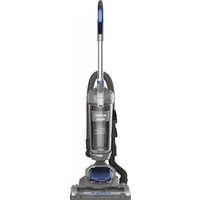
SC15832N - Vacuum Cleaner SWAN - Free user manual and instructions
Find the device manual for free SC15832N SWAN in PDF.


| Product Type | Bagless Vacuum Cleaner |
| Brand | Swan |
| Model | SC15832N |
| Dust Tank Capacity | 2 Litres |
| Motor Power | 400 Watts |
| Energy Class | A++ |
| Noise Level | 80 dBA |
| Net Weight | 4.1 kg |
| Power Cord Length | 6.5 m |
| Voltage | 220-240 V |
| Fuse Rating | 13 A (British) |
| Filter Type | Foam Filter (washable) |
| Filter Maintenance | Wash every 3 months, dry thoroughly for 24 hours |
| Accessories Included | 1 x Pet Tool, 1 x 3-in-1 Crevice Tool, 1 x 2m Hose |
| Brush Roll | Yes, with replaceable drive belt |
| Safety Features | Overheat protection, automatic shut-off if clogged |
| Warranty | 2 years |
| Usage | Household use only, indoor dry surfaces |
| Spare Parts Available | Yes, contact www.eureka-swan.co.uk |
| Cord Storage | Quick release cord hook |
Frequently Asked Questions - SC15832N SWAN
User questions about SC15832N SWAN
0 question about this device. Answer the ones you know or ask your own.
Ask a new question about this device
Download the instructions for your Vacuum Cleaner in PDF format for free! Find your manual SC15832N - SWAN and take your electronic device back in hand. On this page are published all the documents necessary for the use of your device. SC15832N by SWAN.
USER MANUAL SC15832N SWAN
Follow caution information wherever you see this symbol.
When using an electrical appliance, basic precautions should always be followed, including the following:
READ ALL INSTRUCTIONS BEFORE USING THIS VACUUM CLEANER
Failure to follow the warnings and instructions may result in electric shock, fire and/or serious injury.
WARNING
This vacuum cleaner is intended for household use only and NOT for commercial or industrial use.
- Only use the vacuum cleaner indoors on dry surfaces and keep the area you're cleaning well lit.
- Keep fingers, hair and loose clothing away from moving parts and openings whilst using the vacuum cleaner.
- Use only Eureka | Swan recommended tools and accessories with this vacuum cleaner.
- Don't use the vacuum cleaner if it has been dropped, damaged or left outdoors.
- Don't run over the power cord or use the vacuum cleaner if the power cord or plug is damaged.
- Don't handle the plug or use the vacuum cleaner with wet hands.
- Don't pull or carry the vacuum cleaner by the power cord.
- Don't use the power cord as a handle, pull the power cord around corners, sharp edges or close a door over the power cord.
- Don't unplug vacuum cleaner by pulling on the power cord.
- Turn off all controls on the vacuum cleaner before disconnecting or connecting the power cord.
• Always make sure the filters are in place before use. - Always switch off the vacuum cleaner before disconnecting or connecting the hose and accessories.
- Keep all openings clear and free from debris as this may affect the air flow/suction.
• Always replace the fuse in the plug with a British 13 amp fuse.
eureka | Swan
IMPORTANT SAFEGUARDS
- Always protect the power cable from heated surfaces and open flames.
- This appliance can be used by children aged from 8 years and above and persons with reduced physical, sensory or mental capabilities or lack of experience and knowledge if they have been given supervision or instruction concerning use of the vacuum cleaner in a safe way and understand the hazards involved. Children shall not play with the vacuum cleaner. Cleaning and user maintenance shall not be made by children without supervision.
- Don't vacuum up any flammable or combustible materials (lighter fluid, petrol, kerosene etc.) or use the vacuum cleaner in an area with explosive vapours or liquid.
- Don't vacuum up hot coals, cigarette butts, matches or smoking hot, burning items or use in an area where there may be harmful fluids (chlorine, bleach, and ammonia drain cleaner).
- Don't attempt to remove blockages with sharp objects as this may cause damage to the vacuum cleaner.
- Don't vacuum up hard or sharp objects such as glass, nails, screws or coins etc.
- Don't use the vacuum cleaner with incorrect voltage as this may result in damage or injury to the user. The correct voltage is listed on the rating label.
- Take extra care when positioning and using the vacuum cleaner on the stairs.
- Use only CE marked 13 amp extension cords, non-approved extension cords may overheat. Care should be taken to arrange the extension cord as it can be a trip hazard.
- Store the vacuum cleaner in a cool, dry area. If filters have been cleaned as per user guide instructions ensure they are thoroughly dry before storing away.
Please keep instructions for future reference
eureka | Swan
UNPACKING
Carefully unpack and inspect your new Eureka | Swan vacuum cleaner for shipping damage.
Each unit is tested and thoroughly inspected before shipping. For instructions regarding any shipping damage, call the Eureka | Swan Customer Service HELPLINE at 0333 220 6050 immediately.

Make sure your vacuum cleaner is switched off and unplugged when cleaning, removing or refitting parts.
eureka | Swan
PARTS
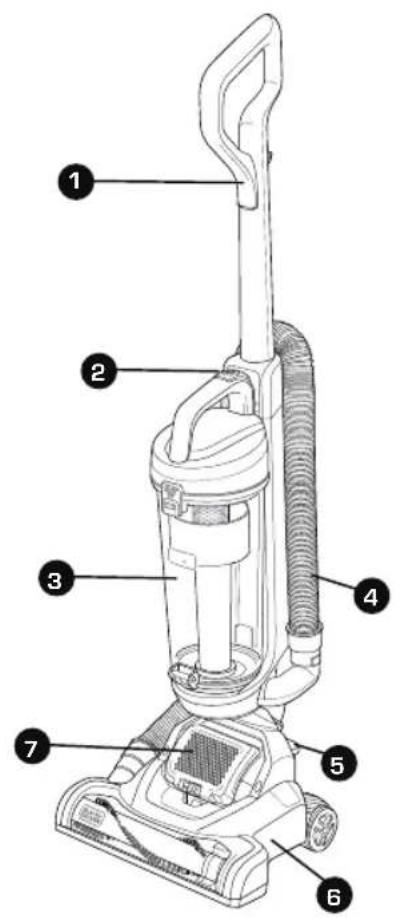
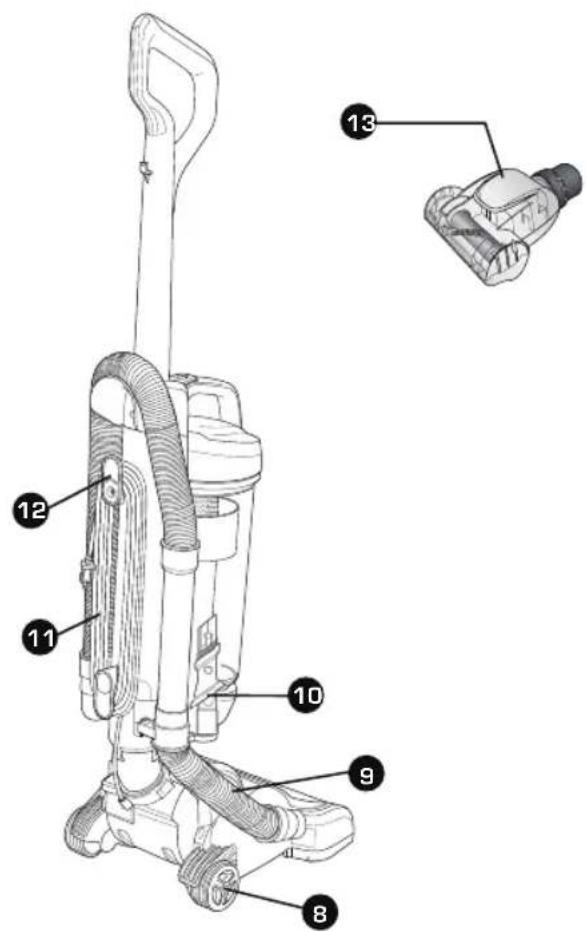
- Handle
- Dust tank release
- Dust tank
- Handle hose
- Power on/off
- Nozzle
-
Air outlet
-
Wheel
- Connecting hose
- 3-in-1 crevice tool accessory
- Power cord
- Power cord wrap
- Turbo Pet Tool accessory SC15832N, SC15834N only
The pet hair cleaning tool (13) is for use when vacuuming pet hair and/or ground-in debris from carpeted or upholstery surfaces.

WARNING
Injury to pets. Do not use pet hair cleaning tool directly on animals.
5
eureka
Swan
eureka
Swan
GET TO KNOW YOUR VACUUM

WARNING:
DO NOT plug in your vacuum cleaner until you have completely assembled it per the following instructions and are familiar with all instructions and operation procedures.

Remove the dust tank before installing handle. Insert the handle into the vacuum body, then rotate the screw into body as shown. IMPORTANT: The handle must be inserted first before replacing dust tank
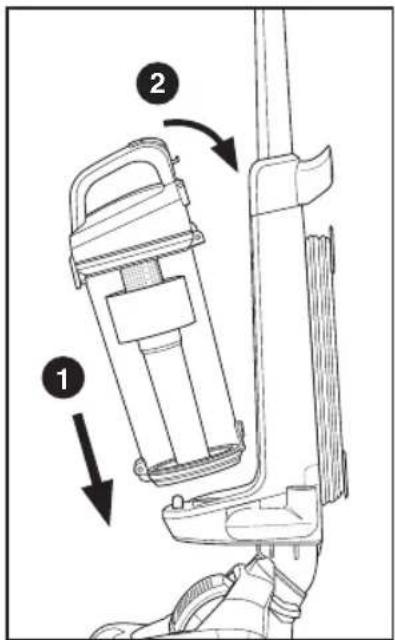
Place the dust tank back onto the machine and push until it clicks into place.
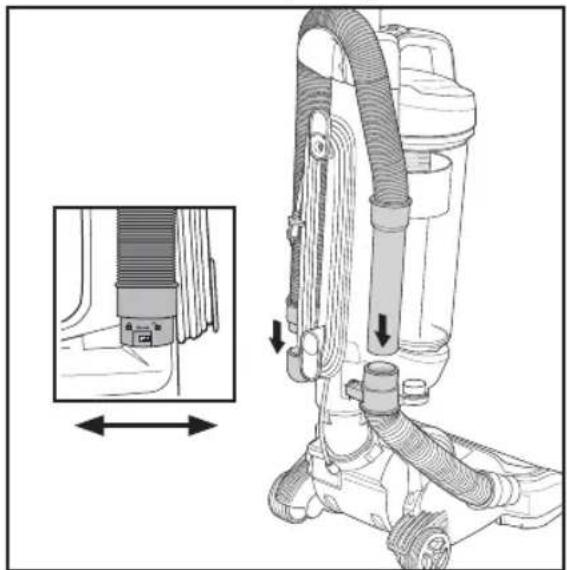
Insert the handle hose end into the conector hose and rotate clockwise to join. Then insert the handle into the other hose of the body.
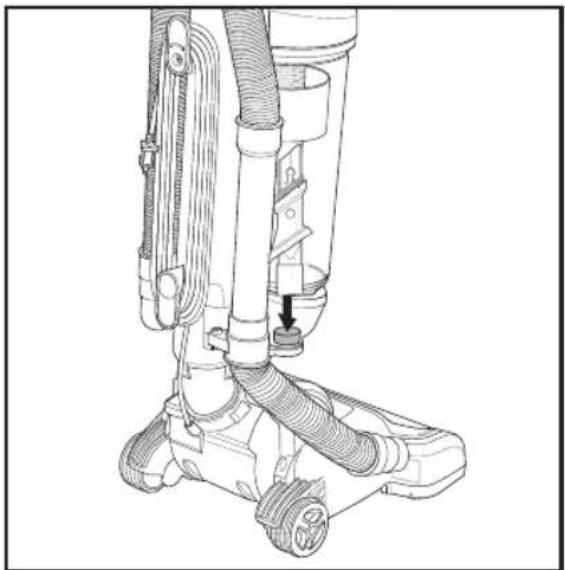
Insert the 3-in-1 crevice tool accessory into the on-board storage reservoir, as shown.

eureka | Swan


eureka | Swan
OPERATION

Twist the quick release cord hook to release the power cord.

Step on the brush cover and pull back on handle, to engage for operation.


Plug in your machine and push ON/OFF button to switch ON/OFF.

To maintain optimal performance, please empty dust tank when debris reaches MAX FILL line.

eureka | Swan

eureka | Swan
USING ACCESSORIES
3-in-1 Crevice Tool Accessory
1

2
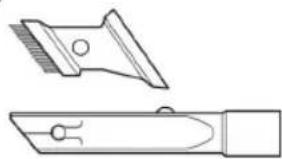
The 3-in-1 crevice tool with brush allows for vacuuming in narrow and hard-to-reach places.
Turbo Pet Tool
SC15832N, SC15834N models only
For vacuuming pet hair from surfaces
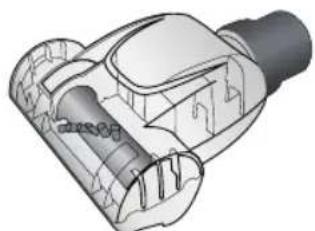

Remove hose handle and 3-in-1 crevice tool from the machine
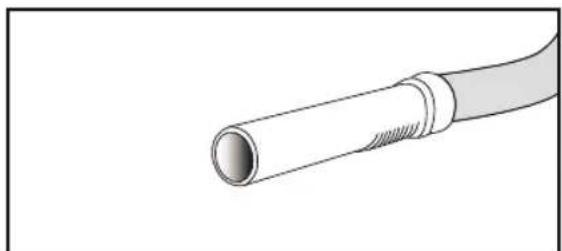
The handle hose can be used immediately.

At the same time, you can insert the 3-in-1 crevice tool/turbo pet tool into the hose handle to extend the distance.
eureka | Swan
MAINTENANCE
⚠ WARNING: Turn off and unplug vacuum cleaner before performing maintenance to the vacuum cleaner.
Emptying and cleaning the dust tank
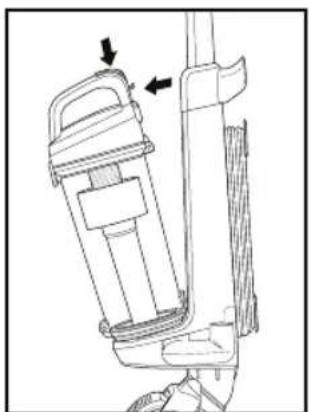
Press dust tank release button to remove the dust tank.

Hold dust tank over rubbish bin and unclip the lock on the bottom of the tank, allowing the dust to empty.
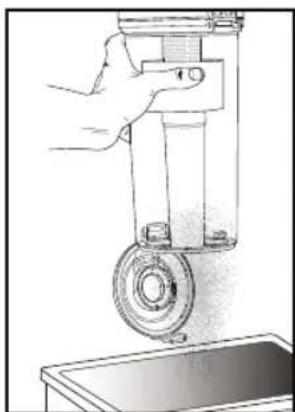
Close the base of the dust tank, align the tank base back onto the machine and push until it clicks back into place.
WARNING
If the filter or hose is clogged, the motor may shut down in order to protect itself from overheating. If this occurs, unplug the vacuum, clean the filter and inspect the hoses and canister for clogging. Allow 3-4 hours for the unit to fully cool down before resuming use.
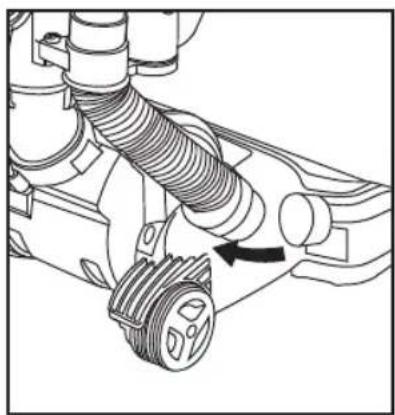
Inspect the lower tube and nozzle and remove the dirt and debris.
eureka
Swan
MAINTENANCE
⚠ WARNING: Turn off and unplug vacuum cleaner before performing maintenance to the vacuum cleaner.

Locate and unlock filter cover as shown.
Push left to un-lock, right to lock

Remove filter cover with filter. Wipe with cloth over rubbish bin, removing dirt and debris.
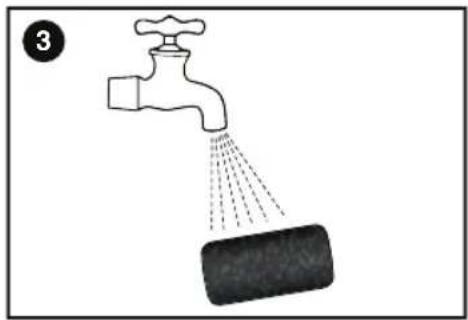
Wash with water every 3 months, allow at least 24 hours to dry and make sure it is dry thoroughly before re-using
DUST TANK
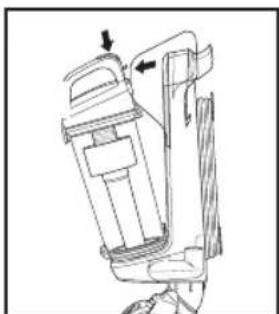
- Remove the dust tank.

- Push the release button, open the dust tank and clean all parts of the dust tank
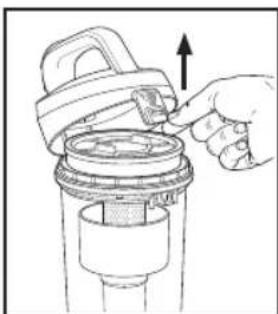
- Open the dust tank filter lid located on top of the tank
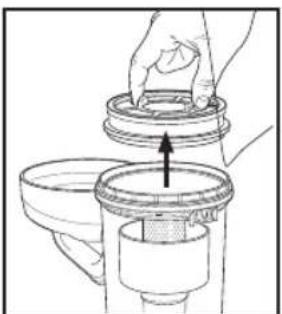
- Remove the dust tank foam filter.
eureka | Swan
MAINTENANCE

- Hand wash the foam filter..

- Allow filter to dry before putting back info vacuum cleaner

- Twist filter assembly anti-clockwise to remove for cleaning dirt and debris as needed.
DO NOT operate without filter installed
DO NOT wash dust tank in the dish washer
DO NOT install filter if it is damp
⚠️ CAUTION:
Do not turn the appliance on when the dust tank is removed. In order to keep the suction force optimised, the dust tank and filters must be cleaned regularly.
⚠ WARNING: Turn off and unplug vacuum cleaner before performing maintenance to the vacuum cleaner.

CLEANING BRUSH ROLL
Carefully remove any string, hair or debris located on the brush roll.
You can use a tool such as a small knife or scissors to remove and cut any hair or string.
eureka | Swan
MAINTENANCE
Pet Tool (SC15832N, SC15834N only)
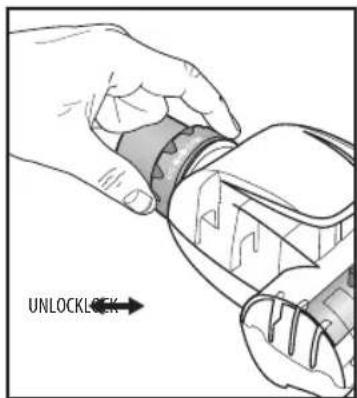
- To release the pet tool plastic upper cap for internal cleaning, roatate, unlock and remove the plastic locking ring as shown.

- Pull up on the plastic upper cap of the pet tool as shown.

-
Remove plastic upper cap and clean, removing pet hair and debris.
-
Do not clean the vacuum cleaner, components or accessories using petrol or any other flammable liquid or solvents, etc.
- Clean only the outside of the vacuum cleaner.
- Use only a moist cloth and mild detergent for cleaning the vacuum cleaner, components and accessories.
• After cleaning, wipe off the moisture on vacuum cleaner, components and accessories with a dry cloth. - Do Not place accessories, tools or components in a dishwasher.
Bush Roll
You should check your cleaner's brush roll and drive belt regularly for wear or damage.
You should also clean the brush and brush ends by removing string, hair and carpet fibres.
These can wrap around the brush and hamper its ability to effectively clean your carpet. Also remove any debris that has accumulated under the brush cover.
- Turn off vacuum and unplug from electrical outlet.
- Place vacuum upside down with brush roll facing upwards.
- Remove the six screws as shown with a small Phillips screwdriver (see images below).
- Lift off brush cover.
- Grasp floor brush at both ends and remove by lifting out.
- Clean string, hair and other debris from floor brush, motor pulley, and drive belt.
- Check floor brush for worn areas and replace if needed.
- Check air passageway for obstructions. Remove debris from this area.
- When finished cleaning, reposition floor brush and drive belt. Then replace the brush cover and re-install the six screws.
- Turn floor brush by hand several times in the direction of the motor pulley. If properly installed, the drive belt will align itself on floor brush.
eureka | Swan
MAINTENANCE



Replacing The Drive Belt
Make sure the vacuum is switched off and unplugged first
Check the drive belt carefully for wear, cuts and stressed areas. If the drive belt appears worn, you will need to replace it. To remove the drive belt, read the instructions and follow the drawings below:
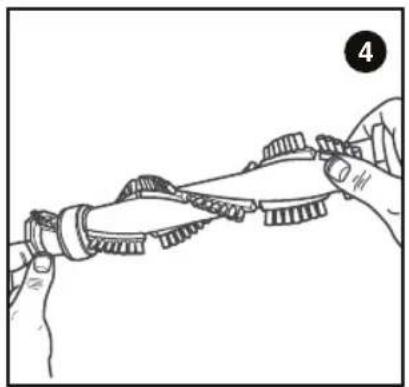
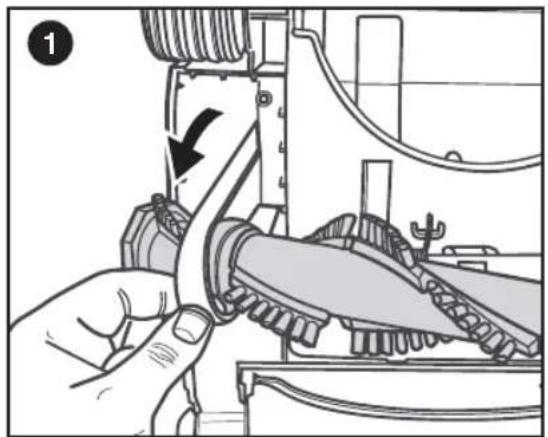
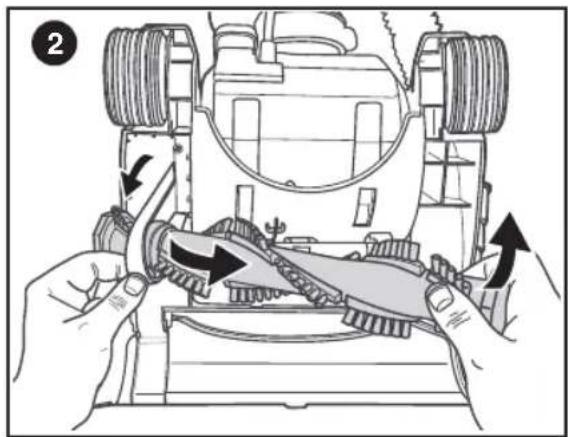
- Grasp the old drive belt and remove from motor shaft. Discard old drive belt.
- Loop new drive belt over motor shaft and stretch other end over floor brush in the space provided between the bristles.
- Place ends of floor brush down into slots on sides as shown.
- Turn floor brush by hand several times in the direction of the motor shaft.
- If properly installed, drive belt will align itself on floor brush.
- Replace brush cover and six screws.
eureka | Swan
MAINTENANCE


eureka | Swan
TROUBLESHOOTING
| Vacuum cleaner won’t run Remedies | |
| 1. Vacuum cleaner not plugged in2. Blown fuse/tripped breaker | 1. Check plug/socket2. Check fuse/breaker |
| Vacuum won’t puck up dirt Remedies | |
| 1. Dust tank full2. Filter is dirty3. Hose not secure4. Dust tank not in place5. Vacuum path blocked | 1. Empty dust tank2. Check/remove debris or clean3. Check hose is properly fitted4. Make sure dust tank is fully inserted and release handle is fully pushed in5. Visually check air passageway, hose inlet and hose for anything that might be obstructing the vacuum path. Remove blockage |
eureka | Swan
DISPOSAL

Appliances bearing the symbol shown here may not be disposed of in domestic rubbish. You are required to dispose of old electrical and electronic appliances like this separately. Please visit www.recycle-more.co.uk or www.recyclenow.co.uk for access to information about the recycling of electrical items. Please visit www.weeeireland.ie for access to information about the recycling of electrical items purchased in Ireland. The WEEE directive, introduced in
August 2006, states that all electrical items must be recycled, rather than taken to landfill. Please arrange to take this appliance to your local Civic Amenity site for recycling, once it has reached the end of its life.
eureka | Swan
TECHNICAL DATA
SC15830N
Performance
• Dust tank capacity: 2 Litres
• Energy class: A ++/D/E/E
• Motor power: 400 Watts
• Sound level: 80dBA
Accessories
- 1 x 3 in 1 brush
- 1 x 2m hose
Weight & Dimensions
- Net weight: 4.1kg
• Power cord length: 6.5 Metres
•
SC15834N
Performance
• Dust tank capacity: 2 Litres
• Energy class: A++/D/E/E
• Motor power: 400 Watts
• Sound level: 80dBA
Accessories
- 1 x Pet tool
- 1 x 3 in 1 brush
- 1 x 3m hose
Weight & Dimensions
- Net weight: 4.1kg
• Power cord length: 9.3 Metres
SC15832N
Performance
• Dust tank capacity: 2 Litres
• Energy class: A ++/D/E/E
• Motor power: 400 Watts
• Sound level: 80dBA
Accessories
- 1 x Pet tool
- 1 x 3 in 1 brush
- 1 x 2m hose
Weight & Dimensions
- Net weight: 4.1 kg
• Power cord length: 6.5 Metres

15
eureka | Swan


eureka | Swan
SPARES
www.eureka-swan.co.uk

- SC15834N-01 3-in-1 tool

- SC15834N-02 2 Metre Hose

- SC15834N-03 Brush roll

- SC15834N-04 Pet tool
- SC15834N-05 Cover filter
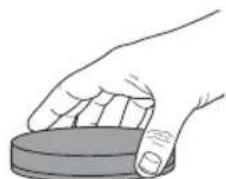
- SC15843N-06 Foam filter
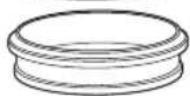
16
eureka | Swan
eureka | Swan
WARRANTY
This product is guaranteed for 2 years from the date of original purchase. If any defect arises due to faulty materials of workmanship the faulty products must be returned to the place of purchase. Refunds or replacement is at the discretion of the store.
The following conditions apply:
- The product must be returned to the retailer with proof of purchase.
- The product must be installed and used in accordance with the instructions contained in this instruction guide.
- It must be used only for domestic purposes.
- It does not cover wear and tear, damage, misuse or consumable parts.
- Swan Products Ltd has limited liability for incidental or consequential loss or damage.
- This guarantee is valid in the UK and Eire Only.



eureka
Swan
NOTES
18
eureka | Swan




eureka
Swan
NOTES
19
eureka | Swan


www.eureka-swan.co.uk
Scan this QR code to hear about our story

We love what we do

we're proud of our quality

Find us on Facebook
* on selected products
Copyright © Swan Products Ltd. PO Box 3117, Stoke-on-Trent ST4 9GD

- FOLLOW CAUTION INFORMATION WHEREVER YOU SEE THIS SYMBOL
- READ ALL INSTRUCTIONS BEFORE USING THIS VACUUM CLEANER
- WARNING
- THIS VACUUM CLEANER IS INTENDED FOR HOUSEHOLD USE ONLY AND NOT FOR COMMERCIAL OR INDUSTRIAL USE
- EUREKA | SWAN
- IMPORTANT SAFEGUARDS
- PLEASE KEEP INSTRUCTIONS FOR FUTURE REFERENCE
- UNPACKING
- PARTS
- EUREKA
- SWAN
- GET TO KNOW YOUR VACUUM
- OPERATION
- USING ACCESSORIES
- TURBO PET TOOL
- MAINTENANCE
- DUST TANK
- ⚠️ CAUTION
- CLEANING BRUSH ROLL
- PET TOOL (SC15832N, SC15834N ONLY)
- BUSH ROLL
- REPLACING THE DRIVE BELT
- MAKE SURE THE VACUUM IS SWITCHED OFF AND UNPLUGGED FIRST
- TROUBLESHOOTING
- DISPOSAL
- TECHNICAL DATA
- SC15830N
- PERFORMANCE
- ACCESSORIES
- WEIGHT & DIMENSIONS
- SC15834N
- SC15832N
- SPARES
- WARRANTY
- THE FOLLOWING CONDITIONS APPLY
Brand : SWAN
Model : SC15832N
Category : Vacuum Cleaner