
MW238B - Mp3 player GPX - Free user manual and instructions
Find the device manual for free MW238B GPX in PDF.


| Product Type | MP3 Player |
| Brand | GPX |
| Model | MW238B |
| Display Type | OLED |
| Supported Audio Formats | MP3, WMA, WAV |
| Video Playback | Not supported |
| FM Radio | Yes |
| Voice Recording | Yes |
| Internal Memory | 8 GB |
| Expandable Storage | microSD (up to 32 GB) |
| Battery Type | Rechargeable lithium-ion |
| Battery Capacity | 300 mAh |
| Playback Time | Up to 30 hours |
| Charging | USB 2.0 |
| Connectivity | USB port, 3.5mm headphone jack |
| Weight | Approx. 30 g (1 oz) |
| Dimensions | 4.0 x 2.0 x 0.5 inches |
| Included Accessories | USB cable, earphones |
| Color | Black |
| User Manual | PDF available for download |
Frequently Asked Questions - MW238B GPX
User questions about MW238B GPX
0 question about this device. Answer the ones you know or ask your own.
Ask a new question about this device
Download the instructions for your Mp3 player in PDF format for free! Find your manual MW238B - GPX and take your electronic device back in hand. On this page are published all the documents necessary for the use of your device. MW238B by GPX.
USER MANUAL MW238B GPX
Warnings and Precautions 2
Important Safety Instructions 3
In the Box & Features 4
Power & Connecting a Computer or Memory Card to the Unit.... 5
Loading Music onto the Unit 6-7
Playing Music on the Unit 7
Location of Controls & Control Definitions 8-9
Frequently Asked Questions.... 10-11
Service Information.... 12
TO PREVENT FIRE OR SHOCK HAZARDS, DO NOT EXPOSE THIS UNIT TO RAIN OR MOISTURE.

This symbol, located on back or bottom of the unit, is intended to alert the user to the presence of uninsulated “dangerous voltage” within the product’s enclosure that may be of sufficient magnitude to constitute a risk of electric shock to persons.

This symbol, located on back or bottom of the unit, is intended to alert the user to the presence of important operating and maintenance (servicing) instructions in the literature accompanying the appliance.
CAUTION: TO PREVENT ELECTRIC SHOCK, MATCH WIDE BLADE OF PLUG TO WIDE SLOT, FULLY INSERT.
To reduce the risk of electric shock, do not remove cover (or back). There are no user-serviceable parts inside. Please refer any servicing to qualified service personnel.
WARNING: Changes or modifications to this unit not expressly approved by the party responsible for compliance could void the user's authority to operate the equipment.
NOTE: This equipment has been tested and found to comply with the limits for a Class B digital device, pursuant to Part 15 of the FCC Rules. These limits are designed to provide reasonable protection against harmful interference in a residential installation. This equipment generates, uses, and can radiate radio frequency energy and, if not installed and used in accordance with the instructions, may cause harmful interference to radio communications. However, there is no guarantee that interference will not occur in a particular installation. If this equipment does cause harmful interference to radio or television reception, which can be determined by turning the equipment off and on, the user is encouraged to try to correct the interference by one or more of the following measures:
- Reorient or relocate the receiving antenna.
- Increase the separation between the equipment and receiver.
- Connect the equipment into an outlet on a circuit different from that to which the receiver is connected.
- Consult the dealer or an experienced radio/TV technician for help.
Important Safety Instructions
- Read Instructions - All the safety and operating instruction should be read before the product is operated.
- Retain Instructions - The safety and operating instruction should be retained for future reference.
- Heed Warnings - All warning on the product and in the operating instructions should be adhered to.
- Follow instructions - All operating and use instructions should be followed.
- Cleaning - Unplug this product from the wall outlet before cleaning. Do not use liquid cleaners or aerosol cleaners. Use a damp cloth for cleaning.
- Attachments - Do not use attachments not recommended by the product manufacturer as they may cause hazards.
- Water and Moisture - Do not use this product near water - for example, near a bath tub, wash bowl, kitchen sink, or laundry tub; in a wet basement, or near a swimming pool, and the like.
- Accessories - Do not place this product on an unstable cart, stand tripod, bracket, or table. The product may fall, causing serious injury to a child or adult, and serious damage to the product. Use only with a cart, stand, tripod, bracket, or table recommended by the manufacturer, or sold with the product. Any mounting of the product should follow the manufacturer's instructions, and should use a mounting accessory recommended by the manufacturer.
- A product and cart combination should be moved with care. Quick stops, excessive force, and uneven surfaces may cause the appliance and cart combination to overturn.

-
Ventilation - Slots and openings in the cabinet are provided for ventilation and to ensure reliable operation of the product and to protect it from overheating, and these openings must not be blocked or covered. The openings should never be blocked by placing the product on a bed, sofa, rug, or other similar surface. This product should not be placed in a built-in installation such as a bookcase or rack unless proper ventilation is provided or the manufacturer's instruction have been adhered to.
-
Power Sources - This product should be operated only from the type of power source indicated on the marking label. If you are not sure of the type of power supply to your home, consult your product dealer or local power company. For products intended to operate from battery power, or other sources, refer to the operating instruction.
-
Grounding or Polarization - This product may be equipped with a polarized alternating-current line plug (a plug having one blade wider than the other). This plug will fit into the power outlet only one way. This is a safety feature. If you are unable to insert the plug fully into the outlet, try reversing the plug. If the plug should still fail to fit, contact your electrician to replace your obsolete outlet. Do not defeat the safety purpose of the polarizes plug.
Alternate Warnings - This product is equipped with a three-wire grounding-type plug, a plug having a third (grounding) pin. This plug will only fit into a grounding-type power outlet. This is a safety feature. If you are unable to insert the plug into the outlet, contact your electrician to replace your obsolete outlet. Do not defeat the safety purpose of the grounding-type plug.
- Power-Cord Protection - Power supply cords should be routed so that they are not likely to be walked on or pinched by items placed upon or against them, paying particular attention to cords at plugs, convenience receptacles, and point where they exit from the product.
-
Protective Attachment Plug - The product is equipped with an attachment plug having overload protection. This is a safety feature. See Instruction Manual for replacement or resetting of protective device. If replacement of the plug is required, be sure the service technician has used a replacement plug specified by the manufacturer that has the same overload protection as the original plug.
-
Outdoor Antenna Grounding - If an outside antenna is connected to the receiver, be sure the antenna system is grounded so as to provide some protection against voltage surges and built-up static charges. Article 810 of the National Electrical Code, ANSI/NFPA 70, provides information with regard to proper grounding of the mast and supporting structure, grounding of the mast and supporting structure, grounding of the lead-in wire to an antenna-discharge unit, size of grounding conductors, location of antenna-discharge unit, connection to grounding electrodes, and requirements for the grounding electrode.
See figure:

- Lightning - For added protection for this product during a lightning storm, or when it is left unattended and unused for long periods of time, unplug it from the wall outlet and disconnect the antenna or cable system. This will prevent damage to the product due to lightning and power-line surges.
- Power Lines - An outside antenna system should not be located in the vicinity of overhead power lines or other electric light or power circuits, or where it can fall into such power lines or circuits. When installing an outside antenna system, extreme care should be taken to keep from touching such power lines or circuits as contact with them might be fatal.
- Overloading - Do not overload wall outlets, extension cords, or integral convenience receptacles as this can result in a risk of fire or electric shock.
- Object and Liquid Entry - Never push objects of any kind into this product through openings as they may touch dangerous voltage points or short-out parts that could result in a fire or electric shock. Never spill liquid of any kind on the product.
- Servicing - Do not attempt to service this product yourself as opening or removing covers may expose you to dangerous voltage or other hazards. Refer all servicing to qualified service personnel.
- Damage Requiring Service - Unplug this product from the wall outlet and refer servicing to qualified service personnel under the following conditions:
a) When the power-supply cord or plug is damaged,
b) If liquid has been spilled, or objects have fallen into the product,
c) If the product has been exposed to rain or water,
d) If the product does not operate normally by following the operating instructions. Adjust only those controls that are covered by the operating instructions as an improper adjustment of other controls may result in damage and will often require extensive work by a qualified technician to restore the product to its normal operation.
e) If the product has been dropped or damaged in any way, and
f) When the product exhibits a distinct change in performance - this indicates a need for service.
- Replacement Parts - When replacement parts are required, be sure the service technician has used replacement parts specified by the manufacturer or have the same characteristics as the original part. Unauthorized substitutions may result in fire, electric shock, or other hazards.
- Safety Check - Upon completion of any service or repairs to this product, ask the service technician to perform safety checks to determine that the product is in proper operating condition.
- Wall or Ceiling Mounting - The product should be mounted to a wall or ceiling only as recommended by the manufacturer.
-
Heat - The product should be situated away from heat sources such as radiators, heat registers, stoves, or other products (including amplifiers) that produce heat.
-
MW2X8B
- USB Cable
• One Set of Stereo Earbuds - Documentation

natural_image
Line drawings of a music player with control panel, earbuds, and plug (no text or symbols)Features
- Memory Size
- Digital Video Player with 1GB* Installed Flash Memory
• Virtual Hard Drive - USB Mass Storage - The amount of memory your OS reports may vary from the stated memory of this device
- Audio Support
- mp3 / WMA™ / WMA™ DRM Playback
- Play / Pause / Stop
- Skip / Search
• Digital Volume control - Repeat 1 / Repeat ALL / Random
- HOLD Feature
- Preset EQ
• External Memory Support
• SD/MMC Card Expansion Slot
• Blue Backlit LCD Display
• ID3 Tag Compatible
• USB Connection, USB Cable, included
• Supports USB 2.0 High Speed
- Stereo Headphone Jack
- Uses 1 x "AAA" Battery, (not included)
- USB Cable
• 1-set of Stereo Earbuds
• System Requirements
- Windows™ XP
- On-Line WMA™ music downloads with DRM require Windows™ & Windows Media Player™ 10
Powering the Unit
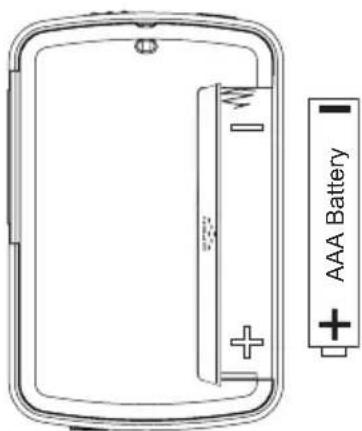
The unit is powered by a single AAA battery (not included).
Install the battery by sliding open the back cover of the unit, and matching up the plus and minus symbols on the battery and the unit, as shown in the illustration.
Connecting an SD or MMC Memory Card
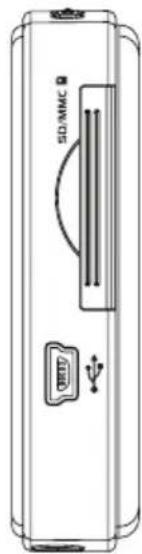
Music can also be played from an SD or MMC memory card when connected to the unit.
To play music from a connected SD or MMC memory card, simply slide the memory card into the SD/MMC Memory Card Slot, then browse and play music directly from the connected card.
natural_image
Diagram of a cylindrical device with internal components and a small connector (no text or symbols)Connecting the Unit to a Computer
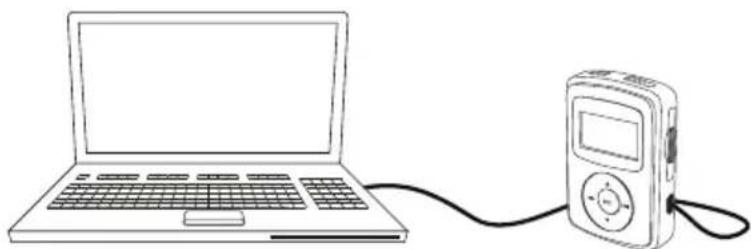
The unit can be connected to a computer in order to load the unit with music.
Please note, the computer must be powered on in order for music to be loaded on the unit from the computer
natural_image
Line drawing of a laptop connected to a digital audio recording device via cable (no text or symbols)If you are using Windows Vista with Windows Media Player 11, you will need to follow these instructions.
Note: You will be able to download purchased/subscribed songs to the unit.
- Start Windows Media Player 11 and then connect your unit to your computer. If you have not set up synchronization between your computer and this device, the Device Setup Wizard starts.
- In Device Setup - Configure Sync, write a name for your mp3 player.
- Click Finish. The window closes and the Sync feature is displayed.
- From the left pane of this Sync feature, you can select from Pictures, Music, and Video.
- After selecting a category, select the desired songs from the center pane.
- Drag these songs, pictures, or video into the Sync List, which is the right pane of the Sync feature.
- Click the Start Sync button on the Sync List pane.
- Repeat steps 4-7 for any other items that you want to copy to your unit.
If you are using Windows XP with Windows Media Player 10, you will need to follow these instructions.
Note: You will be able to download purchased/subscribed songs to the unit.
- Start Windows Media Player 10 and then connect your unit to your computer. If you have not set up synchronization between your computer and this device, the Device Setup Wizard starts.
- In the Device Setup Wizard, select Manual.
- Click Finish. The wizard closes and the Sync feature in the Player is displayed.
- Select the Library option. On the left pane select Sync List.
- From the left pane you can select All Music or My Playlists and you will see the songs located within these folders in the center pane.
- Select the songs from the center pane, and drag them to the Sync List.
- Click the Start Sync button on the Sync List pane.
- Repeat steps 4-7 for any other items that you want to copy to your unit.
If you are using Windows 2000, Windows 98SE, and Windows ME with Windows Media Player 9, you will need to follow these instructions.
Note: You will not be able to transfer purchased/subscribed songs to this unit using Windows Media Player 9. You need Windows XP with Windows Media Player 10 to do so. However, you will be able to download regular MP3/WMA songs.
- Start Windows Media Player 9 and then connect your unit to your computer.
- Click Copy to CD or Device.
- In the Items to Copy pane, in the drop-down list, select the playlist, category, or other collection that you want to copy.
- Check the box next to any file you want to transfer to your mp3 player.
- In the Items on Device pane, in the drop-down list, click the device to where you want your music files transferred.
- Click the Copy button.
- Repeat steps 2-5 for any other items that you want to copy to your unit.
Playing Music on the Unit
- Power the unit on by pressing and holding the Play/Pause Button.
- Press the Play/Pause Button to play or pause a selected audio track.
- Press the Skip/Search Buttons to skip from one audio track to the next. Press and hold the Skip/Search Buttons to search through an individual audio track.
- Press the Volume Buttons to increase or decrease the volume of the unit.
- Switch the Hold Switch to the closed lock to lock the keys so they cannot be accidentally pressed.

7
8

natural_image
Line drawing of a rectangular device with a central display and dotted pattern, no text or symbols present.9
10

natural_image
Simple line drawing of a rectangular device with a circular button and arrow indicator (no text or symbols)11
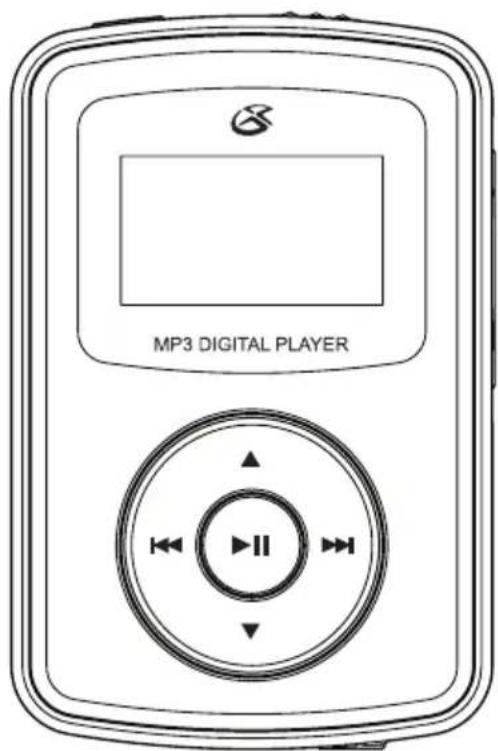
1 LCD Display
The LCD Display shows the ID3 tag information on currently selected music, plus the track time, battery life, and volume.
2 Play/Pause Button
Press the Play/Pause Button to play and pause audio tracks on the unit.
- Press and hold the Play/Pause Button to turn the unit off and on.
3 Skip/Search Button
Press the Skip/Search Button to skip from one track to the next or previous track.
- Press and hold the Skip/Search Button to search forwards or backwards through an individual track.
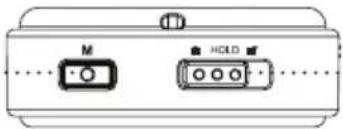
4 M Button
In play mode, press the M Button to switch between Repeat One (REP 1), Repeat All (REP ALL), Random (RAN), and Random Repeat (RAN REP).
- Press and hold the M Button to adjust the unit's EQ setting between Classic, Jazz, Bass, Normal, Pop, and Rock.
- In stop or pause mode, press the M Button once to toggle between “In Card” or “In Flash” memory options.
- When connected to a computer, press the M Button to switch between USB and MTP mode.
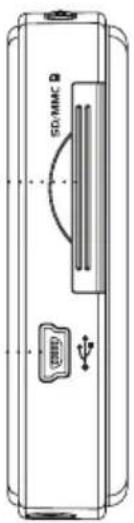
5 SD/MMC Card Slot
Use the SD/MMC Card Slot to insert an SD or MMC memory card into the unit.
Music can be played on the unit from a loaded SD or MMC memory card.
6 USB Port
Use the USB Port to connect the unit to a computer.
Music can be loaded onto the unit from a connected computer.
7 Up/Down Buttons
Use the Up/Down Buttons to adjust the volume of the unit.
8 Hold Switch
Switch the Hold Switch to the “closed lock” icon to lock the keys so they cannot be accidentally pressed. Switch the Hold Switch to the “open lock” icon to unlock all of the unit’s buttons.
9 Lanyard Connection
Use the Lanyard Connection to connect a lanyard, not included, to the unit.
10 Battery Compartment (One "AAA" Battery)
Load one AAA Battery into the Battery Compartment to power the unit.
11 Headphone Jack
Use the Headphone Jack to connect a set of earbuds or headphones to the unit.
-
In stop or pause mode, press the M Button to select the internal or external memory for searching.
-
Press and hold the M Button until the LCD reads "Search".
-
Press the Volume Buttons to adjust the letters and numbers on the LCD display to spell the desired song (ie. "SUN"). Press the M Button to accept the input character.
Only 4 characters can be input for a search.
- Press the Play/Pause Button to begin searching.
If the LCD display shows “NO FILE”, then the search did not yield any results. Otherwise, the unit will begin playing the song.
- Press the Volume Buttons to cycle through all songs that matched the search criteria.
Please note, after searching for a song, the unit will be locked in search mode and will not respond to the Skip/Search Buttons. Reset the unit by turning it off and on.
Frequently Asked Questions
What if I have mp3's or wma's stored in my computer, but they do not appear in the WMP library?
If you are using Windows Media Player 9 or 10, use the following instructions.
-
In the File menu, find Add to Library.
-
Within Add to Library, select Add Folder.
-
Select the folder containing the music files you would like to add to WMP's library.
-
Press OK and the music files located in that particular folder will be added to WMP's library and sync list.
If you are using Windows Media Player 11, use the following instructions.
- Move your cursor to the Library tab at the top of the page.
- Left-click on the Library tab until a menu appears.
- From this menu, select Add to Library.
- A prompt will appear on your screen. Make sure that on the Select the folders to monitor screen “My folders and those of others that I can access” is selected.
- Under the Select the folders to monitor screen, select Advanced Options.
- Within Advanced Options, select Add.
- Select the folder where your music kept and select OK. The music files located in that particular folder will be added to WMP's library.
What measures should be taken if the mp3 player is not being recognized by the computer?
-
Try running Windows Update to see if there are any Service Packs they have available. This can be done by clicking on the start menu. Open the Control Panel. Then, open Windows Update. Also, try simply entering in the URL:
www.windowsupdate.com -
Scan for hardware changes. To do so, open Device Manager. This can be found by right-clicking on My Computer. Choose Properties from the menu that appears. In this System Properties menu, click on the Hardware tab. From this Hardware tab, click on Device Manager. Within Device Manager, there should be a listing for Portable Devices. If there isn't a listing for Portable Devices or the listing it shows is highlighted with a question mark, right-click on Universal Serial Bus Controllers and select Scan for hardware changes.
-
If no devices connected to a USB port can be recognized, try connecting the mp3 player to a different USB port. If all the USB ports are unable to recognize the device, try shutting down your computer and removing the power cord from your tower. If you have a laptop, disengage the laptop's battery. Let the computer sit for thirty minutes to an hour before reconnecting the power. The voltage level that your USB ports receive can sometimes be less than the threshold voltage required to activate and communicate with your mp3 player. This process should return the power levels back to their original default setting.
What is the difference between MTP and USB transfer modes?
- The USB mode uses a file transfer class called the MSC (Mass Storage Class). This was developed as a way for files to be transferred onto an external drive such as a flash drive or an external hard drive. In this mode, your mp3 player will look and function like an external hard drive in that it will appear in My Computer as a separate drive. This transfer class is not very specific to the transfer of media files so the MTP (Media Transfer Protocol) was introduced. The difference with media files (music files) is that they demand more management.
- Downloading services can require special licensing and a limit on the number of playbacks a music file can have. The acquisition, restoration, updating, and backing up of these licenses as well as compatibility issues with file type and compression ratio within these digital music players demanded a more user-friendly and functional approach to file transfers.
- You will need to have Windows Media Player 10 available on your computer to utilize MTP. Those who have Windows Media Player 9 on their Windows 98 SE and Windows Millennium Edition operating system will need to install a driver update using our Download Center and transfer music using the USB transfer er mode. N OTE: Users of Windows 98SE/ME/2000 will only be able to transfer music using this USB mode, and are unable to transfer DRM-protected music files.
- If possible, we recommend the use of MTP over the USB mode because it is designed specifically for the transfer of music files than general data files. It also allows the transfer of DRM-protected music.

natural_image
Abstract geometric logo design with stylized 'S' and arrow-like elements (no text or symbols)Service Information
Address 2116 Carr Street, St. Louis MO, 63106
Phone 1-314-621-2881
Fax 1-314-588-1805
Email prodinfo@gpx.com
Website www.gpx.com
To download this Instruction Manual in English, Spanish, or French visit the Support section at www.gpx.com.
- Important Safety Instructions
- Features
- Powering the Unit
- Connecting an SD or MMC Memory Card
- Connecting the Unit to a Computer
- Playing Music on the Unit
- LCD Display
- Play/Pause Button
- Skip/Search Button
- M Button
- SD/MMC Card Slot
- USB Port
- Up/Down Buttons
- Hold Switch
- Lanyard Connection
- Battery Compartment (One "AAA" Battery)
- Headphone Jack
- Frequently Asked Questions
- What measures should be taken if the mp3 player is not being recognized by the computer?
- What is the difference between MTP and USB transfer modes?
- Service Information
Brand : GPX
Model : MW238B
Category : Mp3 player