
MW3827 - Mp3 player GPX - Free user manual and instructions
Find the device manual for free MW3827 GPX in PDF.


| Product Type | Mp3 player |
| Brand | GPX |
| Model | MW3827 |
| Memory Capacity | 512 MB |
| Display | LCD display for track, time, and song info |
| Playback Formats | MP3 |
| Controls | Plus (volume up), Minus (volume down), PREV/SEARCH, NEXT/SEARCH, PLAY/PAUSE, M (mode), R (repeat) |
| Headphone Jacks | Dual 3.5mm jacks |
| Connectivity | Mini-USB port for computer connection and charging |
| Power Source | Via USB connection to computer |
| Operating Systems | Windows 98SE, ME, 2000, XP |
| Transfer Modes | MTP (for Windows XP + Media Player 10), USB (for Win 98SE/ME/2000) |
| Repeat Modes | Repeat one, repeat all, etc. (cycled via R button) |
| Hold Function | Hold/Un-Hold toggle switch to lock buttons |
| Driver Requirement | Windows 98/98SE: download from GPX website |
| Safety Compliance | FCC Class B, RoHS |
| Included Accessories | USB cord |
Frequently Asked Questions - MW3827 GPX
User questions about MW3827 GPX
0 question about this device. Answer the ones you know or ask your own.
Ask a new question about this device
Download the instructions for your Mp3 player in PDF format for free! Find your manual MW3827 - GPX and take your electronic device back in hand. On this page are published all the documents necessary for the use of your device. MW3827 by GPX.
USER MANUAL MW3827 GPX
MP3 Player MW3827 512MB
INSTRUCTION MANUAL
TO PREVENT FIRE OR SHOCK HAZARDS, DO NOT EXPOSE THIS UNIT TO RAIN OR MOISTURE.

This symbol, located on back or bottom of the unit, is intended to alert the user to the presence of uninsulated “dangerous voltage” within the product’s enclosure that may be of sufficient magnitude to constitute a risk of electric shock to persons.

This symbol, located on back or bottom of the unit, is intended to alert the user to the presence of important operating and maintenance (servicing) instructions in the literature accompanying the appliance.
Any use of the controls or an adjustment to the procedures other than those specified herein may result in hazardous radiation.
CAUTION: TO PREVENT ELECTRIC SHOCK, MATCH WIDE BLADE OF PLUG TO WIDE SLOT, FULLY INSERT.
To reduce the risk of electric shock, do not remove cover (or back). There are no user-serviceable parts inside. Please refer any servicing to qualified service personnel.
WARNING: Changes or modifications to this unit not expressly approved by the party responsible for compliance could void the user's authority to operate the equipment.
NOTE: This equipment has been tested and found to comply with the limits for a Class B digital device, pursuant to Part 15 of the FCC Rules. These limits are designed to provide reasonable protection against harmful interference in a residential installation. This equipment generates, uses, and can radiate radio frequency energy and, if not installed and used in accordance with the instructions, may cause harmful interference to radio communications. However, there is no guarantee that interference will not occur in a particular installation. If this equipment does cause harmful interference to radio or television reception, which can be determined by turning the equipment off and on, the user is encouraged to try to correct the interference by one or more of the following measures:
- Reorient or relocate the receiving antenna.
- Increase the separation between the equipment and receiver.
- Connect the equipment into an outlet on a circuit different from that to which the receiver is connected.
- Consult the dealer or an experienced radio/TV technician for help.
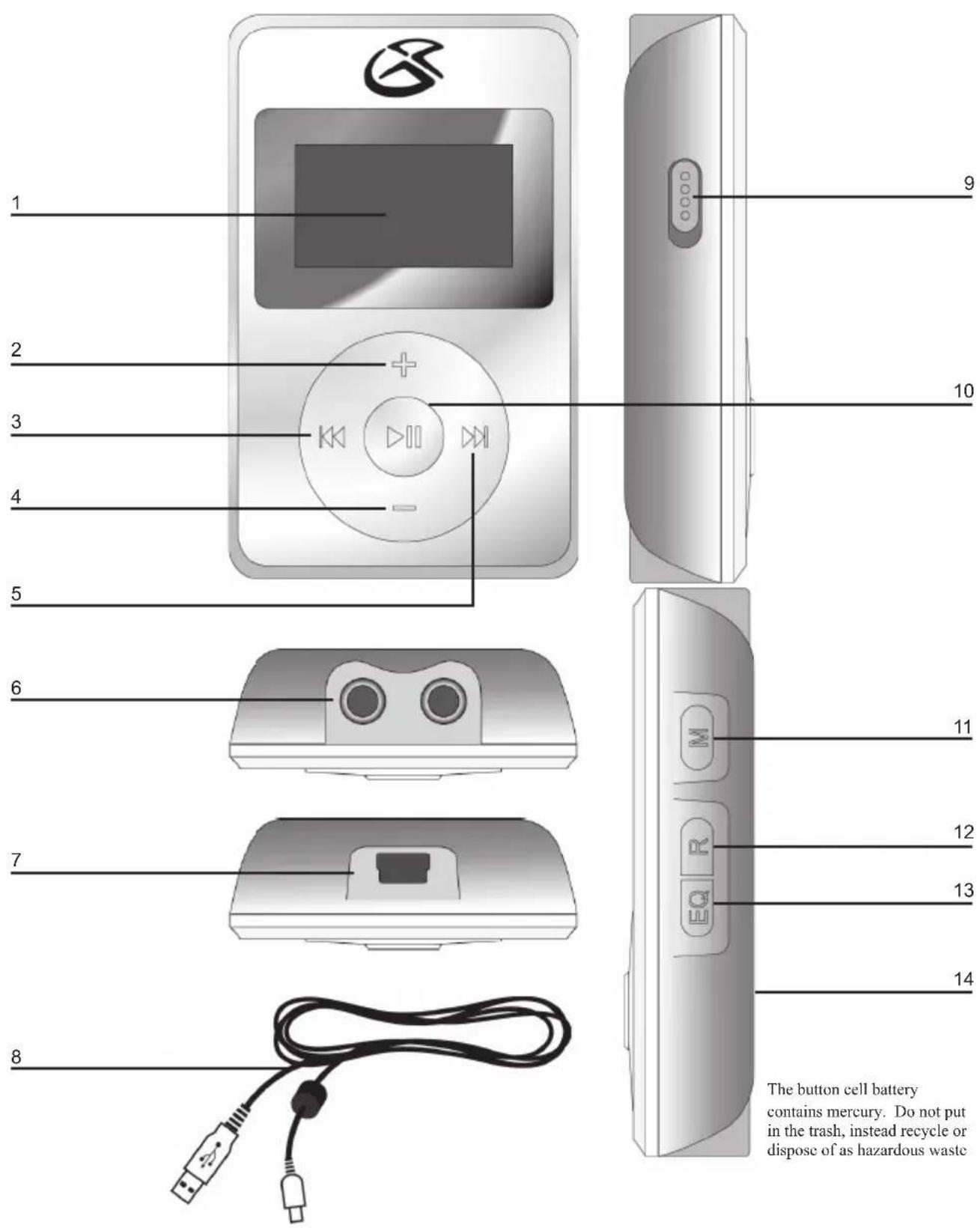
Features Defined
1 LCD Display View the track, track time, and song info. through this Liquid Crystal Display.
2 Plus Press the Plus button to increase the volume.
3 PREV/SEARCH Press the PREV/SEARCH button to skip to the previous track. Press and hold the PREV/SEARCH button to search backwards through a song
4 Minus Press the Minus button to decrease the volume.
5 NEXT/SEARCH Press the NEXT/SEARCH button to skip to the next track. Press and hold the NEXT/SEARCH button to search forward through a song.
6 Dual Headphone Jacks Use the Dual Headphone Jacks to plug in one or two sets of headphones.
7 Mini-USB Port Use the Mini-USB Port to connect the MP3 Player to a computer via the included USB Cord.
8 USB Cord Use the USB Cord to connect the MP3 Player to a computer.
9 Hold/Un-Hold Use the Hold/Un-Hold toggle switch to lock or unlock the buttons on the MP3 Player.
10 PLAY/PAUSE Press the PLAY/PAUSE button to play or pause the MP3 Player, or hold the PLAY/PAUSE button to turn the MP3 Player off and on.
11 M (Mode) Press the M (Mode) button to switch between MTP and USB mode when connected to a computer.
12 R (Repeat) Press the R (Repeat) button to cycle through the following repeat modes; REP
- Microsoft® Windows® 98SE, ME, 2000 Professional, XP Home/Professional Edition
- CD-ROM Drive
USB Driver compatible with Microsoft ^® Windows ^® ME, 2000 Professional, and XP. Multi-CPU or Multi-Boot environments are not supported.
Customers with Windows 98/98SE computer need to go to our website, www.gpx.com, to download the appropriate drivers for the MP3 Player.
Connecting to a Computer
- Turn on the MP3 Player by holding the PLAY/PAUSE button.
- Take the USB Cord and plug the corresponding ends into the MP3 Player and a Computer.
- When connected the LCD Display will either say “USB” or “MTP”.
- Press the “M” (mode) button to switch between “USB” and “MTP” mode.
“MTP” mode will only work, when your player is connected to Microsoft® Windows® XP and Windows® Media Player 10.
The MP3 Player will only work in “USB” mode when it is connected to Windows® 98SE, ME, or 2000 Professional.
- Start Windows Media Player 9 and connect the MP3 Player to your computer.
- Click "Copy to CD or Device".
- In the drop-down list, on the “Items to Copy” pane, click the play list, category, or other item that you want to copy.
- Clear the check boxes next to any files you do not want to copy.
- In the drop-down list, on the “Items to Copy” pane, click the device that you want to copy files to.
- Click the 'Copy' button.
-
Repeat steps 2-5 for any other items that you want to copy to your unit.
-
Start Windows Media Player 10 and connect the unit to your computer. On your player's display it should say 'MTP'. If not, then while the unit is connected press the 'M' (mode) button to change from 'USB' to 'MTP' mode.
- If you have not set up synchronization between your computer and this device, the Device Setup Wizard starts. In the Device Setup Wizard, select Manual.
- Click Finish.
- Select Library option. On the right pane select Sync List.
- From the left pane you can select the Play list or Library and you will see the content songs in the center pane.
- Select the songs from the center pane, drag and add them to the Sync List.
- Click the 'Start Sync' button in the Sync List pane.
- Repeat steps 4-7 for any other items that you want to copy to your unit.

natural_image
Abstract geometric logo design with stylized 'S' and arrow-like elements (no text or symbols)Service Information
Address 2116 Carr Street, St. Louis MO, 63106
Phone 1-314-621-2881
Fax 1-314-588-1805
Email prodinfo@gpx.com
Website www.gpx.com
To download this Instruction Manual in English, Spanish, or French visit the Support section at www.gpx.com.
Brand : GPX
Model : MW3827
Category : Mp3 player