
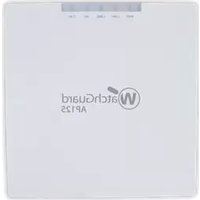
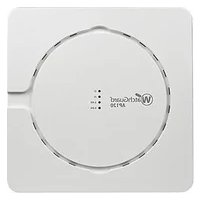
AP225W - Access Point WatchGuard - Free user manual and instructions
Find the device manual for free AP225W WatchGuard in PDF.


| Product Type | Wireless Access Point |
| Model | AP225W |
| Brand | WatchGuard |
| Dimensions (W x D x H) | 190 x 190 x 35 mm |
| Weight | 0.45 kg |
| Power Supply | PoE (802.3af) or 12V DC adapter |
| Power Consumption | 12.95W max |
| Wireless Standards | IEEE 802.11a/b/g/n/ac Wave 2 |
| Frequency Bands | 2.4 GHz and 5 GHz |
| Max Data Rate | 867 Mbps (5 GHz) + 300 Mbps (2.4 GHz) |
| Antenna Type | Internal dual-band antennas, 2x2 MIMO |
| Ethernet Ports | 1x 10/100/1000 Mbps (PoE in) |
| Mounting | Wall or ceiling mount (bracket included) |
| Operating Temperature | 0°C to 40°C |
| Management | Web UI, WatchGuard Wi-Fi Cloud, SNMP |
| Security Features | WPA2/WPA3, 802.1X, VLAN, rogue AP detection |
| Maintenance | Clean with soft, dry cloth; do not use liquids |
| Spare Parts / Repairability | No user-serviceable parts; contact support for RMA |
| Certifications | FCC, CE, IC, RoHS |
| Warranty | 1 year limited |
Frequently Asked Questions - AP225W WatchGuard
User questions about AP225W WatchGuard
0 question about this device. Answer the ones you know or ask your own.
Ask a new question about this device
Download the instructions for your Access Point in PDF format for free! Find your manual AP225W - WatchGuard and take your electronic device back in hand. On this page are published all the documents necessary for the use of your device. AP225W by WatchGuard.
USER MANUAL AP225W WatchGuard
Information in this guide is subject to change without notice. Companies, names, and data used in examples herein are fictitious unless otherwise noted. No part of this guide may be reproduced or transmitted in any form or by any means, electronic or mechanical, for any purpose, without the express written permission of WatchGuard Technologies, Inc.
Guide revised: 2/26/2020
Copyright, Trademark, and Patent Information
Copyright © 1998 - 2020 WatchGuard Technologies, Inc. All rights reserved. All trademarks or trade names mentioned herein, if any, are the property of their respective owners.
Complete copyright, trademark, patent, and licensing information can be found in the Copyright and Licensing Guide, available online at https://www.watchguard.com/wgrd-help/documentation/overview.
About WatchGuard
Address
WatchGuard® Technologies, Inc. is a global leader in network 505 Fifth Avenue South security, providing best-in-class Unified Threat Management, Next Suite 500
Generation Firewall, secure Wi-Fi, and network intelligence Seattle, WA 98104
products and services to more than 75,000 customers worldwide.
The company's mission is to make enterprise-grade security accessible to companies of all types and sizes through simplicity,
making WatchGuard an ideal solution for Distributed Enterprises www.watchguard.com/support and SMBs. WatchGuard is headquartered in Seattle, Washington, U.S. and Canada +877.232.3531 with offices throughout North America, Europe, Asia Pacific, and All Other Countries +1.206.521.3575 Latin America. To learn more, visit WatchGuard.com.
For additional information, promotions and updates, follow
WatchGuard on Twitter, @WatchGuard on Facebook, or on the
LinkedIn Company page. Also, visit our InfoSec blog, Secplicity, U.S. and Canada +1.800.734.9905 for real-time information about the latest threats and how to cope. All Other Countries +1.206.613.0895 with them at www.secplicity.org.
Sales
Contents
WatchGuard AP225W Hardware Guide.1....
AP Management 1
About Your Hardware.2....
Hardware Specifications 2
Environmental Requirements.3....
Hardware Description 4
Rear Panel Connections.4....
Bottom Panel Connections 5
Device Indicators 6
Mount and Connect the AP.8....
Attach the Mounting Bracket.... 8
Connect the AP 9
Attach the AP to the Mounting Bracket.... 11
Power Adapter (Optional) 12
Ethernet Power Injector (Optional).... 13
Notices 15
Safety Warning....15
Power Adapter Requirements.... 15
FCC Certification.... 15
CE Notice 16
Industry Canada Certification.... 16
EU Declaration of Conformity 18
Brazil ANATEL 20
Mexico NOM 20
Japan Statement.... 20
Japan VCCI Class B Statement 20
Taiwan NCC Statement 20
Taiwan Class B Notice 21....
RoHS Statement 21
WEEE Statement.21....
REACH Certificate of Compliance 21
WatchGuard AP225W Hardware Guide
The WatchGuard AP225W is an enterprise-grade 2x2 MU-MIMO tri-radio 802.11ac wall plate access point with dual concurrent 5 GHz and 2.4 GHz radios supporting 802.11a/n/ac Wave 2, 802.11b/g/n, two spatial streams, and data rates of up to 876 Mbps and 400 Mbps, respectively. The AP225W also contains a third 2x2 MIMO 802.11ac radio for dedicated multi-function security and wireless network scanning.

AP Management
There are two ways you can manage your AP225W:
Total Wi-Fi and Secure Wi-Fi with WatchGuard Wi-Fi Cloud
A powerful cloud-based enterprise wireless management solution for AP configuration, security, and monitoring.
Basic Wi-Fi with WatchGuard Firebox Gateway Wireless Controller
Local management, configuration, security, and monitoring of APs directly from your WatchGuard Firebox. The WatchGuard Firebox requires Fireware v12.5.3 and higher.
About Your Hardware
Hardware Specifications
| Hardware Description | |
| Radio Type and Frequency Band | ■ 2.4 GHz, 802.11b/g/n. Max data rate: 400 Mbps■ 5 GHz, 802.11a/n/ac. Max data rate: 867 Mbps■ Third radio for multi-purpose security and wireless network scanning |
| Antennas Six | integrated omnidirectional antennas |
| Ethernet Interfaces | ■ 1 x 10/100/1000 Mbps Gigabit Ethernet (PoE In LAN/Uplink) for wired LAN connection through a switch or hub. This port also provides PoE (802.3af/ for the device. The AP225W requires PoE+ (802.3at) for full functionality a capabilities to enable power on the LAN3/PoE Out port.■ 2 x 10/100/1000 Mbps Gigabit Ethernet (LAN1, LAN2) for wired extension SSID or a VLAN extension. Link aggregation is not supported.■ 1 x 10/100/1000 Mbps Gigabit Ethernet (LAN3 / PoE Out) for wired exten SSID or a VLAN extension, and also provides PoE (802.3af) power to oth devices. The AP must be connected to PoE+ (802.3at) or DC power to er power on the LAN3/PoE Out port. Link aggregation is not supported.■ 2 x pass-through ports for extension of the wired network. |
| Power Interface | PoE In LAN/Uplink port (PoE+ 802.3at, PoE 802.3af), 48VDC In: 12V DC 2A |
| Power Consumption | Maximum: 12W |
| MTBF(Mean Time Between Failures) | 440,000+ hours at 40°C |
| Dimensions | 186 mm X 124 mm X 25.4 mm (7.3" x 4.9" x 1") |
| Weight 0.450 | kg (1 lb) |
Environmental Requirements
To safely install your WatchGuard AP, we recommend that you:
■ Install the device indoors or outdoors, preferably under cover
■ Make sure the device has adequate clearance for air flow and cooling
Other environmental requirements:
| Operating Temperature 0°C to 40°C (32°F to 104°F) |
| Operating Humidity 0% to 95% non-condensing |
| Non-operating Temperature -20°C to 70°C (-4°F to 158°F) |
| Non-operating Humidity 0% to 95%, non-condensing |
Hardware Description
The AP has connections on both the rear panel and the bottom panel of the AP.
Rear Panel Connections
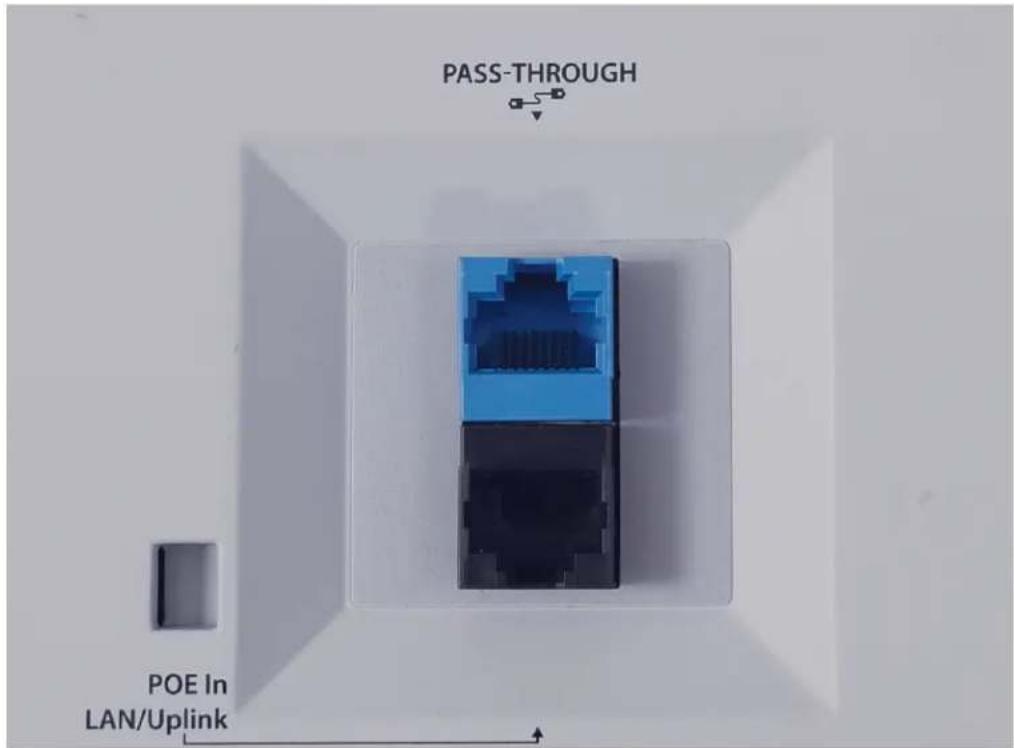
PASS -THROUGH
The pass-through port is a wired port that enables you to extend the wired network after the AP is mounted on the wall. You can plug another device into the pass-through port on the bottom panel of the AP. The pass-through ports on the rear panel and bottom panel of the AP are internally connected. The traffic on the pass-through port does not interfere with AP traffic, and no policies can be applied to pass-through port traffic.
POE In LAN/Uplink
This is an uplink LAN port that connects the AP to a wired LAN connection through a switch or hub. This port also provides PoE (802.3af/802.3at) power for the AP.
Bottom Panel Connections

DC IN
If PoE power is unavailable, you can power the device with the optional 12V DC 2.5A power adapter (WG9009).
Pass-Through
The pass-through port is a wired port that enables you to extend the wired network after the AP is mounted on the wall. You can plug another device into the pass-through port on the bottom panel of the AP. The pass-through ports on the rear panel and bottom panel of the AP are internally connected. The traffic on the pass-through port does not interfere with AP traffic, and no policies can be applied to pass-through port traffic.
LAN3/PoE Out
Standard RJ45 connector that supports link speeds of 10/100/1000 Mbps. You can use this interface as a wired extension of an SSID or a VLAN extension. This port can also provide PoE (802.3af) power for another device. The AP must be connected to PoE+ (802.3at) or DC power to enable power on the LAN3/PoE Out port. Link aggregation is not supported.

The PoE Out port is intended to power small devices such as IP-based phones, cameras, or other similar devices. WatchGuard recommends that you do not power another access point from this port.
LAN2
Standard RJ45 connector that supports link speeds of 10/100/1000 Mbps. You can use this interface as a wired extension of an SSID or a VLAN extension. Link aggregation is not supported.
LAN1
Standard RJ45 connector that supports link speeds of 10/100/1000 Mbps. You can use this interface as a wired extension of an SSID or a VLAN extension. Link aggregation is not supported.
Reset Button
Resets the AP to factory-default settings.
■ Use a paper clip or other small object to press the reset button through the hole.
■ Press and hold the reset button for up to 10 seconds until all LEDs go off to indicate that the AP has rebooted.
Device Indicators
The AP225W has these LED indicators:
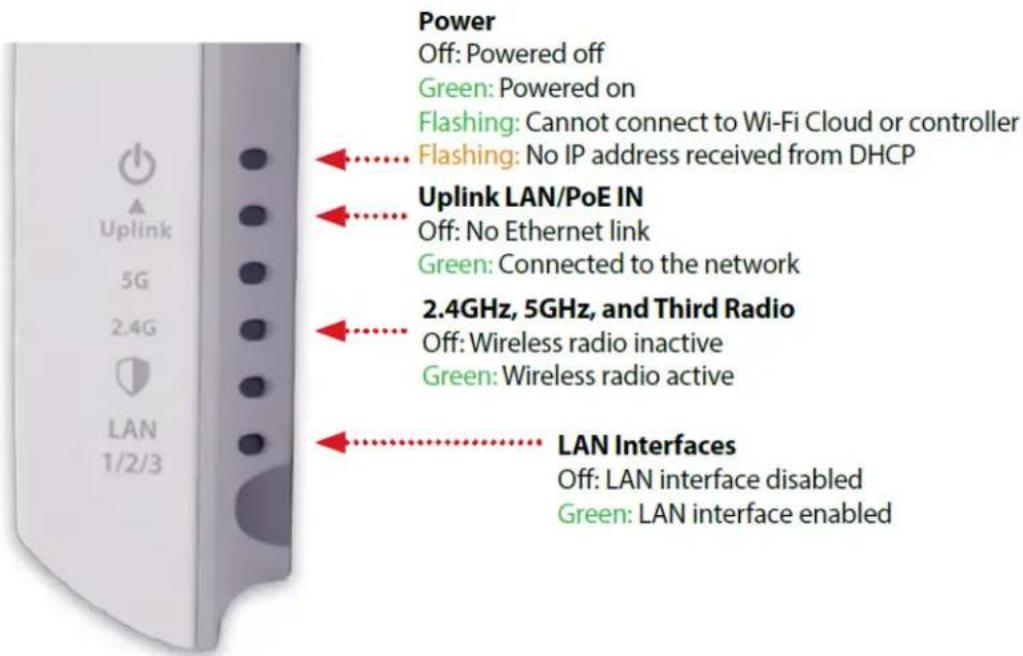
This table provides detailed information about the device indicators:
| LED Status Description | ||
| Power Off Powered off | ||
| Solid Green Powered on | ||
| Flashing Green AP cannot connect to Wi-Fi Cloud or the Gateway Wireless Controller | ||
| Flashing Amber AP did not receive an IP address from the DHCP server | ||
| Uplink (PoE In) | Off No Ethernet link. | |
| Solid Green Connected to the network. | ||
| LAN1/2/3 Off | No Ethernet link. | |
| Solid Green (Wi-Fi Cloud mode) | A LAN interface is configured for a wireless extension, VLAN extension, or link aggregation. | |
| Solid Green (Local mode) | A LAN interface is connected to the network. | |
| 2.4 GHz Off | Wireless radio is inactive | |
| Solid Green Wireless radio is active with a configured SSID | ||
| 5 GHz Off | Wireless radio is inactive | |
| Solid Green Wireless radio is active with a configured SSID | ||
| Third Radio (WIPS) | Off Wireless radio is inactive | |
| Solid Green WIPS scanning is active (Wi-Fi Cloud mode only) | ||
Mount and Connect the AP
Your package includes the AP225W, mounting bracket, and mounting screws.


The MAC address and serial number of your AP are printed on a label on the back of the device. Make sure you record this information before you mount the AP.
Attach the Mounting Bracket
Use the included screws to attach the mounting bracket to an existing wall plate, or to a wall without an existing wall plate.

natural_image
Technical line drawing of a mechanical assembly with two views (top and side), no text or symbols presentWall with existing wall plate

Wall with no existing wall plate
Note: If your existing wall plate has female RJ45 connections, you must either re-terminate the Ethernet cable with a male RJ45 connector, or use a bridge Ethernet cable between the female connectors on your existing cables and the back of the AP if there is enough room in the wall junction box.
Connect the AP
Connect the Ethernet cables to the appropriate ports on the rear panel of the AP.
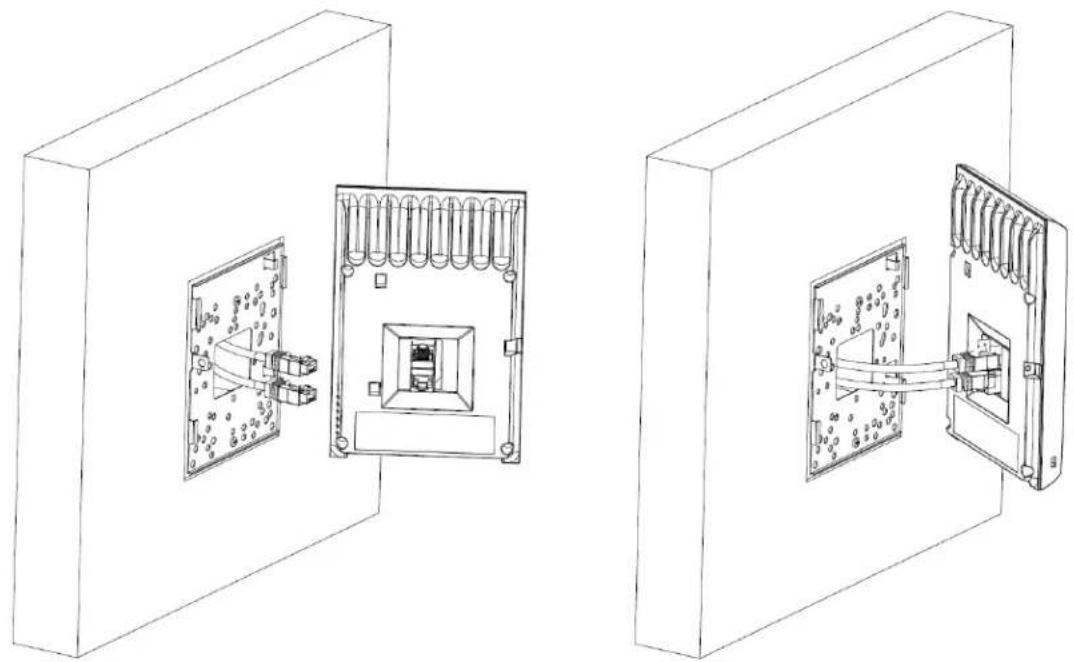
natural_image
Technical line drawings of two electrical enclosure components with internal wiring and mounting brackets (no text or symbols)To power the AP with a PoE power source and connect the AP to your network:
- Plug one end of the Ethernet cable from your network into the POE In LAN/Uplink port on the rear panel of the AP225W. Make sure the other end of the Ethernet cable is connected to your network through a hub, switch, or injector with PoE power enabled.
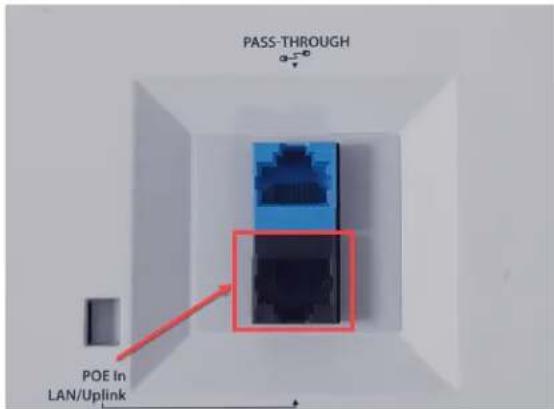
■ Connect an optional Ethernet cable from your network into the PASS-THROUGH port on the rear panel of the AP225W.
To power the AP with the optional 12V DC power adapter and connect the AP to your network:
- Plug the optional 12V power adapter into the DC IN power port on the bottom panel of the AP225W, then plug the power adapter into an AC power source.
■ To connect the AP225W to the network, connect an Ethernet cable into the POE In LAN/Uplink port on the rear panel of the AP. Make sure the other end of the Ethernet cable is connected to your netwo through a hub or switch.
■ Connect an optional Ethernet cable from your network into the PASS-THROUGH port on the rear panel of the AP225W.
Attach the AP to the Mounting Bracket
To attach the AP to the mounting bracket:
-
Align the tabs on the bracket with the slots on the rear panel of the AP, then slide the AP onto the bracket.
-
Attach the AP to the bracket with the included screw.

Power Adapter (Optional)
An optional AC power adapter supplies 12V DC power to the AP.

natural_image
Black handheld electronic device with coiled cable and connector (no visible text or symbols)| AC Power Adapter Specs | |
| WatchGuard Part Number WG9009 | |
| AC Input Voltage Rating 100-240V, 50-60Hz | |
| Output Voltage DC 12V, 2.5A | |
| Region Specific Adapter Plugs US, UK, AU/NZ, EMEA | |
| Temperature Operating: 0 - 40°C (32 - 104°F)Storage: -20 - 85°C (-4 - 185°F) | |
| Humidity Operating: 5% - 95%Storage: 0% - 95% | |
| Dimensions 69 mm x 32.6 mm x 49.5 mm (2.7" x 1.28" x 1.5") |
Ethernet Power Injector (Optional)
You can power the AP with an optional Ethernet Power Injector. The PoE+ power injector enables you to power the AP through an existing Ethernet connection. With this device, you do not have to position your AP near a power outlet.

natural_image
Black rectangular electronic device with two Ethernet ports and a label 'E-Genus' on top (no other text or symbols visible)
This device complies with IEEE 802.3at/af PoE specifications. Do not use any PoE adapters that are not IEEE 802.3at/af compliant as they may damage your device.
To connect an Ethernet Power Injector to the WatchGuard AP:
- Plug the Ethernet Power Injector into an AC power source.
- Connect an Ethernet cable from your network backbone (for example, a PoE-capable router, switch, or hub) to the LAN connector on the Ethernet Power Injector.
- Connect an Ethernet cable from the LAN1 PoE Ethernet interface on the AP to the PoE connector on the Ethernet Power Injector.
The table provides the specifications for the power adapter.
| Ethernet Power Injector Specs | |
| WatchGuard Part Number | 802.3at PoE+ Injector with AC cord (US/FCC) (WG8599)802.3at PoE+ Injector with AC cord (CE) (WG8600)802.3at PoE+ Injector with AC cord (UK) (WG8601)802.3at PoE+ Injector with AC cord (AUS) (WG8602) |
| Specification | IEEE 802.3at/af |
| AC Input Voltage Rating | 100-240 VAC |
| Input Current | 0.8A max for 100VAC |
| Output Power | 30W max |
| Ethernet Interfaces | LAN: RJ-45 for 10/100/1000 Mbps dataPOE: RJ-45 for 10/100/1000 Mbps data and powerVoltage: Pin4, 5:54V, Pin7, 8:Return |
| Indicator Power: Green | |
| Temperature | Operating: 0 - 40°C (32 - 104°F)Storage: -30 - 80°C (-22 - 176°F) |
| Humidity Operating: 5% - 90%Storage: 5% - 90% | |
| Dimensions | 99 mm x 68.5 mm x 33 mm (3.9" x 2.27" x 1.3") |
| Weight 0.33 | Ibs (149.6 g) |
Notices
All WatchGuard products are designed and tested to meet strict safety requirements. These requirements include product safety approvals and other global compliance standards. Please read these instructions carefully before operating the product, and refer to them as needed to ensure the continued safe operation of your product.
For patent information, please visit http://www.watchguard.com/patents
Safety Warning
If protective earthing is used as a safeguard, the instructions shall require connection of the equipment protective earthing conductor to the installation protective earthing conductor (for example, by means of a power cord connected to a socket-outlet with earthing connection). To meet safety and electromagnetic interference (EMI) requirements, you must make sure the power source is connected to earth ground before you connect power to the AP.
Power Adapter Requirements
This product is intended to be supplied by a Listed Power Adapter or DC power source marked "L.P.S." (or Limited Power Source or PS2) rated 12V DC, 2A minimum, maximum ambient temperature (Tma)=40°C, or supplied by a Listed PoE Adapter marked "L.P.S." (or Limited Power Source or PS2) rated 54V DC, 0.6A minimum, maximum ambient temperature (Tma)=40°C. For more information regarding approved power sources, please contact WatchGuard Technologies.
FCC Certification
This device complies with part 15 of the FCC Rules. Operation is subject to the following two conditions: (1) This device may not cause harmful interference, and (2) this device must accept any interference received, including interference that may cause undesired operation.
This equipment has been tested and found to comply with the limits for a Class B digital device, pursuant to part 15 of the FCC Rules. These limits are designed to provide reasonable protection against harmful interference in a residential installation.
This equipment generates, uses and can radiate radio frequency energy and, if not installed and used in accordance with the instructions, may cause harmful interference to radio communications. However, there is no guarantee that interference will not occur in a particular installation. If this equipment does cause harmful interference to radio or television reception, which can be determined by turning the equipment off and on, the user is encouraged to try to correct the interference by one or more of the following measures:
■ Reorient or relocate the receiving antenna.
■ Increase the separation between the equipment and receiver.
■ Connect the equipment into an outlet on a circuit different from that to which the receiver is
■ connected.
- Consult the dealer or an experienced radio/TV technician for help.
* FCC Caution: Any changes or modifications not expressly approved by the party responsible for compliance could void the user's authority to operate this equipment.
This transmitter must not be co-located or operating in conjunction with any other antenna or transmitter. The device is for indoor use only. Supported in 2412-2462, 5180\~5240, 5260\~5320, 5500\~5700, 5745\~5825MHz and operation in the 2412-2462, 5180\~5240, 5260\~5320, 5500\~5700, 5745\~5825MHz band are restricted to indoor usage only.
This device meets all the other requirements specified in Part 15E, Section 15.407 of the FCC Rules.
Radiation Exposure Statement:
This equipment complies with FCC radiation exposure limits set forth for an uncontrolled environment. This equipment should be installed and operated with minimum distance 23cm between the radiator & your body
CE Notice
The CE symbol on your WatchGuard Technologies equipment indicates that it is in compliance with the Electromagnetic Compatibility (EMC) directive and the Low Voltage Directive (LVD) of the European Union (EU).

Industry Canada Certification
This device complies with ISED's licence-exempt RSSs. Operation is subject to the following two conditions: (1) This device may not cause harmful interference, and (2) this device must accept any interference received, including interference that may cause undesired operation.
(i) the device for operation in the band 5150-5250 MHz is only for indoor use to reduce the potential for harmful interference to co-channel mobile satellite systems;
(ii) where applicable, antenna type(s), antenna models(s), and worst-case tilt angle(s) necessary to remain compliant with the e.i.r.p. elevation mask requirement set forth in section 6.2.2.3 shall be clearly indicated.
Avertissement
Radiation Exposure Statement
This equipment complies with ISED radiation exposure limits set forth for an uncontrolled environment. This equipment should be installed and operated with minimum distance 27cm between the radiator & your body.
Dynamic Frequency Selection (DFS) for devices operating in the bands 5250-5350 MHz, 5470-5600 MHz and 5650-5725 MHz.
For indoor use only.
EU Declaration of Conformity
This device complies with the essential requirements of the RED Directive 2014/53/EU. The following test methods have been applied in order to prove presumption of conformity with the essential requirements of the RED Directive 2014/53/EU:
EN 60950-1:2006+A11+A1+A12+A2:2013
Safety of Information Technology Equipment (ITE)
EN 55024:2010
Immunity for Information Technology Equipment (ITE)
EN 55032:2015/AC:2016
Electromagnetic compatibility of multimedia equipment - Emission requirements.
EN 62311:2008
Assessment of electronic and electrical equipment related to human exposure restrictions for electromagnetic fields (0 Hz - 300 GHz).
EN 61000-3-2:2014
Limits for harmonic current emissions.
EN 61000-3-3:2013
Limitation of voltage changes, voltage fluctuations and flicker in public low-voltage supply systems, for equipment with rated current ≤ 16 A per phase and not subject to conditional connection.
EN 300 328 V2.1.1
Electromagnetic compatibility and Radio spectrum Matters (ERM); Wideband transmission systems; Data transmission equipment operating in the 2.4GHz ISM band and using wide band modulation techniques; Harmonized EN covering the essential requirements of article 3.2 of the RED Directive
EN 301 893 V2.1.1
Broadband Radio Access Networks (BRAN); 5GHz high performance RLAN; Harmonized EN covering the essential requirements of article 3.2 of the RED Directive
EN 301 489-1 V2.1.1
Electromagnetic compatibility and Radio spectrum Matters (ERM); Electro Magnetic Compatibility (EMC) standard for radio equipment and services; Part 1: Common technical requirements
Electromagnetic compatibility and Radio spectrum Matters (ERM); ElectroMagnetic Compatibility (EMC) standard for radio equipment; Part 17: Specific conditions for Broadband Data Transmission Systems
This device is a 5GHz wideband transmission system (transceiver), intended for use in all EU member states and EFTA countries, except in France and Italy where restrictive use applies. In Italy the end-user should apply for a license at the national spectrum authorities in order to obtain authorization to use the device for setting up outdoor radio links and/or for supplying public access to telecommunications and/or network services.
This device may not be used for setting up outdoor radio links in France and in some areas the RF output power may be limited to 10 mW EIRP in the frequency range of 2454 - 2483.5 MHz. For detailed information the end-user should contact the national spectrum authority in France.
Declaration of Conformity
WatchGuard Technologies Inc. hereby declares that the product(s) listed below conform to the European Union directives and standards identified in this declaration.
Product (s):
802.11 a/b/g/n/ac Access Point, W-118
EU Directive(s):
Low Voltage (2014/35/EU)
Electromagnetic Compatibility (2014/30/EU)
Energy-related Products (2009/125/EC)
RoHS (2011/65/EU and 2015/863/EU RoHS)
WEEE Directive 2012/19/EU
The Radio Equipment Directive (2014/53/EU)
Common Standard(s):
EN 60950-1:2006+A11+A1+A12+A2:2013
EN 55024:2010
EN 55032:2015/AC:2016
EN 62311:2008
EN 61000-3-2:2014
EN 61000-3-3:2013
Wireless Standard(s):
This device complies with Directive 2014/53/EU issued by the Commission of the European Community.
Manufacturer / Hersteller:
Equipment / Funkanlage:
Operating temperature
The above device complies with the essential requirements and other relevant provisions to Directive
2014/53/EU when used for its intended purpose. This equipment may be operated in the USA, Canada, & Europe Union.
Warning! This is a Class B product. In a domestic environment this product may cause radio interference in which case the
user may be required to take adequate measures.
| Frequency range (MHz) | Max. Transmit Power (W) |
| Bluetooth | 0.00794 |
| WLAN Wi-FI 802.11x; 2, 4 GHz | 0.09977 |
| WLAN Wi-FI 802.11x; 5 GHz | 0.19907 |
Manufacturing Program Manager

Date: Nov 16, 2019
Brazil ANATEL
This equipment contains specified radio equipment that has been certified to the Technical Regulation Conformity Certification under Radio Law.
Japan VCCI Class B Statement
Taiwan NCC Statement
低功率電波輻射性電機管理辦法
Taiwan Class B Notice
The member states of the European Union approved directive 2002/95/EC, Restrictions of Hazardous Substances (“RoHS directive”) that became valid on July 1, 2006. It states that all new electrical and electronic equipment put on the market within the member states must not contain certain hazardous materials. This device complies with the European Union’s R0HS directive 2002/95/EC and similar regulations that may be adopted by other countries for European Sales.
WEEE Statement
WEEE is a general set of requirements dictated in the EU Directive 2002/96/EC. This Directive mandated that member EU countries enact regulations governing the Waste of Electrical and Electronic Equipment (WEEE). The Directive, and its individual transpositions into specific country laws and legislation, is aimed at the reduction of WEEE through reuse, recovery, and recycling of WEEE.
WatchGuard is working in partnership with our European Union (EU) distribution partners to ensure that our products are in compliance with the WEEE statutes, and that the recovery of our product per the specific EU country legislative requirements is seamless for our product's end users. If you have a WatchGuard product that is at its end of life and needs to be disposed of, please contact WatchGuard Customer Care Department at:
U.S. Customers: 877.232.3531
International Customers: +1.206.613.0456
WatchGuard is reasonably confident that our products do not contain any substances or hazardous materials presently banned by any legislation, and do not present a risk due to hazardous materials. WEEE recovery professionals should also note that these products do not have any materials that are of particular high value in their individual form.
REACH Certificate of Compliance
The new EU chemicals policy REACH (Registration, Evaluation, Authorization and restriction of Chemicals) came into effect on June 1, 2007. REACH is Europe's new chemicals legislation, which is applicable in all 27 EU Member States as well as the EFTA European Economic Area (EEA). REACH creates a new system for gathering information, assessing risks to human health and the environment, and authorizing or restricting the marketing and use of chemicals produced or supplied in the EEA. REACH has an impact on EEA producers and importers of finished products and users of chemicals in the course of industrial or professional activities.
WatchGuard supports the overall REACH objective of improving the protection of human health and the environment and will meet all applicable REACH requirements. WatchGuard is strongly committed to working with our customers and supply chain to define and implement the REACH requirements and ensure a smooth transition to compliance.
One of the REACH requirements is that manufacturers and importers have the duty to register substances they are producing or importing. In accordance with the regulations, the products of WatchGuard do not need to be registered for the following reasons:
■ WatchGuard does not import more than 1 metric ton per year of a substance as defined by REACH.
■ WatchGuard products are non-chemical products that are not designed to release any substance under normal and reasonably predictable application.
- Our products do not contain the listed substances at more than 0.1% by weight of the whole product/part.

- Copyright, Trademark, and Patent Information
- About WatchGuard
- Address
- Sales
- Contents
- WatchGuard AP225W Hardware Guide
- AP Management
- About Your Hardware
- Environmental Requirements
- Hardware Description
- Rear Panel Connections
- PASS -THROUGH
- POE In LAN/Uplink
- DC IN
- Pass-Through
- LAN3/PoE Out
- LAN2
- LAN1
- Reset Button
- Device Indicators
- Mount and Connect the AP
- Attach the Mounting Bracket
- Connect the AP
- Attach the AP to the Mounting Bracket
- Power Adapter (Optional)
- Ethernet Power Injector (Optional)
- Notices
- Safety Warning
- Power Adapter Requirements
- FCC Certification
- CE Notice
- Industry Canada Certification
- Avertissement
- Radiation Exposure Statement
- EU Declaration of Conformity
- Declaration of Conformity
- Product (s):
- EU Directive(s):
- Common Standard(s):
- Wireless Standard(s):
- Equipment / Funkanlage:
- Brazil ANATEL
- Japan VCCI Class B Statement
- Taiwan NCC Statement
- Taiwan Class B Notice
- WEEE Statement
- REACH Certificate of Compliance
Brand : WatchGuard
Model : AP225W
Category : Access Point