RMX-100 - Remote control Steren - Free user manual and instructions
Find the device manual for free RMX-100 Steren in PDF.


| Brand | Steren |
| Model | RMX-100 |
| Product Type | Remote Control Extender |
| Power Input | 110 V ~ 60 Hz, 150 mA |
| Function | Extends remote control signal via coaxial cable |
| Max Cable Length per Segment | 50 m (RG59 or RG6) |
| Operating Distance (Remote to Receiver) | Up to 5 m |
| Components | Main unit (extender), splitter, infrared LED, power cord |
| Splitter Inputs/Outputs | To SAT receiver (input), To LED (IR LED), To controller (output), To TV (output) |
| Extender Inputs/Outputs | Ant input, To TV, To splitter |
| Cable Type | Coaxial RG59 or RG6 |
| Safety Precautions | Do not open device; avoid moisture, extreme temperatures, dust, smoke |
| Installation Recommendations | Use well-compressed coaxial connectors; avoid bends less than 90°; keep away from heat and electromagnetic noise |
| Warranty | 1 year from purchase date for original purchaser |
Frequently Asked Questions - RMX-100 Steren
User questions about RMX-100 Steren
0 question about this device. Answer the ones you know or ask your own.
Ask a new question about this device
Download the instructions for your Remote control in PDF format for free! Find your manual RMX-100 - Steren and take your electronic device back in hand. On this page are published all the documents necessary for the use of your device. RMX-100 by Steren.
USER MANUAL RMX-100 Steren
Before using your new Steren's product, please read this instruction manual to prevent any damage.
IMPORTANTE / IMPORTANT
The instructions of this manual are for reference about the product. There may be differences due to updates. Please check our web site (www.steren.com) to obtain the latest version of the instruction manual.
PRECAUCIONES / CAUTIONS
- Do not try to open the device, may cause damages and warranty will be void.
- Do not expose to extreme temperatures.
- Do not use or store the equipment near wet places. May cause malfunction or shock hazard.
- Do not put heavy objects on the device or accessories.
- Do not expose the device or accessories to dust, smoke or steam.
CARACTERISTICAS / HIGHLIGHTS
Remote control extender operates using the coaxial cable as a means of sending a signal to the control computer.
It allows you to operate any device or computer with your remote control from anywhere in the home or office. It consists of a main unit and a signal splitter (splitter).
RECOMENDACIONES / RECOMMENDATIONS
- Los conectores de los cables coaxiales deben estar bien comprimidos.
- Evite dobleces o curvaturas menores de 90° al momento de tirar el cableado.
- El cableado deberá estar alejado de fuentes de calor y ruido electromagnético (motores, interruptores de alimentación, etc.) así como dentro de una tubería en la que ya exista cableado eléctrico u otro servicio.
- Al realizar las perforaciones, tenga cuidado de que no existan tuberías ocultas con cableado eléctrico, gas o agua.
-
No utilice herramienta para apretar los conectores de los cables coaxiales, ya que podría dañarlos.
-
The connectors of the coaxial cables should be well compressed.
- Avoid kinks or bends less than 90 degrees when pulling the wiring.
• The wiring should be away from sources of heat and electromagnetic noise (motors, power switches, etc.) as well as within a pipeline which already exists electrical wiring or other service. - When making holes, be careful that there are no hidden pipes with electrical wiring, gas or water.
- Do not use tool to tighten the connectors of the coaxial cables, as this may damage them.
PARTES / PARTS
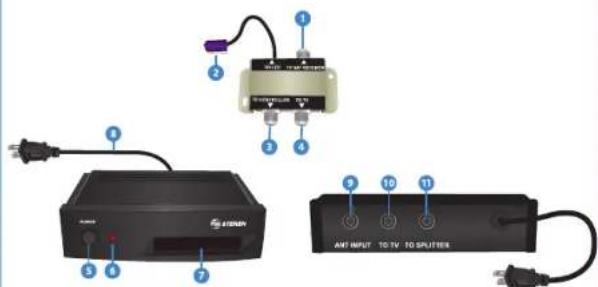
- Splitter
- To SAT receiver (entrada)
- To LED (LED infrarrojo)
- To controller (salida)
- To TV (salida)
Splitter
- To SAT receiver (input)
- To LED (infrared LED)
- To controller (output)
- To TV (output)
- Extensor
- Botón de encendido
- LED de funcionamiento
- Pantalla receptora
- Cable de alimentación
- Ant input
- To TV
-
To splitter
-
Extender
- On/off
- Operating LED
- Receiver screen
- Power cord
- Ant input
10.To TV - To splitter
INSTRUCCIONES / INSTRUCTIONS
Instalación
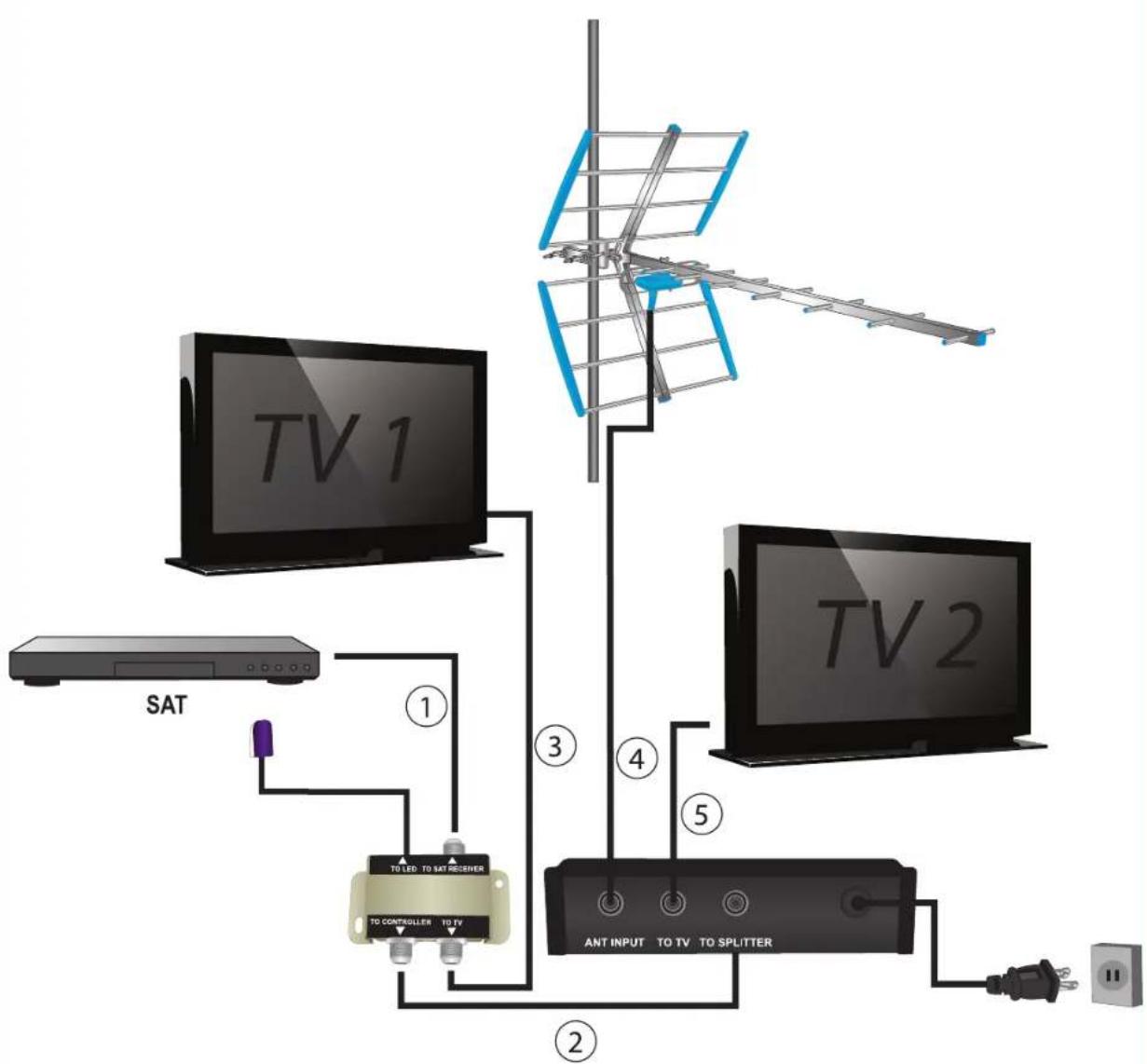
To make connections, you need 4 sections of coaxial cable (RG59 or RG6) whose length should not exceed 50 m per segment.
- Connect the output of the satellite decoder to the TO RECEIVER SAT input splitter.
Consider the splitter IR LED should point directly towards the satellite decoder all the time.
-
Connect the output of the splitter TO CONTROLLER TO SPLITTER input extender.
-
Connect the splitter output TO TV to the TV input 1.
-
If you use an antenna, connect it to the ANT input INPUT extender.
-
Connect the output of the expander TO TV to the input of TV2.
-
Plug the power cord into an electrical outlet.
See diagram on the back page Test run
Before starting the test, make sure all connectors are tight.
1. Turn on the satellite decoder, extender and two televisions.
- Point the remote control (the team) to the receiving screen to tune a channel extender. In both TVs must be the same image.
Note: You should not be at a greater distance than 5 m.
PROBLEMAS Y SOLUCIONES / TROUBLESHOOTING
Receiver / Transmitter
Input: 110 V \~ 60 Hz 150 mA
Product design and specifications are subject to change without notice.


STEREN
Product: Extender remote control
Part number: RDX-100
Brand:STEREN
WARRANTY
This Stock product is a marketable stock named 'a general usage required' because in partnership and materials to the original purchaser for one year from the date of purchase.
- This warranty care with all the required information, invoice or purchase ticket, product box or package, and product, must be preserved when
- If the product is in the sourcey time, this company will report it 'one of these
- The open grid line will not exceed 20 natural days, from 1st day the call was arrived.
- Missen and parts, completely, consumables and allowances in customers, as well as regularly available, may be the addresses mentioned later.
- Sister Srl, Srls, Clllclerls, Oclsnkloes and acceitas to customer, as well as warranty service, a only of the course sites mentioned site.
THIS WARRANTY IS VOID IN THE NEXT CASES: If the product has been damaged by an accident, acts as God, mislanding, lacks,alleases, irum to blow and open into space, increase repair by
This professional has not yet gone on the company, but it is doing business, and is not to be a company representative. The company is an authorized personnel improper sale keeping, among others.
at the consumer can also claim the warranty service in the purchase establishment.
in) If you know I'm not only card, we use microphone. If yes, show the impulse at pace
Name of the minister
Address
RETAILER INFORMATION
B
Brand
58310-18
In case your product fails or have questions, please contact your nearest dealer. If you are in Mexico, please call to our Call Center.
01 800 500 9000
flowchart
graph TD
    A["TV 1"] -->|①| B["TO LED TO SAT RESER"]
    B --> C["TO CONTROLLER TO TV"]
    C --> D["ANT INPUT TO TV TO SPLITTER"]
    D --> E["Power Supply"]
    F["TV 2"] -->|③| G["Antenna"]
    G --> H["Antenna"]
    H --> I["Antenna"]
    I --> J["Antenna"]
    J --> K["Antenna"]
    K --> L["Antenna"]
    L --> M["Antenna"]
    M --> N["Antenna"]
    N --> O["Antenna"]
    O --> P["Antenna"]
    P --> Q["Antenna"]
    Q --> R["Antenna"]
    R --> S["Antenna"]
    S --> T["Antenna"]
    T --> U["Antenna"]
    U --> V["Antenna"]
    V --> W["Antenna"]
    W --> X["Antenna"]
    X --> Y["Antenna"]
    Y --> Z["Antenna"]

Brand : Steren
Model : RMX-100
Category : Remote control