
COM-561 - Remote control Steren - Free user manual and instructions
Find the device manual for free COM-561 Steren in PDF.


| Product Type | Universal Remote Control |
| Brand | Steren |
| Model | COM-561 |
| Dimensions (approx.) | 180 x 55 x 25 mm |
| Weight (with batteries) | 120 g |
| Power Source | 2 x AAA batteries (1.5 V each) |
| Battery Life | Approximately 6 months under normal use |
| Compatible Devices | TV, DVD, Blu-ray, Soundbar, Cable Box, Streaming Devices, and more |
| Control Range | Up to 10 meters (33 feet) |
| Main Functions | Power, Volume, Channel, Mute, Source, Menu, Navigation, Numeric Keypad |
| Programming Method | Direct code entry or auto-search |
| Memory Backup | Retains codes even after battery change (short buffer) |
| Color | Black |
| Material | ABS Plastic |
| Care and Cleaning | Wipe with dry soft cloth, avoid liquids |
| Safety Precautions | Keep away from water, heat sources; do not drop |
| Spare Parts | Batteries (AAA) only, no user-serviceable parts |
| Reparability | Not designed for repair; replace if faulty |
| General Information | Easy-to-use setup, supports most major brands |
Frequently Asked Questions - COM-561 Steren
User questions about COM-561 Steren
0 question about this device. Answer the ones you know or ask your own.
Ask a new question about this device
Download the instructions for your Remote control in PDF format for free! Find your manual COM-561 - Steren and take your electronic device back in hand. On this page are published all the documents necessary for the use of your device. COM-561 by Steren.
USER MANUAL COM-561 Steren
natural_image
Two black electronic devices with control buttons, one showing a red button and the other a small USB port (no visible text or symbols)V4.1/0520N
COM-561
CONTROL INALÁMBRICO DE DIAPOSITIVAS
natural_image
Diagram of a mechanical component with arrows indicating force or movement (no text or symbols)natural_image
Illustration of a cylindrical battery with a battery symbol and internal components (no text or labels)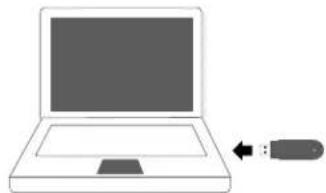
natural_image
Simple line drawing of a laptop with an arrow pointing to it, no text or symbols present.ESPECIFICACIONES
Potencia laser: <1 mW
STEREN PRODUCTO EMPACADO S.A. DE C.V.
Autopista México-Querétaro, Km 26.5, sin número, Nave Industrial 3-A, col. Lomas de Bouleveres. Tlainapantla de Baz, Estado de México, C.P. 54020, RFC: SPE-841215-H43
natural_image
Two black electronic devices with control buttons, one showing a red button and the other a small USB port (no visible text or symbols)V4.1/0520N
COM-561
WIRELESS PRESENTER WITH POINTER
USER MANUAL

STEREN
DESCRIPTION
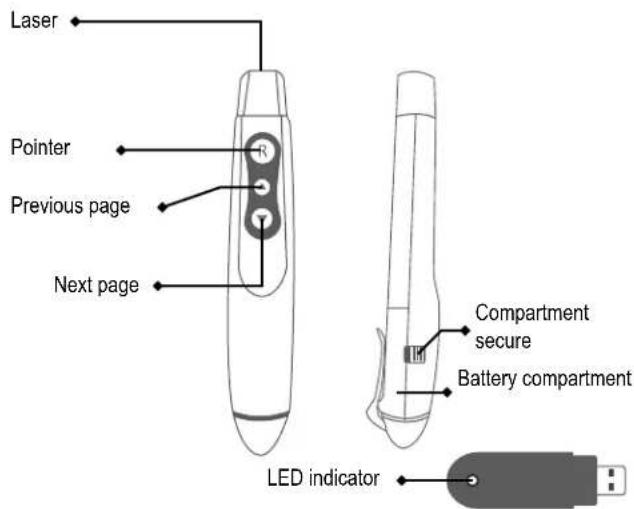
USB receiver
Before to using the product, please read carefully this manual to avoid any malfunction.
The info in this manual is shown as reference. Consult our website www.steren.com to obtain the current version of this manual.
CAUTIONS
- Children should be supervised to ensure that don't use it like a toy.
- This device is not designed for be using by people (including children) with physical capacities, sensorial or mental reduced, or they don't have the necessary experience or knowledge.
- Don't expose the device to extreme temperatures.
- Avoid the drops may cause serious damages.

To avoid damages and injuries in the eyes, don't aim or look to laser beam directly.
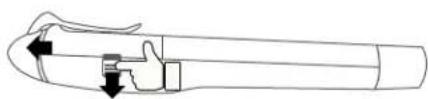
BATTERY REPLACEMENT AND INSTALLATION
Pull down the secure and slide the battery cover compartment.
natural_image
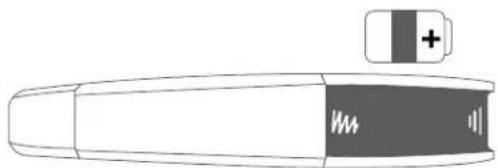
Pure mechanical diagram of a tool or component with arrows indicating direction (no text or symbols)Insert a 23 A battery. Ensure to place it with the right polarity.
natural_image
Illustration of a battery with a resistor and battery symbol (no text or labels)Replace the cover.
HOW TO USE
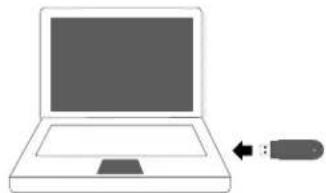
Insert the USB receiver into an USB port of your PC.
The LED indicator will flash continuously; that means that the device is ready to use it. Don't require drivers.
natural_image
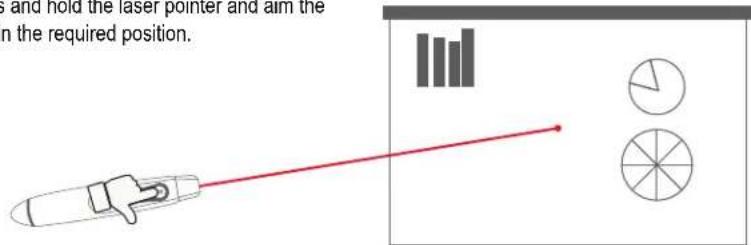
Simple line drawing of a laptop with a USB flash icon pointing to it (no text or symbols)Open a Power Point presentation, use ▲▼ buttons to forward or backward the
slides. Press and hold the laser pointer and aim the laser beam in the required position.
SPECIFICATIONS
Laser pointer input: 12 V --- (1 x 23A)
Receiver input: 5 V --- (x USB)
Transmission frequency: 315 MHz
Laser wave length: 630-670 nm
Laser power output: <1 mW
Specifications may change without previous notice
IMPORTADO POR
ELECTRÓNICA STEREN S.A. DE C.V.
BilcLogo Maximino Martínez, núm. 3408, col. San Salvador Xochimanca, Azcapozalco, Ciudad de México, C.P. 02870, RFC: EST850628-K51
STEREN PRODUCTO EMPACADO S.A. DE C.V.
In case your product fails, or you have questions about your product, please contact your nearest dealer.
If you are in Mexico, please call our Call Center at 01 800 500 9000
Brand : Steren
Model : COM-561
Category : Remote control