CBP-N2 - Battery Bolt - Free user manual and instructions
Find the device manual for free CBP-N2 Bolt in PDF.


| Product Type | Rechargeable Battery Pack |
| Brand | Bolt |
| Model | CBP-N2 |
| Battery Chemistry | Lithium-ion (Li-ion) |
| Voltage | 18 V |
| Capacity | 2.0 Ah |
| Energy Content | 36 Wh |
| Dimensions (L x W x H) | 11.5 x 5.5 x 6.0 cm |
| Weight | 0.38 kg |
| Charging Time | Approx. 60 minutes with compatible charger |
| Charge Cycles | Up to 500 cycles |
| Operating Temperature | -20°C to 60°C |
| Storage Temperature | 0°C to 40°C |
| Compatibility | Bolt 18V cordless power tools |
| LED Charge Indicator | 4-level LED display |
| Overload Protection | Yes, with automatic shut-off |
| Overheat Protection | Yes, thermal cut-off |
| Spare Parts Availability | Battery cells and casing available separately |
| Maintenance | Keep contacts clean; avoid deep discharge |
| Safety Certifications | CE, RoHS, UL |
| Storage | Store at 50% charge in cool, dry place |
Frequently Asked Questions - CBP-N2 Bolt
User questions about CBP-N2 Bolt
0 question about this device. Answer the ones you know or ask your own.
Ask a new question about this device
Download the instructions for your Battery in PDF format for free! Find your manual CBP-N2 - Bolt and take your electronic device back in hand. On this page are published all the documents necessary for the use of your device. CBP-N2 by Bolt.
USER MANUAL CBP-N2 Bolt
Copyright © 2013 Gradus Group.
Bolt and other names of Bolt products are trademarks of Gradus Group. Other product and corporate names mentioned herein are trademarks of their respective holders.
natural_image
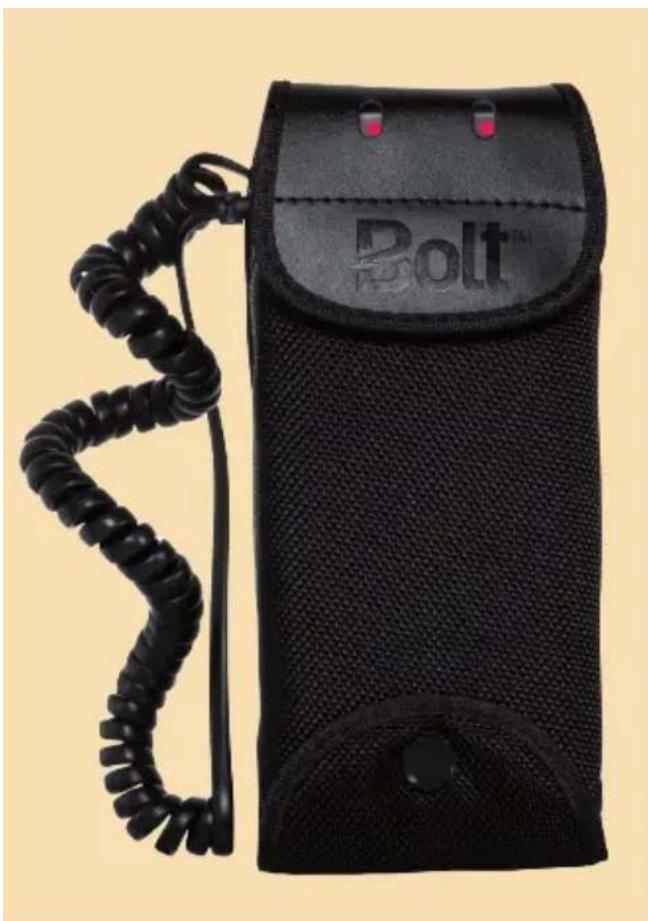
Black Bolt-branded device with coiled cord and two red buttons (no visible text or symbols on body)Introduction
Thank you for choosing the Bolt Compact Battery Pack. This professional battery pack will extend the flash capacity and boost the recycle speed of your flash unit. Its compact design, versatile mounting and carrying options, and compatibility with a range of AA battery types make it easy and convenient to use.
Among the benefits you'll enjoy:
- Option to use 4 or 8 AA batteries at a time.
- Faster flash recycle times.
- Lower standby power consumption and higher charge efficiency than similar packs.
- Built-in thermal protection switch to automatically prevent overheating.
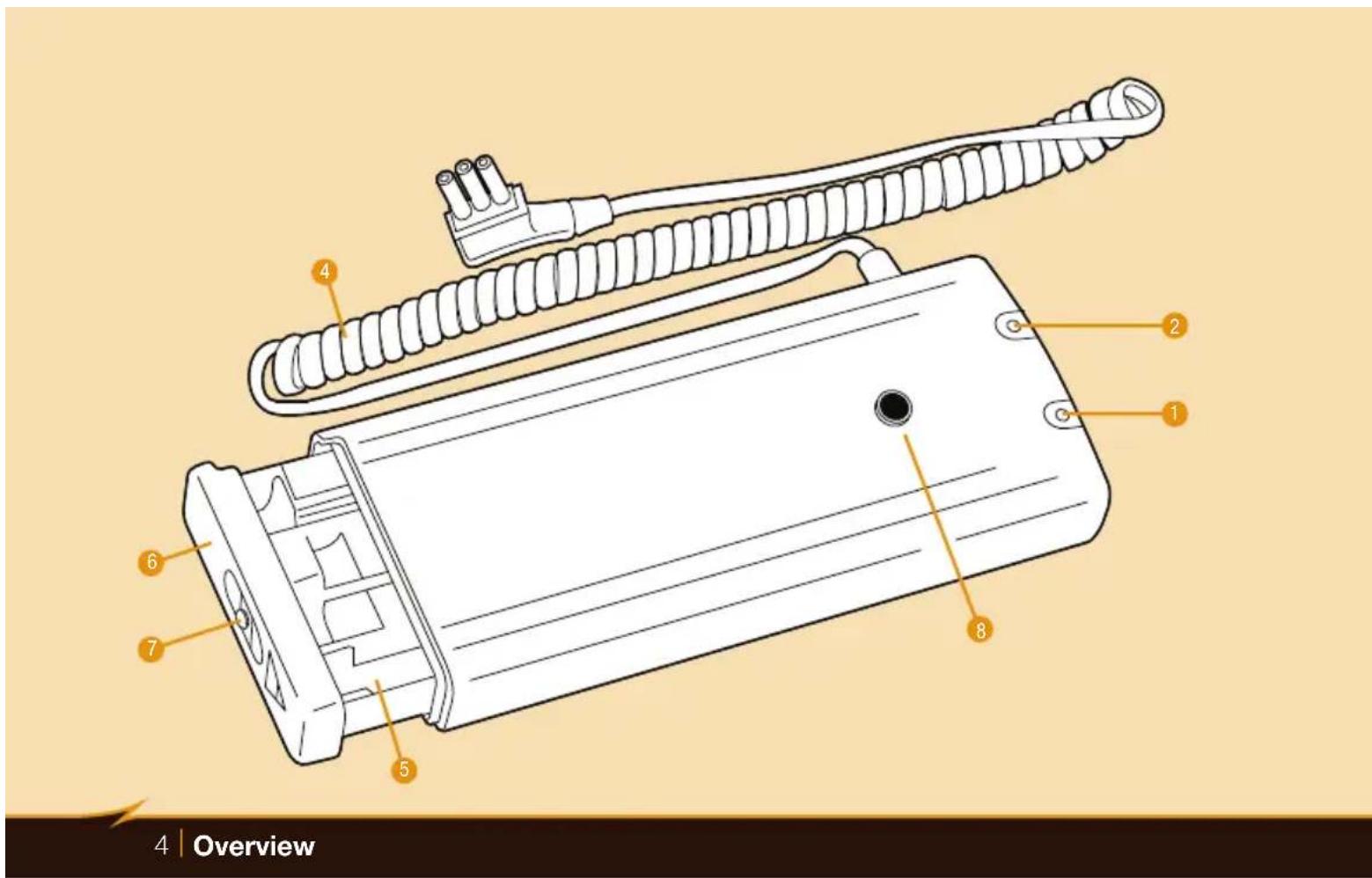
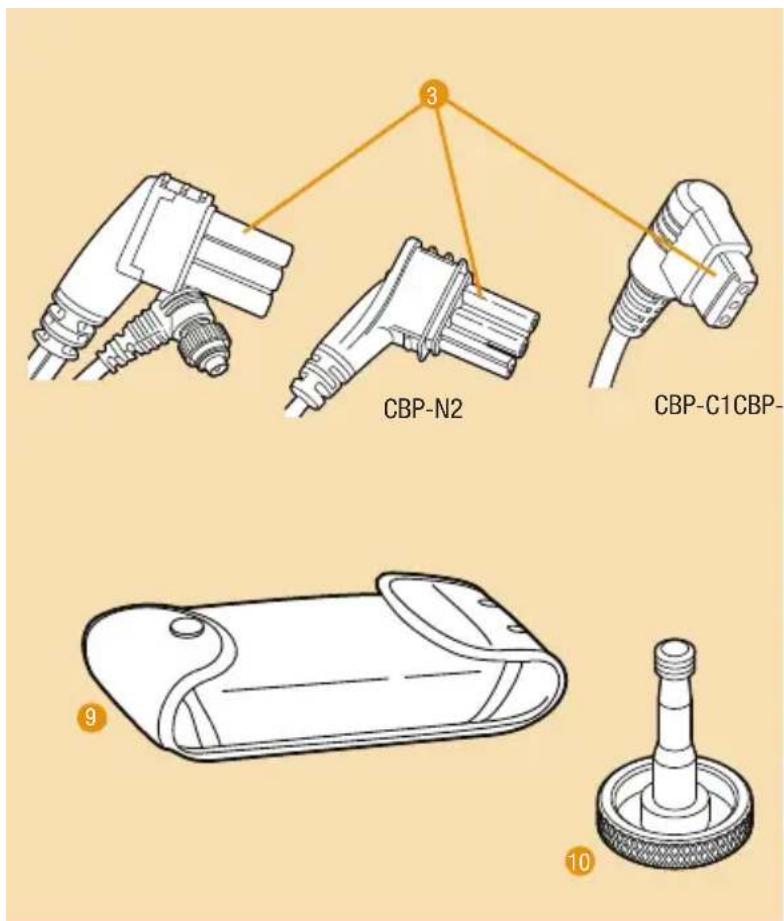
Overview
- Battery set A indicator light
- Battery set B indicator light
- Flash connector
- Flash connection cable
- Battery holder
- Battery holder lid
- Battery holder lock release button
- Mounting slot
- Soft case
- Mounting screw
Warnings
- Do not disassemble or attempt to maintain this product yourself. There are high-voltage components inside the Compact Battery Pack. Contact with them can produce a dangerous electric shock.
- Keep this product and AA batteries out of reach of children.
- Always install AA batteries of the same type, brand, and age in the Compact Battery Pack. Do not combine different types or brands, or used and new batteries. This could cause batteries to leak corrosive liquid, generate heat, or explode.
- Install batteries in the holder in the proper orientation, according to the positive and negative polarity indicator in each battery bay. Installing batteries in the reverse orientation could cause them to leak corrosive liquid, generate heat, or explode.
- Do not use or store the Compact Battery Pack in flammable conditions (such as environments containing flammable gases or liquid chemicals). This could cause permanent damage the product, cause a fire, or cause an electric shock.
- Do not clean the Compact Battery Pack with agents containing flammable substances such as paint thinner, benzene, or paint remover.
-
This product is not water resistant. Keep it away from rain, snow, and humidity. If water or moisture gets inside batteries, they could corrode, ignite or cause electric shock.
-
If the Compact Battery Pack is damaged, do not touch any exposed interior metal parts. If touched, they may generate an electric shock or cause a malfunction. Remove the batteries from the holder and disconnect the pack from your flash unit, and take the product to an authorized service center for repair.
- If you detect heat, smoke, or a burning smell coming from the Compact Battery Pack, immediately stop operation and once smoking has subsided remove the batteries to prevent the product from igniting or melting. Take the product to an authorized service center for repair.
- Do not touch the Compact Battery Pack with wet hands, as this may generate an electric shock.
- Do not drop or otherwise cause a strong physical impact to the Compact Battery Pack, as this could cause a malfunction that might cause it to explode or ignite.
- Remove all batteries from the Compact Battery Pack before long-term storage in order to prevent the product from igniting or leaking corrosive liquids.
- Do not store or use this product at temperatures above 104^ (40°C).
- Keep the metal contacts in the battery holder clean and free of corrosion and dirt. Do not touch them with your fingers. Corrosive oils and residue on the contacts can damage the Compact Battery Pack and prevent it from functioning.
- To avoid overheating and damaging your flash unit, please wait for at least 10 minutes after 20 continuous flashes at full power. Refer to your flash unit's manual for information on its continuous full-power flash capacity and limitations.
Battery Warnings
- Dispose of used batteries properly. Never heat them or throw them into a fire, as this could cause the batteries to leak corrosive liquids, generate heat, or explode.
- If corrosive liquids seep from the batteries and get in your eyes, immediately wash your eyes with water and consult a physician. Your eyes could be seriously injured if not treated quickly.
- If corrosive liquids seep from the batteries and get on your skin or clothes, immediately wash with water. Prolonged contact could injure your skin.
- Do not short-circuit or disassemble the batteries. This could cause batteries to leak corrosive liquids, generate heat, or explode.
- Do not carry or store batteries with metallic materials such as necklaces or hair pins. Such materials may cause batteries to short-circuit, leak corrosive liquid, generate heat, or explode.
- When using rechargeable batteries, charge them only with a charger approved by the battery maker to avoid the possibility of batteries leaking corrosive liquid, generating heat, or exploding. Make sure that batteries are installed in the charger in the proper orientation.
- Always follow the warnings and instructions printed on the batteries to avoid activities that could cause batteries to leak corrosive liquid, generate heat, or explode.
- Remove dead batteries from the Compact Battery Pack immediately, so that they do not leak corrosive liquid, generate heat, or explode.
Installing Batteries in the Compact Battery Pack
The versatile Compact Battery Pack can be used with several AA battery types:
- Alkaline (1.5V)
- Lithium (1.5V)
• Nickel-metal hydride (Ni-MH) (1.2V)
To install batteries, unplug the Compact Battery Pack from your flash unit and follow these steps:
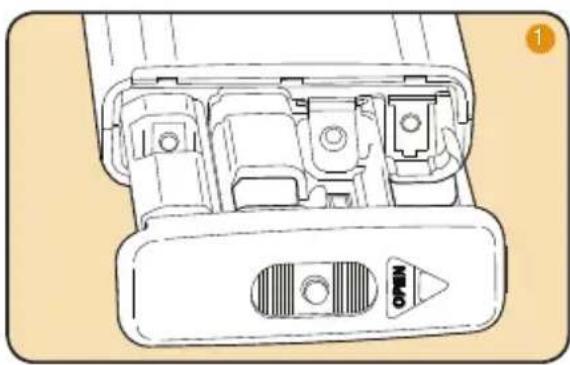
- Press down on the battery holder lock release button and slide the battery holder lid in the direction of the arrow on the lid to release the holder. Remove the battery holder from the pack.
natural_image
Technical line drawing of a mechanical component with internal ports and a labeled connector (no text or symbols)-
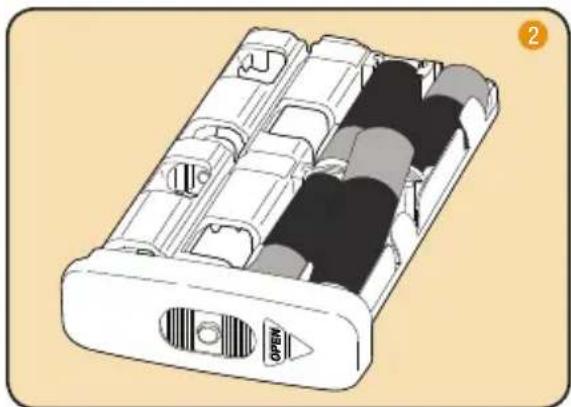
With the holder laying flat, insert four batteries in the open battery bays. Angle the negative (flat) end of each battery down against the contact in the bay and then press the positive end firmly into place. Make sure that each battery is installed in the proper orientation by matching the (+) and (-) polarity symbols on the battery to the (+) and (-) symbols on the battery icon in the bay.
-
Flip the holder over to expose the additional four battery bays and install the batteries.
natural_image
Illustration of a battery pack with internal compartments and a labeled port (no text or symbols on the main body)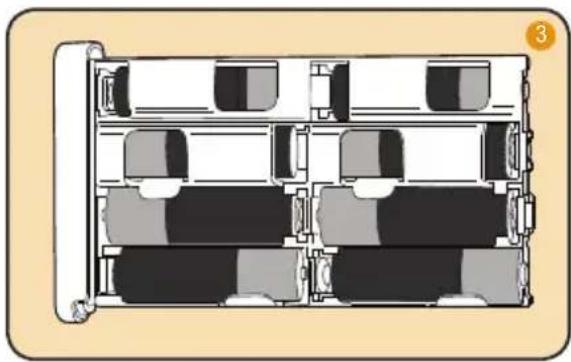
natural_image
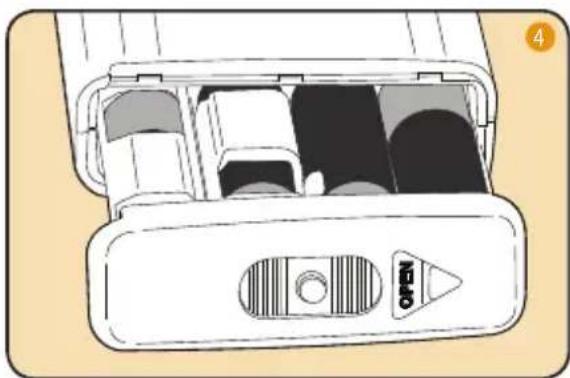
Diagram of a multi-level office or waiting room layout with desks, chairs, and storage units (no text or symbols)- Insert the battery holder into the pack, press the battery holder lock release button, and slide the holder lid in the opposite direction of the arrow until you hear a click and the holder stays firmly in place.
natural_image
Diagram of a device drawer with internal compartments and a labeled 'OPEN' button (no text or symbols beyond the label)Important!
- Using two sets of batteries (a total of eight cells) will enable faster flash recycle times than using a single set of four batteries.
- To remove batteries from the holder, push each cell out of the bay where it is installed from the back. This method lets you remove the battery easily, without touching the contacts.
- Replace all four batteries of each set at the same time. Do not mix battery types or brands, or used and new batteries together.
- Always install one or two sets of four batteries each, and make sure that each set of four batteries is installed in one set of battery bays, accessible from a single side of the holder. Do not install fewer than four batteries in one of the sets of battery bays.
Connecting Your Compact Battery Pack to Your Flash
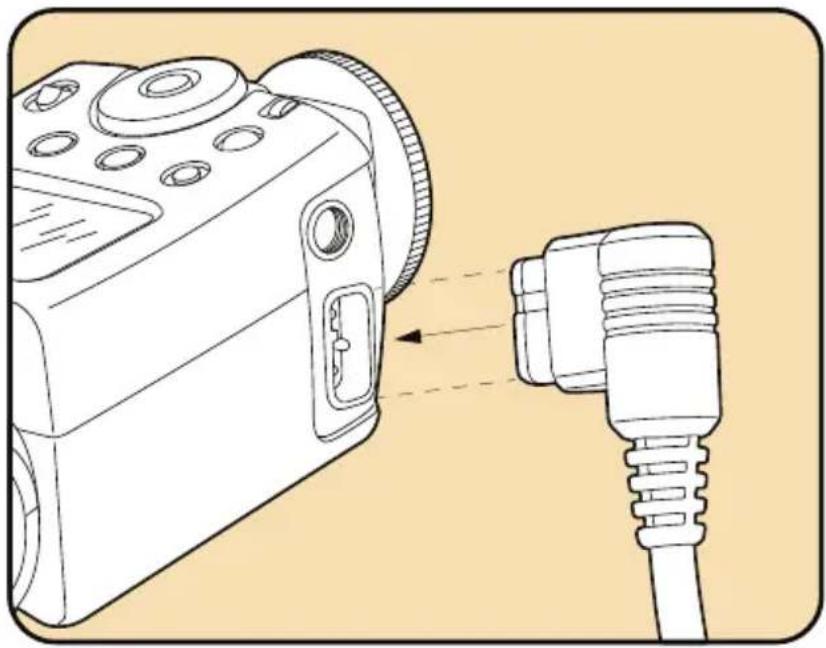
To connect the Compact Battery Pack to your flash unit, simply plug the connector at the end of the pack's connection cable into the power port on your flash.
Make sure that the connector is correctly aligned with the pins and alignment grooves on the power port. Forcing a connector into a port upside down can damage both your flash and the Compact Battery Pack connector.
natural_image
Technical illustration of a device with a connector and cable, showing no text or symbolsImportant!
- The flash must have batteries installed before connecting it to the Compact Battery Pack. Most flash units require the standard batteries to be installed in order to power the display functions that allow the flash to work.
- You may need to activate a setting or custom function on your flash unit to make it draw power only from the battery pack and not the internal batteries. Refer to your flash unit's instructions for information about relevant settings.
Disconnect the Compact Battery Pack from your flash unit before storing it. To disconnect it, turn the flash unit off and remove the pack's connector from the flash unit's power port. When the Bolt Battery pack is disconnected from the flash, it is off.
Mounting and Carrying Your Compact Battery Pack
The Compact Battery Pack comes with a soft case and mounting screw that make it convenient and unobtrusive to use.
Using the soft case:
With the pack enclosed in the soft case, you can wear it on your belt or thread it onto a carrying strap or light stand pole.
Make sure the pack is correctly oriented in the case, so that the indicator lights show through the small openings at the top and the battery holder lid is accessible via the snapping cover at the bottom.
Using the mounting screw:
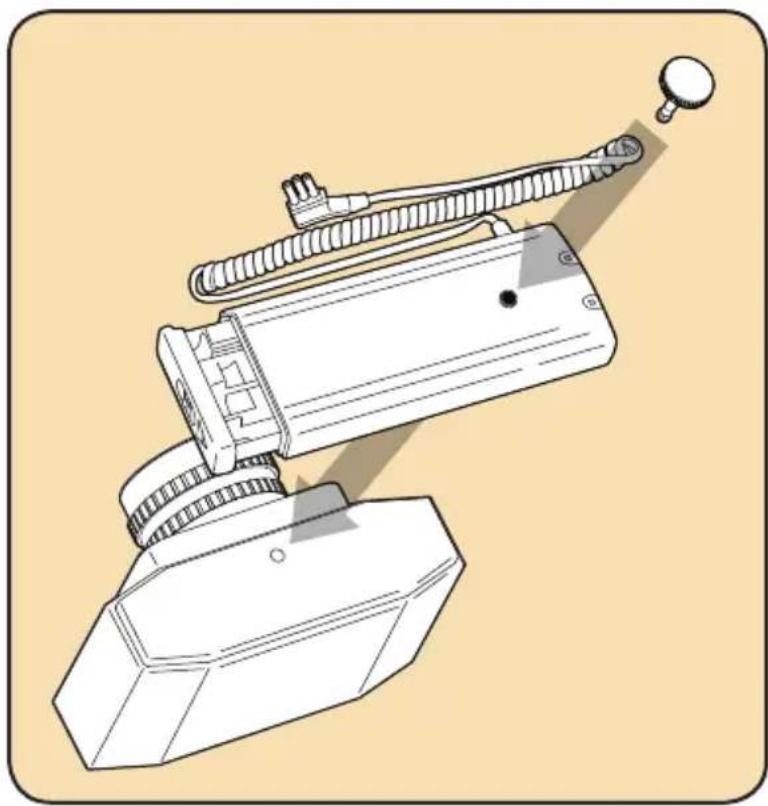
You can use the mounting screw to attach the Compact Battery Pack to the bottom of your camera:
-
Align the mounting slot on the pack with the tripod socket on your camera.
-
Insert the mounting screw into the slot and turn in a clockwise direction until the pack is firmly attached to the camera.
To detach the pack from your camera, turn the mounting screw in a counterclockwise direction.
Important!
The mounting slot on the Compact Battery Pack is threaded with a 1/4" thread. Do not attempt to push the mounting screw through it without turning it.
natural_image
Technical illustration of a mechanical device with attached tubing and a base plate (no text or symbols)Using Your Flash with Your Compact Battery Pack
Your Compact Battery Pack will give you a fast flash recycle time and hundreds of full-power flashes with each set of batteries used.
When the pack is connected to your flash unit, simply turn the flash unit on to begin powering your flash with the Compact Battery Pack.
The indicator lights on the pack will show you the status of each of the two sets of batteries. (The CBP-C1 for Canon indicators function differently than the indicators on other Bolt Compact Battery Pack models due to the way the Canon flash unit charges.)
- Standby mode: No light (on the CBP-C1: flashes every 2sec): The flash is ready to fire.
- Recycle mode. Solid light: The power is recycling and the flash is not yet ready to fire.
- Low power mode. Light flashes during recycling (on the CBP-C1: flashes quickly):
- Power is low due to exhausted or absent batteries. The flash may not be able to fire.
Note: If you fire a long continuous series of flashes, especially at full power, the batteries in the Compact Battery Pack may get hot. The pack will shut off automatically to prevent overheating. The indicator lights will turn off when this happens. In this event, unplug the pack from your flash unit and allow the batteries to cool for at least 10 minutes before continuing use.
To get the best use out of your Compact Battery Pack:
- Use in environments with moderate temperatures. When some battery types get cold, they lose some of their ability to supply power. However, this does not mean that they have lost their charge, and they regain the ability to supply power when their temperature returns to a more moderate level.
- High temperatures can cause some battery types to drain more quickly. If you have to shoot in a hot environment, plan ahead for reduced battery capacity.
- To conserve battery life, turn the flash unit off or disconnect the Compact Battery Pack from it during long standby periods. Very little power is consumed when the pack is in standby mode. The amount may vary according to working conditions and the specific flash model used with the pack.
- Don't fire more than 20 full-power flashes in a row as this can overheat and damage your flash. Refer to your flash unit's manual for information on its continuous full-power flash capacity and limitations.
Tip: If you're shooting in a very cold environment, you can address this issue by alternating sets of AA batteries: Keep one set indoors at room temperature or in an interior pocket next to your body while using the other pack, and then switch the two sets when the one in use starts losing its ability to power your flash.
Cleaning Your Compact Battery Pack
If the metal contacts in the battery holder get dirty or corroded, you can clean them with isopropyl alcohol (rubbing alcohol) with a cotton swab. A pencil or pen eraser can also be used to rub corrosion off of contacts.
Do not touch the metal contacts with your fingers, as this can transfer oil and residues to the contacts.
Keep the outside of the pack clean by removing dust and dirt with a soft cloth. Never attempt to wash the pack in water or use flammable solutions to clean it.
Troubleshooting
| Problem Solution | |
| The Compact Battery Pack has fresh batteries installed and is connected to a flash unit, but the indicator lights flash slowly to indicate that the pack cannot provide power when you turn it on. | The batteries are installed in the wrong orientation. Check each battery in the holder to ensure that it is installed correctly. |
| During use, the indicator lights shut off before expected battery exhaustion. | The batteries have become hot due to a long series of continuous flashes, and the pack has automatically shut off to prevent overheating. Allow the batteries to cool before using the pack again. |
| The Compact Battery Pack has fresh batteries installed and is connected to a flash unit, but neither the flash nor the pack works when the flash is turned on. | Make sure you have AA or other internal batteries installed in the flash. Having flash batteries installed may be required for its display functions to work. |
Customer Service
For customer service, please go to www.boltflashes.com.
Specifications
Dimensions (W x H x D): 6.7 × 2.8 × 1 inches (170 × 72.5 × 25 mm)
Weight: 7 ounces (200 grams)
Operation environment working temperature range: -4°F–104°F (-20°C–40°C)
Operation environment working humidity: 85% or less
| Compact Battery Pack Model | CBP-C1 CBP-N1 | CBP-N2 | |
| Flash unit tested Canon Speed | 580EX II | Nikon SB-800Speedlight | Nikon SB-900Speedlight |
| Fastest recycle time (seconds) | 1.24 seconds 1.88 seconds | 1.92 seconds | |
| Flashes per charge (at full flash power) | 595 524 577 |
Test conditions: Using 4 AA Duracell alkaline batteries in the flash unit and 8 2400 mAh Ni-MH batteries in the Compact Battery Pack. Flash set to full power (1/1) and fired every 30 seconds or at longer intervals when charge became insufficient to power normal recycle time due to battery depletion. Temperature: 20^ C.
One-Year Limited Warranty
Bolt provides a limited warranty to the original purchaser that this product is free from defects in materials and workmanship under normal consumer use for a period of one (1) year from the original purchase date or thirty (30) days after replacement, whichever occurs later. Bolt's responsibility with respect to this limited warranty shall be limited solely to repair or replacement, at Bolt's discretion, of any product that fails during normal consumer use. Inoperability of the product or part(s) shall be determined by Bolt. If the product has been discontinued, we reserve the right to replace it with a model of equivalent quality and function. To obtain warranty coverage, contact Bolt to obtain a return merchandise authorization ("RMA") number, and return the defective product to Bolt, along with the RMA number and proof of purchase. Shipment of the defective product is at the purchaser's own risk.
This warranty does not cover damage or defect caused by misuse, neglect, accident, alteration, abuse, improper installation or maintenance. EXCEPT AS PROVIDED HEREIN, BOLT MAKES NEITHER ANY EXPRESS WARRANTIES NOR ANY IMPLIED WARRANTIES, INCLUDING BUT NOT LIMITED TO ANY IMPLIED WARRANTY OF MERCHANTABILITY OR FITNESS FOR A PARTICULAR PURPOSE. This warranty provides you with specific legal rights, and you may also have additional rights that vary from state to state.

BOLT™ A Gradus Group Brand
www.boltflashes.com Made in China
Copyright © 2013 Gradus Group
Compatible Flash Units
The Bolt Compact Battery Pack is available in three models to provide compatibility with a wide range of flash units:
| Model | CBP-C1Compact Battery Pack for Select Canon Flashes | CBP-N1Compact Battery Pack for Select Nikon Flashes | CBP-N2Compact Battery Pack for Nikon SB-900 |
| Compatible flash units | Canon Speedlite 430EZCanon Speedlite 540EZCanon Speedlite 550EXCanon Speedlite 580EXCanon Speedlite 580EX IICanon Speedlite 600EX RTCanon Macro Ring Lite MR-14EXCanon Macro Twin Lite MT-24EXNissin Di866 for CanonNissin Di866 Mark II for CanonNissin MG8000 for CanonBolt VX-710 and VX-760 for Canon/Nikon | Nikon SB-800 AF SpeedlightNikon SB-80DX SpeedlightNikon SB-28DX SpeedlightNikon SB-28 SpeedlightNikon SB-27 SpeedlightNikon SB-26 SpeedlightNikon SB-25 SpeedlightNikon SB-24 SpeedlightNikon SB-22 SpeedlightNikon SB-20 SpeedlightNikon SB-11 Speedlight | Nikon SB-900 SpeedlightNikon SB-910 SpeedlightNissin Di866 for NikonNissin Di866 Mark II for NikonNissin MG8000 for Nikon |
Bolt™
www.boltflashes.com Copyright © 2013 Gradus Group
- Introduction
- Overview
- Warnings
- Battery Warnings
- Installing Batteries in the Compact Battery Pack
- Important!
- Connecting Your Compact Battery Pack to Your Flash
- Mounting and Carrying Your Compact Battery Pack
- Using the soft case:
- Using the mounting screw:
- Using Your Flash with Your Compact Battery Pack
- To get the best use out of your Compact Battery Pack:
- Cleaning Your Compact Battery Pack
- Customer Service
- Specifications
- One-Year Limited Warranty
- Bolt™
Brand : Bolt
Model : CBP-N2
Category : Battery