PP-500 - Battery Bolt - Free user manual and instructions
Find the device manual for free PP-500 Bolt in PDF.


| Product Type | Portable Rechargeable Battery |
| Model | PP-500 |
| Brand | Bolt |
| Battery Chemistry | Lithium-Ion |
| Capacity | 5000 mAh |
| Input | 5V/2A (Micro USB) |
| Output | 5V/2.4A (USB-A) |
| Number of Output Ports | 2 |
| Dimensions | 6.3 x 3.1 x 1.0 in (160 x 79 x 25 mm) |
| Weight | 12.8 oz (363 g) |
| Charging Time | Approximately 4 hours |
| Main Functions | Charge smartphones, tablets, Bluetooth earbuds, and other USB devices |
| Battery Indicator | 4 LED lights showing charge level |
| Care and Cleaning | Wipe with a soft, dry cloth. Avoid moisture and direct sunlight. |
| Safety | Do not disassemble, puncture, or expose to high temperatures. Use only approved cables. |
| Spare Parts and Repairability | Micro USB cable and USB-A cable available separately. Battery cells are not user-replaceable. |
| General Information | Comes with a 12-month warranty. For indoor use only. Suitable for travel. |
Frequently Asked Questions - PP-500 Bolt
User questions about PP-500 Bolt
0 question about this device. Answer the ones you know or ask your own.
Ask a new question about this device
Download the instructions for your Battery in PDF format for free! Find your manual PP-500 - Bolt and take your electronic device back in hand. On this page are published all the documents necessary for the use of your device. PP-500 by Bolt.
USER MANUAL PP-500 Bolt
PP-500DR Dual-Outlet Power Pack with Removable Battery
User Manual
Thank you for choosing Bolt.
The Bolt PP-500DR Power Pack is a rechargeable, large-capacity lithium-ion battery pack that supplies to 2700 flashes and fast recycling times for up to two flashes. It's compatible with most on-camera flash including Nikon, Canon, Sony, Bolt, Sunpak, Vivitar, and Metz.
The Power Pack includes the PP-5800BP removable battery pack that can be quickly swapped out with a full charge battery. The included charger will fully recharge the battery pack in just 4.5 hours, so a second battery pack (available separately) can charge while you work. The PP-500DR Power Pack features a microcontrol unit (MCU) circuit design with integrated software and hardware protection for more energy efficiency, as well as heat-resistant lightweight construction.
2 | Introduction
Warnings

- Do not disassemble or attempt to service this product yourself. Doing so will void the warranty, and Bolt will not be responsible for any damage. There are high-voltage components inside. Contact can produce a dangerous electric shock.
- Keep out of reach of children.
- Do not touch the metal part of the multifunction socket.
- This product is not water resistant. Keep it away from water and all flammable gases or liquids.
- Do not store or use this product at temperatures above 104^ (40°C).
-
Do not connect this product to a charger other than the included unit.
-
To avoid overheating and damaging your flash unit, please wait at least 10 minutes after 40 continuous full-power flashes.
- Make sure the unit is powered off when plugging it into a power source.
- Use only the correct, recommended voltage.
- Handle the unit with care.
- Clean the unit with a soft, dry cloth.
- Use only parts provided by the manufacturer.
- Please read and follow these instructions and keep this manual in a safe place.
- Make sure the item is intact and that there are no missing parts.
- Images are for illustrative purposes only.
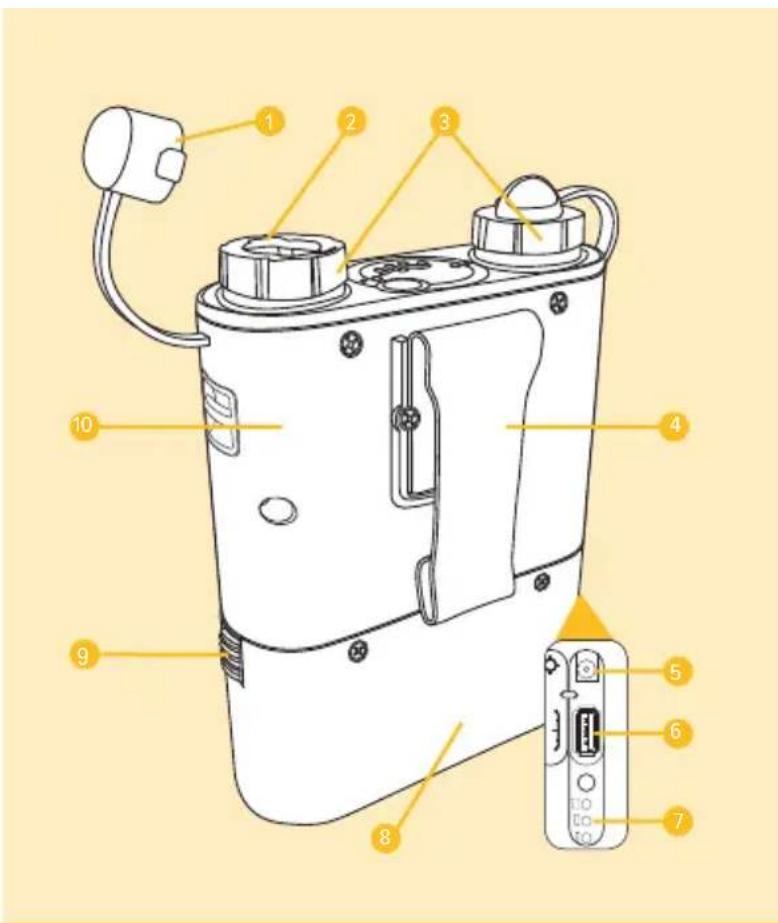
Overview
1 Socket cover
2 Cable locking mechanism
3 Sockets
4 Belt clip
5 Charging port
6 USB terminal
7 Battery gauge
8 Battery pack
9 Battery pack lock
10 Control unit
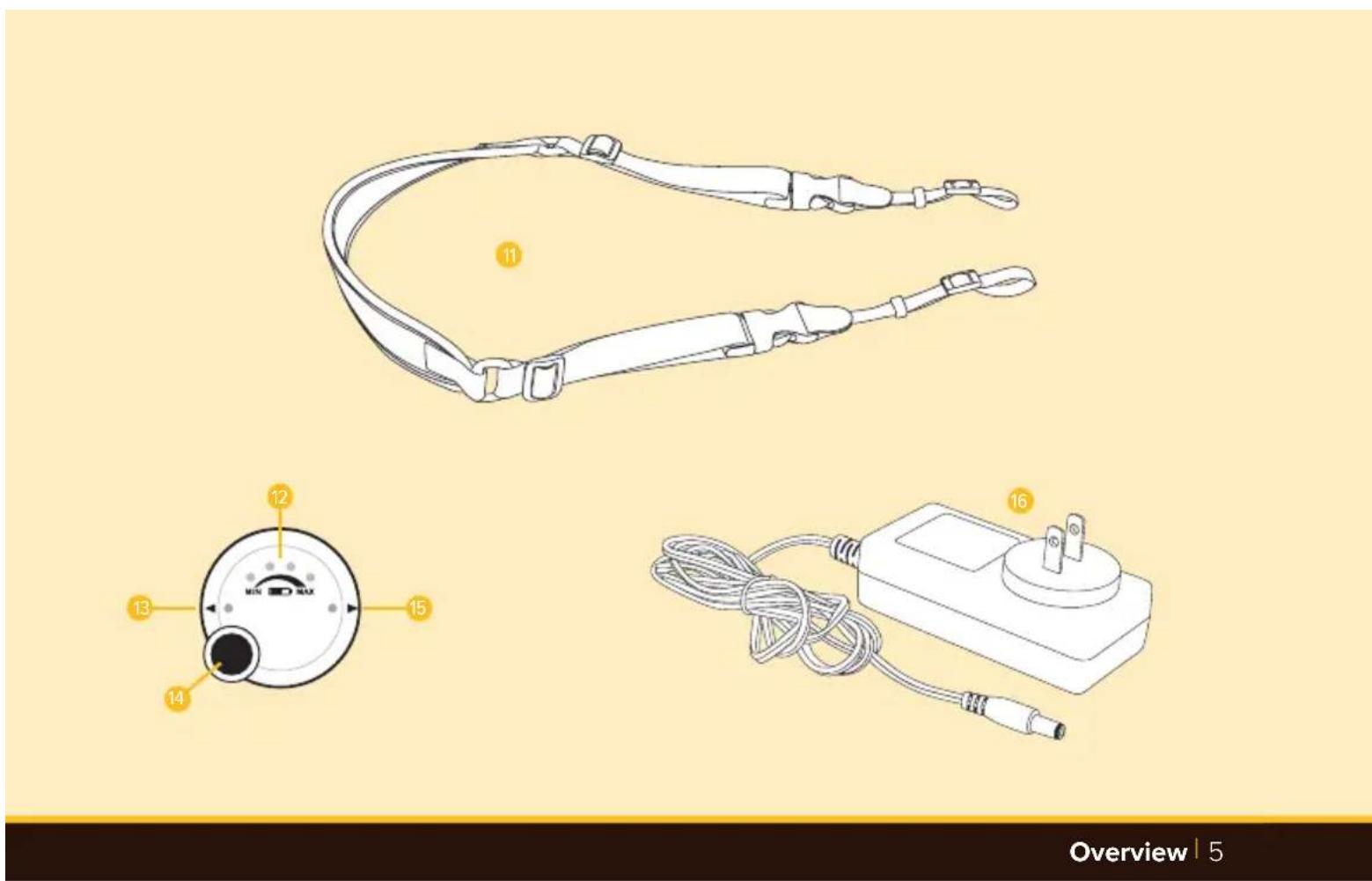
11 Shoulder strap
12 LED battery level indicator
13 Status indicator for Socket #1
14 Power button
15 Status indicator for Socket #2
16 AC battery charger
Charging the Cyclone DR
The Cyclone DR comes with the PP-5800BP battery pack. It's also compatible with Bolt's PP-400BP battery pack.
To charge your Cyclone DR with the included charger:
- Plug the charger unit into an AC outlet.
- Plug the charging cable into the battery's charging port.
- The charger indicator turns red when the battery is charging.
- When the battery charger turns green the battery is full charged.
Tip:
If you own PP-5800BP or PP-400BP batteries, you can remove one battery from the power pack and charge it using the AC charger while using the second battery to power the Cyclone DR.
To get the maximum capacity from your Cyclone DR:
Charge your Cyclone DR shortly before use to ensure that the pack retains the maximum charge. Charge your Cyclone DR at a moderate room temperature, and avoid storing it in hot or cold environments between charging and use.
Note: When charging the pack outside of the United States, plug adapters (available separately) may be used to plug the charger into any 100-240 V AC power outlet.
Reading the indicator lights while charging:
The Status LED remains off during charging. The AC charger's indicator light will be red during charging. When the battery is fully charged, its light will turn green.
To check the battery level while the unit is charging, press the power button. The battery level will be displayed on the LED battery level indicator for approximately two seconds.
Checking the Cyclone DR's charge level:
When the Cyclone DR is not charging and is not connected to a flash unit, its level of charge can be checked by pressing the power button. The battery LEDs will illuminate to indicate the level of charge, as follows:
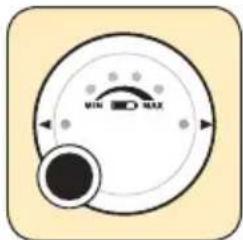
Battery LED 1 on: 25% or lower charge level
Battery LEDs 1-2 on: 25%-50% charge level
Battery LEDs 1-3 on: 50%-75% charge level
Battery LEDs 1-4 on: 75% or higher charge level
When Battery LED 1 is blinking, the Cyclone DR will disable power output—the battery needs immediate charging before it can operate again.
If the Cyclone DR is in use continuously for 12 hours, its automatic power-off function will cause it to power off automatically.
Connecting Your Bolt Cyclone DR Power Pack to Your Flash
You can use the Cyclone DR to power a wide range of flash units. Cables sold by some flash and battery pack manufacturers are interchangeable with Bolt cables, but other flash brands use a different connector type. Make sure you select the right one.
Important! Load your flash unit with its standard batteries before connecting it to the Cyclone DR. You may need to set your flash unit to recycle by drawing power from only the Cyclone DR to avoid draining the installed batteries. Check your flash unit's manual for details on the relevant setting.
To connect your Cyclone DR to your flash unit:
-
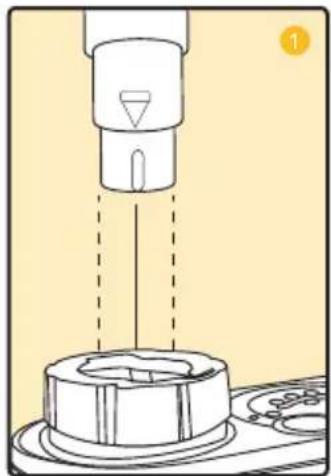
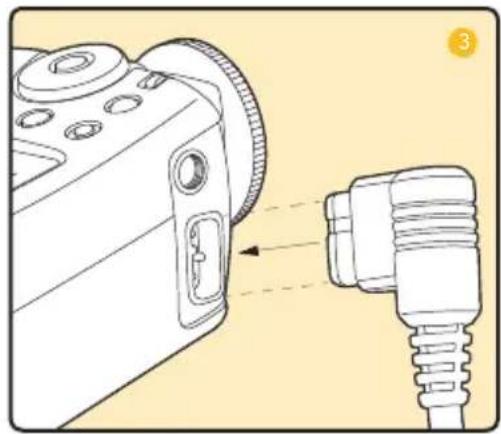
Plug the metal connector of the connection cable firmly into one of the output sockets of the Cyclone DR.
-
If using a cable with a locking mechanism, rotate the locking collar on the terminal to secure the cable.
natural_image
Diagram of a mechanical device with a central component and dashed lines indicating motion or assembly (no text or symbols present)- Plug the other end of the connection cable securely into the compatible power port on your flash unit.
- Press the power button on the Cyclone DR and wait for the Status and battery LEDs to turn on, then power on your flash.
To disconnect your Cyclone DR from your flash unit:
- Press the power button until the Status and battery LEDs turn off.
- If you're using a cable with a locking mechanism, rotate the locking collar to the unlocked position.
- Unplug the connection cable from the battery pack.
natural_image
Diagram showing a camera module connected to a plug, with no visible text or symbolsUsing Your Flash with Your Cyclone DR
Your Cyclone DR can recycle in just 1 second with many popular flash units to keep you shooting and ensure that you don't miss important moments. With your flash firing at full-power, it can power up to 2700 flashes, depending on the specific unit you're using. It can power thousands of shots in automatic mode with some flash units.
To get the best use out of your Cyclone DR:
- Use in environments with moderate temperatures.
- Don't fire more than 40 full-power flashes in a row. Doing this can overheat and even damage your flash. The Cyclone DR has a much higher power output than the typical built-in battery of a flash unit. Refer to your flash unit's manual for information on its continuous full-power flash capacity and limitations.
Reading the indicator lights while using the Cyclone DR:
When you're using your Cyclone DR, its Red Status LED will remain on to indicate that the flash is ready to fire. Its four blue battery LEDs will indicate the level of charge as follows:
Battery LED 1 on: 25% or lower charge level
Battery LEDs 1-2 on: 25%-50% charge level
Battery LEDs 1-3 on: 50%-75% charge level
Battery LEDs 1-4 on: 75% or higher charge level
Battery LED 1 flashing: The Cyclone DR has been drained and needs to be charged.
Status LED flashing: The Status LED flashing indicates that the battery is overheated. Stop using the pack for at least 10 minutes to allow it to cool.
Carrying and wearing the Cyclone DR:
The Cyclone DR is designed to be easy to carry and inconspicuous. Its light weight and compact design make it easy to wear for long periods, and its black finish and clean design make it unobtrusive. It also offers these convenient features:
Padded feet. Two rubberized feet give the Cyclone DR stability and protection when you set it down.
Belt clip. One of the easiest ways to carry the Cyclone DR is to attach it to your belt with the included clip. When you're not carrying the pack on your belt, you can give it a cleaner profile by removing the clip. To do this, loosen the screws securing it with a Phillips screwdriver, remove the clip, then tighten the screws again.
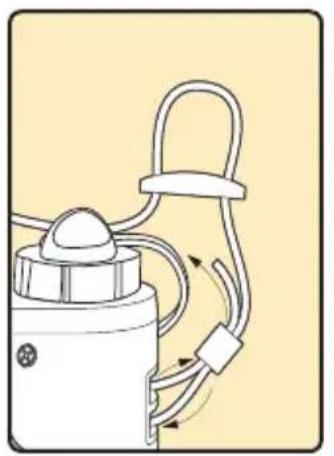
Shoulder strap. Thread the shoulder strap through the built-in lugs on the Cyclone DR and through the strap clips and buckles, as shown here. After threading it, pull it tight to take up any slack. Always make sure that your strap is attached securely; dropping the Cyclone DR can damage it.
natural_image
Diagram of a mechanical device with rope and clamped components, no text or symbols present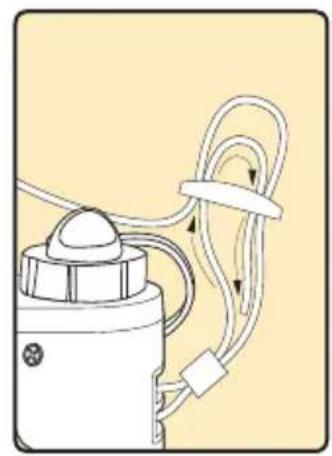
natural_image
Diagram of a mechanical device with hoses and tubing, no visible text or symbols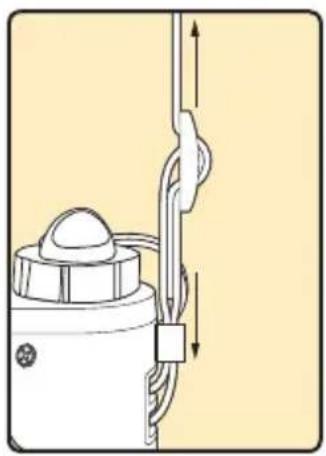
natural_image
Diagram of a mechanical device with a vertical rod and rope, showing no text or symbolsTroubleshooting
| Problem Solution | |
| The Cyclone DR is charged and connected to a flash with a cable, but no indicator lights illuminate when you turn it on. | The cable is damaged or you are using the wrong cable. |
| The Status indicator light is flashing. | The pack is overheated. Turn it off and wait for at least 10 minutes before using it again. |
| The Cyclone DR is charged and connected to a flash with a cable, but the flash does not fire. | Make sure you have AA or other internal batteries installed in the flash. These may be required for its computer functions to work. |
Customer Service
For customer service, please go to www.boltflashes.com.
Charging another device with the PP-5800BP
The battery pack has an integrated USB port for charging a smartphone.
Make sure the battery pack is sufficiently charged, and connect your device with a USB charging cable (not included). Once connected, press the button on the battery pack to get it started.
Compatible Accessories
The Cyclone DR is compatible with a wide range of hot-shoe and handle-mount flash units. Make sure you select a connection cable that is compatible with your flash unit.
Many compatible accessories are also available from Bolt and other brands. Bolt connection cables are interchangeable with some other manufacturers' battery pack connection cables.
These optional accessories are available from Bolt:
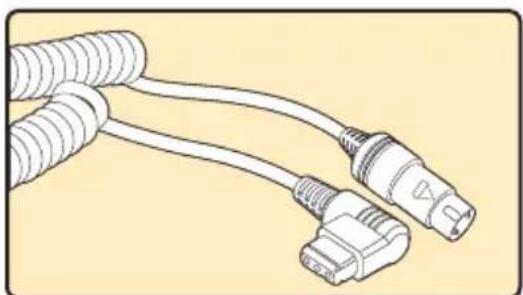
natural_image
Illustration of two connected electrical connectors with coiled wires (no text or symbols)BO-1006 CZ Canon Flash Cable With Locking Mechanism
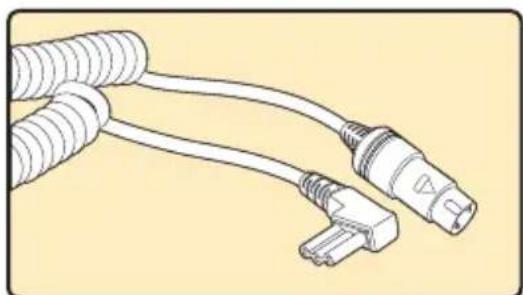
natural_image
Illustration of two connected electrical connectors with coiled wires (no text or symbols)BO-1007 CKE Nikon Flash Cable With Locking Mechanism
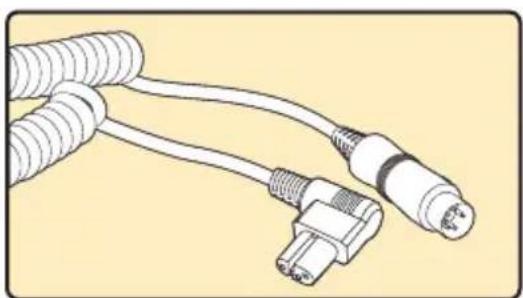
natural_image
Illustration of two connected electrical connectors with coiled cables (no text or symbols)BO-1012 Sony Flash Cable
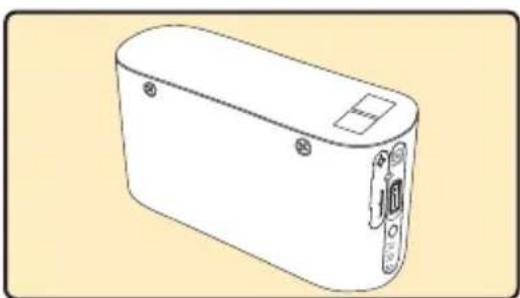
natural_image
Line drawing of a rectangular electronic device with a handle and mounting holes (no text or symbols)Bolt PP-5800BP Battery Pack
Specifications
Power Pack Cyclone DR
Battery type: Lithium-ion
Voltage: 11.1 V DC
Capacity: 5800 mAh
Recycle time with hot-shoe flash units:
Approx. 1 second (at full flash power)
Flashes per charge:
Up to 2700 (at full power)
Operation environment working temperature range:
-4°F to 104°F (-20°C to 40°C)
Operation environment working humidity:
85% or less
USB output:
5 V/1 A
Dimensions (W × H × D):
4.33 × 6.29 × 1.57 in.
(110 × 160 × 40 mm) including belt clip
Weight: 19.4 oz. (550 g)
AC Charger BO-1008
Input: 100 to 240 V AC, 50/60 Hz
Output: 12 V DC, 1500 mA
Cord length: 60 in. (1.5 m)
Dimensions: 3.75 × 1.25 × 1.62 in.
(95 × 32 × 41 mm)
One-Year Limited Warranty
This BOLT product is warranted to the original purchaser to be free from defects in materials and workmanship under normal consumer use for a period of one (1) year from the original purchase date or thirty (30) days after replacement, whichever occurs later. The warranty provider's responsibility with respect to this limited warranty shall be limited solely to repair or replacement, at the provider's discretion, of any product that fails during normal use of this product in its intended manner and in its intended environment. Inoperability of the product or part(s) shall be determined by the warranty provider. If the product has been discontinued, the warranty provider reserves the right to replace it with a model of equivalent quality and function.
This warranty does not cover damage or defect caused by misuse, neglect, accident, alteration, abuse, improper installation or maintenance. EXCEPT AS PROVIDED HEREIN, THE WARRANTY PROVIDER MAKES NEITHER ANY EXPRESS WARRANTIES NOR ANY IMPLIED WARRANTIES, INCLUDING BUT NOT LIMITED TO ANY IMPLIED WARRANTY OF MERCHANTABILITY OR FITNESS FOR A PARTICULAR PURPOSE. This warranty provides you with specific legal rights, and you may also have additional rights that vary from state to state.
To obtain warranty coverage, contact the BOLT Customer Service Department to obtain a return merchandise authorization ("RMA") number, and return the defective product to BOLT along with the RMA number and proof of purchase. Shipment of the defective product is at the purchaser's own risk and expense.
For more information or to arrange service, visit www.boltflashes.com or call Customer Service at 212-594-2353.
Product warranty provided by the Gradus Group.
www.gradusgroup.com
BOLT is a registered trademark of the Gradus Group. © 2019 Gradus Group LLC. All Rights Reserved.

natural_image
Solid black background with a horizontal yellow stripe at the bottom (no text or symbols)
BOLT*
A Gradus Group Brand
- Thank you for choosing Bolt.
- Warnings
- Overview
- Charging the Cyclone DR
- To charge your Cyclone DR with the included charger:
- Tip:
- To get the maximum capacity from your Cyclone DR:
- Reading the indicator lights while charging:
- Checking the Cyclone DR's charge level:
- Connecting Your Bolt Cyclone DR Power Pack to Your Flash
- To connect your Cyclone DR to your flash unit:
- To disconnect your Cyclone DR from your flash unit:
- Using Your Flash with Your Cyclone DR
- To get the best use out of your Cyclone DR:
- Reading the indicator lights while using the Cyclone DR:
- Carrying and wearing the Cyclone DR:
- Customer Service
- Charging another device with the PP-5800BP
- Compatible Accessories
- Specifications
- Power Pack Cyclone DR
- AC Charger BO-1008
- One-Year Limited Warranty
Brand : Bolt
Model : PP-500
Category : Battery