
ProSafe FS116P - Network switch NETGEAR - Free user manual and instructions
Find the device manual for free ProSafe FS116P NETGEAR in PDF.


| Product Type | Unmanaged 16-Port Fast Ethernet Switch with PoE |
| Brand | NETGEAR |
| Model | ProSafe FS116P |
| Category | Network Switch |
| Dimensions (W x D x H) | 28.2 x 18.0 x 4.4 cm (11.1 x 7.1 x 1.7 in) |
| Weight | 1.2 kg (2.65 lb) |
| Power Supply | External power adapter: 48V DC, 1.25A |
| Number of Ports | 16 x 10/100 Mbps RJ-45 |
| PoE Ports | 8 ports (ports 1-8) support IEEE 802.3af PoE |
| Total PoE Budget | 56 Watts |
| Switching Capacity | 3.2 Gbps |
| MAC Address Table | 8K entries |
| Switching Method | Store-and-forward |
| Auto-Negotiation | Supported on all ports |
| Auto-MDI/MDIX | Supported on all ports |
| Fanless Design | Yes, silent operation |
| Mounting | Desktop or wall-mountable (brackets included) |
| LED Indicators | Power, PoE status, Link/Activity per port |
| Safety Certifications | CE, FCC, cUL, UL Listed |
| Operating Temperature | 0°C to 40°C (32°F to 104°F) |
| Storage Temperature | -20°C to 70°C (-4°F to 158°F) |
| Cleaning Instructions | Disconnect power; use a dry, lint-free cloth; avoid liquids and solvents |
| Spare Parts & Repairability | No user-serviceable parts; contact NETGEAR support for replacement |
Frequently Asked Questions - ProSafe FS116P NETGEAR
User questions about ProSafe FS116P NETGEAR
0 question about this device. Answer the ones you know or ask your own.
Ask a new question about this device
Download the instructions for your Network switch in PDF format for free! Find your manual ProSafe FS116P - NETGEAR and take your electronic device back in hand. On this page are published all the documents necessary for the use of your device. ProSafe FS116P by NETGEAR.
USER MANUAL ProSafe FS116P NETGEAR
S1: eP 10.20 Sept 2, Fri Page 1, Probe, September 23, 2012, 11:17 AM
NETGEAR
Installation Guide
Connect with Innovation
ProSafe 16-Port Ethernet Switch with 8-Port PoE FS116P
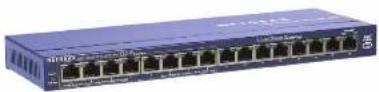
Step 1. Connect equipment
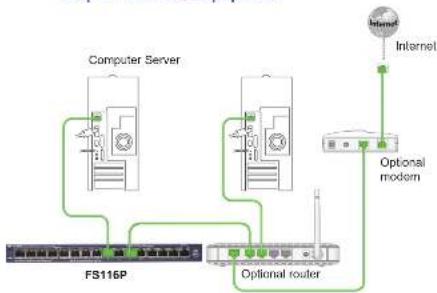
flowchart
graph TD
    A["Computer Server"] --> B["FS116P"]
    A --> C["Optional router"]
    B --> D["Internet"]
    C --> E["Optional modem"]
    C --> F["Internet"]
    style A fill:#f9f,stroke:#333
    style B fill:#ccf,stroke:#333
    style C fill:#cfc,stroke:#333
    style D fill:#fcc,stroke:#333
    style E fill:#cff,stroke:#333
    style F fill:#ffc,stroke:#333
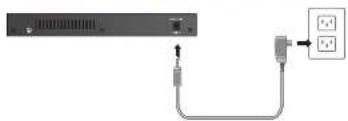
Step 2. Connect power Step 3. Check status
natural_image
Diagram showing a server rack connected to a power outlet via cable (no text or symbols visible)HOT 2018
Power LED

On

Off
Port 1-8 right LEDs

PoE in use

PoE fault

No PoE use (off)
Port 9-16 LEDs

1

100 Maps Ink
(elf LED) 10 Mbar link

(right LED)

Activity (blinking)
PoE Max. LED

Less than 7W of
PoE power is available

PoE MAX LED was
active in the previous 2 minutes

PoE cards are
working normally (off)
Port 1-8 left LEDs
100 Mbps ink
(一)会议召开方式及出席情况
10 Mbps link
m = 311
Activity (blinking)
1
No link (off)

②
No link (off)

[Non-Text]
[Non-Text]

[Non-Text]

[Non-Text]

[Non-Text]

[Non-Text]

[Non-Text]

[Non-Text]

[Non-Text]

[Non-Text]

[Non-Text]

[Non-Text]

[Non-Text]

[Non-Text]

[Non-Text]

[Non-Text]

[Non-Text]

[Non-Text]

[Non-Text]

[Non-Text]

[Non-Text]

[Non-Text]

[Non-Text]

[Non-Text]

[Non-Text]

[Non-Text]

[Non-Text]

[Non-Text]

[Non-Text]

[Non-Text]

[Non-Text]

[Non-Text]

[Non-Text]

[Non-Text]

[Non-Text]

[Non-Text]

[Non-Text]

[Non-Text]

[Non-Text]

[Non-Text]

[Non-Text]

[Non-Text]

[Non-Text]

[Non-Text]

[Non-Text]

[Non-Text]

[Non-Text]

[Non-Text]

[Non-Text]

[Non-Text]

[Non-Text]

[Non-Text]

[Non-Text]

[Non-Text]

[Non-Text]

[Non-Text]

[Non-Text]

[Non-Text]

[Non-Text]

[Non-Text]

[Non-Text]

[Non-Text]

[Non-Text]

[Non-Text]

[Non-Text]

[Non-Text]

[Non-Text]

[Non-Text]

[Non-Text]

[Non-Text]

[Non-Text]

[Non-Text]

[Non-Text]

[Non-Text]

[Non-Text]

[Non-Text]

[Non-Text]

[Non-Text]

[Non-Text]

[Non-Text]

[Non-Text]

[Non-Text]

[Non-Text]

[Non-Text]

[Non-Text]

[Non-Text]

[Non-Text]

[Non-Text]

[Non-Text]

[Non-Text]

[Non-Text]

[Non-Text]

[Non-Text]

广力云智慧零售收银系统

HUI CHAI

1

(1)基因通过控制 通过控制

er LED

On

or

(二)本报告

[Non-Text]

Max LED

1000000 TV of

Less than 10% of FoE power is avi

RoE MAX LED

active in the prev

2 minutes

PoE ports are

working normally

The Ground Truth image displays a single, solid horizontal line. According to Rule 2 (UNDERSCORE & LINE RULES), this is a stylistic or background line, not a placeholder underscore. Therefore, the OCR result must ignore it and output nothing or only meaningful text. The provided OCR content is "____", which consists of four underscores. This is an incorrect interpretation of the line as a placeholder, violating the rule that stylistic lines must be ignored. The OCR has hallucinated underscores where none should exist based on the GT's visual context. Hence, the OCR result is inconsistent with the Ground Truth.

[Non-Text]

[Non-Text]

[Non-Text]

[Non-Text]

[Non-Text]

[Non-Text]

[Non-Text]

[Non-Text]

[Non-Text]

[Non-Text]

[Non-Text]

[Non-Text]

[Non-Text]

[Non-Text]


© P.O. 20 September 2, Fri Page 2 Friday, September 23, 2012 11:17 AM
Specifications
| Specification Description | |
| Network interface RJ-45 connector for 10BASE-T, or 100BASE-TX | |
| Network cable Category 5 (Cat 5) or better Ethernet cable | |
| Portis 16 | |
| Power adapter 48V @ 1.45A DC input | |
| Power consumption 70W max. | |
| PoE Power budget 55W max. (all PoE ports, Port 1 - Port B), 15.4W max. per PoE port | |
| Weight 0.7 kg (1.56 lbs) | |
| Dimensions(W x D x H) | 287 mm x 103 mm x 27 mm11.3 in. x 4.1 in. x 1.1 in. |
| Operating temperature | 0° to 40°C (32° to 104°F) |
| Operating humidity 10% to 90% relative humidity, non-condensing | |
| Electromagnetic compliance | CE Class A. FCC Class A. VCCI Class A. |
| Safety agency approvals | CB, CCC |
CE
September 2012
For the complete EU Declaration of Conformity, visit
http://enprod.entgenc.chin/engkongkongkongkongkongkongkongkongkongkongkongkongkongkongkongkongkongkongkongkongkongkongkongkongkongkongkongkongkongkongkongkongkongkongkongkongkongkongkongkongkongkongkongkongkongkongkongkongkongkongkONGKONGKONGKONGKONGKONGKONGKONGKONGKONGKONGKONGKONGKONGKONGKONGKONGKONGKONGKONGKONGKONGKONGKONGKONGKONGKONGKONGKONGKONGKONGKONGKONGKONGKONGKONGKONGKONGKONGKONGKONGKONGKONGKONGKONGKONGKONGKONGKONGKONGKONG KONG KONG KONG KONG KONG KONG KONG KONG KONG KONG KONG KONG KONG KONG KONG KONG KONG KONG KONG KONG KONG KONG KONG KONG KONG KONG KONG KONG KONG KONG KONG KONG KONG KONG KONG KONG KONG KONG KONG KONG KONG KONG KONG KONG KONG KONG KONG KONG KONG KONG
Statement of Conditions: In the Interest of Improving Internal design, operational function and reliability.
NETGLAR herein provides the right to make change in this product described in this document, written in place. NETGLAR does not assume any liability that may occur due to the use or application of the product(s) or circuit layouts described herein.
Technical Support
After installing your device, locate the serial number on the label of your product and use it to register your product at https://my.netgear.com.
You must register your product before you can use NETGEAR telephone support. NETGEAR recommends registering your product through the NETGEAR web site. For product updates and web support, visit http://support.netgear.com.

This symbol appears in accordance with the European Union Directive 2002-95 on the Waste Electrical and Electronic Equipment (WEEE directive). If you disclose of this product in the European Union, trust and recycle it in accordance with your jurisdiction's laws that implement the WEEE directive.
NETGEAR, Inc. = NETGEAR Impo. and carried with Incorporation and Instrument or under registered trademarks of NETGEAR, Inc., and/or its subsidiaries in the United States and/or other countries. Information is subject to change without notice. Other brand and product names are registered trademarks or trademarks of their respective bodies. & NETGEAR, Inc. All rights reserved. For indoor use only in all EU countries and Switzerland.


Brand : NETGEAR
Model : ProSafe FS116P
Category : Network switch