
HSZ 1801 AA.UK.1 - Refrigerator HOTPOINT - Free user manual and instructions
Find the device manual for free HSZ 1801 AA.UK.1 HOTPOINT in PDF.

 FR
FR
 AR
AR
 BG
BG
 CS
CS
 DA
DA
 DE
DE
 EL
EL
 EN
EN
 ES
ES
 ET
ET
 FI
FI
 HE
HE
 HR
HR
 HU
HU
 HY
HY
 IS
IS
 IT
IT
 LT
LT
 LV
LV
 NL
NL
 NO
NO
 PL
PL
 PT
PT
 RO
RO
 RU
RU
 SK
SK
 SL
SL
 SV
SV
 TR
TR
 UK
UK
| Product Type | Freestanding Fridge |
| Brand | Hotpoint |
| Model | HSZ 1801 AA.UK.1 |
| Total Gross Capacity | 280 L |
| Net Capacity | 275 L |
| Energy Class | A+ |
| Climate Class | N-ST |
| Noise Level | 42 dB(A) |
| Defrost System | Automatic defrost in compartment |
| Refrigerant | R600a |
| Voltage | 220-240 V |
| Frequency | 50 Hz |
| Annual Energy Consumption | 180 kWh/year |
| Dimensions (H x W x D) | 1800 x 600 x 650 mm |
| Weight | 55 kg |
| Number of Shelves | 4 glass shelves |
| Door Reversibility | Yes, reversible |
| Temperature Control | Mechanical thermostat |
| Interior Light | LED |
| Anti-Bacterial Protection | Yes, with silver particles |
Frequently Asked Questions - HSZ 1801 AA.UK.1 HOTPOINT
User questions about HSZ 1801 AA.UK.1 HOTPOINT
0 question about this device. Answer the ones you know or ask your own.
Ask a new question about this device
Download the instructions for your Refrigerator in PDF format for free! Find your manual HSZ 1801 AA.UK.1 - HOTPOINT and take your electronic device back in hand. On this page are published all the documents necessary for the use of your device. HSZ 1801 AA.UK.1 by HOTPOINT.
USER MANUAL HSZ 1801 AA.UK.1 HOTPOINT
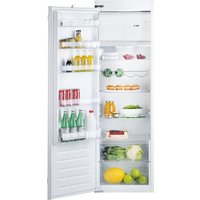
A. Control panel with LED lights B. Shelves C. Level covering fruit and vegetable drawer D. Fruit and vegetable drawers E. Rating plate (placed on the side of the fruit and vegetable drawer) F. Freezer compartment G and H. Door shelves I. Bottle holder (if provided) L. Bottle shelf

Least cold zone
Medium zone
Coldest zone
Fruit & vegetable zone
Note: All of the drawers, door shelves and shelves can be removed.
The ideal food storage temperatures are already factory-set.
Read the instructions carefully before using the appliance. Features, technical data and images may vary according to the model.
QUICK GUIDE
EN
Fast Freeze/Cool Function (Fast Cooling) To quickly cool the refrigerator compartment, or six hours before putting a large quantity of food to be frozen in the freezer compartment (if there is one), turn on the "Fast Cooling" function by repeatedly pressing the button until the 3 icons flash green and then stay constant. The function automatically turns off after 30 hours and the temperature returns to the previous setting when the function is turned on. To turn the function off manually, press the button. Note: do not put foods that are to be frozen in contact with others that are already frozen.
To quickly cool the refrigerator compartment, or six hours before putting a large quantity of food to be frozen in the freezer compartment (if there is one), turn on the "Fast Cooling" function by repeatedly pressing the button until the 3 icons flash green and then stay constant. The function automatically turns off after 30 hours and the temperature returns to the previous setting when the function is turned on. To turn the function off manually, press the button. Note: do not put foods that are to be frozen in contact with others that are already frozen.

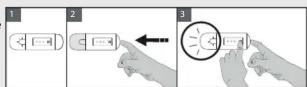
on as shown in figure 3. The light will flash just once if if the fan in ON. If the ambient temperature exceeds it on the glass shelves, it is recommended that the fan isivation of the food. Turning the fan off allows for optimal

On/Stand-by: Press the button for 3 seconds to turn the appliance off (the control panel and the light will remain turned off). Press it briefly to turn it back on. Note: this procedure does not disconnect the appliance from the electricity supply.
Refrigerator compartment temperature
The three lights indicate the temperature set in the refrigerator compartment.
It is possible to set a different temperature with the button.
The possible controls are as follows:
LEDs turned on / Temperature set
(1) Δ (2)
High (least cold)
Medium-high
Medium
Medium-low
Low (coldest)
Fast cool
What to do if... Possible reasons: Solutions:
| There may be a problem with the power supply to the appliance. | Check that:- there is no power outage- the plug is properly inserted in the socket and any bipolar power switch is in the correct position (this enables the power supply to the appliance)- the protective relays for the electrical system for the house are working- the power cable is not broken. | |
| The control panel is off, the appliance is not working. | ||
| The appliance may be in Stand-by mode. | Turn the appliance on by briefly pressing the button (see On/Stand-by function). | |
| The inside light does not work. | It may be necessary to replace the light.Technical component malfunction. | Contact an authorized Service Centre. |
| The internal light is flashing. | Door alarm active.Activates when the door to the refrigerator compartment stays open for a long time. | To stop it, close the refrigerator door.When re-opening the door, check the light function. |
| The internal temperature of the compartments is not cold enough. | There are various possible causes (see the “Solutions” column). | Check that:- the doors are closed properly- the appliance is not installed near a heat source- the set temperature is adequate- the circulation of air through the ventilation grilles on the base of the appliance is not obstructed (see installation manual). |
| There is water on the bottom of the refrigerator compartment. | The defrosting water drain is blocked. | Clean the defrosting water drain (see section “Maintaining and cleaning the appliance” in the instructions for use). |
| Excessive amount of frost in the freezer compartment. The door to the freezer compartment is not closed properly. | - Defrost the freezer compartment.- Make sure the refrigerator has been correctly installed.- Check that there is nothing preventing the door from closing properly. | |
| One or more green symbols are flashing continuously and it is not possible to change the temperature set. | Malfunction alarmThe alarm indicates the malfunction of a technical component. | Call the authorized Technical Assistance Service. |
| The temperature of the refrigerator compartment is too cold. | - The set temperature is too cold.- A large amount of fresh food may have been placed in the freezer compartment. | - Try to set a less cold temperature.- If fresh food has been put in the freezer compartment, wait until the freezing has been completed. |
Note: some noises, such as gurgles and hissing, caused by the refrigeration system, are normal.
- QUICK GUIDE
- FAST FREEZE/COOL FUNCTION (FAST COOLING) TO QUICKLY COOL THE REFRIGERATOR COMPARTMENT, OR SIX HOURS BEFORE PUTTING A LARGE QUANTITY OF FOOD TO BE FROZEN IN THE FREEZER COMPARTMENT (IF THERE IS ONE), TURN ON THE "FAST COOLING" FUNCTION BY REPEATEDLY PRESSING THE BUTTON UNTIL THE 3 ICONS FLASH GREEN AND THEN STAY CONSTANT. THE FUNCTION AUTOMATICALLY TURNS OFF AFTER 30 HOURS AND THE TEMPERATURE RETURNS TO THE PREVIOUS SETTING WHEN THE FUNCTION IS TURNED ON. TO TURN THE FUNCTION OFF MANUALLY, PRESS THE BUTTON. NOTE: DO NOT PUT FOODS THAT ARE TO BE FROZEN IN CONTACT WITH OTHERS THAT ARE ALREADY FROZEN
- ON AS SHOWN IN FIGURE 3. THE LIGHT WILL FLASH JUST ONCE IF IF THE FAN IN ON. IF THE AMBIENT TEMPERATURE EXCEEDS IT ON THE GLASS SHELVES, IT IS RECOMMENDED THAT THE FAN ISIVATION OF THE FOOD. TURNING THE FAN OFF ALLOWS FOR OPTIMAL
Brand : HOTPOINT
Model : HSZ 1801 AA.UK.1
Category : Refrigerator